Agentic AI workflow automation is justified only when a workflow has variable inputs, context-dependent next steps, and a named owner for exceptions; otherwise, use deterministic automation or an AI-assisted review step. The deciding factor is not whether a model can call tools, but whether every permitted action, approval, audit record, and reversal path is defined before it affects a business system.
Agentic AI Workflow Automation: Practical Guide
Explore agentic ai workflow automation: compare workflow fit, costs, risks, evidence, and practical next steps before you build, buy, or hire.

Table of Contents
- What most guides miss: autonomy is an authorization decision
- Choose the workflow pattern before choosing an agent platform
- Process debt to remove before adding autonomy
- A worked pilot: approval-gated credit-file exception routing
- Guardrails should rise with action impact
- Build, buy, or stop
- Production-readiness checklist
- Common failure modes
- Method and accountability
What most guides miss: autonomy is an authorization decision
Most guides describe agents as systems that plan and execute across tools. That is technically useful, but it misses the operating decision: a model’s ability to suggest or select an action does not authorize it to make that action.
For a workflow that can update a CRM record, alter a loan-processing queue, send a customer message, or trigger a payment-related task, the architecture must answer five questions before launch:
- What outcome is the workflow allowed to pursue?
- Which systems and fields may it read?
- Which actions may it propose, write, or execute?
- Who owns exceptions and approvals?
- How is an incorrect action traced and reversed?
This is why the safest design is usually the lowest-autonomy pattern that handles the actual exception load. IBM’s overview of agentic AI workflow automation frames the work as agents, tools, orchestration, and business-process integration—not a standalone model prompt. IBM’s agentic process automation guidance similarly places orchestration, human approvals, compliance, and audit logging around AI-driven work.
A practical decision rule follows:
- Use deterministic automation when the inputs, path, and allowed actions are known.
- Use AI assistance when documents or language are variable but people should still decide and write.
- Use approval-gated agents when the system must gather context and propose a next action across systems.
- Allow autonomous writes only for bounded, reversible actions with tested evaluations, scoped permissions, monitoring, and a rollback path.
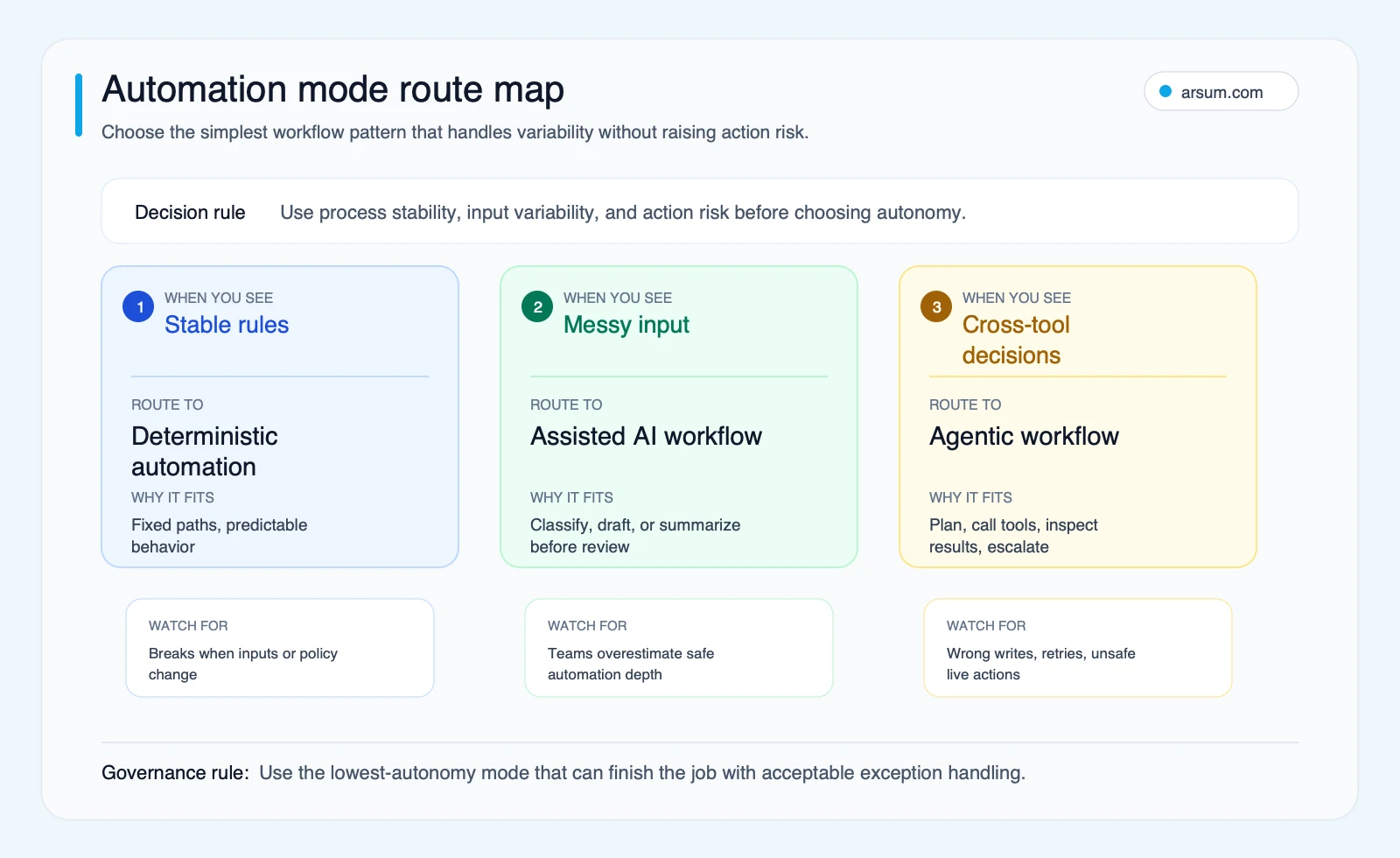
The route map is a buying tool, not a maturity ladder. More autonomy is not automatically better; it is more appropriate only when the workflow’s uncertainty and control design warrant it.
Choose the workflow pattern before choosing an agent platform
| Pattern | Use it when | Human role | Main control boundary |
|---|---|---|---|
| Deterministic workflow | Inputs and routing rules are stable | Handles exceptions outside known rules | Fixed rules and constrained connectors |
| AI-assisted workflow | Documents, messages, or classifications are messy | Reviews decisions and all consequential writes | Human approval before external action |
| Approval-gated agentic workflow | The next action depends on gathered context across tools | Approves sensitive tool calls and owns exceptions | Explicit approval for writes or state changes |
| Autonomous agentic workflow | Actions are bounded, low-impact, reversible, and evaluated | Monitors performance and handles escalation | Least-privilege tools, logs, limits, and tested rollback |
A stable accounts-payable routing rule or standard onboarding sequence often belongs in ordinary business-process automation. An agent is not a substitute for a clear process map. If the work is a known DAG—known steps, known branch conditions, known endpoints—use a conventional workflow engine and add AI only to the narrow task that needs interpretation.
By contrast, an approval-gated agent may be appropriate when it must inspect a case, collect evidence from several authorized systems, reconcile conflicting information, recommend a route, and prepare a case package for a decision-maker. The model can reduce research and coordination work without receiving authority to make the final consequential decision.
This boundary is especially important for finance and compliance workflows. Explore related operating patterns in AI for finance teams, credit decision automation, and AI automation for compliance officers.
Process debt to remove before adding autonomy
Agentic workflows amplify unclear processes. They do not repair them.
Do not add an agent yet if any of these conditions apply:
- No one can define a successful outcome, an unacceptable outcome, or an escalation rule.
- The workflow depends on undocumented policy judgment that differs by operator.
- APIs are unreliable, fields are inconsistent, or source systems lack usable history.
- The proposed write action cannot be reversed or corrected through a tested process.
- Tool permissions are broad because the team has not decided what the agent actually needs.
- There is no named business owner to accept exceptions, connector changes, and policy updates.
- There is no evaluation set containing common cases, edge cases, and adversarial or malformed inputs.
These are disqualifying conditions for autonomous execution. They may still permit a read-only or recommendation-only pilot.
OpenAI’s Agents guide describes agent workflows as a combination of agents, tools, and control-flow logic, while noting production risks such as prompt injection and data leakage. That supports a clear implementation principle: policy enforcement should live in permissions, tool schemas, approval services, and application logic—not only in prompt text.
Security is also a workflow design issue. The paper Authenticated Workflows: A Systems Approach to Protecting Agentic AI argues that probabilistic guardrails alone can be insufficient for enforcing enterprise policy. Treat retrieved content and tool responses as untrusted inputs, constrain what tools can do, and require authenticated approval for actions that change meaningful state.
A worked pilot: approval-gated credit-file exception routing
Consider a bounded workflow for a lending or finance operations team. The purpose is not to approve or decline credit. Its purpose is to prepare and route incomplete application files for human review.
Workflow boundary
Allowed goal: identify missing documentation, assemble an evidence packet, and route the case to the appropriate queue.
Source lineage: the workflow reads only the application record, document-management metadata, policy version, and approved queue rules. Each retrieved record is logged with its source system, record identifier, retrieval time, and policy version.
Permitted tools:
- Read application status and required-document checklist.
- Read document metadata and extract named fields from submitted documents.
- Read the current routing policy from an approved policy repository.
- Create a draft case note.
- Propose a queue assignment.
Prohibited tools:
- Change an applicant’s risk classification.
- Approve, decline, or withdraw an application.
- Alter source documents.
- Send an external decision notice.
- Change policy or permissions.
Approval gate: an underwriting operations lead approves every queue reassignment during the pilot. The agent may draft the rationale, but the approver sees the evidence links, policy version, proposed action, and uncertainty or missing-data flags.
Exception queue owner: the underwriting operations lead owns unresolved or conflicting cases; an integration owner owns connector failures; the compliance owner receives cases where the workflow detects a policy-version mismatch.
Audit record: retain the trace ID, input record IDs, policy version, model and workflow version, tool calls, retrieved evidence, proposed assignment, approver identity, final decision, and timestamp.
Rollback: if a reassignment is approved in error, restore the prior queue assignment from the case-management audit history, attach the correction reason, and review the trace before returning the workflow to service.
Microsoft documents this exact architectural concept: function tools can require human approval. The point is not that a particular framework is required. The point is that approval must be enforceable at the tool-call boundary.
Pilot scorecard and decision rule
The following thresholds are illustrative planning assumptions, not observed outcomes. Set final thresholds with the business owner, risk owner, and the team that performs the current workflow.
| Measure | Baseline method | Pilot target | Owner | Review cadence |
|---|---|---|---|---|
| Case-preparation time | Median minutes for a representative manual sample | At least 20% lower median time, including reviewer time | Operations lead | Weekly |
| Evidence completeness | Manual audit of required evidence links in sampled cases | 98% or higher complete packets | Quality reviewer | Twice weekly |
| Incorrect routing proposal rate | Reviewer marks proposal as wrong or unsafe | No more than 2% of reviewed proposals | Operations lead | Twice weekly |
| Unresolved exception queue | Count and age of cases without a usable recommendation | No upward trend for two review cycles | Queue owner | Daily |
| Reversal rate | Approved reassignment later restored | 0 during the pilot | Operations lead | Immediate review |
| Manual review cost | Reviewer minutes × fully loaded hourly cost | Must not erase planned time savings | Finance partner | Weekly |
Calculate review cost explicitly:
manual review cost = total reviewer minutes ÷ 60 × fully loaded hourly cost
Calculate net time change on the same case mix:
net time saved = baseline handling minutes − (agent preparation minutes + reviewer minutes + correction minutes)
A pilot expands only when all of the following hold across the agreed measurement window:
- The time target is met after including review and correction work.
- Evidence completeness meets the threshold.
- No high-impact routing error or unapproved write occurs.
- Reversal rate remains zero.
- The exception queue remains owned and within the agreed service level.
- The named owner signs off on the traces and approval experience.
Pause the pilot if evidence completeness falls below target, a policy version is misapplied, an unauthorized tool call is attempted, or the exception queue ages beyond the agreed limit. Roll back by disabling write-capable tools, returning to recommendation-only mode, and routing all new cases to the existing manual queue.
That result may justify one of three decisions: keep deterministic routing, retain an approval-gated agent, or expand only the narrow action that has demonstrated acceptable risk. It does not justify broad autonomy by default.
💡 Arsum builds custom AI automation solutions tailored to your business needs.
Get a Free Consultation →Guardrails should rise with action impact
| Action type | Example | Minimum control | Required record | Rollback expectation |
|---|---|---|---|---|
| Read-only lookup | Retrieve account history for triage | Scoped read permission and trace logging | Tool call, source type, trace ID | Traceability only |
| Drafted output | Prepare a customer response | Human review before sending | Prompt context, output, reviewer decision | Discard or revise draft |
| Record update | Update a CRM status | Approval or policy-limited write | Before/after values, reason, approver if required | Restore prior state |
| Billing or contract action | Apply a credit or alter a plan | Human approval every time | Full audit trail tied to owner | Documented reversal before launch |
| Production or access change | Modify permissions or deployment settings | Human approval and change process | Tool calls, diff, approver, affected systems | Tested rollback runbook |
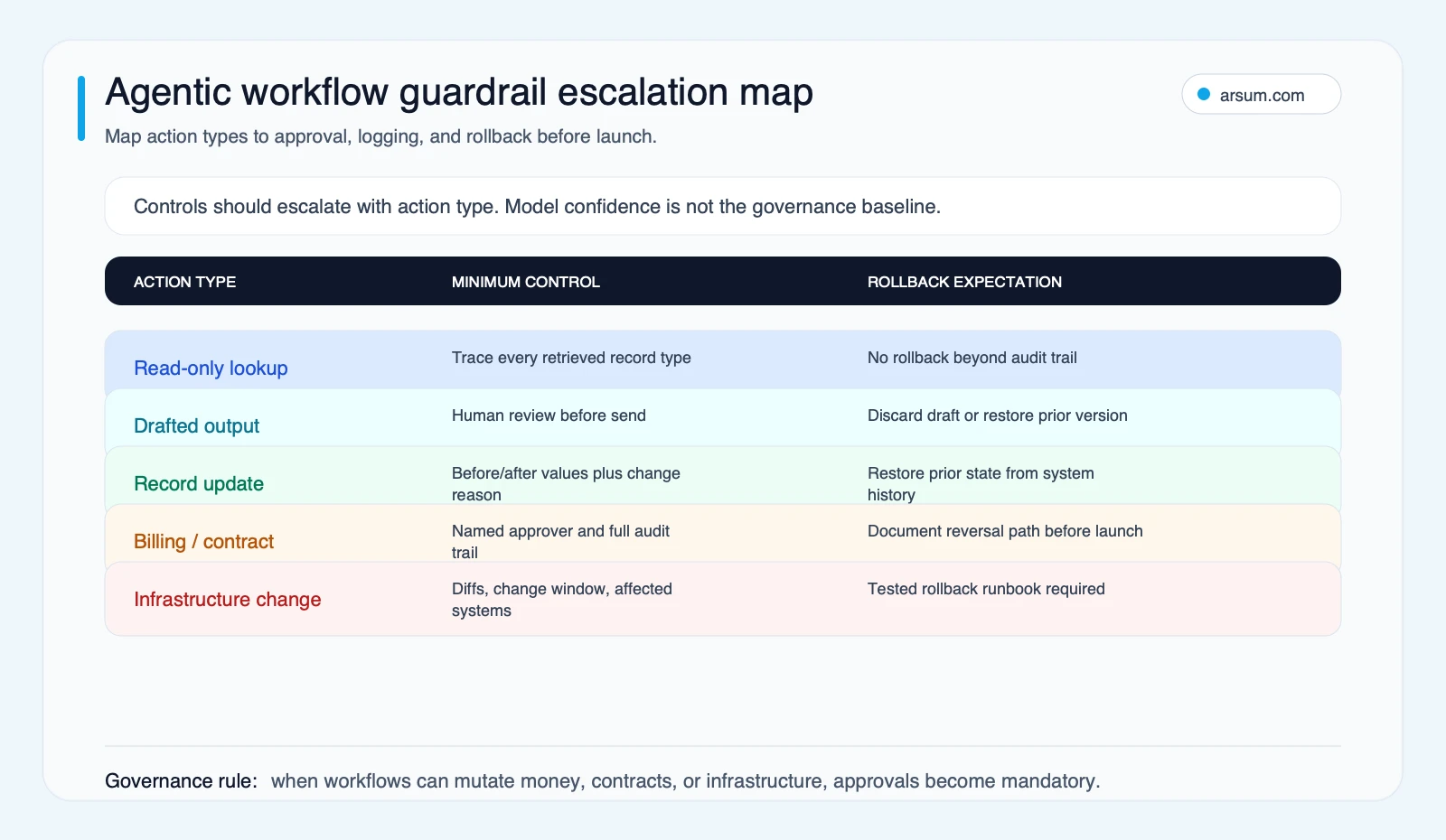
Model confidence is not a substitute for governance. A highly confident model should not receive broader rights than a less confident one merely because it produces a persuasive explanation. Action impact, reversibility, and blast radius determine the control level.
For workflow-level reliability, use evaluations rather than informal demo impressions. OpenAI’s agent-evaluation guidance recommends evaluating workflows with measures such as trace grading and performance checks. Its Agents SDK documentation also illustrates the value of trace identifiers and controls for durable or human-in-the-loop workflows.
Build, buy, or stop
Buy or configure a platform when the workflow is standard, the necessary connectors already exist, governance requirements are common, and the business can work within the platform’s approval and logging model.
Build custom components when the workflow depends on proprietary systems, unusual policy logic, a differentiated operating model, or approval and audit requirements that a standard platform cannot enforce. In that case, evaluate the application architecture, not just the model. AI agent architecture patterns, AI agent security, and AI integration services are useful adjacent decisions.
Stop and simplify when success, failure, escalation, and reversal cannot be stated clearly. The next investment is process design, source-system cleanup, or policy ownership—not an agent platform.
Use these vendor-evaluation questions:
- Can permissions be scoped by tool, action, record type, and environment?
- Can sensitive tool calls require an external, authenticated approval?
- Can the platform expose complete traces and exportable audit records?
- Can you test common, exceptional, and hostile inputs before write access is enabled?
- Can a workflow be versioned, reviewed, and rolled back without editing a live prompt?
- Can the vendor show how it handles connector changes, retries, duplicate actions, and partial failures?
- Can the business operate the workflow after launch without depending on vendor-managed judgment?
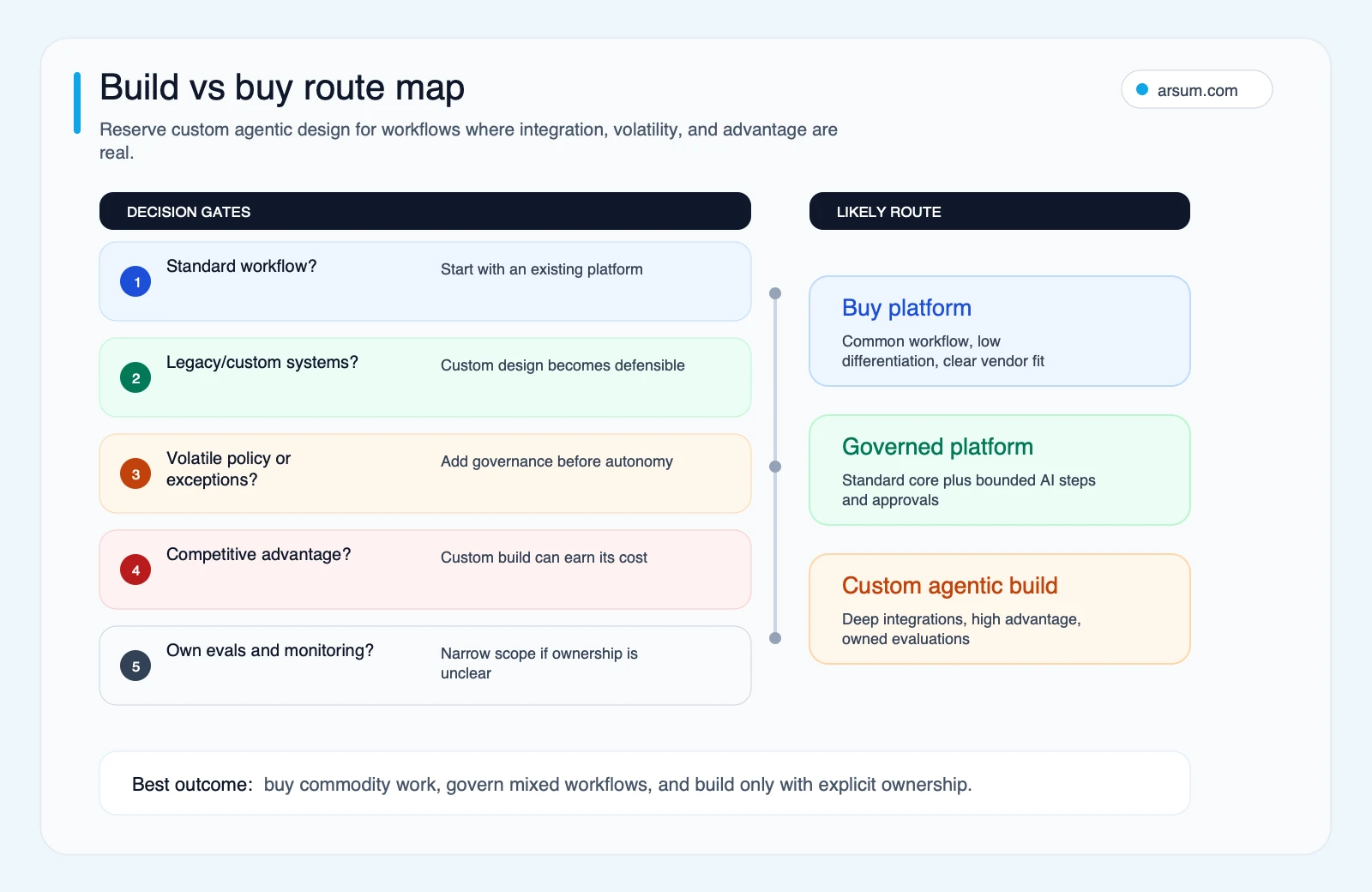
A custom build earns its cost only where integration depth, policy volatility, business advantage, and post-launch ownership are all clear.
Production-readiness checklist
Before a workflow receives autonomous write access, verify that it has:
- A named business owner and a named technical owner.
- A specific allowed outcome and explicit prohibited actions.
- Tool permissions separated into read, draft, approval-gated write, and autonomous write.
- Approval requirements based on action type and impact.
- Evaluation cases for normal paths, exceptions, ambiguous inputs, missing data, and adversarial instructions.
- Trace IDs and retained records for each model decision and tool call.
- Retry limits and idempotency protection for repeated actions.
- A manual fallback queue with a defined owner.
- A tested reversal or rollback method for every material write.
- Metrics for intervention rate, reversal rate, incorrect proposals, exception volume, queue age, and review cost.
- Version control for workflow instructions, tools, policies, and evaluation sets.
Public practitioner discussions can be useful as qualitative prompts for this checklist. For example, questions about sharing agentic workflows across teams and skepticism about whether a workflow should be an agent at all appear in developer discussion of effective agents. They are not market-wide evidence or ROI benchmarks. They do highlight practical risks: permission creep, unversioned templates, unclear ownership, and using an agent where a deterministic workflow would be easier to maintain.
Common failure modes
The most frequent design failures are avoidable:
- Using an agent for a stable workflow with a known path.
- Granting broad system access before proving the narrowest useful tool set.
- Treating prompt instructions as the only policy control.
- Measuring model output quality while ignoring reviewer time, queue age, and reversals.
- Allowing a recommendation workflow to acquire write permissions without a new evaluation and approval review.
- Reusing a personal agent workflow across teams without versioning, ownership, and role-specific permissions.
- Launching without an exception owner or a tested rollback.
- Calling a workflow autonomous when it silently depends on constant manual cleanup.
Method and accountability
This editorial guide is based on the linked official documentation, the decision artifacts in this article, and qualitative community signals identified as such. It does not claim observed customer savings, adoption rates, or production outcomes.
Author: Johnny Kartakov. Editorial review: Arsum Editorial Team. Specialist technical review is required before expanding claims about any production deployment. Research review date: 2026-06-19.
The useful starting question is not “How autonomous can this workflow become?” It is: “What is the minimum autonomy that improves this workflow while preserving accountable approval, evidence, and recovery?”
Ready to Automate Your Business?
Stop wasting time on repetitive tasks. Let AI handle the busywork while you focus on growth.
Schedule a Free Strategy Call →Written by:Arsum editorial team
- Reviewed by
- Arsum editorial team
- Published
- February 16, 2026
- Updated
- August 12, 2026
- How this was produced
- Arsum uses research packs, source checks, and human editorial review to prepare and update blog articles. Editors are responsible for the final page.
- Source policy
- Sources are linked in the article when used. Methodology and source notes are included on higher-risk or high-visibility pages and are being rolled out across the archive. Editorial policy.
- Why this page exists
- Help B2B operators evaluate AI automation, implementation scope, cost, risk, and build-vs-buy decisions with practical context.