The right AI agent platform depends on where your workflow lives, what it can change, and who will operate it. For a Microsoft-based internal workflow, start by evaluating Copilot Studio. For a custom product, compare managed cloud infrastructure with code-first frameworks. Then test each candidate against the same real task, including permissions, human approval, failures, and operating cost.
AI Agent Platforms: Compare Tools, Costs & Build Options
Compare five AI agent platforms and frameworks, see a shipped Shopify AI workflow, and use a practical scorecard to decide what to buy or build.

Table of Contents
- AI agent platform comparison: five options to shortlist
- When a fixed AI workflow is the better starting point
- What a shipped AI product actually needed: Attuned Health
- Use real work tasks to define platform requirements
- Score the workflow before booking platform demos
- Ask for evidence of the controls
- Failure modes that should stop a rollout
- What an AI agent platform really costs to operate
- Build or buy: make the decision around ownership
- Sources and evidence
This guide compares five documented options, shows what Arsum built around AI in a live customer application, and provides a downloadable evaluation brief. It is written for founders and product or engineering leads commissioning an implementation.
AI agent platform comparison: five options to shortlist
An AI agent platform provides some combination of model access, tools, workflow state, deployment, and monitoring. A hosted business application, a cloud runtime, and an open-source framework cover different portions of that work. Compare the complete path to a usable product before comparing license prices.
The shortlist below reflects official documentation checked on September 6, 2026. The suggested fit is Arsum’s editorial judgment; we have not benchmarked these five products against one another.
| Platform or framework | When we would shortlist it | What to account for in the build |
|---|---|---|
| Microsoft Copilot Studio — hosted, low-code agent authoring | Employees work in Microsoft tools and the required workflow can use its connectors and publishing channels. The documentation covers graphical authoring, agent flows, and deployment to channels including Teams and websites. | Prove access to the actual systems and records involved. Budget for connector configuration, review rules, evaluation, and administration. Verify the licensing and capacity required by the proposed setup. |
| Google Gemini Enterprise Agent Platform — cloud platform with low-code and code-based building options | The product’s data and infrastructure already live in Google Cloud. Its documented components include Agent Studio, the Agent Development Kit, managed runtime services, and retrieval capabilities. | Identify which components the quote includes. Test permissions across the source data, retrieval layer, and application; confirm availability for the intended deployment region. |
| Amazon Bedrock AgentCore — managed agent infrastructure | An engineering team building on AWS wants runtime, identity, gateway, memory, or observability components while retaining flexibility over frameworks and models. | Decide which managed components to adopt. The team still has to implement application behavior, integrations, acceptance tests, the user experience, and incident handling. |
| LangGraph — code-first orchestration framework | A developer-owned workflow needs explicit state, long-running execution, or human intervention. Its documentation describes durable execution, persistence, and combining coded workflow steps with model-driven behavior. | Specify the hosting approach and the surrounding application. Authentication, interfaces, connectors, evaluation, and operational ownership need an implementation plan alongside orchestration. |
| OpenAI Agents SDK — code-first agent SDK | Your application needs a programmable agent loop with tools, handoffs, sessions, guardrails, and tracing. Those are documented SDK building blocks. | Design application access controls, storage, approval rules, deployment, and customer-facing screens. A guardrail or trace feature still needs configuration and workflow-specific tests. |
An AWS naming detail that affects a new shortlist: the Bedrock Agents documentation now calls that service “Agents Classic” and says it is no longer open to new customers. It directs new customers to AgentCore. An older comparison of “Bedrock Agents” may therefore describe a different purchasing option.
Shortlist two candidates that suit your existing systems, then compare them on one workflow. For a deeper code-level decision, use our AI agent frameworks guide. If business users will configure the workflow, see the no-code agent builder guide.
When a fixed AI workflow is the better starting point
Ask whether the system actually needs to choose its next action. If the process is always “receive inputs, extract information, prepare a draft, obtain approval, publish,” a defined workflow with selected AI steps is a reasonable first design. Agent orchestration becomes relevant when the path depends on the task: deciding which authorized sources to search, which tools to call, or when to request more information.
For example, a support assistant might retrieve an account’s permitted documentation and prepare a reply. Giving it permission to issue a refund is a separate product decision. Anchor Browser’s browser-automation comparison is a useful distinction here: a scripted browser workflow can stay deterministic, while a digital coworker begins to choose tasks, adapt to context, and keep state across work. Keep the first release’s action boundary explicit, even if the platform advertises broader autonomy. Our agent architecture guide explains the implementation patterns behind that choice.
What a shipped AI product actually needed: Attuned Health
For Attuned Health, Arsum built a custom AI-assisted results application within an existing Shopify customer journey. The engineering problem included orders, customer forms, laboratory results, report preparation, practitioner review, and access through the customer’s account.
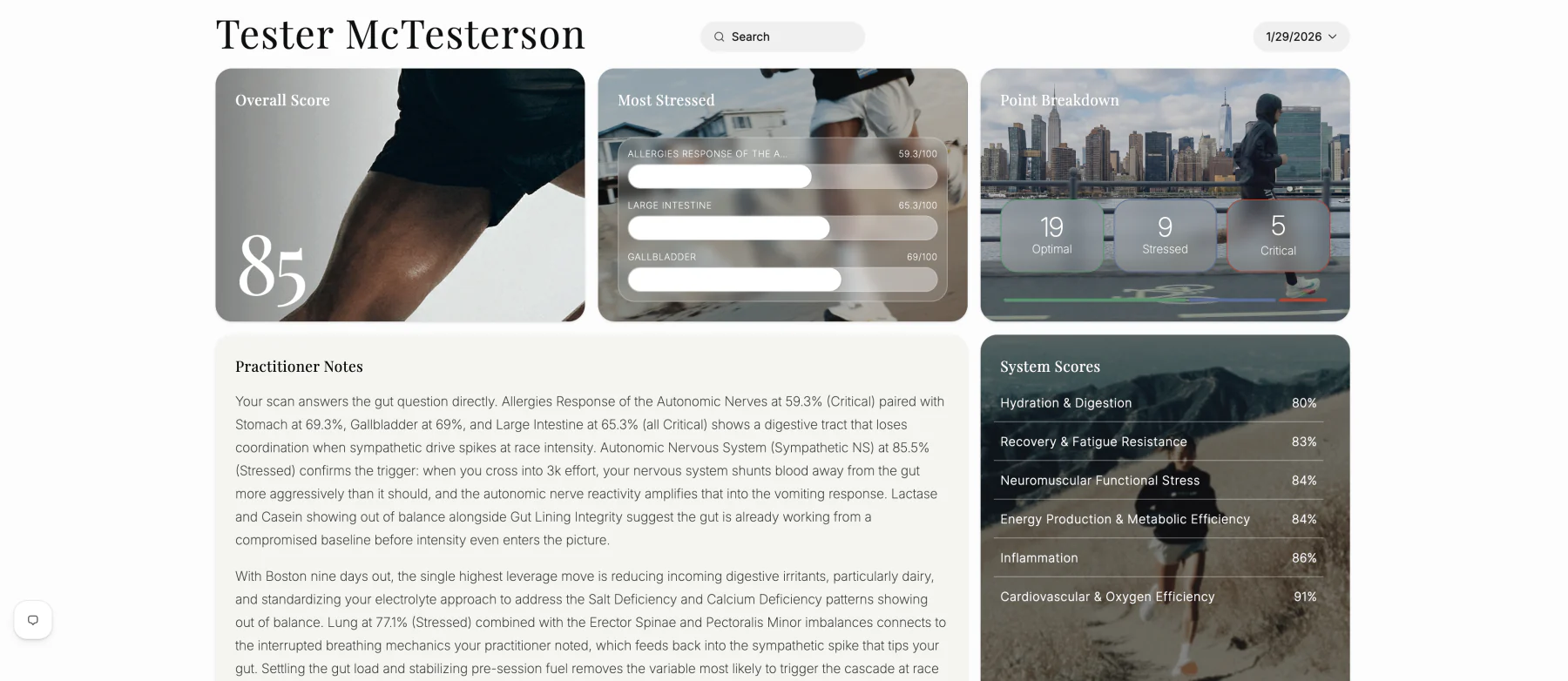
- 01Connect the inputsShopify orders, customer forms, and laboratory results.
- 02Prepare and generateApplication data preparation and AI generation in bounded stages.
- 03Assemble the reportStructured summaries, explanations, charts, and scan sections.
- 04Practitioner reviewsApprove the result or request regeneration before customer release.
- 05Customer accesses resultsThe approved report appears in the Shopify-linked account experience.
The implementation uses React and Shopify App Bridge for the experience, with Node.js, Express, SQL storage, and AWS behind it. OpenAI and Anthropic models support generation in bounded stages. The application assembles those outputs into report sections; a practitioner reviews the result before customer release and can request regeneration.
Three requirements are particularly useful when evaluating platforms:
- The result has to fit an application. Stored reports, customer identity, navigation, and structured sections are part of delivery. A successful model response covers one part of that scope.
- Review needs a working interface and state. The reviewer must be able to inspect the output, request another generation, and decide whether it is ready to share.
- Operations continue after launch. The delivered system includes automated tests, scripted deployment, monitoring with Grafana and Loki, and daily database backups to S3. Provider failures and unexpected response structures also need handling.
The live outcome is a connected preparation-and-review workflow with ongoing development. The delivery interview reports less manual assembly, but we have not measured time savings, error reduction, or commercial impact. This case illustrates the application work around AI; it does not claim that any particular platform in the shortlist was used.
Bring this question to a platform demo: “Show us how a generated result becomes a stored, reviewable, approved output inside our existing product.”
Use real work tasks to define platform requirements
Job titles are too broad to specify an agent. A customer service representative may both record an interaction and resolve a billing complaint, but those tasks need different access and approval rules.
The task descriptions below are adapted from ONET occupational data. The implementation requirements are Arsum’s proposed mapping, not ONET automation ratings or predictions about replacing jobs.
| Work task and source | Useful capability to demonstrate | Boundary to specify |
|---|---|---|
| Record customer interactions and actions taken — Customer Service Representatives, 43-4051.00 | Extract structured fields from a conversation, retain the source reference, and write to the correct CRM record. | Define required fields and duplicate detection. Route missing or conflicting account information to review. |
| Resolve billing complaints through actions such as refunds or bill adjustments — Customer Service Representatives, 43-4051.00 | Retrieve the authorized account and policy, prepare a proposed resolution, and pause before a financial action. | Name the approver and permitted limits. Retrying a failed run must not repeat a refund. |
| Analyze information to plan a new system or a modification — Software Developers, 15-1252.00 | Search permitted specifications and issue history, then prepare a proposal with source references. | A responsible engineer reviews scope and feasibility before implementation. |
| Modify existing databases or database management systems — Database Administrators, 15-1242.00 | Prepare a proposed change and demonstrate it against a staging environment. | Require review, a recovery plan, and separate authorization before production changes. |
For a retrieval-heavy product, this exercise often exposes the first engineering priority: connecting and permissioning the information. Define that search and data system before adding more autonomous actions.
Score the workflow before booking platform demos
Create a small evaluation set from work your team can review. Include straightforward cases, ambiguous inputs, restricted records, and failed integrations. Use de-identified or synthetic examples where appropriate. Record the current manual process so the pilot has a baseline.
Use demonstrated, documented only, and unresolved as evidence statuses. Avoid adding them into a single score that lets good writing compensate for unauthorized access.
| Evaluation dimension | Evidence to record | Release decision |
|---|---|---|
| Task result | Expected output, actual output, reviewer, and reason for acceptance or rejection | Set a quality target appropriate to the task; inspect failures individually. |
| Source fidelity | The records retrieved and the source supporting each important claim | Require evidence where the workflow depends on company information. |
| Permissions and actions | Test user, accessible records, tool permissions, and approval event | An unauthorized read or action blocks the tested release. |
| Recovery | Failed step, retry behavior, saved state, and final system changes | Demonstrate recovery without lost approvals or duplicate actions. |
| Effort and cost | Usage charges, review time, rework, and operator time | Compare a completed, accepted task with the manual baseline. |
Evaluation-heavy workflows need more than a single pass/fail check; Scorable’s guide to continuous semantic scoring is a useful primer on tracking quality dimensions before and after model or prompt changes. Calibrate scoring against examples your team has checked, and retain separate gates for permission failures and unacceptable actions.
Keep some examples outside the implementation team’s tuning set. Rerun the evaluation when the model, prompt, retrieval setup, or connector changes. The evaluation brief includes fields for these cases and acceptance decisions.
Ask for evidence of the controls
Give both shortlisted candidates the same demonstration script:
- Complete a normal task. Use the intended user’s account and the actual class of data source. Record the output and every system change.
- Introduce missing or conflicting information. Check whether the workflow asks for clarification, returns uncertainty, or invents a resolution.
- Request a restricted record. Confirm that retrieval and tools respect the requesting user’s permissions. Inspect the trace as well as the visible answer.
- Require approval, then interrupt the run. Restart it and check that approval state is retained and the external action occurs at most once.
- Make a connector unavailable. Inspect the failure message, retry limits, support alert, and recovery path.
- Hand over the workflow. Ask for an export or repository, configuration instructions, credential ownership, and an explanation of any provider-specific dependencies.
Test access revocation as well as access approval. Scalekit’s AI-agent offboarding checklist explains how service-specific API keys can survive an employee’s identity-provider account being disabled. Revoke the test user’s access, confirm that agent tool calls stop, and inspect the audit trail for any connections that still work.
For email-heavy agent workflows, check whether the platform exposes thread context, reply handling, and per-thread state without requiring a separate inbox implementation. Nuntly’s AI-agent inbox API is a useful example of the layer to evaluate. Test duplicate messages, missing context, and the approval boundary before sending externally.
If a demonstration uses a mock connector or an administrator account, mark the corresponding requirement as unresolved for production. A recorded demo is useful evidence only for the setup it actually exercised.
Failure modes that should stop a rollout
Stop the tested release if it exposes restricted information, performs an unapproved action, repeats a write on retry, or loses the state needed to recover safely. An answer without reliable source support should also block workflows that depend on that evidence. Style and completeness can have separate acceptance thresholds.
For a concrete engineering example, Latitude describes a self-healing loop where agents detect and fix their own failures. Use that example to examine telemetry and recovery design. Any automated repair needs bounded permissions, tests, and a release decision before it changes a production workflow.
Assign a person who can disable the workflow, revoke credentials, and handle pending work. Keep a usable fallback during the pilot. The AI agent security guide turns these boundaries into implementation requirements.
That owner also needs a current inventory of which agents exist and who is accountable for them. Kosmoy’s guide to AI agent registries separates that accountability layer from the platforms teams use to build and run agents, which helps teams decide what to record before a rollout expands.
What an AI agent platform really costs to operate
Separate implementation from recurring operation. Ask a vendor or development partner to cost the same workload, with explicit assumptions for task volume, steps per run, retrieval, retries, and review.
Monthly operating cost = platform and infrastructure + model and tool usage + evaluation runs + review and exception handling + maintenance.
Divide that total by completed tasks that meet your acceptance criteria. Cost per model call leaves out failed attempts and the work required to make an output usable. Track elapsed completion time and staff handling time separately: a task waiting for approval may be slow without consuming hours of staff effort.
Before accepting a quote, ask:
- Which licenses, environments, connectors, and usage allowances are included?
- What happens to charges when a run retries, pauses, or fails?
- How much review and correction did the pilot require?
- Who pays for regression evaluation and integration maintenance after launch?
- What spending alerts, limits, and shutdown controls are available?
Arsum targets initial scoped engagements of USD $5,000–$20,000, with longer engagements available. We use that range to define a focused first phase around one workflow; it is not a quoted price for a particular platform or a complete enterprise rollout. See the AI app development cost worksheet for comparing implementation proposals.
Build or buy: make the decision around ownership
Buy and configure when an existing product covers the workflow, its access model fits your systems, and your team can maintain its configuration. Confirm exportability and what happens if you change providers.
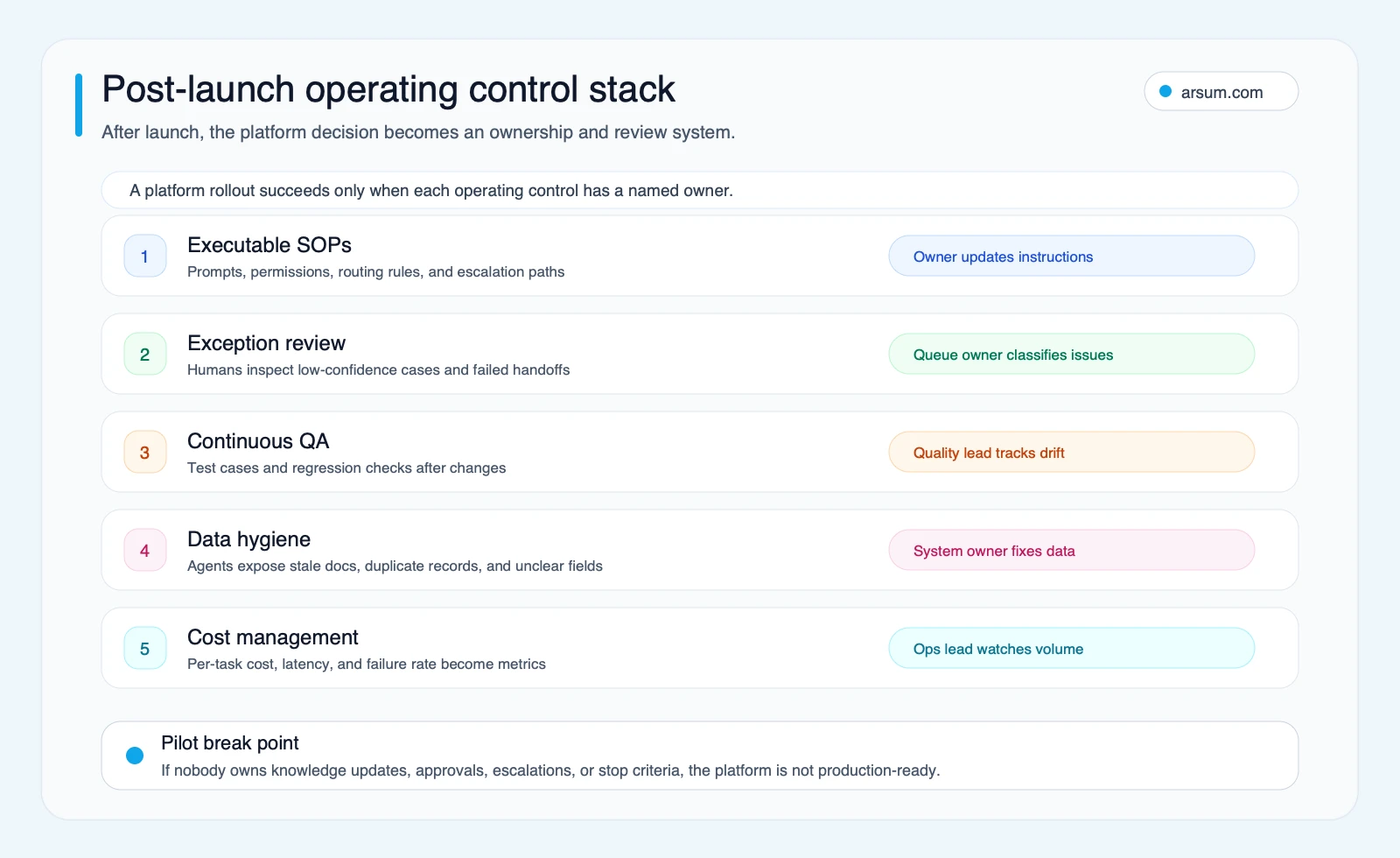
Arsum’s illustrative planning framework. Select the diagram to view it at full size.
Commission a custom application when the customer experience, proprietary retrieval, workflow state, or integrations are central to your product. You can still use a managed runtime or an SDK inside that application. Agree on code access, data ownership, deployment documentation, and support responsibilities.
Start with a bounded workflow when the sequence is already known. Add agent-directed decisions where a pilot establishes a useful reason for them. The right first deliverable might be an approved report or a sourced draft inside an existing application.
For a build discussion, bring the users, source systems, example inputs and outputs, permitted actions, reviewer, expected volume, and budget. Download the project and evaluation brief to put those decisions in one document, or explore our AI product development scope.
Sources and evidence
Platform capabilities above come from the linked official documentation, checked September 6, 2026. Shortlisting advice, task-to-control mappings, and evaluation criteria are Arsum’s analysis. Attuned Health is a first-party account of shipped work; its case study identifies the evidence and limits of the reported outcome. The linked engineering resources illustrate specific evaluation, email, and recovery layers rather than a tested platform ranking.
Task descriptions are adapted from the O*NET database, sponsored by the U.S. Department of Labor, Employment and Training Administration, and used under CC BY 4.0. We paraphrased the tasks and added implementation guidance. O*NET does not endorse this guide. See the O*NET license and attribution terms.
Discuss your AI product or search system
Bring the intended users, data sources, workflow, and budget. We can define a focused first phase and the responsibilities after launch.
Discuss your project →Published by:Arsum
- Published
- February 6, 2026
- Updated
- September 6, 2026
- How this was produced
- These guides are prepared and updated with AI assistance. Linked documentation, proposed evaluation methods, and illustrative calculations are distinguished from reported project results. No independent human review is implied by the byline.
- Source policy
- Technical references are linked where used. Planning figures and suggested scorecards are assumptions, not market benchmarks or measured client outcomes. Editorial policy.
- Why this page exists
- Help product and technical teams scope AI applications and intelligent search, compare delivery options, and define acceptance and ownership.