AI agent security starts with deciding which data the application may read and which actions it may take. Constrain tools, separate untrusted content from instructions and require approval where a mistake is costly. This guide turns those boundaries into implementation checks and a proposed pilot evaluation.
AI Agent Security: Permissions, Tools and Human Review
Scope permissions, isolate untrusted content and test approval boundaries in AI applications. Define logs, failure handling and launch acceptance checks.

Table of Contents
- Define authority before giving an agent tools
- Score the workflow before granting write access
- A worked example: finance exception agent
- Controls that protect the workflow
- Browser, code, and localhost agents need a separate boundary
- Commodity controls versus non-commodity risk
- Failure modes and disqualifiers
- Build, buy, or use a partner
- A practical first-week decision checklist
- Apply this to your product
Define authority before giving an agent tools
Generic threat lists are useful, but they do not answer the buyer’s question: what authority can this agent safely hold on day one?
Start with the workflow, not the model or platform. An agent that summarizes account notes has a different security boundary from one that sends customer emails, changes CRM stages, releases payments, executes code, or browses the open web. The same model may support each task; the authorization design should not be the same.
A practical rule:
- Keep an agent read-only when it handles sensitive data, ambiguous source material, or a process without a reliable baseline.
- Use draft-only when output is customer-visible, financially meaningful, or likely to create cleanup work.
- Allow limited write access only for narrow, reversible actions with a documented owner, action allowlist, and tested rollback.
- Reserve autonomous write access for stable, high-volume, low-blast-radius actions where exceptions are rare and containment is proven.
This is why the business case and security model are inseparable. A broad agent with broad human-equivalent access may look efficient in a demo, but its exception and review cost can erase the operational gain. A constrained agent that produces a useful queue, recommendation, or approved draft can change the workflow without asking the organization to accept uncontrolled autonomy.
Score the workflow before granting write access
Use the following scorecard before selecting a vendor, framework, or implementation path. Score each dimension from 0 to 2, where 0 is low risk and 2 is high risk.
| Dimension | 0 | 1 | 2 |
|---|---|---|---|
| Blast radius if wrong | Minor internal cleanup | A team must correct downstream records | Customer harm, financial loss, legal, compliance, or production impact |
| Reversibility | One-click reversal in one system | Multi-step correction across systems | Irreversible or difficult-to-reconstruct action |
| Data sensitivity | Public or low-sensitivity internal data | Confidential business data | PII, financial, health, regulated, or credential-bearing data |
| External effect | No external action | Internal write or routed notification | Customer, vendor, regulator, payment, or public-facing action |
| Exception rate | Stable rules and structured inputs | Some ambiguity or manual judgment | Frequent exceptions, disputed records, or unstructured evidence |
| Runtime exposure | Fixed internal APIs only | Third-party tools or uploads | Open-web browsing, code execution, localhost, or admin surfaces |
Add the six scores.
| Total | Recommended launch mode | Decision |
|---|---|---|
| 0–3 | Read-only or draft-only | Prove usefulness and establish a baseline. |
| 4–7 | Draft-only or limited write | Use a service role, allowlisted actions, approvals, and rollback. |
| 8–12 | Read-only or approval-gated | Do not grant autonomous write access until the workflow is redesigned or contained. |
Two disqualifiers override the total score:
- Do not launch autonomous write access when high blast radius is combined with sensitive data or an external effect.
- Do not launch autonomous write access for browser or code-capable agents that can reach localhost or privileged internal services without explicit authentication, network restrictions, and environment separation.
The score is a planning tool, not a compliance certification. Its purpose is to make a decision visible: reducing authority is often the fastest way to make a valuable pilot acceptable.
Planning an implementation? See what an Arsum build can include →
A worked example: finance exception agent
Consider an agent that reviews invoice exceptions. It can read invoice metadata, purchase-order references, approved vendor records, and the related email thread. Its job is to explain why an invoice does not match and prepare a recommendation for an accounts-payable reviewer.
This is a useful pilot because it has a bounded action space. It should not begin by changing payment instructions, creating vendors, or releasing payments.
Proposed launch design
| Element | Pilot design |
|---|---|
| Workflow | Triage invoices that fail a matching rule and draft an explanation |
| Launch mode | Draft-only |
| Inputs | Invoice record, purchase order, approved vendor master, defined document set |
| Service role | Read access to specified AP tables and documents; no payment, vendor-master, or bank-detail write access |
| Allowed tools | Retrieve records, compare fields, create a draft exception note |
| Explicitly blocked tools | Payment release, vendor creation, bank-detail changes, outbound email, unrestricted web browsing |
| Approver | Accounts payable manager or designated exception reviewer |
| Exception path | Missing source, conflicting vendor identity, low-confidence match, or any request to alter payment details goes to the manual queue |
| Evidence retained | Input record identifiers, retrieved sources, agent output, tool calls, approval decision, final disposition, and any rejected action |
| Rollback | Disable the service role and draft creation; drafts remain reviewable but no workflow state is changed |
Its illustrative score is 9: blast radius 2, reversibility 1, sensitivity 2, external effect 1, exception rate 2, runtime exposure 1. That score supports draft-only operation, not autonomous action.
Pilot acceptance gate
Set acceptance criteria before the pilot begins. The figures below are placeholders to complete with your own baseline, not expected results.
| Measure | Baseline | Pilot target | Owner | Review cadence | Stop condition |
|---|---|---|---|---|---|
| Weekly exception volume | Document current volume | Enough representative cases to evaluate | AP manager | Weekly | Volume is too low or too atypical to assess |
| Median review time | Measure current manual time | Define a target reduction | AP manager | Weekly | Review time rises after accounting for correction |
| Recommendation quality | Sample and classify correct, incomplete, and unsafe outputs | Agree threshold before launch | AP manager + controller | Twice weekly during pilot | Unsafe recommendation or recurring unsupported rationale |
| Exception escalation rate | Current manual escalation rate | Track rather than assume reduction | AP manager | Weekly | Escalations exceed queue capacity |
| Rejected-action rate | Zero at launch: no autonomous actions | Confirm policy blocks work | Security owner | Every release | Blocked action reaches a write-capable integration |
| Audit completeness | Define required fields | 100% of sampled cases include required evidence | Security owner | Weekly sample | Missing tool, approval, or source record |
| Containment test | Test service-role disablement | Confirm disablement and queue fallback | Engineering owner | Before pilot and after material changes | Rollback cannot stop further action |
Promotion from draft-only to limited write access should require evidence, not confidence. The workflow owner should show that the action is reversible, the allowed fields are narrow, review feedback has stabilized, audit records are complete, and the rollback test works. If any of those conditions fail, keep the agent in draft-only mode or reduce its scope.
Controls that protect the workflow
The OWASP AI Agent Security Cheat Sheet identifies agent-specific risks including tool abuse, privilege escalation, memory poisoning, excessive autonomy, high-impact action abuse, denial of wallet, and supply-chain risk. Its guidance supports least-privilege tooling and approval for sensitive actions. The operational inference here is that controls should sit around the workflow’s tools and identities, not only in its prompt.
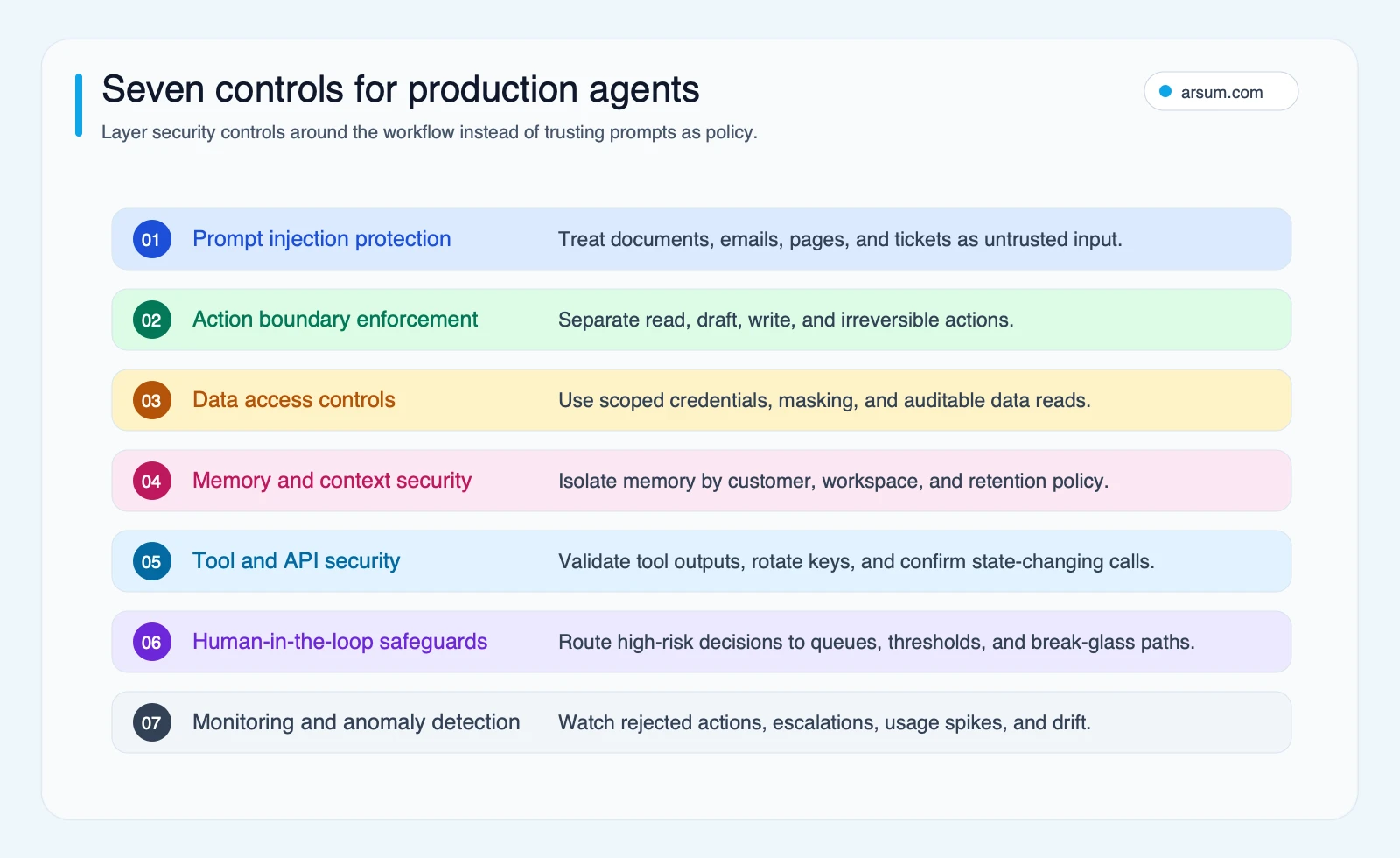
Arsum’s illustrative planning framework. Select the diagram to view it at full size.
Treat untrusted content as data, not instructions
Customer emails, tickets, PDFs, web pages, retrieved documents, and tool outputs can all contain content that attempts to influence an agent. Do not rely on a prompt asking the model to ignore hostile instructions as the control.
Instead:
- Separate untrusted content from the policy and authorization layer.
- Give tools explicit parameters and server-side validation.
- Check every requested action against an allowlist, scope, value limit, and approval rule.
- Restrict outbound destinations and log external calls.
- Route suspicious or conflicting evidence to a human queue rather than asking the agent to resolve it.
Prompt injection is a major design risk for agents that consume untrusted content. It is not a reason to abandon useful workflows; it is a reason not to let content decide what tools the agent may use.
Use a workflow-specific service identity
Never copy a human operator’s broad permissions into an agent integration. Create a service role for the one workflow:
- Read only the tables, folders, fields, and accounts required.
- Use short-lived, scoped credentials where the connected system supports them.
- Separate development, staging, and production identities.
- Deny tool calls outside the allowed action set.
- Require a separate approval identity for consequential actions.
If a task needs broad permissions to be useful, that is usually a sign to split it into smaller agents or keep it human-approved. This architecture decision is as important as the choice of orchestration stack; see AI agent architecture patterns for related implementation choices.
Log decisions so an owner can reconstruct them
A production record should answer: what did the agent see, what sources did it retrieve, which tool did it call, what policy allowed or rejected the action, who approved it, and what changed?
Retain enough evidence to investigate a disputed result without retaining unnecessary sensitive content. The right retention period depends on your data policy and applicable obligations; it is not a universal number to copy from a checklist.
Change-triggered reviews beat calendar theater
The NIST AI Risk Management Framework provides a governance structure for identifying, measuring, and managing AI risk. It supports a repeatable risk-management approach; it does not prescribe one universal audit schedule for every agent.
Trigger a security and workflow review when you introduce:
- A new tool, integration, or data class.
- Write permissions or higher value limits.
- Browser, code-execution, or localhost capability.
- A new outbound communication path.
- Meaningful exception drift, rejected actions, manual overrides, or incident signals.
- A material change to the workflow owner, policy, model, or retrieval source.
Browser, code, and localhost agents need a separate boundary
Ordinary line-of-business agents using fixed internal APIs are not equivalent to agents that browse the open web, execute code, or communicate with local services.
Microsoft’s June 2026 AutoJack security research describes a concrete chain in which untrusted web content could reach privileged localhost services through missing authentication and unsafe command handling. It supports a specific point: localhost should not be treated as trusted merely because it is local, and browsing capability can create a route from hostile content to privileged execution.
For these agents, require:
| Boundary | Minimum operating pattern |
|---|---|
| Browser | Isolated browser profile, restricted downloads, no implicit access to internal admin surfaces |
| Localhost services | Authentication, explicit origin controls, and no assumption that loopback traffic is safe |
| Code execution | Sandbox, resource limits, no production credentials by default, and no unrestricted network access |
| Egress | Destination allowlists, logging, and approval for high-impact communication |
| Tools | Fixed, runtime-defined tools with server-side authorization rather than model-selected privileges |
This distinction matters when comparing AI agent frameworks or evaluating a platform that advertises browser or coding capabilities. Ask where authorization is enforced, how tools are isolated, what reaches the network, and how the vendor prevents one runtime from inheriting authority intended for another.
Commodity controls versus non-commodity risk
| Workflow | Core controls | Additional boundary when risk changes |
|---|---|---|
| Internal knowledge assistant | Scoped retrieval, workspace separation, source links, audit logs | Add approvals if it can write records or contact users |
| Support triage | PII controls, draft replies, escalation rules | Add value limits and approval if it can issue credits or commitments |
| CRM research | Read-only connector, field allowlist, source evidence | Add rollback and manager review for bulk updates |
| Finance exceptions | Service role, approved source set, draft recommendations, dual approval | Keep payment and vendor-master actions separate |
| Browser or coding agent | Environment isolation, tool allowlists, egress policy | Add localhost authentication and execution sandboxing |
Failure modes and disqualifiers
| Failure mode | What it looks like | Safer operating pattern |
|---|---|---|
| Human permission cloning | The agent can access everything its sponsor can | Workflow-specific service role and explicit tool scopes |
| Prompts as policy | A model instruction is the only control against unsafe action | Server-side authorization, approval gates, and tool validation |
| One agent, many jobs | The same agent handles research, customer contact, billing, and record changes | Split workflows by risk and give each a narrow action set |
| No exception owner | Edge cases become Slack messages and silent manual work | Named business owner, queue SLA, and escalation path |
| No egress policy | Sensitive context can reach an unapproved external destination | Destination allowlist, logging, and approval for outbound actions |
| Untested rollback | A bad release cannot be contained quickly | Disable service identity, stop queue processing, and test restoration before promotion |
| Thin bulk automation | Output volume rises while reviewable quality falls | Require provenance, human review, and a business metric beyond quantity |
Do not proceed to autonomous write access if you cannot name the accountable workflow owner, the approval path, the rollback method, and the evidence retained for each action. Those are disqualifying gaps, not documentation tasks to defer.
Build, buy, or use a partner
The right sourcing path depends on who can own the controls after launch.
| Path | Best fit | Integration ownership | Security-control fit | Rule it out when |
|---|---|---|---|---|
| Buy a platform | Common, low-risk workflow with standard integrations | Vendor plus internal administrator | Confirm service roles, audit logs, approval support, and egress controls | The vendor cannot express your approval, logging, or data-boundary requirements |
| Build internally | Stable APIs, strong engineering and security ownership, a differentiated workflow | Internal team | Highest potential fit, but you own implementation and operations | Discovery is unclear or the team is building a general platform before proving one workflow |
| Implementation partner | Cross-functional workflow, legacy integrations, or unclear autonomy boundary | Shared during delivery; internal owner remains accountable | Can translate business rules into scoped services, queues, logs, and rollback | No business owner is available to maintain rules, exceptions, and acceptance criteria |
A practical first-week decision checklist
- Select one workflow with enough volume to measure and a named business owner.
- Document the current path: inputs, systems, handoffs, exceptions, external effects, and manual review time.
- Score the workflow and choose the lowest launch mode that can improve the target metric.
- Create a service role and deny every tool, field, destination, and environment not needed for the pilot.
- Define the approval queue, exception SLA, retained evidence, stop condition, and rollback test.
- Run representative normal, ambiguous, and hostile-input cases before production data or write access.
- Expand authority only after the pilot acceptance gate is met.
AI agent security is successful when the organization can explain why the agent has its authority, who owns its exceptions, how a bad action is contained, and what evidence justifies expanding it. That is a stronger operating model than a broad promise of autonomous work.
Apply this to your product
Arsum scopes AI product development and intelligent search and data systems. Bring one workflow, its intended users, permitted data sources and representative examples. The first implementation decision is the smallest useful scope that can be tested and handed over with a named owner.
Discuss your AI product or search system
Bring the intended users, data sources, workflow, and budget. We can define a focused first phase and the responsibilities after launch.
Discuss your project →Published by:Arsum
- Published
- February 9, 2026
- Updated
- September 6, 2026
- How this was produced
- These guides are prepared and updated with AI assistance. Linked documentation, proposed evaluation methods, and illustrative calculations are distinguished from reported project results. No independent human review is implied by the byline.
- Source policy
- Technical references are linked where used. Planning figures and suggested scorecards are assumptions, not market benchmarks or measured client outcomes. Editorial policy.
- Why this page exists
- Help product and technical teams scope AI applications and intelligent search, compare delivery options, and define acceptance and ownership.