AI agents for business are useful when they improve a defined workflow—not when they merely produce impressive chat. Start with work that has repeatable volume, reliable inputs, a named owner, bounded permissions, and a recoverable failure path; then decide whether the right first release is a copilot, deterministic automation, or a limited-execution agent.
AI Agents for Business: The Complete 2026 Guide
Explore ai agents for business: compare workflow fit, costs, risks, evidence, and practical next steps before you build, buy, or hire.

Table of Contents
- What Most Guides Miss: Capability Is Not Authorization
- What an AI Agent Changes in a Business Workflow
- Screen the Workflow Before You Compare Tools
- Build a Pilot That Can Be Stopped
- Where Agents Are Usually Useful—and Where They Are Not
- Evaluate Platforms on Their Control Surface
- Build, Buy, or Use an Implementation Partner
- Failure Modes to Design Out
- Evidence and Limits
- Next Step
What Most Guides Miss: Capability Is Not Authorization
An agent can technically retrieve data, call tools, plan steps, and generate an action. That does not mean it is authorized to make a customer promise, change a financial record, approve an exception, or trigger an irreversible downstream process.
The buyer decision is therefore not “Which AI agent is smartest?” It is: Which workflow can safely move from human execution to supervised machine execution, and who owns the exceptions?
Production agents need more than a model. OpenAI describes agents as applications that can use tools, maintain state, and coordinate multi-step work; those design choices determine where control belongs in the workflow. OpenAI’s agent guidance is useful here because it frames tools, orchestration, and state as application concerns—not a prompt-writing exercise.
Before buying a platform, name:
- The business outcome the workflow must change.
- The source systems the agent may read.
- The actions it may draft, request approval for, or execute.
- The policy conditions that require escalation.
- The person accountable for reviewing failures.
- The reversal method for every write action.
If those answers are unclear, start with a copilot or a workflow audit. Do not grant autonomy to compensate for an undefined process.
What an AI Agent Changes in a Business Workflow
A chatbot responds to a person. A business agent operates within a process: it receives a trigger, gathers context, applies a policy, takes a bounded action, verifies the outcome, and routes exceptions.
| Pattern | Best use | Control requirement | Common mistake |
|---|---|---|---|
| Chat assistant | Search, drafting, summarization, internal Q&A | Source access and review of outputs | Calling a useful chat interface an “autonomous agent” |
| Deterministic automation | Stable, rule-based handoffs between systems | Reliable trigger, fixed rules, error handling | Using it where messy inputs require judgment |
| AI agent workflow | Multi-step work with variable context and bounded judgment | Permissions, approval gates, state, logs, verification, exception queue | Letting it write broadly before proving controls |
Google’s overview of AI agents similarly distinguishes systems that can reason, plan, observe, and act from simpler conversational experiences. For a buyer, the distinction matters because every additional action increases the need for evidence, permission design, and operational ownership.
A support agent, for example, might classify a ticket, retrieve order and policy context, draft a response, request approval for a refund exception, update the help desk after approval, and verify that the ticket status actually changed. That is different from a model generating an answer in a chat window.
For implementation patterns behind this distinction, see AI agent architecture patterns and AI agents vs. agentic AI.
Screen the Workflow Before You Compare Tools
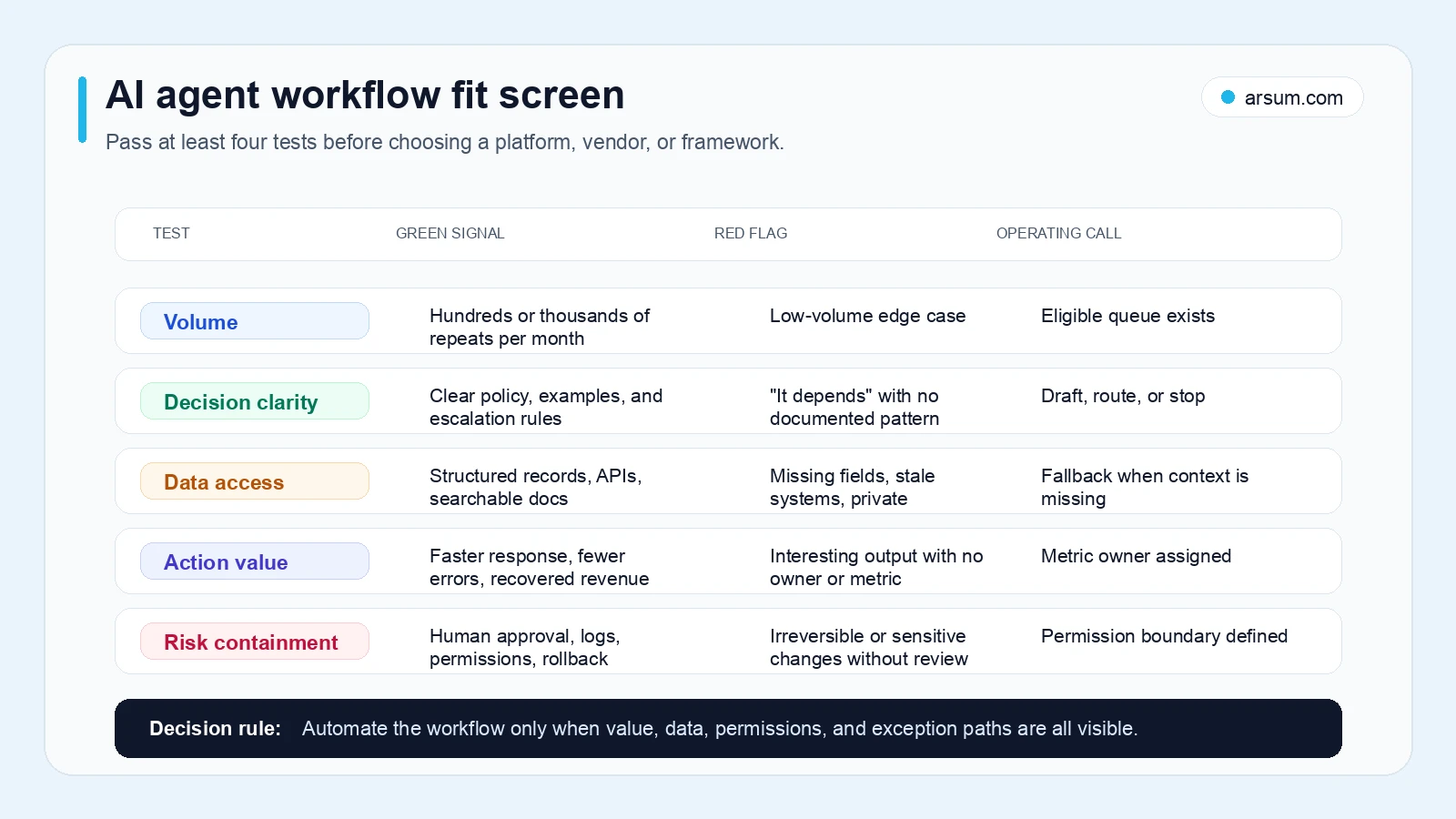
Use this readiness screen on each candidate workflow. Score each dimension from 1 to 5, then apply the weighting rather than treating all criteria as equal.
| Dimension | Weight | A 1 means | A 5 means |
|---|---|---|---|
| Repeatability | 25% | Decisions vary case by case | Steps and common exceptions are documented |
| Data readiness | 20% | Inputs are scattered, stale, or inaccessible | Required records are reliable and available through approved access |
| Approval clarity | 20% | Nobody can state who decides edge cases | Named approver, thresholds, and escalation rules exist |
| Reversibility | 20% | A bad action is difficult or costly to undo | Changes are bounded, logged, and readily reversible |
| Measurable value | 15% | No baseline or economic owner | Volume, handling time, quality, or revenue metric is known |
Calculate the weighted score by multiplying each score by its weight and adding the result.
- 4.0–5.0: Candidate for a controlled pilot with limited execution.
- 3.0–3.9: Start in draft-only or recommendation mode; close the weakest control gaps.
- Below 3.0: Fix the process or data first. An agent project is premature.
A low score on reversibility or approval clarity should cap autonomy even if the overall score is high. High consequence of error reduces the permitted action level; it is not a reason to deploy a more “capable” agent.
Worked Readiness Example: Support-Ticket Routing
Consider an illustrative planning case: a support operations lead wants an agent to classify inbound tickets, retrieve account context, draft a response, and route exceptions.
| Dimension | Score | Weighted result | Reason |
|---|---|---|---|
| Repeatability | 4 | 1.00 | Common intents and routing rules are documented |
| Data readiness | 3 | 0.60 | Ticket and account data exist, but knowledge-base articles need cleanup |
| Approval clarity | 4 | 0.80 | Support manager owns policy exceptions and refunds |
| Reversibility | 5 | 1.00 | Incorrect tags, assignments, and drafts can be corrected |
| Measurable value | 4 | 0.60 | Ticket volume and handling time are already tracked |
| Weighted score | 4.00 / 5 | Controlled pilot candidate |
The recommended autonomy level is not full resolution. Begin with classification, context assembly, draft responses, and routing. Require human approval for refunds, policy exceptions, legal language, account changes, or any commitment outside the approved knowledge base.
The support operations manager is the business approver; the systems owner maintains help-desk permissions and integrations. Retain the input references, retrieved sources, proposed action, approval or rejection, tool-call outcome, and post-action verification record for every pilot case.
Build a Pilot That Can Be Stopped
A pilot is not “turn it on and see.” It is a controlled comparison between a known baseline and a permitted operating mode.
Use a scorecard such as this before the pilot starts.
| Pilot element | Illustrative support-routing design |
|---|---|
| Baseline | Measure eligible ticket volume, current median handling time, reopen rate, escalation rate, and review effort for a defined queue |
| Target | Reduce median handling time for eligible tickets while preserving or improving the baseline quality threshold |
| Quality metric | Human reviewer accepts the proposed classification, routing, and draft against documented policy |
| Exception metric | Track escalations, corrections, reversals, missing-context cases, and unsupported policy suggestions separately |
| Business owner | Support operations manager |
| Technical owner | Integration or platform owner accountable for access, logging, and rollback |
| Review cadence | Daily review during initial limited release; weekly review of trends and policy gaps |
| Stop condition | Pause execution if an action causes material customer harm, exposes restricted data, bypasses required approval, or exceeds the pre-agreed error threshold |
| Rollback path | Remove write permission, disable the workflow trigger, route the queue back to humans, and preserve logs for review |
| Evidence retained | Inputs, source references, model output, tool requests, approvals, action result, verification result, reviewer corrections |
The threshold itself must come from the workflow owner and risk owner. Do not borrow a generic “acceptable accuracy” number from another company. A routing mistake may be recoverable; an incorrect payment or regulatory filing may not be.
NIST’s AI Risk Management Framework provides a practical reason to treat governance as part of implementation: trustworthiness and risk management are ongoing operating activities, not a one-time vendor checklist.
Model the Economics Without Pretending It Is a Benchmark
Use a planning model that makes every assumption visible.
| Input | Illustrative planning assumption |
|---|---|
| Monthly inbound tickets | 8,000 |
| Eligible share after exclusions | 55% |
| Eligible tickets | 4,400 |
| Minutes saved per completed eligible case | 4 |
| Gross hours potentially released | 293 hours |
| Loaded hourly cost assumption | $45 |
| Gross monthly capacity value before operating costs | $13,200 |
This arithmetic is illustrative, not an observed result or a forecast. It assumes that every eligible completed case actually removes four minutes of work and that released capacity has value to the business.
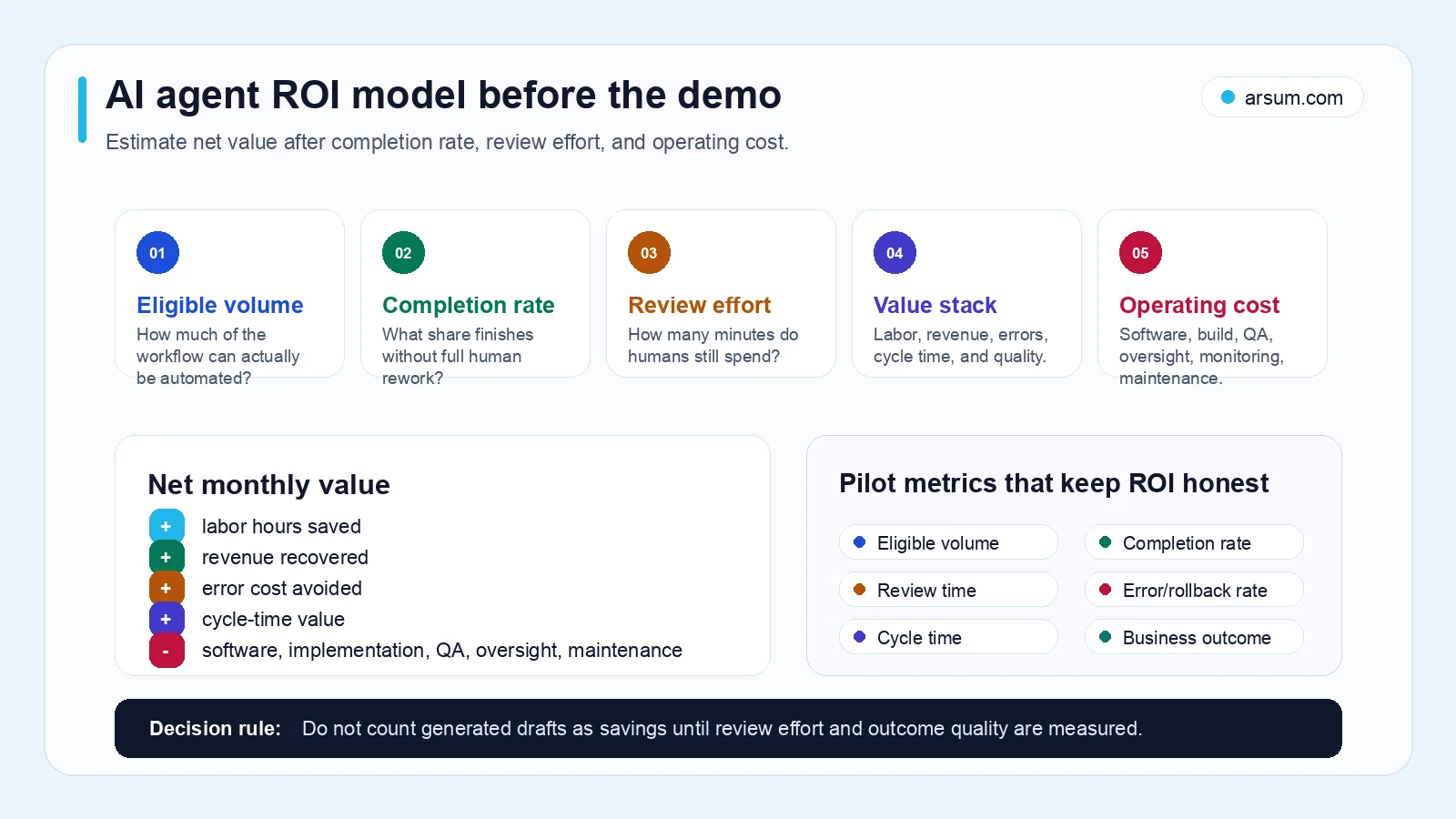
The complete model subtracts implementation work, software usage, integration support, human QA, exception handling, monitoring, maintenance, and the cost of errors or reversals. Run sensitivity scenarios: lower eligible volume, lower completion, more reviewer time, and higher exception cost. If the case only works under the optimistic scenario, it is not yet a reliable investment case.
For related ways to structure a business case, see AI automation ROI examples and AI workflow automation.
Where Agents Are Usually Useful—and Where They Are Not
Strong first candidates are repetitive workflows with bounded judgment and visible outcomes:
- Support triage, context gathering, and response drafting.
- Inbound lead qualification, CRM enrichment, and owner routing.
- Invoice matching, missing-information checks, and exception preparation.
- Operating-report preparation with links back to source systems.
- Employee onboarding coordination and policy-question routing.
- Account follow-up detection and task creation.
A finance workflow may benefit from an agent that prepares evidence, matches records, and routes exceptions. It should not be assumed to have authority to release payments or approve a disputed transaction. For a more specific boundary, see agentic AI use cases in finance and accounts receivable automation.
Disqualifying conditions for a first agent rollout include:
- Business rules exist mainly as undocumented judgment.
- Required data cannot be accessed through approved, reliable paths.
- The agent would make legal, financial, employment, or safety decisions without a clear human approver.
- A failed action cannot be undone or investigated.
- The team cannot name an owner for exceptions after launch.
- The only success metric is output volume.
Dropbox’s account of building Dash highlights a familiar enterprise constraint: business information is diverse, fragmented, and governed by access controls. Retrieval quality and permission boundaries are therefore core product requirements, not implementation details to postpone.
Evaluate Platforms on Their Control Surface
Do not choose between platforms only from a demo or a feature list. Ask vendors, internal teams, and implementation partners to score the specific workflow.
| Evaluation area | Questions to ask |
|---|---|
| Integration fit | Can it use the systems of record through supported, maintainable connections? What happens when an API or field changes? |
| Data and residency | What data leaves the environment, where is it retained, and which records are excluded? |
| Permission model | Can access differ by read, draft, approval request, and write action? Can permissions be narrowed by queue, user, or action? |
| Approval design | Can the workflow pause for a named role, show supporting evidence, and record the decision? |
| Audit logs | Can you inspect inputs, retrieved context, output, tool calls, approvals, execution results, and failures? |
| Evaluation and observability | Can the team test against representative cases, detect regressions, measure cost, and separate model failures from integration failures? |
| Verification | Does the system confirm the business-state change after an action, rather than assume the tool call succeeded? |
| Exit path | Can you export workflow definitions, logs, and data? How difficult is it to replace a vendor or move an integration? |
| Operating ownership | Which internal role maintains policies, data sources, access, evaluations, and exception queues? |
| Total cost | What are the implementation, usage, QA, integration, monitoring, support, and maintenance inputs? |
This comparison avoids false precision. A CRM-native option may be a good fit when the workflow is mostly inside that CRM. A custom agent can be appropriate when the process crosses systems or needs distinctive policy logic, but it also creates an ongoing obligation to operate integrations, evaluations, and security controls.
Use AI agent platforms and AI agent tools to map the technical categories, then score them against your actual control requirements.
Build, Buy, or Use an Implementation Partner
Buy when the workflow is standard
Buy when the work is mostly contained in one existing platform, the needed controls are available, and the business can adapt to the product’s operating model. Verify the permission boundaries, audit records, and export path before relying on it.
Build when the workflow is differentiating
Build when the workflow contains proprietary decision logic, spans critical systems, or needs a control surface that packaged software cannot provide. Building is not a one-time project: budget for evaluation sets, integration maintenance, monitoring, policy changes, and a technical owner.
Use an implementation partner when the gap is design and delivery
An implementation partner can be useful when leadership sees a material workflow problem but has not yet translated it into requirements, controls, economics, and a pilot. The deliverable should be a scoped workflow brief and pilot design—not a vague promise of “agent transformation.”
If you need that kind of assessment, Arsum can help structure a workflow assessment or pilot-design discussion: identify the candidate workflow, map systems and approvals, define evidence retention and rollback, compare build-versus-buy paths, and agree on pilot acceptance criteria before implementation.
💡 Arsum builds custom AI automation solutions tailored to your business needs.
Get a Free Consultation →For buyers considering a custom route, AI agent development services and custom AI agent development services outline the delivery questions worth resolving before committing to a build.
Failure Modes to Design Out
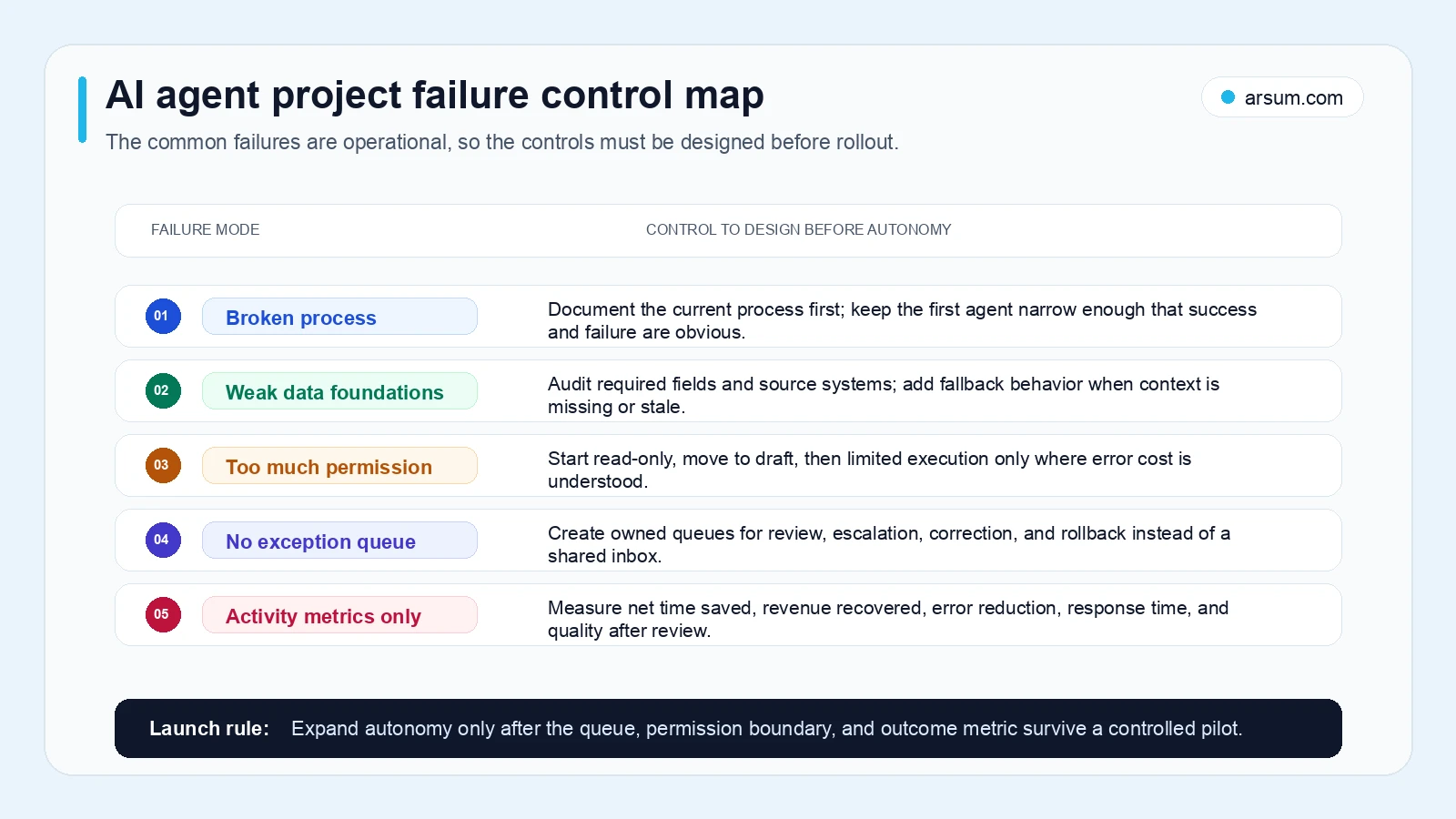
The common failure is not that the model writes poorly. It is that the operating system around it is incomplete.
Broken process, automated faster
If people rely on hidden judgment, manual reconciliation, or informal exceptions, an agent will scale inconsistency. Document the normal path and the ugly path first.
Weak data or excessive access
Missing fields and stale knowledge create plausible but wrong actions. Broad permissions turn those mistakes into material incidents. Start with minimum access and expand only after evidence supports it.
No post-action verification
A tool call returning “success” is not proof that the business state changed correctly. Practitioner discussions have called this “state blindness”: systems can assume completion without verifying the updated UI or underlying record. This is a qualitative signal from one Hacker News discussion, not a market-wide statistic, but the failure mode is practical. Verify the target record, status, and downstream effect after consequential actions.
Activity metrics mistaken for value
More generated drafts, messages, and tasks do not establish ROI. Measure completed work, human correction time, error cost, cycle time, and the business outcome.
Evidence and Limits
This guide combines primary documentation with editorial operating guidance.
- OpenAI’s Agents documentation supports the description of agents as multi-step applications using tools, state, and orchestration.
- Google Cloud’s agent overview supports the distinction between agent capabilities and simpler conversational systems.
- NIST AI RMF supports treating risk management and trustworthiness as part of deployment.
- Dropbox’s Dash engineering write-up supports the practical importance of fragmented data and access controls.
- Practitioner material is used only as qualitative evidence of concerns about setup burden, approval gates, and verification—not as proof of adoption, pricing, accuracy, or savings.
The readiness scorecards, thresholds, comparison rubric, and illustrative economics are editorial decision tools. They should be replaced with your own workflow data, policy obligations, and risk tolerances before a rollout.
Next Step
Start with one workflow brief: owner, monthly volume, current handling time, source systems, allowed actions, approval gates, exception types, success metric, stop condition, and rollback method. If you cannot complete the brief, the work is discovery—not automation.
Ready to Automate Your Business?
Stop wasting time on repetitive tasks. Let AI handle the busywork while you focus on growth.
Schedule a Free Strategy Call →Written by:Arsum editorial team
- Reviewed by
- Arsum editorial team
- Published
- February 4, 2026
- Updated
- August 12, 2026
- How this was produced
- Arsum uses research packs, source checks, and human editorial review to prepare and update blog articles. Editors are responsible for the final page.
- Source policy
- Sources are linked in the article when used. Methodology and source notes are included on higher-risk or high-visibility pages and are being rolled out across the archive. Editorial policy.
- Why this page exists
- Help B2B operators evaluate AI automation, implementation scope, cost, risk, and build-vs-buy decisions with practical context.