The terms overlap in industry usage. For a buying decision about ai agents vs agentic ai, classify the system by its bounded task scope, workflow controls, and authorized autonomy—not by the label in a vendor deck. A single agent may use tools and make choices; a broader agentic workflow may coordinate steps, retain state, and act across systems. The meaningful difference is whether that added autonomy changes permissions, approvals, traceability, exception handling, ownership, and rollback.
AI Agents vs Agentic AI: Comparison
Explore ai agents vs agentic ai: compare workflow fit, costs, risks, evidence, and practical next steps before you build, buy, or hire.

Table of Contents
- What Most Guides Miss: The Label Is Not the Control Boundary
- Route the Workflow Before You Buy Anything
- A Concrete Example: Document Intake With a Controlled Boundary
- The Readiness Scorecard: Prove the Control Layer First
- What to Demand From a Vendor or Internal Build
- Failure Modes That Should Reduce Autonomy
- Social Listening: Vocabulary Is Secondary to Reliability
- Build, Buy, or Partner: Decide From the Boundary
- A Short Answer to Common Buyer Questions
- Methodology and Freshness
- Conclusion
What Most Guides Miss: The Label Is Not the Control Boundary
Most comparisons stop at “agents do tasks” and “agentic AI pursues goals.” That is a useful shorthand, but not a procurement or implementation decision.
The practical question is: what is this system allowed to do when the expected path breaks?
A system that drafts a reply from approved knowledge is materially different from one that can retrieve account data, change a customer record, select an escalation path, and trigger an external action. Both may be marketed as agentic. Only the latter requires a defined action-permission map, approval evidence, replayable traces, and a tested rollback path.
Use the following operating taxonomy as a buyer convention, not a universal industry standard:
| Deployment shape | Practical description | What must be designed before release |
|---|---|---|
| Deterministic automation | Fixed rules and known paths execute in a defined order. | Inputs, rules, exceptions, system ownership, and manual fallback. |
| Bounded AI agent | An AI component interprets ambiguity, uses a limited toolset, and returns a bounded result or recommendation. | Source boundaries, allowed tools, output checks, exception owner, and review path. |
| Controlled agentic workflow | A workflow coordinates AI decisions, tools, state, and cross-system steps toward a defined business outcome. | Permissions, orchestration, approvals, traces, evaluations, escalation, rollback, and operating ownership. |
AWS distinguishes software agents and agentic AI using dimensions such as autonomy, proactivity, communication, and execution model; its terminology is useful, but it should not substitute for your own operating boundary. AWS Prescriptive Guidance’s comparison is a good starting point.
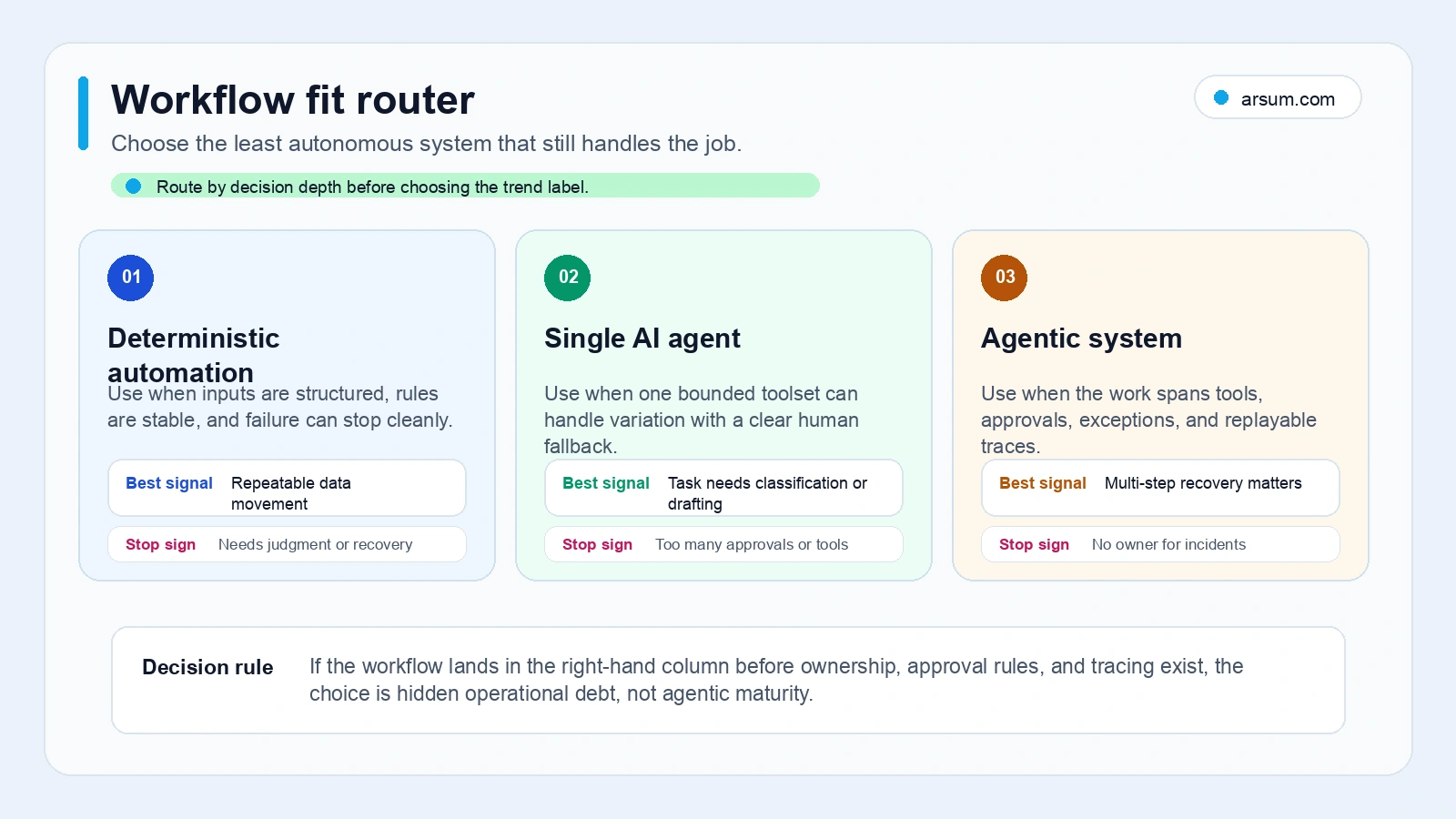
Route the Workflow Before You Buy Anything
Classify the work in this order.
Is the process mostly fixed? If the route, rules, and exception handling are known, model the deterministic workflow first. Add AI only where language interpretation, extraction, classification, or judgment improves the handoff.
Can the output stay bounded? If one request can produce one reviewable result within a limited toolset, a bounded agent may be enough.
Does the work need coordination across systems? If the system must break down a goal, maintain workflow state, choose among tools, handle exceptions, and take cross-system actions, treat it as a controlled agentic workflow.
Can the action be safely reversed? Low reversibility and high failure cost should reduce autonomy. A consequential action needs approval or a narrow authorization boundary even if the system is technically capable of acting.
Who owns the exception? If no named role owns prompt changes, data quality, approval policy, tool failures, and post-release review, do not expand the workflow’s autonomy.
This is the decision boundary missing from many generic AI agents for business discussions: model capability does not authorize business action.
A Concrete Example: Document Intake With a Controlled Boundary
Consider a team receiving supplier documents and routing them for review.
A deterministic workflow can receive the document, store it, check required fields, and assign the case. A bounded AI agent can extract requested fields, summarize the document, identify missing information, and propose a category. A controlled agentic workflow could coordinate extraction, policy comparison, follow-up drafting, routing, and status updates across systems.
The classification changes when the system is authorized to act:
| Step | Safer initial scope | Higher-autonomy scope requiring controls |
|---|---|---|
| Receive and store document | Deterministic workflow | — |
| Extract fields and summarize | Bounded AI agent with source-linked output | — |
| Compare against a policy | Agent proposes findings for reviewer approval | Auto-route only where policy, confidence checks, and exceptions are explicit |
| Request missing information | Draft for review | Send only to approved recipients with defined templates and logging |
| Change a supplier or payment status | Human-controlled action | Requires explicit authorization, audit evidence, and rollback |
The buyer decision is not whether the workflow deserves the word agentic. It is whether every authorized action has an accountable owner and a safe failure path.
For finance-oriented examples where authorization and evidence retention matter, see agentic AI use cases in finance and credit decision automation.
The Readiness Scorecard: Prove the Control Layer First
Use this scorecard as a pass/fail readiness assessment, rather than a maturity score presented as an industry standard.
| Required evidence | What “ready enough to pilot” looks like |
|---|---|
| Defined outcome | A business outcome is explicit, measurable, and safe to refuse or escalate. |
| Baseline | The team documents the current workflow: source systems, handoffs, manual review work, rework, and exception categories. |
| Source lineage | Each AI-supported recommendation can be tied to the approved source material or system record used to produce it. |
| Permission map | Every tool action lists the identity, allowed scope, required approval, and prohibited actions. |
| Named owner | One accountable role owns operating policy, exceptions, release changes, and acceptance decisions. |
| Review and error cost | The team can measure reviewer effort and classify harmful, incorrect, incomplete, and acceptable outputs. |
| Trace and replay | A failed run can be inspected through model calls, tool calls, handoffs, guardrail events, and relevant workflow state. |
| Rollback test | The team has demonstrated how to disable the action path, restore affected records where applicable, and route work manually. |
| Total-cost model | The estimate includes model and tool use, retries, monitoring, support, evaluation, review, and maintenance—not only a demo build. |
OpenAI’s agent guidance describes agents that can plan, use tools, collaborate, and keep state, while leaving orchestration and tool execution under application control. Its tracing documentation describes records for model calls, tool calls, handoffs, guardrails, and custom events; its guardrails documentation explains input and output validation boundaries. Those are implementation capabilities, not proof that a workflow is authorized to operate autonomously.
Worked Pilot Acceptance Scorecard
Use a pilot to test a defined workflow boundary, not to prove that an organization is “ready for agentic AI.”
| Pilot element | Decision to make before launch |
|---|---|
| Baseline | Record the current path, including handling time, reviewer effort, sources used, exceptions, and rework categories. |
| Allowed actions | Specify what the system may read, recommend, draft, update, or send. Prohibit everything else by default. |
| Target | Set a workflow-specific target with the accountable owner—for example, reducing a clearly defined manual step without increasing review burden or policy exceptions. |
| Quality measure | Decide how reviewers will label correct, incomplete, unsupported, and harmful outputs against a representative sample. |
| Exception path | Name the queue, role, and response procedure for missing data, ambiguous cases, tool failures, and policy conflicts. |
| Review cadence | Set a recurring owner-led review of traces, exception reasons, reviewer feedback, and change requests. |
| Stop condition | Pause or restrict the action path if outputs cannot be supported by approved sources, actions exceed authority, or the rollback path fails. |
| Rollback | Demonstrate the manual alternative and the technical action needed to disable or reverse the automation. |
| Expansion decision | Choose one outcome: expand the scope, hold and improve, buy a narrower product, build a controlled integration, or stop. |
Illustrative planning arithmetic should use your own baseline rather than generic industry claims:
Illustrative planning assumption: if a team processes
Ncases per period, reviewers spendMminutes per case on one defined step, and the pilot removesRminutes without adding equivalent review time, then estimated capacity released isN × Rminutes. Validate the result against exception handling, quality review, operating cost, and the business value of redeploying that capacity.
That is a planning model, not an observed ROI result.
💡 Arsum builds custom AI automation solutions tailored to your business needs.
Get a Free Consultation →What to Demand From a Vendor or Internal Build
A useful evaluation is less about which framework appears in a demo and more about whether the implementation can satisfy the workflow boundary.
Ask for evidence on these points:
- Identity-aware permissions: Where do access rules live? Can the vendor show which account, role, and tool permission applies to each action?
- Tool validation: How are tool inputs checked before execution, especially when inputs originate in external content or another system?
- Approval evidence: Which actions stop for review, who can approve them, and how is that approval retained?
- Traceability: Can the team reconstruct a run without relying on a polished summary?
- Evaluation and replay: How are representative cases assembled, labeled, rerun, and compared after a prompt, tool, or policy change?
- Integration fit: Does the system work with the source-of-record systems, identity model, and error-handling conventions you already operate?
- Exportability: Can you retrieve workflow definitions, logs, evaluation records, and business data if you change products?
- Operating ownership: Who maintains source content, evaluates changes, resolves exceptions, and approves production expansion?
Microsoft similarly separates agents from workflows: its Agent Framework overview recommends agents for open-ended or conversational tasks, and workflows when execution order or coordination needs explicit control. That is a useful design cue: when order, approval, and recovery matter, put them in visible workflow logic rather than hiding them in a prompt.
For technical architecture choices after the workflow is scoped, review AI agent architecture patterns and AI agent frameworks from a founder’s view.
Failure Modes That Should Reduce Autonomy
Do not treat these as tuning tasks alone. Some are signals that the workflow boundary is wrong.
The system cannot identify its evidence
If a recommendation cannot be tied back to approved records, documents, or knowledge sources, keep it in a drafting or assistive role. Source lineage is especially important for policy, financial, compliance, and customer-account work.
The workflow hides deterministic rules inside prompts
Fixed eligibility rules, routing logic, and approval thresholds belong in explicit workflow controls. Prompting may interpret ambiguous inputs, but it should not become the only place where a critical business rule exists.
Tool access is broader than the task needs
OWASP identifies excessive functionality, permissions, and autonomy as drivers of damaging agent actions in its guidance on LLM06: Excessive Agency. Use least-privilege tool access, validate tool inputs, and require approval for consequential actions.
Exceptions have no operational owner
A tool timeout, malformed field, conflicting record, or ambiguous request is not merely a technical edge case. It is a handoff to someone’s queue. If that owner, queue, and procedure are undefined, the system is not ready for broader autonomy.
The product claims “learning” without a mechanism
Ask what changes after an error: a human-edited policy, an updated prompt, a revised tool schema, a retrained model, or nothing. Memory, planning, tool use, and learning are separate capabilities. A single “agentic” label should not be accepted as evidence of all four.
Social Listening: Vocabulary Is Secondary to Reliability
Community discussions show that readers often use AI agent and agentic AI interchangeably and want a plain-language distinction. In a Reddit discussion about the terms, the question itself reflects the vocabulary problem. Production-oriented discussions, such as this Hacker News thread on deploying AI agents, concentrate more on reliability, repeatability, evaluation, and deterministic handoffs.
These are qualitative signals, not market-wide statistics. Their value is practical: when practitioners stop debating names and start asking how runs fail, that is where buyers should focus their evaluation.
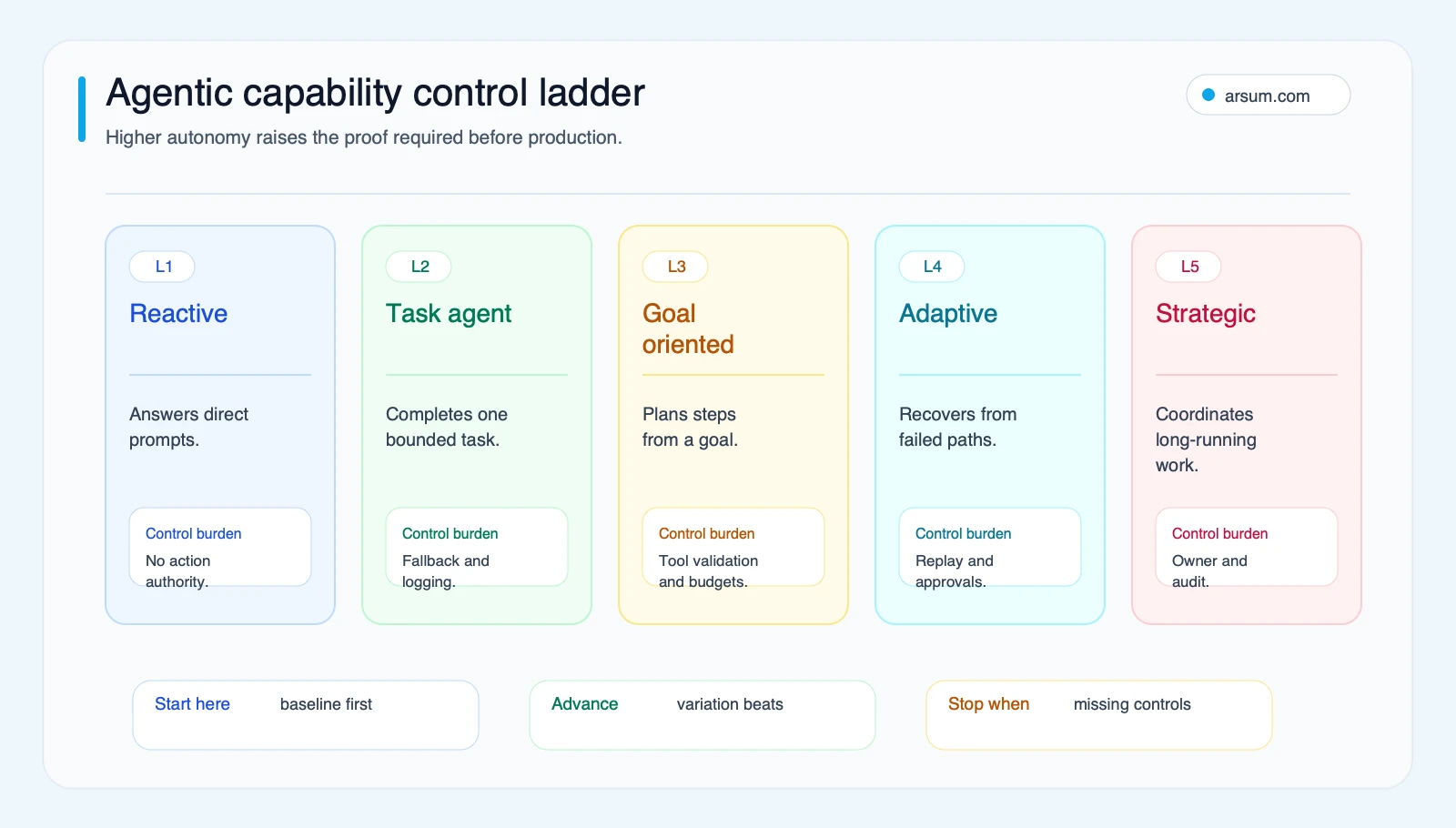
Build, Buy, or Partner: Decide From the Boundary
Buy when the workflow is common and the controls are demonstrable
A product can be a good fit when its integrations match your systems and it can demonstrate permissions, approval handling, traceability, exportability, and a maintainable operating model. A demo alone is not sufficient evidence.
Build when the differentiated work depends on your systems and policies
A custom implementation may fit when proprietary data, unique business rules, or deep integration define the workflow’s value. That decision also commits you to operating ownership: evaluation, release controls, source maintenance, monitoring, and exception handling.
Use an implementation partner when the decision itself needs structure
A partner can be useful when the workflow appears valuable but the organization still needs an action-permission matrix, pilot acceptance criteria, source-lineage design, or a grounded build-versus-buy recommendation. See agentic AI consulting services and AI implementation services for related scoping considerations.
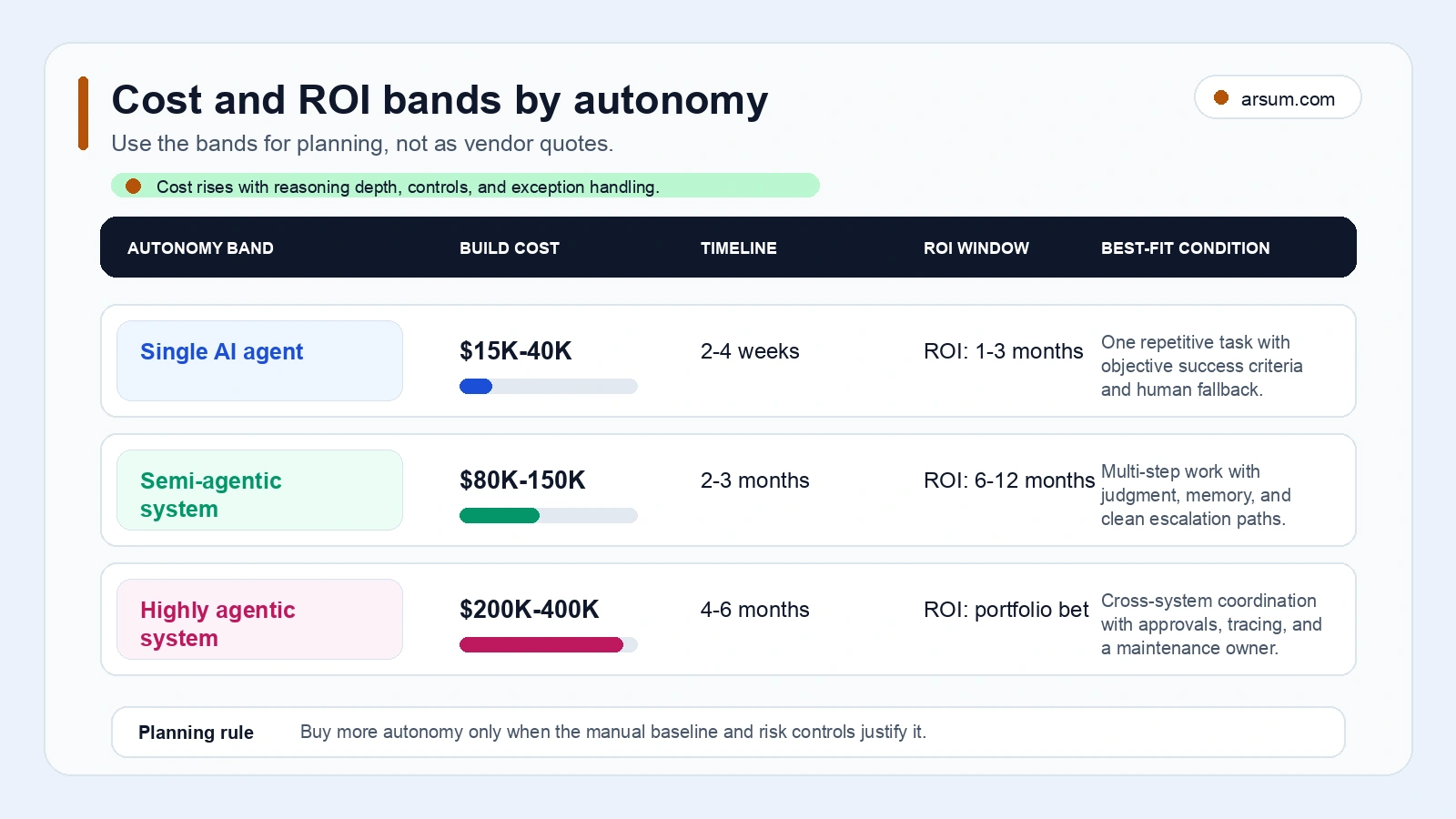
The visual is best read as a reminder that broader autonomy expands the control surface and total-cost model. It is not a vendor quote, deployment estimate, or evidence of a standard return profile.
A Short Answer to Common Buyer Questions
Are AI agents and agentic AI different?
Sometimes, but the terms are not used consistently across vendors. For a practical buying convention, call a bounded task component an AI agent and reserve agentic workflow or agentic AI system for work that coordinates planning, state, tools, and cross-system execution under explicit controls.
Does tool use make a system agentic?
Not by itself. Tool use changes the risk profile when the tool can read sensitive data, alter records, contact people, or trigger external effects. The relevant question is what the tool is authorized to do and how that action is reviewed, traced, and reversed.
Should every multi-step workflow become agentic?
No. Fixed steps should generally remain deterministic. Add AI where it improves interpretation, extraction, prioritization, or exception handling, and keep policy rules, approvals, and critical sequencing visible in the workflow.
What is the first artifact to request from a vendor?
Request an action-permission matrix: every source, tool, allowed action, approval point, exception path, trace record, owner, and rollback procedure. It makes vague autonomy claims testable.
Methodology and Freshness
This article uses AWS, OpenAI, Microsoft, and OWASP documentation for factual implementation and control claims, plus a current academic conceptual taxonomy of AI agents and agentic AI. Reddit and Hacker News material is included only as qualitative evidence of vocabulary and production-risk questions.
Framework names, product capabilities, and security defaults change quickly. Re-check current documentation before approving a platform or expanding tool permissions.
Conclusion
The useful distinction in ai agents vs agentic ai is not a debate over which label is more advanced. It is a decision about bounded work, authorized actions, and operational accountability.
Choose the narrowest deployment shape that can meet the workflow goal. Expand only after the team can show source lineage, permission boundaries, review ownership, trace and replay evidence, exception handling, a rollback test, and a pilot acceptance decision. If a system cannot meet those conditions, reduce its authority—even if it can technically perform the task.
Ready to Automate Your Business?
Stop wasting time on repetitive tasks. Let AI handle the busywork while you focus on growth.
Schedule a Free Strategy Call →Written by:Arsum editorial team
- Reviewed by
- Arsum editorial team
- Published
- February 9, 2026
- Updated
- August 12, 2026
- How this was produced
- Arsum uses research packs, source checks, and human editorial review to prepare and update blog articles. Editors are responsible for the final page.
- Source policy
- Sources are linked in the article when used. Methodology and source notes are included on higher-risk or high-visibility pages and are being rolled out across the archive. Editorial policy.
- Why this page exists
- Help B2B operators evaluate AI automation, implementation scope, cost, risk, and build-vs-buy decisions with practical context.