AI app development tools are easiest to choose when you start with the workflow you need to ship—not a generic “best tool” list: use a prompt-to-app builder for a bounded prototype, pair it with an owned data and identity layer for a controlled internal tool, and use code-first SDKs when the AI behavior is part of a customer-facing product.
AI App Development Tools: Best Picks by Use Case
Compare AI app development tools, from prompt-to-app builders to code-first SDKs and backend platforms, before you commit your team to one stack.

Choosing the right AI app development tool starts with knowing which lane you actually need.
Table of Contents
- What most guides miss: these tools are different layers, not substitutes
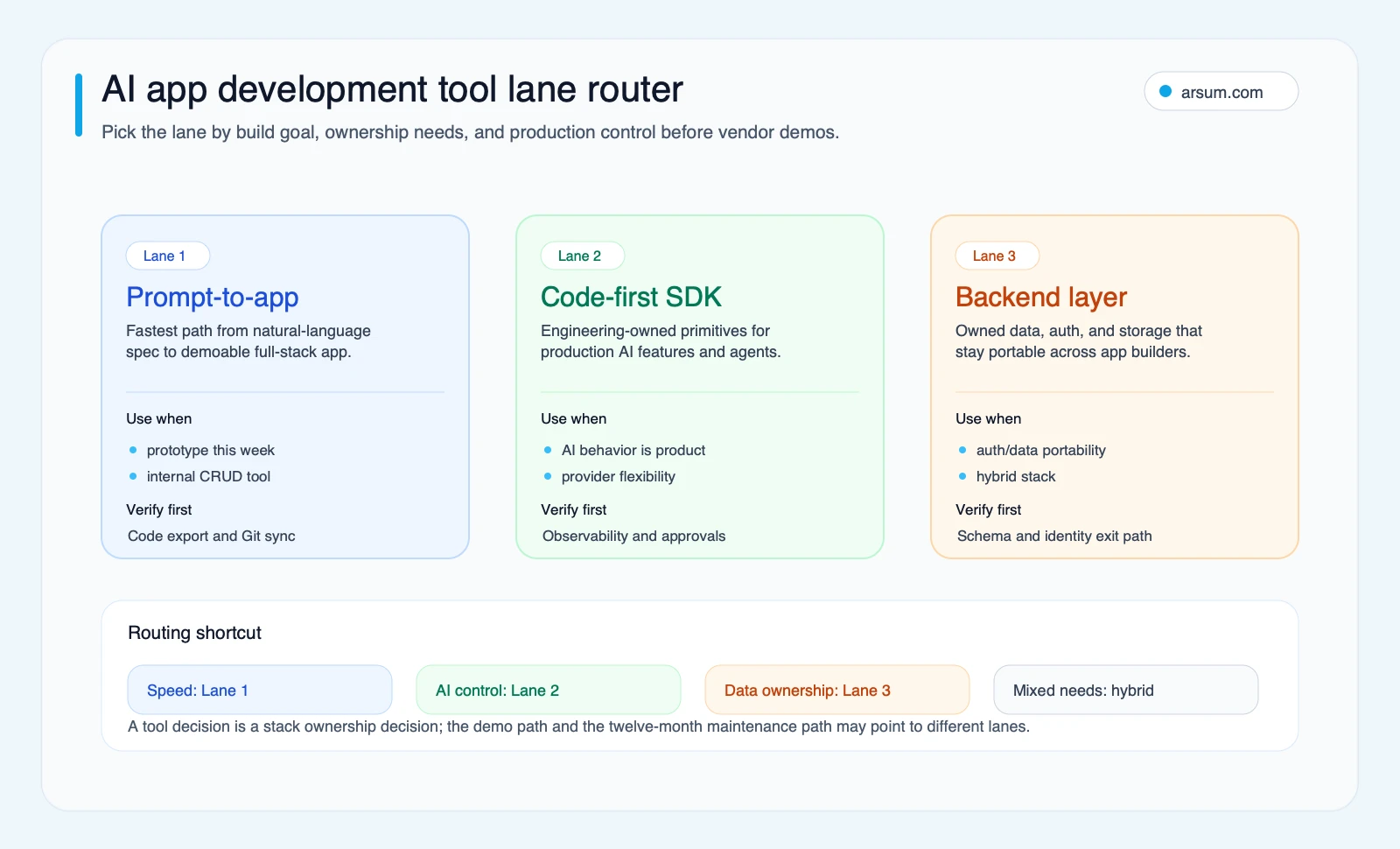
- The three lanes of AI app development tools
- Vendor verification matrix
- A lane scorecard, with its limits
- Run a 30–60 day pilot before making a stack commitment
- Production-readiness gates for AI-built apps
- The hybrid architecture tradeoff
- Disqualifying conditions and common failure modes
- Vendor-evaluation worksheet: test the exit path now
- Frequently asked questions
What most guides miss: these tools are different layers, not substitutes
A builder, an AI SDK, and a backend platform can all appear in the same stack. Comparing them as though one must win creates the wrong buying decision.
The practical question is what must still work after the first demo.
- An internal workflow prototype needs a visible outcome, a small data boundary, and a named person who can review exceptions.
- A controlled internal production tool needs authentication, authorization, source-data lineage, an audit trail where appropriate, and a rollback path.
- A customer-facing AI product needs engineering ownership of behavior, tests, deployments, monitoring, and the policy governing model and tool actions.
Use this lane rule before starting vendor trials.
| Buyer situation | Start with | Required outcome | Approval boundary | Engineering ownership |
|---|---|---|---|---|
| Bounded prototype | Prompt-to-app builder | A testable workflow and user feedback | Human reviews every consequential result | Review exported code before broader use |
| Controlled internal tool | Builder plus owned backend, or code-first build | A repeatable workflow with access controls and evidence retention | Named business owner approves exceptions | Team owns repository, data schema, auth configuration, and deployment |
| Customer-facing AI product | Code-first AI SDK plus production backend | Reliable product behavior under real usage | AI may assist; high-impact actions require explicit approval | Engineering team owns application logic, observability, release process, and incident response |
A fast demo is evidence that a concept can be demonstrated. It is not evidence that the application is authorized to process sensitive data, make changes in another system, or operate without review.
For a broader view of this distinction, see AI app development for business teams and AI-powered app development.
The three lanes of AI app development tools
Prompt-to-app builders: Lovable, Bolt, and Replit Agent
Prompt-to-app builders use natural-language instructions as their primary interface. They are useful when the first decision is whether a workflow, interface, or product concept deserves more investment.
Lovable’s documentation describes a full-stack development platform with editable code and GitHub sync, alongside frontend, backend, database, authentication, and integration capabilities. Bolt presents a chat-driven builder with hosting, databases, user management, analytics, and integrations. Replit Agent is positioned as a natural-language app builder that can build and deploy applications directly.
Choose this lane when the work is bounded:
- A team needs a prototype to test an internal process.
- The expected user group is small and known.
- A human can review every meaningful output or action.
- The team will verify repository ownership, data handling, and deployment before treating the prototype as operational software.
Do not assume a builder is unsuitable for production—or that it is production-ready by default. The answer depends on the specific app, controls, export path, and engineering review. Lovable’s security documentation notes that built-in scans and optional testing integrations do not replace a thorough security review for sensitive or critical applications.
Code-first AI SDKs: Vercel AI SDK and OpenAI Agents SDK
Code-first SDKs are for teams that need to define and test application behavior themselves.
Vercel AI SDK provides a code-first approach to integrating supported model providers. It is relevant when provider flexibility matters, but the buyer should still verify which providers, features, and deployment assumptions apply to the intended implementation.
The OpenAI Agents SDK provides primitives for tools, guardrails, handoffs, sessions, and human-in-the-loop workflows. Those primitives are useful when the product involves multi-step work rather than a single text-generation request.
Choose this lane when:
- The AI workflow is part of what customers are buying.
- Tool calls can create, change, send, or approve something.
- The team needs explicit policy and test coverage around model behavior.
- A technical owner can maintain the application after launch.
For architecture choices beyond a single SDK, see AI agent architecture patterns and agentic AI framework comparisons.
Backend and platform layers: Supabase and Firebase Studio
Backend layers are not merely implementation details. They determine where identities, data schemas, permissions, and application records live.
Supabase Auth documentation describes JWT-based authentication, multiple login methods, and integration with Postgres row-level security. That makes it a candidate for teams that need to evaluate an explicit authentication and authorization model. Firebase Studio documentation describes a full-stack AI workspace with repository import, preview, deployment, and monitoring capabilities.
Neither product should be treated as automatically portable, compliant, or appropriate for a particular data class. Ask for the evidence your architecture requires: schema export, identity-provider compatibility, retention settings, deployment controls, auditability, and the account and support terms that apply to your plan.
Vendor verification matrix
This matrix is intentionally narrower than a “best tools” ranking. It records documented positioning from the research pack and identifies what a buyer should verify in a real evaluation.
| Tool | Documented role | Code / Git ownership | Deployment and backend position | Model or provider flexibility | What to verify before selection |
|---|---|---|---|---|---|
| Lovable | Full-stack AI development platform | Editable code and GitHub sync documented | Generates application components including backend, database, and auth | Verify for the chosen architecture | Export scope, repository control, auth design, data location, plan terms |
| Bolt | Chat-driven app and website builder | Verify in evaluation | Positions built-in hosting, databases, user management, analytics, and integrations | Verify in evaluation | Repository/export path, database export, support terms, retry and credit treatment |
| Replit Agent | Natural-language builder and deployer | Verify in evaluation | Can build and deploy apps directly | Verify in evaluation | Repo ownership, deployment portability, auth/data architecture, operational support |
| Vercel AI SDK | Code-first AI application SDK | Application code remains team-owned in its repository | SDK, not a full backend substitute | Supports integrations across supported providers | Required provider features, framework compatibility, logging and deployment design |
| OpenAI Agents SDK | Agent workflow SDK | Application code remains team-owned in its repository | Provides orchestration primitives, not a complete app platform | Verify against product needs | Tool permissions, handoff policy, session handling, guardrail and approval tests |
| Supabase | Backend, auth, and data platform | Verify repository and infrastructure ownership for your setup | Auth, Postgres, storage, and authorization primitives | Not an AI model layer | Schema export, row-level-security policy, identity migration, region and support needs |
| Firebase Studio | Full-stack AI workspace | Verify in evaluation | Repo import, preview, deployment, and monitoring documented | Verify in evaluation | Code export, Firebase service dependencies, auth migration, operational terms |
“Verify” is not a weakness in the table. It is a procurement instruction. Product capabilities, plan entitlements, and support commitments can change; collect the relevant artifact during the trial rather than inferring it from a landing page.
A lane scorecard, with its limits
The following is an Arsum editorial assessment of lane fit, not a measured vendor benchmark. A score of 5 means the lane is generally the strongest fit for that dimension under these assumptions: a team wants an application it can maintain, the comparison is between lanes rather than individual pricing plans, and the team is willing to combine tools where necessary.
| Dimension | Prompt-to-app builder | Code-first AI SDK | Owned backend platform |
|---|---|---|---|
| Time to first demo | 5 | 2 | 3 |
| Code ownership | 2 | 5 | 4 |
| Data and auth portability | 2 | 4 | 5 |
| Provider flexibility | 2 | 5 | 4 |
| Security review surface | 2 | 4 | 4 |
| Debugging and iteration control | 2 | 4 | 4 |
| Production ceiling | 2 | 5 | 5 |
| Exit-cost control | 2 | 4 | 4 |
The scores do not claim that every builder has poor exports or that every SDK deployment is easy to operate. They show why a lane combination is often more useful than naming one winner: a builder can accelerate interface work while a separately evaluated backend and code repository retain the controls the application needs.
Run a 30–60 day pilot before making a stack commitment
A pilot should prove a workflow, not merely generate a polished interface. Use one workflow with a clear boundary—for example, classifying inbound support requests into a review queue—and define what would make the pilot worth continuing.
| Pilot field | What to record |
|---|---|
| Workflow and scope | One named process, source system, user group, and excluded cases |
| Baseline | Current manual cycle time, manual touches, rework volume, and current quality measure |
| Target | An illustrative planning target, such as reducing routing time while maintaining the existing quality threshold; state the inputs and owner |
| Exception rate | Share of cases that require a human because confidence, policy, or source quality is insufficient |
| Human-review rate | Cases reviewed before action, plus estimated review effort |
| Data and control requirements | Data classification, access rules, retention, source lineage, audit evidence, and required approvals |
| Owner | Named operational owner accountable for acceptance and named technical owner accountable for changes |
| Review cadence | Weekly sample review, incident review after any material error, and an end-of-pilot decision meeting |
| Stop condition | Unauthorized action, inability to trace a recommendation to source data, failure to meet the agreed quality threshold, or review workload that eliminates the intended benefit |
| Rollback path | Disable tool actions, route work back to the existing queue, preserve logs, and have the technical owner restore the prior configuration |
The arithmetic should be explicit. If a team estimates that a workflow currently consumes 20 hours a week, proposes a target of 30% less manual handling, and expects four hours of new review work, the illustrative planning assumption is:
20 baseline hours × 30% reduction − 4 review hours = 2 estimated net hours per week
That is not a realized saving. It is a reason to run the pilot and measure the actual exception and review load.
Before booking an implementation discussion, a team should be able to name the workflow, data and auth boundary, approval owner, and pass/fail criteria. That is also the right point to consider an AI implementation services assessment.
💡 Arsum builds custom AI automation solutions tailored to your business needs.
Get a Free Consultation →Production-readiness gates for AI-built apps
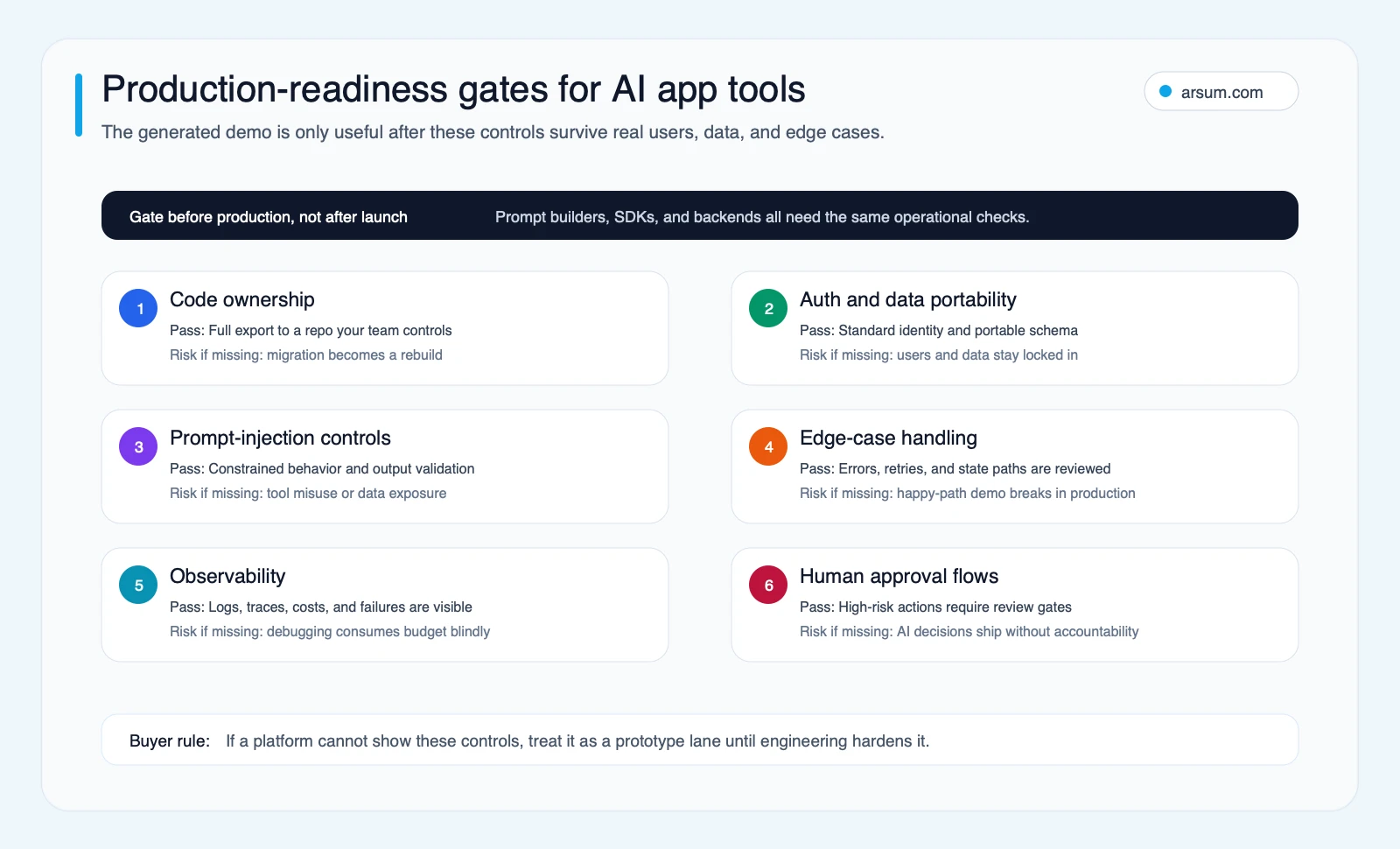
A tool can generate working code and still fail the operating requirements of the application. Review these gates before a prototype receives broader access or external users.
Control access and AI actions
OWASP’s guidance on prompt injection identifies risks including unauthorized tool use and sensitive-data disclosure. Its relevant controls include constrained behavior, output validation, least privilege, and human approval for high-risk actions.
Translate that guidance into implementation checks:
- Separate read-only tools from tools that alter records or communicate externally.
- Give the model only the permissions required for the current task.
- Validate tool inputs and outputs in application code.
- Require human approval before consequential actions.
- Record the source data, prompt or instruction version where appropriate, tool action, reviewer decision, and final outcome.
Technical capability is not authorization. If a model can submit a payment, change a customer record, or send a message, the business still needs to decide whether it may do so autonomously.
Own the debugging path
A practitioner build log describes reaching a prototype quickly and then spending substantially more time on edge cases, infrastructure, rate limits, and concurrency before launch. It is a single practitioner account, not evidence of an average timeline or cost. Its useful lesson is narrower: evaluate the hardening path separately from the first-build experience.
Ask each vendor:
- Can the team inspect and change the generated code?
- Where do runtime logs, errors, and traces appear?
- What does a failed AI generation or retry consume?
- Who can diagnose a production issue when the assistant cannot resolve it?
- Can tests run in the repository and deployment path the team controls?
A separate practitioner discussion of AI coding costs also treats usage ceilings and retry-heavy work as operational considerations rather than just subscription pricing. Use it as a qualitative prompt to examine your own usage model, not as a vendor cost benchmark: AI coding cost analysis.
The hybrid architecture tradeoff
Consider a hypothetical internal ticket-triage application.
A builder-only approach may be enough for a narrow demo: load a sample set, classify tickets, and let an operator review suggested routing. If the pilot expands, the team may need to add production access rules, source-data lineage, durable logs, tests, deployment controls, and a defined incident path.
A hybrid approach can use a builder for rapid interface iteration while placing authentication and operational data behind a separately evaluated backend. If the AI workflow becomes more complex, the team can move the orchestration into code-first components.
That does not mean migration is free. Application integrations, authorization policies, deployment configuration, tests, operational documentation, and user migration may still require work. The decision benefit is that these components are visible and owned earlier, rather than discovered after the prototype becomes important.
This is particularly relevant for teams moving from a simple assistant to a multi-step automation. See agentic AI workflow automation for the workflow boundary that must be designed before autonomy is increased.
Disqualifying conditions and common failure modes
Do not select a tool for a production use case until these questions have a satisfactory answer.
| Disqualifying condition | Why it matters | Required response |
|---|---|---|
| No export or repository-ownership evidence | The team cannot demonstrate a credible maintenance or exit path | Run an export and repository-control test during evaluation |
| No clear auth and authorization model | UI correctness does not prove users can access only what they should | Document identity flow, roles, permissions, and migration approach |
| AI can take high-impact actions without approval | Capability can exceed the organization’s risk authorization | Add constrained tools, approval gates, and audit evidence |
| No usable logs or incident owner | Production failures cannot be investigated or contained | Define observability, escalation, and rollback before launch |
| Pilot has no baseline or acceptance threshold | A polished demo can be mistaken for business value | Use the pilot worksheet and go/no-go criteria |
| Retry and support terms are unclear | Iteration cost and operational response cannot be planned | Obtain current written terms and test the support path |
Vendor-evaluation worksheet: test the exit path now
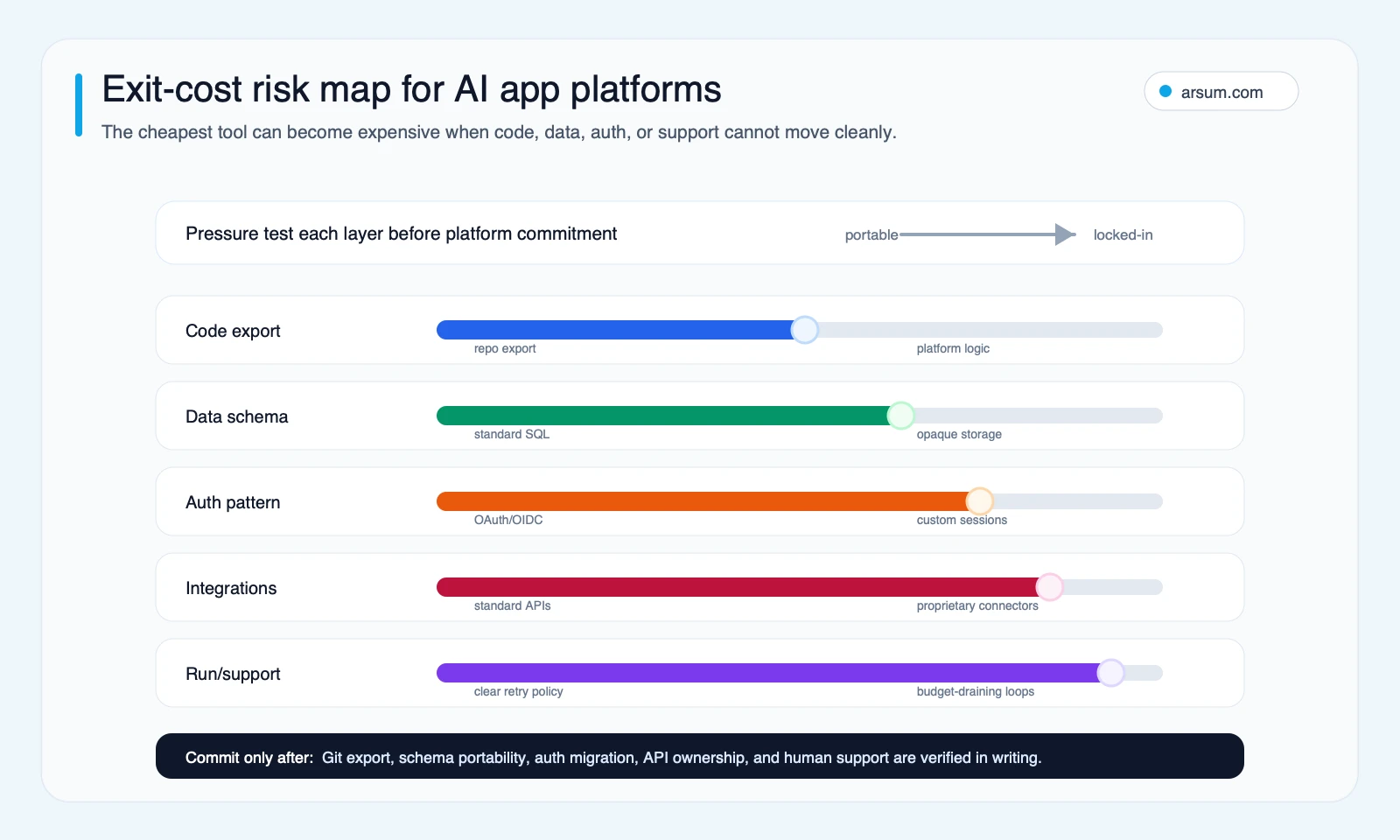
Before committing beyond a pilot, collect evidence rather than relying on feature labels.
- Run a code-export test into a Git repository controlled by your organization.
- Make a schema dump or document how data export will be performed.
- Write the authentication migration plan, including identity provider, account identifiers, roles, and user-impact steps.
- Map integrations to standard APIs, credentials, and failure handling.
- Obtain the support or SLA terms applicable to the plan you intend to buy.
- Confirm credit, retry, overage, and suspension terms in writing.
- Have the technical owner review generated code and configuration before production access is granted.
- Test rollback: disable actions, return the workflow to its prior queue, and verify retained evidence is accessible.
The right AI app development tools stack is the one that helps you prove a bounded workflow while keeping future ownership decisions visible. For teams weighing internal build capacity against outside support, hiring an AI developer versus an agency and AI app development services provide useful adjacent decision frames.
Frequently asked questions
Which AI app development tools are best for a prototype?
Lovable, Bolt, and Replit Agent are documented as natural-language app-building options. Choose among them only after verifying the specific export, deployment, data, and support conditions your prototype may need if it succeeds.
When should a team start with a code-first SDK?
Start with Vercel AI SDK or an agent-oriented SDK when AI behavior, tool permissions, state handling, provider choice, and reviewable implementation are central to the product—not incidental interface features.
Is an owned backend necessary for an internal tool?
It depends on the data, identity, and operational boundary. If the tool handles business data, shared accounts, approvals, or a process likely to persist, define and test the backend and auth ownership model before treating it as production software.
What is the most important production risk?
For agentic applications, an important risk is unauthorized behavior through prompt injection or excessive tool permissions. OWASP’s recommended controls—least privilege, validation, constrained behavior, and human approval—should influence autonomy decisions from the start.
Methodology note: This editorial comparison uses direct documentation for Lovable, Bolt, Replit, Vercel AI SDK, OpenAI Agents SDK, Supabase, Firebase Studio, and OWASP. Practitioner material is used only as qualitative evidence of potential hardening and iteration failure modes, not as a market-wide benchmark. Lane scores are Arsum editorial assessments under stated assumptions, not vendor performance measurements.
Ready to Automate Your Business?
Stop wasting time on repetitive tasks. Let AI handle the busywork while you focus on growth.
Schedule a Free Strategy Call →Written by:Arsum editorial team
- Reviewed by
- Arsum editorial team
- Published
- June 11, 2026
- Updated
- August 12, 2026
- How this was produced
- Arsum uses research packs, source checks, and human editorial review to prepare and update blog articles. Editors are responsible for the final page.
- Source policy
- Sources are linked in the article when used. Methodology and source notes are included on higher-risk or high-visibility pages and are being rolled out across the archive. Editorial policy.
- Why this page exists
- Help B2B operators evaluate AI automation, implementation scope, cost, risk, and build-vs-buy decisions with practical context.