AI app development should start with a bounded workflow, not a feature idea: define the input, the decision or draft the system may produce, the evidence used to judge it, the person who handles exceptions, and the approval required before any consequential action.
AI App Development Costs and Timeline
Explore ai app development: compare workflow fit, costs, risks, evidence, and practical next steps before you build, buy, or hire.

Table of Contents
- What most guides miss: the buying decision is not “build an AI app”
- The ROI screen before approving custom development
- What belongs in an AI app—and what should stay conventional
- Architecture choices that determine operating cost
- A production-ready brief, not a vague feature request
- Build, buy, or partner
- Cost and timeline: request comparable estimates, not false precision
- The first 90 days after launch
- Disqualifying conditions and common failure modes
- Methodology and limitations
- Related Arsum guides
An AI app can classify documents, retrieve approved knowledge, draft responses, or route work within a normal product stack. It should not receive more autonomy simply because a model can produce a plausible answer. Final authority belongs to the workflow owner, based on error cost, permissions, reversibility, and the controls the business has actually approved.
What most guides miss: the buying decision is not “build an AI app”
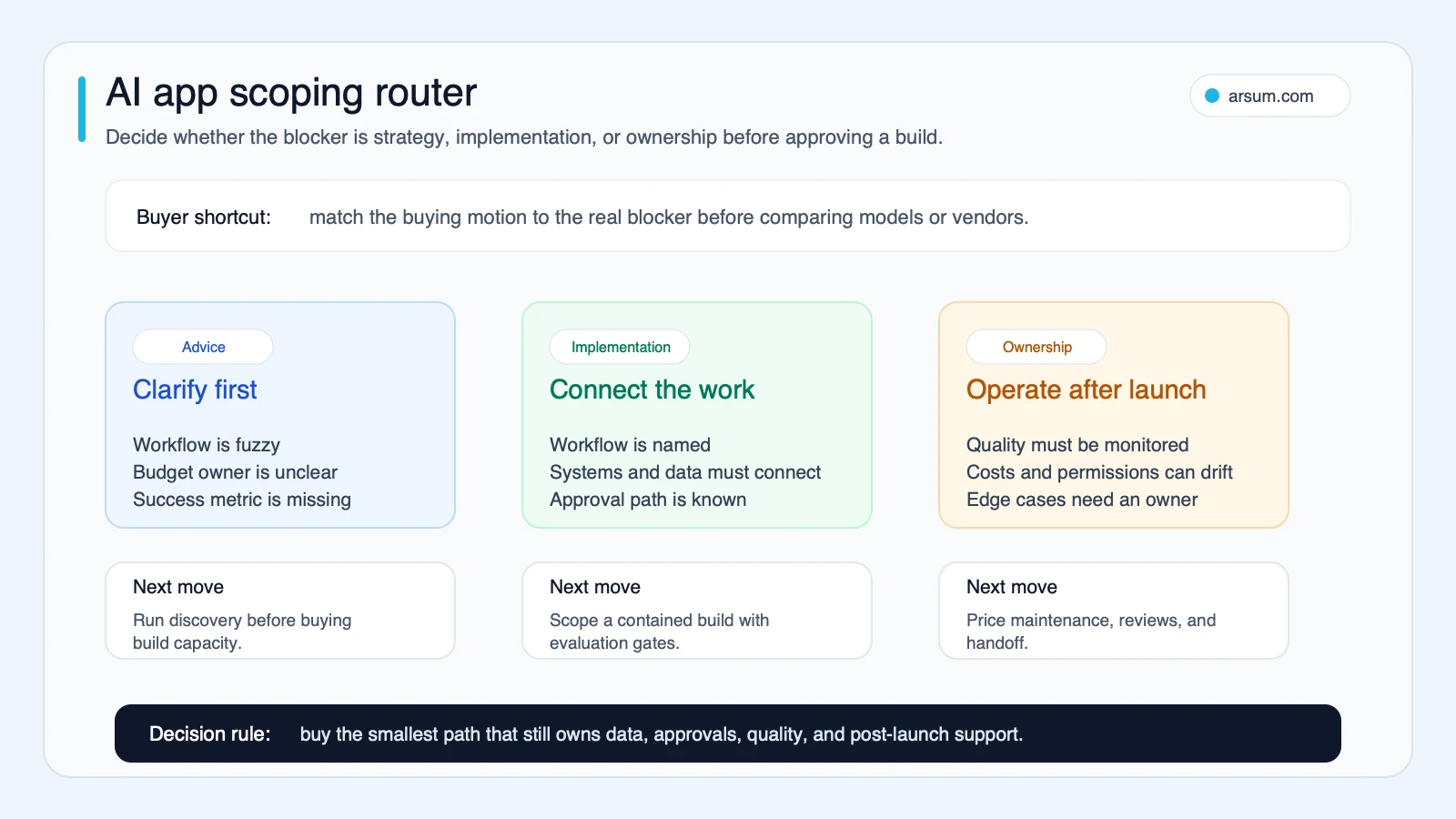
Before comparing models, frameworks, or agencies, decide which of these problems you have:
- Advice problem: no one has yet selected a workflow with measurable value and acceptable risk.
- Implementation problem: the workflow is chosen, but data, systems, approvals, and user experience still need to be connected.
- Ownership problem: a usable version exists, but no team owns evals, source freshness, budget alerts, permissions, or incident response.
This distinction changes the work you should buy. Strategy will not fix missing API access. A build team cannot responsibly deliver a production workflow when nobody can define what a good output looks like. And a polished demo is not a production system if no owner can review failures after launch.
For a first build, favor work where AI prepares, classifies, drafts, or routes—and a person can correct exceptions before an irreversible customer, financial, legal, or compliance outcome. That is a more useful starting boundary than “use AI wherever possible.” If you are choosing the type of engagement first, see AI app development services and delivery options.
The ROI screen before approving custom development
A custom build earns attention when it changes a measurable operating constraint, not when it makes a demo more impressive.
| Question | Strong signal | Warning sign |
|---|---|---|
| Is the workflow frequent? | A recurring queue with visible backlog or cycle time | An occasional edge case |
| Is current cost observable? | Hours, rework, SLA misses, delayed revenue, or abandonment can be measured | The pain is only anecdotal |
| Does it require bounded judgment? | People read, classify, extract, draft, or route similar inputs | The task is already deterministic and rule-based |
| Is failure recoverable? | Exceptions can be reviewed before external impact | One error can trigger payment, regulatory, or customer harm |
| Is the data usable? | Representative inputs and source-of-truth documents are identifiable | Examples are scattered, stale, or disputed |
| Is there an accountable owner? | One functional owner can define acceptance and handle exceptions | Multiple teams disagree about the desired output |
If most answers fall in the warning-sign column, start with process cleanup or an off-the-shelf tool. If the workflow passes, define the pilot before selecting a technical approach.
A worked pilot scorecard
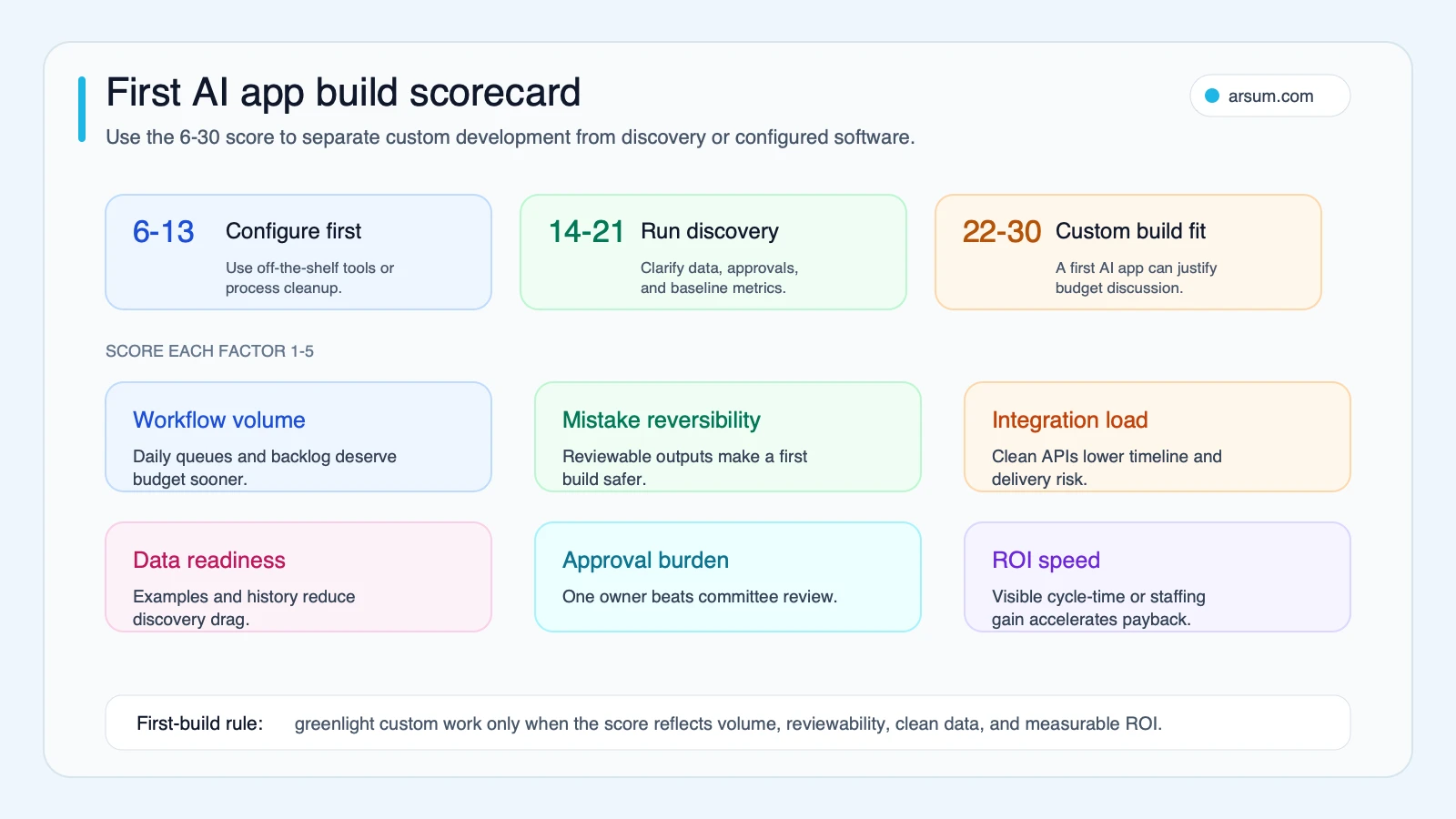
Use the following as a buyer-planning heuristic, not a benchmark dataset. The threshold should be calibrated in discovery because risk tolerance, reviewer capacity, and data quality vary by workflow.
Score each dimension from 1 to 5:
| Dimension | 1 | 3 | 5 |
|---|---|---|---|
| Volume | Rare or irregular | Weekly recurring work | Daily queue with backlog |
| Reversibility | Error creates immediate external harm | Recoverable with review | Fully reviewable before release |
| Data readiness | No representative examples | Some history, cleanup needed | Approved examples and sources exist |
| Integration path | Permissions and systems unclear | Several known systems | Narrow, documented read/write path |
| Ownership | No named decision-maker | Shared ownership | One owner and exception queue |
| Value measurement | Benefits are vague | Time or quality can be tracked | A baseline and target are agreed |
A high score does not authorize autonomy. It indicates that a bounded pilot may be worth scoping. A low score means the next investment is usually discovery, data work, or policy design.
Pilot acceptance template
Document these fields before development begins:
| Field | Example decision |
|---|---|
| Workflow owner | Head of support operations |
| Baseline | Current median triage time and manual-review rate, measured over an agreed period |
| Target | A stated cycle-time or queue-reduction goal, without relaxing required review |
| Quality measure | Error categories, false-positive and false-negative cost, and acceptable exception rate |
| Eval set | Representative historical and edge-case inputs, with expected outcomes approved by the owner |
| Review cadence | Weekly during the pilot; after every material prompt, model, retrieval, or tool change |
| Stop condition | A defined safety, quality, cost, or latency threshold that pauses rollout |
| Rollback path | Disable automated routing, return work to the existing queue, retain logs for review |
An illustrative planning calculation can make the economics inspectable: weekly value equals hours removed from the approved workflow × fully loaded hourly cost, minus reviewer time, model usage, and operating cost. Treat each input as an assumption to validate against your own baseline; it is not a promised saving.
If you want an assessment rather than a generic estimate, Arsum can turn this template into a workflow owner map, integration inventory, eval-set outline, exception path, pilot acceptance criteria, and cost-control plan.
💡 Arsum builds custom AI automation solutions tailored to your business needs.
Get a Free Consultation →What belongs in an AI app—and what should stay conventional
AI app development is still application development. Authentication, roles, interfaces, audit logs, database design, integrations, queues, and observability remain ordinary engineering responsibilities. AI adds non-deterministic components that need their own controls: prompts, retrieval, structured outputs, tool calling, evaluation, and guardrails.
OpenAI’s AI application development guidance describes production concerns including prompting, retrieval-augmented generation, structured outputs, tools, agents, guardrails, cost, latency, and performance. The practical implication for a buyer is simple: do not fund “an AI feature” as a single black box. Fund the operating boundaries around it.
Start with a bounded workflow
Useful first candidates often include:
- Document intake that extracts fields and routes a human-review queue.
- Internal knowledge retrieval that cites approved source material.
- Support drafting that escalates policy, billing, cancellation, or high-risk requests.
- Operations triage that classifies incoming work and preserves the original input.
- Internal assistants that prepare summaries while leaving decisions to accountable staff.
Customer-facing or action-taking systems can be appropriate later, but only after the team has evidence that the failure path, permissions, and reviewer capacity are real—not assumed. For examples of this broader operating model, see AI workflow automation for business processes.
Separate reusable parts from the work that creates durable value
| Usually reusable | Usually specific to your business |
|---|---|
| Login, roles, basic chat UI, admin screens | Workflow design and approval boundaries |
| Standard API integration patterns | Source-of-truth rules and data lineage |
| Basic document storage and search | Eval cases and definitions of acceptable output |
| Generic model access | Internal tool permissions and exception routing |
| Logging infrastructure | Review workflow, incident response, and change control |
Higher-level agent frameworks may accelerate a prototype, but they can also obscure state, tool calls, and debugging. A practitioner discussion about production use of an agent SDK frames the concern as a tradeoff between abstraction and control. That is qualitative operator feedback, not evidence of broad market prevalence. Treat it as a prompt to ask vendors how traces, state, retries, and failures are inspected—not as a reason to reject frameworks categorically.
Architecture choices that determine operating cost
Architecture should follow the workflow, not a trend label.
Prompt-only, retrieval, or fine-tuning
Use a prompt-only approach when the task can be completed from the user’s input and stable instructions. Add retrieval when answers must be grounded in changing internal documents, policies, or product information. Retrieval needs more than a vector store: source selection, metadata, access controls, freshness rules, citations where useful, and a behavior for missing or conflicting evidence.
Fine-tuning is a separate decision. It may be useful for certain repeated patterns, but it does not replace source governance, evaluation, or approval controls. Do not use it as a shortcut around unclear requirements.
Request-response versus long-running workflow
A simple request-response application may be enough for drafting, extraction, or internal Q&A. If work requires several steps, external systems, delayed responses, retries, or handoffs, plan for queues, resumable state, trace logs, idempotency, and a clearly owned failure queue.
A production-infrastructure question from an operator specifically raises long-running tasks, state management, vector-store scaling, and API-cost control after prototype stage. It is one practitioner signal, not a market statistic, but it highlights why “serverless prompt wrapper” is often an incomplete production plan.
Security and authorization
Security review belongs in the delivery plan before tools can write to systems or access sensitive sources. The OWASP Top 10 for Large Language Model Applications is a useful starting point for discussing application-specific threats and governance.
At minimum, define:
- which sources the app may read;
- which actions it may request versus execute;
- how tool permissions are scoped;
- what prompts, retrieved content, and outputs are retained;
- who approves changes to access, models, prompts, and tool behavior;
- how an incident disables automation without losing the underlying workflow.
For deeper design patterns, review AI agent architecture patterns and AI agent security controls.
A production-ready brief, not a vague feature request
The difference between a fragile prototype and a buildable brief is visible in the details.
| Vague request | Production-ready brief |
|---|---|
| “Build an AI support app.” | “Draft replies for web-chat tickets using approved help-center sources and current account context.” |
| “Make it answer from our documents.” | “Retrieve only from named, permissioned sources; display citations in the reviewer view; escalate when no approved source supports an answer.” |
| “Automate the process.” | “Automate classification and draft creation; require approval before refunds, account changes, legal statements, or pricing commitments.” |
| “Launch quickly.” | “Pilot with a fixed eval set, quality and exception thresholds, budget alert, fallback queue, and weekly owner review.” |
This brief creates the inputs an engineering team needs to estimate responsibly: integrations, permissions, data condition, user roles, expected throughput, evaluation work, and operational support.
Build, buy, or partner
Buy when the workflow is common and the product’s configuration, permissions, reporting, and security model meet the need. This is often the right first move for standard meeting notes, basic OCR, simple CRM enrichment, or straightforward routing.
Build internally when the capability is core to your product or operating model and you already have sustained product, security, and platform ownership.
Use an external implementation partner when the workflow is clear enough to justify investment but your team needs help translating it into an eval strategy, controlled architecture, integration plan, and supportable handoff. The question is not whether the partner can demonstrate a chatbot. It is whether they can explain acceptance criteria, evidence retention, ownership, rollback, and the cost drivers they have excluded from an estimate.
For a buyer-side comparison, see how to evaluate AI app development companies and hiring an AI developer versus an agency.
Cost and timeline: request comparable estimates, not false precision
No universal cost or delivery range is reliable without scope. The major uncertainty drivers are workflow ambiguity, source condition, integration access, identity and permissions, evaluation depth, reviewer workflow, security requirements, expected volume, latency expectations, and post-launch ownership.
Ask each vendor to separate the estimate into these work packages:
| Work package | What to ask for |
|---|---|
| Discovery | Workflow map, owner, baseline, risk boundaries, and acceptance criteria |
| Data and retrieval | Source inventory, permissions, cleanup assumptions, freshness process |
| Product and integration | User roles, interfaces, systems read and written, error handling |
| AI behavior and evaluation | Eval-set creation, scoring method, regression checks, model-change plan |
| Security and operations | Logging, access review, budget alerts, incident and rollback procedures |
| Handoff | Documentation, training, ownership transfer, and support boundaries |
Also ask what is excluded, what assumptions must be true, and what event triggers a change request. That gives you a comparable estimate even when vendors choose different implementation stacks.
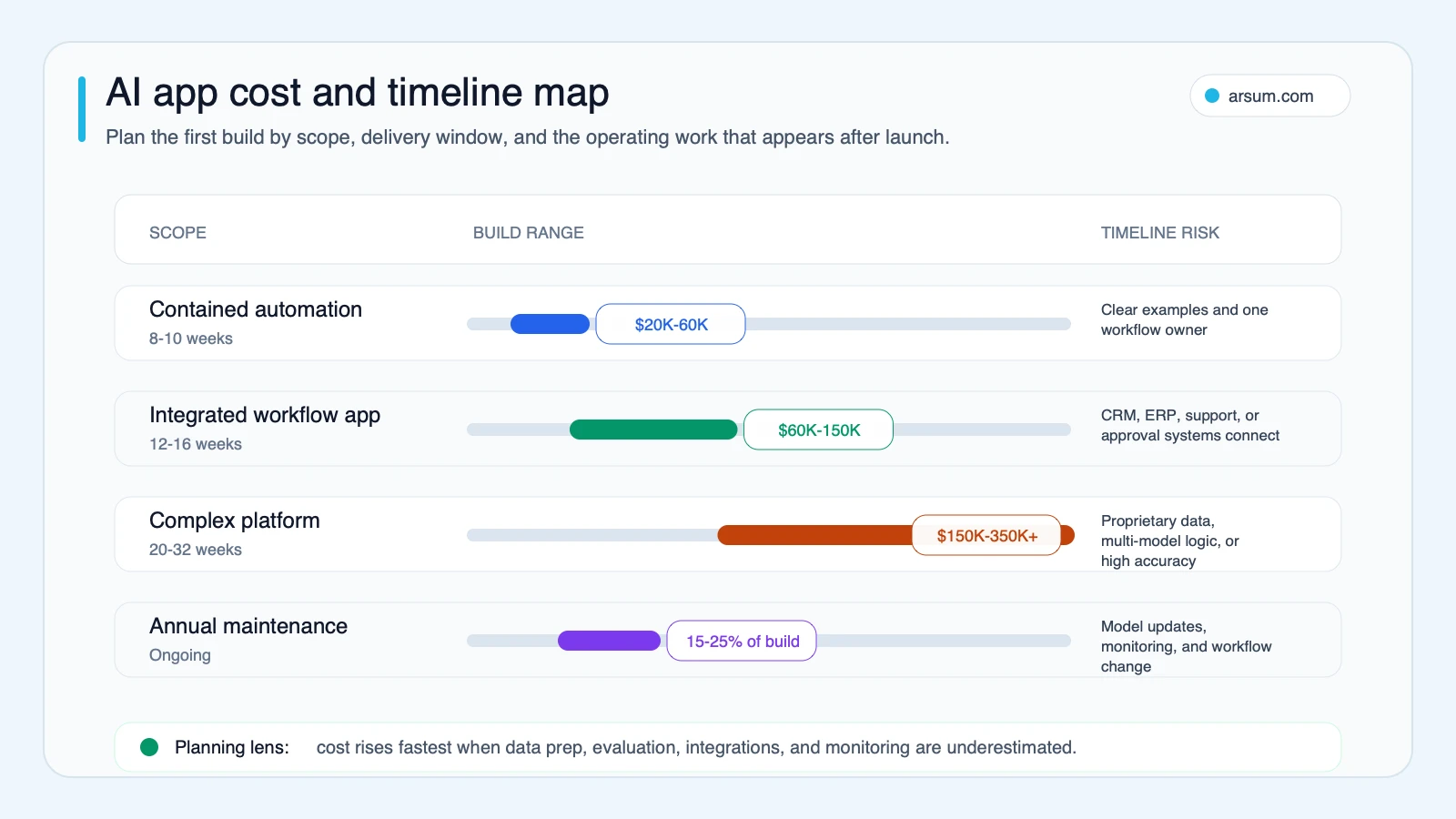
Use any cost-and-timeline map as a scoping conversation, not a prediction. A narrow pilot with a known source and one review queue has different risk from a multi-system product with external actions. The delivery sequence should be driven by evidence and controls, not a promised calendar.
The first 90 days after launch
An AI app is an operating function. Assign these responsibilities before production release:
| Responsibility | Named owner’s job |
|---|---|
| Prompts and workflow logic | Review change requests and document intended behavior |
| Evals and regressions | Re-run the eval set after material model, prompt, retrieval, or tool changes |
| Source quality | Remove stale material, resolve conflicts, and maintain permissions |
| Cost and latency | Watch usage, retries, queues, timeouts, and budget thresholds |
| Security | Review tool access and confirm approvals still match the workflow |
| Exceptions and incidents | Own the fallback queue, escalation path, and rollback decision |
OpenAI’s eval guidance describes evals as essential for reliable LLM applications, especially when changing models or approaches. In practical terms, do not accept “it looked good in testing.” Require a representative test set, an agreed scoring method, and a review of results whenever a material change is made.
Disqualifying conditions and common failure modes
Pause or narrow the build when any of these conditions apply:
- No workflow owner can define an acceptable output.
- Source documents have no identifiable authority, access policy, or update process.
- The business cannot retain enough representative inputs to evaluate behavior safely.
- The proposed app can make consequential changes without a review or rollback path.
- The economics omit human-review time, integration work, or operating ownership.
- A vendor offers a confident accuracy, savings, cost, or timeline claim without a defined baseline, measurement method, and scope.
Common failures are less dramatic than “the model failed.” Teams frequently automate an unclear process, treat retrieval as automatically trustworthy, skip regression testing, or let a demo bypass the approvals that real operations require.
For content-generation use cases, apply the same standard to search and trust. Google’s people-first content guidance emphasizes helpful, reliable information created for people. Generated pages without original evidence, meaningful review, or substantial value can create a content-quality risk even when the software works.
Methodology and limitations
This article uses an editorial decision framework rather than a benchmark dataset. Production and evaluation guidance is linked to OpenAI documentation; security framing is linked to OWASP; content-quality guidance is linked to Google Search Central. Hacker News discussions are included only as attributed qualitative signals about the questions operators raise after prototype stage.
The scorecard, pilot template, architecture boundary, and estimate checklist are planning tools. They do not predict delivery cost, timeline, performance, adoption, savings, or job impact. Calibrate them against the actual workflow, baseline, systems, risk controls, and owner capacity during discovery.
A useful next step is a scoped workflow assessment: identify the owner, map inputs and integrations, define the eval set and exception route, set pilot stop/go thresholds, and establish the rollback path before committing to a production build.
Ready to Automate Your Business?
Stop wasting time on repetitive tasks. Let AI handle the busywork while you focus on growth.
Schedule a Free Strategy Call →Related Arsum guides
Written by:Arsum editorial team
- Reviewed by
- Arsum editorial team
- Published
- April 16, 2026
- Updated
- August 12, 2026
- How this was produced
- Arsum uses research packs, source checks, and human editorial review to prepare and update blog articles. Editors are responsible for the final page.
- Source policy
- Sources are linked in the article when used. Methodology and source notes are included on higher-risk or high-visibility pages and are being rolled out across the archive. Editorial policy.
- Why this page exists
- Help B2B operators evaluate AI automation, implementation scope, cost, risk, and build-vs-buy decisions with practical context.