AI automation for small business is worth funding when it removes work from one documented, recurring workflow without creating a larger review and exception burden. Start by choosing a task with measurable handling time, clear authority boundaries, and a named owner; then decide whether a commercial tool can handle the standard path, a custom workflow is justified, or the process should remain manual for now.
AI Automation For Small Business: Practical Guide
Explore ai automation for small business: compare workflow fit, costs, risks, evidence, and practical next steps before you build, buy, or hire.

Table of Contents
- What Most Guides Miss: Capability Is Not Authority
- Score the Workflow Before Comparing Tools
- Choose the First Process by Operating Shape
- Build a Pilot That Can Be Accepted or Stopped
- The Normal Path Is Easy; Design the Ugly Exceptions
- Buy, Build, or Wait
- Governance Is Part of the Small-Business Operating Model
- Common Failure Modes
- Questions to Ask Before Approving Spend
- Methodology and Next Step
- Related Arsum Guides
What Most Guides Miss: Capability Is Not Authority
A demo can show that a model can summarize an email, extract an invoice field, or draft a customer response. That does not mean it should send the response, update a record, approve a refund, or change pricing.
The first decision is not “Which AI tool should we buy?” It is:
- What is the single workflow?
- What is the current baseline: volume, handling time, backlog, rework, and errors?
- Which actions may run automatically, and which require human approval?
- What happens when data is missing, confidence is low, or systems disagree?
- Who owns the workflow after launch?
This distinction matters most in small teams because the person who configures an automation is often also the person who must clean up its failures. A useful implementation shifts staff from handling every routine item to resolving clearly routed exceptions. An unsafe implementation hides uncertainty until it reaches a customer, ledger, or system of record.
A practitioner comment in a Hacker News discussion about AI agents describes the practical pattern well: bounded tasks with clear success criteria and human checkpoints are easier to operate than ambiguous, open-ended deployments. That is a directional practitioner signal, not a benchmark—but it is a sound starting constraint.
Score the Workflow Before Comparing Tools
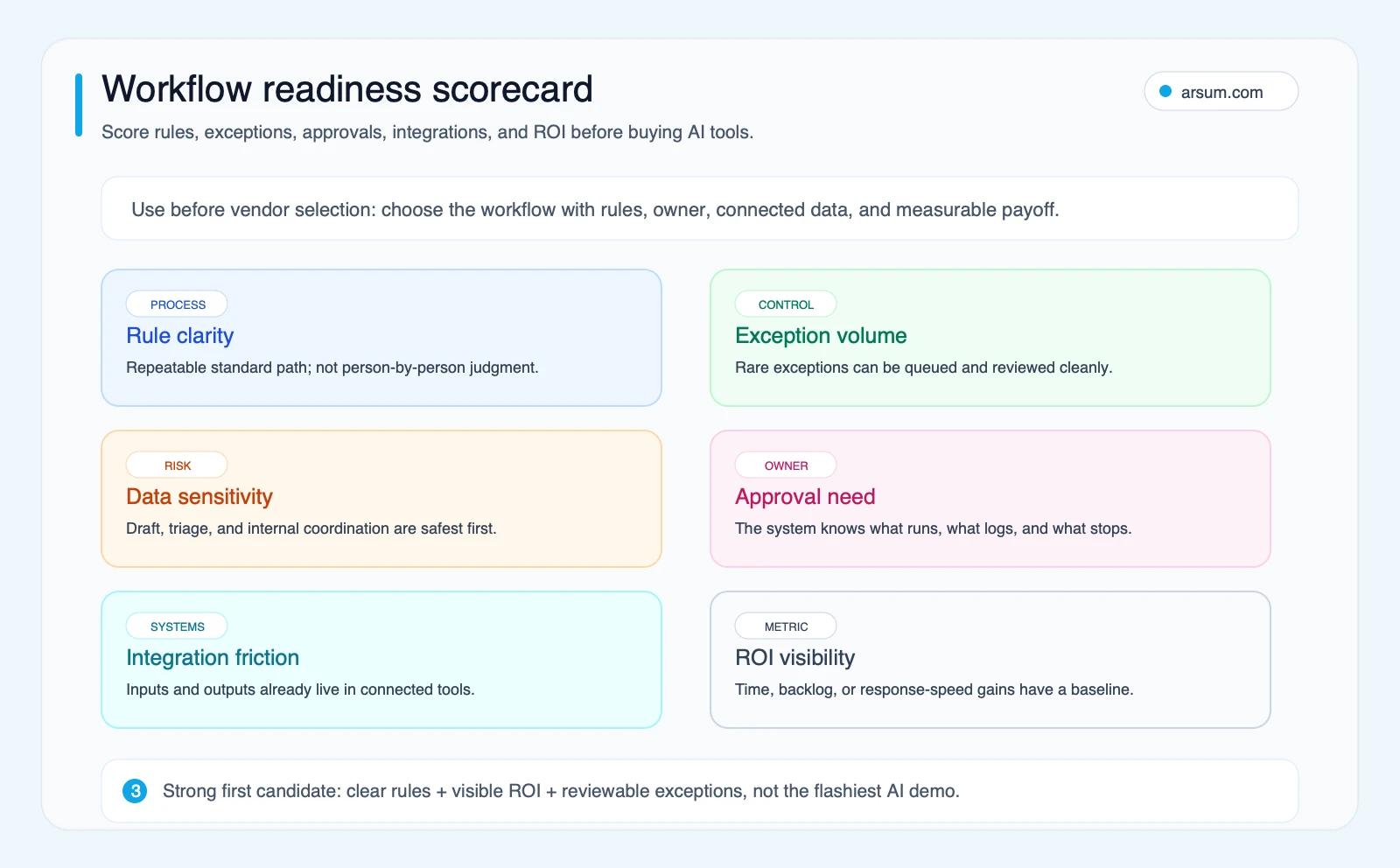
Use this readiness model to compare actual candidates. Score each dimension from 1 to 3, then total the six scores.
| Dimension | 1 — weak first candidate | 2 — possible with guardrails | 3 — strong first candidate |
|---|---|---|---|
| Rule clarity | Different people handle it differently | Standard path exists, with known variants | Steps and expected outputs are easy to document |
| Exception volume | Exceptions require frequent improvisation | Exceptions are common but routable | Exceptions are limited or straightforward to queue |
| Data sensitivity | Money, pricing, contracts, or sensitive records are central | Sensitive data is present but final approval can remain human-led | Mostly internal drafting, triage, or coordination |
| Approval need | Every outcome needs judgment | Only defined actions need approval | Standard actions can proceed with logs and spot checks |
| Integration friction | Data is fragmented or unreliable | Two systems need mapping and reconciliation | Source and destination systems are accessible and stable |
| ROI visibility | Current effort and outcome are unknown | Baseline is partly measurable | Time, backlog, response time, or rework is measurable |
A total of 15–18 is a reasonable candidate for a controlled pilot if there are no disqualifiers. A total of 11–14 may still be viable, but only with a narrower scope or more human review. A score of 10 or less means map and stabilize the process before automating it.
Scores do not override risk. Treat these as disqualifiers for unattended actions:
- The workflow can move money, set prices, accept contractual terms, or make regulated decisions without an explicit human approval step.
- No accountable operational owner can review exceptions and approve changes.
- There is no reliable source of truth for the data.
- The team cannot restore the prior manual or rule-based process if the automation fails.
- The cost of a wrong action is materially higher than the cost of timely human review.
Worked scoring example: invoice intake
Consider invoice intake for a business that receives supplier invoices by email and enters selected fields into its accounting workflow.
| Dimension | Example score | Why |
|---|---|---|
| Rule clarity | 3 | Required fields and routing rules are documented |
| Exception volume | 2 | Some invoices are duplicates, incomplete, or use unfamiliar layouts |
| Data sensitivity | 2 | Financial records are involved, but approval can remain human-led |
| Approval need | 2 | Draft coding is allowed; posting requires review |
| Integration friction | 2 | Email, document storage, and accounting systems need mapping |
| ROI visibility | 3 | Baseline handling time and exception count can be measured |
Total: 14. That supports a narrow pilot—not automatic posting. The normal path can extract fields, match a supplier, propose a coding category, and place the item in a review queue. Duplicate invoices, missing purchase-order references, unfamiliar vendors, and totals that do not reconcile should stop the workflow and route to accounts payable.
The decision changes if the commercial tool pilot produces too many manual corrections, cannot retain needed evidence, or cannot connect safely to the systems of record. Those are reasons to assess a custom workflow, not reasons to increase autonomy.
Choose the First Process by Operating Shape
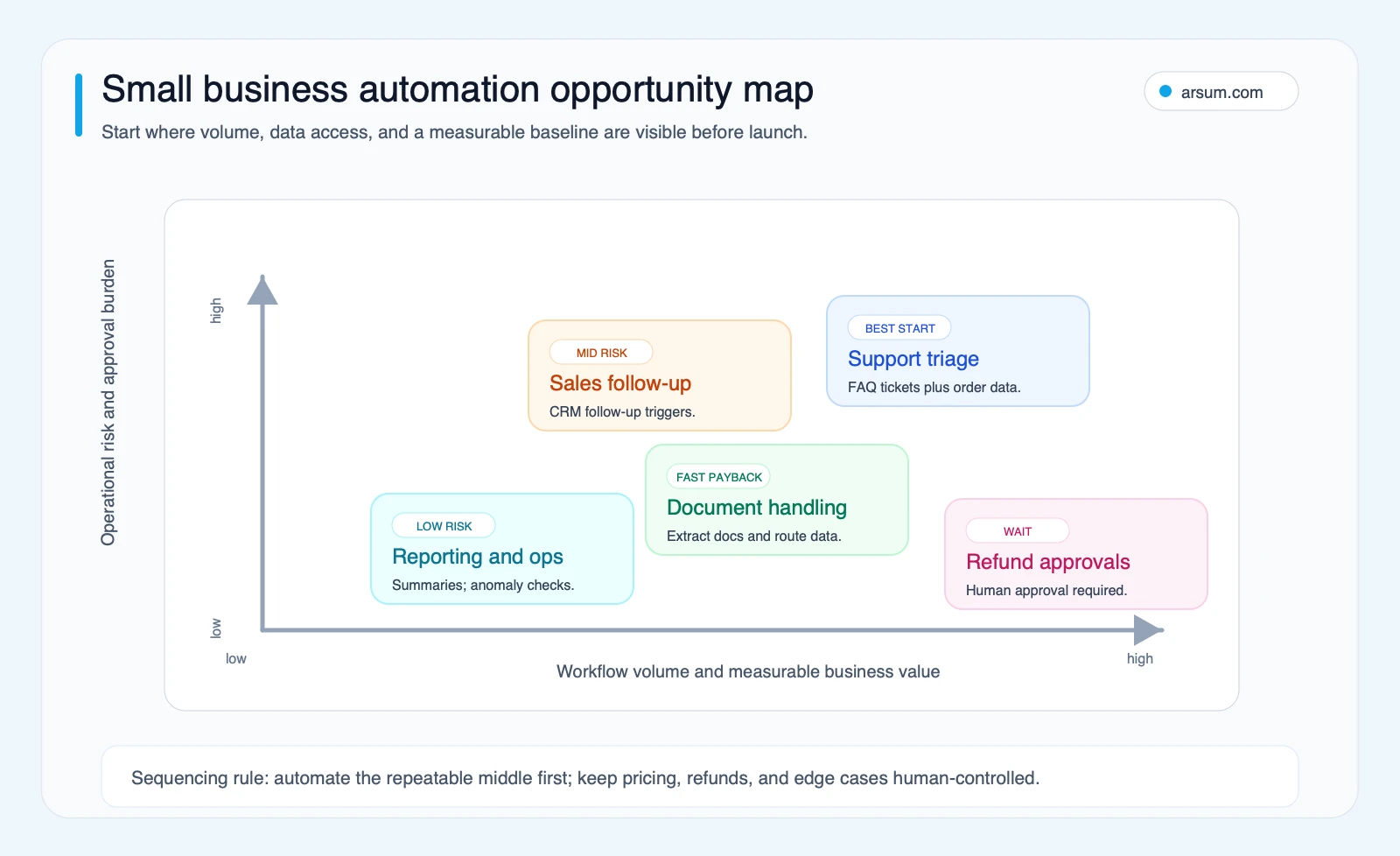
The best first candidate is usually not the most visible AI use case. It is the workflow where inputs, outputs, ownership, and exceptions are already visible.
| Process area | Suitable bounded task | Source of truth | Prohibited autonomous action | Pilot metric |
|---|---|---|---|---|
| Support triage | Classify inbound messages and draft responses from approved content | Help desk and approved knowledge base | Refunds, account changes, or policy exceptions | Routing accuracy, review rate, first-response time |
| Document intake | Extract fields and route documents to a review queue | Document store and accounting/operations system | Posting, payment, or final approval | Field-correction rate, exception aging |
| Sales follow-up | Identify stale deals and draft follow-up tasks | CRM | Changing deal value, stage, or commitments without owner approval | Follow-up completion rate, override rate |
| Reporting operations | Assemble a recurring draft summary from approved data sources | Reporting system or data warehouse | Publishing financial or customer claims without review | Preparation time, source reconciliation issues |
| Appointment administration | Send reminders from a confirmed schedule | Scheduling system | Changing appointments when source systems conflict | Cancellation/reschedule reconciliation rate |
The opportunity is often in routine coordination, not autonomous decision-making. For example, business workflow automation can clarify how to frame the workflow, while automating data entry is useful when the real problem is repetitive capture and routing rather than judgment.
Build a Pilot That Can Be Accepted or Stopped
A pilot should answer a business question: can this workflow reduce manual handling while maintaining an acceptable quality and control level? It should not be an open-ended tool trial.
Pilot scorecard
Use your own baseline rather than a generic payback claim.
| Element | Define before launch |
|---|---|
| Workflow | One named task, such as “invoice intake from shared mailbox to AP review queue” |
| Baseline | Weekly item volume, median handling time, backlog age, correction/rework count, and current owner |
| Target | A chosen reduction in manual touches or cycle time, stated as an internal target rather than a market benchmark |
| Quality metric | Correct routing, approved-field accuracy, or reviewer override rate on representative historical cases |
| Confidence threshold | The point below which the system must queue a human review rather than act |
| Exception SLA | Who reviews exceptions and by when |
| Source lineage | Which source record, document version, prompt/rule version, and output are retained |
| Operational owner | The functional lead accountable for outcomes and exception policy |
| Integration owner | The person accountable for credentials, field mapping, failures, and changes |
| Review cadence | Daily exception review during launch; a scheduled weekly review thereafter |
| Stop condition | A defined quality, security, backlog, or reconciliation failure that pauses the automation |
| Rollback | How to disable writes, restore manual routing, and reconcile items handled during the incident |
An illustrative planning calculation can help decide whether a pilot is worth testing:
annual addressable effort = weekly item volume × median manual minutes per item × 52 ÷ 60
Then estimate a conservative pilot case using only the proportion of items that can safely follow the standard path:
potential recovered hours = annual addressable effort × tested standard-path rate
Do not treat that arithmetic as savings until you include reviewer time, exception handling, software and implementation costs, maintenance, and the value—or cost—of errors. The point is to make assumptions visible.
30/60/90-day decision rule
At 30 days, verify that source systems, permissions, logs, and the exception queue work as designed. Do not expand scope if staff are still reconciling hidden failures.
At 60 days, compare measured handling time, correction rate, exception age, and reviewer workload with the baseline. Update rules, prompts, and routing only through a recorded change process.
At 90 days, choose one of three paths:
- Continue with the commercial tool if it meets the agreed quality and workload targets.
- Design a custom workflow if the business case is blocked by recurring integration gaps, proprietary context, or costly overrides.
- Stop or redesign if exceptions remain too frequent, data quality is too poor, or the accountable owner cannot sustain review.
💡 Arsum builds custom AI automation solutions tailored to your business needs.
Get a Free Consultation →A scoped workflow assessment should produce this scorecard, a process map, an authority boundary, and a testable pilot plan—not merely a list of tools.
The Normal Path Is Easy; Design the Ugly Exceptions
Small-business automation projects often fail at state changes, not at the first action. A Hacker News discussion about appointment reminders framed this as “state sync” rather than sending the initial alert: cancellations and reschedules create the real operating work. This is one practitioner’s view, but it highlights a common implementation question: which system wins when records disagree?
For every workflow, document:
- The source of truth for status, customer data, and approvals.
- The event that starts the workflow.
- The required data fields and validation checks.
- The standard-path output.
- The confidence or validation condition that sends work to a human.
- The person or queue that receives exceptions.
- The action to take if an external system times out or returns conflicting data.
- The evidence retained for audit, correction, and customer support.
For invoice intake, an ugly exception might be a document that looks like a supplier invoice but duplicates a previously received invoice, contains a changed bank detail, or does not match the purchase order. The correct automation response is not to guess. It is to attach the source document, flag the mismatch, preserve the extraction result, and route the item to the accountable reviewer.
For support triage, a customer can receive a draft answer grounded in approved policy content, but a request involving refunds, personal data, threats, or an account change should route to an authorized person. For more detail on these boundaries, see AI customer service automation and AI agent security.
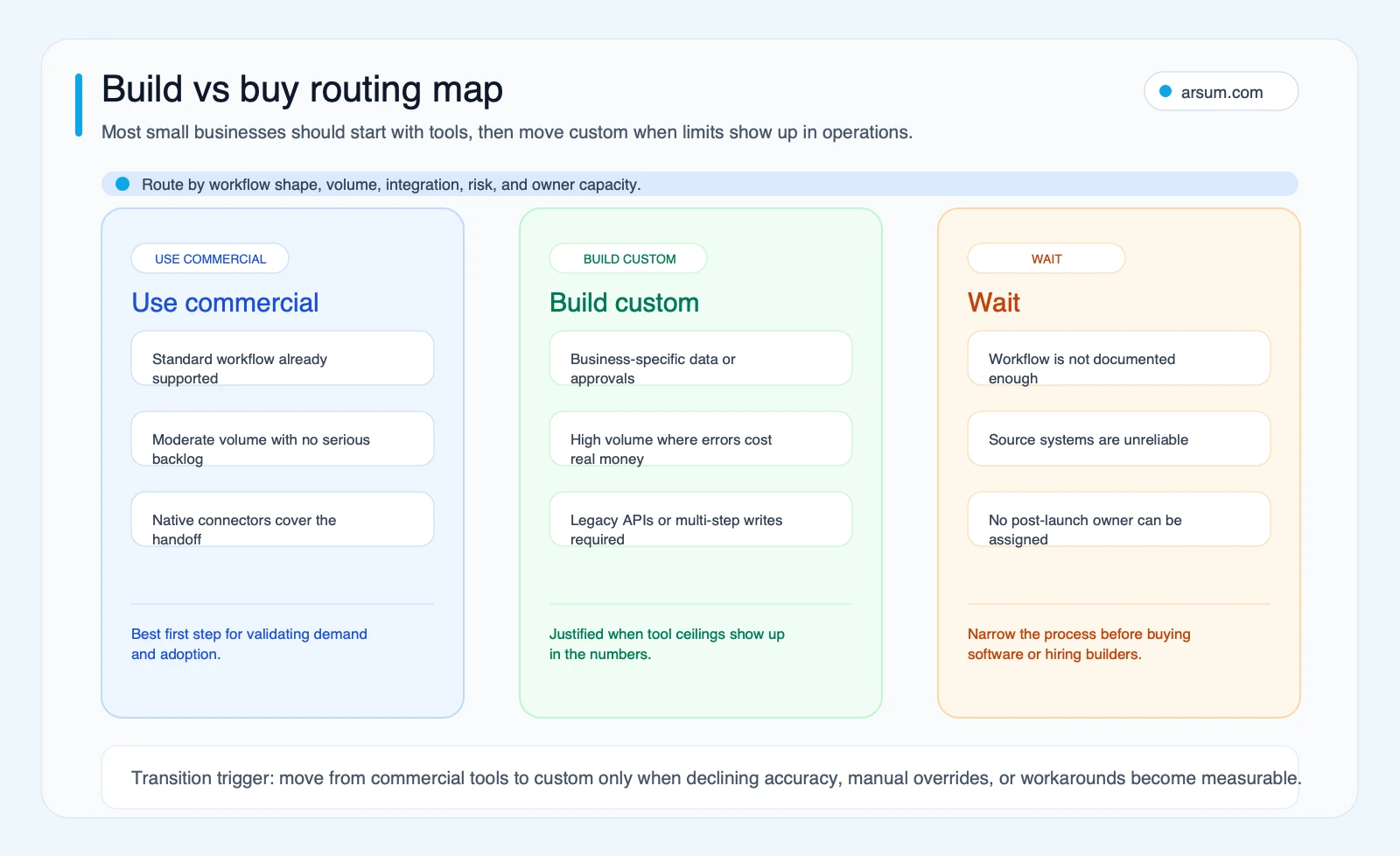
Buy, Build, or Wait
Commercial tools are often the correct first implementation route when the workflow is standard, connectors are sufficient, and humans can review exceptions quickly. “No-code” does not mean “no design”: webhook-based workflows still require payload mapping, authentication, testing, and troubleshooting across external systems, as Zapier’s webhook documentation makes clear.
Custom implementation may be justified when the commercial-tool pilot exposes a specific, measured limitation:
- Your proprietary rules or terminology materially affect outputs.
- The workflow requires dependable multi-system routing and reconciliation.
- Manual overrides remain concentrated in repeatable, buildable edge cases.
- Existing connectors cannot support required permissions, evidence retention, or approval boundaries.
- The annual cost of labor, delay, rework, and tool workarounds can be compared credibly with implementation and ongoing maintenance costs.
Wait when the process is undocumented, inputs are unreliable, the business cannot assign ownership, or a wrong outcome would be consequential without a safe approval and rollback path.
| Decision signal | Commercial tool | Custom workflow | Wait |
|---|---|---|---|
| Workflow | Standard and well documented | Distinct rules, data, and exception logic | Still ambiguous or changing |
| Systems | Native integrations cover the necessary path | Requires controlled multi-system reads/writes | Systems are unreliable or unowned |
| Review | Human review is quick and affordable | Review burden reveals repeatable gaps worth engineering | No reviewer can be assigned |
| Control | Vendor controls meet the needed boundary | Business needs tailored permissions, logging, or routing | Required controls are undefined |
| Economics | Compare subscription and review cost against baseline | Compare implementation and maintenance against measured rework and labor | No baseline exists |
A self-reported Hacker News example describes a buyer building only the subset of a software product they needed. It is not evidence of typical cost or speed, but it illustrates the right question: is the requirement a commodity feature, or is the workflow-specific portion valuable enough to own?
If you are comparing implementation options, AI automation consulting, AI integration services, and hiring an AI developer versus an agency can help structure the due diligence.
Governance Is Part of the Small-Business Operating Model
Both commercial and custom automations need a named operational owner, an integration owner, a review cadence, a change log, an exception queue, and a rollback procedure. This is not enterprise theater. It is what keeps a workflow from silently drifting when policies, products, customer language, or connected applications change.
The NIST AI Risk Management Framework describes managing AI risk and trustworthiness considerations across design, development, use, and evaluation. For a small business, that can remain lightweight:
- Keep a simple list of permitted and prohibited actions.
- Retain representative inputs, outputs, overrides, and error reasons.
- Review exceptions and changes on a recurring schedule.
- Test changes against historical or representative cases before broadening autonomy.
- Make it easy to disable writes and fall back to the prior process.
Use extra caution with search-facing content. Google’s spam policies on scaled content abuse make clear that automation intended to manipulate search results can create ranking and visibility risk. Internal drafting or workflow assistance is different from publishing large volumes of thin, unreviewed pages. Keep editorial approval, source checking, and meaningful user value in the publishing path.
Common Failure Modes
The recurring mistakes are predictable:
- Buying a tool before documenting the current process.
- Measuring launch speed instead of workload, quality, and exception cost after launch.
- Treating model confidence as business authorization.
- Allowing the automation to write to the system of record without reliable validation and rollback.
- Leaving low-confidence cases in an inbox with no owner or response expectation.
- Assuming a commercial tool requires no maintenance.
- Expanding from a narrow pilot to broad autonomy before the standard path is proven.
The practical alternative is deliberately narrow: one workflow, one accountable owner, one baseline, one review path, and one explicit decision after the pilot.
Questions to Ask Before Approving Spend
What should we automate first?
Choose a recurring task with a clear start and finish, measurable baseline, accessible source data, and a low-risk exception path. Support triage, document intake, CRM follow-up, and reporting preparation can be suitable when authority remains bounded.
How do we evaluate a vendor or implementation quote?
Ask what systems will be connected, which actions may occur automatically, how failures are logged, who handles exceptions, what data is retained, what ongoing maintenance is required, and how the workflow can be rolled back. Compare total implementation and operating cost with your own measured labor, delay, rework, and error costs.
Do we need technical staff?
Someone must own operations, exceptions, and policy decisions; someone must also own integrations, permissions, and changes. Those responsibilities can be fulfilled by internal staff, a vendor, or a partner, but they should be explicit in either a commercial-tool or custom implementation plan.
Which processes should remain human-led?
Keep final authority with people where the work involves money movement, pricing, contracts, employment decisions, sensitive records, compliance determinations, or novel relationship judgment—unless the business has designed and tested a controlled approval process appropriate to that risk.
Methodology and Next Step
This guide is an editorial framework, not a claim about universal AI savings, pricing, implementation duration, or adoption rates. It draws on primary guidance from NIST, Google Search documentation, and Zapier’s help materials, plus clearly labeled qualitative practitioner discussions. The workflow-readiness model and pilot scorecard are Arsum editorial tools intended to make assumptions, controls, and acceptance criteria visible before a buying decision.
If the workflow is documented but the buy/build route is unclear, the useful next step is a workflow assessment that produces a process map, source-of-truth design, exception and approval model, baseline calculation, and pilot acceptance criteria.
Ready to Automate Your Business?
Stop wasting time on repetitive tasks. Let AI handle the busywork while you focus on growth.
Schedule a Free Strategy Call →Related Arsum Guides
Written by:Arsum editorial team
- Reviewed by
- Arsum editorial team
- Published
- April 13, 2026
- Updated
- August 12, 2026
- How this was produced
- Arsum uses research packs, source checks, and human editorial review to prepare and update blog articles. Editors are responsible for the final page.
- Source policy
- Sources are linked in the article when used. Methodology and source notes are included on higher-risk or high-visibility pages and are being rolled out across the archive. Editorial policy.
- Why this page exists
- Help B2B operators evaluate AI automation, implementation scope, cost, risk, and build-vs-buy decisions with practical context.