For a founder, ai automation pricing founder view means comparing quotes by the operating system you are buying—not the setup fee alone. Ask what workflow is changing, who owns exceptions, what the automation may write or approve, how usage costs can move, and what evidence proves the result after launch. A cheap integration can be the right choice for a low-risk helper; it is the wrong benchmark for a workflow that changes customer, financial, or operational records.
AI Automation Pricing Founder View: Costs and ROI
Explore ai automation pricing founder view: compare workflow fit, costs, risks, evidence, and practical next steps before you build, buy, or hire.

Table of Contents
- What most pricing guides miss: the invoice is not the ownership plan
- Break every quote into five ownership layers
- The vendor-evaluation worksheet to use before approving a quote
- Same lead workflow, three legitimate prices
- Founder quote-review scorecard
- Work the pilot economics before debating the build fee
- Usage cost volatility belongs in the quote
- Buy, connect, build, or partner?
- Disqualifying conditions and common failure modes
- Publishing and content workflows need a separate quality boundary
- Founder approval gates
- Methodology and freshness
- Final founder view
What most pricing guides miss: the invoice is not the ownership plan
A proposal can describe the same “AI automation” in radically different ways:
- A form submission triggers a model and sends a draft to a human.
- A workflow reads several systems, classifies a request, updates a CRM record, and creates work for a team.
- A production system routes exceptions, logs decisions, supports overrides, and affects revenue or compliance operations.
Those are not comparable scopes, even if each vendor uses the same label.
The decision rule is simple: the more a workflow can change, delay, or expose, the more the quote must include controls and named operating ownership. Capability is not authorization. A model may be able to make a recommendation, but that does not mean it should send the message, alter the record, or make the final decision without review.
This matters because AI delivery cost is not only software access. Compute, inference, and human-in-the-loop work can all affect the economics of an AI product or service, as Bessemer’s AI pricing and monetization playbook explains. For a buyer, a fixed monthly quote is useful only when its workload, model, support, and review assumptions are visible.
Break every quote into five ownership layers
A good quote makes its scope legible. Use these five layers to compare two proposals that otherwise look similar.
| Layer | What to require in the quote | What is often omitted |
|---|---|---|
| Workflow design | Current-state map, baseline, business rules, exception paths, success metric | Discovery treated as a short intake call |
| Integration | Systems, fields, APIs, credentials, read/write permissions, failure behavior | Data cleanup and ownership of source-system changes |
| AI behavior | Model assumptions, structured output, evaluation approach, uncertainty handling, fallback | Prompt-only work presented as durable intelligence |
| Production controls | Logs, alerts, testing, audit evidence, incident path, rollback | Manual checking described as monitoring |
| Ownership after launch | Named internal owner, support scope, documentation, change process, review cadence | The buyer inheriting maintenance by default |
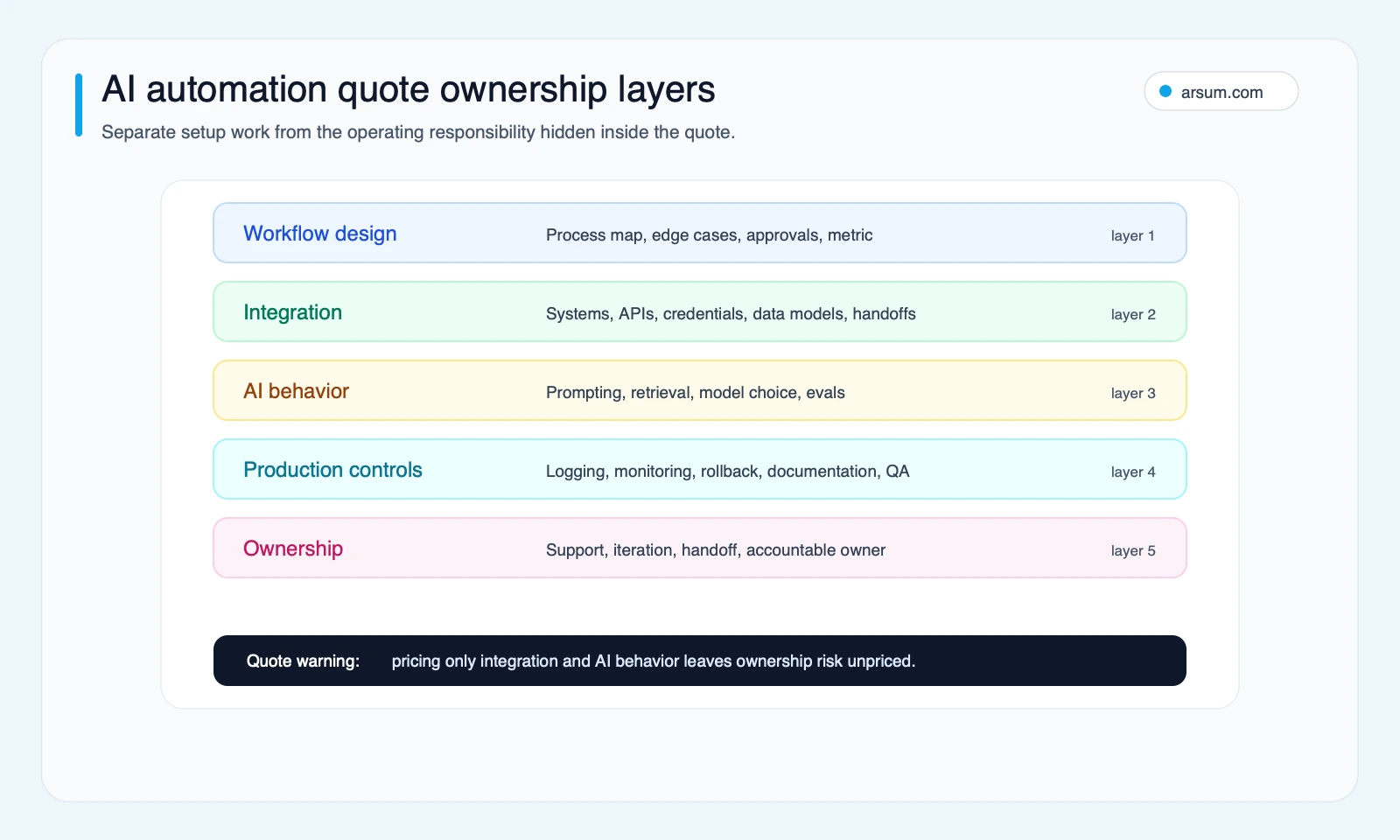
A quote that prices only integrations and a model call may be reasonable for a controlled helper workflow. It should not be sold or evaluated as a production automation.
Production model integrations commonly use structured outputs and tool calls rather than a one-off chat interaction; that changes the need for validation, permissions, testing, and maintenance. See the OpenAI text-generation documentation for the underlying application patterns. The buyer does not need to prescribe the implementation, but should require the vendor to show how outputs are validated before a system action occurs.
The vendor-evaluation worksheet to use before approving a quote
Request the following in writing. If a vendor cannot answer it, you do not yet have enough information to compare price.
| Requirement | Vendor must state | Why it changes the decision |
|---|---|---|
| Baseline workload | Monthly task volume, average handling time, peak or burst periods | Tests whether the workflow is large enough and stable enough to automate |
| Manual path | Current steps, systems, handoffs, and known exceptions | Prevents a happy-path demo from being mistaken for the real process |
| Model and tool assumptions | Model/provider, automation platform, estimated runs, retry behavior, fallback | Reveals usage-cost sensitivity and dependency risk |
| Data lineage | Source systems, fields used, freshness rules, data owner | Lets the team verify why an output was produced |
| Access boundaries | Read permissions, write permissions, credential ownership, environment separation | Determines the blast radius of failure |
| Uncertainty threshold | What counts as low confidence and what happens next | Converts “human in the loop” into an actual operating rule |
| Approval authority | Named role that may approve, override, or disable the workflow | Makes business authorization explicit |
| Retained evidence | Logs, input/output records where appropriate, prompt or workflow versions, approval history | Supports debugging, audit, and post-launch learning |
| Rollback method | How to stop writes, reverse changes, and return to manual handling | Establishes a recoverable failure path |
| Support scope | Response expectations, change requests, monitoring responsibility, vendor and internal contacts | Distinguishes a handoff from managed ownership |
| 30/60/90-day proof | Baseline, target, quality measure, review cadence, decision point | Stops the project from becoming an unmeasured integration |
The AI automation agency pricing guide can help frame quote categories, but this worksheet is the test for whether a category fits your workflow.
How to interpret incomplete answers
A low-control quote is acceptable when all of the following are true: the workflow is read-only or draft-only, a human reviews every output, errors are easy to correct, data access is limited, and the team can operate it without the vendor.
Require a production-control scope when the workflow writes to a CRM, ERP, ticketing system, inbox, or customer record; acts across multiple systems; changes routing or priority; or creates costly cleanup when wrong.
Defer automation when the manual process has no stable owner, the source data is unreliable, the exception rate is unknown, there is no authority to approve the workflow’s actions, or no one can own rollback. In those cases, the useful project may be workflow cleanup or measurement first—not an AI build.
Same lead workflow, three legitimate prices
Consider inbound lead research and follow-up preparation.
A helper version reads a form submission, enriches public company context, creates a summary, and sends it to a sales rep. The rep decides whether to use it. This can be a narrow, low-risk project because it is mostly read-only and every consequential action remains human-controlled.
An operational version checks CRM history, uses approved segmentation rules, drafts a follow-up, writes notes to the opportunity, and assigns a task. The project now needs field mapping, duplicate handling, role permissions, logging, and adoption design. A failure does not just create a bad draft; it can change sales operations.
A production version routes leads, detects missing information, applies defined escalation rules, records why a route occurred, produces an exception queue, and reports performance against a baseline. It needs a controlled launch, evaluation data, monitoring, and an owner who can pause or adjust the workflow.
| Version | Autonomy boundary | Required evidence before launch | Appropriate quote expectation |
|---|---|---|---|
| Helper draft | Human approves every external or system action | Sample inputs, draft quality review, manual fallback | Small scope can be appropriate |
| Operational workflow | Writes are constrained to defined records and rules | Permission design, write validation, exception queue, rollback test | Integration and operating controls matter |
| Production system | Workflow routes or changes work at scale within approved limits | Audit trail, owner, incident path, review cadence, launch criteria | Treat as a managed operational system |
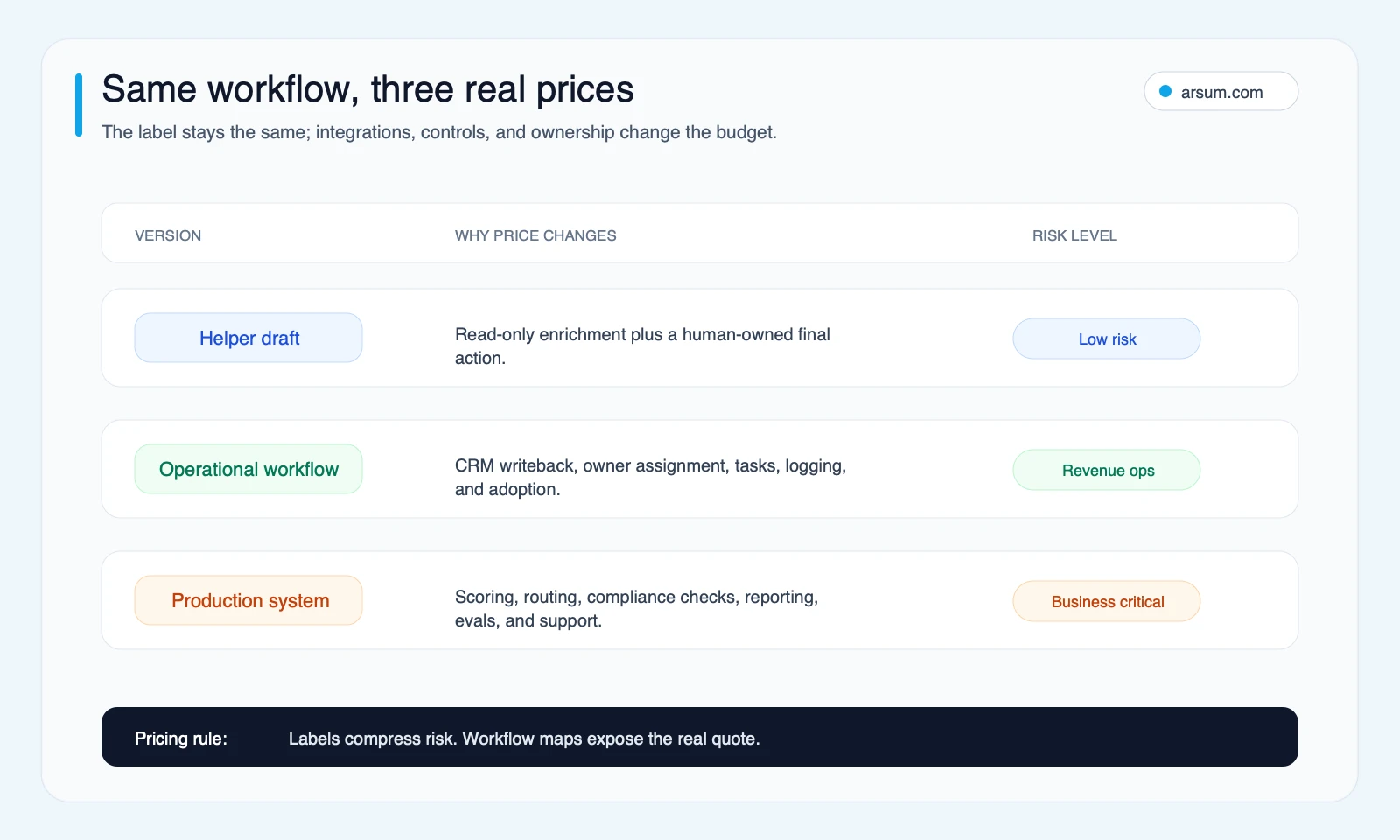
The useful question is not “Why is the production quote higher?” It is “Which risks are we choosing to own internally, and are we actually equipped to own them?”
💡 Arsum builds custom AI automation solutions tailored to your business needs.
Get a Free Consultation →Founder quote-review scorecard
Score each proposal from 1 to 5 on the five layers. This is an editorial evaluation framework, not empirical performance data.
| Layer | 1: limited scope | 3: defined operational scope | 5: production-ready scope |
|---|---|---|---|
| Workflow design | Generic use case | Workflow map and some edge cases | Baseline, exception taxonomy, approvals, and measurable acceptance criteria |
| Integration | One or two simple connectors | Multiple systems and bounded writeback | Permission design, data validation, environment separation, and failure recovery |
| AI behavior | Prompt or model call | Structured output and tested rules | Evaluation set, confidence handling, fallback, versioning, and cost controls |
| Production controls | Manual checking | Basic logging and alerts | Monitoring, incident path, rollback, QA, and retained evidence |
| Ownership | Builder hands off | Limited post-launch support | Named operating owner, documentation, review cadence, and change process |
Two hypothetical proposals, scored
Proposal A: “Lead research assistant.” It creates a Slack summary from new inbound forms. Sales reviews every summary before acting. The vendor documents the workflow and hands it to a sales-operations owner.
| Layer | Score | Reason |
|---|---|---|
| Workflow design | 3 | Defined intake and handoff, but limited exception detail |
| Integration | 2 | Form and Slack only |
| AI behavior | 2 | Summary generation with a human review step |
| Production controls | 2 | Basic error notifications; no formal evaluation plan |
| Ownership | 3 | Named internal owner and documentation |
| Total | 12/25 | Suitable as a contained pilot if the team accepts manual review |
The next action for Proposal A is not to demand enterprise controls. Define a bounded pilot, measure whether summaries save meaningful review time, and keep it draft-only.
Proposal B: “Autonomous lead-routing system.” It reads the CRM and enrichment data, assigns ownership, changes priority, sends outreach, and reports conversion impact. The quote does not name permissions, uncertainty handling, logs, or rollback.
| Layer | Score | Reason |
|---|---|---|
| Workflow design | 2 | Outcome is stated, but the exception path is missing |
| Integration | 3 | Several systems are included, but access boundaries are unclear |
| AI behavior | 2 | Model use is described without evaluation or fallback |
| Production controls | 1 | No audit, alert, or rollback plan |
| Ownership | 1 | Support is vague and no launch owner is named |
| Total | 9/25 | Do not approve for autonomous operation |
The next action for Proposal B is to reduce autonomy or add a production-control scope. A lower setup fee does not compensate for unknown write permissions and no recovery plan.
As a practical threshold, a quote scoring below 12/25 should generally be treated as a prototype or discovery proposal, not a system ready to run consequential work. A 13–18 score can support a bounded pilot if its autonomy is limited. Above that, the buyer should still validate the evidence and ownership commitments rather than assuming the score guarantees success.
Work the pilot economics before debating the build fee
A useful pilot does not promise a return in advance. It tests whether the workflow can meet a defined operating threshold.
Here is an illustrative planning assumption, not an observed result, for the lead-research helper:
| Input | Planning assumption |
|---|---|
| New leads per month | 240 |
| Current manual research and preparation time | 12 minutes per lead |
| Fully loaded internal review-cost assumption | $50 per hour |
| Pilot target | Reduce preparation time by 50% while retaining human approval |
| Automation usage and tools | $300 per month |
| Internal review after automation | 6 minutes per lead |
| Exception or cleanup time | 12 hours per month |
| Pilot build fee | $6,000 one time |
Current manual labor cost under these assumptions is: 240 leads × 12 minutes ÷ 60 × $50 = $2,400 per month.
Pilot-state operating cost is: 240 × 6 minutes ÷ 60 × $50 = $1,200, plus $600 for 12 hours of exception cleanup, plus $300 in usage and tools = $2,100 per month.
That produces only $300 per month of estimated direct labor reduction before considering the build fee. It might still be worthwhile if quality, speed-to-lead, or rep capacity has a measurable and approved value, but it would not justify a labor-savings claim on its own.
If cleanup time rises to 24 hours, pilot-state operating cost becomes $2,700 per month. The workflow is worse than the manual baseline on this narrow metric. This is why review and cleanup cost must be in the model.
Pilot scorecard and decision gates
| Measure | Baseline | Pilot target | Owner | Cadence | Stop condition | Rollback |
|---|---|---|---|---|---|---|
| Handling time | 12 minutes per lead | 6 minutes or less | Sales operations lead | Weekly | No improvement after four weeks of stable volume | Disable automation; return to manual research checklist |
| Output quality | Establish a sampled human rating before launch | Agreed quality threshold maintained | Sales team manager | Weekly sample review | Material quality decline or unacceptable factual errors | Send draft-only summaries; require full human research |
| Exceptions | Count current missing-data and duplicate cases | Exception rate remains within agreed capacity | Sales operations lead | Weekly | Queue exceeds team’s review capacity | Pause intake and triage queued records manually |
| Usage cost | $0 incremental tool usage | Within approved monthly budget | Finance owner | Monthly | Usage exceeds agreed ceiling without approved benefit | Disable nonessential model calls or revert to manual path |
| System safety | No production writes in pilot | Only approved, reversible writes | CRM administrator | Before launch and weekly | Unauthorized or irrecoverable write | Revoke credentials, disable workflow, restore from documented records |
The proceed decision should happen after enough volume has passed through the workflow to test normal and ugly cases—not merely after a successful demo. The 30-day review asks whether the mechanism works. The 60-day review asks whether the team can operate it. The 90-day review asks whether it should be expanded, redesigned, or retired.
Usage cost volatility belongs in the quote
Usage-based cost is not automatically bad. It becomes a problem when the buyer does not know what drives it.
Ask vendors to model at least three scenarios:
- Expected volume: normal monthly tasks and average input size.
- Peak volume: campaigns, month-end, launches, or backlog clearance.
- Exception volume: retries, missing data, human rework, and fallback model calls.
Workflow platforms can price around executions, environments, concurrency, support, and governance features; review n8n’s current pricing directly rather than relying on an agency’s description. AI providers can also combine seats, usage tiers, and limits, so verify the current provider terms and workload behind any “included usage” statement; Anthropic’s plans and pricing is one example of why a flat plan name is not a workload model.
A Reddit search snippet reviewed in the research pack referred to a roughly $500/month minimum for a light Power Automate AI Builder use case. Treat that as a historical, snippet-level buyer objection—not a current price. Verify current platform pricing, minimums, and entitlements directly with the vendor before using them in a budget.
Buy, connect, build, or partner?
The appropriate purchasing path depends on both workflow differentiation and operating burden.
| Path | Best fit | Main tradeoff |
|---|---|---|
| Buy a platform | Common workflow, predictable volume, strong internal owner | Process may need to adapt to the tool |
| Connect existing tools | Stable systems and simple handoffs | Hidden complexity appears when data or exceptions are messy |
| Build a narrow workflow | Business rules are specific and the workflow has measurable value | Requires deliberate ownership and control design |
| Use an implementation partner | The workflow is valuable but the company lacks available delivery or systems expertise | Buyer must still assign business ownership and acceptance authority |
For a framework or agent-oriented implementation, the AI agent architecture patterns guide and agentic AI workflow automation guide can help distinguish a constrained workflow from a system that needs explicit state, tools, and oversight. If the decision is primarily whether to create bespoke capability, compare that with the tradeoffs in custom AI solutions for business.
A partner can implement and support the system, but cannot become the business authority for what the workflow is allowed to do. That authority belongs to the operator accountable for the process.
Disqualifying conditions and common failure modes
Do not launch an automation beyond a controlled helper stage when any of these are true:
- No reliable baseline exists for volume, handling time, quality, or error cost.
- The source system lacks an owner or its data is routinely incomplete.
- The workflow needs broad credentials because access boundaries were never designed.
- Nobody has authority to approve exceptions, pause the workflow, or accept risk.
- A vendor cannot show how a wrong write is detected and reversed.
- The expected review queue would simply move manual work from one team to another.
- The business case depends on optimistic revenue or savings claims that cannot be measured during the pilot.
The recurring failures are predictable: automating an unstable process, treating a demo as an operational system, giving the model too much write authority, hiding internal review cost, and paying a retainer without a stated operating backlog.
For finance or compliance-related workflows, the AI automation for compliance officers guide is useful decision context. Technical capability should remain separate from authorized autonomy: preserve source lineage, keep approvals with accountable people, and retain evidence needed to investigate an exception.
Publishing and content workflows need a separate quality boundary
AI automation can speed up content operations, but throughput is not proof of business or search value. Google’s people-first content guidance emphasizes helpful, reliable content created for people rather than output designed mainly to attract search traffic.
If a quote includes content generation or publishing, require a clear boundary:
- What source material and original expertise inform the draft?
- Who verifies claims and approves publication?
- What makes the output materially useful rather than interchangeable?
- Which outputs may be published automatically, if any?
- How are corrections, removals, and source updates handled?
The AI SEO services explained guide and AI content automation business guide provide related decision context. The commercial question remains the same: pay for controls and editorial ownership that make automation useful, not simply for more generated pages.
Founder approval gates
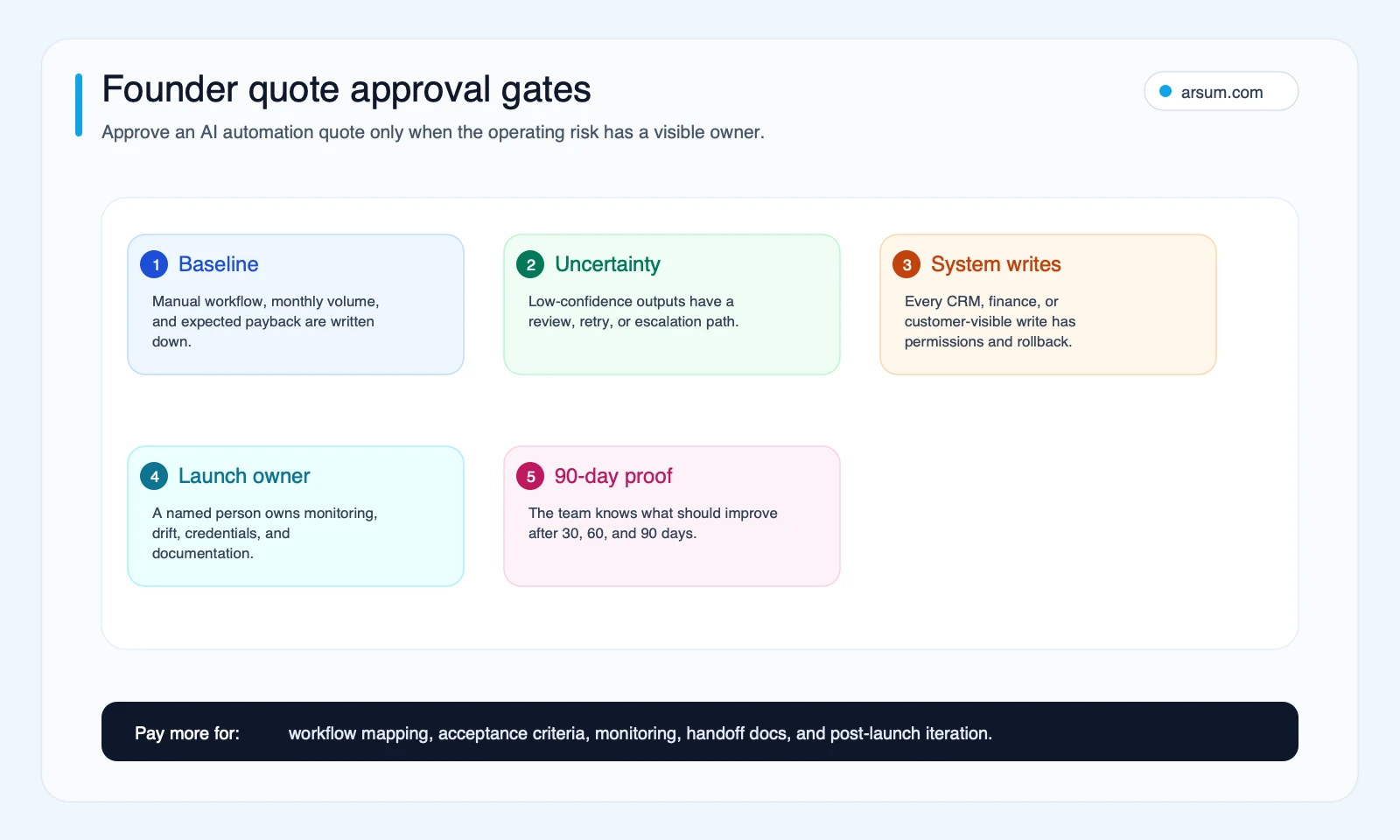
Approve the quote only after five decisions are explicit: the manual baseline, uncertainty and exception path, permitted system writes, launch owner, and 90-day proof. If any one is missing, the appropriate next step is discovery or a constrained helper—not production autonomy.
Methodology and freshness
This is an editorial framework from the Arsum editorial team, built from the validated research pack dated June 29, 2026. It uses primary documentation from Bessemer, Google Search Central, OpenAI, n8n, and Anthropic. Community discussion is used only as qualitative evidence of buyer questions and failure modes, not as a price benchmark, market statistic, or proof of outcomes.
Model pricing, platform limits, and support tiers change. Recheck the underlying vendor terms, workload assumptions, and access model before approving a quote.
Final founder view
The right AI automation quote makes ownership visible. It identifies the workflow, baseline, permissions, uncertainty path, review cost, usage assumptions, launch owner, evidence retained, and rollback method.
If you need an implementation discussion, the useful output is not a generic estimate. It is a workflow assessment that produces the same artifacts this guide asks you to require: a workflow map, exception design, ownership plan, and pilot scorecard.
Ready to Automate Your Business?
Stop wasting time on repetitive tasks. Let AI handle the busywork while you focus on growth.
Schedule a Free Strategy Call →Written by:Johnny Kartakov
- Reviewed by
- Arsum editorial team
- Published
- June 29, 2026
- Updated
- August 12, 2026
- How this was produced
- Arsum uses research packs, source checks, and human editorial review to prepare and update blog articles. Editors are responsible for the final page.
- Source policy
- Sources are linked in the article when used. Methodology and source notes are included on higher-risk or high-visibility pages and are being rolled out across the archive. Editorial policy.
- Why this page exists
- Help B2B operators evaluate AI automation, implementation scope, cost, risk, and build-vs-buy decisions with practical context.