An AI automation service guide should help you buy or package a controlled workflow improvement—not a vague promise that a model will “automate the business.” A credible service defines the workflow, source systems, allowed actions, review path, accountable owner, measurement method, and maintenance responsibility before it recommends an AI tool.
AI Automation Service Guide: Buyer Guide
Explore AI automation service guide: compare workflow fit, costs, risks, evidence, and practical next steps before you build, buy, or hire.

Table of Contents
- What most guides miss: the service is three layers, not one build
- Score one workflow before you buy a service
- Choose the service model that matches the actual blocker
- A worked pilot scorecard: use assumptions, not invented results
- What a production-ready service scope should include
- Disqualifying conditions and common failure modes
- How to compare provider proposals without comparing slogans
- A practical service brief for buyers and agency operators
- Source and method note
- Scope an automation around one real workflow
- Related Arsum guides
What most guides miss: the service is three layers, not one build
Buyers often compare proposals by features, model names, or a polished demo. That misses the work that determines whether an automation survives production.
An AI automation service has three connected layers:
- Technical layer: integrations, data mappings, prompts or models, orchestration, credentials, retries, and logs.
- Control layer: what the system may do, what requires approval, how exceptions are routed, and when the workflow pauses.
- Operating layer: who owns changes after launch, reviews quality, rotates credentials, handles vendor changes, and authorizes a rollback.
A low quote may omit one of those layers. That does not automatically make it a poor option, but it means you may be comparing a prototype, a build, and an operating service as though they were equivalent.
Before requesting proposals, name one workflow and answer five questions:
- What repeats often enough to justify improving it?
- Which system is the source of truth?
- Which actions may run without a person approving every record?
- Who resolves exceptions and owns the business rule?
- What evidence must be retained when the automation acts or fails?
If those answers are unavailable, start with a process audit rather than a production build.
Score one workflow before you buy a service
Use this screen on one candidate workflow. It is a prioritization aid, not proof that an automation will work.
| Workflow factor | 1 = weak fit | 2 = workable with guardrails | 3 = strong first project |
|---|---|---|---|
| Process stability | The task changes substantially by case | A standard path exists, but exceptions are common | Inputs, decisions, and outputs follow a documented pattern |
| System access | Data is trapped in manual or unstable steps | Some exports or access paths exist | APIs, inboxes, structured exports, or stable documents are available |
| Approval design | Every action requires bespoke judgment | Some steps can proceed, with approvals retained | Standard actions are authorized with logging and exception review |
| Baseline visibility | Time, errors, or backlog are unknown | The team can estimate a baseline | Volume, handling time, rework, or delay are measured |
| Owner readiness | No team owns the process end to end | Ownership exists but escalation rules are unclear | A named owner can approve rules, review exceptions, and accept results |
A high score does not authorize autonomy. It indicates that the workflow is more suitable for a scoped evaluation. A weak score usually means the immediate work is process documentation, access design, or ownership alignment.
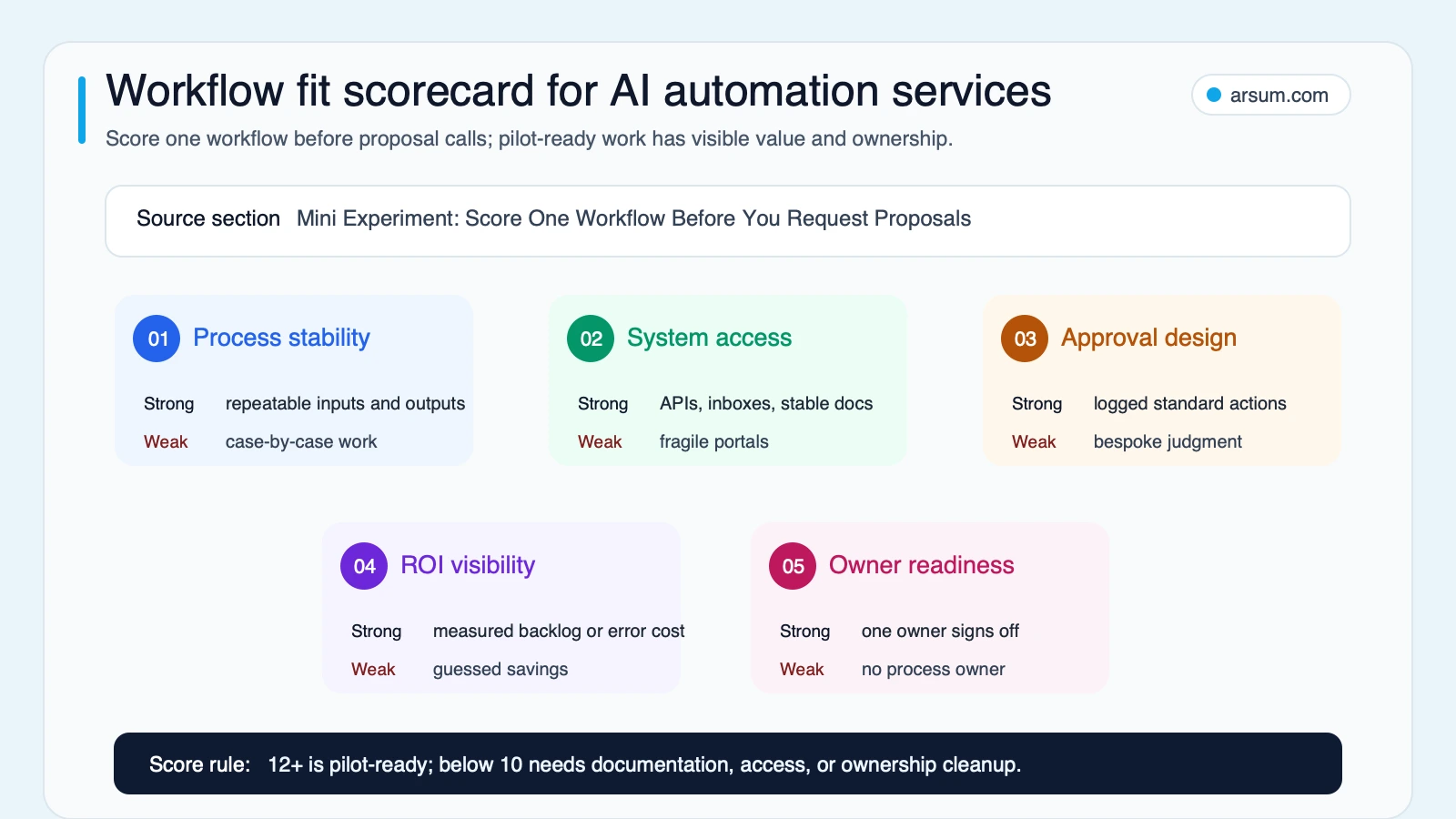
The best first workflow is usually repeatable, observable, accessible, reversible, and owned—not necessarily the most impressive use case.
Choose the service model that matches the actual blocker
The right engagement depends on whether the problem is uncertainty, delivery capacity, or ongoing operations.
| Service model | Use it when | Core deliverables | Buyer must provide | Main acceptance question |
|---|---|---|---|---|
| Process audit | Several workflows compete for budget | Workflow map, baseline plan, risks, shortlist, recommendation | Process access and stakeholders | Did we identify a workflow worth piloting? |
| Pilot workflow | One workflow is promising but data, approvals, or exceptions need testing | Narrow automation, test plan, exception queue, pilot scorecard | Sample records, access, business owner | Can it meet the agreed boundary under review? |
| Production automation | Workflow, systems, and success threshold are clear | Production integrations, controls, monitoring, handoff materials | Technical access, approvers, operating owner | Is it supportable in normal operations? |
| Managed automation retainer | The workflow changes often or remains business-critical | Monitoring, incident response, rule changes, periodic review | Decision rights and a client owner | Are maintenance duties and response expectations explicit? |
A process audit is not a smaller production build. Its output should be decision evidence. A pilot is not a disguised commitment to broad rollout. Its output should be a measured go/no-go decision.
For a related view of whether to engage an outside partner or assemble internal capability, see AI automation agency services and custom AI solutions for business.
Pick the simplest automation category that fits
Start with the workflow mechanism, then decide whether AI is necessary.
| Service type | Best fit | Control boundary |
|---|---|---|
| RPA or UI automation | Stable, repetitive work in legacy portals | Expect maintenance when the interface changes; keep retry and failure handling visible |
| API workflow automation | Reliable handoffs among CRM, finance, support, and operations tools | Validate mappings, permissions, duplicate handling, and reconciliation |
| Document processing | Extraction, classification, and routing from forms, invoices, or intake records | Low-confidence or incomplete records go to review before downstream posting |
| Customer-service automation | Triage, routing, knowledge retrieval, and response drafting | Escalate sensitive, ambiguous, account-specific, or policy-bound interactions |
| Agent-style workflows | Multi-step research, drafting, or controlled tool use where the path varies | Limit tools and permissions; consequential actions require explicit authorization and accountable ownership |
An agent can assist with classification, drafting, planning, and controlled tool use. Technical capability does not mean a system is authorized to make a consequential decision or execute an irreversible action. For architecture choices, see AI agent architecture patterns and agentic AI workflow automation.
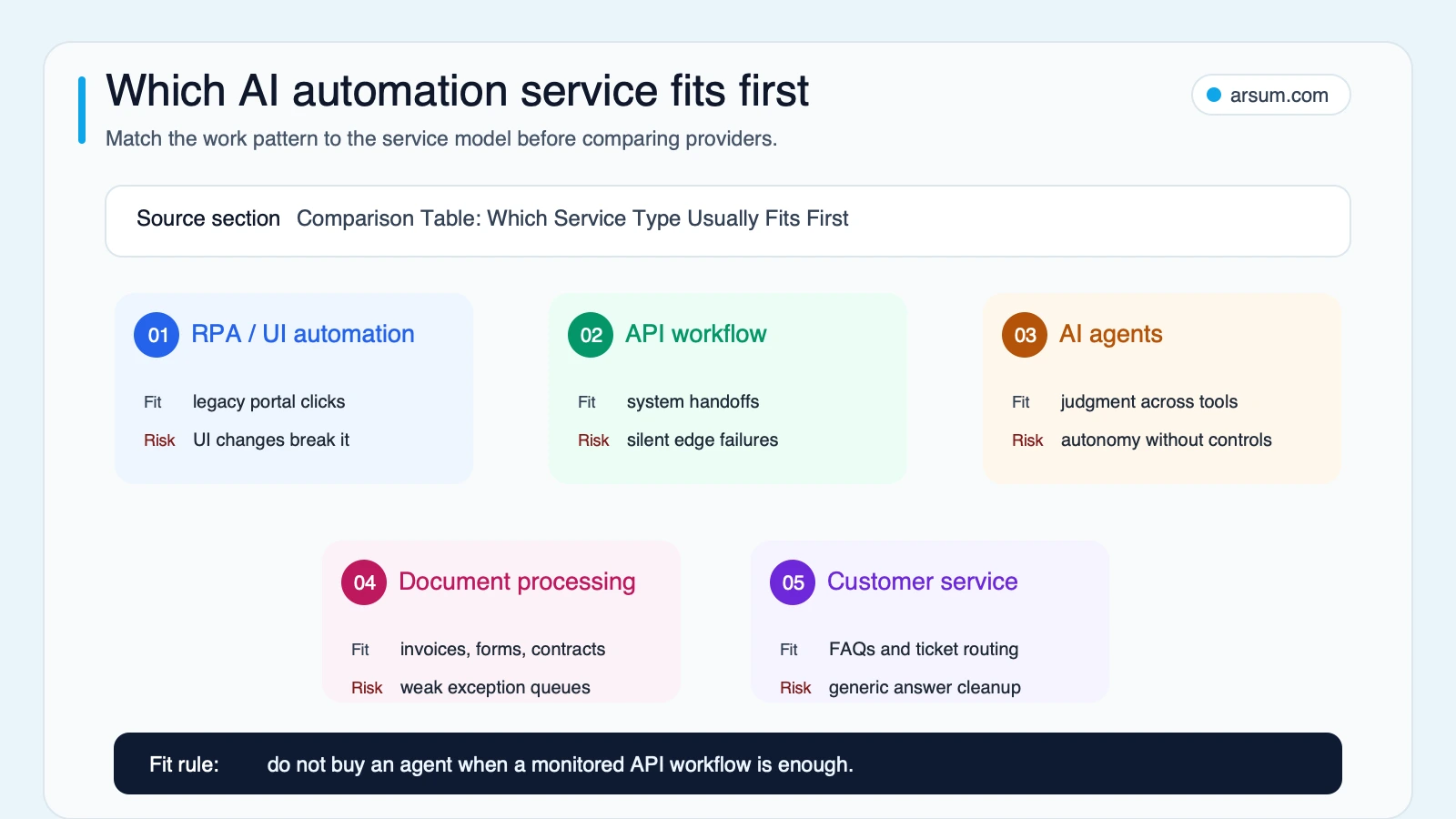
An API workflow with explicit rules is often a better first service than an agent when the work is primarily system handoffs.
A worked pilot scorecard: use assumptions, not invented results
The following is a hypothetical planning example for invoice intake. It is not a client result, pricing benchmark, accuracy benchmark, or forecast.
Assume a finance team receives 400 invoices per month. Its owner measures an average of 8 minutes from intake through data entry, routing, and basic reconciliation for standard invoices. The baseline manual effort is:
400 invoices × 8 minutes = 3,200 minutes, or about 53 hours per month.
That is only the effort baseline. A valid business case also needs the cost of review, rework, integration maintenance, and any errors that reach a downstream system. The pilot should be accepted or rejected against agreed evidence, not against a provider’s generic ROI claim.
| Pilot field | Example planning entry | Evidence to retain |
|---|---|---|
| Workflow | Invoice intake: capture, extract, validate, route | Current-state process map and system diagram |
| Baseline volume and effort | 400 records/month; 8 minutes per standard record | Time sample, queue data, or documented measurement method |
| Pilot scope | Standard invoice formats only | Inclusion and exclusion rules |
| Sampled records | A buyer-defined representative sample, including known exceptions | Sample list, labels, and adjudication notes |
| Allowed actions | Draft fields and route records; no autonomous payment, posting, or vendor change | Permission matrix and tool configuration |
| Quality metric | Field-level correctness and exception-routing quality against a human-reviewed reference | Review worksheet and error taxonomy |
| Review cost | Minutes per automated record and minutes per exception | Reviewer time log |
| Exception SLA | Named queue owner acknowledges and resolves within the agreed operating window | Queue timestamps and escalation record |
| Source lineage | Retain source document reference, extracted values, rule/model version, reviewer decision, and downstream action | Audit log and linked record IDs |
| Owner | Accounts payable operations lead | Named role and backup owner |
| Review cadence | Daily during pilot; a scheduled decision review after the agreed sample | Review agenda and decision record |
| Pause trigger | Repeated misrouting, missing lineage, access failure, or a quality-threshold breach | Incident log and pause record |
| Rollback path | Disable write actions, retain read-only triage, return records to the existing queue | Runbook and tested rollback procedure |
| Go/no-go threshold | A written threshold jointly set before testing, including quality, review burden, and exception handling | Signed acceptance criteria |
The point is not to force every workflow into a single metric. It is to prevent an apparent time saving from hiding more expensive review work or a control failure.
For examples of how finance teams can frame workflow boundaries, see AI for finance teams and accounts receivable automation.
💡 Arsum builds custom AI automation solutions tailored to your business needs.
Get a Free Consultation →What a production-ready service scope should include
A credible provider scope should make the operating design inspectable. Ask for these items in writing.
Data and permission boundaries
The proposal should identify:
- Systems accessed, credentials required, and whether access is read-only or write-enabled.
- Source-of-truth fields and any data copied, transformed, or retained.
- Third-party services involved in model, hosting, workflow, or observability functions.
- Data classification, retention, and access requirements owned by your organization.
- Actions that are prohibited even if the workflow technically could perform them.
- The person or role authorized to approve a production permission change.
The OpenAI practical guide to building agents frames use-case fit, guardrails, and deployment choices as implementation concerns. The OpenAI Agents SDK documentation describes orchestration and tool-execution patterns that may need server-owned controls. These sources inform system design; they do not decide what your organization is authorized to automate.
Validation and exception design
“Tested” is not enough. The provider should state:
- What constitutes a representative test sample.
- Who labels or adjudicates disputed outputs.
- Which errors matter most, such as misclassification, missing data, incorrect routing, or an unauthorized action.
- How low-confidence, ambiguous, or malformed records enter an exception queue.
- Whether the workflow retries, pauses, or creates a ticket when an integration fails.
- Which steps can be reversed and which require reconciliation.
- How baseline effort, review effort, exception volume, and quality are measured.
For workflows built with automation platforms, the n8n AI workflow documentation is useful for understanding the building blocks of an AI-powered flow. It is not evidence that a particular production workflow is safe, compliant, or economically justified.
Handoff and maintenance responsibilities
Maintenance is part of the service decision, not an optional afterthought. Practitioner discussions identify maintenance as a recurring concern for agencies when credentials, client processes, and tools change. That is qualitative signal, not a market-wide statistic: agency operator discussion.
Use a responsibility matrix before launch:
| Responsibility | Provider | Client business owner | Client technical owner |
|---|---|---|---|
| Workflow rules and policy decisions | Proposes and documents | Approves changes | Consulted |
| Credentials and access approval | Configures within approved access | Accountable for authorization | Administers where required |
| Integration monitoring | Agreed service scope | Receives escalation | Resolves internal system issues |
| Exception review | Builds queue and routing | Owns business adjudication | Supports access or defects |
| Prompt, model, or rule changes | Recommends and implements if contracted | Approves production changes | Reviews technical impact |
| Incident pause and rollback | Executes documented runbook if contracted | Authorizes business resumption | Supports restoration |
| Handoff documentation | Produces and maintains as scoped | Accepts operating materials | Accepts technical materials |
Disqualifying conditions and common failure modes
Not every workflow should be automated first. Pause or narrow the scope if any of these conditions apply:
- No owner can define what a correct result looks like.
- The process is too rare to produce a useful test sample or justify ongoing support.
- Source data is inaccessible, unreliable, or lacks a clear system of record.
- The workflow requires irreversible action with no approval, audit, or reconciliation path.
- Exceptions are the majority of work and cannot be categorized.
- The organization cannot support credential management, access reviews, or an incident response path.
- The expected benefit is asserted but no baseline can be measured.
Common failures are usually operational rather than model-related:
- A team automates an unclear process and discovers that different people follow different rules.
- A provider demos a happy path but does not specify missing data, duplicate records, system downtime, or policy exceptions.
- A workflow writes into production systems before the organization has approved its permission boundary.
- Ownership disappears after handoff, so changes in prompts, APIs, documents, or business rules quietly degrade output.
- Review cost grows until the automation merely moves manual work into a less visible queue.
The NIST Generative AI Profile provides a risk-management reference for generative AI. Use it to shape controls and review questions, not as a guarantee that a workflow meets legal, policy, or economic requirements.
How to compare provider proposals without comparing slogans
Ask every provider to respond to the same brief. That makes differences in scope visible.
Include:
- The workflow name and current process steps.
- Monthly or weekly volume and a baseline measurement method.
- Inputs, outputs, and systems of record.
- Required permissions and prohibited actions.
- Standard path, exception types, and approval owner.
- Pilot sample and validation method.
- Success metric, quality metric, and review-cost metric.
- Required logs, source lineage, and retained evidence.
- Pause trigger, rollback path, and incident contacts.
- Handoff materials and maintenance responsibilities.
Then ask these proposal questions:
- What is deliberately out of scope?
- Which actions are automated, drafted, recommended, or approval-gated?
- How will you test with representative records and document errors?
- What happens if a tool, credential, vendor policy, source format, or internal process changes?
- Which materials can our team operate if we change providers?
- What recurring work remains after launch, and who owns it?
For a broader comparison of external specialists and implementation approaches, read AI automation consulting and AI integration services.
A practical service brief for buyers and agency operators
A responsible AI automation service is easier to sell and buy when it is packaged around a decision, not a generic capability claim.
A process-audit brief can promise a mapped workflow, risk register, baseline plan, and recommendation. A pilot brief can promise a constrained workflow, approval boundary, evaluation sample, exception queue, and go/no-go review. A production brief can promise defined integrations, monitoring, handoff, and an operating model. A managed-service brief can promise specific maintenance duties and escalation expectations.
Do not promise a universal timeline, cost, accuracy rate, or payback period. Those outcomes depend on system access, data variation, exception volume, risk tolerance, validation effort, and the ownership model. Use discovery to establish the inputs, then make the measurement method part of the commercial agreement.
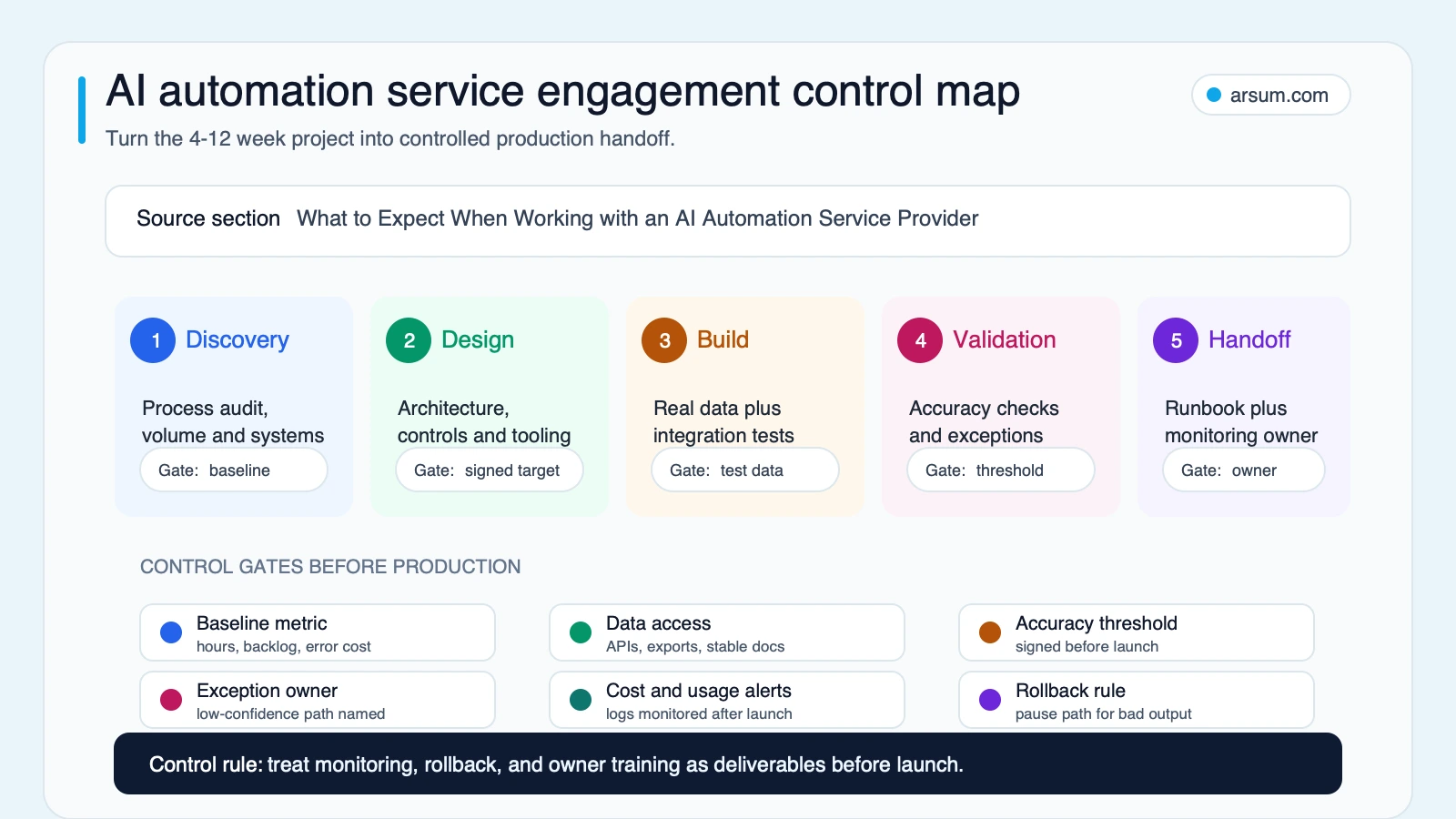
The control map is a reminder that discovery, design, validation, handoff, monitoring, and rollback planning are all part of the service scope.
Source and method note
This guide follows a link-only editorial evidence route because the buyer decision is about service scope, control design, and operating ownership rather than an occupation or website-performance dataset. Official sources are linked where they inform agent controls, workflow building blocks, and risk management. Community material is treated only as qualitative evidence of recurring concerns about discovery, buyer fit, and maintenance.
Scope an automation around one real workflow
Bring a workflow—not an “AI transformation” request—to the first conversation. The most useful starting inputs are process volume, systems involved, source-of-truth data, approval owner, normal exception path, and one baseline metric you can measure.
Arsum can help assess whether that workflow needs process cleanup, a controlled pilot, a production integration, or an ongoing operating model.
Ready to Automate Your Business?
Stop wasting time on repetitive tasks. Let AI handle the busywork while you focus on growth.
Schedule a Free Strategy Call →Related Arsum guides
Written by:Arsum editorial team
- Reviewed by
- Arsum editorial team
- Published
- February 22, 2026
- Updated
- June 29, 2026
- How this was produced
- Arsum uses research packs, source checks, and human editorial review to prepare and update blog articles. Editors are responsible for the final page.
- Source policy
- Sources are linked in the article when used. Methodology and source notes are included on higher-risk or high-visibility pages and are being rolled out across the archive. Editorial policy.
- Why this page exists
- Help B2B operators evaluate AI automation, implementation scope, cost, risk, and build-vs-buy decisions with practical context.