The ai automation tipping point is not when a model produces an impressive demo. It is when one defined workflow has stable inputs, measurable value, a named owner, reviewable outputs, and a safe way to stop or reverse a mistake. If you cannot describe those conditions, defer the automation decision; if you can, run a controlled pilot before choosing whether to buy software, build internally, or use an implementation partner.
AI Automation Tipping Point: Practical Guide
Explore ai automation tipping point: compare workflow fit, costs, risks, evidence, and practical next steps before you build, buy, or hire.

Table of Contents
- What Most Guides Miss: Capability Is Not Authorization
- Use a Readiness Scorecard Before Funding a Pilot
- A Worked Example: Finance Variance-Review Workflow
- Define a Pilot Scorecard Before You Select a Tool
- Buy, Build, Partner, or Defer
- Least Privilege Is a Workflow Requirement
- Failure Modes That Should Change the Decision
- Run the First 90 Days as Gates, Not a Calendar Promise
- The Practical Next Step
What Most Guides Miss: Capability Is Not Authorization
Most AI automation guidance asks, “Can the model do this task?” That is only the first gate. An operator also needs to decide whether the business should authorize the system to act, under what conditions, and with what evidence retained.
A workflow can be technically capable but still be a poor automation candidate. For example, an AI system may summarize a customer document accurately enough to help a reviewer, while still being unsuitable to send a customer-facing commitment, alter a ledger, approve a claim, or make a credit decision without a human owner.
The practical decision rule is:
Automate preparation and routing first. Automate consequential actions only after the workflow has a proven evaluation set, clear approval authority, adequate logs, and a tested rollback path.
This is consistent with OpenAI’s production guidance, which treats evaluations, guardrails, and optimization for real operating constraints as part of production readiness—not as post-launch cleanup. It also aligns with the NIST AI Risk Management Framework, which frames risk management as something incorporated into design, development, use, and evaluation.
That distinction changes the buyer’s decision. Instead of asking which agent looks most autonomous, ask:
- What business event triggers the workflow?
- Which systems are the sources of truth?
- Which output is draft-only, and which output causes an external or irreversible side effect?
- Who owns exceptions and approves consequential actions?
- What gets logged so a bad result can be investigated?
- What condition pauses the pilot or rolls it back?
For a broader view of how controlled multi-step systems work, see what agentic AI means in practice.
Use a Readiness Scorecard Before Funding a Pilot
A good first AI automation target is repetitive enough to matter, measurable enough to evaluate, and controllable enough to contain when it fails. Score each factor from 1 to 5, where 5 always means greater readiness.
| Factor | 1: low readiness | 3: mixed readiness | 5: high readiness |
|---|---|---|---|
| Repetition | Rare, inconsistent work | Recurs weekly | Frequent, patterned work |
| Business value | Nice-to-have convenience | Meaningful capacity or service impact | Clear margin, revenue, risk, or cycle-time impact |
| Input quality | Sources are scattered or conflicting | Some cleanup required | Inputs come from known systems of record |
| Output verification | Correctness is hard to assess | Reviewer can sample results | A reviewer can quickly verify each output or use defined checks |
| Reversibility | Mistakes are difficult to undo | Some actions can be reversed | Actions are draft-only, staged, or easily reversed |
| Ownership clarity | No accountable business owner | Shared ownership | One process owner and one technical owner are named |
Add the six scores to create an internal triage signal, not a benchmark. A score of 22 or more can justify deeper pilot design, but it does not override risk. It is deliberately a heuristic: it helps prioritize workflows for evaluation; it does not predict savings, reliability, or safe autonomy.
Apply these separate veto gates before approving any pilot with live business data:
- The workflow has no reliable source lineage.
- It requires regulated, highly sensitive, or confidential data without an approved handling design.
- A wrong action can create a legal, financial, safety, contractual, or customer harm that cannot be promptly reversed.
- No human has authority to approve exceptions.
- The team cannot explain how to pause the workflow and restore the prior process.
A high-value workflow that fails a veto gate may still be suitable for a read-only or draft-first use case. It is not suitable for autonomous production action.
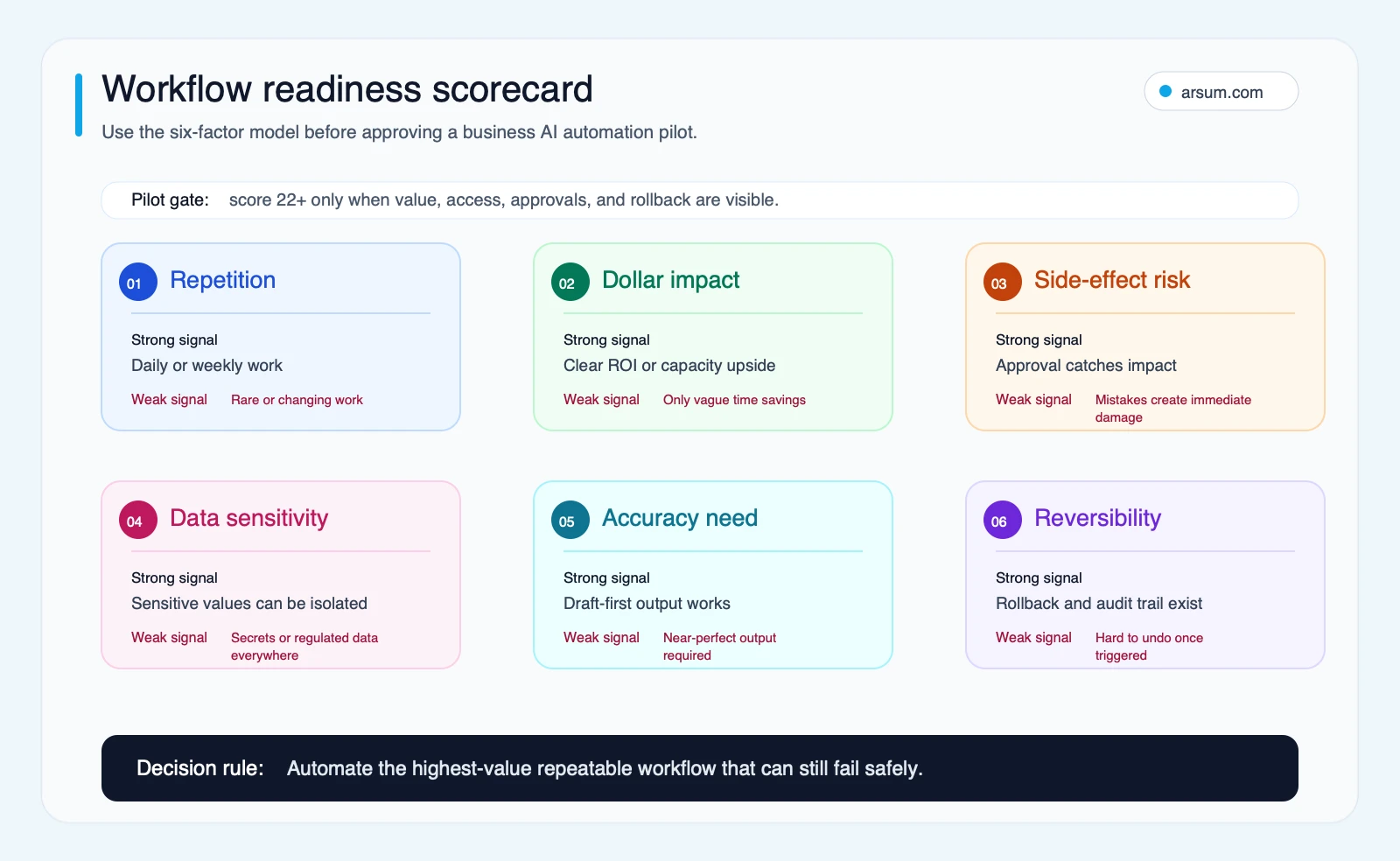
Use the scorecard to prioritize candidates, then use the veto gates to set the autonomy boundary.
A Worked Example: Finance Variance-Review Workflow
Consider a finance team preparing a weekly operating-variance review. This is a useful first pilot because it demonstrates the full operating path without authorizing a financial decision.
Trigger and source systems
The workflow starts when the finance team closes the reporting period. It reads from approved sources such as the general ledger export, planning model, revenue report, and a controlled list of prior-period commentary. The source list should be explicit; the model should not treat a random spreadsheet, email attachment, or stale dashboard as an equal source of truth.
The automation can:
- Collect approved files and record their version or export date.
- Identify material movements based on thresholds set by the finance owner.
- Draft a variance summary that cites the underlying line items or source links.
- Identify missing explanations and route questions to the relevant functional owner.
- Assemble a reviewer packet for finance.
It should not post journal entries, change forecasts, send external financial communications, or make approval decisions.
Normal path, exceptions, and approvals
On the normal path, the system prepares a draft for a finance analyst. The analyst checks calculations, source references, and wording; the controller approves the final narrative used in management reporting.
Exceptions should be explicit:
| Exception | Required action | Owner |
|---|---|---|
| Source files disagree | Stop draft generation and flag the discrepancy | Finance systems owner |
| Material movement lacks support | Create an internal question, not an invented explanation | Functional budget owner |
| Model output lacks a source reference | Mark as incomplete and require manual review | Finance analyst |
| Data contains restricted fields | Apply the approved data-handling route or exclude the field | Risk or security owner |
| Automation produces incorrect classifications repeatedly | Pause the workflow and revert to the manual packet | Pilot owner |
The retained evidence should include the source-file identifiers, generated draft, reviewer edits, approvals, exceptions, model or prompt version, and workflow run timestamp. The right audit trail is proportionate to the decision: enough to reconstruct what happened without duplicating unrestricted access to every financial system.
Illustrative planning worksheet
This is planning arithmetic, not a claim about typical results.
Suppose the current weekly reporting cycle requires:
- 2 analysts
- 5 hours each per week on collection, first-pass commentary, and routing
- 48 reporting weeks per year
- a loaded internal planning rate of $65 per hour
The annual manual capacity baseline is:
2 × 5 hours × 48 weeks × $65 = $31,200
If the pilot reduces that effort by 30%, the illustrative capacity released is:
$31,200 × 0.30 = $9,360
That figure is not a project ROI by itself. Subtract the cost of implementation, model usage, monitoring, reviewer time, security review, and ongoing support. Also test whether the reviewer’s work actually falls; a faster first draft that creates extensive fact-checking may not improve the operating model.
For examples of how to structure the inputs without treating them as guaranteed outcomes, see AI automation ROI examples.
Define a Pilot Scorecard Before You Select a Tool
The pilot should have an acceptance decision, not a vague goal to “see what AI can do.” Write the scorecard before the build starts.
| Field | Example pilot definition |
|---|---|
| Workflow | Weekly finance variance-review packet |
| Baseline | 10 analyst hours per reporting week; track current rework and turnaround time |
| Target | Reduce draft-preparation time while maintaining reviewer acceptance |
| Quality metric | Percentage of draft statements with correct source references and no material factual error |
| Exception metric | Percentage of cases correctly routed for human review instead of receiving an unsupported conclusion |
| Review-cost metric | Reviewer minutes per accepted packet, compared with baseline |
| Business owner | Controller |
| Technical owner | Systems or data lead |
| Review cadence | Weekly pilot review; documented exception review after each run |
| Stop condition | Material unsupported statement, missing source lineage, or access-control failure |
| Rollback | Disable writes and generated distribution; return to the existing manual packet process |
| Expansion gate | Acceptance criteria met over an agreed sample, review burden remains acceptable, owners sign off |
Use evaluations rather than relying on a few persuasive examples. OpenAI’s evals guidance recommends defining the task, testing representative inputs, and analyzing results—especially when changing models or prompts. For an operational workflow, the test set should include ordinary cases, incomplete inputs, conflicting sources, unusual exceptions, and cases that must be escalated.
The question is not whether the system ever produces a good draft. The question is whether it behaves safely and usefully across the cases that matter.
If you want an implementation assessment, bring the baseline, source systems, approval map, and draft acceptance criteria—not just a tool shortlist. Arsum can help turn that material into a scoped workflow assessment and pilot design.
Work With Arsum
We help businesses implement AI automation that actually works. Custom solutions, not cookie-cutter templates.
Learn more →Buy, Build, Partner, or Defer
Choose the route based on workflow specificity and operating ownership, not on a vendor’s most polished demo.
| Condition | Default route | Why |
|---|---|---|
| No baseline, unclear process, no owner, or no rollback | Defer | Fix the workflow definition before adding AI |
| Common, low-risk task with established integration patterns | Buy | Commodity software may be sufficient |
| Business-specific logic and strong internal engineering ownership | Build | You retain control of the workflow, testing, and change path |
| Cross-system workflow with a defined need but limited internal capacity | Partner | External implementation can accelerate architecture and pilot setup |
Buy when the work is commodity
Buying is usually appropriate for narrow, widely shared tasks: document summarization, ticket tagging, meeting-note preparation, standard CRM hygiene, or routing based on explicit rules. Even then, check permissions, exportability, audit records, and the boundary between draft assistance and direct action.
A useful comparison is between individual AI features and workflow automation. An AI feature may help a person write or summarize faster. A workflow automation must also manage triggers, data access, system updates, exceptions, controls, and ownership. See AI workflow automation for that distinction.
Build when the differentiation is in the exception path
Build when your company’s advantage depends on business-specific decisions, nonstandard data relationships, proprietary operating rules, or a tightly integrated customer experience. The custom layer is rarely the generic model call. It is the orchestration around it: source selection, state, tool permissions, evaluation, approval routing, and observability.
This does not mean every important workflow requires a custom agent framework. It means the team must own the parts that define the business decision. AI agent architecture patterns can help frame those boundaries.
Partner when the gap is execution, not ownership
A partner makes sense when the workflow is important and well enough understood to scope, but the internal team lacks time or experience in integrations, security design, evaluation harnesses, or production operations. The business should still retain ownership of process rules, approval policy, and success criteria.
When comparing options, focus on the implementation questions in AI automation agency services and AI automation agency versus an AI development firm: who owns the workflow after launch, what is commodity versus custom, and what evidence is required before expansion?
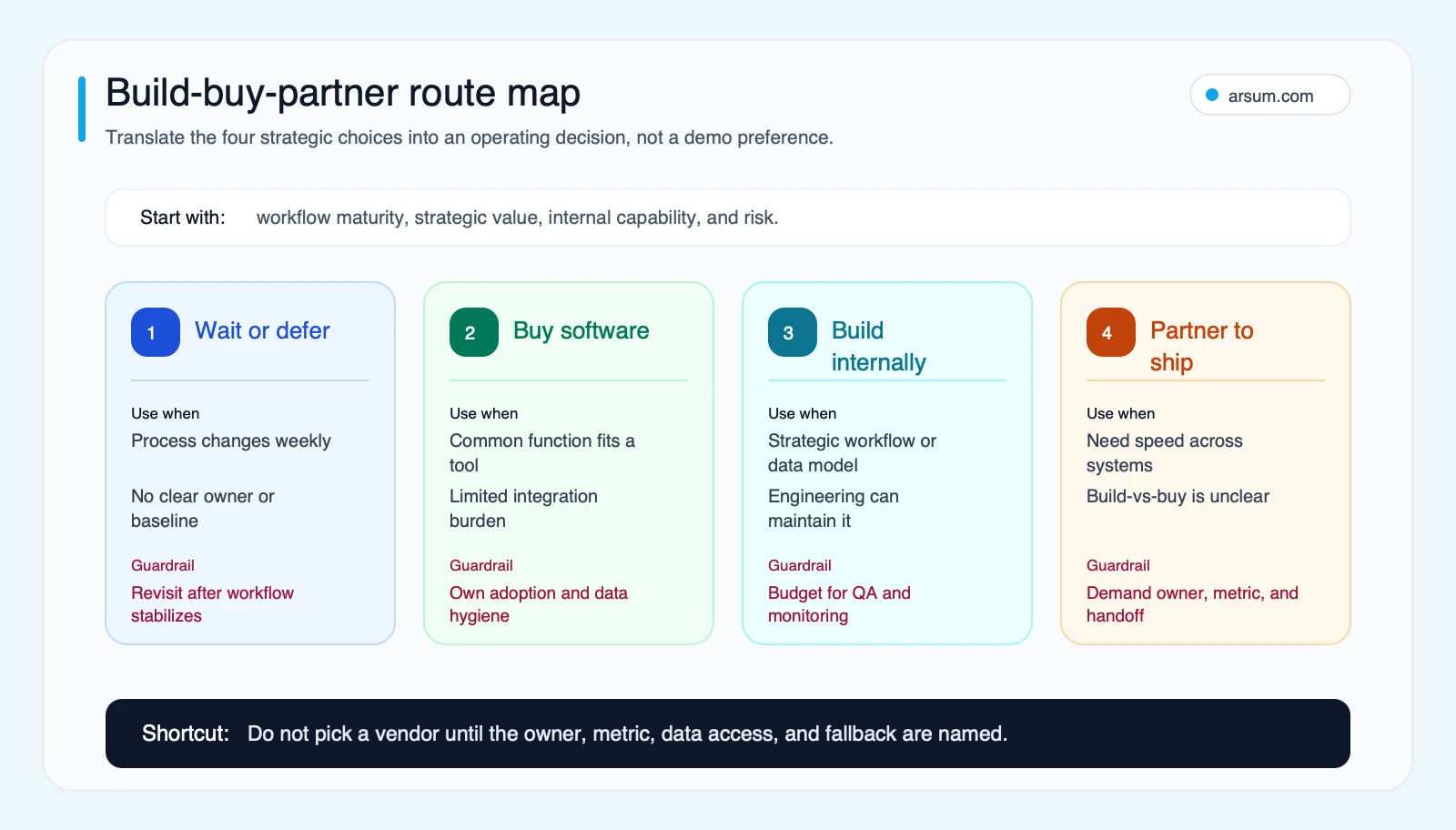
The route map is an operating-model choice: choose the smallest route that can safely own the workflow after the pilot.
Least Privilege Is a Workflow Requirement
Permissions are not an implementation detail to postpone. They determine what the system is allowed to do when its classification, retrieval, or routing is wrong.
Start with read-only access where possible. A workflow that prepares a summary or assembles a draft rarely needs delete, send, payment, credential-management, or production-change authority. Separate context gathering from consequential action: one component can retrieve approved information, while a narrower action step requires either explicit rules or human approval.
The practical checklist is:
- List each system and whether the workflow needs read, create, edit, send, or delete access.
- Justify every write permission against a named workflow step.
- Use the narrowest available scope and avoid sharing broad credentials across automations.
- Log tool calls, source references, approvals, errors, and retries.
- Test failure behavior: unavailable system, malformed input, missing source, duplicate request, and denied approval.
- Give a named owner the authority to disable the workflow.
Practitioner conversations surface this concern, but they are qualitative signals rather than market-wide proof. One Hacker News discussion about production AI infrastructure focused on state, long-running tasks, cost control, and scaling beyond a prototype. Another discussion about the OpenAI Agent SDK raised concerns about abstraction and debugging. A third thread on read-only OAuth scopes highlighted resistance to broad permissions for tasks that only need to inspect information.
The common operational lesson is simple: a fast prototype is not evidence that a workflow is maintainable or safe in production.
Failure Modes That Should Change the Decision
Do not proceed because the workflow has apparent upside alone. These are reasons to narrow, redesign, or defer it.
The process itself is unstable
If teams regularly change the rules, definitions, handoffs, or records involved, automation will encode confusion. Stabilize the workflow and document the decision path first.
The system cannot access a source of truth
An automation that guesses from partial context may be more dangerous than a manual process. Identify authoritative sources, field definitions, refresh behavior, and conflicts before measuring output quality.
Review cost erases the value
A draft-first system can still be worthwhile, but only if reviewers can verify it efficiently. Track reviewer minutes, correction rate, and exception routing—not just completion speed.
The exception path is missing
Exceptional cases are part of the design, not a sign of failure. Define what the automation must not decide, who receives the escalation, what context they need, and how the case returns to the normal workflow.
The action is irreversible or regulated
For sensitive or consequential decisions, lower autonomy rather than raising it. Use AI for retrieval, classification, preparation, or evidence assembly while a properly authorized person approves the action.
Generated output becomes thin or unverified
For AI-assisted publishing, search content, or customer-facing knowledge work, output needs source checks and genuine added value. Google’s people-first content guidance emphasizes helpful, reliable information created for people, including original value and care rather than scaled filler. That is a content standard, but it is also a useful operating discipline: if nobody can verify the output or explain its basis, the automation is creating risk rather than leverage.
Run the First 90 Days as Gates, Not a Calendar Promise
The sequence below is a planning structure. It is not a universal delivery-time claim; the actual pace depends on workflow complexity, access approvals, data readiness, and the availability of accountable owners.
Gate 1: Map and baseline
Document the trigger, normal path, source systems, approval steps, exceptions, current cost or cycle time, and rollback method. Name the business and technical owners.
Gate 2: Choose the route
Decide whether an existing tool can handle the commodity portion, whether a custom layer is needed for business-specific logic, and what access design is acceptable. Build the evaluation set before configuring the production path.
Gate 3: Run a controlled workflow
Use limited permissions and draft-first or approval-first actions. Review logs and exceptions on a regular cadence. Do not expand authority because early outputs look persuasive.
Gate 4: Measure and decide
Compare the pilot against the original baseline. Review quality, exception routing, review burden, security events, support effort, and owner confidence. Expand only when the acceptance criteria are met; otherwise revise, narrow, or stop.
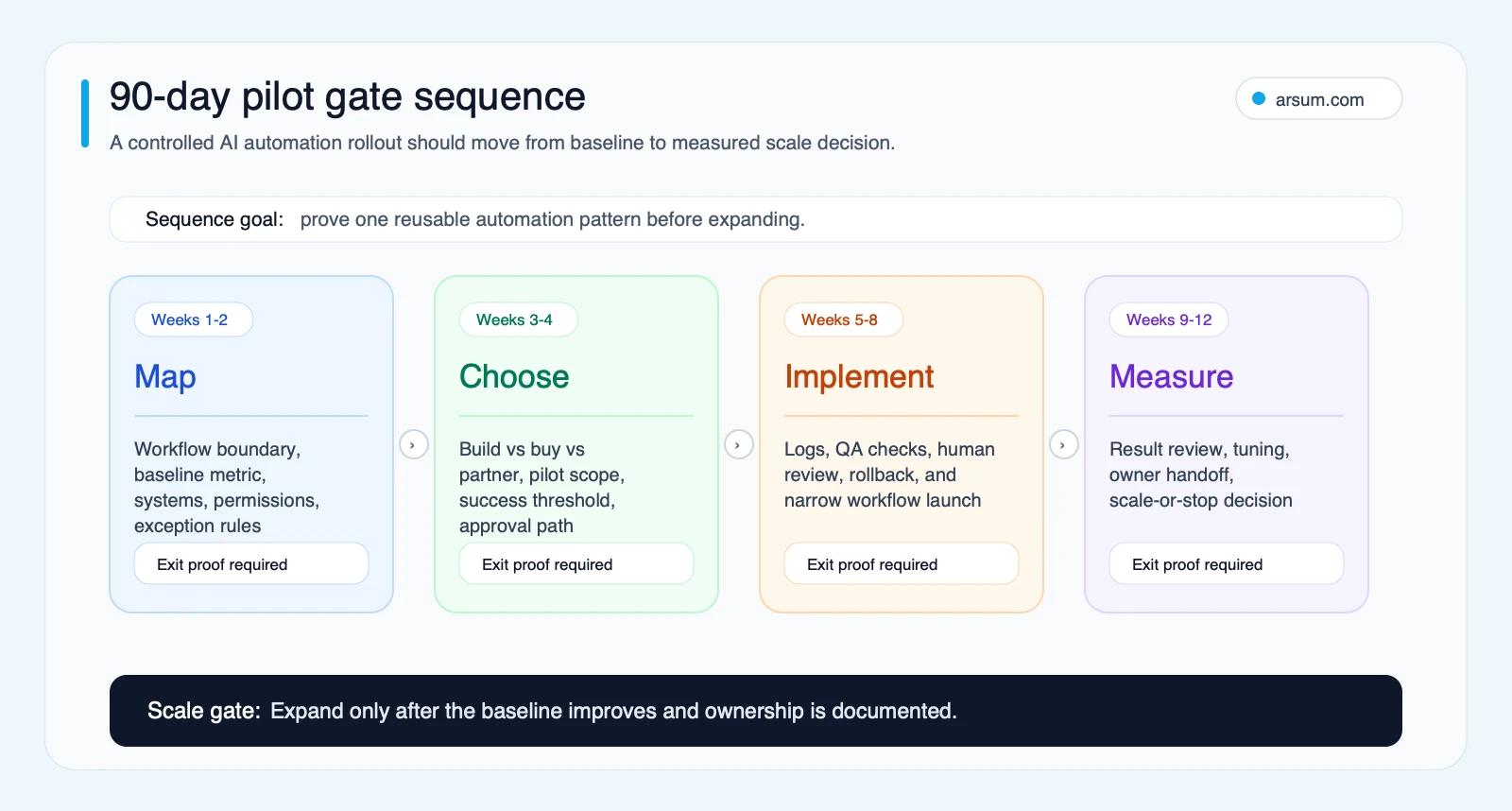
The pilot is successful when it produces a defendable decision to expand, redesign, buy a simpler tool, or stop—not merely when it produces a convincing demo.
The Practical Next Step
The AI automation tipping point is reached workflow by workflow. Start with one process that has measurable value, accessible sources, a clear human approval boundary, and a reversible first action. Baseline it, define the acceptance criteria, test the ugly exceptions, and choose the smallest implementation route that your team can own.
For adjacent decisions, explore AI tools for business automation, custom AI solutions for business, and AI implementation services.
Ready to Automate Your Business?
Stop wasting time on repetitive tasks. Let AI handle the busywork while you focus on growth.
Schedule a Free Strategy Call →Written by:Arsum editorial team
- Reviewed by
- Arsum editorial team
- Published
- February 12, 2026
- Updated
- July 3, 2026
- How this was produced
- Arsum uses research packs, source checks, and human editorial review to prepare and update blog articles. Editors are responsible for the final page.
- Source policy
- Sources are linked in the article when used. Methodology and source notes are included on higher-risk or high-visibility pages and are being rolled out across the archive. Editorial policy.
- Why this page exists
- Help B2B operators evaluate AI automation, implementation scope, cost, risk, and build-vs-buy decisions with practical context.