AI business process automation works when a workflow has enough business value to justify change and enough operational control to contain mistakes: start with rules or APIs where they fit, use AI for bounded interpretation, and allow system actions only when permissions, review, ownership, and rollback are explicit.
AI Business Process Automation: Practical Guide
Explore ai business process automation: compare workflow fit, costs, risks, evidence, and practical next steps before you build, buy, or hire.

Table of Contents
- What most guides miss: value and control are separate gates
- Start with the cheapest reliable layer
- Candidate selection: score value first, then controllability
- A practical pilot scorecard before build or buy
- Worked design: invoice intake without premature autonomy
- Production architecture: verification is a core boundary
- Security, approvals, and exception ownership
- Build, buy, or partner: decide from the workflow boundary
- Failure modes and disqualifying conditions
- Production trust checklist
- Methodology and limits
What most guides miss: value and control are separate gates
A workflow can be expensive, repetitive, and technically possible to automate yet still be a poor candidate for autonomous action. The first decision is not whether a model can produce a plausible answer. It is whether the process clears two gates:
- Business value: sufficient volume, manual effort, error or rework cost, and cycle-time impact.
- Operational control: usable inputs, measurable quality, manageable exceptions, limited permissions, a named owner, and a tested rollback path.
A high-value workflow with weak controls should usually begin as assistance, not autonomy. A controlled workflow with little volume or downstream impact may not deserve an AI project at all. This two-axis test prevents a common mistake: treating risk signals as reasons to automate sooner instead of reasons to narrow the operating mode.
The distinction matters most when a workflow touches money, customer communications, approvals, or a system of record. Technical capability does not grant business authorization. The organization still needs to decide what the system may read, draft, recommend, route, write, or send. If the workflow under consideration includes approvals, supplier intake, invoice matching, or ERP posting, use the practical breakdown in how to automate purchase orders as the more specific reference point before deciding whether the process should start as assistance or automation.
Start with the cheapest reliable layer
AI business process automation is not one technology category. Rules engines, APIs, RPA, document extraction, language models, and agent-style orchestration can all appear in the same workflow. The practical question is which layer is necessary for each step.
| Workflow condition | Start with | Add AI when | Action boundary |
|---|---|---|---|
| Stable fields, repeatable routing, scheduled handoffs | API, rules engine, or conventional automation | Unstructured inputs repeatedly defeat deterministic rules | Usually safe to automate after validation |
| Documents, emails, calls, or notes require interpretation | AI-assisted extraction, classification, or drafting | Quality can be measured and uncertain cases have a review queue | Human approves or corrects outputs |
| Multiple systems require contextual coordination | Controlled orchestration with explicit state and audit logs | Each action has an owner, narrow permission, and recovery path | Gate writes and external communications |
| The process changes constantly or has no stable definition of “right” | Redesign the process first | A repeatable decision policy and evaluation set exist | No autonomous action |
RPA is useful for deterministic interface and system tasks; it is not inherently limited to clicking buttons, nor is it always brittle. Its fit depends on the stability of the process and integrations. AI assistance is useful where people interpret variable inputs. It does not reliably resolve unfamiliar exceptions without an evaluation method, escalation design, and active monitoring.
This is also the answer to a recurring qualitative practitioner objection: many “AI automation” ideas may be better served by APIs or deterministic workflows. That is a healthy challenge to put into discovery, not a reason to force AI into the design. A Hacker News discussion raised exactly that question; it is a practitioner signal, not market measurement. Read the discussion.
Candidate selection: score value first, then controllability
Use two short scorecards. Do not combine them into one total: a risky workflow should not rise in priority merely because it has direct write access or costly failures.
Value score
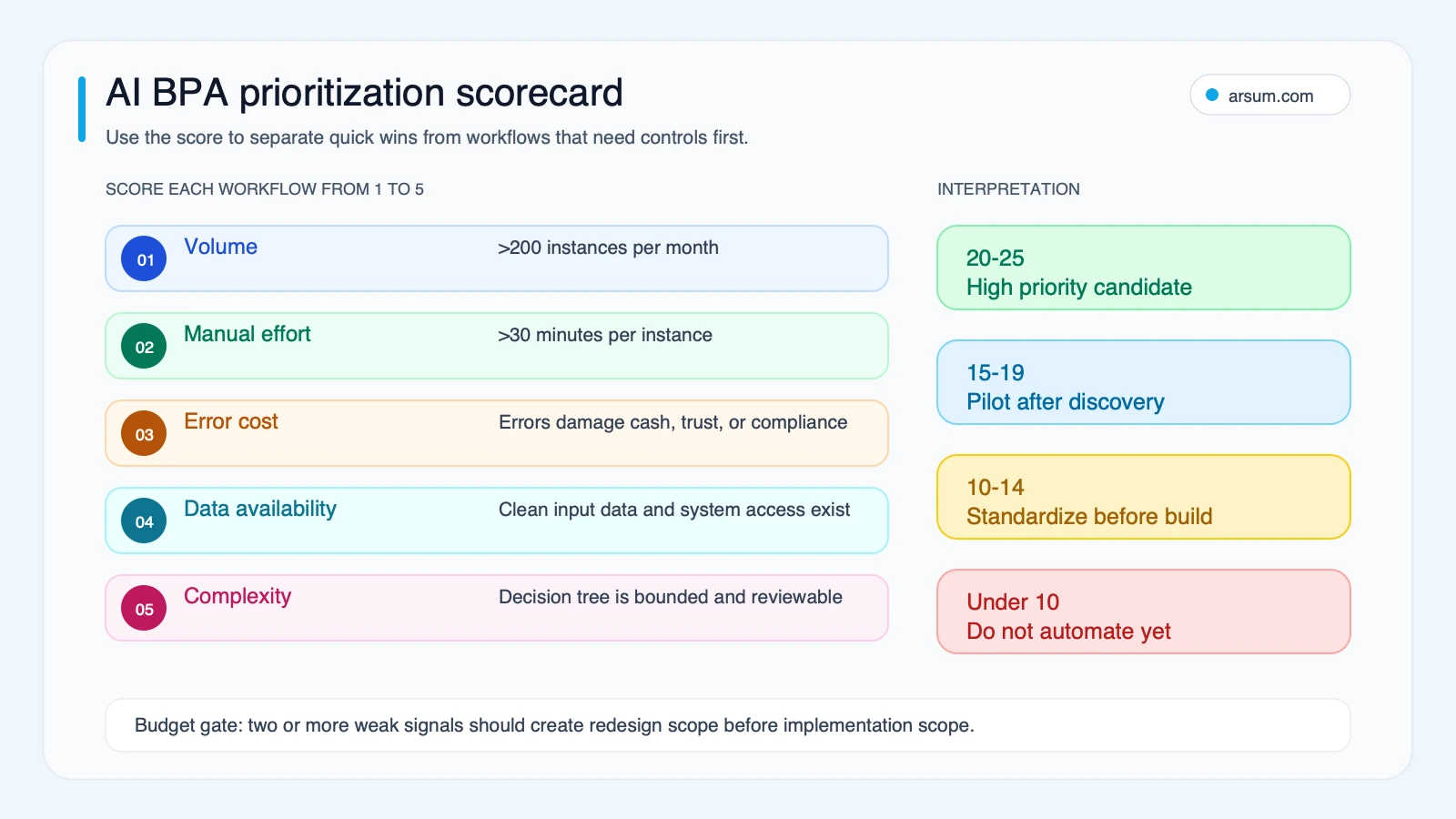
Score each factor from 1 to 5. This is an internal prioritization aid, not a benchmark.
| Factor | 1 | 3 | 5 |
|---|---|---|---|
| Monthly volume | Infrequent | Regular | High and recurring |
| Manual minutes per instance | Minimal | Material | Significant |
| Downstream error or rework cost | Little consequence | Team-level rework | Measurable financial, service, or compliance impact |
| Cycle-time importance | No meaningful deadline | Internal SLA | Customer, cash-flow, or operating dependency |
| Repeatability of outcome | Varies by individual | Partly defined | Clear acceptance criteria |
A higher value score justifies investigation. It does not justify autonomous execution.
Control score
Score the workflow by the strength of its controls.
| Factor | Weak control | Partial control | Strong control |
|---|---|---|---|
| Input quality | Missing, inconsistent, or inaccessible | Mixed quality | Source fields and lineage are known |
| Exception handling | No defined owner | Informal handoff | Queue, owner, SLA, and escalation path exist |
| Quality measurement | No ground truth | Periodic spot checks | Sample-based evaluation and error taxonomy |
| Permissions | Broad shared access | Limited but unclear scopes | Least-privilege, action-specific scopes |
| Reversal | Hard to undo | Manual recovery possible | Documented rollback and drill |
| Accountable owner | None | Sponsor only | Named operational owner with authority |
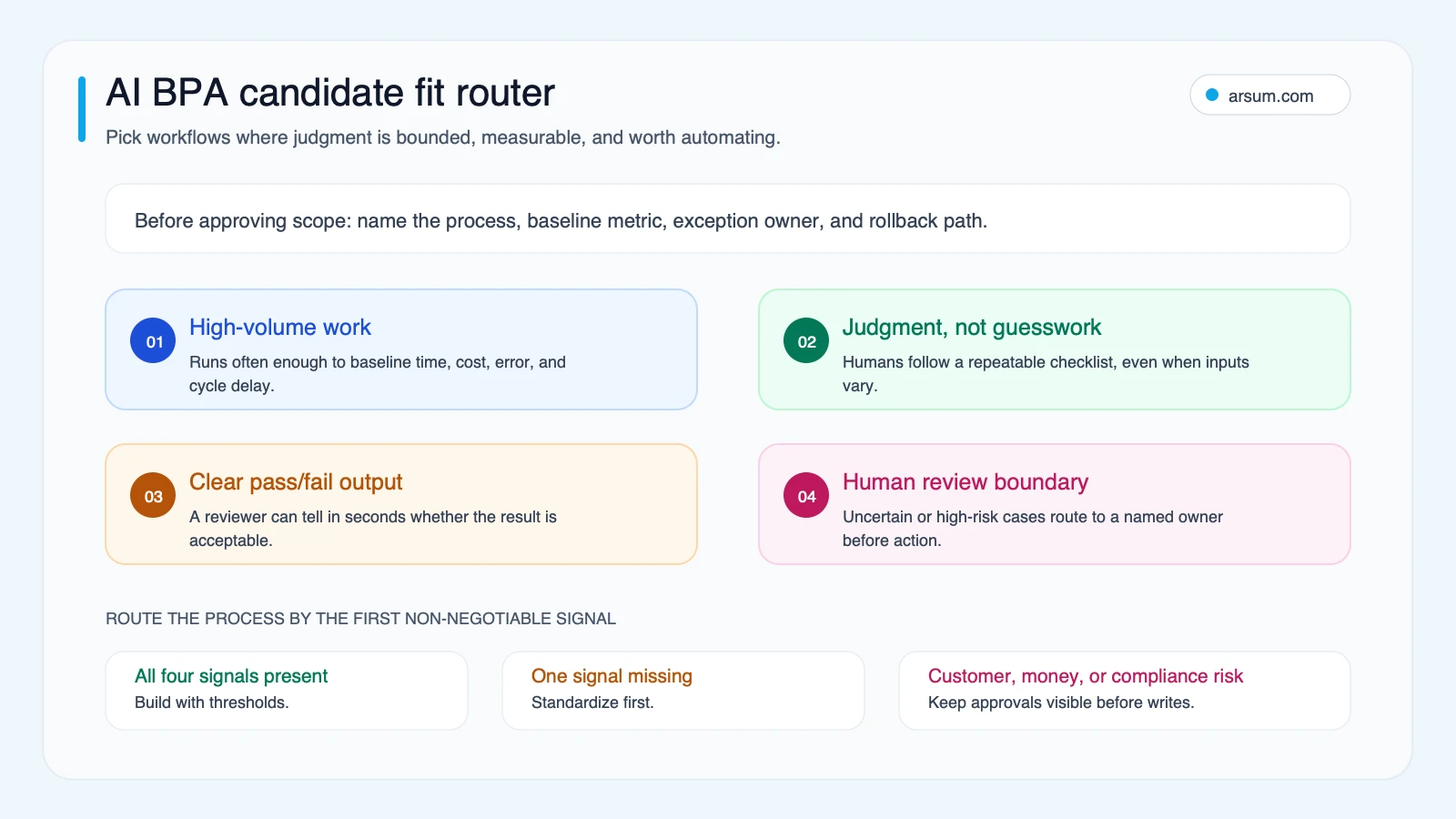
Use the result to choose an operating mode:
| Value | Control | Recommendation |
|---|---|---|
| Low | Any | Do not automate yet; improve the process or choose a higher-value candidate |
| High | Weak | Redesign the workflow and controls first |
| High | Partial | Run an AI-assist pilot with human approval |
| High | Strong | Consider a controlled action pilot, beginning with narrow write permissions |
For related workflow design choices, see business process architecture for AI automation and AI workflow automation patterns.
A practical pilot scorecard before build or buy
A pilot should test an operating design, not just demonstrate that a model can extract text or draft an answer. Define the scorecard before selecting a vendor or writing custom code.
One-page pilot acceptance scorecard
| Item | Record before pilot | Set before launch |
|---|---|---|
| Workflow and scope | Exact trigger, inputs, systems, and excluded cases | One bounded workflow; no silent scope expansion |
| Baseline | Monthly volume, median handling minutes, current error/rework rate, queue age | Source and sample period for every baseline |
| Target | Desired automation or assist rate | Target quality and review rate by case type |
| Review cost | Reviewer minutes per item and queue capacity | Maximum review minutes that still preserves value |
| Approval owner | Functional leader accountable for outcomes | Named approver for policy or write-action changes |
| Permissions | Read, draft, write, send, approve | Minimum required scopes; separate test and production credentials |
| Evidence retained | Inputs, output, rule/version, reviewer decision, action log | Retention location and access owner |
| Exception path | Current escalation behavior | Queue owner, response expectation, and fail-safe default |
| Rollback | How a mistaken action is currently corrected | Tested reversal or disable procedure |
| Review cadence | Existing operating rhythm | Weekly pilot review; 30/60/90-day acceptance decision |
The pilot’s default behavior should be safe: unclear input, missing evidence, policy conflict, or a failed integration routes the work to a person. Confidence labels alone are not a universal safety mechanism; they must be calibrated against reviewed outcomes and monitored by workflow segment.
Illustrative economics after review
The following is a planning worksheet, not a claim about a client result. It makes the hidden costs visible.
Assume a workflow has 1,100 monthly instances. The current median handling time is 20 minutes. During a pilot, 60% of cases receive an AI-assisted first pass; those cases still require 4 reviewer minutes. The remaining 40% enter an exception queue and require the full 20 minutes. Use a loaded labor rate of $45 per hour only as an illustrative planning assumption.
| Monthly input | Illustrative calculation | Result |
|---|---|---|
| Current labor time | 1,100 × 20 minutes | 366.7 hours |
| Assisted-case review time | 660 × 4 minutes | 44 hours |
| Exception handling time | 440 × 20 minutes | 146.7 hours |
| Pilot labor time | 44 + 146.7 hours | 190.7 hours |
| Gross capacity recovered | 366.7 − 190.7 hours | 176 hours |
| Gross labor value | 176 × $45/hour | $7,920/month |
That gross value is not ROI and it is not automatically headcount reduction. Deduct recurring software and model costs, implementation amortization, human review, exception handling, maintenance, security work, change management, and any new quality-control burden. Add avoided-error value only when it is measured and attributed under a documented method.
A simple worksheet is:
Net monthly value = gross capacity value + measured avoided-error value − reviewer cost − exception cost − recurring operating cost − monthly implementation amortization − maintenance and change cost
Use capacity recovery as a staffing or service-level planning input unless leadership has made a separate, documented decision to reduce labor spend.
Worked design: invoice intake without premature autonomy
Consider a hypothetical distributor receiving invoices through PDFs, email, EDI, and scans. The accounting system remains the system of record. The pilot scope is invoice intake and match preparation, not payment approval.
Recommended first operating mode
- Ingest invoices from a controlled mailbox, EDI feed, or upload queue.
- Extract supplier, invoice number, dates, amounts, line items, and purchase-order references.
- Run deterministic checks for duplicate invoice numbers, required fields, arithmetic, vendor identity, and purchase-order availability.
- Present a structured draft match to an AP reviewer.
- Route missing purchase orders, price discrepancies, and ambiguous supplier matches to the responsible buyer.
- Write a draft record only after the reviewer approves it; keep payment release outside the pilot.
The system may assist with interpretation. It should not silently create payment obligations, change vendor banking details, or approve exceptions.
Pilot acceptance thresholds
The AP owner should choose thresholds from the organization’s risk tolerance and baseline data. An illustrative set could be:
| Checkpoint | 30 days | 60 days | 90 days |
|---|---|---|---|
| Baseline captured | Complete sample and error taxonomy | Refreshed baseline | Confirmed against pilot operating data |
| Review coverage | 100% of assisted outputs reviewed | Sampled only after quality criterion is met | Sampling plan approved by AP owner |
| Exception queue | Owner and reason code on every item | Aging and recurring causes reviewed weekly | Redesign recurring causes or revise scope |
| Write permission | No production writes without approval | Draft creation only, if rollback works | Narrow write action only if acceptance criteria are met |
| Quality | Compare extracted fields and match recommendation with reviewer decision | Segment performance by supplier/input type | Continue only if agreed quality holds by segment |
| Rollback | Disable and correction procedure documented | Drill performed | Drill repeated after workflow changes |
Stop or redesign the pilot if review time consumes the projected capacity benefit, quality varies materially by supplier or input type, exception queues age without ownership, required permissions expand beyond the approved boundary, or rollback cannot be demonstrated.
This design helps answer whether to buy, build, or integrate. A standard AP platform may be sufficient when the supplier formats, ERP connector, approval sequence, and evidence requirements fit the product. A custom layer may be justified when intake formats, matching logic, exception ownership, or audit evidence are distinctive. For adjacent finance workflows, see accounts receivable automation and AI for finance teams.
💡 Arsum builds custom AI automation solutions tailored to your business needs.
Get a Free Consultation →Production architecture: verification is a core boundary
A useful architecture describes what can happen when the system is uncertain, not just the happy path.
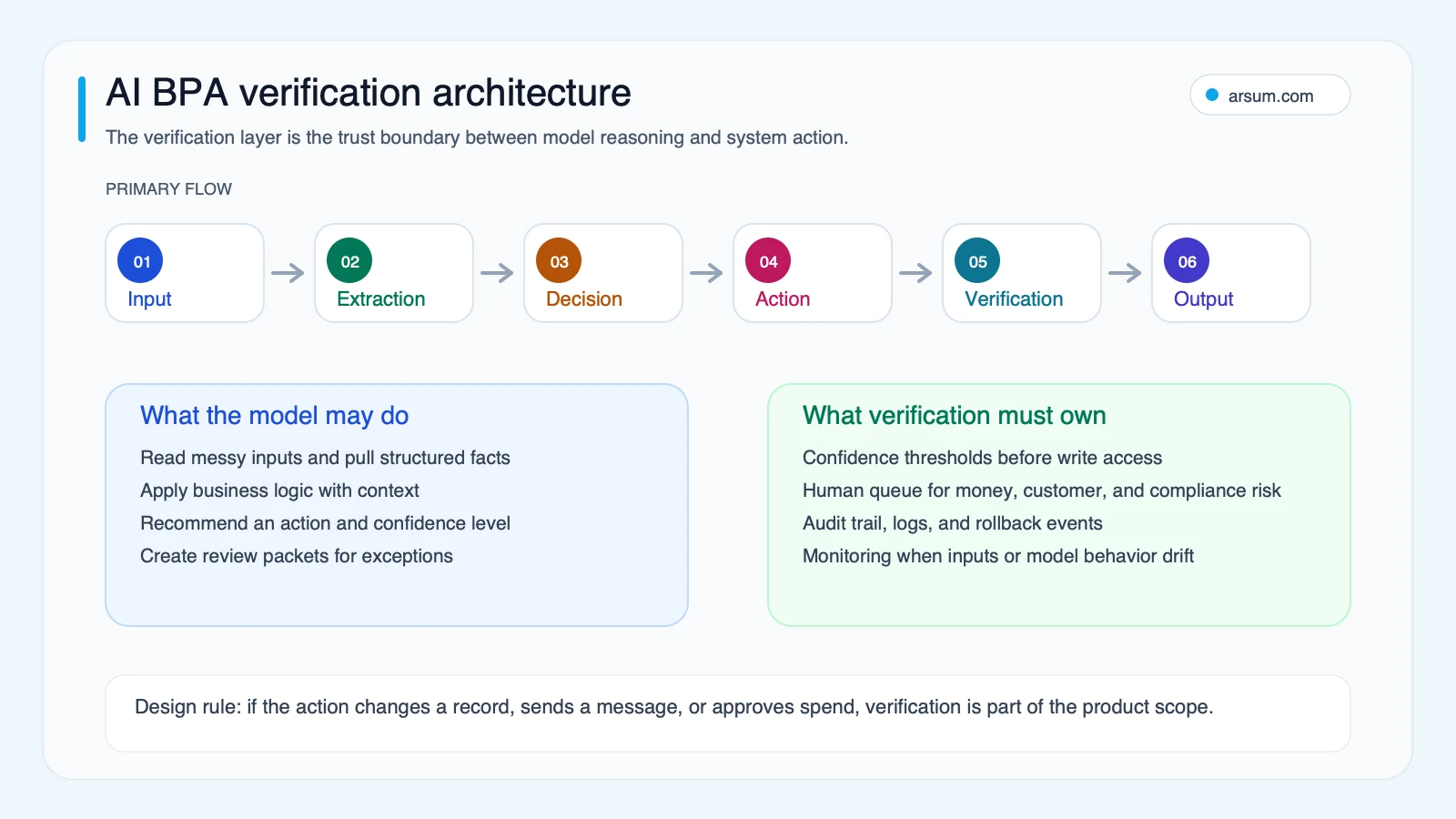
A controlled implementation typically includes:
- Input and lineage: identify the source, time received, document or record identifier, and applicable policy version.
- Interpretation: extract, classify, summarize, or recommend within a defined task.
- Deterministic validation: check required fields, business rules, duplicates, allowed values, and system state.
- Review and exceptions: send uncertain or disallowed cases to a named owner with enough context to decide.
- Action boundary: separate read, draft, write, send, and approve permissions; do not grant broad access for a narrow use case.
- Audit and rollback: retain the output, relevant inputs, versioned workflow logic, reviewer decision, executed action, and reversal method.
NIST’s AI Risk Management Framework is a useful reference for treating governance as part of design and operation rather than a final compliance review. Google’s Rules of Machine Learning similarly emphasizes starting with simple, measurable systems and robust infrastructure before adding complexity.
Feedback does not automatically make an AI workflow better. Teams need to instrument reviewed outcomes, classify failures, update rules, prompts, retrieval content, or models through change control, and test the revised system against representative cases before release.
Security, approvals, and exception ownership
The highest-risk decision is often permission design, not model selection. Grant only what the task requires. A read-only summarization workflow should not receive send or edit rights. A draft-generation workflow should not receive approval rights. A controlled action pilot should begin with a limited action, a reversible state change, and a named approver.
A practitioner post about AI workflows and Google service scopes highlighted this exact concern: read-only use cases can still be asked for broader access than they need. It is useful objection language for vendor evaluation, but it is not neutral market research. Read the practitioner post.
Use these questions in a vendor or build review:
- Can permissions be scoped by system, action, environment, and user role?
- Can the workflow operate in read-only or draft-only mode first?
- What evidence is retained for a reviewed decision and a write action?
- Can an approver pause the workflow without disabling unrelated operations?
- How is a mistaken record corrected, and who owns that correction?
- What happens if a connector, model service, or source system is unavailable?
- Does the vendor’s logging meet the organization’s security and retention requirements?
For a deeper treatment of system boundaries, see AI agent security considerations and AI integration consulting decisions.
Build, buy, or partner: decide from the workflow boundary
Do not begin with generic cost ranges or delivery promises. The relevant comparison is the amount of workflow-specific ownership you need.
| Option | Strong fit | Watch for |
|---|---|---|
| Buy a platform | Common connectors, standard approvals, acceptable data handling, limited exception complexity | Forced permissions, opaque evaluation, connector limits, weak evidence retention |
| Connect existing systems | Stable APIs and rules, clear data ownership, a narrow orchestration problem | Hidden integration maintenance and incomplete error handling |
| Build a narrow custom workflow | Proprietary exceptions, distinctive decision policy, strict controls, or a differentiated operating process | Building broad autonomy before the pilot proves value |
| Use an implementation partner | A sponsor has a defined workflow but lacks internal integration, evaluation, or control-design capacity | Unclear internal ownership after launch |
The best choice can be mixed: buy document extraction, connect existing systems through APIs, and build only the exception, review, and audit layer that represents your operating policy. See business process automation services for the buyer questions that should shape that evaluation.
Failure modes and disqualifying conditions
Do not automate a process first when any of these conditions apply:
- The team cannot agree on the correct outcome or policy for ordinary cases.
- There is no accessible baseline for volume, handling time, rework, or quality.
- Exceptions depend on undocumented judgment with no accountable escalation owner.
- The workflow requires broad production access that cannot be narrowed.
- A wrong action is irreversible or disproportionately consequential.
- The source data lacks lineage or is too incomplete to review.
- The expected reviewer workload has not been included in the economics.
- The organization cannot run a regular quality review or respond to discovered failures.
Customer-facing and search-facing content requires an additional boundary. High-volume generation is not evidence of usefulness. Google’s people-first content guidance reinforces the need for original, useful, trustworthy output rather than scaled low-value material. In operational terms, retain sources, assign reviewers, and keep a publish or send approval where consequences warrant it.
Production trust checklist
Before launch, the workflow owner should be able to answer:
- What exact decision or task is being assisted or automated?
- What baseline will prove or disprove value after review costs?
- Which steps are rules, which require AI interpretation, and why?
- Who owns every exception queue and policy escalation?
- Which permissions are read, draft, write, send, and approve?
- What evidence is retained for input, output, review, and action?
- What quality threshold is monitored by workflow segment?
- What is the safe default when data, model output, or an integration fails?
- How is a bad action reversed and when was rollback last tested?
- What 30/60/90-day decision will continue, expand, pause, or retire the workflow?
A workflow that cannot pass this checklist may still be valuable, but its next step is process and control design—not a larger model, broader permissions, or an autonomy claim.
Methodology and limits
This page uses an editorial, link-only evidence route because the decision is about workflow design, governance, and implementation choice rather than an occupation-level automation estimate or web-performance comparison. The practitioner material cited here is qualitative and non-representative; it identifies objections around review burden, integration drag, permissions, and unnecessary AI complexity rather than proving adoption or outcomes.
The practical standard is straightforward: measure the current workflow, make the review cost visible, start with the narrowest reliable operating mode, and earn broader action authority through observed pilot evidence.
Ready to Automate Your Business?
Stop wasting time on repetitive tasks. Let AI handle the busywork while you focus on growth.
Schedule a Free Strategy Call →Written by:Arsum editorial team
- Reviewed by
- Arsum editorial team
- Published
- June 1, 2026
- Updated
- July 3, 2026
- How this was produced
- Arsum uses research packs, source checks, and human editorial review to prepare and update blog articles. Editors are responsible for the final page.
- Source policy
- Sources are linked in the article when used. Methodology and source notes are included on higher-risk or high-visibility pages and are being rolled out across the archive. Editorial policy.
- Why this page exists
- Help B2B operators evaluate AI automation, implementation scope, cost, risk, and build-vs-buy decisions with practical context.