AI consulting for small businesses is worth paying for when it turns one costly, repeatable workflow into a controlled operating process—not when it sells a vague “AI transformation.” Start by choosing a workflow with a clear owner, known inputs, measurable baseline, review path for exceptions, and a reversible first deployment.
AI Consulting For Small Businesses: Buyer Guide
Explore ai consulting for small businesses: compare workflow fit, costs, risks, evidence, and practical next steps before you build, buy, or hire.

Starting with the right workflow determines whether AI consulting pays off in months or years.
Table of Contents
- What Most Guides Miss About AI Consulting for Small Businesses
- Start With a Workflow, Not an AI Category
- The Failure-Mode Gates to Check Before You Sign
- Buy, Configure, or Build a Custom Workflow?
- What a Credible Consulting Proposal Contains
- A Worked Pilot Scorecard You Can Put in the Contract
- Disqualifying Conditions and Common Failure Modes
- Cost and ROI: Approve Proof, Not a Generic Promise
- Watch for Thin Automation and Scaled-Content Pitches
- The Handoff Checklist
- Methodology and Next Step
- Related Arsum Guides
What Most Guides Miss About AI Consulting for Small Businesses
The first decision is not which model, platform, or consultant to choose. It is whether your problem needs advice, implementation, or ongoing ownership.
- Advice problem: You have several possible automation ideas but no evidence for which workflow deserves budget first.
- Implementation problem: The workflow is clear, but systems, data, approvals, and exception handling are not connected.
- Ownership problem: A first version can run, but no one has defined who reviews output, resolves failures, approves changes, or maintains integrations.
Those are different purchases. A proposal that bundles them into “AI strategy” without naming the workflow, systems, owner, and acceptance criteria is difficult to evaluate fairly.
A useful consultant should be able to describe your current process in operational terms before recommending a tool: what triggers the work, where the data comes from, what normal processing looks like, which exceptions occur, who approves consequential actions, and what happens when the automation cannot proceed. That workflow-first approach is also consistent with a qualitative practitioner signal from a Hacker News discussion on small-business automation consulting: the useful proposal behaved like a mini consultation rather than a generic capabilities pitch. It is one observed discussion, not market-wide evidence, but it is a practical buyer test.
Start With a Workflow, Not an AI Category
A good candidate is stable enough to describe, repeated often enough to measure, and bounded enough to test safely. It may include lead intake, email classification, document extraction, CRM updates, reporting assembly, appointment coordination, or accounts-receivable follow-up. See AI automation for small businesses for related workflow ideas.
The right first project is rarely “automate customer service” or “deploy an agent.” It is closer to:
Classify inbound service requests, retrieve the related account record, draft a response for staff approval, and route uncertain cases to a queue.
That statement exposes the real design work: data access, permitted actions, confidence handling, ownership, and rollback.
Route the work before hiring
Use these questions in order:
- Is the process stable, documented, and repeated?
- Can you take a representative sample of recent work without exposing data that should not be used?
- Are inputs mostly structured, or does the work depend on emails, PDFs, notes, or other unstructured material?
- Can a human review or reverse a bad output before it creates a customer, financial, legal, or operational consequence?
- Is there a named internal owner with authority to approve changes after launch?
If the answer to the first or fifth question is no, process cleanup and ownership design should come before automation. If the work is structured and rules are stable, deterministic automation may be enough. OpenAI’s practical guide to building agents makes a similar distinction: agentic approaches fit complex decisions, difficult-to-maintain rules, or unstructured inputs; simpler workflows may be better served by simpler systems.
That is a commercial decision as much as a technical one. The least-complex system that safely solves the workflow is usually easier to understand, operate, and replace.
The Failure-Mode Gates to Check Before You Sign
The expensive part of an AI project is often not the initial demo. It is discovering late that the workflow has inconsistent records, unpriced exceptions, unclear approvals, or no operating owner.
Data cleanup is a separate scope
Ask what data is required, where it lives, who can access it, and how complete it is. For example, a consultant should identify whether an intake workflow depends on CRM fields that are frequently blank, customer names that do not match between systems, or documents that arrive in multiple formats.
Do not accept “the model can handle messy data” as a data-readiness plan. Request a representative sample review, a list of known missing fields, and an explicit statement of which cleanup work is included, excluded, or owned by your team.
Exceptions define the operating cost
A happy-path demo can be real and still be a poor production design. Ask for a written exception inventory:
- Inputs that are incomplete, duplicated, conflicting, or outside the expected format
- Outputs below the agreed confidence or validation threshold
- Requests that require a human judgment call
- External system failures, permission errors, and API limits
- Customer-facing, financial, or record-changing actions that require approval
The consultant does not need to predict every edge case before a pilot. They do need to say how unknown cases will be captured, reviewed, labeled, and incorporated—or deliberately kept out of scope.
Technical capability is not authorization
A system may be capable of drafting an email, changing a CRM record, routing a payment-related document, or responding to a customer. That does not mean it should act without review.
OWASP identifies risks including prompt injection, insecure output handling, excessive agency, and overreliance in LLM applications. For a small business, the practical response is simple: limit permissions, validate outputs, keep consequential actions behind an approval step, and retain enough logs to investigate a bad run.
NIST’s AI Risk Management Framework is voluntary, but its core discipline is useful at any company size: consider risk and trustworthiness throughout design, use, evaluation, and ongoing management—not only after a system has already been deployed.
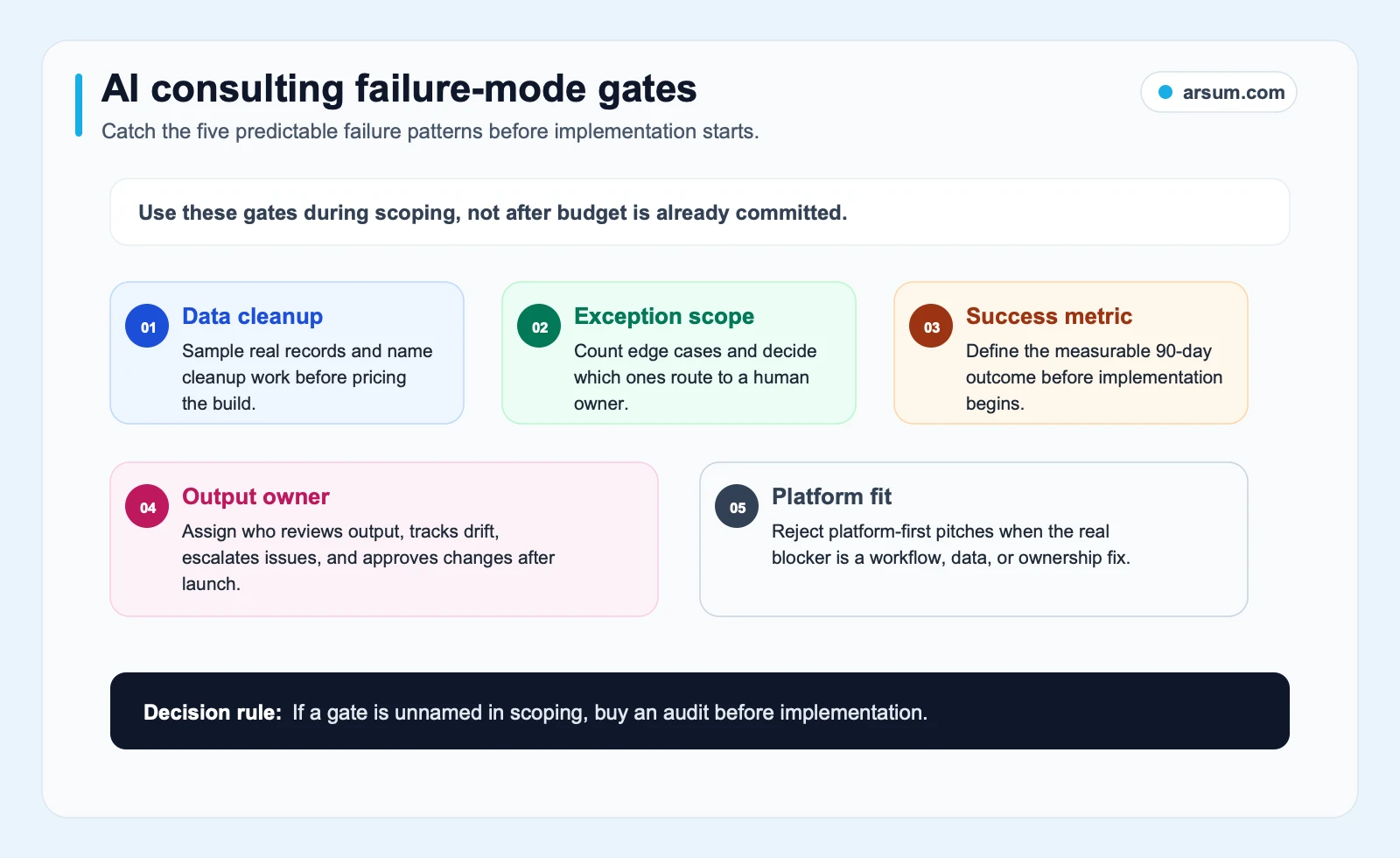
Use these gates as proposal requirements. If a vendor cannot state the data dependency, exception route, output owner, success measure, and platform-fit rationale, ask for a narrower audit before approving implementation.
Buy, Configure, or Build a Custom Workflow?
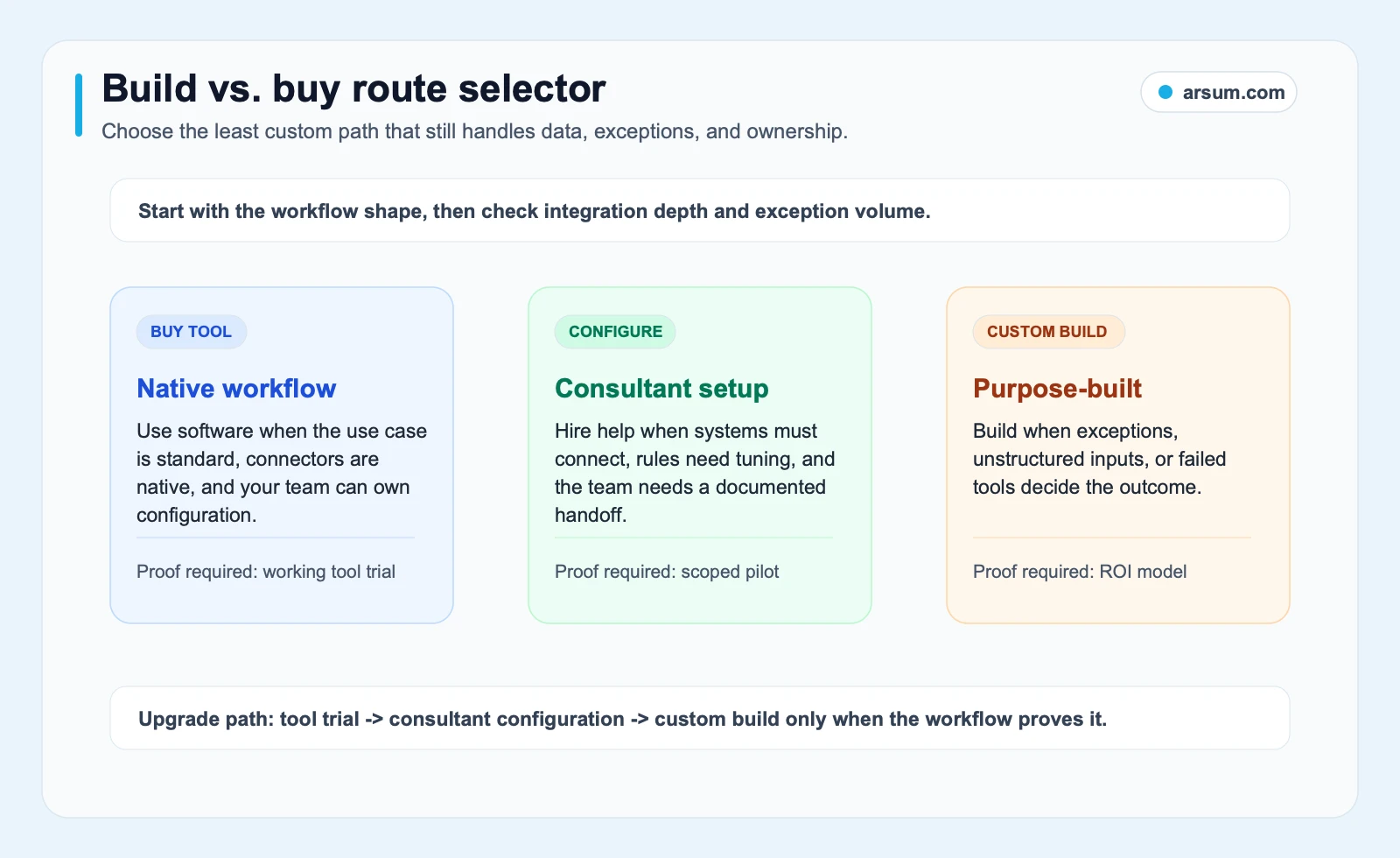
The build-versus-buy decision should not be ideological. It should reflect the shape of the workflow, the systems you already own, the cost of maintenance, and the ability to reverse the decision.
| Route | Appropriate when | What to require |
|---|---|---|
| Manual process cleanup | The process is changing, undocumented, or lacks an owner | Process map, owner assignment, baseline sample, and revised operating procedure |
| Deterministic automation | Inputs and rules are structured and stable | Rule definition, error handling, monitoring, and a person able to update the rules |
| Existing platform configuration | Your systems have supported integrations and the workflow matches a standard pattern | Clear configuration ownership, permission review, exportability, and maintenance plan |
| AI-assisted workflow | Unstructured inputs need classification, extraction, drafting, or routing, while a person approves important outcomes | Evaluation sample, review queue, validation checks, logging, and rollback |
| Custom agentic orchestration | The workflow has changing rules, multiple systems, meaningful unstructured context, and a justified need for tool use | Restricted permissions, approval boundaries, audit logs, exception handling, and named long-term owner |
A custom system can be appropriate when standard tools cannot connect the required systems, cannot handle the needed transformations, or cannot provide the controls and observability the workflow requires. It is not automatically better because it is custom.
Likewise, an off-the-shelf platform can be the right choice when the workflow is conventional and your team can own the configuration. Before buying, ask how you will export workflow logic, retain access to logs, rotate credentials, change providers, and recover if a connector or vendor feature changes. The AI workflow automation tools guide can help frame the tooling layer, while AI integration consulting is relevant when the hard part is connecting systems rather than choosing a model.
What a Credible Consulting Proposal Contains
Avoid evaluating consultants mainly by tool logos, model names, or broad claims about productivity. Evaluate the artifact you would receive and the operating commitments attached to it.
| Proposal element | Low-signal version | Useful version |
|---|---|---|
| Discovery | Generic opportunity workshop | A map of one workflow, its systems, inputs, decisions, exceptions, and owner |
| Recommendation | “Add an AI agent” | A reasoned route to process cleanup, rules, a platform, AI assistance, or custom development |
| Scope | A broad transformation statement | Included and excluded actions, dependencies, assumptions, acceptance criteria, and change process |
| Safety | “Enterprise-grade security” | Permissions, data handling, validation, approval points, logs, and incident route |
| Launch | A demo or handoff meeting | Pilot sample, monitoring plan, rollback procedure, training, and named post-launch owner |
| Maintenance | Open-ended optimization | Defined responsibilities for prompts, integrations, failures, reviews, and releases |
Ask a consultant to walk through a single recent example from your own operation. If they need only a few details to recommend a platform, they may be selling a product. If they can identify the source systems, ambiguity, manual decisions, and ownership questions they still need answered, they are doing discovery.
For comparison, AI consulting services covers the broader service category, and AI automation consultant focuses on the role and fit of a specialist.
💡 Arsum builds custom AI automation solutions tailored to your business needs.
Get a Free Consultation →A Worked Pilot Scorecard You Can Put in the Contract
A pilot is useful when there is uncertainty about data quality, exception frequency, model behavior, or operational adoption. The goal is not to prove that AI is impressive. It is to decide whether this specific workflow should proceed, change design, or stop.
The figures below are illustrative planning assumptions, not benchmark results or promised outcomes. Replace them with your own baseline.
Example pilot: inbound request triage
Suppose an operations team receives 120 inbound requests in a four-week sample. A coordinator currently categorizes each request, locates account context, and routes it.
| Scorecard field | Example planning entry |
|---|---|
| Workflow | Classify and route inbound service requests |
| Baseline sample | 120 requests from a defined four-week period |
| Current baseline | Record handling time, rework cases, escalation volume, and the cost of review using your own records |
| Pilot scope | Draft category and routing recommendation only; no automatic external action |
| Target | A pre-agreed share of pilot items can be accepted after review without material correction |
| Quality measure | Reviewer records correct, corrected, and rejected recommendations by category |
| Exception measure | Every unresolved or low-confidence item enters a named review queue |
| Review cost | Track reviewer minutes and correction effort, not only automated throughput |
| Approval owner | Operations lead approves the pilot design and any change in action scope |
| Technical owner | Named internal system owner manages access, credentials, and alerts |
| Evidence retained | Input reference, output, reviewer decision, reason for correction, version of workflow, and error log |
| Review cadence | Short operational review during the pilot, plus a documented go/no-go review on a set date |
| Stop condition | Pause if outputs create unacceptable risk, required logs are unavailable, permissions exceed scope, or review burden makes the pilot uneconomic |
| Rollback path | Disable the workflow, restore the manual queue, revoke access tokens if necessary, and preserve logs for analysis |
Define the target in business terms before testing. For example: “The pilot proceeds only if reviewed recommendations reduce coordinator handling effort without increasing unresolved customer requests or requiring an unmanageable review burden.” That is more honest than choosing a universal automation percentage.
Make the go/no-go decision explicit
At the pilot review, ask:
- Did the system perform within the agreed boundary, or did it create new work elsewhere?
- Which input types and exceptions should remain manual?
- Did reviewers have the evidence needed to correct and explain bad outputs?
- Can the internal owner monitor the workflow without depending on the consultant for every issue?
- Is the next step a controlled expansion, a redesign, a simpler deterministic approach, or a stop?
A credible consultant should be comfortable with a stop outcome. A pilot that demonstrates the workflow is not ready can prevent a much larger implementation mistake.
Disqualifying Conditions and Common Failure Modes
Do not start a production AI implementation when any of these conditions remains unresolved:
- The workflow changes frequently and no operating procedure exists.
- No internal person has authority to own outcomes after launch.
- The required records cannot be accessed lawfully, reliably, or with appropriate permissions.
- The business cannot define which outputs require human approval.
- The consultant cannot describe a rollback path.
- The proposed scope mixes several workflows without a shared owner or measurable outcome.
- The value case depends on unsupported savings claims rather than your own baseline.
- The vendor cannot explain how prompts, workflow logic, credentials, logs, and integrations will be handed over.
The normal failure pattern is predictable: a narrow demo expands into data cleanup, edge cases arrive late, the team lacks a review queue, and the consultant’s work becomes difficult to operate after handoff. The remedy is not more autonomy. It is narrower scope, stronger controls, and clear ownership.
For workflows involving invoices, collections, or payment-adjacent records, see accounts receivable automation and AI automation for accountants for adjacent operational considerations.
Cost and ROI: Approve Proof, Not a Generic Promise
Do not treat a generic market range, promised payback period, or vendor savings percentage as a business case. The relevant cost depends on integration complexity, data cleanup, evaluation work, security requirements, post-launch ownership, and how much of the workflow remains subject to review.
Ask every proposal to separate:
- Discovery or audit work
- Data preparation and access work
- Configuration or development work
- Testing and evaluation work
- Documentation and handoff
- Ongoing maintenance, model usage, platform subscriptions, and support
- Work that is excluded or requires a change request
Then use an illustrative planning calculation with your own inputs:
Monthly value hypothesis = (hours currently spent × fully loaded hourly cost) + measurable rework avoided + any separately evidenced revenue-adjacent value
Monthly operating cost = platform fees + model usage + maintenance + required human review
Decision: proceed only if the pilot evidence supports the value hypothesis after review and operating costs.
This is a planning model, not evidence that a project will achieve a particular return. It is particularly important to include review cost: an automation that produces more items but creates costly checking or corrections may not improve the workflow.
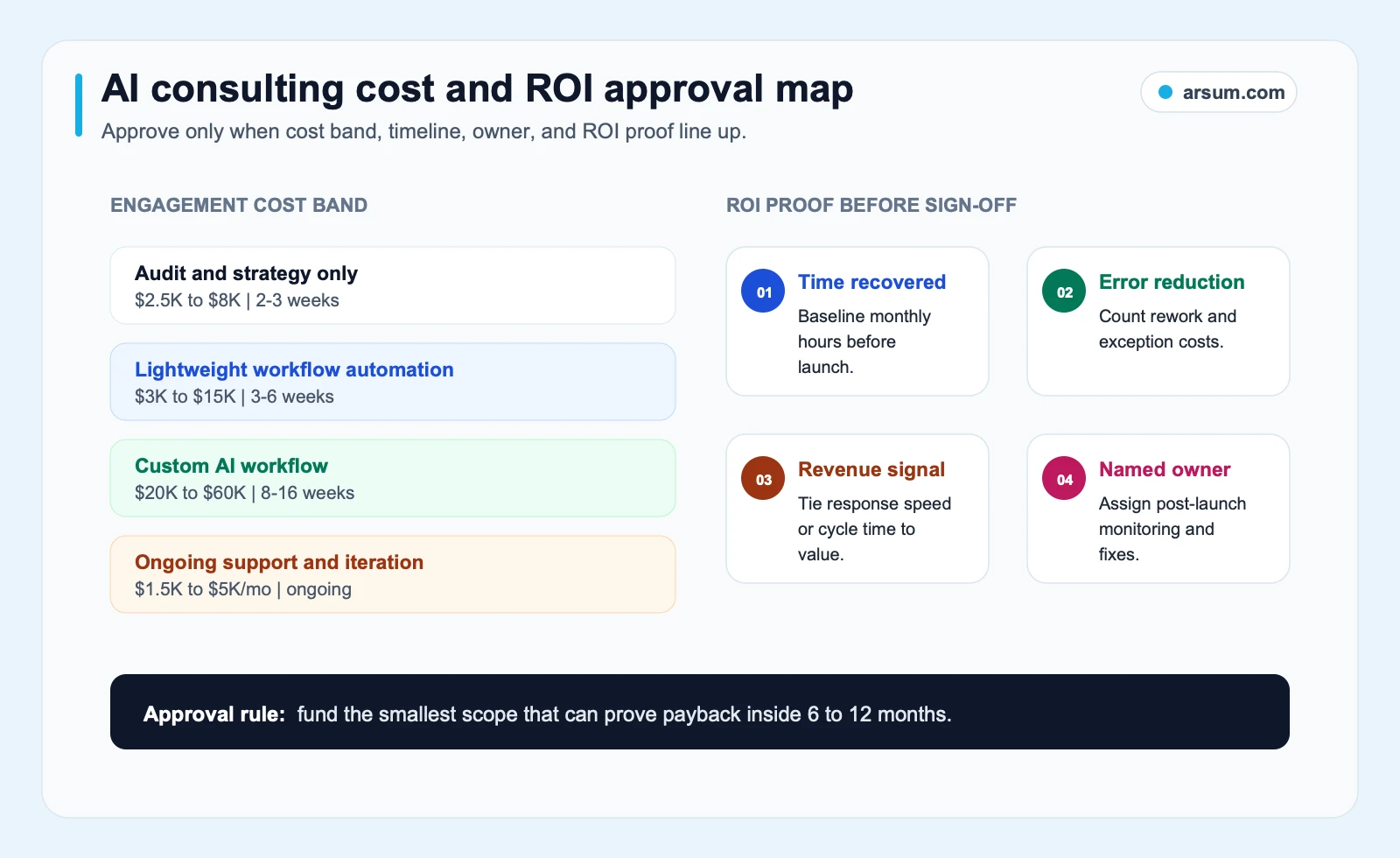
The approval map is a reminder to fund the smallest scope that can establish workflow fit, controls, operating cost, and a decision date. For additional ways to structure internal evaluation, see AI automation ROI examples.
Watch for Thin Automation and Scaled-Content Pitches
If a consultant pairs useful operations work with promises of mass SEO content, automated publishing, or scaled outbound volume, separate those scopes. The questions and risks are different.
Google’s helpful, reliable, people-first content guidance emphasizes content created to benefit people and provide original value. Its guidance on AI-generated content says AI can be used appropriately, while automation used primarily to manipulate rankings violates spam policies.
Ask in writing:
- What original business value does the content workflow create?
- What source material supports claims before publication?
- Which outputs require editorial or legal approval?
- How are inaccurate, repetitive, or low-value outputs detected and stopped?
- Who has authority to pause the workflow?
The same rule applies to operational automation. More output is not automatically better output. Approval boundaries, source lineage, and a stop condition matter whenever a system can affect customers, records, reputation, or spend.
The Handoff Checklist
Before closing an engagement, verify that your team—not only the consultant—can operate the workflow.
- You can access relevant logs, alerts, run history, and error records.
- The workflow has a documented exception queue and a named reviewer.
- Consequential actions have explicit approval rules.
- Failed runs have retry, escalation, and manual fallback procedures.
- Credentials, permissions, prompts, workflow logic, and integration settings have an identified owner.
- Data retention and access rules are documented.
- Changes are versioned, tested, and approved before production release.
- A vendor or platform change has a response path.
- The manual process can be restored if the automation is paused.
If these cannot be answered, the project is not fully handed off.
Methodology and Next Step
This is an editorial buyer framework, not a claim about universal project outcomes, market pricing, or client results. It draws on OpenAI’s agent guidance, OWASP’s LLM application risks, NIST’s AI Risk Management Framework, and Google’s published content guidance. Practitioner discussions are used only as qualitative signals about buyer concerns and delivery failure modes.
If you are evaluating a project now, bring one workflow, a small representative sample, the systems it touches, the current owner, and a proposed pilot decision date. That is enough to decide whether the next purchase should be process cleanup, a tool configuration, a scoped audit, or a controlled implementation.
Work With Arsum
We help businesses implement AI automation that actually works. Custom solutions, not cookie-cutter templates.
Learn more →Ready to Automate Your Business?
Stop wasting time on repetitive tasks. Let AI handle the busywork while you focus on growth.
Schedule a Free Strategy Call →Related Arsum Guides
Written by:Arsum editorial team
- Reviewed by
- Arsum editorial team
- Published
- May 9, 2026
- Updated
- July 3, 2026
- How this was produced
- Arsum uses research packs, source checks, and human editorial review to prepare and update blog articles. Editors are responsible for the final page.
- Source policy
- Sources are linked in the article when used. Methodology and source notes are included on higher-risk or high-visibility pages and are being rolled out across the archive. Editorial policy.
- Why this page exists
- Help B2B operators evaluate AI automation, implementation scope, cost, risk, and build-vs-buy decisions with practical context.