AI content automation business works when it automates a defined, lower-risk content workflow—not when it promises unlimited publishing. Start only where inputs are structured, claims can be checked, one person owns approval, publishing can be verified, and a bad release can be rolled back.
AI Content Automation Business: Practical Guide
Explore ai content automation business: compare workflow fit, costs, risks, evidence, and practical next steps before you build, buy, or hire.

Table of Contents
- What most guides miss: the decision is about autonomy, not output
- A readiness scorecard before you automate
- Define the workflow before selecting technology
- Pilot scorecard: prove control and economics before expansion
- Choose the use case before you choose the stack
- Build, buy, or partner: evaluate the operating requirements
- Failure modes and disqualifying conditions
- Source limits and the next decision
What most guides miss: the decision is about autonomy, not output
Most guides compare writers, prompts, or publishing tools. The operational question is simpler: what is the highest level of autonomy this page type can safely support?
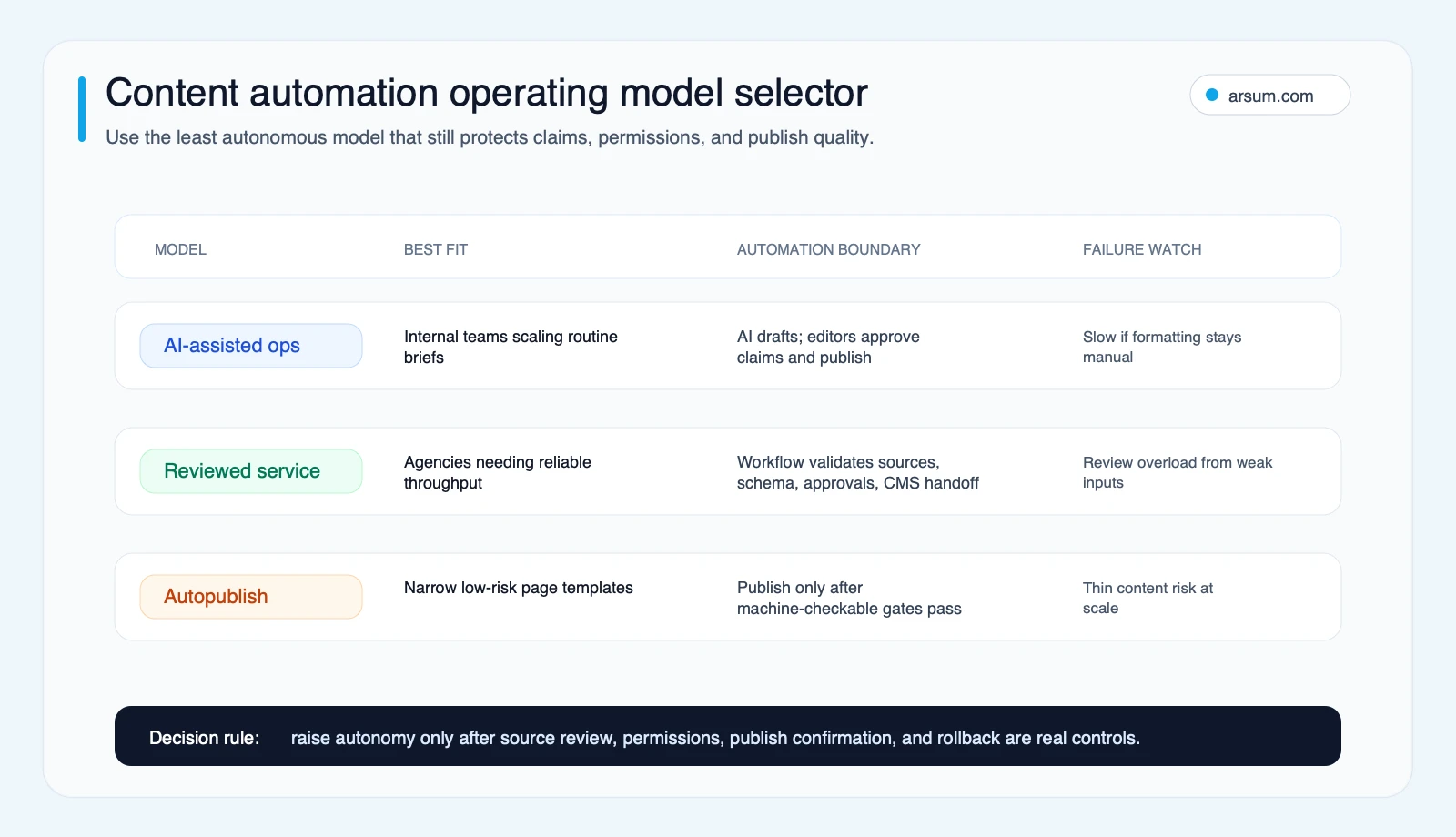
A useful system separates three operating models:
| Operating model | What AI does | What stays human-owned | Appropriate use |
|---|---|---|---|
| Manual with AI assistance | Research support, outlines, first drafts, formatting | Claims, editorial judgment, publishing | High-trust, brand-critical, regulated, or citation-heavy pages |
| Reviewed workflow | Draft assembly, structured checks, CMS preparation, refresh routing | Source approval, exceptions, final publish decision | Repetitive pages with clear templates and acceptance rules |
| Constrained autopublishing | Produces and publishes only eligible outputs after automated gates | System design, periodic audit, incident response | Narrow, low-risk templates with validated inputs and reversible publishing |
The right model is not the most autonomous one. It is the least autonomous model that removes a real bottleneck without creating more review, correction, or reputational cost than it saves.
Google’s guidance does not treat AI use itself as the deciding factor; it focuses on whether content is helpful, reliable, and made for people. Its spam policies separately warn against scaled content created primarily to manipulate search results. That makes a reviewed workflow more defensible than a volume-first publishing loop. See Google’s AI-generated content guidance and its spam policies.
A readiness scorecard before you automate
Score each dimension from 0 to 2. Do this for one page type at a time: for example, update-driven SEO refreshes, comparison pages, support articles, or sales enablement collateral. Do not score “content” as one category.
| Dimension | 0 — not ready | 1 — partly ready | 2 — ready |
|---|---|---|---|
| Repeatable demand source | Topics are ad hoc | Some recurring requests exist | Approved topic, sales-question, or refresh queue exists |
| Structured inputs | Each brief is invented from scratch | A template exists but varies heavily | Required fields, sources, exclusions, and template are defined |
| Acceptance criteria | Review means “looks good” | Some checks are documented | Pass/fail editorial, factual, and formatting checks are defined |
| Fact-checkable claims | Claims are difficult to validate | Some approved references exist | Claims map to approved sources or internal documentation |
| Human review path | No clear approver | Reviewer is available informally | Named owner approves risky claims and exceptions |
| Publishing controls | Manual or broad CMS access | Basic workflow exists | Scoped permissions, live-page verification, and rollback are tested |
| Measurable business outcome | Success means page count | Traffic or turnaround is tracked | Conversion, support, pipeline, or review-hour metric is defined |
| Refresh cadence | Published pages are forgotten | Reviews happen inconsistently | Trigger, owner, and review interval are assigned |
Add the eight scores.
| Total | Route | Practical implication |
|---|---|---|
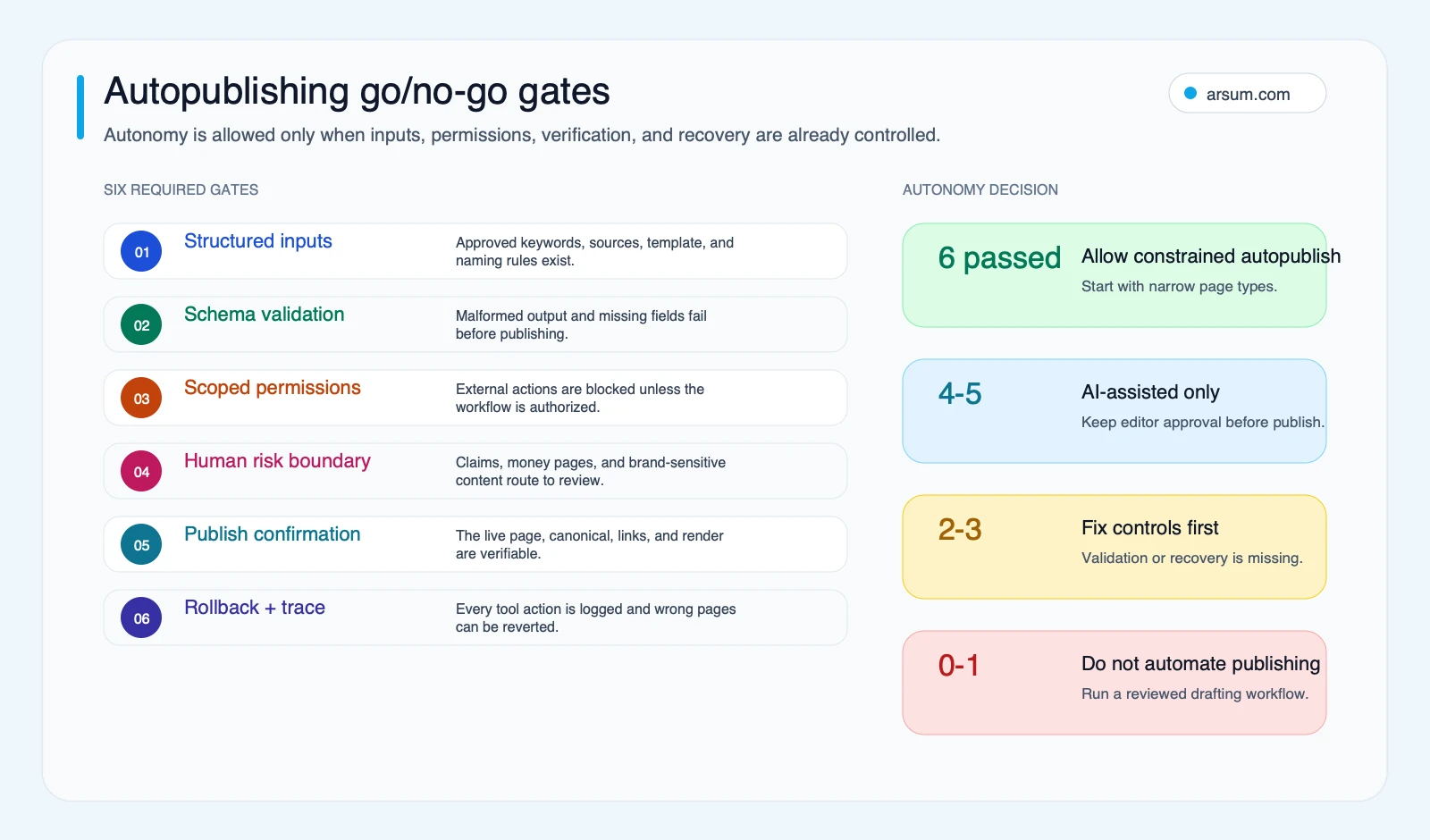
| 0–7 | Keep manual | Use AI for drafting support, but do not automate publishing or factual assembly |
| 8–12 | AI-assisted pilot | Automate repeatable preparation steps; require human approval before publishing |
| 13–16 | Reviewed workflow | Automate eligible workflow steps with validation, evidence retention, and publish confirmation |
| 17–18 | Consider constrained autopublishing | Only for a narrow template after a successful reviewed pilot proves control reliability |
Worked example: update-driven product education pages
Assume a team maintains product education pages after documented product changes.
- Demand source: 2 — release notes create a repeatable update queue.
- Structured inputs: 2 — each update includes approved terminology, feature state, and affected pages.
- Acceptance criteria: 2 — correct terminology, no unsupported capability claims, and required internal links.
- Fact-checkable claims: 2 — product documentation is the source of record.
- Human review path: 2 — product marketing approves the final change.
- Publishing controls: 1 — CMS publishing works, but rollback has not been tested.
- Business outcome: 1 — time-to-update is tracked, but reader outcomes are not.
- Refresh cadence: 2 — updates are reviewed after each release.
Score: 14/16. This is a reviewed-workflow candidate, not an autopublishing candidate. The initial work is to test rollback and define a stronger outcome measure—not to add more generation tools.
This scorecard is an Arsum operational recommendation, not a prediction of rankings, conversions, or savings. Those outcomes require measurement in your own workflow.
Define the workflow before selecting technology
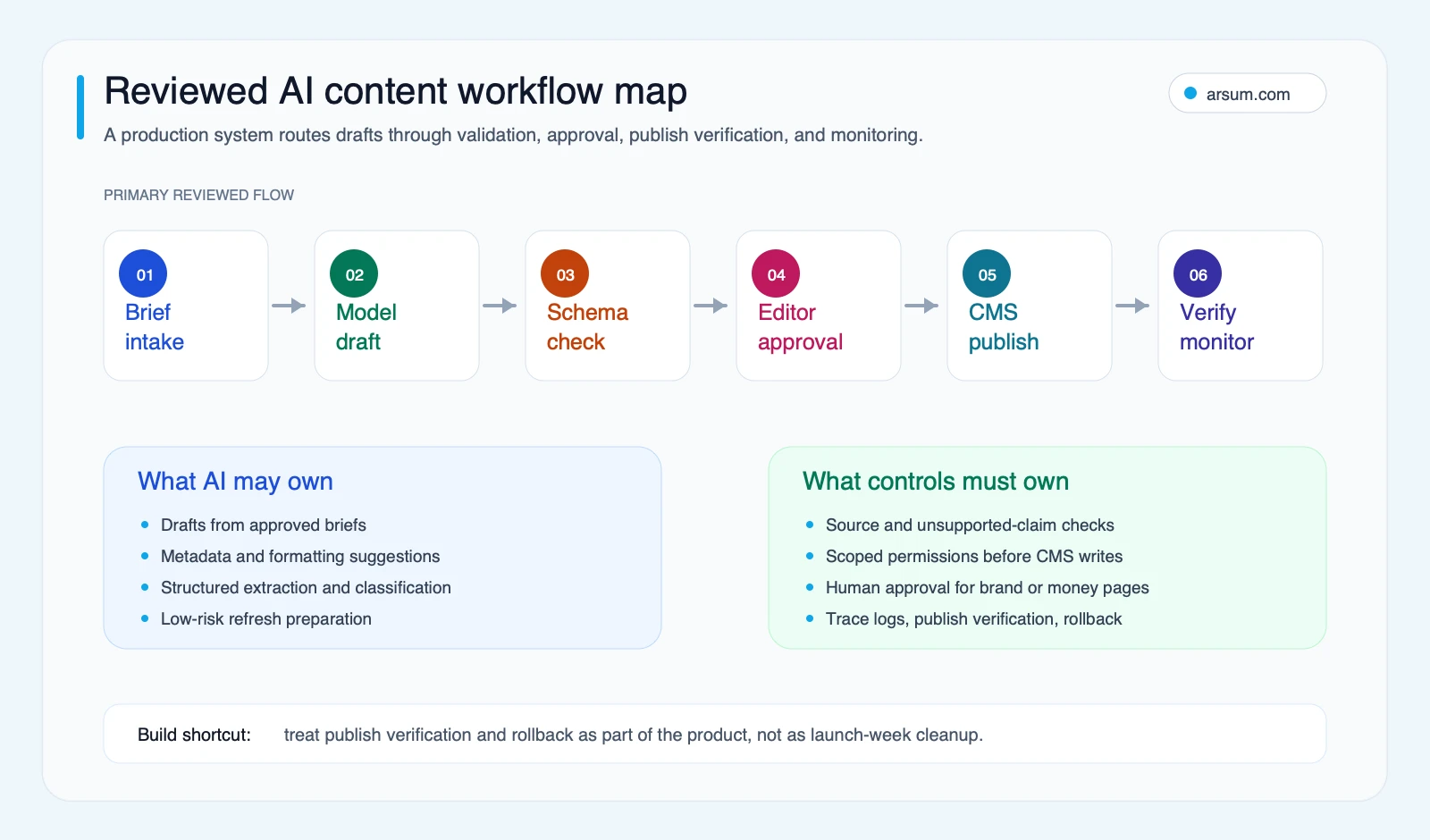
A content automation system is an operating workflow with an AI component. It needs an input contract, approvals, exception handling, controlled external actions, and feedback after publication.
| Step | Required input | Automated work | Human decision | Evidence retained |
|---|---|---|---|---|
| Demand selection | Approved topic queue, sales questions, or refresh trigger | Deduplicate, classify, prioritize | Content owner confirms business intent | Topic source and priority rationale |
| Brief creation | Audience, template, CTA rules, source requirements | Assemble a structured brief | Content owner accepts scope | Versioned brief |
| Source collection | Approved internal docs and allowed external sources | Retrieve, organize, flag gaps | Source approver validates support | Source list and access date |
| Draft assembly | Approved brief and source bundle | Produce draft and structured metadata | Editor evaluates usefulness and claims | Draft version and validation results |
| Quality review | Editorial rules and risk flags | Check required fields, links, formatting | Editor resolves exceptions | Review decision and edits |
| CMS preparation | Approved content package | Convert and stage content | CMS approver authorizes release | Staged ID and permission log |
| Publish confirmation | CMS response and expected page state | Verify URL, metadata, rendering, links | Incident owner handles mismatch | Publish result and check record |
| Monitoring and refresh | Analytics, corrections, source changes | Open refresh tasks and trend exceptions | Content owner decides next action | Change history and refresh decision |
Workflow orchestration tools can coordinate AI steps with other applications, but that capability does not substitute for governance. n8n’s Advanced AI documentation is useful for understanding orchestration patterns; your workflow still needs a clear permission model, retry behavior, and owner for failed actions.
For a broader operating-model view, see AI workflow automation and business process automation consulting.
Pilot scorecard: prove control and economics before expansion
Run a pilot on a bounded batch of one eligible page type. A planning window, batch size, and budget should be set by the team based on existing volume and risk; this framework does not claim a universal timeline or cost.
Use a baseline from your current manual process, then set targets before the first draft is generated.
| Metric | Baseline | Pilot target | Owner | Review cadence | Acceptance gate |
|---|---|---|---|---|---|
| Approved-draft cycle time | Measure current median from brief approval to editorial approval | Improve without reducing quality | Content operations lead | Weekly | Target met or a documented bottleneck explains the miss |
| Heavy-rewrite rate | Share of drafts requiring structural rewrite or claim replacement | No worse than manual baseline | Managing editor | Per batch | If higher for two batches, reduce automation scope |
| Unsupported-claim escapes | Claims found after approval without adequate support | Zero | Source approver | Per batch and post-publish | Any confirmed escape pauses the affected template |
| Exception rate | Items routed for missing inputs, unclear sources, or validation failure | Expected and visible, not suppressed | Technical operator | Weekly | Rising rate triggers root-cause review |
| Publish-verification failures | Pages that do not match expected live state | Zero unresolved failures | CMS approver | Every publish | Any unresolved failure blocks autopublishing |
| Review hours per accepted page | Measure editor and approver time | Reduce only if quality gates hold | Content operations lead | Weekly | Savings do not count if rework moves post-publish |
| Business outcome | Choose one: qualified conversions, assisted pipeline, support resolution, or refresh completion | Directional improvement or a documented learning result | Functional sponsor | Monthly | Expand only if the metric remains attributable enough to guide a decision |
Stop, expand, or roll back
Use explicit rules so an automation pilot does not drift forward because the team has already invested in it.
- Expand only when the workflow meets quality gates, publish checks succeed, and review effort is not merely being shifted downstream.
- Hold and revise when drafts are useful but exceptions concentrate in a fixable step such as incomplete briefs, source retrieval, or CMS formatting.
- Stop when unsupported claims escape approval, publish verification fails without a reliable recovery path, or the workflow creates more correction work than the manual baseline.
- Roll back by disabling publishing actions, reverting to the previous approved page version, preserving the trace record, and assigning an incident owner to diagnose the failure.
NIST’s AI Risk Management Framework supports this kind of approach: accountability, measurement, and ongoing management are part of operating an AI-enabled process, not post-launch extras.
💡 Arsum builds custom AI automation solutions tailored to your business needs.
Get a Free Consultation →Choose the use case before you choose the stack
The same tools can be appropriate for one content workflow and wrong for another. Route use cases by the cost of a mistake, reversibility, and availability of reliable inputs.
| Use case | Value hypothesis | Risk level | Minimum inputs | Human owner | Go-live boundary |
|---|---|---|---|---|---|
| SEO refreshes | Keep existing pages current and internally connected | Medium | Existing page, approved source changes, link rules | Content lead | Reviewed publication after factual and rendering checks |
| Comparison pages | Help buyers evaluate a defined alternative | Medium to high | Approved comparison criteria and source standards | Editor or strategist | Human approval for positioning and claims |
| Product education | Improve understanding of current capabilities | Medium | Current product docs and terminology | Product marketing | Accuracy review against product source of truth |
| Sales enablement | Reduce repetitive preparation work | Low to medium | Approved messaging, account context, privacy rules | Revenue owner | Human approval before external use |
| Support knowledge base | Make known resolutions easier to find | Medium | Validated troubleshooting steps and escalation paths | Support owner | Preserve escalation and test instructions |
| Programmatic pages | Cover narrowly structured demand | High | Original, useful structured data and strict quality rules | SEO lead | Only after usefulness, duplication, and monitoring gates are proven |
If the buyer decision is commercial or high consequence, automate research assembly and formatting first. Keep the conclusion, positioning, legal or product claims, and release decision human-owned.
This is particularly important for teams comparing AI systems with off-the-shelf tools. AI automation platforms can accelerate a prototype, while custom AI solutions for business explains when a workflow’s integration and control requirements justify a more tailored system.
Build, buy, or partner: evaluate the operating requirements
Do not buy a platform because it can generate drafts. Evaluate whether it can support the workflow you have chosen.
| Evaluation question | Why it matters |
|---|---|
| Does it integrate with your source-of-truth systems? | Unreliable or manually copied inputs create factual and version-control risk |
| Can permissions be scoped by action and environment? | A model instruction is not a substitute for restricting who or what can publish |
| Are prompts, sources, outputs, approvals, and tool actions logged? | You need to reconstruct why a page changed and who authorized it |
| Can it retry safely and surface failures? | A failed CMS call, timeout, or malformed payload should become an exception, not a silent loss |
| Can it retain source lineage? | Editors need to see what supports a claim and what requires escalation |
| Can the workflow hand exceptions to named people? | Automation without ownership becomes an unattended queue |
| What is the total review cost? | A cheaper draft is not valuable if every page requires a larger cleanup effort |
| Can publishing be verified and reversed? | External actions need confirmation and a tested recovery path |
Model usage is one cost bucket, alongside validation, human review, integration, monitoring, and remediation. Check current OpenAI API pricing or the pricing documentation for your chosen provider when budgeting; usage-based costs can vary with generation, extraction, retries, and enrichment.
For leadership teams deciding how much technical ownership they need, AI integration consulting and the AI automation ROI examples guide provide adjacent decision frameworks.
Failure modes and disqualifying conditions
Automation should be reduced or rejected when the normal path is easy but the exception path is costly.
Do not autopublish when any of these are true
- The page makes consequential financial, legal, health, safety, product, or compliance claims.
- The team cannot identify a source of truth for material claims.
- The page requires original reporting, expert judgment, or a distinctive point of view that a template cannot supply.
- No one owns final approval or post-publish incident response.
- CMS actions cannot be scoped, verified, and reversed.
- The only success metric is output volume.
- The expected review work is opaque, so apparent savings may just move into post-publish corrections.
Common failures to design for
- Thin inputs: a vague topic becomes a generic draft, then more generic pages.
- False confidence: fluent prose masks unsupported or outdated claims.
- Permission failure: a workflow can publish more broadly than its owner intended.
- Silent CMS failure: the API reports success, but the wrong metadata, canonical, rendering, or page state reaches production.
- Exception blindness: failures are retried repeatedly instead of being routed to an accountable human.
- Unmeasured output: pages are published without a review-hours, conversion, pipeline, support, or refresh measure.
Community discussions can be useful as qualitative buyer signals: readers frequently question whether AI content automation is legitimate, whether it creates low-value SEO output, and whether tool choice is overwhelming. Those discussions are not evidence of prevalence or outcomes. They do reinforce the need to measure useful business results rather than draft volume. See the qualitative discussions from r/automation, r/DigitalMarketing, and Hacker News.
Source limits and the next decision
| Source type | What it informs | What it does not establish |
|---|---|---|
| Google Search Central | Content quality and search-spam policy considerations | That any specific page will rank or convert |
| NIST AI RMF | Risk-management and accountability principles | That a particular workflow is authorized for autonomous action |
| Workflow-tool documentation | What a platform can orchestrate or connect | That the implementation will be reliable in your environment |
| Model-pricing documentation | Current usage-cost inputs | Total cost of ownership or realized ROI |
| Qualitative community signals | Buyer objections and likely failure questions | Market-wide adoption, performance, or outcomes |
| This article’s scorecards | A structured way to scope and govern a pilot | Savings, ranking, or conversion guarantees |
The decision for an AI content automation business is therefore not “Can a model write this?” It is: “Can we operate this page type with acceptable evidence, approval, publishing, and recovery controls—and can we measure whether it improves a business outcome?”
If the answer is not yet clear, start with one reviewed workflow and a pilot scorecard. Keep the highest-trust decisions human-owned. Expand autonomy only after the evidence from your own process supports it.
Ready to Automate Your Business?
Stop wasting time on repetitive tasks. Let AI handle the busywork while you focus on growth.
Schedule a Free Strategy Call →Written by:Arsum editorial team
- Reviewed by
- Arsum editorial team
- Published
- June 3, 2026
- Updated
- July 3, 2026
- How this was produced
- Arsum uses research packs, source checks, and human editorial review to prepare and update blog articles. Editors are responsible for the final page.
- Source policy
- Sources are linked in the article when used. Methodology and source notes are included on higher-risk or high-visibility pages and are being rolled out across the archive. Editorial policy.
- Why this page exists
- Help B2B operators evaluate AI automation, implementation scope, cost, risk, and build-vs-buy decisions with practical context.