AI-driven app development has two different meanings: using AI to help a team build software, and building software whose outputs depend on AI. The first changes the delivery workflow; the second changes the product’s operating risk. Before funding either, decide whether the target workflow has a measurable baseline, usable source data, a named owner, and a safe way to handle exceptions.
AI-Driven App Development Guide
Explore ai-driven app development: compare workflow fit, costs, risks, evidence, and practical next steps before you build, buy, or hire.

Table of Contents
- What most guides miss: the two meanings lead to different buying decisions
- Qualify the workflow before comparing tools or vendors
- A worked example: document intake for a finance operations team
- Demo-ready is not production-ready
- Choose the lightest viable build path
- Plan the work and cost model around uncertainty
- The production readiness checklist
- Common failure patterns
- Frequently asked questions
What most guides miss: the two meanings lead to different buying decisions
A team can use AI-assisted development to draft code, tests, documentation, or refactors without shipping AI behavior to customers. Or it can build an AI-powered application that extracts data, retrieves knowledge, classifies requests, drafts content, routes work, or proposes actions.
Those are different projects.
| If you are doing this | Your primary decision | The main risk |
|---|---|---|
| Using AI to build conventional software faster | Can the team retain architecture, code-review, testing, and security discipline? | Faster output creates faster review debt if controls do not keep up |
| Adding an AI feature to a product | Is the model behavior useful, testable, and bounded enough for this workflow? | A plausible but wrong output reaches a user or downstream system |
| Automating a consequential workflow | What may the system do autonomously, what requires approval, and who owns exceptions? | Technical capability is mistaken for authorized autonomy |
This distinction prevents an expensive category error. A standard integration, search interface, rules engine, or form workflow may solve the problem without an LLM. Conversely, a workflow that relies on judgment across messy documents needs more than a polished interface: it needs source lineage, evaluation, human review, monitoring, and rollback.
For a broader view of the delivery choices, see this guide to AI app development and the distinction between agentic AI and generative AI.
Qualify the workflow before comparing tools or vendors
Do not begin with “Which model?” Begin with “What changes in the operating process?”
Score each signal from 0 to 2.
| Signal | 0 | 1 | 2 |
|---|---|---|---|
| Repetition | Rare or inconsistent | Recurs, but inputs vary substantially | Recurs frequently with recognizable patterns |
| Data readiness | Data is inaccessible, stale, or fragmented | Exports exist but require cleanup | Current source systems and permissions are available |
| Output evaluability | Good output is subjective | Reviewers can judge it manually | Pass/fail rules and escalation triggers are clear |
| Business consequence | Convenience only | Useful internal improvement | Material effect on cost, service, revenue, or risk |
A score of 6–8 supports a scoped discovery or pilot. A score of 3–5 usually means clean up the workflow, data, or review rules first. Below 3, delay the AI build and solve the underlying process problem.
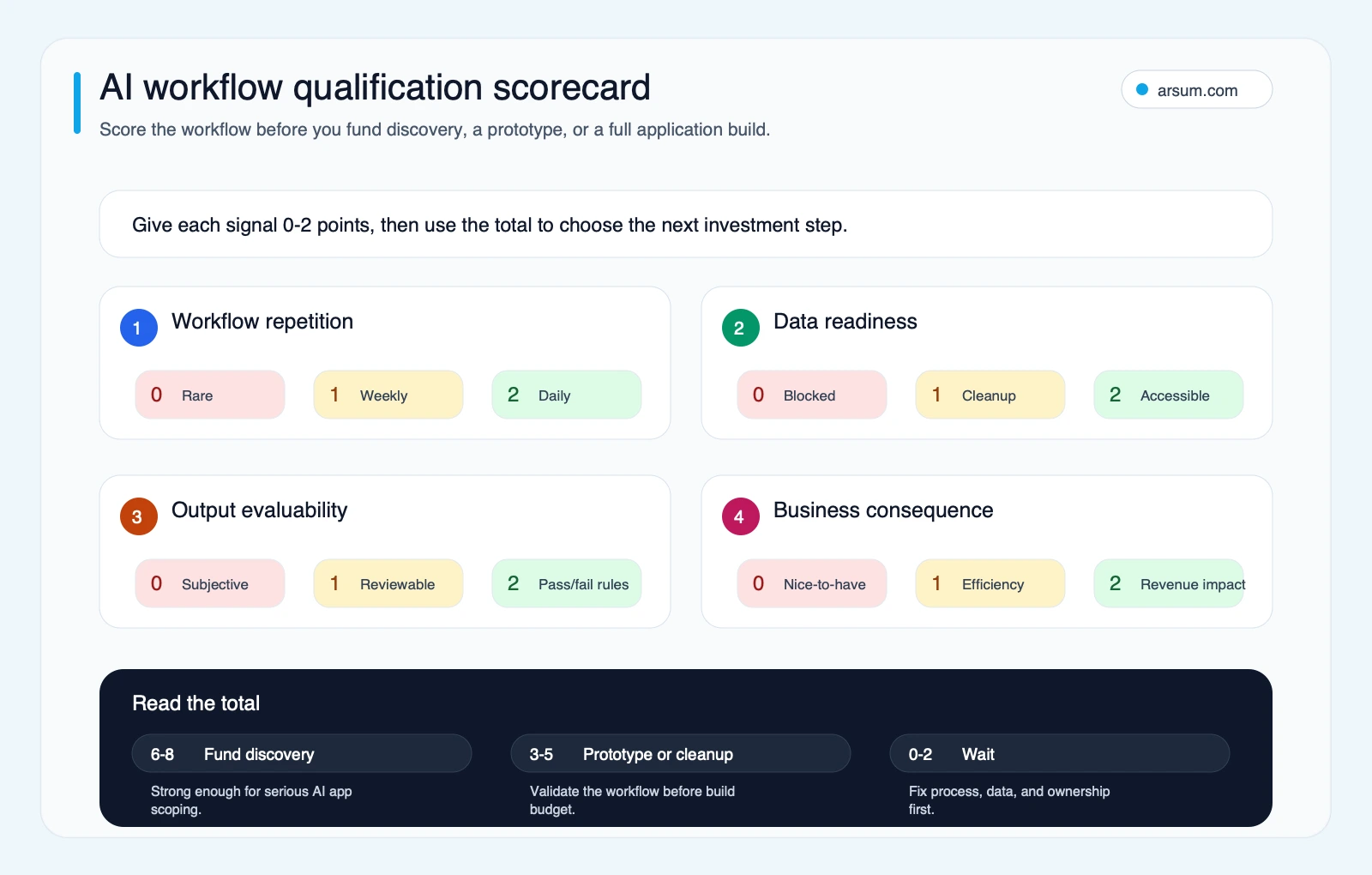
Use the scorecard to decide whether to fund discovery, run a narrow prototype, or improve the workflow before introducing AI.
Disqualifying conditions
Pause rather than automate when any of these remains unresolved:
- No one can name the business owner who accepts or rejects output quality.
- The source documents, records, or knowledge base are not current enough to support a defensible answer.
- A bad output has high consequence but approval authority and escalation rules are vague.
- The workflow occurs too rarely to justify maintaining evals, integrations, and operating controls.
- A deterministic workflow, search experience, or ordinary integration would meet the need more reliably.
That is not a failed project. It is useful scoping evidence. It protects the team from building a model-shaped solution to a process problem.
A worked example: document intake for a finance operations team
Consider a team that receives supplier onboarding packets or invoice-supporting documents through email and a portal. The proposed AI application would extract fields, classify the document, flag missing information, and prepare a record for a human reviewer. It would not autonomously approve payments, create vendors, or override controls.
This is a better pilot candidate than a generic “AI assistant” because the boundary can be written down.
Define the baseline and the authority boundary
Start with a baseline drawn from the team’s own records over a representative period:
- Number of packets received and completed
- Current median and long-tail turnaround time
- Reviewer handling time per packet
- Rework or exception categories
- Documents that require a second approver
- Existing system of record and required audit evidence
The target should be stated as an internal pilot acceptance criterion, not as a promise. For example: reduce reviewer preparation work while maintaining the team’s current required review and approval controls. Measure quality by field-level acceptance, exception classification, and the number of cases returned for correction.
The approval owner might be the finance operations manager. They own the acceptance threshold, approve any workflow expansion, and decide whether the tool may move from “draft for review” to a more automated routing step. Security or compliance owners should approve data access and retention decisions where the documents contain sensitive information.
Design the normal path and the ugly exceptions
A usable workflow map includes both.
| Step | Normal path | Exception path | Evidence retained |
|---|---|---|---|
| Intake | File arrives through an approved channel | Unsupported format, unreadable file, duplicate, or missing attachment | File identifier, source channel, receipt time |
| Extraction | System produces structured fields with source references | Required field is absent, ambiguous, or conflicts with a record | Extracted output, cited page/section, exception reason |
| Classification | System assigns a document type and queue | Low-confidence or unrecognized class | Classification result, routing decision, reviewer override |
| Review | Reviewer accepts, edits, or rejects the draft | High-risk category requires additional approval | Reviewer action, approver identity, final record |
| Handoff | Approved record reaches the system of record | Integration error or downstream validation failure | Request log, error code, retry or manual resolution |
Source lineage matters: a reviewer should be able to see which document and which relevant passage supported a field. A fluent answer without evidence is not sufficient for a consequential workflow.
Pilot scorecard
Use a short, fixed review cadence rather than waiting for a vague sense that the pilot “feels good.”
| Item | Pilot definition |
|---|---|
| Baseline | Internal record of volume, turnaround, reviewer handling, and exception types before launch |
| Target | A pre-agreed improvement in preparation or routing work without weakening required approvals |
| Quality metric | Reviewer acceptance and correction patterns by field and document class |
| Exception metric | Unhandled exception count, misrouted items, and cases requiring manual recovery |
| Owner | Finance operations manager for workflow acceptance; designated technical owner for system health |
| Review cadence | Weekly operational review during the pilot, with documented changes to prompts, retrieval, or rules |
| Stop condition | A material control failure, recurring untraceable output, or exception handling that the team cannot safely absorb |
| Rollback | Disable automated handoff; retain the existing manual queue and system of record as the fallback |
This example generally points toward a narrow custom workflow or an integration-led build, not an unrestricted agent. If the required sources are stable, the output can be evaluated, and humans remain responsible for approval, an off-the-shelf extraction capability may be worth evaluating. If the workflow needs unique business rules, deeper integrations, or durable audit evidence, custom development becomes more defensible.
For adjacent operational patterns, see accounts receivable automation and AI automation for finance teams.
💡 Arsum builds custom AI automation solutions tailored to your business needs.
Get a Free Consultation →Demo-ready is not production-ready
A demo can prove that a model is capable of producing an output. It does not prove that the application can safely operate on representative inputs, survive dependency failures, or remain affordable and observable in daily use.
| Signal | Demo-ready | Production-ready |
|---|---|---|
| Inputs | Curated examples | Representative normal, messy, and edge-case inputs |
| Quality checks | Informal spot checks | Repeatable eval set and explicit acceptance threshold |
| Output | Free-form response | Structured or constrained output where downstream systems require it |
| Human role | Someone watches the demo | Approval, override, escalation, and fallback are documented |
| Security | Credentials and access work | Threat model, permissions, output handling, and abuse paths reviewed |
| Cost and latency | Not yet meaningful | Usage budgets, limits, retries, and operational monitoring defined |
| Change management | Prompt changes are ad hoc | Changes are evaluated and reversible |
Practitioner discussions regularly raise production readiness, AI-generated-code security, reliability, and usage cost as the gap between a working demo and a dependable system. Treat those discussions as qualitative warning signals, not as market-wide statistics. The operational controls are supported more directly by official implementation guidance.
Four launch gates to make explicit
Evaluation gate. Build a representative evaluation set before broad release, define the pass threshold, and run it when prompts, retrieval, models, or logic change. OpenAI’s evaluation guidance explains why variable model output needs a more deliberate evaluation approach than ordinary deterministic testing.
Safety and security gate. Review prompt injection, sensitive-data exposure, insecure output handling, excessive agency, and overreliance. OWASP’s Top 10 for LLM applications identifies these application-level risks; OpenAI’s safety guidance recommends safeguards including testing, constraints, and human review for appropriate use cases.
Architecture gate. Decide whether the workflow needs retrieval, direct system access, caching, asynchronous processing, or a simpler deterministic path. Google Cloud’s generative AI architecture guidance is useful for framing those deployment and integration decisions, especially where enterprise systems and retrieval are involved.
Public-content gate. If the app publishes content visible to customers or search engines, require a human standard for originality, sourcing, usefulness, and accountability. Google’s people-first content guidance is relevant here: automated production alone is not evidence of value.
Choose the lightest viable build path
The choice is not “build versus buy” in the abstract. It is a choice about ownership, integration depth, reversibility, and how differentiated the workflow must become.
| Path | Use when | Avoid when |
|---|---|---|
| No-code or low-code | The workflow is simple, reversible, low-risk, and uses supported connectors | It requires sensitive data controls, complex state, custom evals, or nonstandard integrations |
| Existing product or API | The capability is commodity and the system can meet your governance requirements | The vendor cannot meet required data, audit, workflow, or exit requirements |
| Agency or implementation partner | The workflow is measurable but needs product, integration, AI, and operational design together | The team has not defined the baseline, owner, or acceptance criteria |
| In-house build | AI behavior is core IP or a lasting operating advantage, and the team can own it | The organization lacks the capacity to maintain evals, security, and operations |
| Delay | Baseline, data access, or decision rights are unclear | The team is merely responding to urgency or fear of missing out |
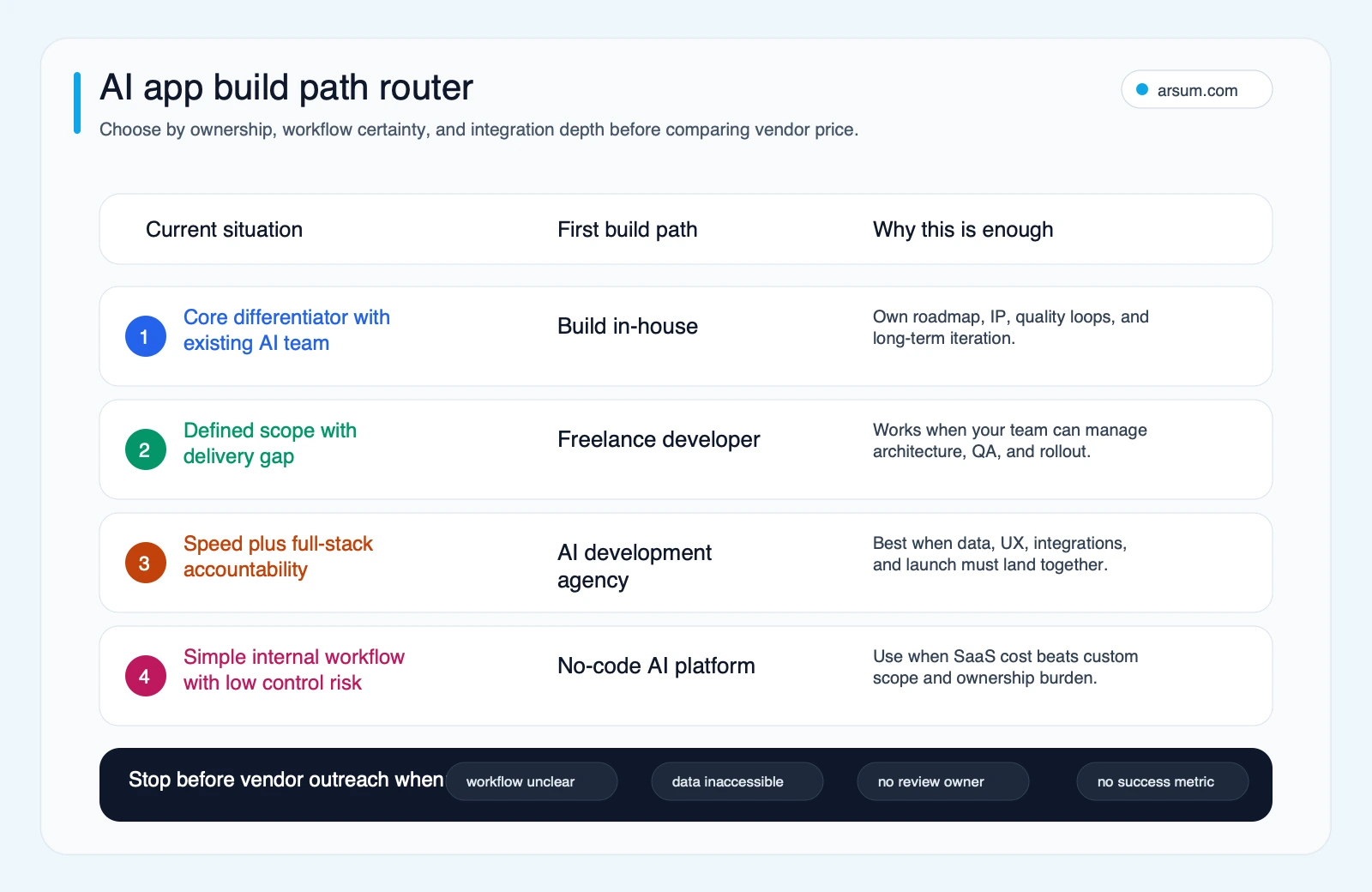
Choose the path based on workflow certainty, ownership, integration depth, and control risk—not a generic pricing comparison.
A freelance developer can be effective when an internal product owner can specify the work, manage systems access, and accept delivery. An agency can be a better fit when the unresolved work spans workflow design, product decisions, integrations, evaluation, and launch controls. In-house development is strongest where long-term ownership is real and sustained—not simply because custom code sounds more strategic.
Useful comparisons include hiring an AI developer versus an agency, AI app development services, and AI integration services.
Plan the work and cost model around uncertainty
Avoid unsupported universal price or schedule ranges. The relevant planning model is the work required to remove uncertainty and safely operate the result:
- Discovery: workflow map, baseline, systems inventory, decision rights, and acceptance criteria
- Data and integration: source access, permissions, data cleanup, mappings, and system-of-record behavior
- Product and implementation: interface, orchestration, schemas, fallback behavior, and testing
- Reliability and controls: eval set, monitoring, logging, threat modeling, security review, and rollback
- Change management: training, reviewer guidance, exception ownership, and operating cadence
- Ongoing operations: model usage, vendor changes, prompt or retrieval updates, incident handling, and review effort
For an illustrative planning assumption, estimate the pilot economics using your own inputs:
manual workload avoided or redirected
minus human review and exception workload
minus recurring model, platform, and operations cost
minus implementation and change-management cost allocated to the pilot period
Do not treat this as realized savings until the pilot measures it against the pre-launch baseline. In high-consequence workflows, a smaller gain with strong evidence, approval controls, and reversibility may be a better outcome than a larger claimed gain with unclear risk.
The production readiness checklist
Before moving from prototype to production, confirm each item has an owner.
- The workflow has a named business owner, baseline, and acceptance criteria.
- Source data, permissions, retention, and system-of-record boundaries are documented.
- The team has examples of acceptable, unacceptable, ambiguous, and high-risk outputs.
- The application preserves source lineage where reviewers need to verify an answer.
- Outputs are constrained or structured where downstream systems depend on predictable fields.
- Human approval, override, escalation, and manual fallback paths are documented.
- Evals compare relevant changes rather than relying on intuition.
- Logs capture inputs, outputs, tool calls, exceptions, overrides, and material system errors in line with the organization’s policies.
- Usage, latency, retries, and budget guardrails are visible to an operating owner.
- Rollback can disable AI behavior without interrupting the underlying business workflow.
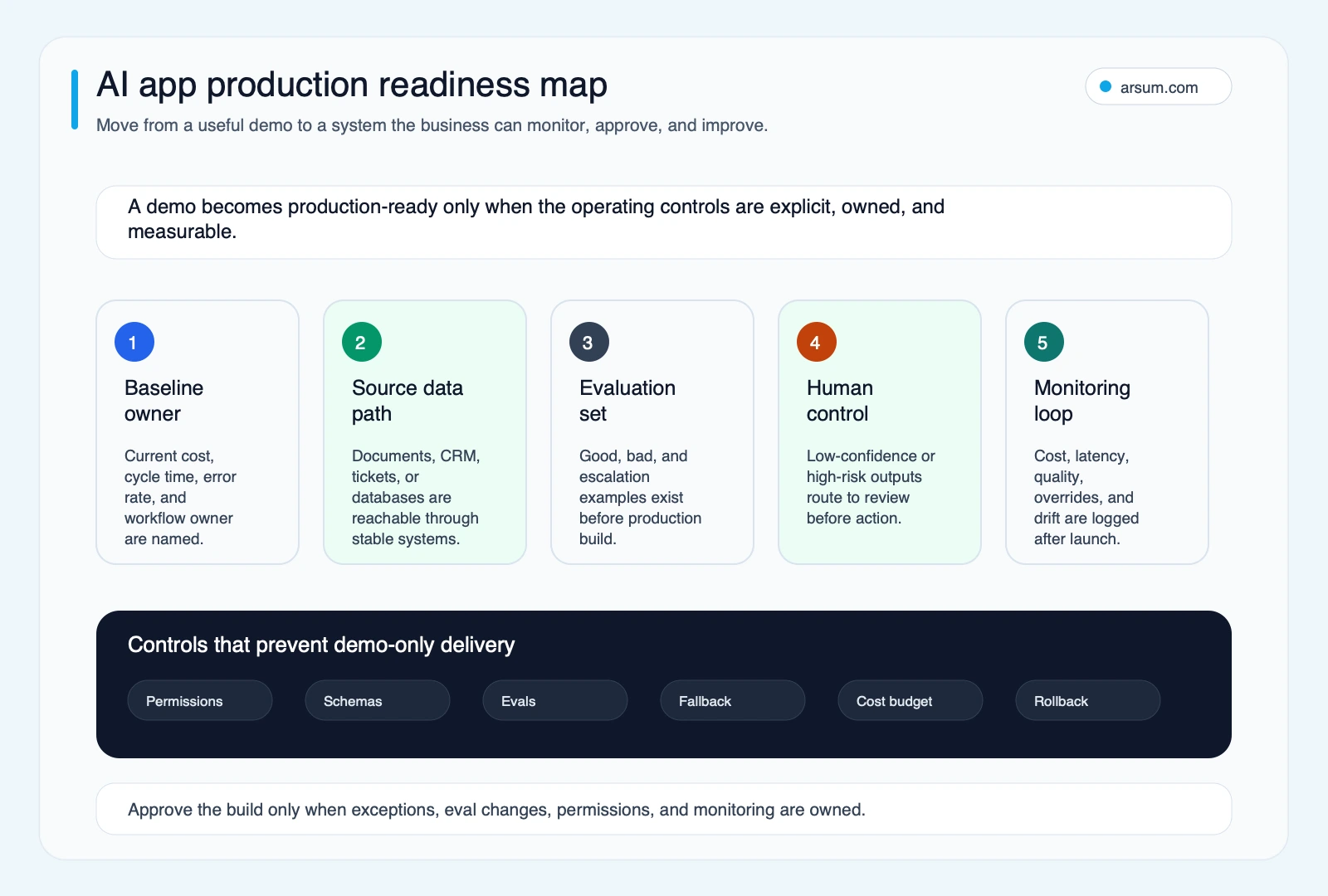
The build is not production-ready until ownership, source data, evals, human control, monitoring, and rollback are all visible.
Common failure patterns
The recurring failure is not that a model produces an imperfect answer. It is that the surrounding workflow has no way to detect, contain, or recover from an imperfect answer.
- No baseline: the team cannot establish whether the application improved the process.
- No eval set: prompt, model, or retrieval changes become arguments rather than controlled decisions.
- Unbounded autonomy: an application takes action where a human should approve, especially when failure is hard to reverse.
- Weak source lineage: reviewers cannot determine why a field or recommendation was produced.
- Security treated as a final checklist: sensitive systems and untrusted inputs are connected before the threat model is understood.
- No exception owner: the system generates work faster than the team can resolve ambiguity.
- Thin-wrapper thinking: a generic chat interface is confused with a defensible workflow product.
A model can be technically capable while the organization is not authorized or operationally ready to let it act. Keep autonomy proportional to reversibility and failure cost.
Frequently asked questions
What is AI-driven app development?
It can mean AI-assisted software delivery—using AI to help write, test, document, or refactor code—or it can mean an AI-powered application whose product behavior depends on models. The first is mainly a development-process decision; the second is a workflow, reliability, security, and ownership decision.
How much does an AI application cost?
There is no reliable universal range without scope. Estimate discovery, integrations, data work, evaluation and security controls, change management, and recurring operations separately. Use a pilot baseline and acceptance criteria to determine whether a larger investment is justified.
How long does it take to build an AI app?
The schedule depends on workflow definition, data readiness, integrations, evaluation burden, approval design, and ownership—not simply on the model or interface. A narrow pilot can resolve critical uncertainty before the team commits to a broader production build.
Should we build, buy, or partner?
Buy or use low-code for simple, reversible workflows with acceptable governance. Build in-house where the behavior is core IP and the team can operate it over time. Use a partner when the work spans workflow qualification, integrations, product implementation, evals, and launch controls. Delay if the baseline, data, or decision rights are unclear.
What should an AI pilot prove?
It should prove more than that a model can generate an answer. It should show performance against representative cases, reviewer and exception workload, source lineage, cost guardrails, approval ownership, and a rollback path.
If you are evaluating an initiative now, Arsum can help scope a workflow assessment around the qualification score, current baseline, operating owner, evidence retained, and pilot acceptance criteria.
Ready to Automate Your Business?
Stop wasting time on repetitive tasks. Let AI handle the busywork while you focus on growth.
Schedule a Free Strategy Call →Written by:Arsum editorial team
- Reviewed by
- Arsum editorial team
- Published
- April 30, 2026
- Updated
- July 3, 2026
- How this was produced
- Arsum uses research packs, source checks, and human editorial review to prepare and update blog articles. Editors are responsible for the final page.
- Source policy
- Sources are linked in the article when used. Methodology and source notes are included on higher-risk or high-visibility pages and are being rolled out across the archive. Editorial policy.
- Why this page exists
- Help B2B operators evaluate AI automation, implementation scope, cost, risk, and build-vs-buy decisions with practical context.