AI for ecommerce is worth funding when it improves a measurable workflow—not when it merely adds a generative feature. Start with work that has repeatable volume, usable source data, a named owner, and a safe exception path: support triage, catalog-content drafting, and merchandising analysis are usually easier to validate than autonomous refunds, pricing, or inventory actions.
AI for Ecommerce: Automation That Increases Revenue
Explore ai for ecommerce: compare workflow fit, costs, risks, evidence, and practical next steps before you build, buy, or hire.

Table of Contents
- What Most Guides Miss: The Workflow Is the Product
- Screen the Platform Before Adding More Scripts
- Ecommerce stack performance associations
- A Readiness Scorecard for Ecommerce AI
- Three Workflows Worth Evaluating First
- Decide What AI May Do, Not Just What It Can Do
- Build, Buy, or Connect Existing Systems
- Model the Economics Before You Purchase
- Disqualifying Conditions and Failure Modes
- A 30- to 90-Day Pilot Scorecard
- Methodology and Limits
What Most Guides Miss: The Workflow Is the Product
Most guides for AI for ecommerce list recommendations, chatbots, personalization, inventory, and content generation. That is a capability list, not an implementation decision.
The deciding question is: can this workflow make a bounded decision using reliable data, with an owner who can review exceptions and reverse a bad action?
A tool may be technically able to answer a customer, change product copy, or suggest a reorder. That does not authorize it to take that action without controls. For every candidate workflow, define:
- Trigger: What starts the work—a ticket, SKU update, stock threshold, or customer session?
- Source of truth: Which system provides the authoritative order status, policy, product specification, price, or inventory record?
- Allowed action: May AI draft, classify, recommend, or execute?
- Exception route: Which cases leave the automated path immediately?
- Owner: Who is accountable for policy changes, quality review, and escalation?
- Rollback: How do you disable the integration, revoke permission, or restore a prior change?
- Measure: Which baseline and decision threshold determine whether the pilot continues?
This is why a polished demo can still be a poor first project. If policies live in scattered documents, product attributes are incomplete, or no one owns edge cases, the constraint is operating design—not model capability.
Screen the Platform Before Adding More Scripts
The evidence brief supports a narrow but important buying decision: adding an AI app, personalization layer, chat widget, or analytics script changes the store’s technical surface area. Treat the observed HTTP Archive and Chrome UX Report associations as a pre-purchase screening signal, not proof that a technology caused a performance outcome.
Before selecting a platform or adding another storefront script:
- Check the vendor’s implementation requirements and data-collection method.
- Test on a comparable staging environment or controlled production slice.
- Monitor mobile page weight and Core Web Vitals alongside the business metric.
- Remove or disable the script if its operating benefit does not justify its customer-experience cost.
For related context, review ecommerce platform Core Web Vitals considerations and the website technology tax framework. Performance associations do not decide whether a support workflow or catalog process should be automated; they help prevent an otherwise sound workflow decision from creating unnecessary storefront overhead.
A Readiness Scorecard for Ecommerce AI
Use this as an Arsum editorial framework, not benchmark data. Score each dimension from 0 to 2.
| Dimension | 0 | 1 | 2 |
|---|---|---|---|
| Product data completeness | Missing or conflicting fields | Core fields available | Attributes, variants, and source ownership are reliable |
| Catalog taxonomy | Inconsistent labels and collections | Partly maintained | Stable taxonomy supports search and merchandising |
| Customer and order data access | Required records inaccessible | Manual export or partial access | Approved, current access to needed records |
| Permission boundaries | Undefined | Informal approval | Actions and approvers are explicit |
| Workflow owner | No accountable owner | Shared ownership | One named operational owner |
| Review path | No exception handling | Ad hoc escalation | Queue, reviewer, and response expectation exist |
| Rollback plan | No documented reversal | Manual workaround | Disable or revert process is tested |
| Measurement | Broad objective only | Metric exists but no baseline | Baseline, target, and review cadence exist |
| Customer risk if wrong | High and unbounded | Moderate | Low or contained by review |
Add the score:
- Below 10: clean data, document policies, or use internal drafting tools only.
- 10–14: run a narrow pilot with human review.
- 15–18: customer-facing or workflow automation may be appropriate if monitoring and rollback are active.
The score changes the sequence, not the economics by itself. A high score means the workflow is more controllable; it does not guarantee savings, conversion gains, or adoption.
Three Workflows Worth Evaluating First
The following implementation cards focus on workflows where a team can observe inputs, outcomes, and exceptions without delegating consequential business decisions too early.
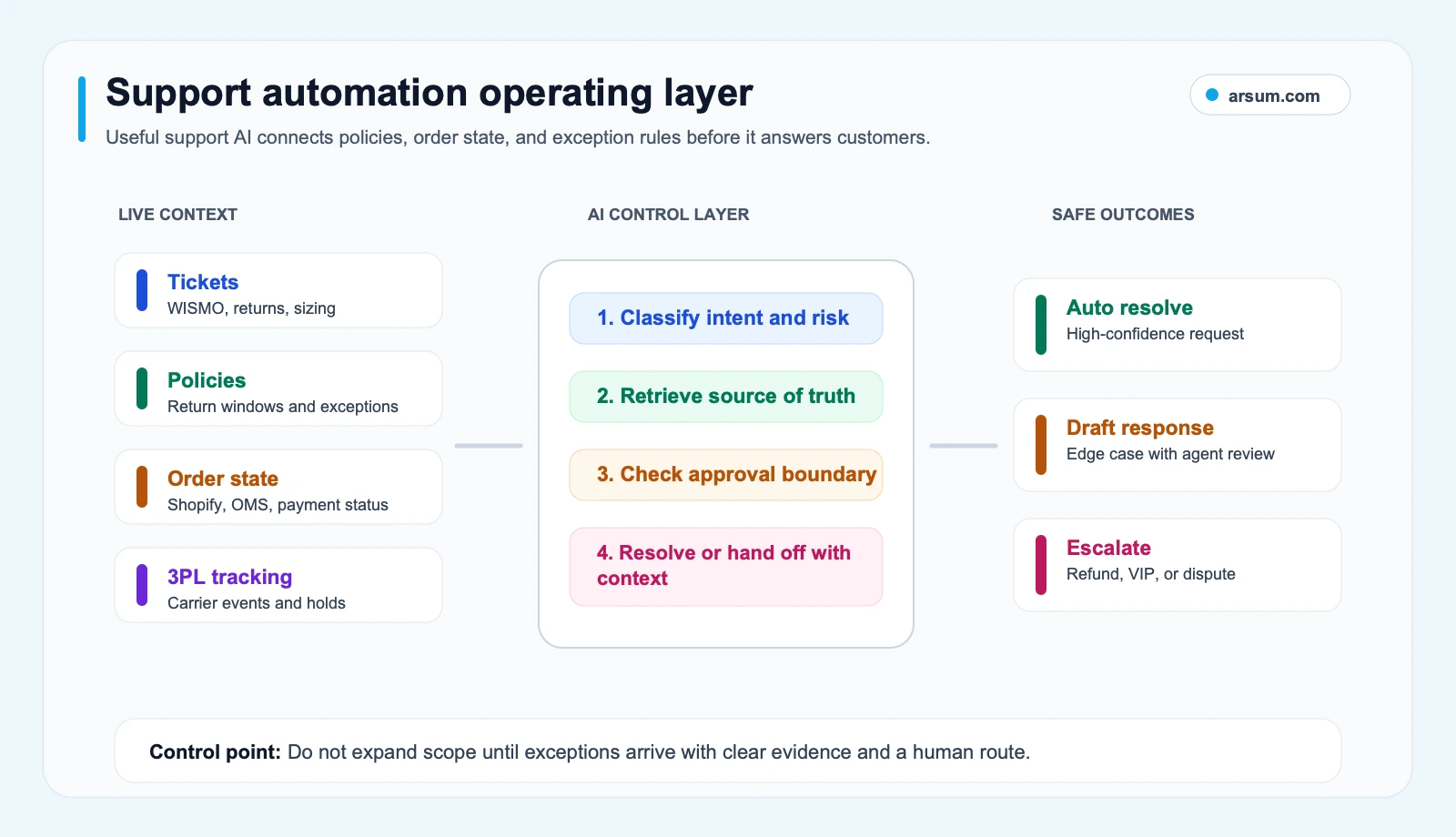
Support triage and response drafting
Shopify documents Sidekick as an assistant in Shopify admin that can provide guidance and complete tasks while presenting changes for review. Its stated capabilities and permission context are useful examples of how merchant-facing assistance differs from unattended customer-facing automation. Shopify Help Center: Sidekick
For customer support, the first bounded use is usually classification and drafting—not unrestricted resolution.
| Element | Pilot design |
|---|---|
| Trigger | New email, chat, or social support request |
| Source systems | Help center, return policy, product catalog, order status, shipping or tracking record |
| Allowed action | Classify intent; draft a response for approved categories; attach relevant order context |
| Exception queue | Damaged orders, disputes, subscriptions, bundles, fraud concerns, policy ambiguity, and wholesale accounts |
| Approver | Support lead owns policy and escalation rules |
| Retained evidence | Original message, retrieved sources, draft, final response, route taken, and reviewer changes |
| Rollback | Disable automated send; revert to draft-only mode; remove system access if data is incorrect |
Pilot acceptance test: establish a baseline for eligible ticket volume, average handling minutes, escalation rate, and the customer-quality signal already used by the team. Run the first phase in draft-only mode. The support lead reviews a defined sample weekly and records correct routing, policy-grounded answers, unnecessary escalations, and harmful answers.
Expand only if the team’s pre-agreed quality threshold and handling-time target are met without an increase in policy errors. Stop automated sending immediately if a material policy, privacy, or order-status error reaches a customer; return to draft-only mode while the source or rule is corrected.
This follows the same control logic described in AI customer service automation: useful automation reduces routine queue work while preserving human ownership of exceptions.
Product-content drafting from structured catalog data
AI can draft product descriptions, collection copy, attribute summaries, and internal catalog QA notes. Shopify identifies product-content generation among ecommerce AI applications, while IBM and BigCommerce describe content, search, customer experience, and operational use cases. These sources establish category capabilities; they do not establish a revenue or SEO result for a particular store.
| Element | Pilot design |
|---|---|
| Trigger | New SKU, product update, or content backlog |
| Source systems | PIM or product records, manufacturer specifications, approved brand guidance, and compliance copy |
| Allowed action | Generate a first draft from visible structured fields |
| Exception queue | Regulated, medical, safety, compatibility, warranty, or incomplete-specification products |
| Approver | Ecommerce content or merchandising lead |
| Retained evidence | Input attributes, source links or record IDs, generated draft, editor changes, and published version |
| Rollback | Restore prior copy or unpublish the draft |
Pilot acceptance test: choose one defined product family and record baseline turnaround time, the percentage of products with required attributes, and editor-correction categories. Review every generated draft during the pilot. Continue only if the team meets its stated throughput target while preserving factual accuracy and required claims review.
If outputs introduce unsupported specifications, stop the workflow until the source fields and approval rules are corrected. This is a better first use case than broad “SEO automation” because the output can remain grounded in visible source data. For a wider operating model, see AI content automation as a business workflow and AI SEO services explained.
Merchandising and discovery analysis
Search, recommendations, and personalization can be valuable when a store has enough catalog, behavioral, and inventory data to test an explicit hypothesis. Salesforce and Shopify describe personalization, recommendations, customer queries, and commerce-aware assistance as ecommerce AI applications. Salesforce ecommerce AI and Shopify’s ecommerce AI guide are capability references, not independent performance benchmarks.
Start with analysis and recommendations before allowing a system to alter storefront rules.
| Element | Pilot design |
|---|---|
| Trigger | Weekly merchandising review or defined collection-page opportunity |
| Source systems | Product catalog, inventory availability, search terms, onsite behavior, and promotion calendar |
| Allowed action | Produce a ranked merchandising brief or recommendation for human approval |
| Exception queue | Stale inventory, low-margin products, excluded categories, regulated claims, and active promotions |
| Approver | Merchandising lead |
| Retained evidence | Inputs, recommendation, approved changes, inventory state, and test dates |
| Rollback | Restore prior sort, collection, or placement rules |
Pilot acceptance test: use a defined set of collection pages or search queries. Record baseline traffic, product availability, conversion measure, and merchandising effort. The merchandising lead approves every change. At a fixed review date, compare the pilot group with the team’s own baseline and inspect whether recommendations pushed unavailable, unsuitable, or low-priority products.
Keep the workflow if it improves the agreed operating or commercial measure without creating unacceptable availability or margin exceptions. Otherwise, retain the analysis layer and stop automated application.
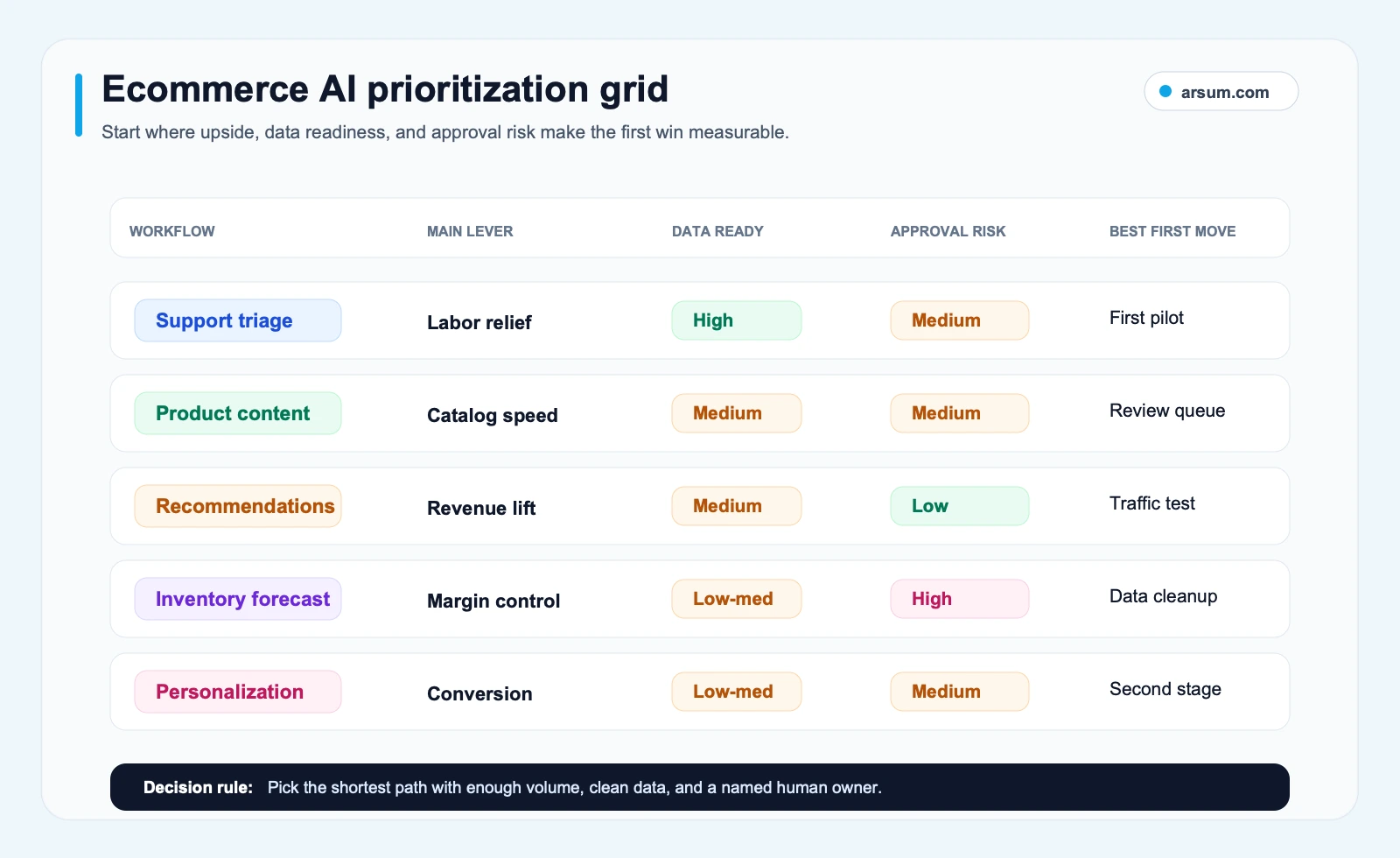
This grid is an editorial starting heuristic. Its labels reflect typical first-pilot conditions—upside, available data, and approval risk—not a measured industry ranking.
Decide What AI May Do, Not Just What It Can Do
| AI type | Appropriate early role | Data needed | Primary risk | Review owner |
|---|---|---|---|---|
| Merchant assistant | Drafting, admin guidance, internal summaries | Store context and approved permissions | Incorrect store change or weak copy | Ecommerce manager |
| Support AI | Triage, retrieval, response drafts | Policies, catalog, order, and tracking data | Wrong answer or failed escalation | Support lead |
| Search and personalization AI | Recommendations for review and bounded tests | Product, behavioral, and inventory data | Irrelevant or unavailable products | Merchandising lead |
| Workflow AI | Exception summaries and approval requests | ERP, PIM, OMS, analytics, and rules | Unapproved impact on margin or customer experience | Operations owner |
The move from merchant-facing assistance to customer-facing or agentic action changes the authorization problem. A customer-visible answer, a refund, a price, or a purchase-order recommendation has a different failure cost than an internal draft. High failure cost should reduce autonomy and increase review—not encourage a more aggressive rollout.
Practitioner discussions reinforce this boundary. Community conversations raise concerns about fragmented workflows, chatbot setup, missing order context, and confident but incorrect technical guidance. Treat these as qualitative failure signals, not adoption or performance statistics: Magento operator discussion, chatbot setup discussion, and Shopify Community discussion on AI-generated technical guidance.
Build, Buy, or Connect Existing Systems
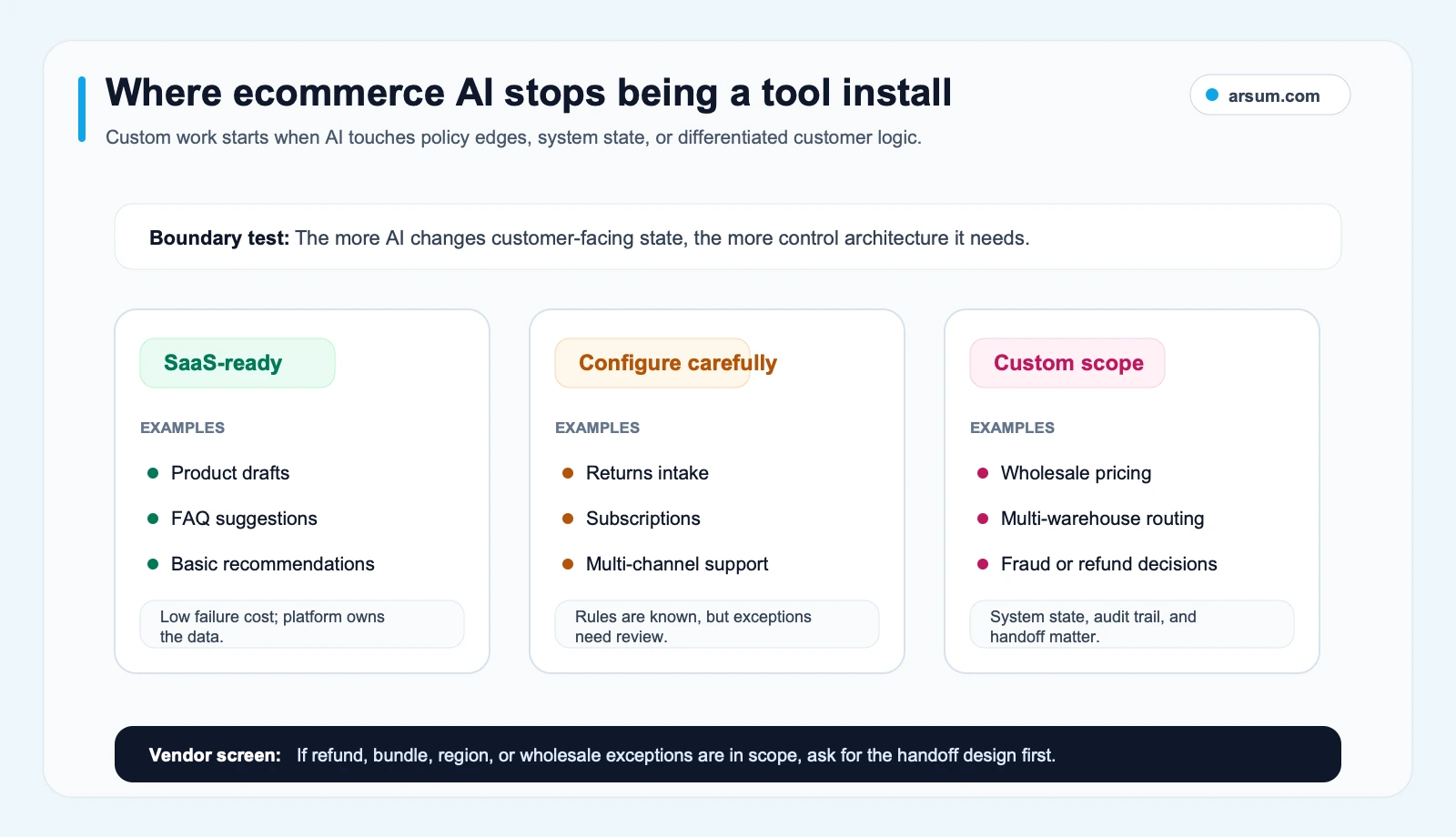
Use native functionality or specialized SaaS when the workflow is bounded, the system already holds the needed context, and the team can work within available controls. Consider a configurable integration or custom workflow when several systems must remain consistent or when approval logic is central to the process.
| Question | Buy or native feature | Configure and connect | Custom workflow |
|---|---|---|---|
| Data access | Primary data already lives in the tool | Several approved systems need exchange | Unique records, rules, or lineage need a dedicated layer |
| Integration ownership | Vendor owns most of the connection | Internal team or partner maintains connectors | Team owns interfaces, monitoring, and change control |
| Permissions | Standard roles are sufficient | Existing roles need mapping across tools | Fine-grained authorization and action logging are required |
| Customization | Standard policy and catalog logic | Workflows need rules and routing | Exceptions and decision logic are central to the process |
| Ongoing tuning | Vendor settings and regular QA | Prompts, mappings, and policies need upkeep | Product, data, and operating tuning need explicit ownership |
| Failure recovery | Disable feature or revert configuration | Pause workflow and route to humans | Disable actions, inspect logs, restore state, and correct integrations |
The decision should be based on validated workflow requirements, not a claim that SaaS is inherently limited or custom systems are inherently superior. A good scope identifies where the existing stack already works and where the gaps are in data access, control, or recovery.
For a broader evaluation approach, see AI workflow automation tools, AI integration consulting, and the build-versus-agency hiring decision.
Model the Economics Before You Purchase
Do not use generic savings claims. Build an illustrative planning model from your own inputs.
For a support workflow, calculate monthly labor opportunity as:
Monthly eligible tickets × average handling minutes ÷ 60 × fully loaded hourly cost × expected automation or deflection rate
Then calculate monthly net value as:
Monthly labor opportunity − monthly software and operating cost − review cost − expected error cost
This is an illustrative planning assumption, not an expected result. The inputs should include:
- Eligible monthly ticket volume from support records
- Average handling minutes
- Fully loaded labor cost
- The percentage of cases the team expects to automate or deflect
- Reviewer minutes and review rate
- Cost of a harmful error, based on internal refund, rework, retention, or escalation data
- Implementation cost
- The payback threshold the business requires
A pilot should test the uncertain inputs—especially automation rate, review burden, and error cost—before wider implementation is approved. For general examples of framing automation economics, see AI automation ROI examples.
💡 Arsum builds custom AI automation solutions tailored to your business needs.
Get a Free Consultation →Disqualifying Conditions and Failure Modes
Do not begin with customer-facing autonomy if any of these are true:
- The relevant policy or product data has no identified source of truth.
- The workflow contains high-cost edge cases but no staffed exception queue.
- A system cannot reliably identify the customer, order, SKU, or current policy.
- No one has authority to approve changed answers, prompts, or rules.
- The team cannot turn the action off quickly or restore the prior state.
- The proposed success metric is vague, such as “better experience” or “more AI adoption.”
- The use case touches legal, medical, safety, regulated, or high-value financial claims without an appropriate review process.
Common failure patterns are predictable:
- Automating before cleaning inputs. The output reflects incomplete catalog records, stale tracking, or conflicting policies.
- Measuring only time saved. A workflow can save handling time while increasing refunds, escalations, or customer friction.
- Treating launch as completion. Policies, products, promotions, and exception patterns change; someone must review the system.
- Giving AI invisible authority. An automation quietly changes an action with margin, compliance, or customer consequences.
- Adding tooling before proving the path. More apps do not solve missing ownership or disconnected systems.
A 30- to 90-Day Pilot Scorecard
Use this template in an internal planning document or vendor evaluation.
| Field | Define before launch |
|---|---|
| Workflow | One bounded task, such as order-status triage or product-description drafting |
| Baseline | Current volume, handling time, correction rate, and relevant business measure |
| Target | A pre-agreed improvement in throughput, handling time, or approved commercial measure |
| Quality metric | Correct routing, factual accuracy, policy compliance, or editor acceptance rate |
| Exception metric | Escalation rate, harmful-error count, and reasons for fallback |
| Owner | Named support lead, merchandising lead, or operations owner |
| Review cadence | Daily during launch, then weekly review of a defined sample and exception log |
| Stop condition | Material customer, policy, privacy, or margin error; quality below the agreed threshold |
| Rollback path | Disable automated action, revert to draft-only mode, remove access, restore prior configuration |
| 30–90 day decision | Expand, keep as assistive workflow, rebuild inputs or controls, or stop |
A qualified implementation assessment should produce this scorecard alongside a system map, source-of-truth list, exception design, and build-versus-buy recommendation. That is more useful than a generic tool shortlist because it makes the operating commitment visible before anyone purchases or builds.
Methodology and Limits
This page was refreshed against vendor documentation from Shopify, IBM, BigCommerce, and Salesforce, accessed in the validated research pack on June 19, 2026. Those sources are used for described capabilities and category context. Community posts are included only as qualitative operator signals about implementation and failure modes; they are not market-wide measurements.
The visual readiness scorecard, prioritization logic, implementation sequence, and pilot scorecard are Arsum editorial frameworks. They help a buyer expose assumptions and make a controlled decision; they are not original performance research or a guarantee of outcome.
AI does not create demand, repair a weak offer, or make an unowned process reliable. It can make a well-defined ecommerce workflow faster to observe, sort, draft, and execute when the data, authority, review, and rollback conditions are in place.
Ready to Automate Your Business?
Stop wasting time on repetitive tasks. Let AI handle the busywork while you focus on growth.
Schedule a Free Strategy Call →Written by:Arsum editorial team
- Reviewed by
- Arsum editorial team
- Published
- May 1, 2026
- Updated
- July 3, 2026
- How this was produced
- Arsum uses research packs, source checks, and human editorial review to prepare and update blog articles. Editors are responsible for the final page.
- Source policy
- Sources are linked in the article when used. Methodology and source notes are included on higher-risk or high-visibility pages and are being rolled out across the archive. Editorial policy.
- Why this page exists
- Help B2B operators evaluate AI automation, implementation scope, cost, risk, and build-vs-buy decisions with practical context.