
AI can help finance teams, but the useful question is narrower than most articles admit. It is not “where can we use AI?” It is “which finance workflow is structured enough to improve, important enough to matter, and controlled enough to review safely?”
That framing matters because finance work looks deceptively simple from the outside. Demos look polished. Real workflows are not. They run through spreadsheets, PDFs, ERP exports, approval chains, and edge cases that do not show up in a vendor video.
Published finance guidance from IBM, Oracle, Workday, Microsoft, and CFA Institute points in the same general direction: start with a specific workflow, keep humans in the approval path, and treat AI as part of a finance operating model rather than a magic layer on top of messy processes. Those sources support the direction of travel, not a single universal rollout formula.
This guide is for finance leaders in spreadsheet-heavy, mid-market, or multi-system environments who need to decide where AI helps first, where native tools are enough, and where a custom build only makes sense after the limits of the current stack are visible.
Want to automate this for your business? Let's talk →
What Most Guides Miss
Most finance AI guides jump from “forecasting” to “automation” to “productivity” without forcing a harder question: what breaks first when finance work leaves the clean demo environment?
Usually it is one of four things:
- The workflow still depends on spreadsheets, PDFs, and email attachments.
- The review logic lives in a controller’s head, not in a system.
- The task crosses more than one platform, so no single tool sees the full picture.
- The output looks polished enough to trust before it is actually safe to use.
That is why the best early wins are rarely the most ambitious ones. Finance AI works best when the workflow is narrow, the reviewer is obvious, and the exception pattern is already understood.
What AI Helps With First, and Where It Usually Breaks
| Workflow | Good first use | Usually works when | Usually breaks when |
|---|---|---|---|
| Reporting commentary | Draft first-pass variance notes | Data structure is stable and a human reviewer already owns the final narrative | The reporting logic changes every cycle or depends on undocumented business context |
| Invoice intake and AP triage | Extract invoice fields, route for review, flag exceptions | Vendors are repeatable, coding rules are consistent, and ERP integration is clean | Formats vary widely, coding is highly contextual, or approval logic lives outside the tool |
| Reconciliation support | Surface mismatches and likely causes | Reconciliation steps are explicit and source systems are reliable | Files are inconsistent and exception handling is mostly judgment-based |
| Anomaly review | Flag unusual payments, timing, or duplicates for human review | Historical patterns are stable and reviewers can resolve alerts quickly | The business changes faster than the baseline or the team expects fully autonomous decisions |
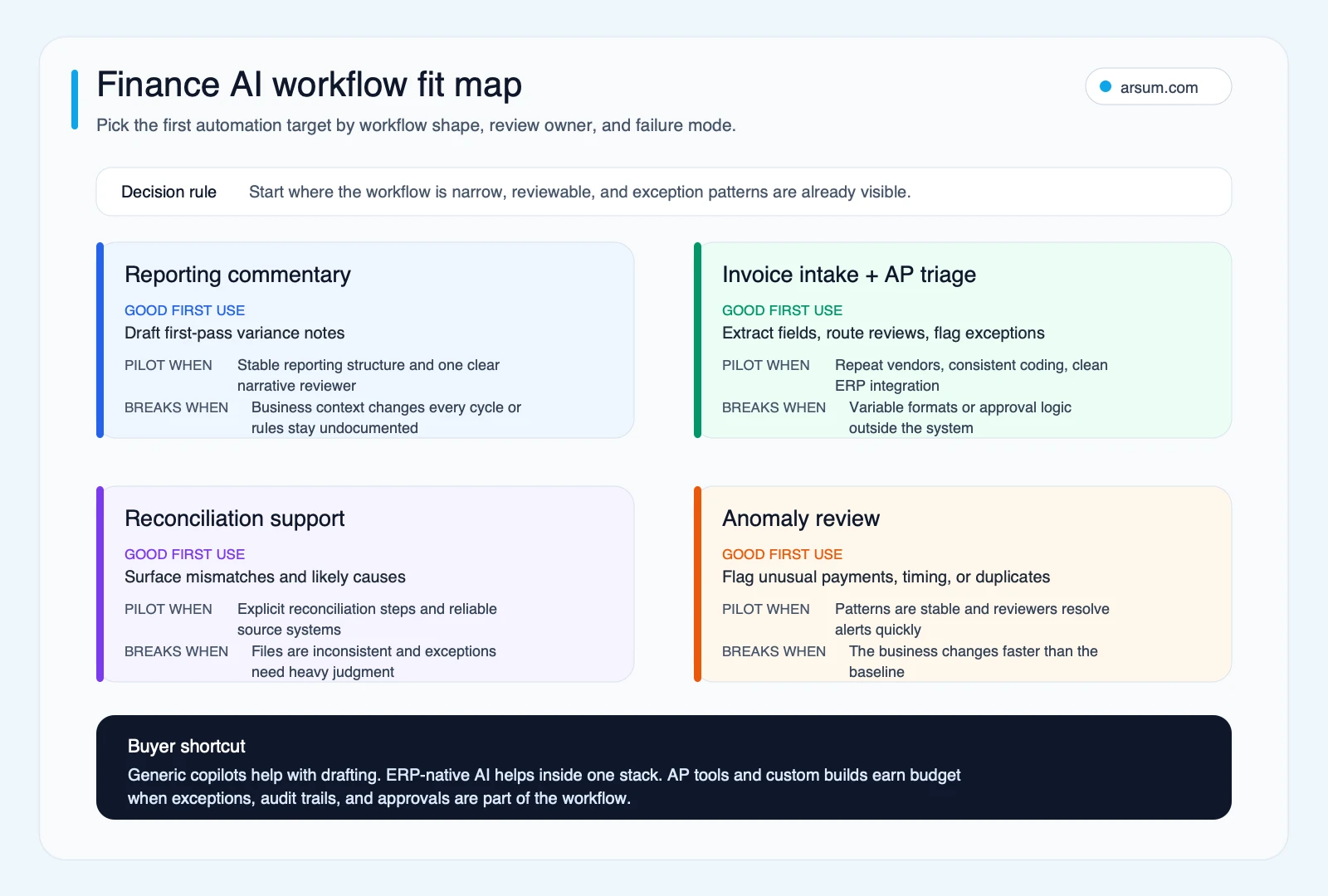
Use the workflow fit map to pick an early finance AI target by reviewability, system fit, and exception risk before comparing vendor categories.
The practical split in the market reflects this.
- General copilots are strongest when the job is drafting, summarizing, or helping an analyst explain a report that already exists.
- ERP-native AI is strongest when the workflow, permissions, and approvals already live inside the finance stack and the team mainly wants less manual navigation.
- AP-specific tools are stronger when the pain is invoice intake, coding, routing, duplicate detection, and approval flow across repeatable vendor patterns.
- Custom builds become relevant when the workflow crosses ERP data, spreadsheets, PDFs, and business-specific exception rules that no single product category handles well.
Operator Note
Finance teams are right to be skeptical of broad “agentic” AI claims.
The strongest recurring signal in CFO and FP&A discussions is not “we need more AI.” It is “which single workflow should we trust first, and how do we keep control when the source data is messy?” That shows up in questions about spreadsheet-heavy close work, old ERP setups, scattered exports, and tools that demo well but do not match the real review path.
That is also where finance buying conversations change. Once the team moves past the demo, the real questions become ERP fit, file fidelity, approval ownership, and whether a workflow-specific tool removes real admin work or just adds another polished layer on top of it.
What Finance Practitioners Keep Stressing
Across CFO, FP&A, and accounting discussions, the pattern is consistent:
- Teams want help choosing the first workflow to automate, not a vague AI strategy.
- Legacy systems and spreadsheet exports are still the practical starting point for many mid-market finance teams.
- Polished output is not enough. Reviewers need source evidence, explicit approval boundaries, and an exception log they can trust.
- Rule-based work can still fail badly if the system cannot explain why it classified, routed, or drafted something a certain way.
Treat those signals as operational context, not as market-wide proof. They are useful because they match what breaks in real finance implementations: unclear ownership, weak source fidelity, and automation that outruns the control layer.
Original Data: Finance AI Readiness Scorecard
Use this scorecard before you buy anything. Score each row from 1 to 3.
| Factor | 1 = not ready | 2 = workable with cleanup | 3 = ready for pilot |
|---|---|---|---|
| Source-data cleanliness | Files arrive in many formats with no standard naming or structure | Some structure exists, but exceptions still require manual cleanup | Inputs are consistent enough that reviewers can explain what “normal” looks like |
| Spreadsheet and PDF dependence | The workflow lives mostly in attachments and manual handoffs | Mixed system and document workflow | Most steps already happen inside stable systems |
| Control sensitivity | Errors would affect filings, approvals, or material decisions immediately | Errors are reviewable but still expensive | Outputs are advisory and easy to review before use |
| Integration depth | The task touches several systems with no clean handoff | One or two integrations are needed but the flow is understood | The workflow already sits mostly inside one stack |
| Review ownership | No clear person owns exceptions or final sign-off | Ownership exists but is inconsistent by cycle | One named reviewer or team already owns the output |
How to use it:
- 12 to 15 points: good candidate for a contained pilot.
- 8 to 11 points: fix the data or review layer first, then pilot.
- Below 8: do not start with automation. First simplify the workflow.
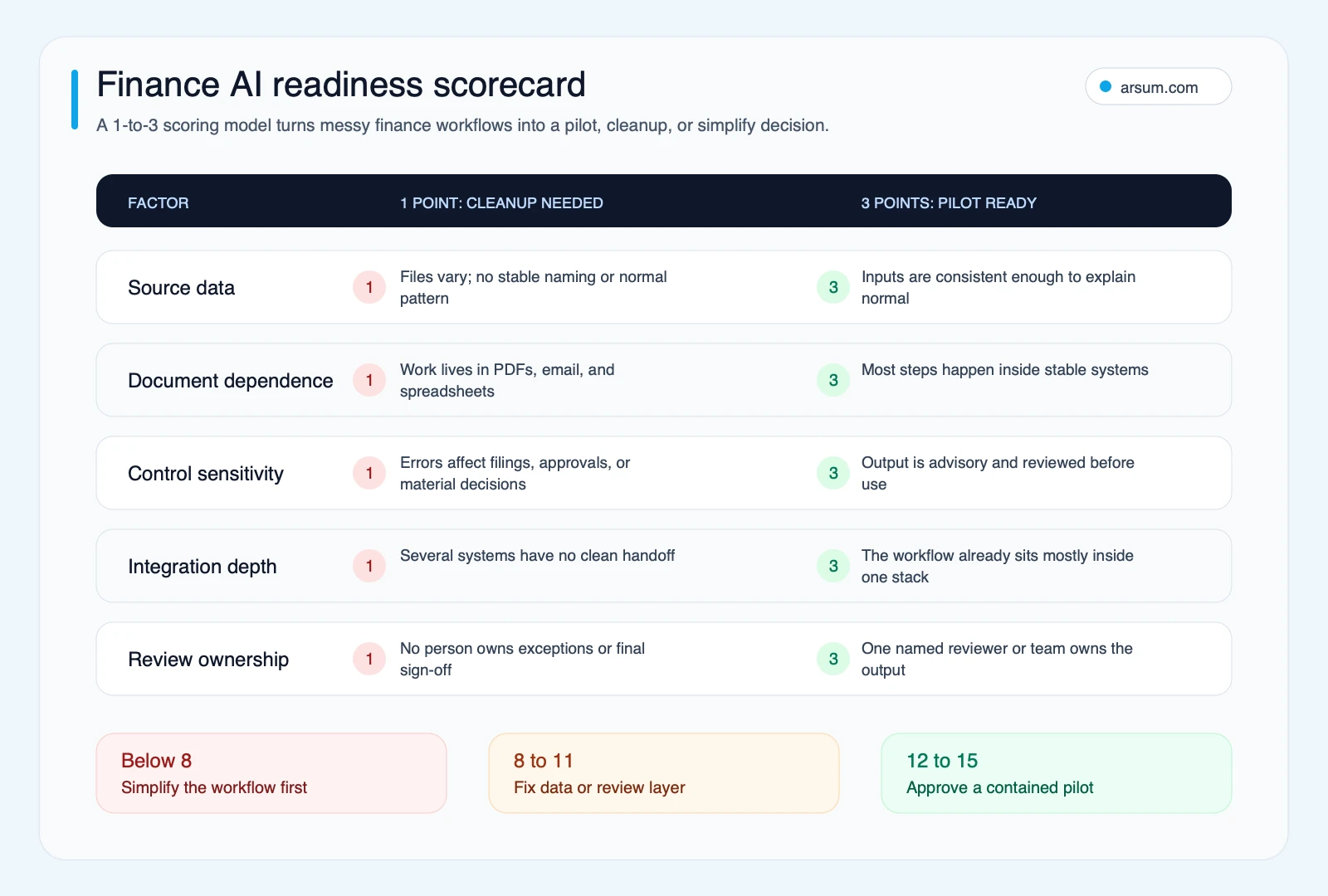
The scorecard turns the article criteria into a cleaner pilot gate: simplify below 8, repair the data or review layer at 8 to 11, and pilot only when the workflow reaches 12 to 15.
Finance AI Decision Tree
Start here instead of starting with tools.
If the pain is monthly reporting commentary:
- Start with drafting support.
- Keep the human reviewer central.
- Measure time saved on first-pass narrative creation.
If the pain is invoice handling and AP queues:
- Compare ERP-native features with AP-specific tools first.
- Pilot on repeat vendors and routine coding patterns.
- Expand only after you know the exception rate.
If the pain is reconciliation or close friction:
- Map the exact handoffs first.
- Automate mismatch detection before you automate resolution.
- Treat exceptions as the real product requirement.
- Model the payoff conservatively using benchmarks like AI automation ROI examples before you expand scope.
If the pain is a multi-system workflow with unstable files:
- Do not start with a generic copilot rollout.
- First clean the inputs and make the approval path explicit.
- Then decide whether native AI, an AP tool, or a custom build fits best.
Finance Team Use Cases by Risk and Review Burden
This is where finance buyers usually get clearer. The right AI category changes by workflow, materiality, and how easy it is to review what the system did.
| Finance workflow | Best first AI role | Review burden | Risk if over-automated |
|---|---|---|---|
| FP&A variance analysis | Draft first-pass commentary with source links | Medium, a finance owner should confirm logic and wording | Teams trust polished narratives before checking the numbers behind them |
| Accounting close support | Surface missing inputs, checklist gaps, and likely mismatches | High, because cycle timing and sign-off still matter | Close noise increases if exceptions are not routed clearly |
| AP and invoice routing | Extract, classify, and queue routine items for review | Medium, especially on repeat vendors and stable coding rules | Misclassification spreads fast when approval logic is weak |
| Reconciliation support | Flag mismatches and suggest likely causes | High, because exception handling is the real work | Reviewers waste time chasing false positives or miss real issues |
| Policy and control Q&A | Summarize rules and link to source documentation | Low to medium, if the source policy is current and visible | People treat a summary as policy when the source is outdated or ambiguous |
| Executive reporting drafts | Prepare first-pass board or leadership notes from approved data | High, because tone, caveats, and materiality need a human owner | Clean prose hides missing qualifiers or unsupported conclusions |
If a workflow lands in the high-review, high-risk corner, keep the system in draft or triage mode until the exception pattern is well understood.
Finance AI Permission Ladder
One useful way to scope finance AI is to decide what the system is allowed to do before you decide which tool to buy.
| Permission level | What AI can do | What stays human-controlled |
|---|---|---|
| Level 1 | Summarize policies, transaction context, or variance drivers | Final interpretation and sign-off |
| Level 2 | Draft reconciliation notes or reporting commentary with source links | Reviewer confirms accuracy and wording |
| Level 3 | Classify, tag, and route exceptions | Human resolves material or ambiguous cases |
| Level 4 | Prepare journal, accrual, or forecast inputs for approval | Approver verifies logic, support, and materiality |
| Level 5 | Execute an already approved workflow step with logging and rollback | Owner monitors outcomes and can stop the flow |
| Level 6 | Post autonomously or move money | Keep this narrow, rare, and tightly controlled |
If a team cannot say which level a workflow belongs to, it is too early to automate it.
Commodity vs. Non-Commodity Breakdown
Not every finance AI project deserves custom implementation.
| Commodity work | Non-commodity work |
|---|---|
| First-draft reporting commentary inside a stable template | Multi-step workflows that pull from ERP, spreadsheets, PDFs, and approval systems |
| Summaries, tagging, and drafting that a human reviews immediately | Invoice or reconciliation flows with business-specific exception logic |
| Basic routing inside a single well-configured platform | Workflows that need auditability, retry logic, reviewer escalation, and error handling |
| Standard AP or expense automation that matches the team’s stack | Processes where file fidelity, policy interpretation, or compliance risk make generic outputs unsafe |
This distinction matters because finance teams often overbuy on one side and under-scope on the other.
- If the workflow is commodity, a native feature or focused AP tool often beats a custom project.
- If the workflow is non-commodity, a broad copilot almost always under-specifies the real work.
For a broader build-versus-buy decision framework, see AI automation service guide and custom AI solutions for business.
Where Custom Builds Actually Make Sense
A custom build starts to make sense when three conditions are true at the same time:
- The workflow matters enough to justify implementation effort.
- The exception pattern is known well enough to design around it.
- The off-the-shelf ceiling is already visible.
That usually means a team has already learned something concrete. The same pattern shows up in adjacent cross-system workflows covered in AI for operations teams, where fragmented handoffs and exception ownership matter more than the model layer itself.
- the ERP-native feature handles routine routing but not the approval nuance,
- the AP platform captures fields correctly but misroutes too many exceptions,
- the general copilot drafts the narrative but cannot follow internal reporting conventions reliably,
- or the workflow crosses systems in a way no single product category handles cleanly.
CFA Institute’s agentic-finance guidance is useful here because it reinforces the same boundary finance operators already feel in practice: analysis support is one thing, workflow execution under controls is another. That distinction matters because calculation accuracy, file handling, approval logic, and professional conventions are not edge cases in finance. They are the job.
If you cannot name the exact failure mode yet, you are probably too early for a custom build.
💡 Arsum builds custom AI automation solutions tailored to your business needs.
Get a Free Consultation →Reusable Artifact: First 30 Days Plan and Control Checklist
Use this sequence before approving any finance AI pilot.
First 30 days plan
- Map one finance workflow from source data to approval.
- Collect the policies, account mappings, reports, and exception examples that reviewers already use.
- Run the AI in shadow mode on historical or copied data, not live production decisions.
- Compare the AI output against human-reviewed output and log the exact failure types.
- Move into production only for draft, triage, or preparation steps that still have a named approver.
Control checklist
- Every output should link back to a source document, report, or transaction record.
- Material or unusual items need a review queue, not silent auto-completion.
- The preparer and approver should stay separate when the workflow affects controls.
- Keep a change log for prompts, workflow rules, and version updates.
- Use an exception taxonomy so the team can see which failures repeat.
- Define a rollback path before the first live run.
- Limit access by role.
- Review the workflow on a schedule instead of assuming the first setup stays reliable.
If the team cannot answer those questions and set those controls in one short working session, the workflow is not ready for automation yet.
Google Risk Box: Thin Automation in Finance Creates Audit Noise
Finance does not usually think about “scaled content” in the SEO sense, but the same risk appears internally as thin automation: polished output generated at scale without enough checking around it.
Watch for these patterns:
- AI-generated commentary that sounds plausible but does not match the source report.
- Automated summaries that drop qualifiers, caveats, or reviewer context.
- Invoice and document workflows that extract fields correctly but mishandle exceptions.
- Teams expanding automation because the draft looks clean, before they have measured reviewer cleanup time.
Thin automation is dangerous in finance because it creates false confidence. The output looks finished before the control layer is finished. The fix is not to avoid AI. It is to tie every workflow to a named reviewer, a clear exception path, and a source boundary that humans can audit.
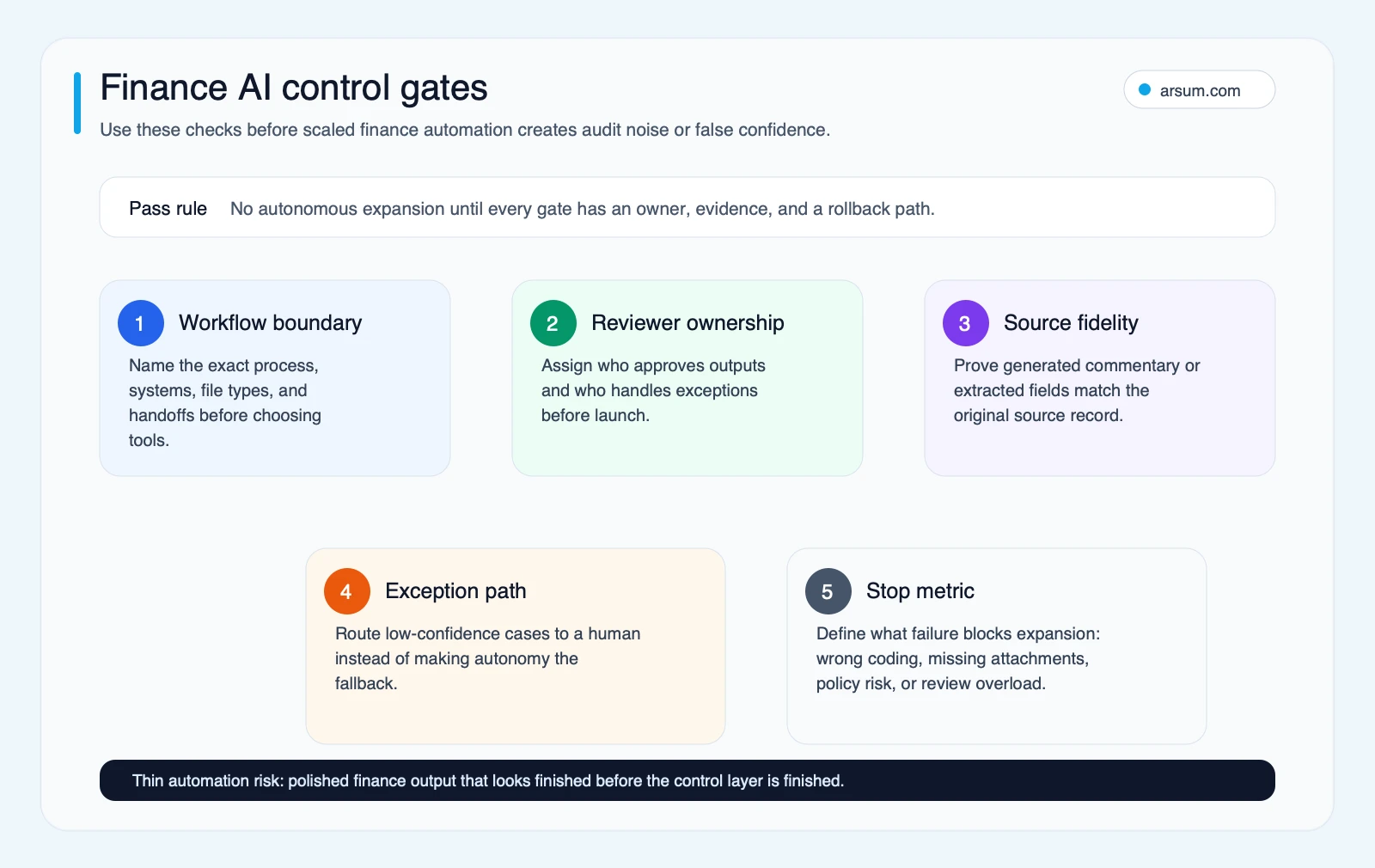
Use these control gates before expanding finance automation so polished outputs do not outrun reviewer ownership, source fidelity, exception handling, or stop metrics.
Work With Arsum
We help businesses implement AI automation that actually works. Custom solutions, not cookie-cutter templates.
Learn more →Common Implementation Mistakes
Starting with a broad copilot rollout. Finance teams get more value from one well-scoped workflow than from a department-wide mandate to “use AI more.”
Treating review as a fallback instead of a design layer. In finance, the reviewer is part of the system, not a cleanup crew added later.
Ignoring document reality. If the workflow still depends on messy PDFs, spreadsheets, and email handoffs, those inputs determine success more than the model choice does.
Choosing by AI branding instead of workflow fit. AP-specific tools, ERP-native features, and custom builds solve different problems. Using the wrong category creates the illusion that the technology failed when the fit failed.
FAQ: AI for Finance Teams
What are the best AI tools for finance teams? The best fit depends on the workflow boundary. If the work already lives inside one ERP and the main pain is repetitive navigation or draft analysis, start with ERP-native features. If the pain is invoice-heavy AP work with repeat vendors and routing rules, compare AP-focused tools first. A custom build makes sense only when you can name the exact exception pattern, file handoff, or approval rule that packaged tools keep missing.
How much does AI automation for finance teams cost? Cost usually scales with integration and control depth, not with how many AI features are on a landing page. A narrow pilot inside an existing stack is the low-cost path. Costs rise when you need multi-system ingestion, document handling, approval logic, exception queues, and audit trails. Compare options against the same workflow scope so you do not mistake a smaller project for a cheaper architecture.
Can AI replace finance team members? No. The safer pattern is assistive automation around intake, drafting, anomaly surfacing, and preparation work. Finance still needs humans for approvals, exceptions, policy interpretation, and anything that could affect controls, filings, or cash movement.
How long does it take to see ROI from finance AI? The fastest ROI usually comes from a narrow workflow with a measurable baseline, such as invoice triage, reconciliation support, or first-draft commentary. If the team cannot measure current cycle time, exception volume, and reviewer effort, it is too early to promise ROI because the workflow is not scoped tightly enough.
What data do you need to implement AI in finance? You need more than raw data. You need source documents, stable field definitions, account mappings, policy rules, and an owner who can explain what counts as a valid output. If the workflow still depends on ad hoc spreadsheets, PDFs, and email threads with no clean ownership, normalize that layer before you automate it.
Methodology Note
Last updated: July 3, 2026. This article was refreshed using finance-team research captured on June 19, 2026 across IBM, Oracle, Workday, Microsoft, CFA Institute, and qualitative CFO, FP&A, and accounting community discussions. Direct claims in the article are grounded in those published sources. Community threads were used only to surface recurring implementation friction, especially around legacy systems, spreadsheet-heavy processes, approval boundaries, and accuracy risk. They were treated as qualitative signal, not statistical proof.
The bottom line is simple: finance AI is not a single buying category. Start with the workflow, not the tool. If the work is routine and controlled, off-the-shelf options may be enough. If the workflow crosses systems, files, and approval logic, the real requirement is not “more AI.” It is better workflow design, clearer review ownership, and only then the right implementation path.
Ready to Automate Your Business?
Stop wasting time on repetitive tasks. Let AI handle the busywork while you focus on growth.
Schedule a Free Strategy Call →