AI for HR teams is most useful when it removes administrative friction without handing consequential people decisions to a model: automate drafting, routing, scheduling, reminders, status checks, and approved-policy retrieval first; keep hiring, compensation, employee relations, and policy exceptions under named human approval. The buying decision is then practical: use native HRIS or ATS capabilities for standard, single-system work; pilot an off-the-shelf layer where the workflow and data boundaries are already clear; consider a custom workflow only when cross-system coordination, permissions, policy logic, and audit evidence are the real constraint.
AI for HR Teams: 26 Specialist Tasks Ranked
Explore ai for hr teams: see the O*NET/BLS task score, 2029 capability scenario, human-review boundary, and a measurable first workflow pilot.

AI for HR teams automates the repetitive, high-volume work – so people ops can focus on the decisions that require judgment.
Table of Contents
- What most AI-for-HR guides miss: capability is not authorization
- HR and recruiting automation opportunity
- Start with the workflow, not the vendor demo
- Where native and off-the-shelf AI are usually enough
- When custom AI is justified
- Worked example: an HR service-desk pilot
- Recruiting, fairness, and high-consequence decisions
- Pre-build gates and common failure modes
- A practical buy, configure, or build decision
- Methodology and next step
What most AI-for-HR guides miss: capability is not authorization
A model may be technically able to summarize an interview, rank applications, draft a leave response, or identify an apparent trend in people data. That does not make it authorized to decide who progresses in a hiring process, what an employee is entitled to receive, or how an employee-relations issue should be resolved.
For an HR or People Ops leader, the useful boundary is not “can AI do this?” It is:
- Can the workflow be expressed as rules, approved sources, and permissions?
- Is a wrong answer reversible before it affects a person?
- Can a named owner review exceptions and show what evidence informed the output?
- Does the workflow remove a measurable amount of coordination work after review cost is included?
If the answer to the second or third question is no, reduce autonomy. Use AI to prepare material, retrieve approved sources, or route work—not to make the consequential outcome.
This distinction also separates three purchases that are often incorrectly grouped together:
| Category | Best use | Boundary |
|---|---|---|
| Native HRIS or ATS AI | Drafting, search, standard self-service, routine scheduling within the existing platform | Use only within the vendor’s configured permissions and supported workflow |
| Workflow automation layer | Reminders, handoffs, approvals, status updates, and data movement between defined systems | Require clear trigger conditions, exception routes, and system ownership |
| Custom policy-aware workflow | Cross-system onboarding, controlled HR service desks, custom reporting definitions, or specialized routing | Justify only when policy logic, source lineage, permissions, and auditability cannot be configured adequately elsewhere |
The practical lesson: do not commission a custom assistant because a demo is impressive. First identify the workflow where manual coordination is persistent, the source of truth is known, and human approval can be designed into the exception path. That is the same operating discipline behind a broader AI business process automation strategy.
Arsum Automation Opportunity Index · 2026-08-12
HR and recruiting automation opportunity
HR specialists can automate records, scheduling, routine candidate communication, and policy retrieval. Interviews, employee relations, classification, accommodation, and hiring decisions need strong human control.
Current score
46.2/100
Selective automation opportunity
Modeled task capacity
10.4-17.4 hours/week
P25-P75 planning range
2029 capability scenario
55.9/100
+9.7 points, not an adoption forecast
Recommended first pilot
candidate scheduling and HR record maintenance
Start narrow, measure, then expand
Decision: Begin with recruiting operations and employee-service administration, not autonomous candidate or employee decisions.
How the hr and recruiting score is calculated
For hr and recruiting, Arsum assessed 26 of 26 O*NET tasks from Human Resources Specialists (13-1071.00). The 46.2/100 result weights each task's current automation share by O*NET importance, relevance, and frequency. It measures technical workflow opportunity—not the percentage of hr and recruiting jobs that disappear and not the share of a team that should be removed.
Keep people accountable for selection, adverse-action decisions, employee relations, compensation judgment, accommodations, and sensitive investigations. The weighted supervision estimate is 55.6%, which is why the practical design is an exception-and-approval system rather than unsupervised autonomy.
Top hr and recruiting tasks for automation support
O*NET task 18857
Contact job applicants to inform them of the status of their applications.
55/100
Llm
AI assists; review exceptions and material outputs
O*NET task 18858
Develop or implement recruiting strategies to meet current or anticipated staffing needs.
55/100
Llm
AI assists; review exceptions and material outputs
O*NET task 18863
Maintain and update human resources documents, such as organizational charts, employee handbooks or directories, or performance evaluation forms.
65/100
Hybrid
AI assists; review exceptions and material outputs
O*NET task 18864
Maintain current knowledge of Equal Employment Opportunity (EEO) and affirmative action guidelines and laws, such as the Americans with Disabilities Act (ADA).
65/100
Hybrid
AI assists; review exceptions and material outputs
O*NET task 18866
Prepare or maintain employment records related to events, such as hiring, termination, leaves, transfers, or promotions, using human resources management system software.
65/100
Hybrid
AI assists; review exceptions and material outputs
O*NET task 18869
Schedule or administer skill, intelligence, psychological, or drug tests for current or prospective employees.
65/100
Hybrid
AI assists; review exceptions and material outputs
O*NET task 18870
Schedule or conduct new employee orientations.
65/100
Hybrid
AI assists; review exceptions and material outputs
These are ranked for practical opportunity: task exposure and current capability are discounted when implementation is complex, supervision is heavy, or live human interaction dominates. The recommended pilot above is an editorial choice among these signals, not simply the highest raw percentage.
HR and recruiting tasks that should remain human-led
- 35/100 current capability: Interpret and explain human resources policies, procedures, laws, standards, or regulations. AI prepares; human approval is required.
- 25/100 current capability: Hire employees and process hiring-related paperwork. AI prepares; human approval is required.
- 50/100 current capability: Review employment applications and job orders to match applicants with job requirements. AI prepares; human approval is required.
- 30/100 current capability: Advise management on organizing, preparing, or implementing recruiting or retention programs. AI prepares; human approval is required.
HR and recruiting capability from 2026 to 2029
2026 current
46.2/100
46.2/100
2028 midpoint
52.7/100
52.7/100
2029 scenario
55.9/100
55.9/100
The scenario adds 9.7 score points by 2029-08-12 under the same task mix. It assumes better reliability and integration in the tasks already identified as technically assistable. It does not assume that employers deploy those systems, that every normal case becomes autonomous, or that employment changes by the same amount.
The largest weighted capability gains come from:
- O*NET task 18861, Interpret and explain human resources policies, procedures, laws, standards, or regulations. 35→50.
- O*NET task 18859, Hire employees and process hiring-related paperwork. 25→40.
- O*NET task 18868, Review employment applications and job orders to match applicants with job requirements. 50→60.
Modeled hours and wage capacity for hr and recruiting
The hr and recruiting model assigns 30 hours of a reference 40-hour week across rated tasks and leaves 10 hours unmodeled. On that explicit assumption, current automation capability represents 10.4-17.4 hours/week. At the May 2025 BLS national mean wage of $39/hour, the gross hr and recruiting planning range is $21,327-$35,545/year per worker.
BLS national employment912,430
Mean annual wage$81,990
Tasks with full score inputs26/26
Assessment coverage100%
Gross wage capacity is not net savings. A business case must subtract implementation, software and model usage, review time, exception handling, maintenance, and risk reserves. BLS employment excludes self-employed workers.
A controlled 30/60/90-day hr and recruiting pilot
- Days 0-30: baseline candidate scheduling and HR record maintenance. Capture volume, handling time, rework, error rate, source systems, permissions, and the exception owner before changing the workflow.
- Days 31-60: run in review mode. Let the system prepare or route work, keep logs, and require human approval at the boundary described above. Measure accepted outputs and review cost, not generated volume.
- Days 61-90: expand only after evidence. Increase scope when accuracy, cycle time, exception rate, and net capacity beat the baseline without weakening customer, employee, financial, legal, or operational controls.
Sources, formula, and limitations
Occupation and task facts come from O*NET O*NET 30.3. Employment and wage inputs come from BLS OEWS May 2025 national estimates. Arsum adds the task-level current capability, supervision, implementation, time-allocation, and 2029 scenario assessments.
The occupation score is the exposure-weighted mean of task automation shares. Exposure combines normalized O*NET importance, relevance, and a log-scaled transformation of frequency. The time range applies a ±25% planning band around the modeled task capacity. Read the full Automation Opportunity Index methodology for formulas, QA gates, version history, and reproducible queries.
- The task inventory comes from O*NET 30.3; Arsum supplies the automation assessment and transformation.
- The time model allocates 30 hours of a reference 40-hour week across rated O*NET tasks, leaving 10 hours unmodeled for context switching and work not represented by task statements.
- Hours and wage capacity are planning ranges, not measured savings. Net ROI must subtract software, implementation, review, exception handling, maintenance, and risk costs.
- The 2029 value is a capability scenario, not a forecast of adoption, employment, layoffs, or autonomous operation.
- All 26 tasks have the O*NET inputs needed for score weighting and were assessed.
- BLS wage and employment data use the matching detailed SOC occupation; employment excludes self-employed workers.
Version: aoi-v0.2 · run 6 · capability date 2026-08-12 · forecast horizon 2029-08-12.
The task model above is an O*NET/BLS-based view of technically addressable task capacity, not a forecast of job loss, adoption, savings, or permission to automate HR judgment. Use it to find work worth inspecting at the task level. Then apply the workflow scorecard below before choosing a tool, pilot, or build. For the underlying framing and limits, see Arsum’s automation opportunity index methodology.
Start with the workflow, not the vendor demo
An HR team should map the normal path before asking whether AI belongs in it. The normal path exposes the actual handoffs, sources, permissions, and delays; it also reveals where automation would simply conceal a broken process.
A workflow qualification scorecard
Score each candidate workflow from 1 to 5. The weighting intentionally favors recoverable administrative effort and penalizes consequential judgment.
| Factor | Weight | Score 1 | Score 5 |
|---|---|---|---|
| Weekly coordinator effort | 30% | Minor, irregular effort | Recurring manual work with visible volume |
| Rule and source clarity | 25% | Sources conflict or are missing | Current sources and explicit rules exist |
| System and handoff complexity | 20% | One system, little coordination | Several systems and repeated manual handoffs |
| Exception containment | 15% | Exceptions are frequent or undefined | Exceptions can be identified and routed |
| Consequence sensitivity | 10% | Low-impact administrative output | Hiring, pay, employee-relations, or legal impact |
For the first four factors, a higher score supports automation. For consequence sensitivity, reverse the score when calculating readiness: a 5 means automation may assist, but it must not make or deliver the final decision.
Calculate:
Readiness score = effort × 30% + clarity × 25% + complexity × 20% + containment × 15% + (6 − sensitivity) × 10%
Use the result as a decision rule:
| Readiness score | Action |
|---|---|
| 4.0–5.0 | Configure native tools or run a narrow pilot; custom work is only justified if integrations or controls are missing |
| 3.0–3.9 | Pilot with a human reviewer and explicit acceptance criteria before scaling |
| Below 3.0 | Fix sources, process ownership, or exception handling before automating |
| Any workflow with final hiring, compensation, disciplinary, or employee-relations authority | Keep final authorization human regardless of score |
This score does not prove ROI. It makes assumptions visible before the organization invests in a solution that creates more review work than it removes.
Where native and off-the-shelf AI are usually enough
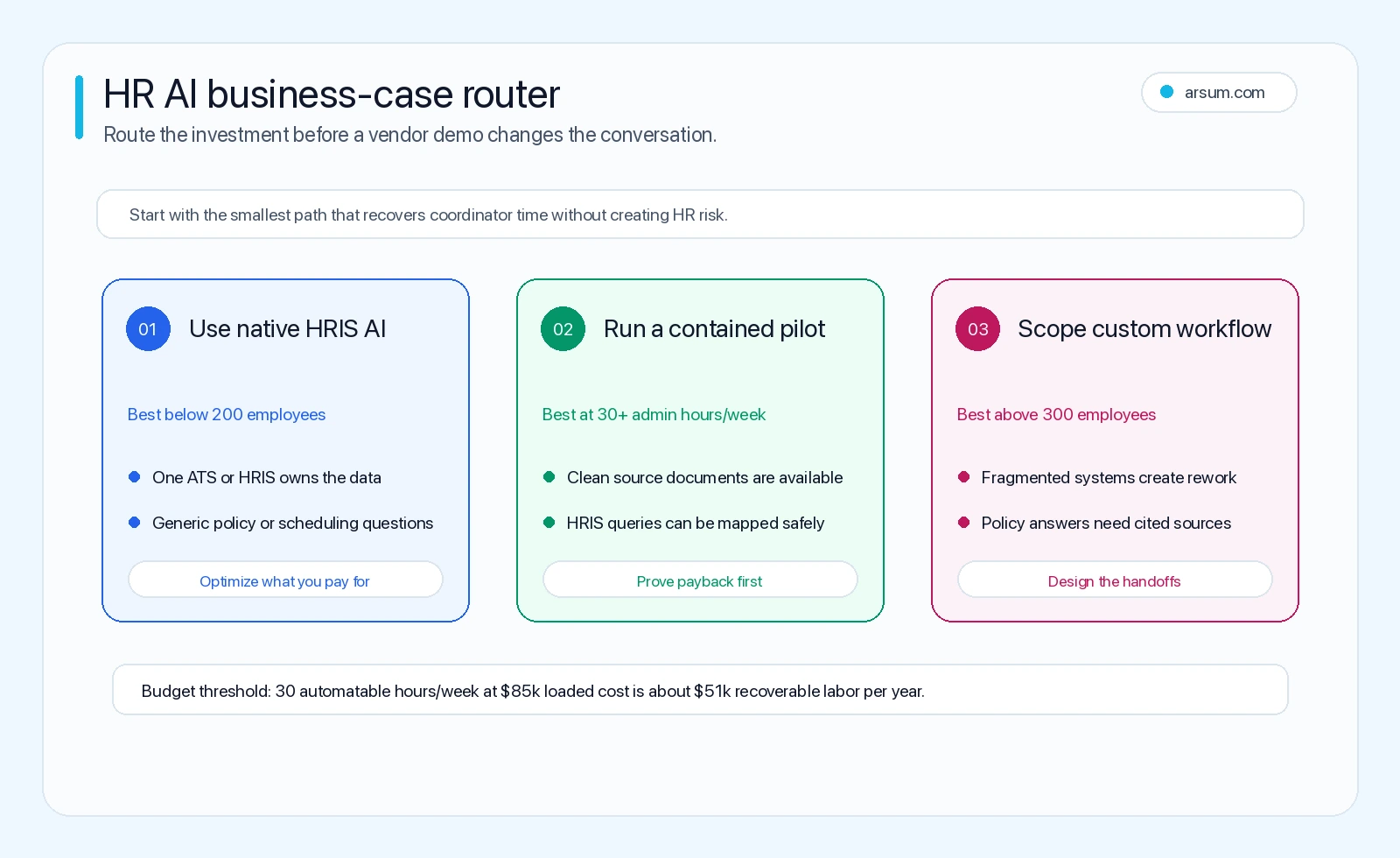
Standardized work inside a well-configured HR stack is often the best place to start. The question is not whether every vendor’s feature will fit; it is whether your workflow remains simple enough that configuration, permissions, and review can be managed in the systems you already own.
Good native-tool candidates
| Workflow | Suitable first use | Required control |
|---|---|---|
| Interview scheduling | Propose times, send confirmations, manage routine reschedules | Escalate panel conflicts, accessibility needs, and unusual requests |
| Employee self-service | Retrieve approved policy excerpts and direct people to forms | Cite the source; route interpretation and exceptions to HR |
| Onboarding checklists | Assign standard tasks, reminders, and status updates | Confirm each downstream system’s completion state |
| Reporting preparation | Assemble recurring inputs and draft a narrative for review | Human owner validates definitions and figures before circulation |
| Recruiting administration | Parse applications, deduplicate records, draft candidate communications | Human recruiter owns progression and rejection decisions |
Microsoft’s public overview of AI for HR is a useful benchmark for the category of workflow simplification vendors commonly position: recruitment support, administrative assistance, and operational efficiency. Treat that as a description of a vendor category, not as evidence that a particular feature is appropriate for your data or policy environment.
A standard workflow should stay native or off-the-shelf when it can be configured within existing systems, has a clear owner, and does not require the automation to infer policy or resolve contested context. That is often a better first move than building a new layer. The same buy-first logic applies in the wider AI workflow automation decision.
When custom AI is justified
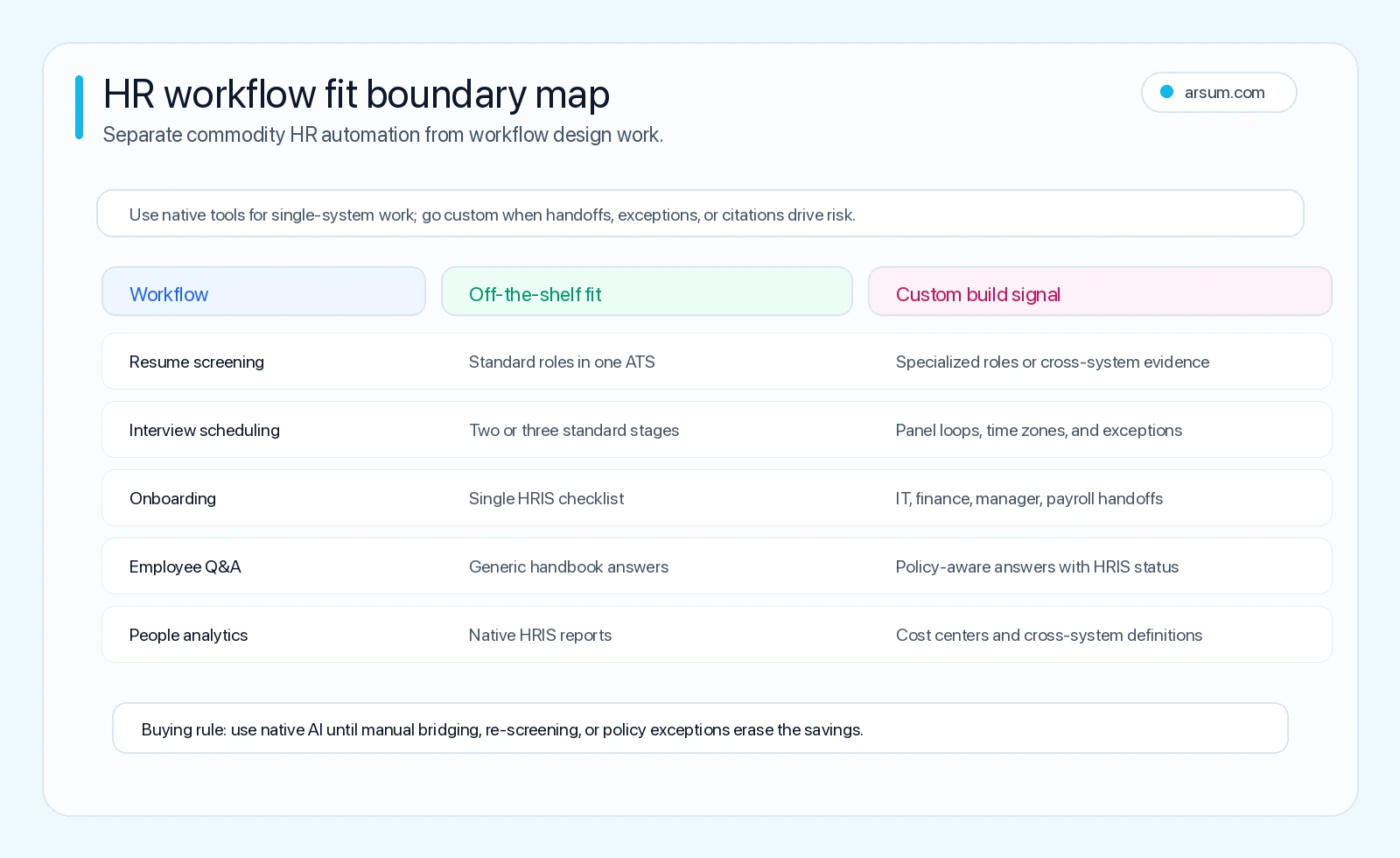
Custom work earns its place when the missing value is not better prose generation but controlled orchestration: systems that need to exchange status, policy rules that require traceable application, and approvals that cannot be left implicit.
The custom-workflow threshold
Consider a custom workflow when all or most of these conditions are present:
- A process crosses several owned systems, such as HRIS, ATS, identity management, payroll, service desk, document storage, and collaboration tools.
- The team repeatedly bridges those systems manually with spreadsheets, tickets, reminders, or status chasing.
- The output must honor organization-specific policy, role permissions, or jurisdictional distinctions.
- The workflow can identify its exceptions and route them to a named person.
- Existing tools cannot provide sufficient source citation, approval logging, or permission-aware access for the intended use.
Cross-system onboarding is a common example. A new starter may need employment details verified in the HRIS, an IT equipment request, identity provisioning, payroll setup, manager tasks, and a documented exception path for missing information. A model can draft messages and explain the next step, but the value of a custom workflow is the orchestration and retained state—not conversational text.
A policy-aware service desk is another candidate. It may retrieve only approved handbook and benefits material, show the source used, enforce role-based access, and route leave, pay, immigration, accommodation, or employee-relations questions to the appropriate human owner. Data ownership, retention, and access should be explicit vendor or architecture questions before employee data is exposed to any model. OpenAI’s enterprise privacy guidance is one example of the type of documentation buyers should review; it does not replace your own legal, security, or procurement review.
For implementation patterns that need to coordinate tools and approvals, see AI agent architecture patterns and this guide to AI integration services. The architectural question is always the same: which system remains authoritative, which action is merely proposed, and who can authorize the next state change?
💡 Arsum builds custom AI automation solutions tailored to your business needs.
Get a Free Consultation →Worked example: an HR service-desk pilot
A service desk is often a more controlled first pilot than candidate screening because it can begin with approved source material and a clear escalation path. It is still not safe by default: permission errors, stale policy, and ambiguous questions can turn an answer tool into a privacy or employee-relations problem.
Normal path
- An employee submits a routine question through the established HR channel.
- The workflow classifies the request as informational, transactional, or sensitive.
- For informational questions, it retrieves only approved policy content available to that employee’s role.
- It drafts an answer with a link or citation to the relevant policy source.
- It logs the source version, answer, confidence or routing outcome, and any human edit.
- The employee receives the answer only when the request is within the approved scope.
Exception path
The workflow does not answer directly when the request concerns pay, benefits eligibility, leave interpretation, accommodation, performance, disciplinary action, employee relations, legal matters, or an unavailable source. It creates a case for the designated HR service owner, retains the submitted question and attempted source lookup, and records the human resolution. The human owner—not the model—approves the response.
Pilot scorecard and acceptance rule
The following is an illustrative planning assumption, not an observed result. Replace the sample baseline with your own service-desk export.
| Measure | Illustrative baseline | Pilot target | Owner | Review cadence |
|---|---|---|---|---|
| Routine tickets received per week | 100 tickets | Measure; no target assumed | HR service lead | Weekly |
| Hours spent on in-scope routine tickets | 12 hours/week | Reduce only after review time is included | HR service lead | Weekly |
| Answers supported by an approved source | Baseline not yet measured | 100% for auto-sent answers | Knowledge owner | Weekly sample |
| Correct escalation of out-of-scope requests | Baseline not yet measured | 100% of sampled sensitive cases routed to humans | HR operations manager | Weekly |
| Human review effort | Baseline not applicable | Must be measured, not ignored | HR service lead | Weekly |
| Privacy or unauthorized-access event | 0 | 0 | Security/privacy owner | Immediate |
| Policy-source freshness | Baseline not yet measured | Every source has an accountable owner and version date | Policy owner | Monthly |
A practical 30-day decision rule is: continue only if sampled auto-sent answers are fully source-supported, sensitive requests are routed correctly in the review sample, no unauthorized disclosure occurs, and net coordinator time improves after including human review, corrections, and policy maintenance. Pause the pilot if any privacy event occurs, an unapproved answer is delivered for a sensitive case, or review shows that the workflow is creating comparable or greater rework than the baseline.
Rollback should be simple: disable auto-send, keep the intake channel, route all cases to the existing HR queue, retain the pilot logs for internal review according to your retention policy, and remove or correct the failing source or rule before any relaunch.
This is a better business case than promising savings before the workflow has earned them. For more ways to structure the economics, use AI automation ROI examples as a planning reference, then validate actual labor and review inputs internally.
Recruiting, fairness, and high-consequence decisions
Screening and recruiting automation deserve a stricter threshold. AI can assist with administrative preparation: structured extraction from applications, duplicate detection, interview coordination, question drafting, and recruiter-facing summaries. It should not be treated as the final decision-maker for candidate progression, rejection, compensation, or suitability.
The controls should be concrete:
- Define prohibited uses before launch, including automated final rejection or ranking used as the sole basis for a hiring decision.
- Keep a named recruiting or hiring owner responsible for each decision.
- Record the source data, model output, reviewer action, and reason for any override where your policy and retention requirements permit.
- Test whether the workflow treats comparable inputs consistently; involve legal, privacy, and appropriate HR stakeholders in choosing the validation approach.
- Review candidate-facing communications for clarity, accessibility, and a human escalation option.
- Disable the automation if review detects a material quality, fairness, privacy, or process-control failure.
NIST’s AI Risk Management Framework supports this governance-first approach: trustworthiness considerations belong in the design, use, evaluation, and oversight of AI systems. It is a framework for managing risk, not a certification that a particular HR implementation is fair or compliant.
Community discussion also flags an operational failure mode worth taking seriously: when AI appears to eliminate human contact too early in recruiting, it can damage the experience for candidates and recruiters. A surfaced r/recruiting discussion and a r/humanresources thread are qualitative, snippet-level signals about questions and concerns—not market-wide evidence or performance benchmarks. They reinforce a useful design choice: automate admin around the human conversation, not the conversation itself.
Pre-build gates and common failure modes
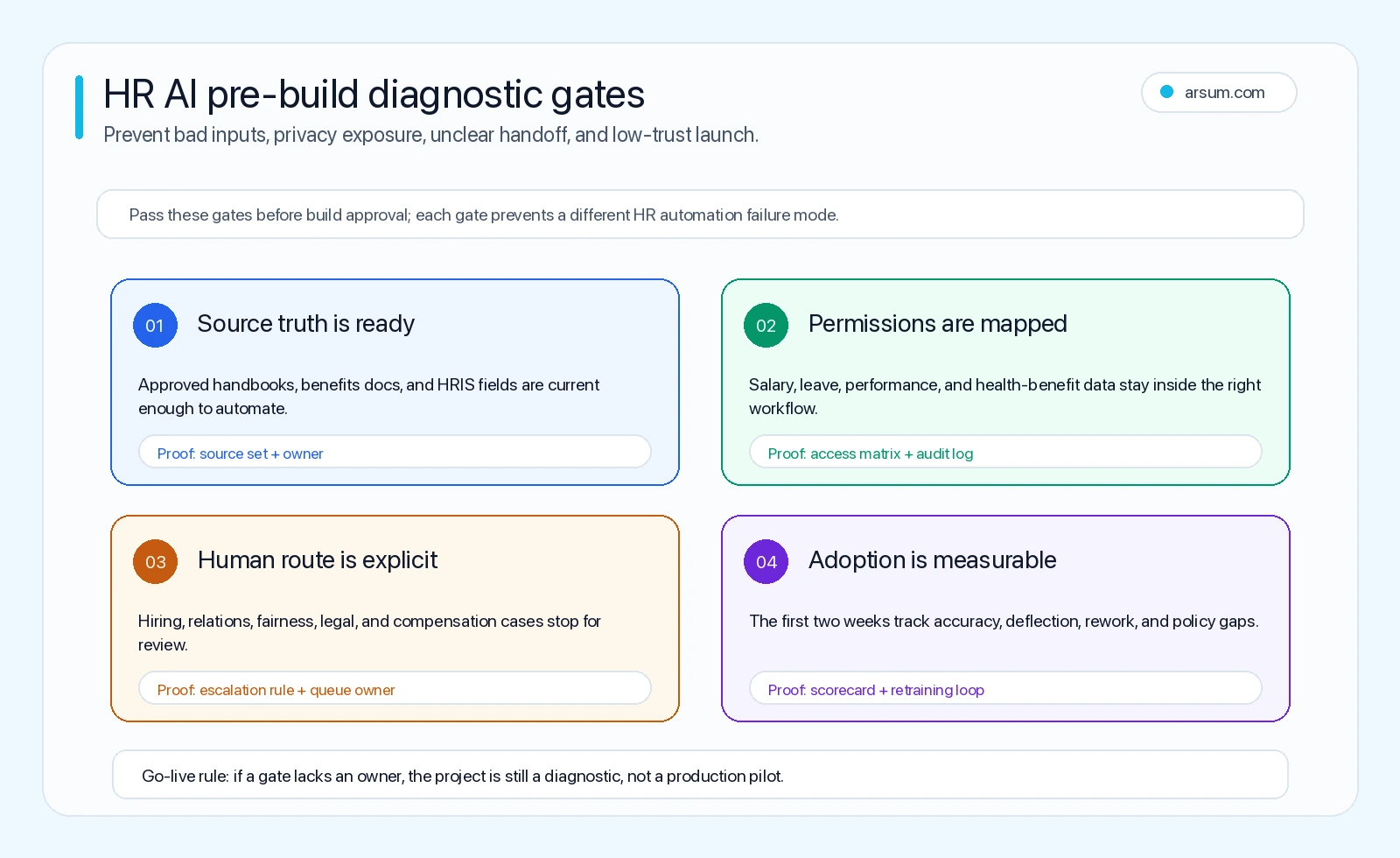
Before approving a pilot or custom build, require answers to these gates:
- Source quality: Which documents and systems are authoritative? Who updates them, and how does the workflow know the current version?
- Data boundaries: What employee or candidate data is accessible, by whom, in which locations, and for what purpose?
- Action boundaries: Which outputs can be drafted, which can be sent automatically, and which require a named approver?
- Exception design: What conditions stop the normal path, where do they route, and how quickly must a human respond?
- Measurement: What baseline, quality sample, review cost, and rollback condition determine whether the pilot continues?
Common failures follow directly from skipping one of those gates:
- Launching a policy assistant before policy sources, ownership, and access rules are current.
- Using automation to decide a consequential HR outcome rather than to prepare evidence for a human decision.
- Measuring ticket volume or messages sent while ignoring corrections, escalations, and reviewer time.
- Connecting systems without defining the authoritative record or rollback path.
- Treating vendor privacy language as a substitute for validating the organization’s own data flow, permissions, and retention obligations.
- Expanding from a controlled pilot to broad employee access before the normal and exception paths have been reviewed.
A practical buy, configure, or build decision
Choose native capability when the workflow is standard, stays largely within one platform, and existing permissions and reporting satisfy the requirement.
Choose a focused off-the-shelf pilot when the workflow is repeatable but needs a specialized scheduling, service-desk, or workflow layer. Require a time-bounded evaluation with the same baseline, exception, and rollback rules described above.
Choose a custom workflow when the work crosses systems, needs company-specific policy logic, has meaningful audit or permission requirements, and the pilot scorecard shows enough recoverable effort after review cost. A custom build should still start narrow: one workflow, defined sources, named owners, an exception queue, and a decision point before expanding.
Avoid all three options, for now, when the inputs are inconsistent, the accountable owner is unclear, the exception path cannot be stated, or the intended output would make an irreversible people decision without human authorization.
Methodology and next step
This guide uses the O*NET/BLS task model rendered above as a directional starting point, plus public guidance from NIST, OpenAI, and Microsoft. The community links are explicitly qualitative search-signal context, not statistics. No generalized adoption rate, savings figure, implementation timetable, or hiring outcome should be assumed from this page; the pilot scorecard is designed to establish your own evidence.
If your team is deciding whether to configure, buy, or build, bring one workflow export, its current sources, the systems it touches, and a list of exceptions to the discussion. That is enough to determine whether the work is an administrative automation candidate, a controlled pilot, or a process that should remain human-led.
Ready to Automate Your Business?
Stop wasting time on repetitive tasks. Let AI handle the busywork while you focus on growth.
Schedule a Free Strategy Call →Written by:Arsum editorial team
- Reviewed by
- Arsum editorial team
- Published
- June 3, 2026
- Updated
- August 12, 2026
- How this was produced
- Arsum uses research packs, source checks, and human editorial review to prepare and update blog articles. Editors are responsible for the final page.
- Source policy
- Sources are linked in the article when used. Methodology and source notes are included on higher-risk or high-visibility pages and are being rolled out across the archive. Editorial policy.
- Why this page exists
- Help B2B operators evaluate AI automation, implementation scope, cost, risk, and build-vs-buy decisions with practical context.