AI for marketing teams is most useful when it improves a defined operating workflow—such as reporting, lead routing, or content production—with trusted inputs, an accountable reviewer, and a measurable outcome. A drafting tool may save effort; a connected workflow can reduce handoffs and speed decisions, but only when the team can control exceptions and verify the result.
AI for Marketing Teams: 20 Manager Tasks Ranked
Explore ai for marketing teams: see the O*NET/BLS task score, 2029 capability scenario, human-review boundary, and a measurable first workflow pilot.

Table of Contents
- What Most Guides Miss: Capability Is Not Authorization
- Marketing management automation opportunity
- How the marketing management score is calculated
- Top marketing management tasks for automation support
- Marketing management tasks that should remain human-led
- Marketing management capability from 2026 to 2029
- Modeled hours and wage capacity for marketing management
- A controlled 30/60/90-day marketing management pilot
- One Buyer Decision Sequence: Baseline, Readiness, Path, Pilot
- Which Marketing Workflows Make Good First Candidates?
- Worked Pilot Scorecard: Lead Routing
- Worked Pilot Scorecard: Reporting Data Assembly
- Content Operations: Productive Drafting Without Publishing Autonomy
- Privacy, Permissions, and Failure Controls
- Methodology and Limits
What Most Guides Miss: Capability Is Not Authorization
Most guides about ai for marketing teams focus on copy generation and tool features. The harder decision is whether a workflow is ready to operate with AI involvement.
A model may be capable of drafting a campaign brief, prioritizing a lead, or explaining a dashboard. That does not make it authorized to publish, route, or recommend without controls. Set the implementation boundary using:
- input-data quality and lineage;
- the consequence of a wrong output;
- the number of systems that must agree;
- whether the action is reversible;
- the named person who reviews exceptions.
This is why “automate content” is usually an incomplete requirement. A workable system also needs approved source material, forbidden claims, a review queue, a publishing owner, and a way to withdraw or correct an output.
IBM’s overview of AI in marketing describes common uses across customer insights, CRM, personalization, and routine-task support. The operational opportunity is not to replace marketing judgment. It is to reduce repeated collection, formatting, routing, and first-pass analysis so the team can spend more time on strategy and accountable decisions.
Arsum Automation Opportunity Index · 2026-08-12
Marketing management automation opportunity
Marketing managers have useful research, survey, catalog, and forecasting workflows for AI, but the occupation is dominated by strategy, coordination, negotiation, and accountable commercial choices.
Current score
37.1/100
Human-led role with targeted automation
Modeled task capacity
8.3-13.9 hours/week
P25-P75 planning range
2029 capability scenario
54.4/100
+17.3 points, not an adoption forecast
Recommended first pilot
product-offering compilation and research synthesis
Start narrow, measure, then expand
Decision: Use AI to assemble evidence and options; do not delegate brand, budget, hiring, or market-position decisions.
How the marketing management score is calculated
For marketing management, Arsum assessed 20 of 20 O*NET tasks from Marketing Managers (11-2021.00). The 37.1/100 result weights each task's current automation share by O*NET importance, relevance, and frequency. It measures technical workflow opportunity—not the percentage of marketing management jobs that disappear and not the share of a team that should be removed.
People should own positioning, pricing, team management, vendor negotiation, legal disputes, and the final interpretation of market evidence. The weighted supervision estimate is 69.9%, which is why the practical design is an exception-and-approval system rather than unsupervised autonomy.
Top marketing management tasks for automation support
O*NET task 952
Evaluate the financial aspects of product development, such as budgets, expenditures, research and development appropriations, or return-on-investment and profit-loss projections.
55/100
Hybrid
AI assists; review exceptions and material outputs
O*NET task 957
Compile lists describing product or service offerings.
85/100
Llm
Automate normal cases; route exceptions
O*NET task 958
Use sales forecasting or strategic planning to ensure the sale and profitability of products, lines, or services, analyzing business developments and monitoring market trends.
55/100
Hybrid
AI assists; review exceptions and material outputs
O*NET task 963
Initiate market research studies, or analyze their findings.
65/100
Hybrid
AI assists; review exceptions and material outputs
O*NET task 965
Conduct economic or commercial surveys to identify potential markets for products or services.
70/100
Hybrid
AI assists; review exceptions and material outputs
O*NET task 19503
Develop business cases for environmental marketing strategies.
55/100
Hybrid
AI assists; review exceptions and material outputs
O*NET task 950
Develop pricing strategies, balancing firm objectives and customer satisfaction.
35/100
Hybrid
AI prepares; human approval is required
These are ranked for practical opportunity: task exposure and current capability are discounted when implementation is complex, supervision is heavy, or live human interaction dominates. The recommended pilot above is an editorial choice among these signals, not simply the highest raw percentage.
Marketing management tasks that should remain human-led
- 30/100 current capability: Identify, develop, or evaluate marketing strategy, based on knowledge of establishment objectives, market characteristics, and cost and markup factors. AI prepares; human approval is required.
- 35/100 current capability: Formulate, direct, or coordinate marketing activities or policies to promote products or services, working with advertising or promotion managers. AI prepares; human approval is required.
- 15/100 current capability: Direct the hiring, training, or performance evaluations of marketing or sales staff and oversee their daily activities. AI prepares; human approval is required.
- 20/100 current capability: Consult with product development personnel on product specifications, such as design, color, or packaging. AI prepares; human approval is required.
Marketing management capability from 2026 to 2029
2026 current
37.1/100
37.1/100
2028 midpoint
48.6/100
48.6/100
2029 scenario
54.4/100
54.4/100
The scenario adds 17.3 score points by 2029-08-12 under the same task mix. It assumes better reliability and integration in the tasks already identified as technically assistable. It does not assume that employers deploy those systems, that every normal case becomes autonomous, or that employment changes by the same amount.
The largest weighted capability gains come from:
- O*NET task 20709, Formulate, direct, or coordinate marketing activities or policies to promote products or services, working with advertising or promotion managers. 35→55.
- O*NET task 951, Identify, develop, or evaluate marketing strategy, based on knowledge of establishment objectives, market characteristics, and cost and markup factors. 30→50.
- O*NET task 958, Use sales forecasting or strategic planning to ensure the sale and profitability of products, lines, or services, analyzing business developments and monitoring market trends. 55→76.
Modeled hours and wage capacity for marketing management
The marketing management model assigns 30 hours of a reference 40-hour week across rated tasks and leaves 10 hours unmodeled. On that explicit assumption, current automation capability represents 8.3-13.9 hours/week. At the May 2025 BLS national mean wage of $85/hour, the gross marketing management planning range is $37,093-$61,821/year per worker.
BLS national employment395,240
Mean annual wage$177,770
Tasks with full score inputs20/20
Assessment coverage100%
Gross wage capacity is not net savings. A business case must subtract implementation, software and model usage, review time, exception handling, maintenance, and risk reserves. BLS employment excludes self-employed workers.
A controlled 30/60/90-day marketing management pilot
- Days 0-30: baseline product-offering compilation and research synthesis. Capture volume, handling time, rework, error rate, source systems, permissions, and the exception owner before changing the workflow.
- Days 31-60: run in review mode. Let the system prepare or route work, keep logs, and require human approval at the boundary described above. Measure accepted outputs and review cost, not generated volume.
- Days 61-90: expand only after evidence. Increase scope when accuracy, cycle time, exception rate, and net capacity beat the baseline without weakening customer, employee, financial, legal, or operational controls.
Sources, formula, and limitations
Occupation and task facts come from O*NET O*NET 30.3. Employment and wage inputs come from BLS OEWS May 2025 national estimates. Arsum adds the task-level current capability, supervision, implementation, time-allocation, and 2029 scenario assessments.
The occupation score is the exposure-weighted mean of task automation shares. Exposure combines normalized O*NET importance, relevance, and a log-scaled transformation of frequency. The time range applies a ±25% planning band around the modeled task capacity. Read the full Automation Opportunity Index methodology for formulas, QA gates, version history, and reproducible queries.
- The task inventory comes from O*NET 30.3; Arsum supplies the automation assessment and transformation.
- The time model allocates 30 hours of a reference 40-hour week across rated O*NET tasks, leaving 10 hours unmodeled for context switching and work not represented by task statements.
- Hours and wage capacity are planning ranges, not measured savings. Net ROI must subtract software, implementation, review, exception handling, maintenance, and risk costs.
- The 2029 value is a capability scenario, not a forecast of adoption, employment, layoffs, or autonomous operation.
- All 20 tasks have the O*NET inputs needed for score weighting and were assessed.
- BLS wage and employment data use the matching detailed SOC occupation; employment excludes self-employed workers.
Version: aoi-v0.2 · run 6 · capability date 2026-08-12 · forecast horizon 2029-08-12.
The role-research model should change how you read the opportunity. Its score estimates technically addressable task capacity under disclosed assumptions; it does not predict job loss, adoption, accuracy, or realized savings. Marketing management includes strategy, negotiation, team leadership, and accountable choices, so the strongest uses are bounded tasks around the manager—not autonomous management.
One Buyer Decision Sequence: Baseline, Readiness, Path, Pilot
Use one sequence to decide whether to configure an existing platform, buy a point solution, build a connected workflow, or wait.
1. Establish the baseline
Choose a workflow that happens often enough to measure. Record:
- volume each week or month;
- current manual hours;
- error, rework, or exception rate;
- elapsed time from input to completed action;
- the downstream metric the workflow influences;
- the team or role accountable for the result.
A reporting process may have a clear baseline in data-assembly hours and time-to-decision. Lead routing needs operational measures plus downstream evidence such as accepted-lead rate and conversion to the next sales stage.
2. Test data and control readiness
Do not ask AI to silently reconcile disputed definitions. Before automating, identify the source of truth for each input, its field owner, and the fallback rule when the value is missing or conflicting.
Salesforce’s guidance on AI CRM adoption challenges identifies risks directly relevant to marketing operations: poor data quality, legacy integrations, adoption, governance, privacy, accuracy, bias, and hallucinations. These are not details to postpone; they determine whether the workflow should be automated at all.
3. Choose the narrowest viable path
| Condition | Appropriate path | Boundary |
|---|---|---|
| One trusted platform, low-consequence output | Use native platform AI | Keep human review for external publishing or material decisions. |
| Common, narrow process with limited integration needs | Buy a point solution | Confirm permissions, exports, audit trail, and exception handling. |
| Three or more systems, proprietary rules, or meaningful failure cost | Evaluate a connected custom workflow | Define source lineage, owners, controls, and rollback before building. |
| Weak data, unclear ownership, or vague value | Wait | Repair workflow ownership and measurement first. |
Off-the-shelf tools are not inherently weak at integration. The real question is whether the specific platform configuration can express your data rules, approval chain, and evidence requirements. A connected custom layer becomes more plausible when a workflow crosses CRM, analytics, product data, campaign tools, and content systems—and a wrong result has measurable pipeline, reputational, or compliance cost.
For adjacent implementation choices, see AI workflow automation and custom AI solutions for business.
Which Marketing Workflows Make Good First Candidates?
| Workflow | Useful first outcome | Main risk | Best first control |
|---|---|---|---|
| Reporting and attribution | Less manual assembly; faster review | Conflicting definitions or incomplete data | Source-by-source reconciliation and reviewer sign-off |
| Lead routing | Faster assignment with fewer avoidable misroutes | Bad CRM data or incorrectly inferred fit | Confidence thresholds, exception queue, sales-ops approval |
| Content operations | Faster first drafts and repurposing | Unsupported claims, brand drift, accidental publication | Approved sources, editorial review, publish permission |
| Personalization | More relevant approved messaging by segment | Sensitive or stale customer context | Allowed fields, approved segments, holdout comparison |
| Campaign monitoring | Earlier anomaly detection | False alarms or misleading attribution narratives | Human validation before reallocating budget |
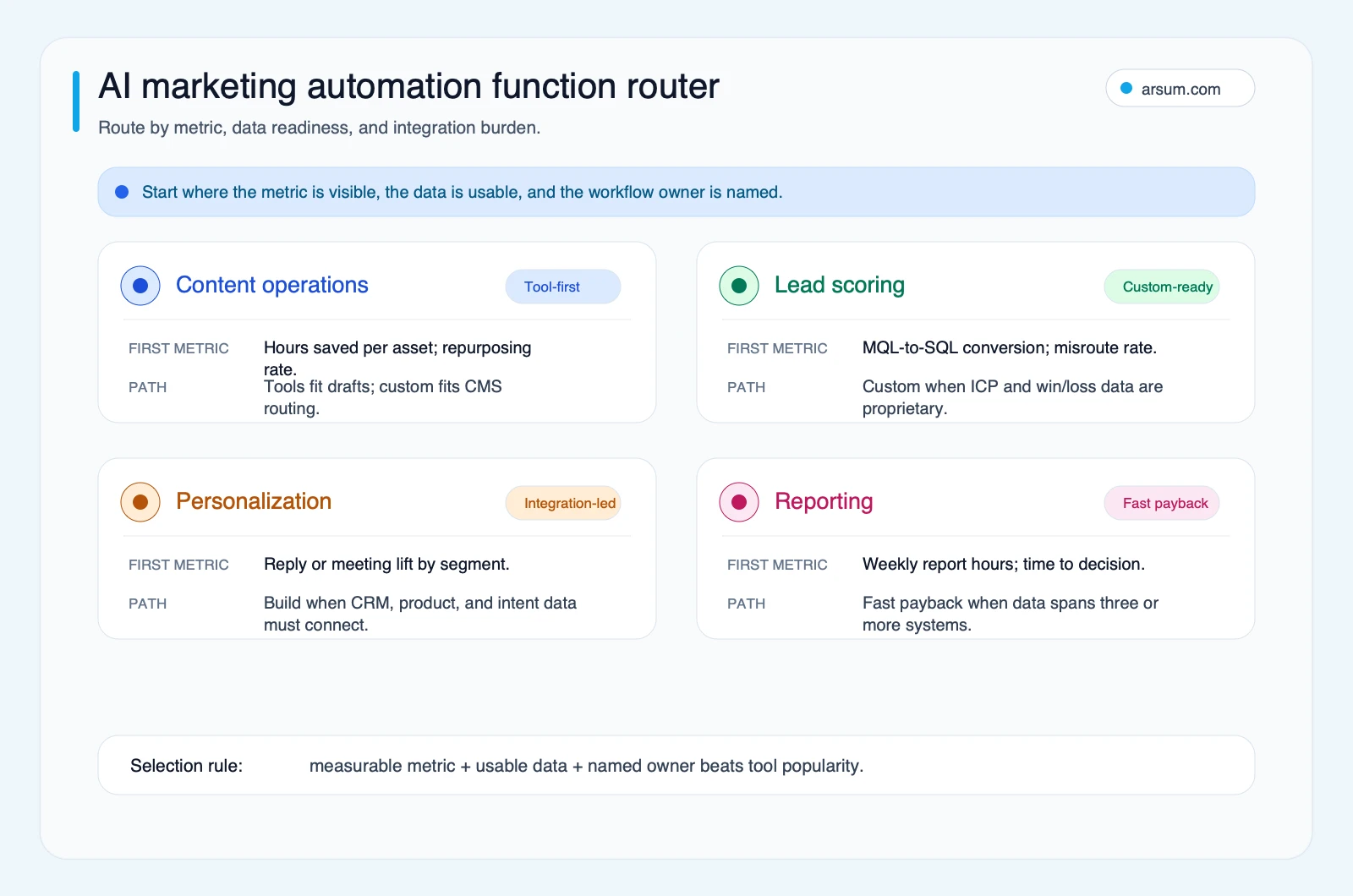
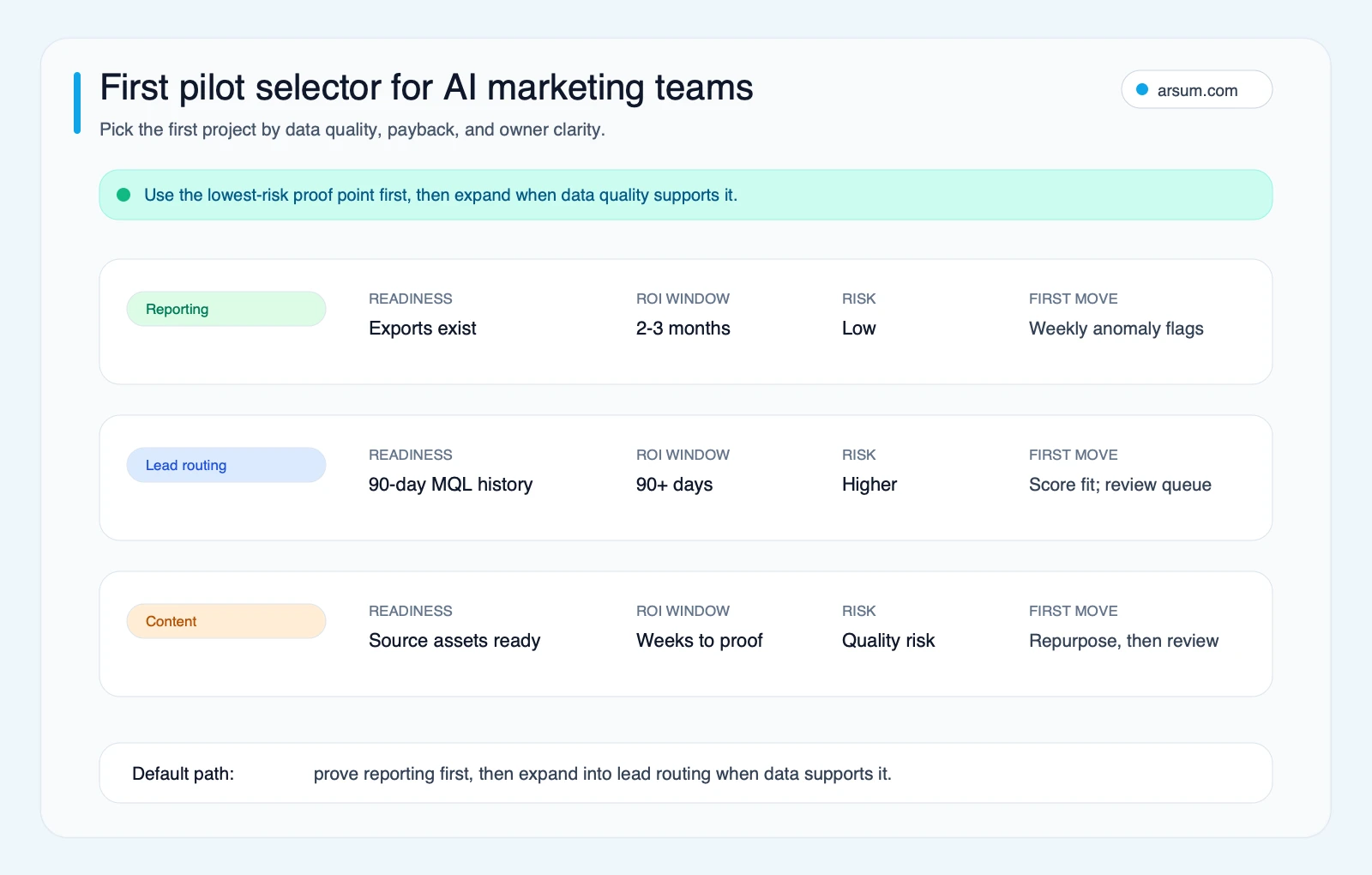
Reporting is often a sensible first pilot because its output can remain advisory. A reviewer can compare the generated narrative with the underlying dashboard before it changes budget, messaging, or sales action.
Lead routing can carry more direct commercial impact, but it requires stronger data discipline and a clear rollback. Content production is useful when treated as a controlled workflow rather than a publishing autopilot. Google Search Central’s generative AI guidance notes that generative AI can support research and structure, while scaled pages that add no user value can violate spam policies. The commercial equivalent is simple: published marketing material still needs source grounding, brand evidence, and accountable review.
For related boundaries, read AI content automation for business and AI SEO: a complete guide.
Worked Pilot Scorecard: Lead Routing
Lead routing is consequential because it can affect response time, sales capacity, and pipeline quality. Treat it as a controlled decision-support pilot, not an autonomous assignment system.
Pilot design
Input set: inbound form submissions, CRM account and contact records, declared geography, company size, product interest, campaign source, approved enrichment fields, and existing territory or account-ownership rules.
Routing logic: apply deterministic exclusions and ownership rules first. Use AI only to classify incomplete free-text context or suggest a queue when defined rules do not resolve the case.
Named owner: Marketing Operations owns workflow design and weekly quality review. Sales Operations approves routing-rule changes. The receiving sales leader owns feedback on accepted and rejected leads.
Human approval point: any low-confidence recommendation, conflicting account match, missing required field, restricted territory, strategic account, or recommendation that overrides a deterministic ownership rule enters an exception queue. It is not assigned automatically.
Evidence retained: source record IDs, field values used, rule version, model output, confidence flag, reviewer decision, final route, timestamp, and later sales disposition.
Rollback: preserve the existing routing configuration as the default. If the pilot stops, disable the AI suggestion layer and return eligible records to the prior rules; recovery should not require a data migration.
Acceptance scorecard
| Measure | Baseline to capture | Pilot target | Owner and cadence | Stop condition |
|---|---|---|---|---|
| Accepted-lead rate | Share of routed leads accepted by sales | Improve against baseline, or remain stable while assignment speed improves | Marketing Operations; weekly | Sustained decline linked to routing recommendations |
| Misroute rate | Confirmed incorrect owner, territory, or queue assignment | Lower than baseline manual-routing error rate | Sales Operations; weekly | Exceeds the agreed tolerance |
| Review time | Hours spent resolving exceptions | Does not exceed agreed operating capacity | Marketing Operations; weekly | Exception queue becomes the new bottleneck |
| Time to first assignment | Median elapsed time from submission to owner | Reduce against baseline | Revenue Operations; weekly | Delay worsens or records are stranded |
| Downstream conversion | Conversion to the selected next sales stage | Observe by cohort; do not infer causation from a small sample | Sales leader; monthly | Material adverse movement requiring investigation |
Set targets from the team’s own baseline, not a generic benchmark. If there is no reliable accepted-lead definition or no owner willing to review exceptions, the workflow is disqualified for autonomous routing. Start with deterministic CRM cleanup and queue visibility instead.
💡 Arsum builds custom AI automation solutions tailored to your business needs.
Get a Free Consultation →Worked Pilot Scorecard: Reporting Data Assembly
A reporting pilot can establish whether a connected workflow is worth extending without giving AI authority over revenue decisions.
Assume, as an illustrative planning assumption, that three people spend a combined 12 hours each week collecting, reconciling, and formatting marketing-report inputs. Suppose a workflow removes 60% of that assembly work but requires two hours of review and exception handling each week.
| Calculation input | Illustrative value |
|---|---|
| Current assembly time | 12 hours/week |
| Assembly work removed | 60% |
| Review and exception work added | 2 hours/week |
| Net capacity recovered | 5.2 hours/week |
| Planning weeks per year | 50 |
| Annual capacity recovered | 260 hours |
| Illustrative internal value rate | $65/hour |
| Illustrative annual capacity value | $16,900 |
The arithmetic is a planning scenario, not a client result, price, savings claim, or revenue forecast. It excludes implementation cost, software cost, and management time outside the pilot.
The Marketing Operations or Revenue Operations leader who owns reporting definitions should own the pilot. Review each output against source dashboards every reporting cycle. Stop the pilot if it repeatedly changes definitions, hides reconciliation gaps, or creates more review work than it removes. Roll back by returning to the existing report process while retaining the standardized source mapping for later use.
Content Operations: Productive Drafting Without Publishing Autonomy
Content is often easy to start and easy to over-automate. Use AI for research organization, first drafts, repurposing, metadata suggestions, and editorial checklists. Keep the final claim, source, brand, and publishing decision with an accountable editor.
A controlled content workflow needs:
- approved source documents and source URLs;
- examples of accepted brand language;
- forbidden claims, regulated language, and legal-review triggers;
- a reviewer who can reject or revise output;
- version history linking drafts to their source inputs;
- a publishing permission that generation cannot bypass.
Public practitioner discussions surfaced in search repeatedly raise the same qualitative questions: whether AI connects work across CRM, campaign documentation, enrichment, and reporting; whether real brand examples are needed; and whether draft output receives genuine review. These are useful prompts for design, not market-wide evidence or adoption statistics.
The key distinction is between drafting assistance and operated marketing automation. A drafting tool produces an artifact. A workflow also gathers approved context, assigns review, records a decision, publishes through a controlled path, and links downstream outcomes back to the work.
Teams preparing to scale this work should also distinguish workflow automation from mass publishing. Generative SEO guidance and AI marketing consulting considerations provide related decision frameworks.
Privacy, Permissions, and Failure Controls
Before connecting customer, pipeline, campaign, or product data, review the vendor’s actual plan-level controls. Do not rely on a generic statement about AI privacy.
OpenAI states that business data is not used to train models by default unless an organization explicitly opts in, and describes retention and enterprise controls in its Enterprise Privacy and business-data documentation. Those statements apply to relevant OpenAI business offerings and configurations; they do not describe every vendor or every implementation.
For every proposed workflow, define:
| Control | Question to answer before launch |
|---|---|
| Data lineage | Which systems and fields are allowed inputs? |
| Permissions | Who can connect sources, inspect prompts, and approve outputs? |
| Exception handling | What sends a case to a human instead of an automated path? |
| Audit evidence | Can an operator reconstruct the input, rule, output, and final decision? |
| Rollback | Can the prior workflow be restored immediately? |
| Change control | Who approves a new prompt, rule, source field, or routing threshold? |
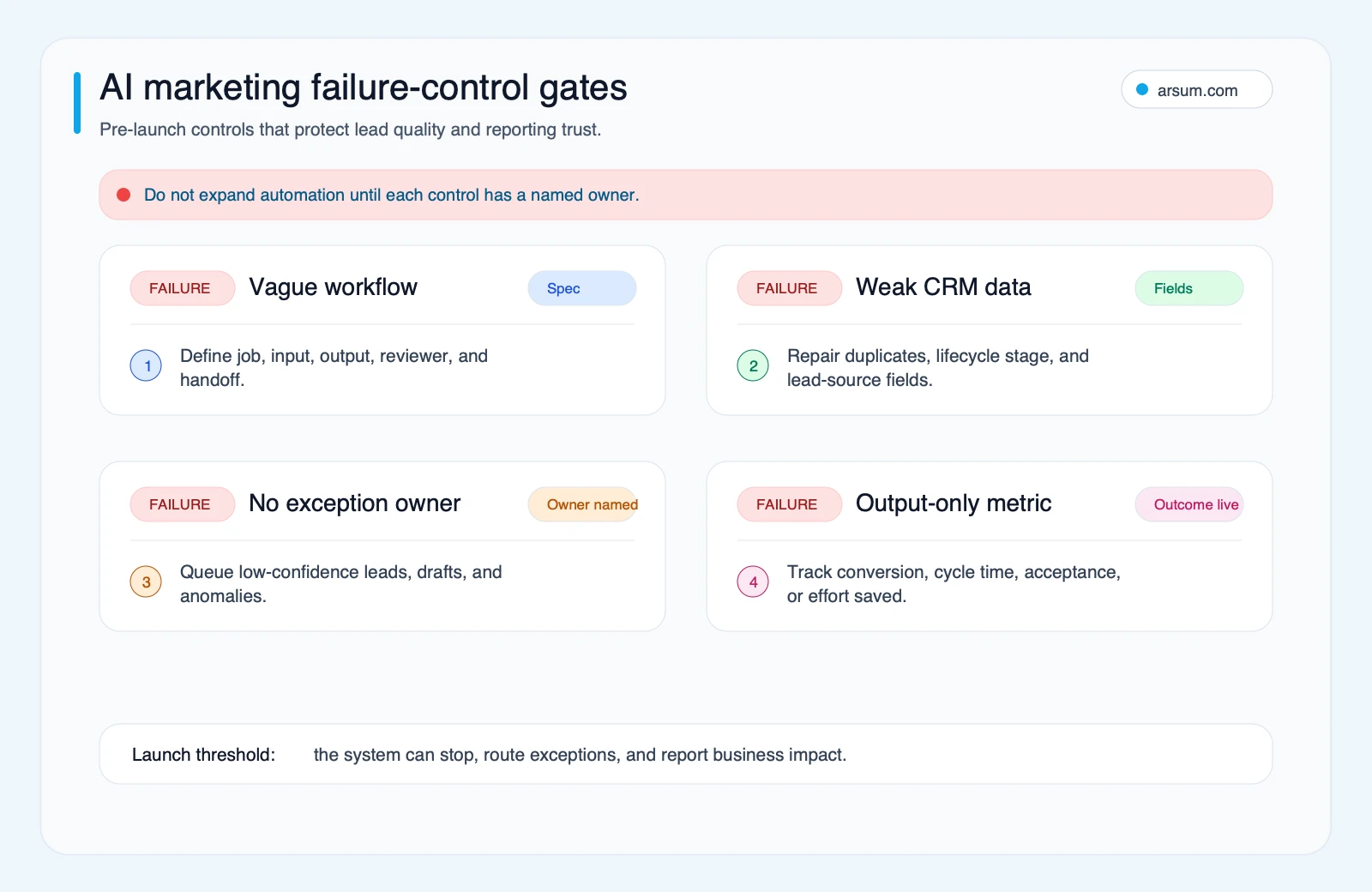
Disqualifying conditions matter as much as good-fit conditions:
- CRM fields are incomplete, disputed, or lack an accountable owner.
- The team cannot state the baseline or the decision the workflow should improve.
- A wrong action is hard to reverse and no reviewer is assigned.
- The process changes faster than rules and approved examples can be maintained.
- The proposed system would publish, route, or make customer-impacting decisions without retained evidence.
- Expected value rests only on a vague promise of “more productivity.”
Methodology and Limits
The role-research module assesses all 20 tasks in the ONET Marketing Managers occupation, 11-2021.00, using Arsum’s task-automation rubric. The source task set is the ONET occupation record current to the analysis; the rendered research module above is the page’s task-level artifact.
Arsum’s model rates task-level technical capability, supervision requirement, judgment dependency, human interaction, implementation complexity, and best-fit technology. It weights task assessments with the available O*NET task importance, relevance, and frequency inputs. Rubric task-automation-v1.0 and model aoi-v0.1 were applied on August 12, 2026.
The resulting Automation Opportunity Score is a planning model for technically addressable task capacity. It does not estimate headcount reduction, adoption, accuracy, implementation duration, or realized financial return. ONET source data and Arsum’s scoring calculations are separate: ONET provides occupation and task information; Arsum applies the disclosed evaluation rubric.
The practical decision is therefore not “Can AI do this?” It is:
- Is the task repeatable and valuable enough to measure?
- Are the inputs trusted and permissioned?
- Can a named owner review exceptions?
- Is a wrong result reversible?
- Does the pilot improve its agreed scorecard without creating a larger control burden?
If the answer is yes, begin with the smallest workflow that can show evidence. If not, improve the operating process before adding model logic.
Ready to Automate Your Business?
Stop wasting time on repetitive tasks. Let AI handle the busywork while you focus on growth.
Schedule a Free Strategy Call →Written by:Arsum editorial team
- Reviewed by
- Arsum editorial team
- Published
- May 3, 2026
- Updated
- August 12, 2026
- How this was produced
- Arsum uses research packs, source checks, and human editorial review to prepare and update blog articles. Editors are responsible for the final page.
- Source policy
- Sources are linked in the article when used. Methodology and source notes are included on higher-risk or high-visibility pages and are being rolled out across the archive. Editorial policy.
- Why this page exists
- Help B2B operators evaluate AI automation, implementation scope, cost, risk, and build-vs-buy decisions with practical context.