AI for operations teams is worth funding when a workflow has enough recurring volume and measurable friction to matter, but only when its exceptions, approvals, system handoffs, and rollback path are designed before automation begins. Start with the work where AI can separate clean cases from review-gated cases; use standard tools for stable, low-risk flows, and consider custom orchestration only when fragmented systems and costly exceptions create a measurable ceiling.
AI for Operations Teams: 17 Manager Tasks Ranked
Explore ai for operations teams: see the O*NET/BLS task score, 2029 capability scenario, human-review boundary, and a measurable first workflow pilot.

AI helps operations teams automate high-volume, repetitive work so they can focus on decisions that require judgment.
Table of Contents
- Operations management automation opportunity
- How the operations management score is calculated
- Top operations management tasks for automation support
- Operations management tasks that should remain human-led
- Operations management capability from 2026 to 2029
- Modeled hours and wage capacity for operations management
- A controlled 30/60/90-day operations management pilot
- What Most Guides Miss: Exceptions Determine the Automation Boundary
- Choose the Right Operating Model Before Choosing a Tool
- Evaluate Workflow Value and Autonomy Separately
- A Worked Operations Example: Vendor Certificate Tracking
- Build a Pilot Scorecard a COO Can Actually Approve
- The Handoff Checklist That Keeps Automation From Becoming Another Inbox
- Build, Buy, Partner, or Wait
- Common Failure Modes and Disqualifying Conditions
- Methodology and Limits
- Bottom Line
- Related Arsum Guides
Arsum Automation Opportunity Index · 2026-08-12
Operations management automation opportunity
Operations managers can automate recurring reporting, monitoring, and administrative coordination. Personnel, vendor, resource-allocation, and policy decisions remain high-context management work.
Current score
36.3/100
Human-led role with targeted automation
Modeled task capacity
8.2-13.6 hours/week
P25-P75 planning range
2029 capability scenario
55.3/100
+19.0 points, not an adoption forecast
Recommended first pilot
recurring operational reporting and exception monitoring
Start narrow, measure, then expand
Decision: Automate operational visibility and exception queues before delegating decisions about people, money, or suppliers.
How the operations management score is calculated
For operations management, Arsum assessed 17 of 17 O*NET tasks from General and Operations Managers (11-1021.00). The 36.3/100 result weights each task's current automation share by O*NET importance, relevance, and frequency. It measures technical workflow opportunity—not the percentage of operations management jobs that disappear and not the share of a team that should be removed.
Humans should own staffing, performance, budget trade-offs, vendor commitments, policy changes, and consequential exceptions. The weighted supervision estimate is 37.0%, which is why the practical design is an exception-and-approval system rather than unsupervised autonomy.
Top operations management tasks for automation support
O*NET task 20701
Prepare staff work schedules and assign specific duties.
60/100
Hybrid
AI assists; review exceptions and material outputs
O*NET task 20702
Monitor suppliers to ensure that they efficiently and effectively provide needed goods or services within budgetary limits.
55/100
Hybrid
AI assists; review exceptions and material outputs
O*NET task 945
Develop or implement product-marketing strategies, including advertising campaigns or sales promotions.
50/100
Llm
AI assists; review exceptions and material outputs
O*NET task 949
Plan store layouts or design displays.
50/100
Llm
AI assists; review exceptions and material outputs
O*NET task 20699
Review financial statements, sales or activity reports, or other performance data to measure productivity or goal achievement or to identify areas needing cost reduction or program improvement.
50/100
Hybrid
AI assists; review exceptions and material outputs
O*NET task 944
Perform sales floor work, such as greeting or assisting customers, stocking shelves, or taking inventory.
35/100
Hybrid
AI assists; review exceptions and material outputs
O*NET task 947
Direct non-merchandising departments of businesses, such as advertising or purchasing.
35/100
Hybrid
AI assists; review exceptions and material outputs
These are ranked for practical opportunity: task exposure and current capability are discounted when implementation is complex, supervision is heavy, or live human interaction dominates. The recommended pilot above is an editorial choice among these signals, not simply the highest raw percentage.
Operations management tasks that should remain human-led
- 20/100 current capability: Direct and coordinate activities of businesses or departments concerned with the production, pricing, sales, or distribution of products. AI prepares; human approval is required.
- 20/100 current capability: Plan or direct activities, such as sales promotions, that require coordination with other department managers. AI assists; review exceptions and material outputs.
- 20/100 current capability: Manage the movement of goods into and out of production facilities to ensure efficiency, effectiveness, or sustainability of operations. Decision support only; human owns the conclusion.
- 35/100 current capability: Direct or coordinate financial or budget activities to fund operations, maximize investments, or increase efficiency. Decision support only; human owns the conclusion.
Operations management capability from 2026 to 2029
2026 current
36.3/100
36.3/100
2028 midpoint
49/100
49/100
2029 scenario
55.3/100
55.3/100
The scenario adds 19.0 score points by 2029-08-12 under the same task mix. It assumes better reliability and integration in the tasks already identified as technically assistable. It does not assume that employers deploy those systems, that every normal case becomes autonomous, or that employment changes by the same amount.
The largest weighted capability gains come from:
- O*NET task 933, Direct and coordinate activities of businesses or departments concerned with the production, pricing, sales, or distribution of products. 20→45.
- O*NET task 20700, Direct administrative activities directly related to making products or providing services. 35→55.
- O*NET task 20706, Plan or direct activities, such as sales promotions, that require coordination with other department managers. 20→45.
Modeled hours and wage capacity for operations management
The operations management model assigns 30 hours of a reference 40-hour week across rated tasks and leaves 10 hours unmodeled. On that explicit assumption, current automation capability represents 8.2-13.6 hours/week. At the May 2025 BLS national mean wage of $65/hour, the gross operations management planning range is $27,531-$45,885/year per worker.
BLS national employment3,503,020
Mean annual wage$134,940
Tasks with full score inputs17/17
Assessment coverage100%
Gross wage capacity is not net savings. A business case must subtract implementation, software and model usage, review time, exception handling, maintenance, and risk reserves. BLS employment excludes self-employed workers.
A controlled 30/60/90-day operations management pilot
- Days 0-30: baseline recurring operational reporting and exception monitoring. Capture volume, handling time, rework, error rate, source systems, permissions, and the exception owner before changing the workflow.
- Days 31-60: run in review mode. Let the system prepare or route work, keep logs, and require human approval at the boundary described above. Measure accepted outputs and review cost, not generated volume.
- Days 61-90: expand only after evidence. Increase scope when accuracy, cycle time, exception rate, and net capacity beat the baseline without weakening customer, employee, financial, legal, or operational controls.
Sources, formula, and limitations
Occupation and task facts come from O*NET O*NET 30.3. Employment and wage inputs come from BLS OEWS May 2025 national estimates. Arsum adds the task-level current capability, supervision, implementation, time-allocation, and 2029 scenario assessments.
The occupation score is the exposure-weighted mean of task automation shares. Exposure combines normalized O*NET importance, relevance, and a log-scaled transformation of frequency. The time range applies a ±25% planning band around the modeled task capacity. Read the full Automation Opportunity Index methodology for formulas, QA gates, version history, and reproducible queries.
- The task inventory comes from O*NET 30.3; Arsum supplies the automation assessment and transformation.
- The time model allocates 30 hours of a reference 40-hour week across rated O*NET tasks, leaving 10 hours unmodeled for context switching and work not represented by task statements.
- Hours and wage capacity are planning ranges, not measured savings. Net ROI must subtract software, implementation, review, exception handling, maintenance, and risk costs.
- The 2029 value is a capability scenario, not a forecast of adoption, employment, layoffs, or autonomous operation.
- All 17 tasks have the O*NET inputs needed for score weighting and were assessed.
- BLS wage and employment data use the matching detailed SOC occupation; employment excludes self-employed workers.
Version: aoi-v0.2 · run 6 · capability date 2026-08-12 · forecast horizon 2029-08-12.
The task model above is a prioritization aid, not a prediction that a role or team can be replaced. It estimates technically addressable task capacity under its disclosed O*NET/BLS assumptions. Use it to identify candidate work for a workflow review, then test the actual process, controls, and economics in your environment.
What Most Guides Miss: Exceptions Determine the Automation Boundary
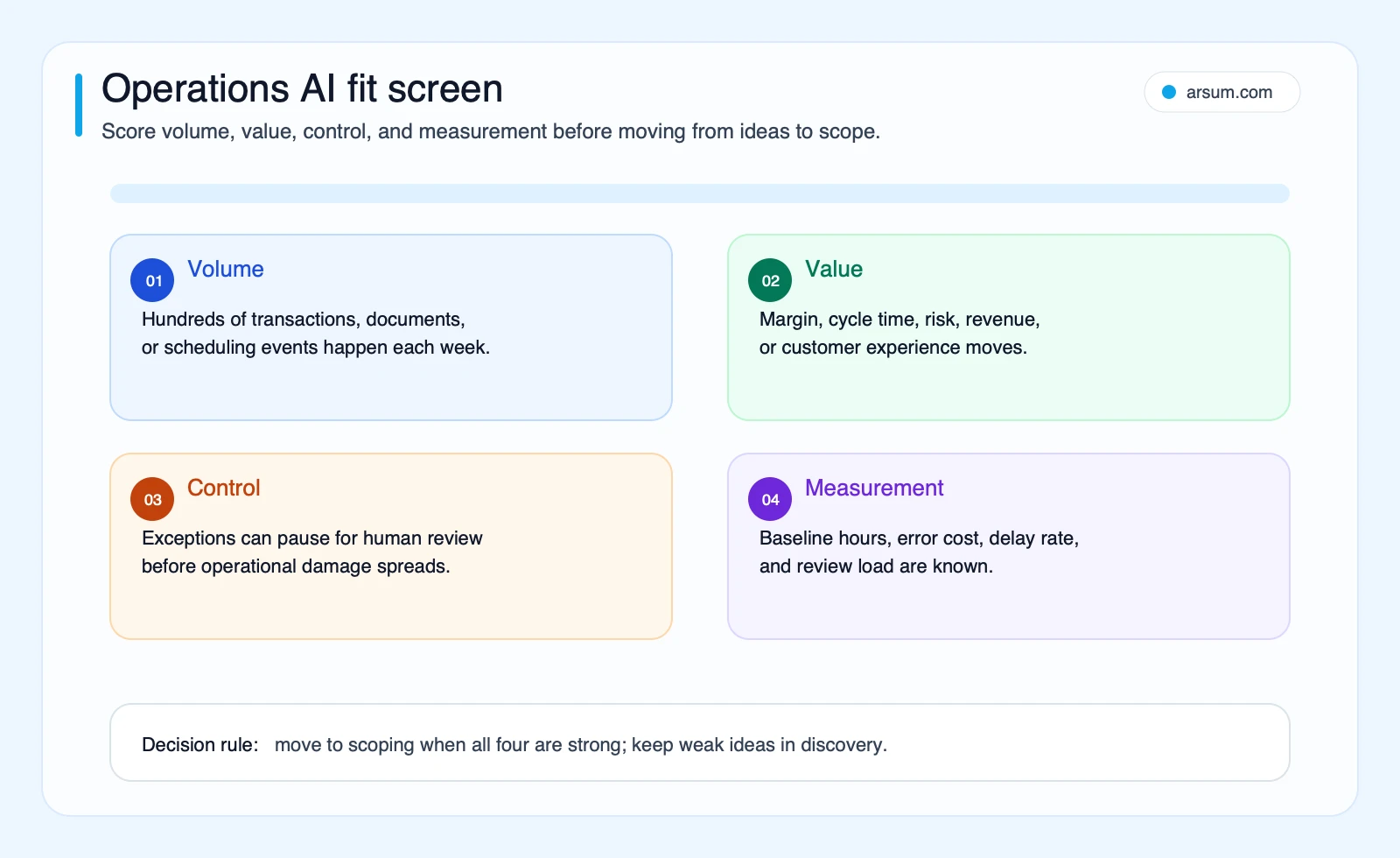
Most AI for operations teams guides begin with a use-case list. That is useful only after you know whether the workflow can operate safely outside the happy path.
A workflow deserves budget when it has a clear trigger, repeatable inputs, a named owner, and a measurable bottleneck. It does not become a good candidate merely because a model can summarize a document, classify an email, or recommend the next step.
The decision changes on five questions:
- How many cases arrive each week, and how much touch time does each require?
- Which exception classes create rework, delay, customer impact, or compliance exposure?
- Which systems supply the required evidence and receive the final update?
- Which actions can be review-gated, and which must remain human-authorized?
- Can the team detect, reverse, and recover from a bad system update?
High-risk or irreversible actions are not points in favor of more autonomy. They are reasons to reduce autonomy, require approval, or decline automation until the process is safer. This distinction matters for payments, contractual commitments, compliance decisions, access changes, safety-sensitive scheduling, and customer-impacting promises.
Choose the Right Operating Model Before Choosing a Tool
The useful comparison is not “AI versus no AI.” It is the operating model that fits the workflow.
| Workflow condition | Best first approach | Human role |
|---|---|---|
| Stable rules, one system, low-cost correction | Deterministic workflow automation | Handle rare exceptions |
| Documents or messages require extraction, classification, or summaries | AI-assisted workflow with confidence thresholds | Review uncertain or consequential cases |
| Multiple systems, unstructured inputs, changing paths, and observable exceptions | Narrow agentic or custom orchestration layer | Approve, resolve, and govern exceptions |
| Unclear process owner, changing policy, missing source data, or irreversible action | Do not automate yet | Standardize and instrument the process first |
For simple, deterministic work, conventional automation is often more reliable and easier to maintain. OpenAI’s practical guide to building agents makes the same boundary clear: agentic systems are for complex, multi-step work that needs judgment, tools, guardrails, evaluation, and handoff behavior—not a default replacement for rules.
Where off-the-shelf tools are usually enough
Buy or configure existing workflow software first when the workflow is mostly contained in one platform, the data model is clean, and a wrong output is easy to correct. Tool-native AI can be useful when work already lives inside the suite. For example, Atlassian Intelligence’s documented features cover AI capabilities across products such as Jira, Jira Service Management, Confluence, Trello, Bitbucket, and Rovo.
Common starting points include:
- Routine approval routing with stable rules
- Standard recurring reporting from a trusted data source
- Categorization and extraction from consistent documents
- Reminder and status workflows inside an existing system
- Internal knowledge retrieval where the content is already governed
For broader platform selection, see the AI workflow automation tools guide.
Where custom AI can be justified
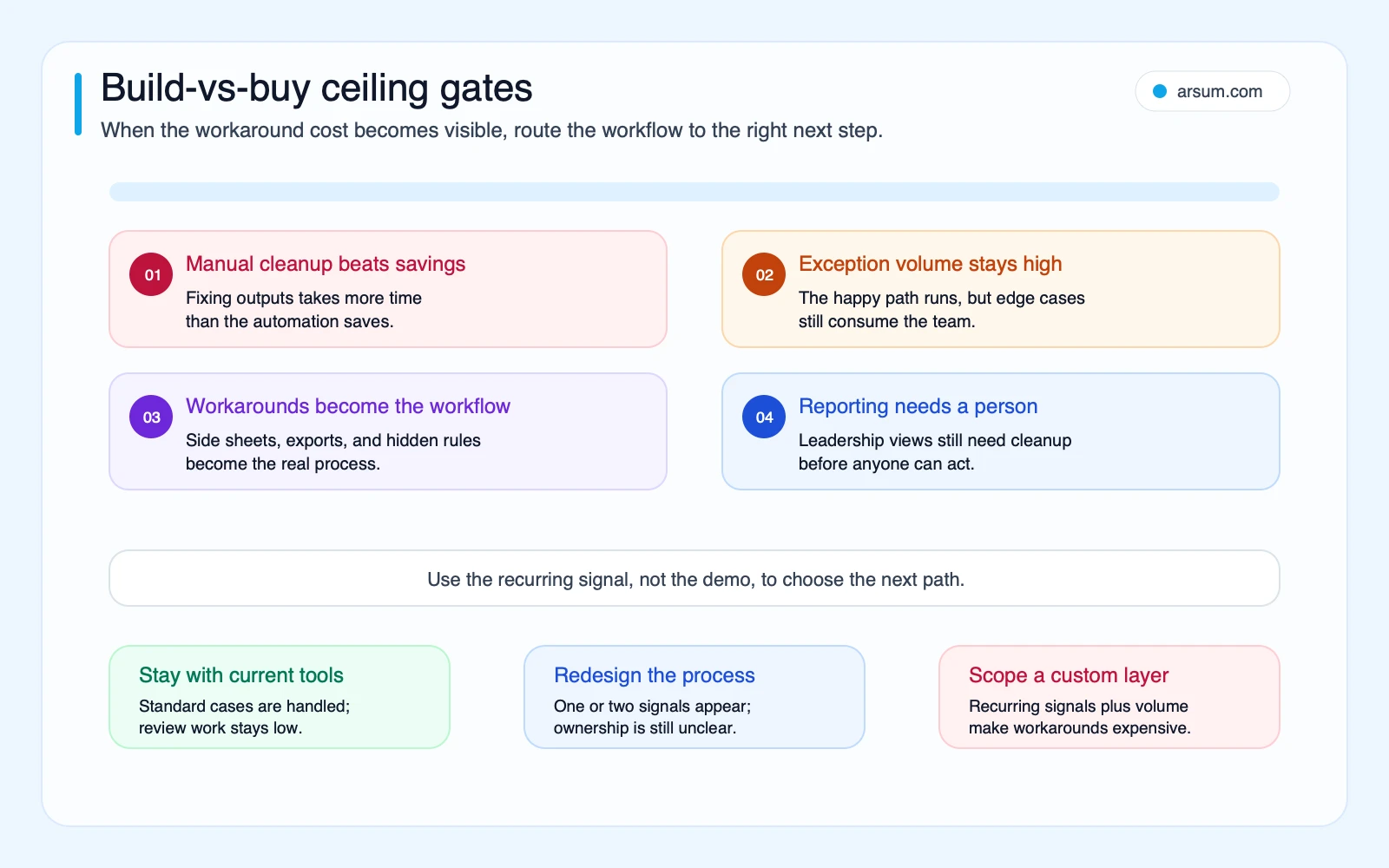
Custom work becomes more defensible when the expensive part of the workflow sits between systems rather than inside one tool. Typical signals include:
- The team manually reconciles an inbox, spreadsheet, ERP, document repository, and ticketing system.
- A high share of cases are incomplete, contradictory, or non-standard.
- Existing automation creates enough cleanup work that net time savings are unclear.
- The required audit history, status model, or approval path does not exist in the available product.
- The workflow has a durable business-specific rule set that the team can maintain after launch.
That is a case for a narrow integration and exception-management layer, not for giving a model blanket authority over the end-to-end process. The adjacent AI business process automation guide explains the broader workflow-design lens.
Evaluate Workflow Value and Autonomy Separately
Avoid a single additive score that accidentally treats risk as a reason to automate more. Use two axes instead.
Axis one: value and feasibility
A workflow is a stronger pilot candidate when it has:
- Recurring volume that makes baseline measurement meaningful
- Known touch time, backlog, rework, or service-level pain
- Source data that is accessible and sufficiently consistent
- A stable trigger and clear expected outcome
- An operations owner who can make process decisions
Axis two: autonomy and control
A workflow should receive less autonomy when it has:
- High downstream error cost
- Financial, compliance, security, safety, or customer-impacting consequences
- Actions that are difficult to reverse
- Ambiguous policy interpretation
- Weak evidence lineage or uncertain source data
The resulting decision is straightforward:
| Value/feasibility | Control requirement | Recommended treatment |
|---|---|---|
| High | Low | Automate bounded actions with monitoring |
| High | High | Automate preparation and routing; require human approval for consequential actions |
| Low | Low | Use native tools only if setup effort is minimal |
| Low | High | Leave manual or redesign the process first |
NIST’s AI Risk Management Framework is a useful governance reference here: risk management, measurement, and trustworthy operation belong in the workflow design, not as a later compliance add-on.
A Worked Operations Example: Vendor Certificate Tracking
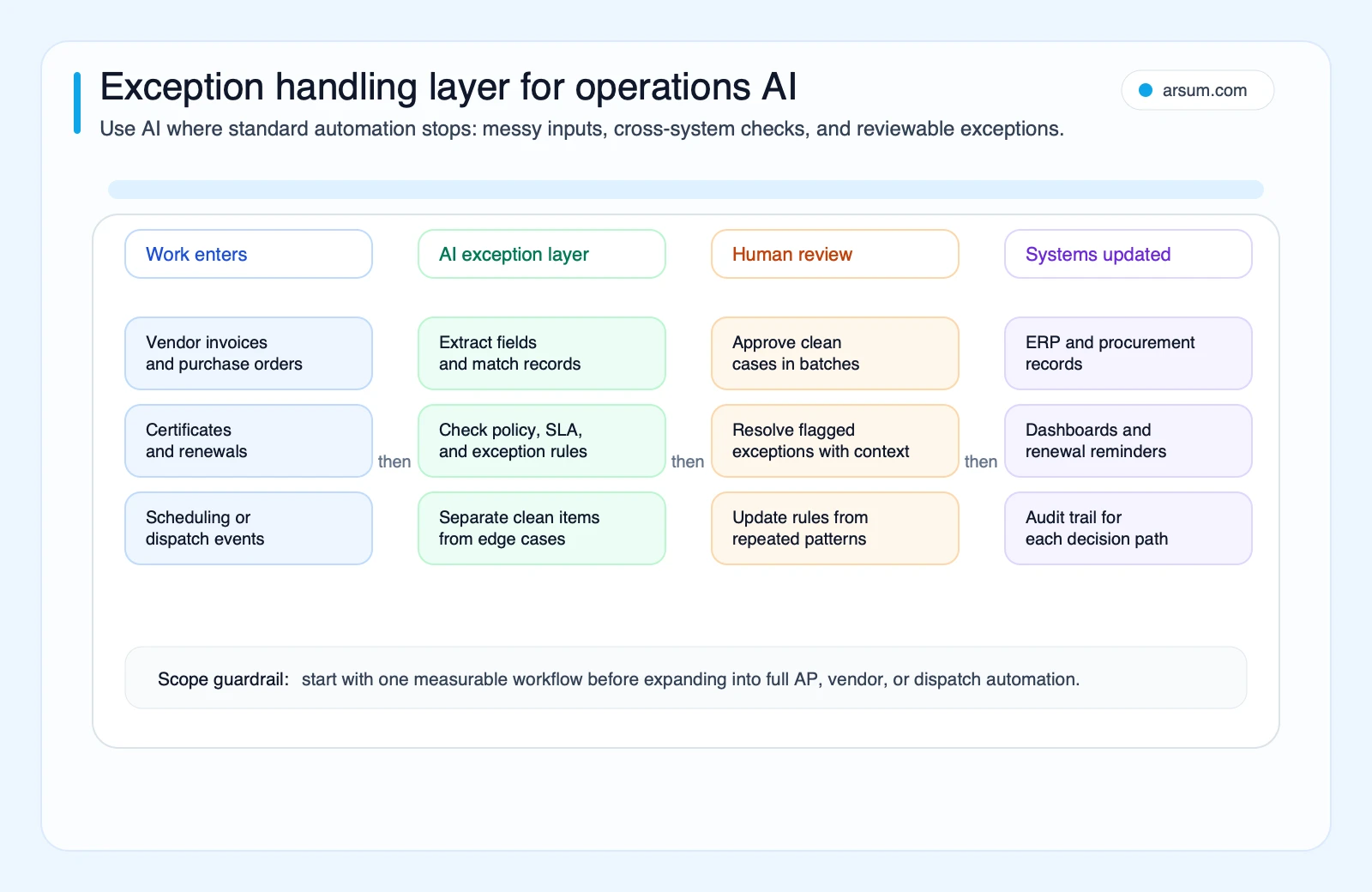
Consider a vendor-certificate workflow. Documents arrive through a shared inbox or portal. An operations coordinator checks the document type, expiration date, vendor identity, required coverage, and whether the record matches the supplier entry in the ERP. The clean case is simple; the costly cases are mismatched names, missing pages, expired coverage, unreadable scans, or a vendor that must be suspended pending review.
A bounded AI-assisted workflow could operate as follows:
- A document arrives and receives a case ID.
- The system retains the original file, source channel, timestamp, extraction result, and confidence signal.
- AI extracts candidate fields and compares them with the vendor record.
- Clean, non-consequential updates may be prepared for a reviewer.
- Any mismatch, missing field, low-confidence extraction, or policy condition enters an exception queue.
- The vendor-compliance owner approves the final status and any downstream ERP update.
- Stuck cases trigger an alert with an owner, due date, and visible status.
- A rollback procedure restores the prior vendor status and preserves the decision history.
This is closer to production guidance in Microsoft’s AI document-processing reference architecture, which describes extraction alongside human review, reporting, reliability, security, monitoring, auditability, and least-privilege controls.
The key design choice is not the extraction model. It is the exception taxonomy and approval boundary.
| Exception class | System behavior | Owner |
|---|---|---|
| Low-confidence extraction | Hold record; queue for review | Operations reviewer |
| Vendor identity mismatch | Do not update supplier record; request verification | Vendor-compliance owner |
| Missing required document field | Create follow-up task with due date | Vendor coordinator |
| Policy-sensitive status change | Present evidence and recommendation only | Authorized approver |
| Integration failure | Retry within policy; alert if unresolved | Workflow owner or technical support |
Build a Pilot Scorecard a COO Can Actually Approve
A pilot should be a measured operating test, not a demo. The following is an illustrative planning model, not an observed Arsum result. Replace every input with your own baseline before approval.
| Scorecard item | Illustrative planning assumption | Evidence to collect |
|---|---|---|
| Pilot length | 6 weeks | Start and end dates; policy changes during test |
| Weekly case volume | 250 cases | Queue or system export |
| Current average touch time | 8 minutes per case | Time sample across normal and exception cases |
| Baseline exception rate | 18% | Exception taxonomy and case count |
| Reviewer time after automation | 2 minutes per case, plus exception review | Reviewer time log |
| Quality metric | No increase in material correction rate | Sampled quality checks and rework records |
| Exception SLA | 95% of queued cases assigned within one business day | Queue timestamps |
| Implementation cost | Input provided by finance or delivery owner | Approved pilot budget |
| Pilot owner | Operations manager | Named accountable decision-maker |
| Technical owner | Integration or systems lead | Incident and rollback responsibility |
For the labor component, calculate the planning estimate transparently:
weekly gross time released = weekly volume × (baseline touch time − post-launch touch time)
Using the illustrative inputs:
250 × (8 − 2) = 1,500 minutes, or 25 hours per week before counting exception-review time, implementation effort, software cost, quality correction, and supervision.
That is not realized savings. It is a starting hypothesis. A more complete pilot economics model is:
net pilot value = avoided baseline labor + avoided rework or delay cost − reviewer labor − implementation cost allocated to the pilot − software and operating cost
Finance should decide which inputs are appropriate. If error cost or downstream risk cannot be measured credibly, do not substitute an optimistic estimate; keep that uncertainty visible in the decision.
Explicit acceptance and stop conditions
Set these before launch:
- Scale condition: the workflow meets the quality target, the exception SLA, and the owner confirms that reviewer workload is manageable.
- Pause condition: exception volume exceeds the staffed review capacity, source-data quality changes materially, or reviewers identify a new uncategorized failure pattern.
- Stop condition: the workflow causes a material unauthorized update, repeated evidence-lineage failure, or a quality decline that the owner cannot safely contain.
- Rollback test: before production use, create a controlled bad update or failed handoff and verify that the prior system state, case history, evidence, and manual work queue can be restored.
- Review cadence: daily operational review during the first two weeks; then weekly review of quality, exceptions, backlog, and policy changes.
- Go/no-go owner: the accountable operations leader, with security, compliance, or finance approval where the workflow requires it.
💡 Arsum builds custom AI automation solutions tailored to your business needs.
Get a Free Consultation →The Handoff Checklist That Keeps Automation From Becoming Another Inbox
For every AI-assisted operations workflow, document:
- The trigger and the source systems of record
- The fields or evidence needed to make a recommendation
- The AI task: extraction, classification, summary, matching, routing, or drafting
- The deterministic rules that surround the AI step
- The confidence threshold and exception taxonomy
- The reviewer, approver, and escalation owner
- The status field, audit trail, and evidence-retention location
- The retry policy for temporary failures
- The action that may be automated versus the action that requires approval
- The rollback procedure and test owner
- The cadence for reviewing drift, exceptions, and policy changes
If no one can name the queue owner or explain the rollback path, the workflow is not ready for greater autonomy.
Operator note on practitioner evidence
Practitioner discussions often describe the same operational pain: spreadsheets, chat pings, missing handoffs, and uncertainty over who owns a workflow once the first automated step finishes. These are qualitative signals, not market-wide statistics or proof of outcomes. Examples include discussions about fragile automation handoffs and whether AI can operate persistent workflows while humans retain approvals and judgment (community discussion). Treat them as prompts for workflow design, not as a business case.
Build, Buy, Partner, or Wait
Use the same workflow evidence to decide how to execute.
Buy or configure existing software
Choose this route when the workflow is standardized, contained in one system, and the product already provides the required permissions, audit trail, and exception queue. A suite-native AI feature may be the shortest path to a useful pilot.
Build a narrow custom layer
Choose custom orchestration when your measured constraint is cross-system handoffs, exception resolution, data normalization, or evidence retention that standard products cannot handle. Keep the first scope narrow: one workflow, a small number of source systems, defined review gates, and measurable acceptance criteria.
Partner for the first implementation
A specialist partner can be useful when the workflow has a credible business case but the organization does not yet have the capacity to own integrations, evaluations, monitoring, and recovery procedures. The hiring an AI developer versus agency guide can help frame that capacity decision, while the AI integration consulting guide focuses on connecting systems safely.
Wait and standardize first
Delay automation when process steps change constantly, source records cannot be trusted, no one owns policy decisions, or the organization cannot staff the exception queue. Automating ambiguity typically moves the work into a harder-to-see form.
Common Failure Modes and Disqualifying Conditions
AI projects for operations teams commonly fail at the workflow boundary rather than at the first AI output.
- Scope expands before a first workflow is proven. Keep the pilot to one measurable flow rather than turning document intake into a full operating-system redesign.
- The exception rate is unknown. Measure it before claiming the workflow will save time.
- The review queue has no capacity owner. Low-confidence cases become a hidden backlog.
- Source evidence is not retained. Reviewers cannot validate or reconstruct a decision.
- Integration errors are treated as model errors. Distinguish failed connectors, stale records, permissions issues, and extraction mistakes.
- Automation executes a consequential action without authorization. Restrict the system to preparation, routing, or recommendation where approval is required.
- Rollback is theoretical. Test it before relying on the workflow in production.
For workflows involving invoices, receivables, or payment-adjacent processing, the accounts receivable automation guide offers a more specific operational lens. For a broader distinction between AI-assisted workflows and more autonomous systems, see agentic AI workflow automation.
Methodology and Limits
Last updated: June 20, 2026. Author: Johnny Kartakov. Research-pack editorial review status: pending.
This guide combines the rendered O*NET/BLS task model with primary documentation from Microsoft, OpenAI, NIST, and Atlassian. Community discussions are used only as qualitative signals about implementation questions and failure modes. The article does not claim an adoption rate, staffing outcome, savings figure, or vendor performance result.
O*NET/BLS automation-opportunity scores describe technically addressable task capacity under a disclosed model. They do not predict job loss, implementation success, authorized autonomy, or realized ROI. Your own baseline, control requirements, reviewer workload, and rollback test should decide whether a workflow advances.
Bottom Line
AI for operations teams is most useful when it makes the normal path faster while making exceptions more visible, owned, and recoverable. Fund the first workflow only after you can name its baseline, exception classes, reviewer, approval boundary, evidence trail, pilot threshold, and rollback path.
If standard tools handle the process safely, use them. If repeated manual cleanup, fragmented systems, and visible exception cost persist after that, scope a narrow custom layer around those constraints—not an unbounded autonomous system. Arsum can help qualified teams turn that evidence into a controlled workflow assessment and pilot plan.
Ready to Automate Your Business?
Stop wasting time on repetitive tasks. Let AI handle the busywork while you focus on growth.
Schedule a Free Strategy Call →Related Arsum Guides
- AI process automation: workflow boundaries and implementation choices
- AI automation ROI examples and planning inputs
- Custom AI solutions for business: when a bespoke system is justified
- AI agent security: controls for systems with tools and data access
- AI for finance teams: authorization, evidence, and review boundaries
Written by:Arsum editorial team
- Reviewed by
- Arsum editorial team
- Published
- April 17, 2026
- Updated
- August 12, 2026
- How this was produced
- Arsum uses research packs, source checks, and human editorial review to prepare and update blog articles. Editors are responsible for the final page.
- Source policy
- Sources are linked in the article when used. Methodology and source notes are included on higher-risk or high-visibility pages and are being rolled out across the archive. Editorial policy.
- Why this page exists
- Help B2B operators evaluate AI automation, implementation scope, cost, risk, and build-vs-buy decisions with practical context.