AI for product teams is most useful when it accelerates evidence handling and draft production inside a defined product workflow—feedback synthesis, PRD drafting, roadmap communication, and sprint reporting—while people retain approval over prioritization, commitments, and sensitive customer data. The first decision is not which model to buy; it is whether your sources, taxonomy, permissions, and review process are structured enough for AI output to be trusted.
AI for Product Teams: Best Workflows, ROI, and Fit
Explore ai for product teams: compare workflow fit, costs, risks, evidence, and practical next steps before you build, buy, or hire.

AI is reshaping how product teams work: from automating user research synthesis to generating draft requirement docs.
Table of Contents
- What Most Guides Miss: Personal Acceleration Is Not Product Intelligence
- Where research and product work can use AI responsibly
- Choose the Workflow Before the Tool
- Make Feedback Synthesis Inspectable
- Controls Before Autonomy
- Run a Pilot With Acceptance Criteria
- Buy, Connect, or Build
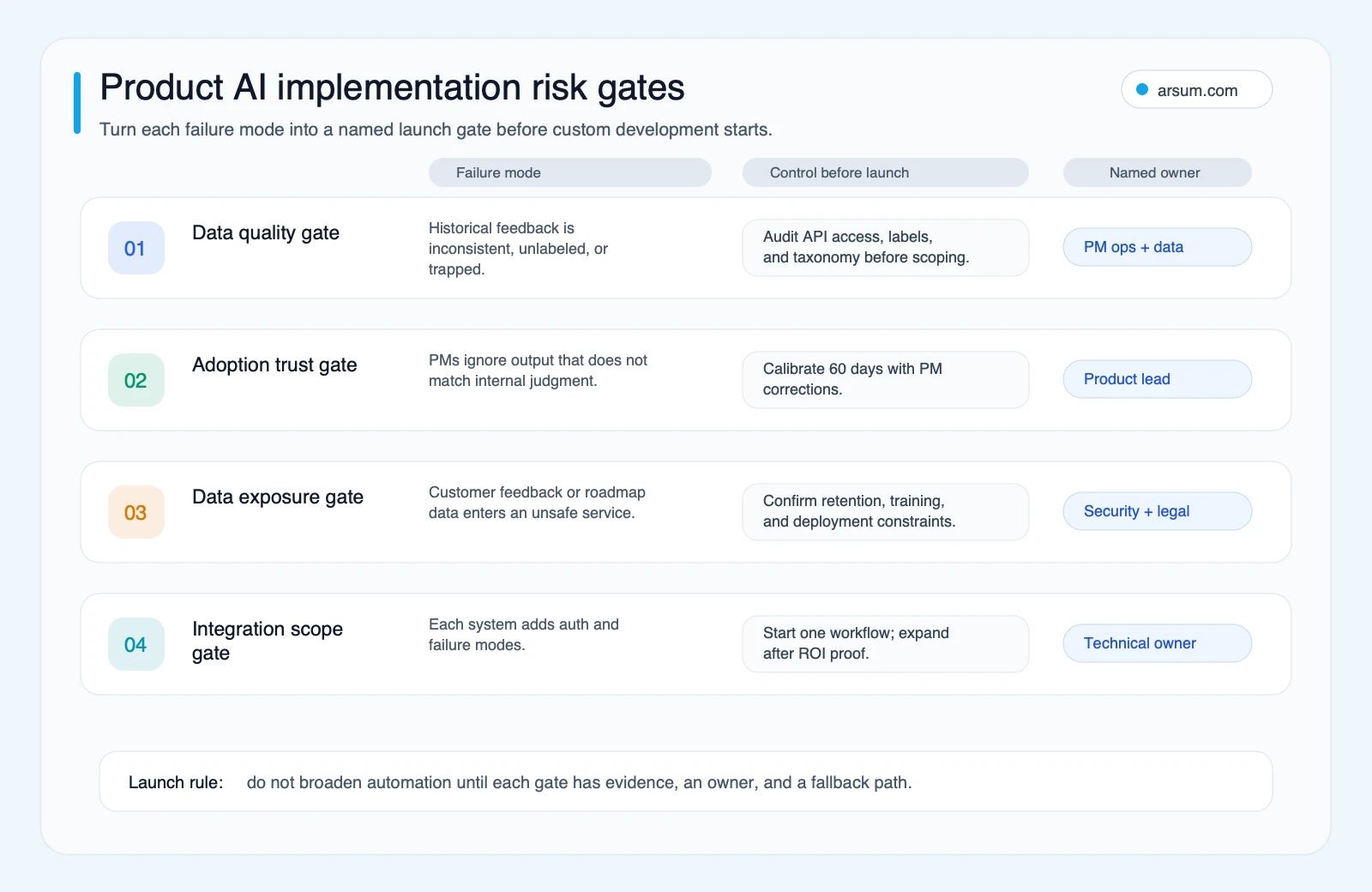
- Failure Modes That Should Disqualify or Pause the Initiative
- A Practical First 30–60 Days
- Methodology and Limits
- FAQ: AI for Product Teams
What Most Guides Miss: Personal Acceleration Is Not Product Intelligence
A PM asking AI to rewrite a brief or brainstorm edge cases has a personal productivity tool. A team asking AI to connect support tickets, interview notes, sales handoffs, roadmap context, and Jira activity has an operating-workflow problem.
Those are different purchases.
Personal assistance can start with a bounded prompt and low-risk documents. Team-level product intelligence requires source access, a shared taxonomy, correction handling, and an owner who decides whether the output is reliable enough to circulate. A custom workflow is justified only when a real constraint—fragmented data, specialized terminology, approval logic, or deployment requirements—prevents an existing product tool from doing the job acceptably.
Use this workflow-fragmentation test before comparing tools:
- Does decision-relevant context live in more than one system?
- Must output map to your internal product taxonomy, account segment, or initiative naming?
- Would an incorrect output affect a roadmap decision, customer commitment, or regulated-data obligation?
- Can a named person review exceptions and correct the system’s output?
One “yes” usually supports a simple tool trial. Several “yes” answers may support a connected workflow. If approval ownership is missing, do not expand automation yet.
Choose the Workflow Before the Tool
The right first use case has repeatable inputs, a stable output format, a low consequence of a flawed draft, and a human who can review it quickly. Product judgment is not a defect to automate away; it is the control that makes the workflow safe to use.
| Workflow | Appropriate AI role | Human control | Off-the-shelf fit | Custom-workflow trigger |
|---|---|---|---|---|
| Feedback synthesis | Cluster, summarize, propose tags, surface source excerpts | PM or research lead validates themes and corrections | Good when sources and taxonomy are straightforward | Multiple feedback systems, account context, specialized taxonomy |
| PRD drafting | Produce a first draft, questions, acceptance-criteria candidates | PM and engineering reviewer approve requirements | Good for standard templates | Internal architecture, APIs, security constraints, or document conventions must be grounded |
| Roadmap communication | Draft a rationale or stakeholder update from approved inputs | Product leader approves claims and commitments | Good when inputs are already approved | Reporting requires data from several systems and strict approval routing |
| Sprint reporting | Summarize completed work, blockers, and changed scope | Engineering/product owner checks source data | Good with connected project tools | Status requires reconciliation across delivery, support, CRM, and analytics systems |
| Prioritization | Prepare evidence and alternative scenarios | Product leadership makes the decision | Decision support only | Do not automate final prioritization or customer commitments |
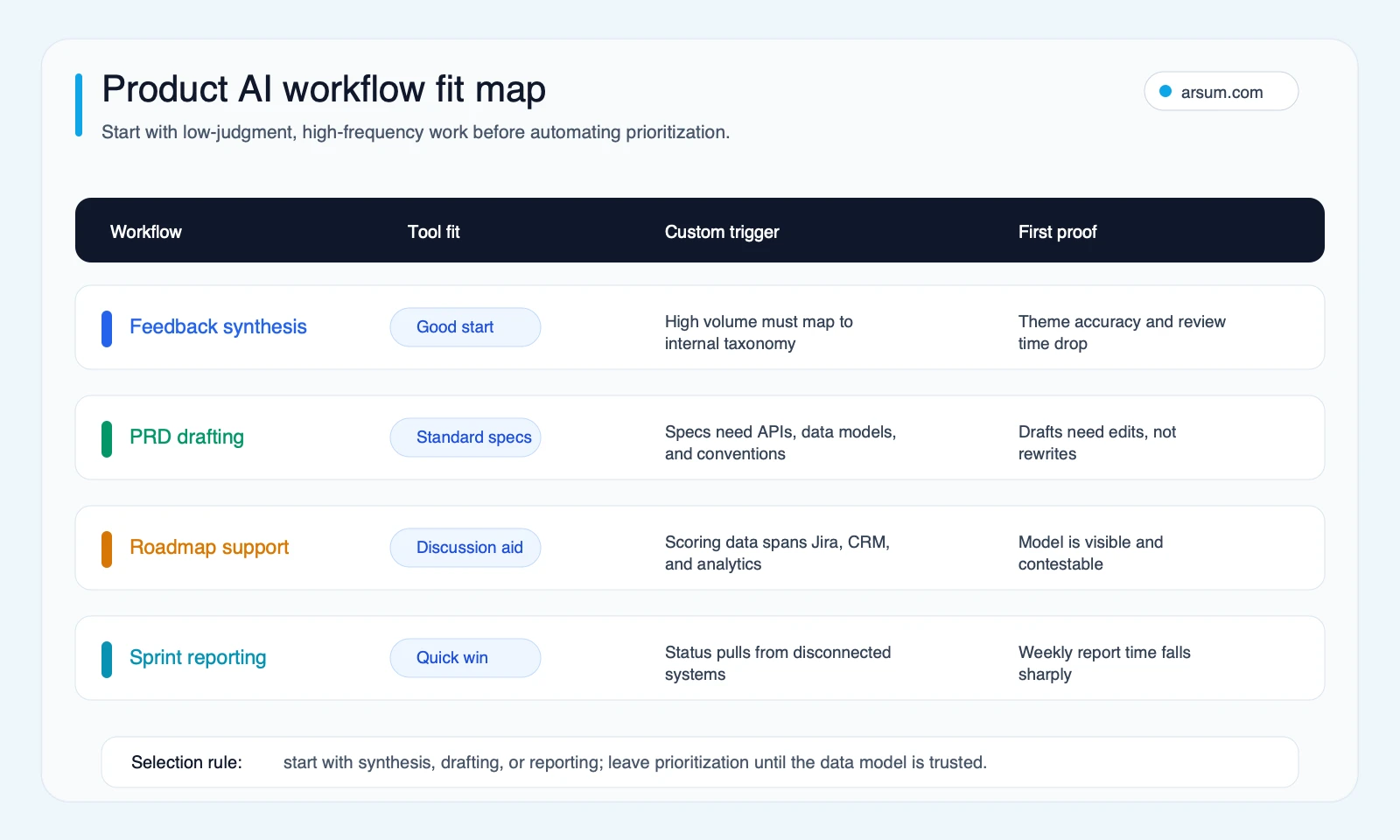
Start with low-risk drafting or synthesis. Move to connected reporting only after the team can trace an output to its source records and correct it without creating a shadow process.
The maturity ladder
| Level | What changes | Suitable when | Do not advance until |
|---|---|---|---|
| Personal assistant | One person summarizes notes, drafts text, or checks edge cases | Low-risk work with limited shared context | The user has a repeatable prompt and knows where output is unreliable |
| Team workflow helper | A shared tool tags feedback or drafts standardized artifacts | One primary system and a simple taxonomy exist | Corrections can be recorded and reviewed |
| Product intelligence layer | Sources from research, support, sales, roadmap, and delivery are connected | The team has clear data ownership and a common operating vocabulary | Data access, retention, and approval rules are documented |
| Custom AI workflow | Private deployment, bespoke integration, audit evidence, and approval logic | SaaS tools cannot meet material data, taxonomy, or workflow needs | A pilot has met buyer-defined acceptance criteria |
This distinction matters more than a feature checklist. It is also the practical boundary between a tool-adoption project and a connected workflow described in agentic AI workflow automation.
Make Feedback Synthesis Inspectable
Feedback synthesis is often the best first workflow because it can be useful without granting AI authority to make a product decision. It becomes unsafe when a polished summary hides missing sources, misclassified feedback, or customer context that a reviewer cannot inspect.
Example: from ticket to reviewed product signal
- A support ticket, interview transcript, or sales handoff enters the approved intake location. Retain its source ID, timestamp, source system, customer/account permissions, and any allowed segment metadata.
- The workflow extracts a proposed product area, problem statement, sentiment or urgency signal, and supporting excerpt. It must link back to the original record rather than present an untraceable claim.
- The AI produces a draft theme summary only after it has identified the source records used. A PM or research lead reviews the theme, corrects taxonomy assignments, and decides whether it belongs in a product-insight board.
- The workflow routes uncertain cases to an exception queue. Examples include conflicting product-area labels, missing account permission, low-confidence classification, or a request that could imply a customer commitment.
- Retain the source links, model output, reviewer correction, approval status, and final destination. The retained record is the audit trail for the product team—not proof that the AI was correct.
- If quality falls below the team’s agreed threshold, disable automated publication and revert to source-linked manual synthesis while the taxonomy, prompt, or integration is corrected.
This is the operational difference between “AI summarized our feedback” and a workflow a product organization can defend.
Official documentation supports bounded capability, not a guarantee of business outcome. Dovetail documents AI-assisted analysis, insight generation, and indication of AI contribution. Productboard documents linking feedback from an insights board to feature ideas. Airtable describes AI-assisted tagging, categorization, and summarization for product-team feedback. Each can reduce draft work when underlying records and taxonomy are usable; none establishes that a tool should autonomously select roadmap priorities.
Readiness audit
Before granting a tool access to customer feedback, answer:
- Where does feedback actually live, and can each source be accessed through an approved API or export?
- Who owns product-area labels and naming conventions?
- Is the customer, segment, revenue, or contract context necessary for the output—and is it permitted to flow into the selected system?
- Can a reviewer see the original evidence behind each proposed theme?
- Where do exceptions go, who owns them, and what is the approval service level?
- Can the workflow be paused without losing source data or disrupting the existing manual process?
For teams with broader workflow needs, AI integration services are relevant only after these questions have answers.
Controls Before Autonomy
AI can draft, summarize, classify, and retrieve context. Technical capability does not authorize a system to make consequential product choices. The higher the failure cost and the harder the decision is to reverse, the less autonomy the workflow should receive.
| Risk tier | Examples | Allowed automation | Required control |
|---|---|---|---|
| Low | Meeting summaries, PRD formatting, wording alternatives | Draft generation | Author review before distribution |
| Medium | Feedback clustering, theme proposals, acceptance-criteria suggestions | Source-linked recommendations | PM or research review; correction record |
| High | Roadmap ranking, release tradeoffs, customer-facing commitment language | Evidence preparation only | Named accountable decision-maker; no automatic publication |
Customer-feedback workflows also need a data-handling decision before implementation. Identify personal data, contract-sensitive notes, restricted internal roadmap information, and any customer or procurement terms that constrain processing. The NIST AI Risk Management Framework is useful as a governance framework: it supports thinking about risk and trustworthiness, but it does not certify a particular product workflow as compliant.
Agentic or connected systems need the same discipline. OpenAI’s practical guide to building agents describes tools, instructions, orchestration, guardrails, evaluations, and cost-latency tradeoffs. For a product team, that means defining the system boundary before adding an agent: what it can read, what it can write, what needs review, and how it is stopped. See also AI agent security considerations and AI agent architecture patterns.
Run a Pilot With Acceptance Criteria
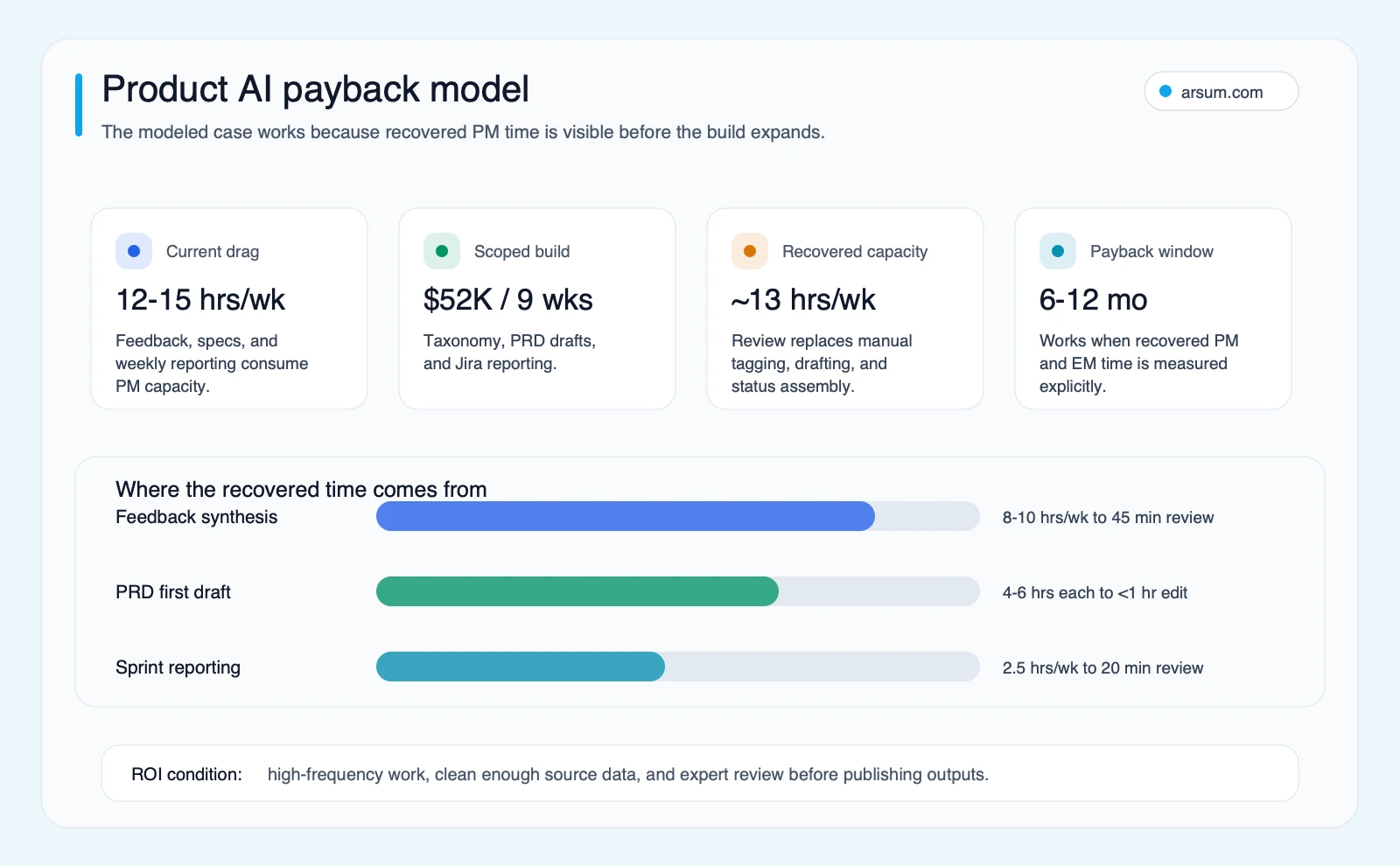
This is an illustrative internal planning model, not market data. Replace every input with your team’s actual baseline, constraints, and costs before approving a purchase or build.
A credible pilot tests one workflow, one output format, and one approved source set. Do not begin by connecting every product system.
| Scorecard field | How to establish the baseline | Buyer-selected target | Owner | Review cadence |
|---|---|---|---|---|
| Input volume | Count eligible tickets, interviews, or project updates in a representative period | Enough volume to assess recurring work without expanding sources | Product operations lead | Weekly |
| PM/research hours | Time current manual intake, synthesis, drafting, review, and rework | Reduced effort without moving hidden work to reviewers | Product lead | Weekly |
| Source coverage | Compare source records represented in output with approved source records | Coverage threshold chosen for the use case | Research or support operations owner | Weekly sample |
| Correction rate | Record taxonomy, factual, and formatting corrections per reviewed output | A declining, acceptable rate set before launch | Taxonomy owner | Weekly |
| Exception volume | Count low-confidence, permission, conflict, and missing-context cases | Exceptions remain reviewable within the agreed SLA | Exception-queue owner | Weekly |
| Approval pass rate | Record outputs approved without material rewrite | Target chosen by the accountable approver | PM lead | Weekly |
| Data-access approval | Document permitted sources, vendor terms, and retention decision | No unapproved source enters the workflow | Security/privacy owner | Before launch and on change |
| Operating cost | Record subscription, model, integration, and reviewer cost | Within the buyer’s approved budget | Finance or sponsor | Monthly |
Define the stop condition in advance. Examples include: source lineage cannot be reliably retained; corrections increase rather than decrease; exceptions exceed the named owner’s capacity; a prohibited data class appears; or reviewers cannot approve output within the intended operating rhythm.
Define the rollback too: revoke or pause source connections, disable automated posting, preserve underlying records, and return to the prior manual template. A rollback path is especially important when the workflow writes into a roadmap, ticketing system, or customer-facing channel.
Illustrative planning arithmetic
Suppose a team measures the following for a narrowly scoped pilot:
| Input | Illustrative assumption |
|---|---|
| Current eligible workflow time | 8 PM/research hours per week |
| Target reduction after review time | 3 hours per week |
| Recovered capacity | 5 hours per week |
| Loaded hourly cost | Buyer-supplied internal number |
| Annual value of recovered capacity | 5 × 52 × loaded hourly cost |
| Pilot/build and setup cost | Buyer-supplied scoped cost |
| Ongoing monthly operating cost | Subscription + model usage + integration support + reviewer time |
| Simple payback estimate | Upfront cost ÷ monthly net recovered-capacity value |
This formula is intentionally incomplete until you add your own values. It does not measure quality gains, strategic upside, displaced work, implementation risk, or actual cash savings. Recovered capacity is not automatically a financial return; it becomes one only if the organization can redirect that capacity to work it values.
If you have completed the readiness audit and can name a pilot owner, an implementation discussion should focus on the workflow boundary, acceptance criteria, source permissions, and rollback—not on a generic “AI transformation” pitch.
💡 Arsum builds custom AI automation solutions tailored to your business needs.
Get a Free Consultation →Buy, Connect, or Build
Use a standard product AI tool when the job is common, sources are already centralized, and the team can accept the vendor’s taxonomy and review pattern. Tool documentation can establish feature availability, not whether it fits your data or governance needs. For example, Atlassian documents Jira AI features for creating work items from Microsoft Teams conversations and generating summaries or descriptions. That may be enough for a bounded Jira workflow.
Use a connected workflow layer when the value depends on bringing together approved data from several systems while retaining a shared view of source lineage and exceptions. This is frequently an integration and operating-model problem before it is a model-selection problem.
Consider a custom workflow only when all of these are true:
- A pilot or tool trial reveals a specific ceiling: taxonomy mismatch, unavailable integration, required approval logic, private deployment, or audit-record requirement.
- The workflow is recurring enough to justify maintaining connectors, evaluations, and exception handling.
- A named business owner accepts responsibility for taxonomy, review, and outcome measurement.
- Security, privacy, and procurement requirements are defined early enough to shape the design.
- The team can keep a manual path available during calibration and rollback.
Do not use custom development to automate an unclear product decision. It is appropriate when the team has a defined workflow whose constraints cannot be handled by a standard tool. For a broader comparison of implementation paths, see custom AI solutions for business and AI automation consulting.
Failure Modes That Should Disqualify or Pause the Initiative
Pause the initiative when source data is inaccessible, approvals are vague, or the team cannot articulate what a correct output looks like.
Common failure modes include:
- Unowned taxonomy: AI classifications cannot improve if nobody decides what categories mean or resolves disputed labels.
- Missing lineage: A theme summary without linked source records creates false confidence and turns review into re-research.
- Permission drift: A workflow begins with approved research notes and later absorbs sales, support, or customer data without a renewed data-access decision.
- Invisible reviewer burden: Automation appears to save PM time while moving substantial cleanup work to research, support, or engineering.
- Over-automation of judgment: A score or recommendation is treated as a prioritization decision without an accountable product leader weighing strategy, effort, and commitments.
- Integration scope creep: Every new connector brings its own schema, permissions, refresh behavior, and failure handling. Prove one workflow before adding more.
- No operating owner: If no one owns prompt standards, evaluation samples, exception handling, and rollout decisions, the system becomes an untrusted side channel.
Community discussions help explain why these boundaries matter, but they are not market-wide evidence. PMs in one practitioner discussion describe using generative AI for blind-spot checks, drafting, and thinking support rather than delegating product judgment. In another discussion, participants describe the gap between note summarization and deeper cross-workflow implementation. These are qualitative signals about buyer language and failure patterns, not adoption or performance statistics.
A Practical First 30–60 Days
Start with one feedback or reporting workflow that has a stable manual baseline.
- Document the current process, sources, time spent, reviewer, and existing failure points.
- Restrict the pilot to approved data and one output format.
- Require source links and a reviewer correction field for every sampled output.
- Review weekly results against the pilot scorecard.
- Decide to expand, revise, or stop based on agreed criteria—not on a persuasive demo.
- Only then consider adding PRD drafting, new data sources, or a more connected workflow.
This sequence keeps AI useful to product teams without confusing fast drafting with trustworthy product operations. It also aligns with the broader distinction between agentic AI and generative AI and the practical choices in AI tools for business automation.
Methodology and Limits
This guide uses the validated research pack for this page: official documentation from Dovetail, Productboard, Airtable, Atlassian, OpenAI, and NIST; O*NET/BLS task context rendered through the evidence brief; and identified Reddit discussions as qualitative practitioner signals only.
The occupation-oriented evidence model indicates technically addressable task capacity under its disclosed assumptions. It does not predict job loss, tool adoption, savings, or the suitability of autonomous product decisions. Vendor documentation describes supported product capabilities; it does not establish a team’s economics, implementation timeline, or governance posture. Any planning arithmetic in this article is illustrative and must be replaced with internal baseline data.
FAQ: AI for Product Teams
What should product teams automate first?
Start with low-risk, repeatable work such as source-linked feedback synthesis, PRD first drafts, or sprint-summary drafts. Keep a person responsible for approval and corrections.
Can AI prioritize a roadmap?
AI can assemble evidence, identify patterns, and prepare scenarios. Product leadership should retain the prioritization decision because strategy, customer commitments, opportunity cost, and reversibility are business judgments.
When does a custom workflow make sense?
When a standard tool cannot meet a material requirement: cross-system data connections, internal taxonomy, private deployment, audit evidence, or approval logic. Confirm that constraint through a bounded pilot before committing to a larger build.
What should we measure in a pilot?
Measure current manual hours, source coverage, correction rate, exception volume, approval pass rate, operating cost, and whether approved data controls remain intact. Set your own thresholds before launch.
Can customer feedback be used with AI?
Possibly, but only after reviewing which data is present, whether the intended vendor or deployment path is permitted, retention expectations, and who approves exceptions. Technical access does not by itself authorize data use.
Ready to Automate Your Business?
Stop wasting time on repetitive tasks. Let AI handle the busywork while you focus on growth.
Schedule a Free Strategy Call →Written by:Arsum editorial team
- Reviewed by
- Arsum editorial team
- Published
- April 19, 2026
- Updated
- July 3, 2026
- How this was produced
- Arsum uses research packs, source checks, and human editorial review to prepare and update blog articles. Editors are responsible for the final page.
- Source policy
- Sources are linked in the article when used. Methodology and source notes are included on higher-risk or high-visibility pages and are being rolled out across the archive. Editorial policy.
- Why this page exists
- Help B2B operators evaluate AI automation, implementation scope, cost, risk, and build-vs-buy decisions with practical context.