AI in app development benefits become real when a team ties an AI capability to one measurable workflow, a defined approval boundary, and an owner for what happens when the system is wrong. AI can help teams deliver software faster, help users find or configure the right thing, and reduce repetitive handling at scale—but only when data access, evaluation, review, monitoring, and fallback costs are included in the approval decision.
AI in App Development Benefits
Explore ai in app development benefits: compare workflow fit, costs, risks, evidence, and practical next steps before you build, buy, or hire.

Table of Contents
- What most guides miss: a feature is not an operating model
- Where AI can create value—and the conditions that make it credible
- Production costs are part of the benefit calculation
- A controlled workflow example: document-intake triage
- Build, buy, or partner: choose the path that preserves control
- When AI in app development does not make sense
- Decision scorecard for approving an AI feature
- A note on scaled content and customer-facing AI
- A reusable approval checklist
The first decision is to separate two investments that are often bundled together:
| Investment layer | What changes | Primary owner | Useful proof |
|---|---|---|---|
| AI-assisted software delivery | How the team builds, tests, documents, or reviews software | Engineering leadership | Less time on a defined task without more rework |
| AI embedded in the product | What customers or operators can do in the shipped app | Product and functional owner | Better workflow outcome with controlled errors and operating cost |
A coding assistant may be a tooling decision. An AI search, recommendation, document-review, or action-taking feature is a product operating-model decision. Treating both as one “AI investment” hides the budget, risk, and ownership differences that determine whether either benefit survives production.
What most guides miss: a feature is not an operating model
Most lists of AI benefits describe a capability and imply a result. A buyer should approve the reverse sequence: identify the workflow problem, establish a baseline, choose the smallest safe AI boundary, and prove that the benefit remains after review and operating costs.
Use this router before choosing a vendor or approving a roadmap item:
- Advice problem: You do not yet know which workflow has enough volume, variation, and measurable downside to justify AI.
- Implementation problem: The workflow is clear, but the required systems, data, permissions, and user experience are not connected.
- Ownership problem: A prototype works, but nobody owns evaluations, incidents, exception handling, cost controls, or changes after launch.
If the blocker is advice, do not fund a broad build. If it is implementation, another strategy deck will not connect the systems. If it is ownership, a fast prototype is not evidence that the product is ready.
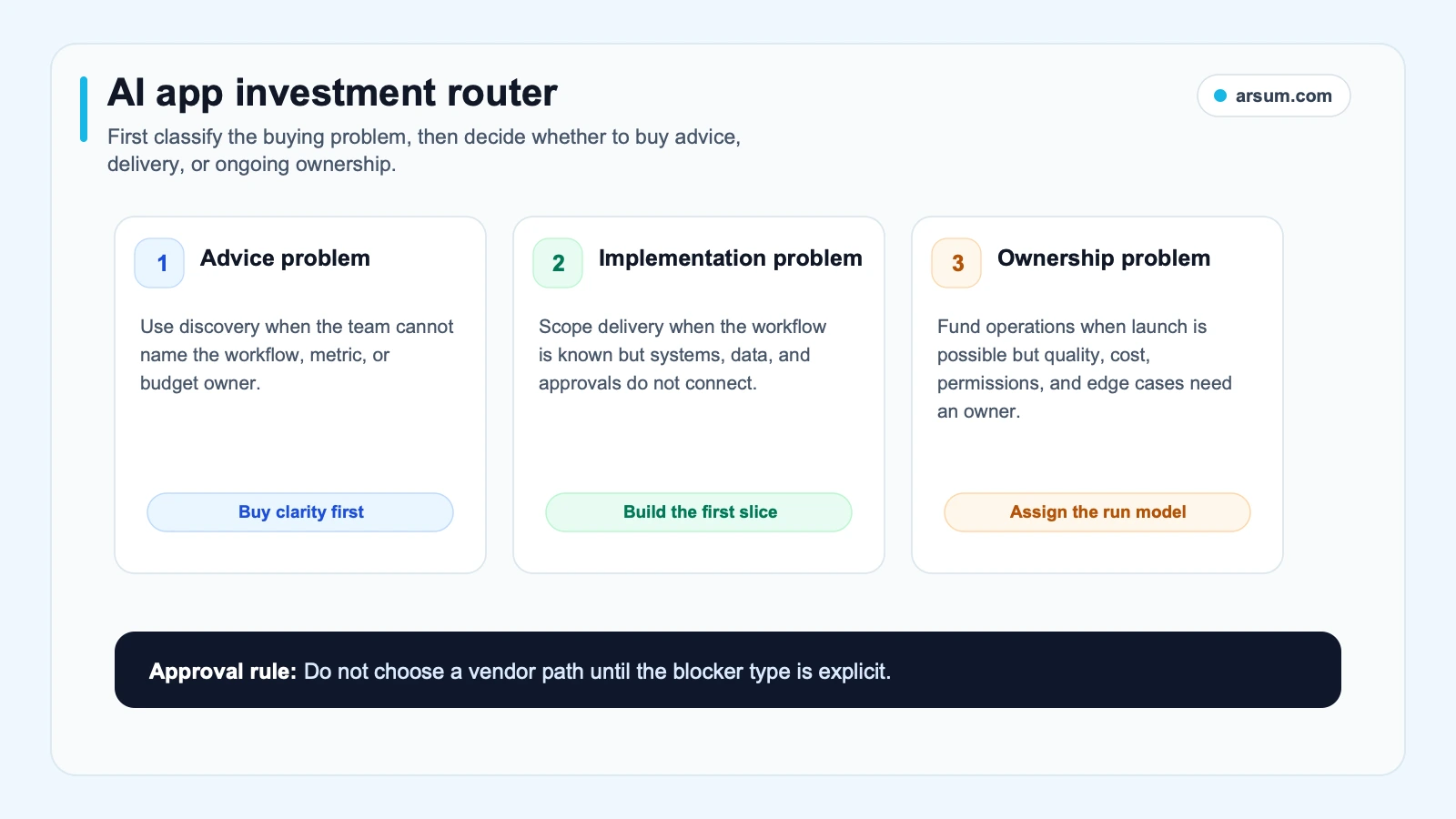
Advice, implementation, and ownership are different buying decisions. A feature should not pass to build until the relevant problem has an owner.
Where AI can create value—and the conditions that make it credible
Faster development cycles
AI-assisted development can reduce time spent on bounded, reviewable work such as scaffolding, first-pass tests, documentation drafts, code explanation, and repetitive transformations. The benefit is credible when the team measures the task being reduced and includes rework in the comparison.
Do not measure lines of code or prompts sent. Capture baseline time for a repeatable implementation slice, review time, defects found after merge, and time spent correcting generated output. A team bottlenecked on unclear requirements, approvals, architecture decisions, or dependency coordination will not solve that constraint by generating code faster.
An evaluation of AI automation for software developers should therefore start with the delivery bottleneck, not the tool name. If the goal is a broader product build, the scope belongs in an AI app development services decision rather than a developer-tool rollout.
Intelligent search and retrieval
Intent-aware search can help when users know the problem they need to solve but not the vocabulary, document name, or product feature that contains the answer. It is strongest in a bounded corpus with a known answer path: a help center, policy library, product documentation set, or internal knowledge base.
The relevant metric is not “the model answered.” Measure search abandonment, time to a verified answer, escalation rate, and the rate at which users correct or reject a response. For sensitive material, show the source used, preserve the retrieved context, and make it clear when the product does not know.
A product that cannot trace an answer to an authorized source is not ready to provide authoritative guidance. Retrieval quality, permissions, and citation behavior are part of the feature—not polish added after launch.
Natural-language configuration
A natural-language interface can reduce configuration friction when users currently need to understand filters, fields, rules, or product-specific terminology before completing a routine task. Examples include creating reports, configuring alerts, drafting a workflow, or translating a plain-language request into a reversible setup.
The safe boundary matters. Let the AI propose a configuration, explain its assumptions, and require confirmation before it changes a consequential setting. For actions involving money, access, compliance treatment, or external communication, authorization must be explicit. Retain the original request, proposed action, approving user, and resulting change.
The OpenAI Agents SDK documentation treats tools, guardrails, tracing, sessions, handoffs, and human-in-the-loop controls as production concerns. That is the useful implementation lens: the model interaction is only one part of application behavior.
Prediction and anomaly triage
Prediction, classification, and anomaly detection can add value when an app needs to identify a risk or opportunity early enough for a person or deterministic workflow to act. The feature should surface a decision-support signal, not quietly become an unauthorized decision-maker.
In finance, insurance, compliance, lending, or other consequential workflows, a high-confidence score does not grant autonomy. The system can prioritize a queue, collect evidence, or recommend a next step; an authorized role should own the resulting decision unless a policy-approved, reversible exception applies. See agentic AI use cases in finance and AI automation for compliance officers for workflow-specific boundaries.
The business case improves when the workflow has a clear exception path. If every output still requires the same human effort, the model may add a new cost without reducing the old one.
Repetitive-workflow assistance at scale
AI can help structure, classify, summarize, route, or draft within repetitive workflows that otherwise create a growing queue of manual handling. The right comparison is not “AI versus people.” It is the controlled allocation of work among automation, deterministic rules, and human judgment.
For a document-heavy process, a useful first release may extract specified fields, identify missing evidence, route low-confidence cases to review, and leave approval to the existing operator. The benefit comes from reducing avoidable handling and improving queue visibility—not from claiming that a function has been replaced.
This differs from a general AI business process automation initiative because an app feature must also meet customer-facing reliability, latency, permission, and support expectations.
Production costs are part of the benefit calculation
A convincing demo does not establish durable value. Production AI creates responsibilities for evaluation data, prompt and model changes, observability, sensitive-data boundaries, tool permissions, incident response, fallback behavior, and failure inspection.
The OWASP Top 10 for LLM Applications identifies risks including prompt injection, sensitive-information disclosure, insecure output handling, insecure plugin design, excessive agency, and overreliance. These are not reasons to reject all AI features. They are reasons to reduce autonomy when failure cost is high, scope permissions narrowly, and test the system at the boundary where it can cause harm.
Public practitioner discussions point to similar production questions. A Launch HN discussion about agent debugging describes difficulty inspecting failures in a tool-using e-commerce agent. A Show HN discussion about deployment highlights scaling, monitoring, rollback, artifacts, and secrets as work that follows local success. These are qualitative, company-authored practitioner signals—not market-wide performance evidence—but they are useful prompts for buyer due diligence.
Thin demo versus production-ready feature
A proposal should pause if it cannot answer these questions:
| Production question | Evidence required before approval |
|---|---|
| What precise workflow changes? | A baseline process map and named user or operator |
| What data can the feature use? | Source list, permission boundary, retention approach, and known gaps |
| How is quality measured? | Test set or sampled cases, pass criteria, and reviewer decision |
| What happens when confidence is low? | Explicit routing to a person, deterministic path, or user confirmation |
| What happens when the feature is slow or unavailable? | Fallback experience and incident owner |
| What can the feature do? | Narrow tool permissions and action limits |
| Who owns it after launch? | Named role, review cadence, and rollback authority |
If a pitch centers on speed but omits evaluation, approval, and rollback, the team is evaluating a demo rather than a durable capability.
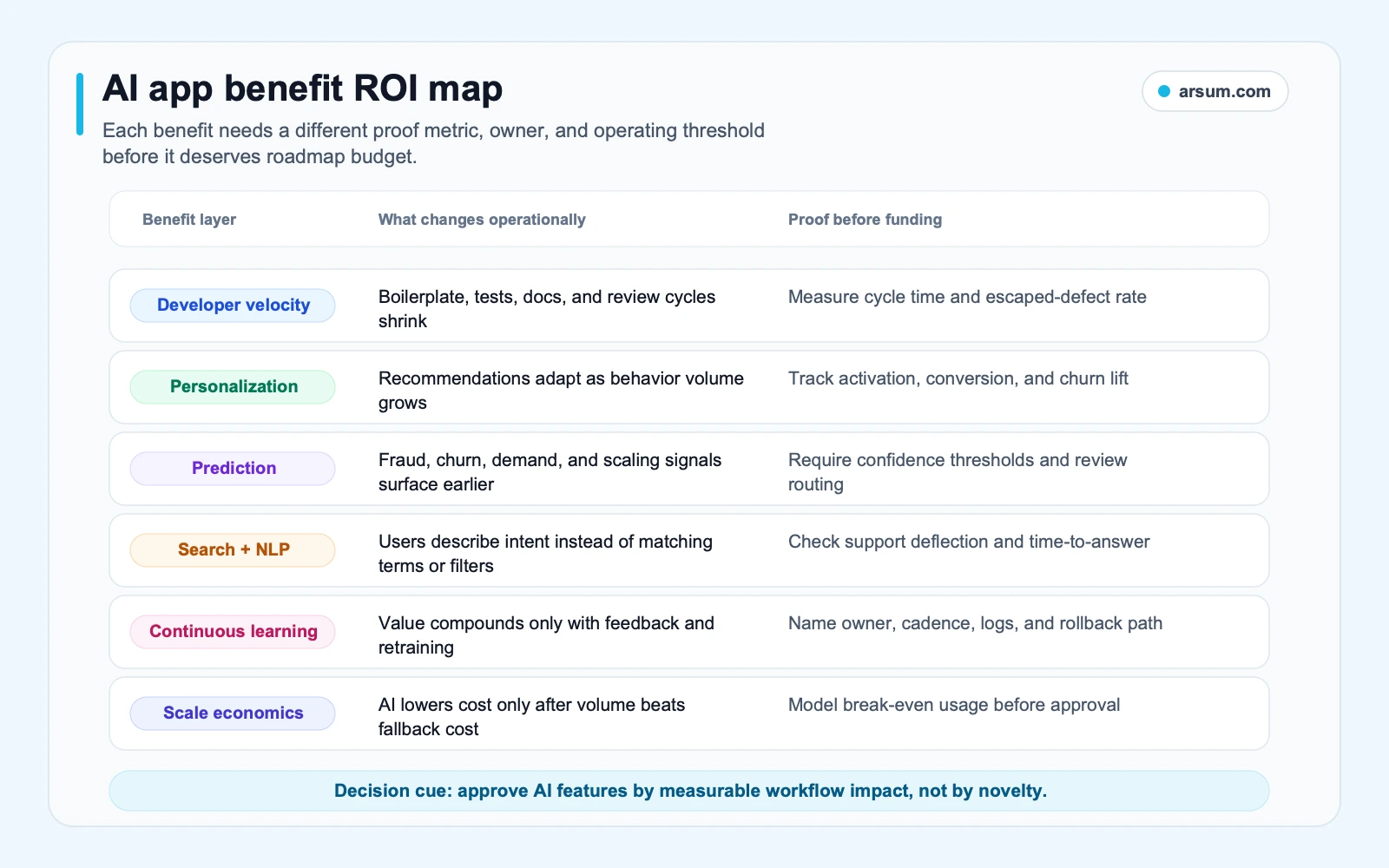
Developer tooling tends to pay back through delivery capacity. Embedded AI must also prove customer or operator value after quality, review, and operating costs are included.
A controlled workflow example: document-intake triage
Consider a finance or compliance team receiving inbound documents that must be checked for required fields before an authorized reviewer decides what happens next. This is an illustrative planning example, not an observed Arsum result.
Define the boundary
- Current workflow: An operations analyst opens each submission, checks for required documents and fields, labels the case, and routes incomplete cases for follow-up.
- Baseline: Capture a representative sample of completed cases. Record weekly volume, analyst minutes per case, incomplete-case rate, rework rate, and time from receipt to a correctly routed case.
- AI boundary: Extract specified fields, identify likely missing items, propose a routing label, and provide source references from the submitted material.
- Not automated: Credit, eligibility, fraud, compliance, pricing, payment, account, or adverse decisions. These remain with the authorized reviewer and existing policy controls.
- Approval owner: Operations manager for workflow acceptance; compliance or risk owner for policy and exception treatment; engineering owner for availability, logging, and rollback.
- Retained evidence: Input document identifiers, model or configuration version, extracted fields, source references, routing signal, reviewer correction, final disposition, and timestamp.
- Fallback: If the system is unavailable, slow, or below its quality gate, route the case to the current manual intake queue.
- Rollback: Disable AI routing actions while preserving read-only logs, then return to manual triage. Do not delete evidence needed to investigate the failure.
Pilot scorecard
Run the pilot on one bounded document type and a representative sample of ordinary and difficult cases. Set the exact thresholds before seeing the results.
| Measure | Baseline | Pilot target | Acceptance gate | Owner | Review cadence |
|---|---|---|---|---|---|
| Correct routing | Measured from manually completed cases | Match or improve baseline | Must not fall below the agreed baseline on the validation sample | Operations manager | Weekly |
| Required-field extraction | Reviewer-verified fields | Reduce analyst handling | Every extraction used in routing must be traceable to source material | Functional reviewer | Daily sample |
| Exception-routing success | Current unclear cases correctly routed | Route uncertainty safely | 100% of low-confidence or rule-conflict cases reach review, not automatic completion | Workflow owner | Daily |
| Reviewer minutes per case | Average minutes for baseline sample | Lower total handling time | Savings must remain after correction and audit time | Team lead | Weekly |
| Cost per completed case | Fully loaded manual handling cost ÷ completed cases | Compare with AI-assisted total | Include model, infrastructure, review, support, and maintenance inputs | Finance partner | Weekly |
| Harmful errors | Define harm categories before pilot | Maximum tolerated count | Zero for pre-defined high-severity errors during the pilot | Risk owner | Immediate review |
“Quality” cannot mean a generic accuracy number. A benign typo, incorrect routing label, missing-document flag, and unauthorized action have different costs. Define the errors that matter to the workflow and test them separately.
Illustrative break-even formula
Use your own inputs:
Break-even completed cases = fixed implementation and operating cost ÷ (manual cost per completed case − AI-assisted cost per completed case)
Where:
- Manual cost per completed case includes analyst time, rework, and escalation.
- AI-assisted cost per completed case includes model usage, infrastructure, human review, corrections, monitoring, support, and retained-control work.
- Fixed cost includes integration, evaluation setup, security review, training, and change management.
If AI-assisted cost is not lower than manual cost, there is no cost break-even. The proposal must justify itself through another measured outcome, such as faster service, lower abandonment, or a controlled reduction in avoidable errors.
💡 Arsum builds custom AI automation solutions tailored to your business needs.
Get a Free Consultation →Build, buy, or partner: choose the path that preserves control
The delivery route should follow the source of advantage and the burden of ownership.
| Path | Fits when | Watch for |
|---|---|---|
| Buy | The capability is common, the workflow is standard, and differentiation is limited | Data sharing, integration limits, evaluation access, and vendor exit plan |
| Build | Proprietary workflow logic, domain data, or product experience creates the advantage | Long-term ownership of evaluation, security, reliability, and model changes |
| Partner | The workflow is valuable but the internal team lacks implementation or operating-model capacity | Vague handoff terms, unclear ownership, and a scope that ends at demo |
A narrow build may fit when your application needs a distinctive workflow or a controlled user experience. A commodity platform may be better for standard transcription, search, or drafting needs. The decisive question is not whether the model is custom; it is whether the workflow, data boundary, and evaluation logic are strategically important enough to own.
For architecture questions, compare AI agent architecture patterns with the actual operating boundary rather than selecting a framework first. For a broader sourcing decision, hiring an AI developer versus an agency is useful after the workflow and ownership model are defined.
When AI in app development does not make sense
Reject or defer the project when one of these conditions applies:
- The underlying problem is weakly defined or cannot be measured.
- A deterministic rule or ordinary UX improvement solves the problem more reliably.
- The available data is unauthorized, incomplete, untraceable, or too inconsistent for the intended use.
- The feature needs high-stakes autonomy but has no authorized approval model.
- The team cannot name a fallback experience when the model is wrong, slow, or unavailable.
- The proposed benefit relies on a volume level that is unlikely to occur.
- No product, functional, risk, and technical owners will accept post-launch responsibilities.
- The expected review and correction burden removes the proposed time or cost benefit.
These are not anti-AI criteria. They prevent a probabilistic component from being used where simpler controlled software is the better product decision.
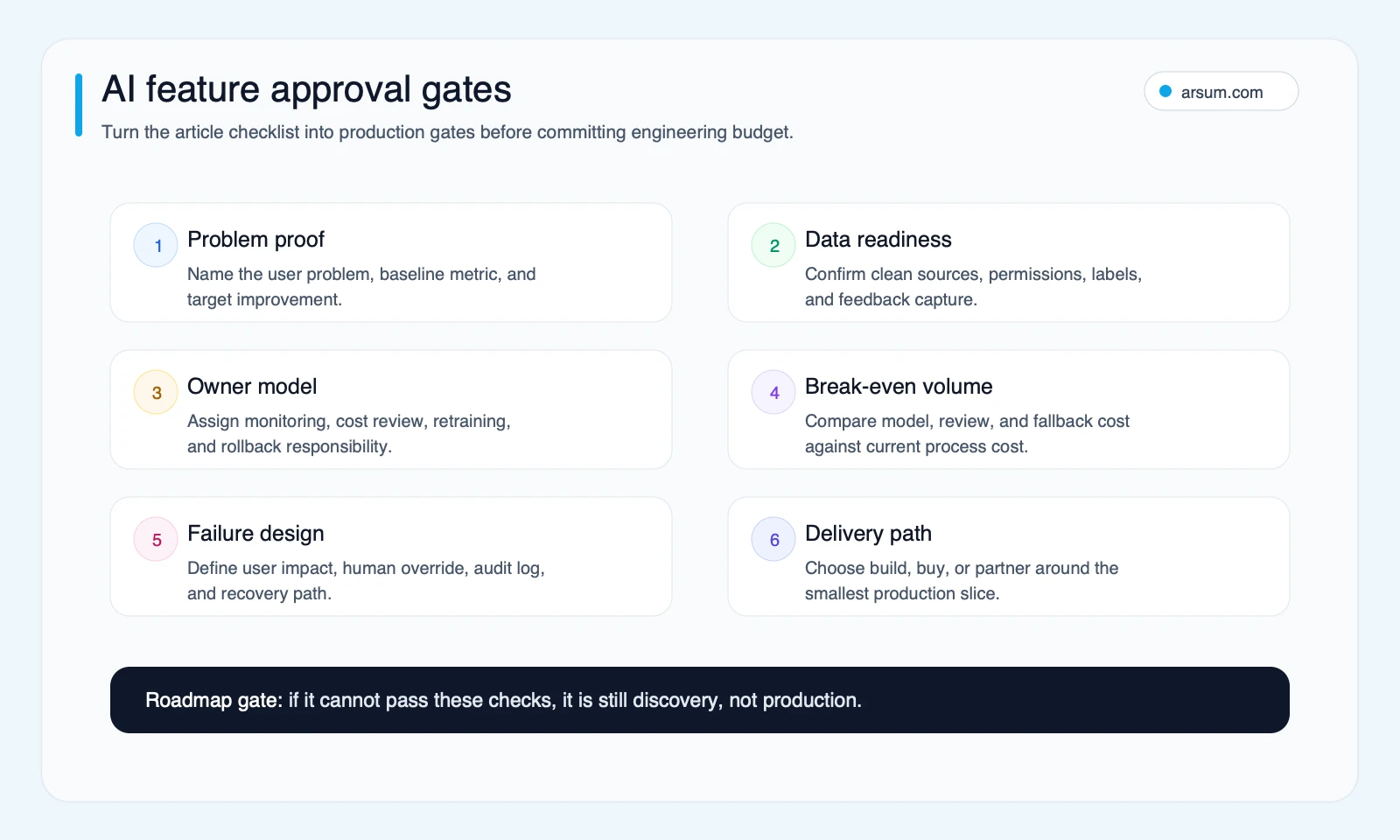
An AI feature is ready for a pilot only when its problem, data, approval boundary, quality gate, economics, failure path, and owners are explicit.
Decision scorecard for approving an AI feature
Score the feature before committing to a large build.
| Signal | Green | Yellow | Red |
|---|---|---|---|
| Problem evidence | Measured delay, error, queue, or abandonment exists | Plausible pain but incomplete baseline | “We need AI” is the main rationale |
| Data lineage | Authorized sources and permissions are documented | Sources exist but need cleanup or access design | No reliable source or usage authority |
| Quality control | Representative test cases, reviewers, and pass gates exist | Evaluation plan is partial | Demo output is the only proof |
| Exception path | Low-confidence cases route safely and visibly | Some exceptions are defined | Wrong output can complete a consequential action |
| Cost model | Full operating cost is compared with baseline | Partial estimate | Only implementation cost is discussed |
| Ownership | Named product, functional, technical, and risk owners | Shared but incomplete ownership | No post-launch owner |
| Reversibility | Users can confirm, correct, or undo the outcome | Partial fallback exists | Irreversible or high-impact action without robust controls |
A note on scaled content and customer-facing AI
For content-generation features, product scale is not the same as user value. Google’s guidance on using generative AI content explains that using generative AI to create many pages without added value can violate its scaled-content-abuse policy. That guidance concerns search quality; it does not validate or invalidate every AI app feature.
The practical product implication is narrower: if an AI feature generates public-facing material, define originality, accuracy, provenance, review responsibility, and the user value that the material adds. Publishing more output is not a business outcome by itself.
A reusable approval checklist
Before approving an AI feature or AI development engagement, require these answers:
- What workflow changes, for whom, and why now?
- What is the baseline metric and sample period?
- Is this developer tooling, an embedded product feature, or an internal operator workflow?
- What data is used, who authorizes it, and how is source lineage shown?
- Which outputs are advisory, which are executable, and who may approve each?
- How are low-confidence, contradictory, missing, slow, and unavailable cases handled?
- What is the acceptance threshold for quality, reviewer time, exception routing, and harmful errors?
- What does fully loaded cost per completed case include?
- Who owns monitoring, evaluation, incidents, changes, and rollback?
- What would make the team stop the pilot?
When these answers are clear, the benefits of AI in app development become testable rather than aspirational. When they are absent, reduce scope, use deterministic software, or delay the feature until the control model is ready.
If your team has a candidate workflow but needs help turning it into a measurable, controlled release plan, Arsum’s AI implementation services can help frame the data boundary, pilot gates, delivery route, and operating responsibilities before a broader build.
Ready to Automate Your Business?
Stop wasting time on repetitive tasks. Let AI handle the busywork while you focus on growth.
Schedule a Free Strategy Call →Written by:Arsum editorial team
- Reviewed by
- Arsum editorial team
- Published
- February 18, 2026
- Updated
- July 4, 2026
- How this was produced
- Arsum uses research packs, source checks, and human editorial review to prepare and update blog articles. Editors are responsible for the final page.
- Source policy
- Sources are linked in the article when used. Methodology and source notes are included on higher-risk or high-visibility pages and are being rolled out across the archive. Editorial policy.
- Why this page exists
- Help B2B operators evaluate AI automation, implementation scope, cost, risk, and build-vs-buy decisions with practical context.