Most conversations about AI in app development begin in the wrong place. They lead with capabilities and demos, then work backward to use cases. The teams that get burned usually followed this path: they approved budget for an AI feature, watched it perform well in staging, and then discovered post-launch that the surrounding workflow was wrong, the model behaved differently under real load, or no one owned the process of reviewing and correcting AI outputs before they reached users.
AI in App Development: Use Cases, Risks, and ROI
Explore ai in app development: compare workflow fit, costs, risks, evidence, and practical next steps before you build, buy, or hire.

Table of Contents
- The Four Types of AI in App Development
- Decision Framework: Which Path Is Right for Your Team?
- Implementation Route Decision Tree
- Original Data: AI App Scope Scorecard
- Where AI Adds Measurable Value
- Where It Breaks Down
- Social Listening: What Operators Worry About Before Launch
- Common Scoping Mistakes in AI App Development
- Commodity vs Non-Commodity AI Development Work
- Builder vs Custom Integration vs Agency Build
- Production-Readiness Checklist
- What to Scope Before Committing Budget
- Methodology Note
- Frequently Asked Questions
What AI in app development actually means for buyers – at a glance
AI in app development covers four distinct project types – single feature integration, workflow automation, AI-first product builds, and no-code builder prototypes – that carry substantially different costs, risks, and governance requirements. Most content about this topic answers “what is AI app development” or promotes a builder platform. If you need a broader tool-category comparison first, see Best AI for App Development in 2026. This guide answers a different question: which type does your team actually need, and what must be scoped before you commit budget.
Key evidence from this research:
- Practitioners report that RAG-based AI features can hit concurrency ceilings at surprisingly low parallel-user counts when each request carries large retrieval payloads, a throughput problem that rarely surfaces in staging
- Teams usually recover real support time only after they define routing labels, confidence thresholds, and a human review step before build begins
- OpenAI’s production AI development guidance frames readiness around agents, evals, guardrails, structured outputs, and cost-latency optimization – not model selection alone
- OWASP’s GenAI Top 10 covers prompt injection, data exposure, and unsafe tool use as shipping requirements, not post-launch edge cases
- NIST’s AI Risk Management Framework states the goal is to “improve how organizations incorporate trustworthiness considerations into the design, development, use, and evaluation of AI systems”
The decision threshold in one sentence: If your project touches proprietary data, integrates with production systems, or runs a workflow where an AI error has direct commercial or operational consequences, the delivery and governance requirements are in a different category from a no-code prototype – and that distinction belongs in your scope document before a build budget is approved.
AI in app development is the practice of embedding artificial intelligence into software products or internal tools, from a single intelligent feature to a fully AI-first architecture. The part most guides skip is that the work involves not just adding AI, but redesigning the workflow, data ownership, and review process that surrounds it. Getting that right before committing budget is the difference between a shippable product and a demo that never fully works.
The Four Types of AI in App Development
The first decision any team needs to make is which type of AI implementation they actually need. These are not interchangeable, and the costs, risks, team requirements, and governance obligations differ significantly across each.
AI Feature Integration
Adding a single AI-powered capability to an existing product: a document summarizer in a project management tool, a recommendation layer in an e-commerce app, or a natural language search interface over an existing database. This is the most common entry point. It has the narrowest scope of change and the most predictable implementation path, but it still requires evaluation, fallback logic, and clear ownership of what happens when the AI output is wrong.
AI Workflow Automation
Replacing or augmenting a multi-step operational process with AI logic: routing support tickets through a classifier before a human sees them, running contract drafts through a review layer before a lawyer touches them, or generating initial responses to incoming sales inquiries. The value here is time recovery. The risk is that the AI is making decisions with real operational or commercial consequences, which means the review and fallback design must be defined before the workflow goes live.
AI-First Product Builds
Designing an application where the AI model is the core product, not a supporting feature. The product’s value depends on what the model does. These are the most complex builds, requiring the deepest investment in evaluation infrastructure, retrieval pipeline design, observability, and production monitoring. Teams that underscope this category often discover halfway through that the model reliability and latency requirements exceed what a simple integration budget can support.
No-Code AI App Builders
Platforms that allow teams to prototype AI-assisted tools without a development team. These are legitimate options for narrow internal use cases with low complexity, no sensitive data handling, and limited integration requirements. They are the wrong starting point for any product where performance, reliability, proprietary data, or custom integrations are non-negotiable.
Misidentifying which of these four types a project falls into is one of the most expensive early decisions in any AI in app development engagement.
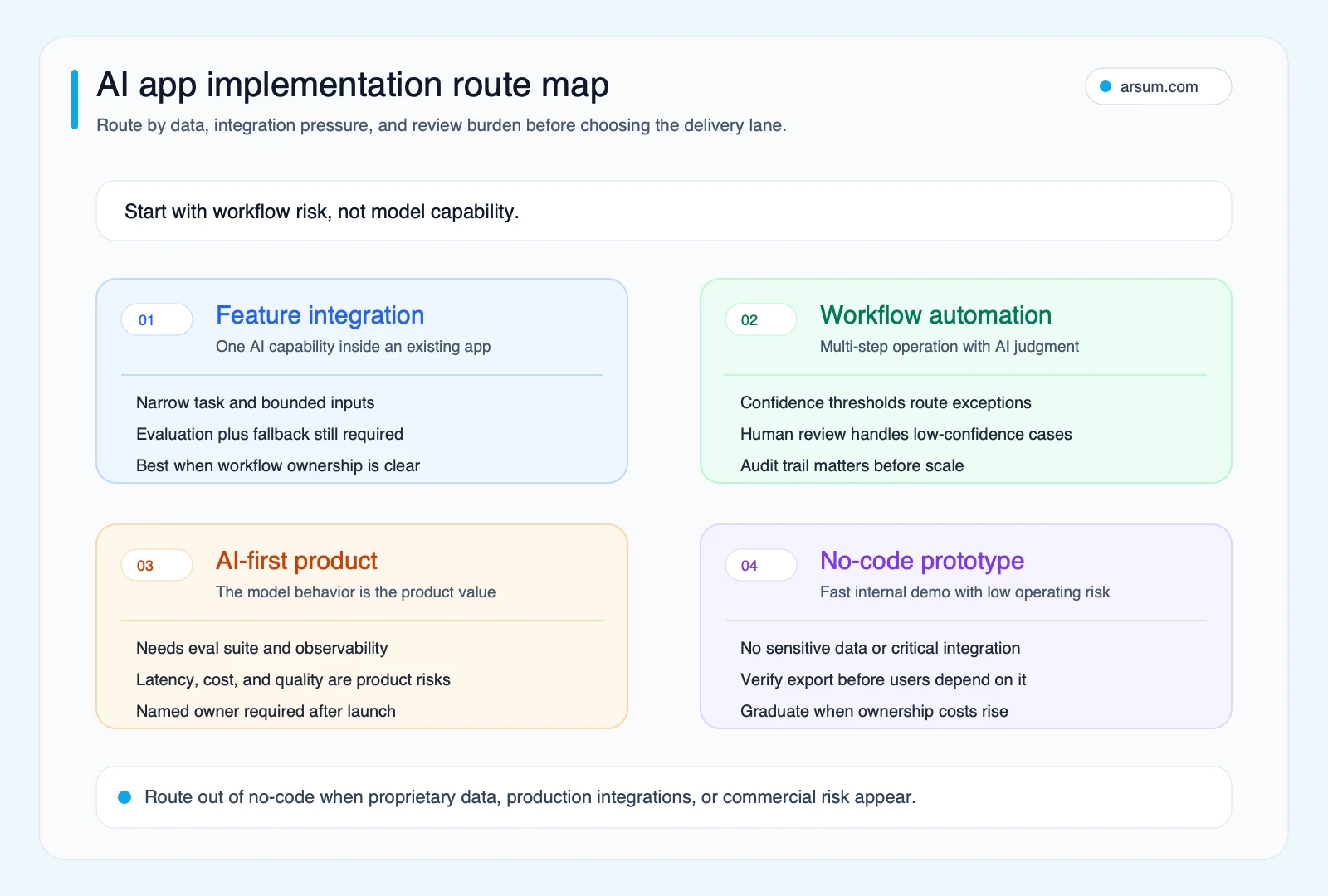
Use the route map to separate low-risk prototypes from production AI builds before a tool choice turns into architecture debt.
Decision Framework: Which Path Is Right for Your Team?
Operator Note: This framework emerged from repeated early-stage scoping conversations where buyers already knew they wanted AI but had not yet settled on what kind. The decision is not about ambition. It is about where the team’s data readiness, integration complexity, and internal review capacity actually sit today.
Use these four questions to route your project before selecting a delivery model:
- Is your data owned, clean, and accessible? If not, no AI implementation will be reliable regardless of how good the model is. Data quality is not a problem the AI solves; it is a prerequisite the team resolves first.
- Does the workflow require deterministic output at any point? If a compliance check, financial calculation, or legal clause must always be exact, it cannot be AI-generated without a validation layer. Map those steps before scoping anything.
- Who reviews AI output before it affects users or operations? If there is no clear answer, the project is not ready to scope. An AI system without a named reviewer is not a product; it is a liability.
- What happens when the AI returns an incomplete or wrong answer? A fallback path is not a nice-to-have. It is a design requirement that belongs in the scope document before a single line of implementation is written.
If all four questions have specific answers, the project is ready to scope. If more than one is unclear, scoping the AI implementation before answering them adds cost and risk without adding value.
Implementation Route Decision Tree
Use the route below before choosing tools, vendors, or a delivery model:
- Start with a no-code prototype when the use case is narrow, internal, low-sensitivity, and light on integrations.
- Scope feature integration when AI is one capability inside an existing product and the output can be reviewed before it affects users.
- Treat it as workflow automation when AI changes a multi-step operating process with handoffs, approvals, or downstream consequences.
- Budget for an AI-first build when the product’s value depends primarily on model behavior and the team needs dedicated evals, observability, and governance from day one.
This simple routing step prevents a common mistake: teams choose a tool category first, then discover later that the real project needed a different level of review, ownership, and reliability engineering.
Original Data: AI App Scope Scorecard
This is the simple scorecard we use to pressure-test whether an AI app idea is ready for a real build budget or still needs a discovery phase first. It is intentionally practical: if the team cannot answer these six questions clearly, the AI work is usually being scoped too early.
| Scope signal | Green light | Yellow light | Red light |
|---|---|---|---|
| Workflow clarity | One task, one owner, one measurable outcome | Multiple owners or fuzzy handoffs | Team cannot describe the exact workflow being changed |
| Data readiness | Clean internal data already available | Data exists but needs cleanup or permissioning | Data is fragmented, missing, or owned by other teams |
| Eval coverage | Clear pass-fail criteria plus a test set | Team has examples but no repeatable evaluation loop | No one can define what a good answer looks like |
| Throughput assumptions | Concurrent usage and payload size already estimated | Rough volume assumptions only | Load, token budget, or latency target is unknown |
| Fallback design | Deterministic fallback already defined | Human review exists but no formal fallback path | AI failure would block the workflow outright |
| Post-launch ownership | Named owner plus alerting and review cadence | Shared ownership without explicit escalation | No one owns quality after launch |
A simple rule of thumb: if two or more rows are still red, treat the next step as discovery rather than implementation. That decision usually saves more time and money than trying to code around missing scope later.
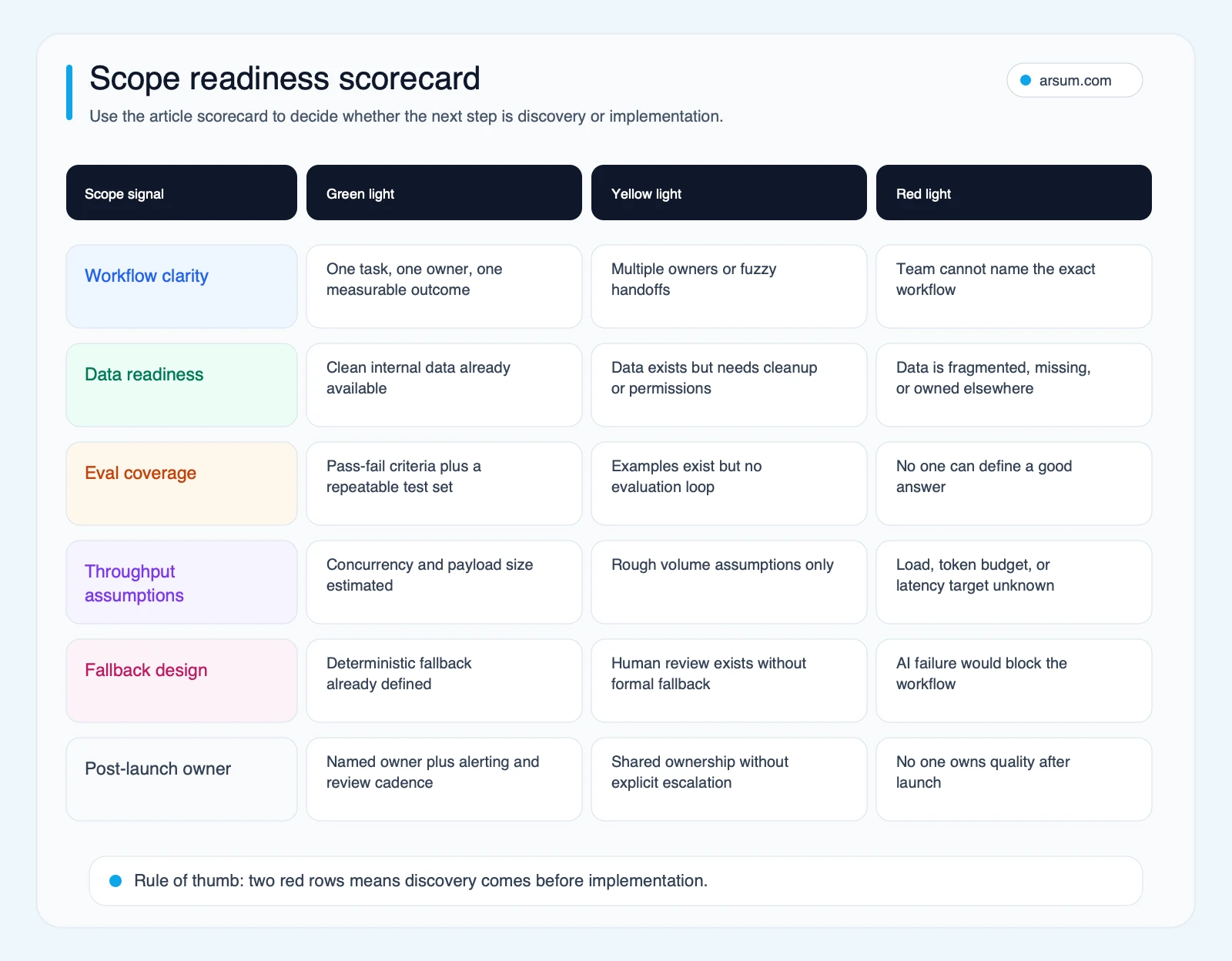
Use the scorecard to decide whether the project is ready for an implementation estimate or still needs discovery work.
Where AI Adds Measurable Value
AI creates reliable value in app development when it operates on a well-defined task, has access to clean and complete data, and sits inside a workflow where errors are detectable before they affect users or operations.
High-return use cases tend to share three structural properties: the task is repetitive, the correct output can be verified quickly, and humans can review exceptions without needing to understand every step the model took. Document classification, structured data extraction, response drafting with approval gates, and code suggestion with developer review all fit this pattern.
The teams that get consistent ROI from AI features are not always the ones with the most sophisticated models. They are usually the teams that defined what success looks like before selecting a model, identified who reviews AI outputs and at what cadence, and had a baseline metric to measure whether the AI actually moved the needle.
Illustrative Example: Support Triage with Human Review Still in the Loop
Before: A support team manually categorizes inbound tickets, assigns priority, and routes work to the right queue. Routing quality depends on who is on shift, how well they know the product, and how quickly they can spot exceptions.
After: An AI classifier drafts tags, priority, and routing suggestions before a human reviews the output. Low-confidence items stay in the review queue instead of being pushed through automatically. The team only gets durable value when the routing categories are defined in advance, examples are labeled before launch, and someone owns the confidence threshold that decides when the AI must hand off instead of guessing.
The point is not that AI magically fixes support. It is that narrow workflows can improve when the review boundary, fallback path, and ownership model are designed before the build starts.
💡 Arsum builds custom AI automation solutions tailored to your business needs.
Get a Free Consultation →Where It Breaks Down
The most common failure pattern in AI in app development is not a technical failure. It is a scoping failure that surfaces as a technical problem after launch.
Failure-Mode Table
| Failure mode | When it typically appears | Root cause | Control that prevents it |
|---|---|---|---|
| Throughput ceiling | Post-launch with real user load | Concurrency and token limits not tested at scale | Load test with production-size payloads before launch |
| Review burden shift | Within weeks of launch | AI output increases checking requirements rather than reducing them | Define expected review time per output before building; measure post-launch |
| Ownership ambiguity | Months after launch as a support pattern | No named owner assigned to catch and fix AI errors | Assign a named owner with an escalation path at project start |
| Hallucinated output | Any time, including in staging | Model returns confident but wrong answer on out-of-distribution inputs | Evals against a labeled test set run before and after any model or prompt change |
| Prompt injection | When user input reaches the model | Unvalidated user text included in system prompts without sanitization | Input validation and output filtering per OWASP GenAI Top 10 |
| Silent model drift | Weeks or months after launch | Model behavior changes after a vendor update with no notification | Regression test on eval set after any upstream model change |
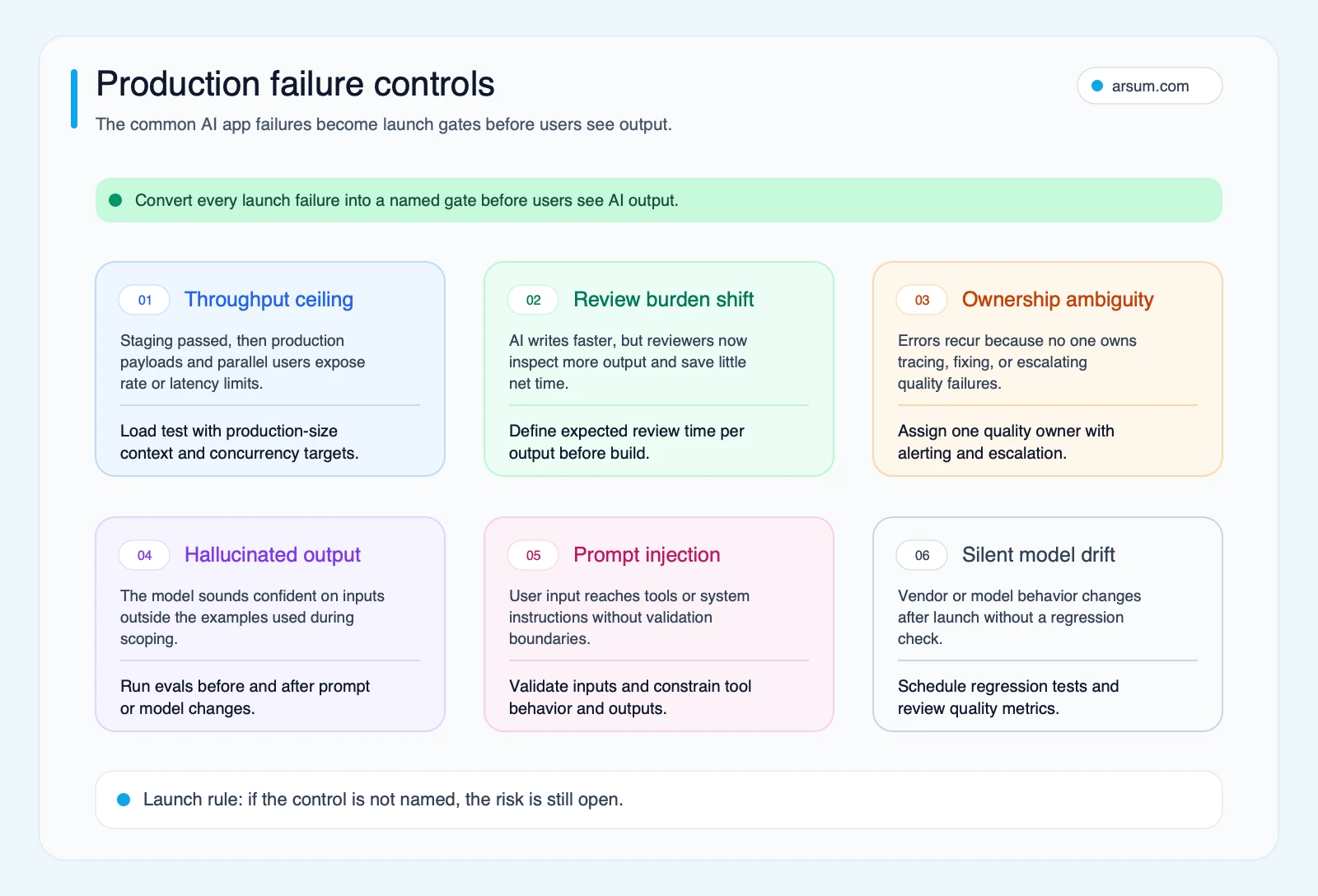
Use the failure-control map to turn common AI app risks into named launch gates before the system reaches users.
Throughput and concurrency are the first wall most teams hit. A workflow that performs well with controlled inputs in a staging environment can degrade significantly in production when user inputs vary, context payloads grow larger, or concurrent usage pushes against rate limits or token ceilings. Practitioners building retrieval-augmented generation systems have documented reaching token-per-minute ceilings with as few as six or seven parallel users when each request carries roughly 10,000 tokens of retrieval context. Teams that skipped throughput and concurrency testing during scoping typically discover this problem after they have already promised a feature to users.
Review burden shift is the second pattern. AI-generated outputs can move work from the creator to the reviewer. If an engineering team uses AI tooling to write code faster but reviewers must now check every pull request more carefully for confident-but-wrong output or edge-case bugs introduced without detection, the net productivity gain may be marginal or neutral. The same pattern appears in any workflow where AI output reaches people or systems before it passes through a reliable validation step.
Ownership ambiguity is the third pattern. When an AI output is wrong, someone needs to catch it, trace the failure, and fix the underlying cause. In many projects this is assumed rather than assigned. It surfaces weeks after launch as a recurring support problem with no clear owner and no escalation path.
Social Listening: What Operators Worry About Before Launch
The practitioner pattern here is consistent. Operators are rarely worried about whether a model can produce an impressive demo response. They worry about what happens when production traffic arrives, prompts become multi-step, or reviewers have to inspect every output more carefully than the work AI replaced.
- Concurrency surprises: retrieval-heavy features can behave very differently once real payload sizes and real parallel usage arrive.
- Workflow instability: multi-step agent graphs often become more reliable only after teams decompose them into smaller, less ambitious nodes.
- Review sludge: AI can shift work from doing to checking if quality thresholds and reviewer responsibilities are not scoped up front.
- Control gaps: teams want acceptance hooks, fallback behavior, and monitoring before AI output is trusted inside production workflows.
Common Scoping Mistakes in AI App Development
The same avoidable mistakes show up across otherwise different AI app projects:
- Treating model choice as the whole project: model selection matters, but it does not replace workflow design, eval coverage, or owner assignment.
- Assuming staging equals production: narrow test prompts hide latency, concurrency, and payload-size problems that show up only under real traffic.
- Leaving review work implicit: if no one owns spot checks, escalation, and quality thresholds, the AI feature creates review sludge instead of leverage.
- Skipping fallback logic: when the model is slow, wrong, or incomplete, the workflow still needs a deterministic path to completion.
- Starting implementation before scope is stable: when the task, data source, or success metric is still fuzzy, discovery work is cheaper than coding around ambiguity.
These are management mistakes before they become engineering mistakes. Catching them early is usually the fastest way to protect ROI.
Commodity vs Non-Commodity AI Development Work
Not all AI development effort carries equal risk or requires equal expertise. Understanding the distinction helps buyers allocate review time, budget, and agency engagement appropriately.
| Work type | Commodity | Non-commodity |
|---|---|---|
| RAG pipeline setup with standard document types | Yes, template-able | No, when retrieval quality and latency are product-critical |
| Prompt engineering for simple classification | Yes, for well-defined task types | No, when accuracy is compliance-sensitive or output is customer-facing |
| Model selection for standard use cases | Yes, for most integrations | No, when cost-per-request or data residency requirements are binding |
| Eval framework design | No, always specific to the task | No |
| Production monitoring and alerting | Yes, once standard patterns are in place | No, when model behavior is business-critical or regulatory-adjacent |
| Fallback logic design | No, always specific to the workflow | No |
| Integration with legacy systems | No, high variation and complexity | No |
The commodity vs non-commodity split matters for budget planning. Buyers who treat all AI development work as equally complex overpay for setup and commoditized tooling. Buyers who treat all AI development work as commodity underscope the pieces that actually require expertise and ongoing ownership. Most project failures are not caused by the wrong model. They are caused by underscoping the non-commodity work.
Builder vs Custom Integration vs Agency Build
Choosing the right delivery model for an AI in app development project is a separate question from choosing the use case. For a buyer-side view of prototype speed versus production ownership, see App Development Using AI. See the detailed breakdown of how AI development agencies compare to internal build options for a full analysis. The summary decision logic comes down to four factors: data sensitivity, integration complexity, how much the product’s core value depends on AI performance, and internal capacity to maintain and improve the system after handoff.
| Factor | No-Code Builder | Custom AI Integration | Agency-Led Build |
|---|---|---|---|
| Data sensitivity | Low only | Medium to high | High, enterprise-grade |
| Integration complexity | Pre-built connectors only | Full API integration | Custom, including legacy systems |
| AI performance dependency | Low | Medium | High |
| Evaluation and monitoring | Limited, vendor-managed | Requires engineering investment | Full eval plus observability stack |
| Post-launch ownership | Vendor managed | Internal team | Hybrid or structured handoff |
| Best for | Internal prototypes | Adding AI to an existing product | AI-first products or critical workflows |
A practical threshold: if the application handles sensitive or proprietary data, requires integrations with existing production systems, or must be reliable enough that a failure has direct operational or commercial consequences, a no-code builder is not the right delivery vehicle. The more the project outcome depends on AI quality and reliability, the more the delivery model needs to support ongoing evaluation, monitoring, and improvement cycles.
Production-Readiness Checklist
OpenAI’s production AI development guidance explicitly frames the work around agents, evals, guardrails, structured outputs, and optimization for cost, latency, and performance. OpenAI states that evaluations are “an essential component for understanding whether LLM applications meet expectations, especially when upgrading prompts or models.” That framing is important: production-readiness is not a configuration step at the end of a project. It is a set of design decisions that must be made before the first line of implementation begins.
Use this checklist before committing a build budget for AI app development services or any internal initiative:
- Eval coverage: What percentage of expected outputs will be tested against defined acceptance criteria before launch?
- Throughput ceiling: What is the maximum concurrent usage the system must handle without degrading, and has this been tested with production-size payloads?
- Fallback design: What happens when the model returns incomplete, incorrect, or slow output? Is there a deterministic fallback path that does not require AI?
- Observability plan: What metrics will be monitored after launch, at what frequency, and by whom? Who receives an alert when output quality drops?
- Security review: Has the system been reviewed against OWASP GenAI risks including prompt injection, sensitive data exposure, and unsafe tool use?
- Owner assignment: Who is accountable for AI output quality after launch, and what is the escalation path when the AI is wrong?
- Review cadence: How frequently will AI outputs be spot-checked post-launch, and does the review process scale to production volume without requiring new headcount?
- Hidden cost accounting: Has the team scoped model spend, retrieval costs, orchestration overhead, monitoring tooling, reviewer time, and post-launch maintenance separately? Build quotes that bundle these into a single line item typically understate total cost of ownership.
NIST’s AI Risk Management Framework reinforces this framing at an organizational level. NIST states that the AI RMF is intended to “improve how organizations incorporate trustworthiness considerations into the design, development, use, and evaluation of AI systems.” For enterprise buyers, the question is not whether to use this framework, but whether the team building the AI application has thought through the same categories before they begin.
Work With Arsum
We help businesses implement AI automation that actually works. Custom solutions, not cookie-cutter templates.
Learn more →What to Scope Before Committing Budget
Before any AI in app development project moves from evaluation into execution, buyers should have specific answers to questions that most early-stage conversations avoid. For a full breakdown of what drives project costs, see how AI app development is priced.
What is the exact workflow being changed, and who currently owns it? What does an acceptable AI output look like, and how long does it take a reviewer to confirm it is correct? What happens when the model returns an incomplete or wrong answer? Who monitors output quality after launch, at what frequency, and with what escalation path? What is the concurrent usage ceiling that the system must handle without degrading?
These are not post-launch concerns. They are design constraints that determine whether the project is commercially viable at all. Scoping them before signing a development contract is the clearest signal that a buyer is ready to build something that ships.
Google Risk Box: Teams that skip the scoping questions above and move directly to build are the most common source of thin AI automation: systems that appear functional in demos, degrade under production load, and require ongoing manual intervention at costs that were never accounted for. The combination of low eval coverage, absent fallback logic, and no named post-launch owner is not an AI development problem. It is a project management failure with an AI surface area.
Methodology Note
This guide was refreshed through a mix of live SERP review for the exact keyword and close variants, public practitioner questions on Stack Overflow and Hacker News, and direct reads of OpenAI, OWASP, NIST, and Microsoft documentation. Practitioner signals were used to surface recurring concerns such as concurrency limits, unstable multi-step agents, review burden, and missing ownership. Official documentation was used for factual grounding on evals, security risks, trustworthiness, and production controls. Qualitative operator evidence was treated as directional signal, not as statistical proof.
Frequently Asked Questions
What is AI in app development? AI in app development refers to building software products or internal tools that use artificial intelligence to perform tasks, support decisions, or automate workflows. It ranges from adding a single AI-powered feature to an existing product to designing an AI-first application where the model is the core product.
What is the difference between AI feature integration and an AI-first product build? AI feature integration adds one AI-powered capability to an existing application. An AI-first product build is designed from the ground up around the AI model’s behavior. AI-first builds carry substantially higher requirements for evaluation infrastructure, retrieval pipeline design, monitoring, and production ownership.
When should we use a no-code AI builder versus custom development? No-code builders are appropriate for narrow internal use cases with low complexity, no sensitive data, and no performance-critical integration requirements. Custom development is necessary when the project involves proprietary data, integration with existing production systems, compliance obligations, or product-level performance requirements.
What are the biggest production risks when launching an AI feature? The most common production risks are throughput and concurrency limits that were not surfaced during staging, review burden shift where AI output increases manual checking requirements rather than reducing them, ownership gaps where no one is assigned to catch and fix AI errors after launch, and security exposures including prompt injection and unintended data disclosure.
How do we evaluate an AI app before it goes live? Evaluation requires defining what an acceptable output looks like, building a test set that covers the range of expected inputs, running that test set against the model regularly, and assigning a human reviewer to audit edge cases. OpenAI recommends treating evals as a continuous component of any production AI system rather than a one-time pre-launch check.
What does a production-ready AI application actually require beyond the model? A production-ready AI application requires defined evaluation coverage, tested throughput assumptions, a deterministic fallback path for AI failures, an observability plan with named owners, security review against OWASP GenAI risks, and a post-launch review cadence. These are design requirements that belong in the scope document before build begins, not a configuration layer added after launch.
Ready to Automate Your Business?
Stop wasting time on repetitive tasks. Let AI handle the busywork while you focus on growth.
Schedule a Free Strategy Call →Written by:Arsum editorial team
- Reviewed by
- Arsum editorial team
- Published
- June 13, 2026
- Updated
- July 4, 2026
- How this was produced
- Arsum uses research packs, source checks, and human editorial review to prepare and update blog articles. Editors are responsible for the final page.
- Source policy
- Sources are linked in the article when used. Methodology and source notes are included on higher-risk or high-visibility pages and are being rolled out across the archive. Editorial policy.
- Why this page exists
- Help B2B operators evaluate AI automation, implementation scope, cost, risk, and build-vs-buy decisions with practical context.