AI-powered app development is the process of building software where AI affects a user workflow or product behavior—and the right delivery path depends less on how quickly a demo appears than on decision consequence, data sensitivity, integrations, required evidence, and who will own failures after launch.
Ai-powered App Development: Practical Guide
Explore ai-powered app development: compare workflow fit, costs, risks, evidence, and practical next steps before you build, buy, or hire.

Table of Contents
- What Most Guides Miss: Choose the Operating Model Before the Tool
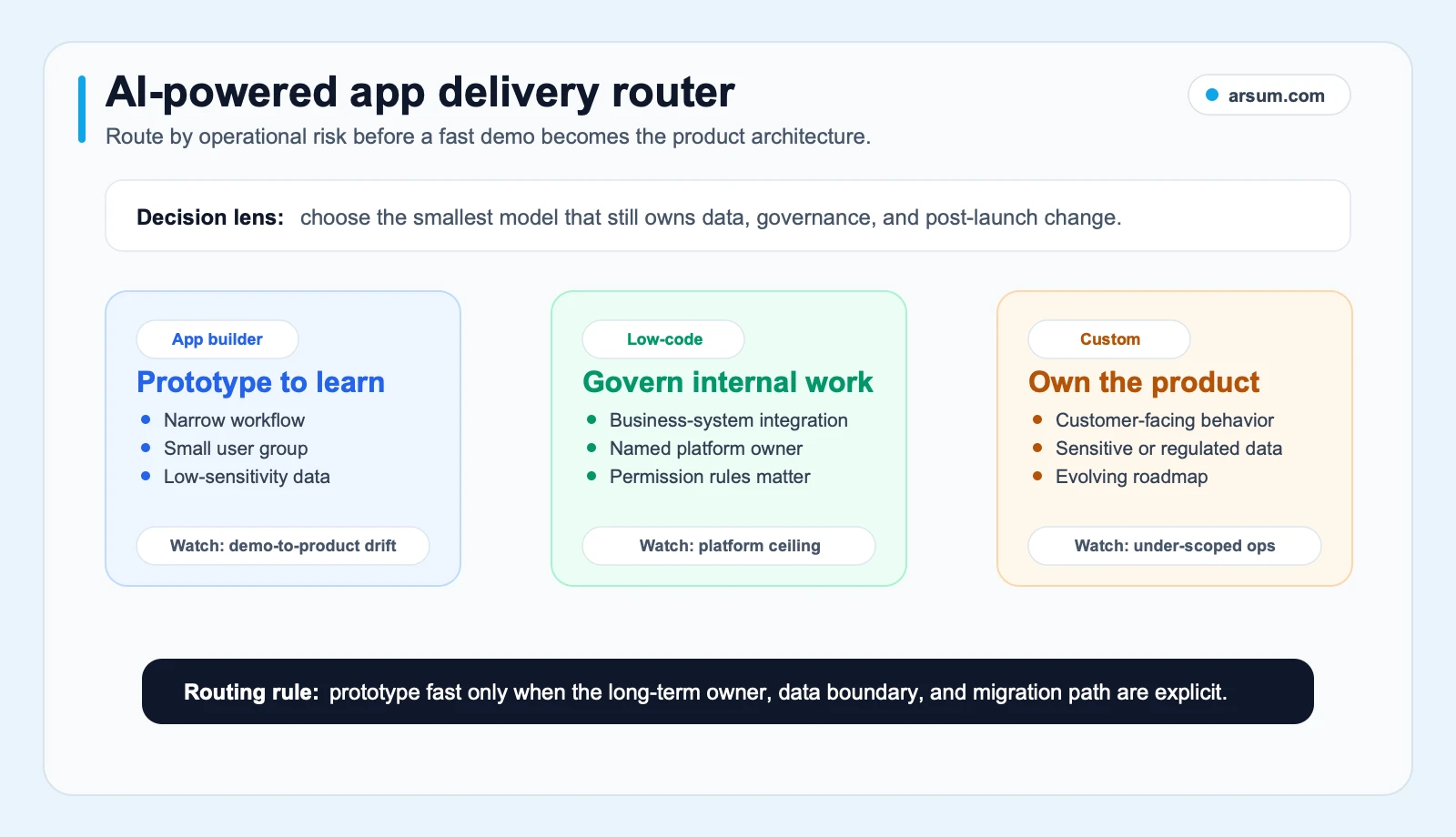
- Route the App by Operational Risk
- The Difference Between a Prototype and a Production System
- Build the Workflow Boundary Before Building the AI
- Production Controls: A Short, Testable Checklist
- A Worked Pilot Scorecard: Document-Intake Triage
- Use the Scorecard to Select the Delivery Model
- Disqualifying Conditions and Common Failure Modes
- Content and Go-to-Market: Do Not Scale Thin AI Output
- The Buying Decision
- Methodology and Freshness Note
What Most Guides Miss: Choose the Operating Model Before the Tool
Most guides begin with a platform, model, or prompt. That is backwards for a buyer.
The first decision is whether you are funding:
- a narrow prototype to learn from;
- a governed internal workflow;
- or a long-lived product whose AI behavior affects customers, money, access, compliance, or operational decisions.
That choice determines the engineering work still required after the first useful response: identity, permissions, data contracts, evaluation, fallback behavior, monitoring, change control, and an exception owner.
OpenAI’s guidance describes agents as systems that combine instructions, tools, and guardrails; more complex systems introduce orchestration and model tradeoffs rather than removing them. OpenAI’s building-agents guidance supports the practical point: an AI feature is a component inside a workflow, not a substitute for workflow design.
A useful outcome for this page is simple. By the end, you should be able to name:
- The delivery path that fits your app.
- The controls that path requires.
- The pilot acceptance criteria.
- The person or team that owns the app after launch.
Route the App by Operational Risk
The comparison below is a directional default, not a claim that one model is inherently safer in every situation. Implementation quality, platform controls, and the workflow’s consequence can change the answer.
| Delivery path | Usually fits | Control boundary | Conditions that change the recommendation | Exit and ownership question |
|---|---|---|---|---|
| AI app builder | Prototype, demo, narrow low-sensitivity workflow | Keep access, data, and actions limited while learning | Moves toward another path when external users, sensitive data, complex integrations, or irreversible actions appear | Can you export data, code, configuration, and audit records? |
| Governed low-code | Internal tool with known systems and a named business owner | Use existing identity, permissions, approvals, and platform governance | Weakens when custom orchestration, unusual integrations, or differentiated product behavior become central | Who administers the platform, connectors, and workflow changes? |
| Custom AI application | Customer-facing product, high-change workflow, consequential AI behavior | Design the architecture, evaluation, logging, and rollback around the use case | May be excessive for a short-lived proof of concept with low failure cost | Who owns repositories, infrastructure, data contracts, and release control? |
| Hybrid approach | You need prototype speed but can already see production constraints | Isolate prototype-only components from data, identity, and core workflow logic | Becomes risky if the prototype silently becomes the system of record | Which parts must be portable before the pilot expands? |
Start with six questions
Score each question before comparing vendors or tools.
| Decision factor | Low-risk answer | Higher-control answer |
|---|---|---|
| Decision consequence | A wrong result is easy to spot and reverse | A wrong result can affect a customer, payment, access right, compliance outcome, or material workflow |
| Data sensitivity | Public or synthetic data | Personal, financial, confidential, health, security, or regulated information |
| Integration criticality | Standalone or read-only | Writes to systems of record, triggers tickets, sends messages, changes records, or gates a process |
| Auditability | A simple usage record is enough | You need source lineage, approval history, prompts/configuration, outputs, and action logs |
| Change rate | Stable, narrow workflow | Product logic, policies, integrations, or user needs will change frequently |
| Portability | Temporary learning artifact | A strategic capability that must survive a vendor, model, or platform change |
If several answers fall in the right column, treat the app as a governed software initiative even if the first screen was generated in an afternoon.
The Difference Between a Prototype and a Production System
A prototype answers: “Is this experience worth testing with users?”
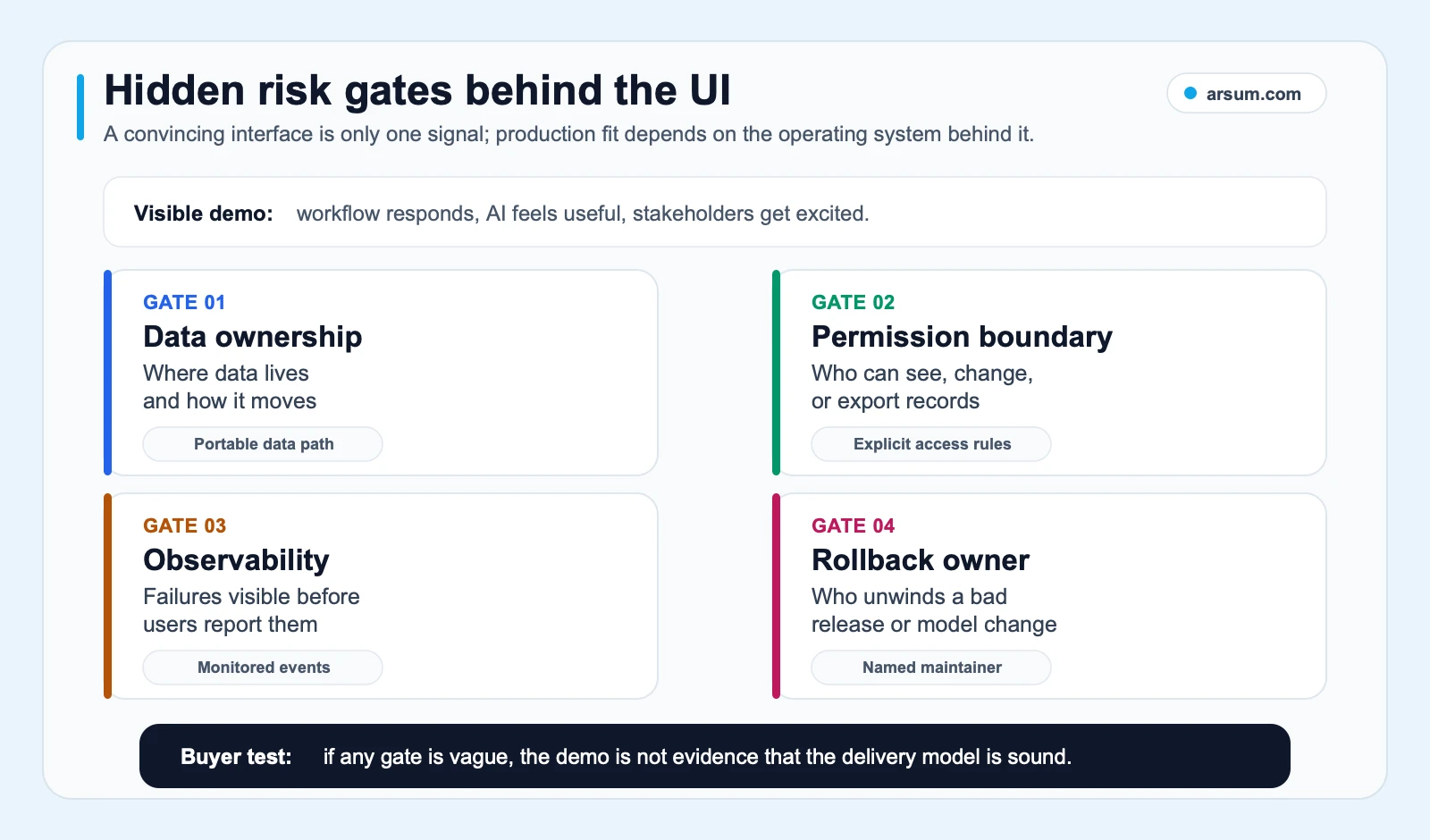
A production system answers: “Can this workflow operate when inputs are incomplete, the model is wrong, an integration fails, a user has the wrong permission, or a release changes behavior?”
Those are different investment decisions.
AI tools can accelerate UI scaffolds, CRUD features, boilerplate, debugging, and early exploration. A search-discovered Hacker News discussion is a useful qualitative signal here: practitioners describe AI copilots as force multipliers for boilerplate and debugging, not as a replacement for engineering judgment. That is not market-wide evidence, but it reflects the boundary buyers should plan around.
Commodity work versus work you still need to own
Commodity work can be valuable:
- early interface scaffolds;
- standard forms and dashboards;
- basic retrieval or chat experiences;
- simple read-only integrations;
- internal prototypes with synthetic or low-sensitivity data.
The non-commodity work is where operating risk lives:
- defining what the AI may recommend, draft, retrieve, or execute;
- setting permission boundaries and approval steps;
- establishing source lineage for outputs;
- validating output before it reaches a user or downstream system;
- testing exceptions and integration failures;
- creating monitoring, incident, and rollback procedures;
- deciding how model, prompt, and tool changes are approved.
For a broader view of product scoping before implementation, see AI for product teams. For the delivery options themselves, compare AI app development services with low-code AI automation.
Build the Workflow Boundary Before Building the AI
An AI feature should be described as a bounded job inside a larger process.
For example, “build an AI underwriting assistant” is not yet an implementation brief. A more usable statement is:
The system extracts specified fields from a submitted package, identifies missing documents, drafts a review summary with linked source excerpts, and routes uncertain or policy-sensitive cases to an authorized reviewer. It does not approve, decline, price, or alter an application.
That statement creates boundaries a team can test.
A concrete workflow map
Before development, document these seven items:
| Workflow element | Decision to make |
|---|---|
| Trigger | What event starts the workflow? |
| Inputs | Which documents, records, APIs, or user-provided data may be used? |
| AI task | Is the model classifying, extracting, summarizing, drafting, retrieving, or proposing an action? |
| Allowed action | What can occur automatically, and what must remain a recommendation? |
| Exception path | What happens when inputs are missing, contradictory, low quality, or outside policy? |
| Evidence retained | Which inputs, source references, output versions, reviewer decisions, and action logs are retained? |
| Owner | Which named product, operations, risk, or engineering role owns quality and changes after launch? |
This is the practical distinction between technical capability and authorized autonomy. A model may be technically able to take an action. That does not mean the business should authorize it.
For workflows where AI crosses systems or coordinates steps, AI agent architecture patterns and AI workflow automation provide useful design context. The key buyer question remains: where must a human retain approval authority?
Production Controls: A Short, Testable Checklist
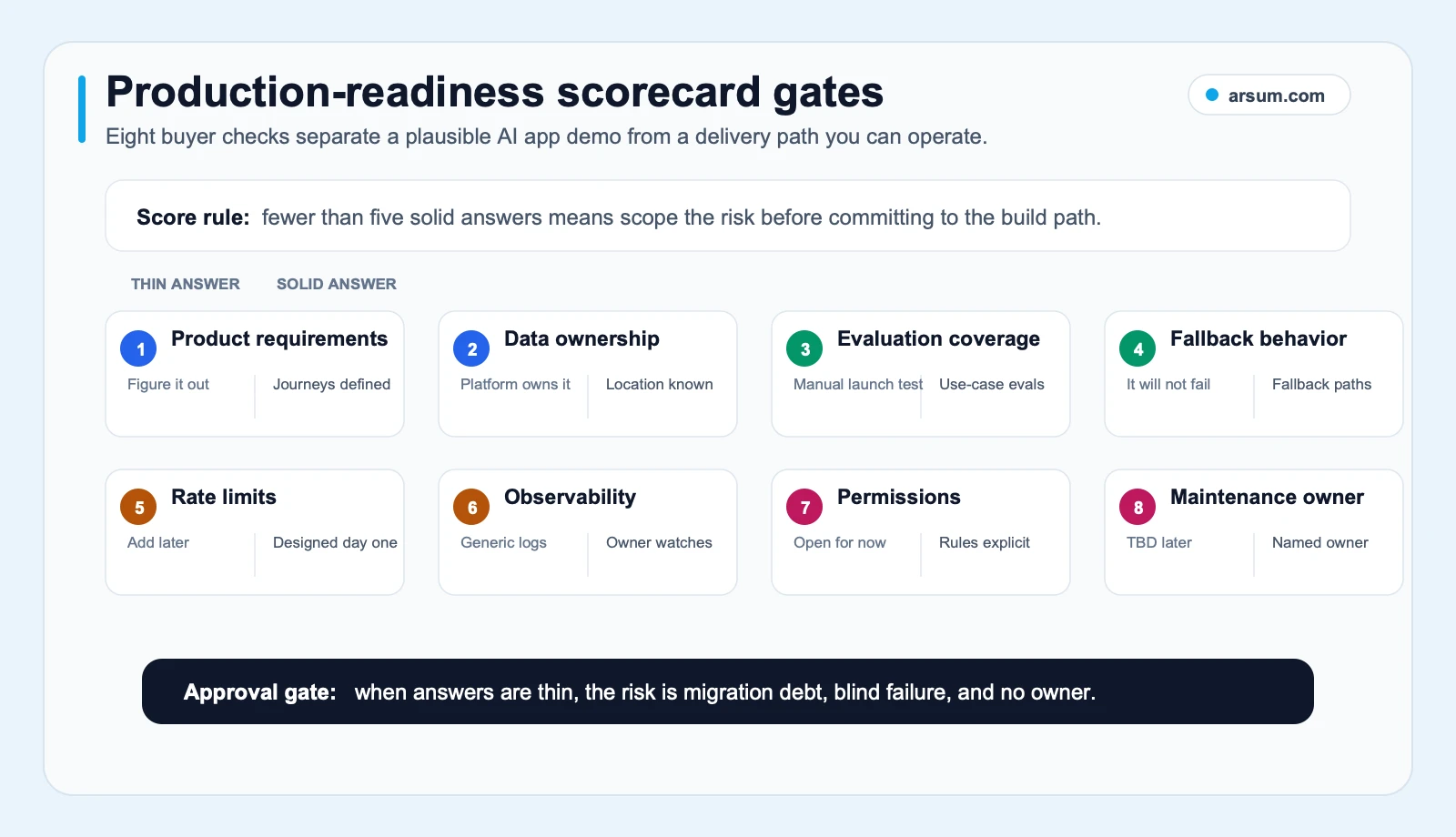
OWASP identifies prompt injection, sensitive-information disclosure, insecure output handling, model denial of service, and supply-chain issues among the core risks for LLM applications. See the OWASP Top 10 for LLM Applications for the current taxonomy.
Translate those categories into controls that your app can actually operate.
Prompt injection boundary
Treat untrusted text, uploaded files, retrieved content, and web pages as data—not as privileged instructions. Define which tools an AI component can call and what each tool is allowed to do. High-impact actions should require an explicit approval step.
Sensitive-data handling
Classify data before placing it in prompts, logs, or third-party systems. Confirm retention settings, access controls, and export paths for the services you choose. For example, OpenAI’s business data documentation states that business and API data are not used for training by default and describes encryption and retention controls; that supports a vendor-review question, not a blanket approval for every data type or deployment.
Output validation
Never assume plausible text is valid output. Validate structured fields, constrain allowed actions, and show source references where a human needs to verify a claim. For consequential workflows, a reviewer should be able to see why an item was routed or recommended.
Rate, cost, and abuse controls
Set usage ceilings, authentication rules, tool-call limits, and alert thresholds before opening a public or broad internal surface. A cost ceiling is an operating control, not merely a finance forecast.
Audit logs and rollback
Record the version of the prompt, model configuration, tools, input references, output, reviewer decision, and executed action when appropriate to the workflow. Test rollback before launch: what is disabled, who can disable it, and how does the team return to the prior manual process?
A Worked Pilot Scorecard: Document-Intake Triage
A pilot is useful when it produces a clear accept, revise, or stop decision. The following is an illustrative planning scenario, not an observed customer result.
Assume an operations team receives inbound document packages. Staff currently identify document type, check for missing items, and prepare a review queue. The AI app may classify and extract information, but an authorized reviewer retains the final decision.
| Scorecard item | Illustrative planning assumption |
|---|---|
| Workflow | Intake triage for submitted document packages |
| Baseline volume | 200 packages per week |
| Baseline handling time | 12 staff minutes per package, measured over two representative weeks |
| Proposed AI task | Classify package type, extract required fields, flag missing items, prepare a reviewer summary |
| Human approval | Operations reviewer approves every queue disposition during the pilot |
| Quality metric | Field extraction accuracy and correct missing-item flags, measured against reviewer corrections |
| Exception categories | Unreadable file, missing document, conflicting data, unsupported format, low-confidence output, policy-sensitive case |
| Evidence retained | Source file reference, extracted fields, model/prompt version, reviewer edits, final disposition, exception reason |
| Owner | Operations manager owns workflow acceptance; technical owner owns reliability and releases; risk owner approves expansion of autonomy |
| Review cadence | Daily operational review during the pilot; weekly decision review with product, operations, and risk |
| Stop condition | Stop automated routing if reviewer escalation increases materially from baseline, source linkage fails, or a control failure exposes data or creates an unauthorized action |
| Rollback path | Disable AI routing; return packages to the existing manual queue; preserve pilot logs for root-cause review |
Add measurable pass/fail thresholds
The exact thresholds belong to the workflow owner because error cost varies. A useful pilot structure is:
- Baseline: measure current handling time, rework, queue age, and exception categories.
- Target: define a throughput or review-preparation improvement without lowering the required quality bar.
- Quality gate: set a minimum acceptable accuracy or reviewer-correction threshold by field and document type.
- Exception gate: track the share and type of cases routed to human review; do not hide them inside an average.
- Authorization gate: no automatic action beyond the approved boundary.
- Stop gate: a named owner can disable the feature immediately.
Illustrative arithmetic should remain visible as an assumption. If 200 weekly packages each require 12 minutes of handling, the baseline is 2,400 staff minutes per week. That does not mean an AI system “saves” 2,400 minutes. The realistic planning question is what portion of that time can be removed from preparation without increasing review, rework, or incident cost.
Work With Arsum
We help businesses implement AI automation that actually works. Custom solutions, not cookie-cutter templates.
Learn more →Use the Scorecard to Select the Delivery Model
For the document-intake example, an app builder may be appropriate for a synthetic-data demonstration or a tightly restricted proof of concept. It becomes a weak fit if production requires SSO, records-system writes, confidential documents, detailed audit evidence, or high availability.
A governed low-code implementation can fit if the process is internal, connectors are supported, platform governance aligns with your requirements, and a business owner can maintain the workflow.
A custom implementation becomes more appropriate when the workflow is customer-facing, integration behavior is differentiated, data or retention requirements are unusual, or the AI component is central enough that evaluation and rollback must be tailored to the process.
That is also the logic behind a sensible buy/build/partner decision:
- Buy when the workflow is standard and the platform’s controls, integration depth, portability, and operating model are sufficient.
- Build when the workflow itself is differentiated or the architecture must meet requirements a platform cannot demonstrate.
- Partner when you need to reach a bounded pilot or production implementation but do not have the combined product, security, integration, and AI-evaluation capacity in-house.
If you need help turning a candidate workflow into a scorecard, control boundary, and delivery recommendation, an Arsum assessment should produce those artifacts before a broad build commitment.
Disqualifying Conditions and Common Failure Modes
Do not approve autonomous or semi-autonomous behavior merely because the model performs well in a small test.
The initiative needs redesign, tighter scope, or a manual-first path if any of these are true:
- no one can define a correct output or acceptable error;
- the workflow has high consequence and no practical human approval point;
- source data cannot be lawfully or safely supplied to the chosen architecture;
- no owner will maintain prompts, tools, integrations, evaluation, and incidents;
- the process changes so often that rules and acceptance criteria cannot stabilize;
- the team cannot describe a rollback path to the prior workflow;
- the platform cannot provide the required access, audit, data-control, or portability answers.
The most common failure pattern is not “the AI was bad.” It is that the project automated an unclear process, gave the system authority before controls existed, or treated the prototype as proof of operational readiness.
For pricing and scope conversations, review AI app development cost alongside AI implementation services. A credible estimate separates prototype work from integration, security review, evaluation, monitoring, and maintenance ownership.
Content and Go-to-Market: Do Not Scale Thin AI Output
If the application will generate onboarding content, documentation, product pages, or support material, use the same workflow discipline.
Google says its systems aim to prioritize helpful, reliable, people-first content, and its guidance warns that generating many pages without adding value for users may violate policies on scaled content abuse. See Google’s helpful-content guidance and its guidance on generative AI content.
The implementation boundary is practical:
- use AI to draft, classify, personalize, or identify gaps;
- require accountable review for claims, advice, and high-stakes instructions;
- add original product knowledge, evidence, examples, and clear ownership;
- do not use automation to publish large volumes of undifferentiated pages.
This is not a critique of AI-generated content. It is a quality-control requirement for any system that publishes at scale.
The Buying Decision
AI-powered app development is worth funding when there is a bounded workflow, a measurable quality bar, a credible exception path, and an owner prepared to run the system after launch.
Choose an app builder when you are learning quickly with constrained risk. Choose governed low-code when an internal workflow fits the platform and its control model. Choose custom development when the AI behavior, data, integration, or customer experience is too important to leave inside an unexamined default.
The sequence that reduces rework is:
- Define the workflow and decision boundary.
- Classify data and identify integrations.
- Set approval, evidence, exception, and rollback requirements.
- Build a pilot scorecard with named owners and stop conditions.
- Select the delivery model that can meet those requirements.
Methodology and Freshness Note
This editorial guide uses primary documentation from OpenAI, OWASP, and Google Search Central for specific implementation, security, privacy, and content-quality claims. Practitioner discussions are included only as qualitative signals about recurring delivery questions, not as statistics or proof of typical outcomes.
Platform capabilities, retention settings, export options, connector support, and pricing change frequently. Before signing, verify the current terms for data location, retention, identity, audit logs, portability, rate limits, support, and responsibility for incident response.
Ready to Automate Your Business?
Stop wasting time on repetitive tasks. Let AI handle the busywork while you focus on growth.
Schedule a Free Strategy Call →Written by:Arsum editorial team
- Reviewed by
- Arsum editorial team
- Published
- June 10, 2026
- Updated
- July 4, 2026
- How this was produced
- Arsum uses research packs, source checks, and human editorial review to prepare and update blog articles. Editors are responsible for the final page.
- Source policy
- Sources are linked in the article when used. Methodology and source notes are included on higher-risk or high-visibility pages and are being rolled out across the archive. Editorial policy.
- Why this page exists
- Help B2B operators evaluate AI automation, implementation scope, cost, risk, and build-vs-buy decisions with practical context.