AI process automation is the right fit when a workflow has enough volume and repeated variation to justify AI-assisted interpretation, but still has clear business rules, a named owner, human review for consequential exceptions, and a safe way to reverse system changes. Use it to improve a controlled process—not to grant a model authority over an outcome your team cannot explain or recover.
AI Process Automation: Practical Guide
Explore ai process automation: compare workflow fit, costs, risks, evidence, and practical next steps before you build, buy, or hire.

Table of Contents
- What most guides miss: the model is not the control system
- AI process automation vs. RPA: choose the smallest safe approach
- Select a pilot with gates, not enthusiasm
- Build the ROI case in currency, then test it in a pilot
- A controlled finance pilot: document intake to approval-ready exception routing
- Production architecture: context, controls, and an exception path
- Build, buy, or partner
- Common failure modes
- Methodology and limitations
What most guides miss: the model is not the control system
The question is not simply whether AI can read a PDF, summarize an email, or choose the next workflow step. It is whether the business can safely authorize that action.
A production-ready workflow needs answers to five questions before tool selection:
- What baseline is being improved: labor cost, rework, cycle time, cash delay, or a combination?
- Which source systems are authoritative when records disagree?
- Which exception classes must remain human-reviewed?
- Who can approve a write-back, override a decision, or pause the workflow?
- How are incorrect writes found, reconciled, and reversed?
That distinction changes the buying decision. A model may technically extract invoice fields, for example, but that does not authorize it to release payment, change supplier master data, or close an exception. High failure cost and low reversibility should reduce autonomy.
This is also why a polished demo is not a pilot. A demo proves a capability on selected inputs. A pilot must prove that the workflow can handle normal cases, known exceptions, system failures, and review operations with evidence retained for each outcome.
AI process automation vs. RPA: choose the smallest safe approach
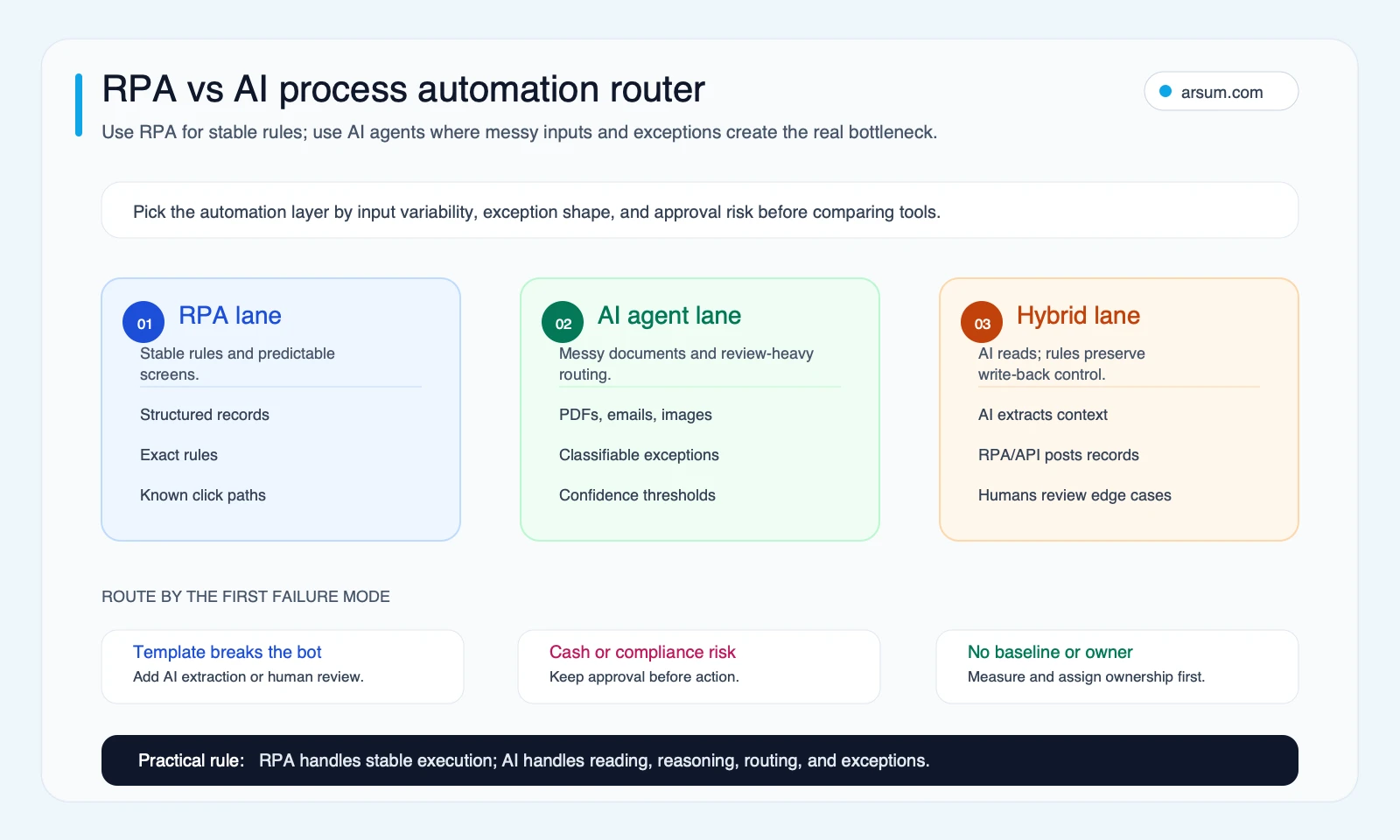
RPA, intelligent automation, and AI process automation overlap, but they solve different workflow problems.
| Approach | Best fit | Boundary |
|---|---|---|
| RPA | Stable interface, deterministic steps, predictable inputs | Breaks when screens, formats, or rules change |
| Intelligent automation | Classification, extraction, or summarization with human approval central | AI assists a controlled workflow; it does not own consequential decisions |
| AI process automation | Context-dependent routing across systems, repeated exception patterns, scoped actions | Requires evaluation, observability, approvals, escalation, and rollback |
Blue Prism’s comparison of intelligent automation and RPA similarly distinguishes task-mimicking RPA from automation that adds cognitive capabilities. Automation Anywhere’s intelligent automation overview describes the combination of AI, machine learning, and RPA; that is a vendor framing, not a guarantee of business outcomes.
Use this routing rule:
- If the system path is stable and deterministic, start with RPA or an API-based workflow.
- If the process needs document extraction, classification, or drafting but a person approves the result, use intelligent automation.
- If each next step depends on context across documents, policies, systems, and exception history, evaluate AI process automation—but only with scoped permissions and explicit controls.
A legacy application may justify screen automation when no API exists, but prefer APIs and observable system state for durable workflows. Screen clicks are harder to validate, replay, and reconcile.
For the broader operating model, see what agentic AI means in practice and this guide to agentic AI workflow automation.
Select a pilot with gates, not enthusiasm
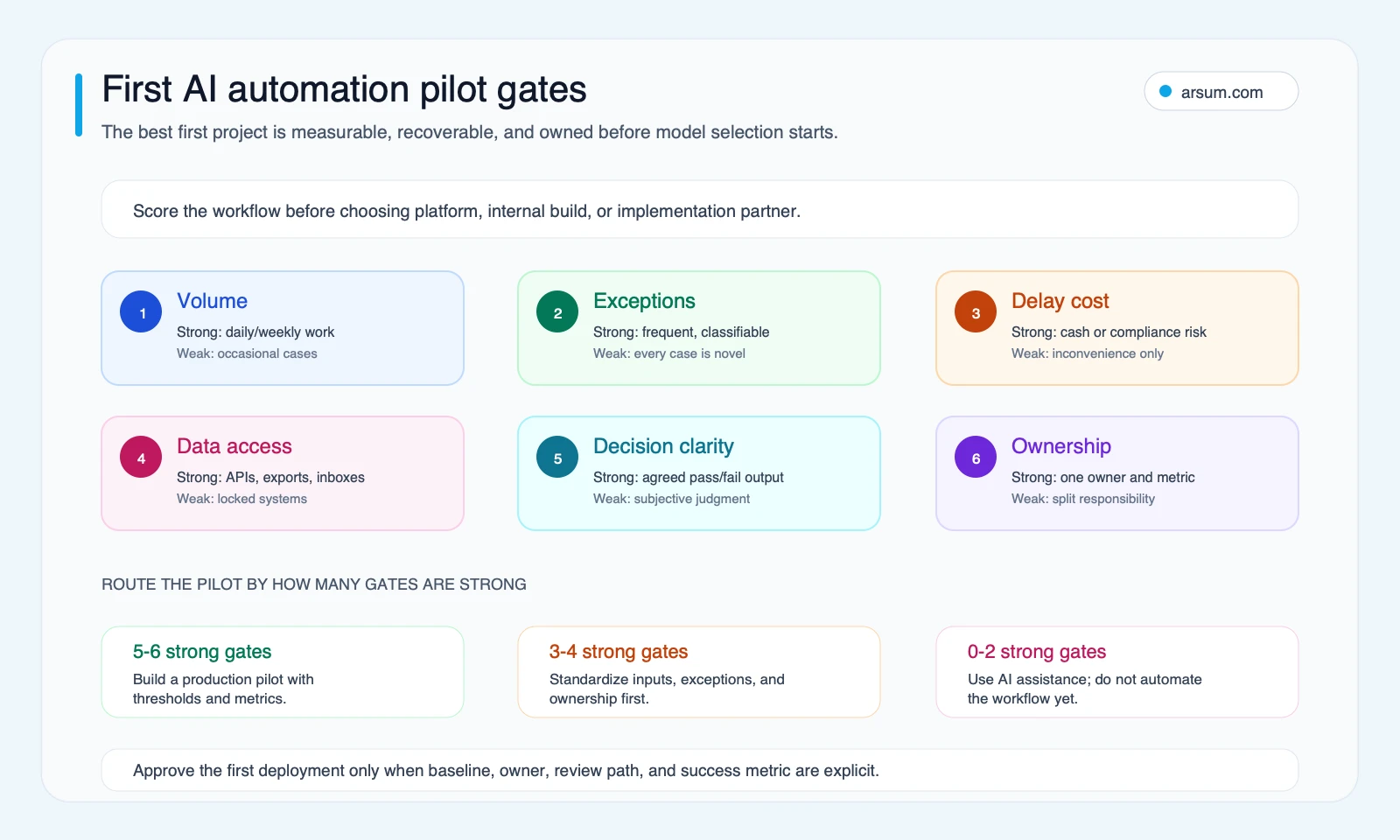
A good first process has repeated volume, measurable friction, bounded exceptions, available data, and one accountable operator. It is not necessarily the largest or most strategic workflow.
Process-fit scorecard
Score each factor from 1 to 5. A high score is useful only if the disqualifiers below are cleared.
| Factor | 1 | 3 | 5 |
|---|---|---|---|
| Volume | Low or irregular | Weekly recurring work | Daily, high-volume work |
| Baseline | No usable time, rework, or delay data | Partial data | Clear baseline for time, rework, and delay |
| Inputs | Every case is novel | Some recurring formats | Semi-structured inputs with repeatable patterns |
| Exceptions | Mostly unknown | Partly categorized | Known, classifiable exception categories |
| Data access | Fragmented or blocked | Exports or partial connectors | Reliable APIs, inboxes, or controlled exports |
| Ownership | No accountable owner | Shared ownership | One owner accountable for outcomes |
| Recovery | No review or reversal design | Manual checks exist | Review queue, logs, reconciliation, and rollback are defined |
A score of 22 or above can justify a governed pilot. A score between 13 and 21 may support AI-assisted work with humans retaining final control. A lower score usually means standardize the process, improve the baseline, or use simpler automation first.
Disqualifiers
Do not authorize autonomous production actions when any of these are true:
- The process owner cannot define a valid output or an acceptable error threshold.
- The authoritative source record is unclear or inaccessible.
- Exceptions are not categorized and no staffed review queue exists.
- A wrong write cannot be reversed or reconciled.
- The workflow changes regulated, financial, employment, eligibility, or customer-facing outcomes without an accountable approver.
- The team cannot retain the input, model output, rules used, approver identity, action trace, and final disposition.
A low-confidence model response is not an exception strategy. It is a routing signal: hold the case, request missing information, or send it to a named reviewer.
Build the ROI case in currency, then test it in a pilot
Do not add hours directly to dollar values. Convert labor time to a loaded labor cost first, then model rework and delay separately.
Monthly value = (manual hours avoided × loaded hourly cost) + avoided rework cost + reduced delay value − monthly operating cost
Assess implementation cost separately:
Payback months = implementation cost ÷ monthly value
These are planning equations, not universal results. They depend on actual adoption, review work, data quality, policy changes, and whether the workflow can safely remove steps rather than simply shifting them to a new queue.
Illustrative invoice-processing worksheet
Assume the following planning inputs for one accounts-payable workflow:
| Input | Illustrative assumption |
|---|---|
| Monthly invoices | 800 |
| Current manual handling | 10 minutes per invoice |
| Loaded hourly cost | $45 |
| Share of handling time avoided | 50% |
| Avoided rework cost | $600 per month |
| Reduced delay value | $400 per month |
| Monthly platform, model, review, and maintenance cost | $1,400 |
| One-time implementation cost | $12,000 |
The current handling baseline is 800 × 10 minutes = 8,000 minutes, or about 133.3 hours per month.
If the pilot avoids 50% of that handling time, the labor component is 66.7 hours × $45 = about $3,000 per month.
The illustrative monthly value is:
$3,000 labor value + $600 avoided rework + $400 reduced delay value − $1,400 operating cost = $2,600 per month
At that assumption, a $12,000 implementation cost has an illustrative payback of about 4.6 months.
Sensitivity matters more than a single number. If only 25% of manual time is avoided, the labor component falls to about $1,500 and monthly value falls to about $1,100. If 75% is avoided while review and operating costs stay unchanged, monthly value rises to about $4,100. Validate the assumptions through a pilot; do not use this arithmetic as an observed customer result.
For more examples of how to structure automation economics, see AI automation ROI examples and accounts receivable automation.
💡 Arsum builds custom AI automation solutions tailored to your business needs.
Get a Free Consultation →A controlled finance pilot: document intake to approval-ready exception routing
Consider a pilot for supplier invoices. The goal is not “touchless AP.” The goal is to route routine invoices faster while preventing an unverified write or approval.
Workflow boundary
Inputs
- Invoice received through a designated inbox or upload queue
- Purchase order and receiving data from the approved system of record
- Supplier master data from the controlled vendor record
- Current approval policy and tolerance rules
Allowed AI tasks
- Extract proposed invoice fields
- Classify document type
- Compare proposed fields with PO and receiving data
- Draft a reason code for a mismatch
- Route the case to the correct queue
Prohibited autonomous actions
- Creating or changing supplier master records
- Releasing payments
- Approving invoices outside policy
- Overriding a PO, receiving discrepancy, tax treatment, or segregation-of-duties control
- Writing financial records before validation and the required approval
Exception classes and owners
| Case | Route | Approval owner | Retained evidence |
|---|---|---|---|
| Clear match within policy | Validation queue or controlled write-back path | AP process owner defines policy | Source document, extracted fields, validation result, trace ID |
| Low-confidence extraction | Human review | AP reviewer | Document region, proposed value, corrected value, reviewer |
| PO or receiving mismatch | Exception queue | Buyer or budget owner | Source records, mismatch reason, approver decision |
| Duplicate or supplier-data concern | Hold | AP control owner or vendor-management owner | Match evidence, action history, final disposition |
| Integration failure | Retry, then operations queue | Automation owner | Error log, retry result, reconciliation record |
30- and 60-day scorecard
Targets must be process-specific and set before launch. A practical scorecard includes:
| Measure | Baseline | Pilot target | Owner | Review cadence |
|---|---|---|---|---|
| Extraction accuracy by document and exception class | Measured during sample review | Threshold set by AP owner | AP controls lead | Weekly |
| Correct routing rate | Measured during sample review | Threshold set by queue owners | AP operations manager | Weekly |
| Human-review rate | Current manual rate | Declines only if quality holds | AP operations manager | Weekly |
| False-write rate | Zero-tolerance category | Zero unauthorized writes | Automation owner | Daily |
| Recovery time for failed writes | Baseline from incidents | Target set before production access | Integration owner | Weekly |
| Audit-log completeness | Sampled baseline | Complete trace for every processed case | Risk or controls owner | Weekly |
The stop condition should be explicit: pause production write access if an unauthorized write occurs, reconciliation fails, a material exception class is misrouted above the agreed threshold, or audit evidence is incomplete.
The rollback path should be owned too: disable the write-enabled integration, keep intake and review queues available, reconcile all cases processed since the last clean checkpoint, and return the workflow to the prior manual approval route until the defect is resolved.
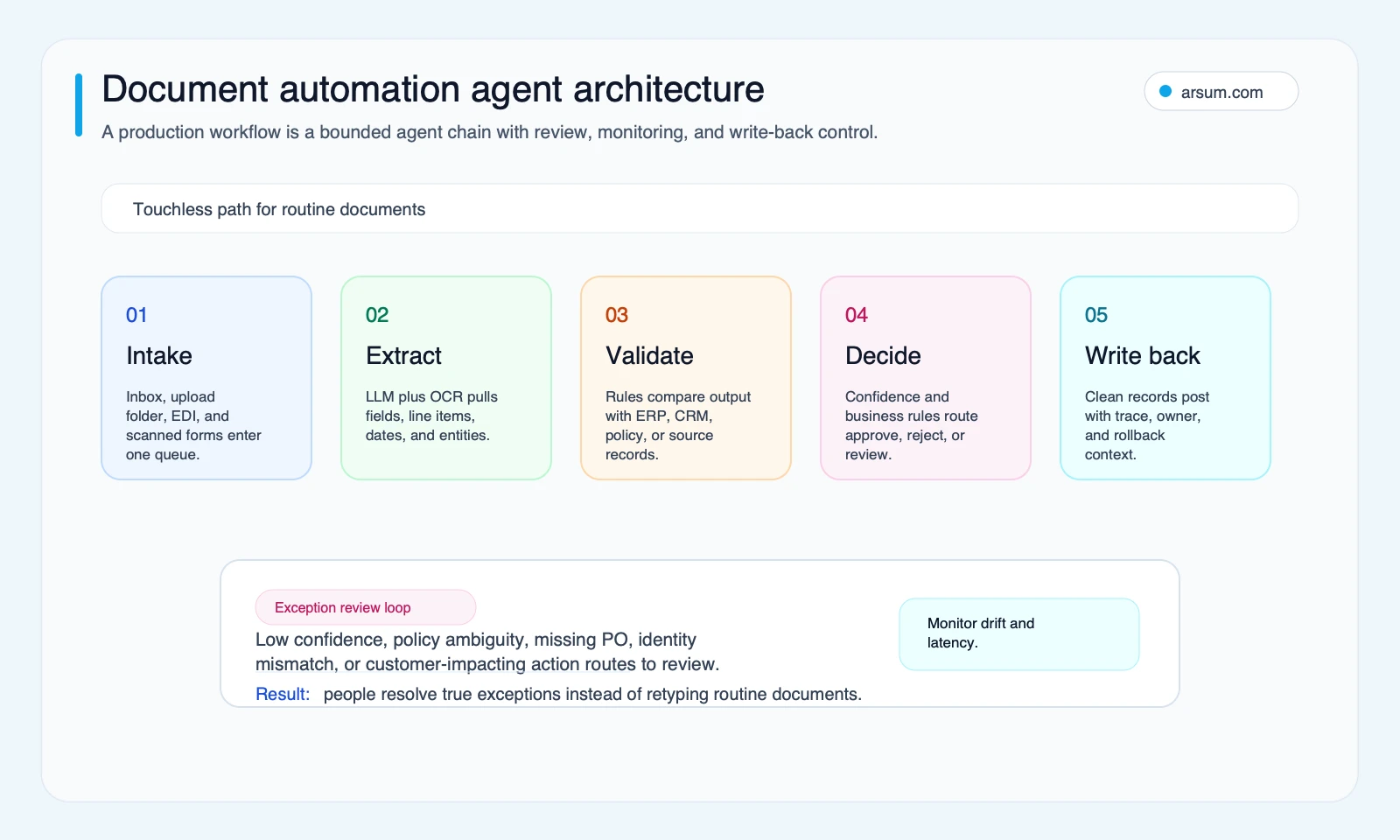
OpenAI’s human-in-the-loop guidance provides one technical pattern for pausing sensitive tool calls for approval or rejection. The business requirement remains broader: approval ownership, evidence retention, and recovery must work even when an integration or model behaves unexpectedly.
Production architecture: context, controls, and an exception path
A robust AI process automation system usually separates interpretation from authorization.
- Intake receives documents, messages, or events and creates a traceable case.
- Extraction and classification produce structured proposals, not unverified truth.
- Validation compares proposals against authoritative records and deterministic policy rules.
- Decision routing sends a case to a safe path based on confidence, policy, and exception class.
- Approval and write-back occurs only within scoped permissions and documented ownership.
- Reconciliation and monitoring verify downstream state and surface drift, failures, and unresolved cases.
Camunda’s agentic orchestration documentation describes combining agents, human tasks, and deterministic workflow steps. Celonis’s process-intelligence overview emphasizes using actual process context and business knowledge. These sources support an architecture direction; they do not prove that a particular implementation will deliver savings or accuracy.
A short deployment gate belongs between prototype and production:
- No production write access until evaluation results are reviewed by exception class.
- No autonomous action beyond the agreed boundary.
- No launch without a named process owner, queue owner, and integration owner.
- No workflow without trace IDs, retained evidence, reconciliation, and a tested rollback.
- No assumption that a policy, template, or model behavior will remain stable without monitoring.
For implementation patterns beyond document processing, see AI agent architecture patterns and AI integration services.
Build, buy, or partner
Choose the delivery model based on workflow specificity and operational ownership—not on the number of AI features in a sales demo.
| Option | Best when | Watch for |
|---|---|---|
| Platform | Workflow is common, data connectors are available, and controls match the product | Licensing, customization limits, and whether the product supports your exception model |
| Internal build | Engineering capacity and long-term product ownership are real | Hidden integration, evaluation, maintenance, and controls work |
| Implementation partner | The process is valuable but the team needs help with discovery, integration, and controlled delivery | Scope clarity, handoff ownership, and whether operating controls are part of the work |
Off-the-shelf tools can be suitable for common, low-risk workflows. A custom approach can be justified when the process depends on nonstandard systems, exception logic, permissions, or evidence requirements. Neither choice removes the need for a process owner and pilot acceptance criteria.
Common failure modes
AI process automation usually fails in the seams between systems and teams, not in the happy-path model demonstration.
- Automating a broken or undocumented process before measuring it
- Treating extraction confidence as permission to write
- Giving broad credentials to a workflow that has no reconciliation path
- Letting exceptions disappear into email, chat, or an unowned queue
- Evaluating only aggregate accuracy instead of accuracy by exception class
- Ignoring data-quality issues, policy changes, template drift, and integration failures
- Claiming ROI before accounting for human review, maintenance, implementation, and operating costs
Practitioner discussions reflect this uncertainty: readers ask where tools such as Make, n8n, and Zapier stop being personal workflow glue and become governed business automation, and developers remain skeptical of “agents” without concrete controls. Those are qualitative reader-language signals, not adoption data: r/Entrepreneur discussion, r/automation discussion, and an Hacker News discussion on real agent work.
Arsum can help assess a candidate workflow by producing a prioritized shortlist, baseline ROI model, exception inventory, integration map, and implementation roadmap. The useful outcome is a decision-ready pilot design, whether the next step is a platform evaluation, internal build, or partner-led delivery.
Methodology and limitations
Written by Johnny Kartakov. Reviewed by the Arsum Editorial Team; specialist technical review is pending before this page makes broader production-deployment claims. Last updated June 19, 2026.
This guide uses official vendor and technical documentation for category and architecture boundaries, plus an editorial process-fit rubric and ROI worksheet. Community links are used only as qualitative signals about buyer questions and failure modes. Targets, thresholds, costs, savings, and payback must be established from the reader’s own workflow baseline and validated in a controlled pilot.
Ready to Automate Your Business?
Stop wasting time on repetitive tasks. Let AI handle the busywork while you focus on growth.
Schedule a Free Strategy Call →Written by:Arsum editorial team
- Reviewed by
- Arsum editorial team
- Published
- February 24, 2026
- Updated
- July 4, 2026
- How this was produced
- Arsum uses research packs, source checks, and human editorial review to prepare and update blog articles. Editors are responsible for the final page.
- Source policy
- Sources are linked in the article when used. Methodology and source notes are included on higher-risk or high-visibility pages and are being rolled out across the archive. Editorial policy.
- Why this page exists
- Help B2B operators evaluate AI automation, implementation scope, cost, risk, and build-vs-buy decisions with practical context.