An ai tool for app development should be chosen by the ownership and operating controls it leaves with your team—not by how quickly it produces a demo. Start with the category that fits your repository, hosting, data, security-review, and maintenance requirements; only then compare specific products.
AI Tool For App Development: Practical Guide
Explore ai tool for app development: compare workflow fit, costs, risks, evidence, and practical next steps before you build, buy, or hire.
Table of Contents
- What most guides miss: a prototype is not an ownership model
- The three categories, compared by control
- Use the build-risk scorecard as a transparent heuristic
- A pilot that produces procurement evidence
- The vendor-evaluation worksheet to complete before purchase
- Failure modes that should disqualify the current route
- Where AI tools help—and where engineering still owns the work
- Make the category decision before the vendor shortlist
- Source note and limitations
What most guides miss: a prototype is not an ownership model
Most “best AI app development tools” lists combine coding assistants, full-stack workspaces, and generated-app builders. That is convenient for a shortlist, but it is a poor procurement decision.
These categories can all accelerate delivery. They do not transfer the same responsibilities to the buyer.
Before choosing a vendor, establish who will own:
- The repository, dependencies, secrets, and environment configuration
- The cloud account, domain, deployment permissions, and rollback procedure
- Data-flow review and approval for customer, employee, or operational data
- Testing, security remediation, incident response, and maintenance after launch
- The ability to export the application and operate it elsewhere
If a team cannot name those owners, it has not yet selected a production path. It has selected a prototype path.
A useful starting point is to separate the decision into three categories. For a broader comparison of products and use cases, see this AI tools for app development guide and the more implementation-focused AI app development tools overview.
The three categories, compared by control
AI coding assistants
Coding assistants help engineers write, explain, refactor, test, or review code within an existing development workflow. They are most useful when a team already has people who can make architecture, deployment, and code-review decisions.
The buyer normally retains control of the repository and infrastructure because those systems already belong to the team. That does not remove risk: generated code can still introduce defects, insecure patterns, or licensing and dependency questions. It does mean the organization can apply its existing pull-request, testing, secrets-management, and deployment controls.
Choose this route when engineering owns the product and the goal is to increase delivery capacity without changing the fundamental operating model.
Full-stack AI workspaces
Full-stack AI workspaces combine an AI-assisted development environment with project scaffolding, backend services, and deployment integrations. Firebase Studio’s documentation describes an agentic, cloud-based environment for building full-stack AI applications, including repository import, browser-based development, built-in tooling, and deployment integrations.
This category can be a good fit for a greenfield build with an engineering owner. But the exact ownership profile is vendor- and configuration-specific. Verify whether the repository can be exported, which services are coupled to the workspace, who administers the cloud project, and whether the app can be deployed through the organization’s normal release process.
A workspace is not automatically less controlled than an IDE assistant. It becomes risky when the team assumes that “full stack” also means “fully owned” without testing the handoff.
Generated-app builders
Generated-app builders turn a plain-language request into a running app or prototype. Replit Agent’s documentation describes a flow that turns ideas into apps from natural-language instructions and is marketed as requiring no coding.
That can be valuable for early product discovery, internal workflow prototypes, and low-consequence tools. It is not proof that every generated output is suitable for production.
Whether code, hosting, deployment, data controls, export paths, and support are platform-managed depends on the specific vendor, plan, hosting model, and configuration. Treat each of those as a procurement question, not a category fact. A generated-app builder can be appropriate for a customer-facing application if the buyer can meet its ownership, security, testing, and maintenance requirements; it can be inappropriate for a simple internal tool if no one can support it after the original creator leaves.
| Decision dimension | Coding assistant | Full-stack AI workspace | Generated-app builder |
|---|---|---|---|
| Best starting condition | Existing engineering workflow | Greenfield build with technical ownership | Fast prototype or narrowly scoped app |
| Repository control | Usually retained by the buyer’s existing workflow | Verify import, export, and dependency boundaries | Verify code export and whether it runs outside the platform |
| Deployment control | Usually retained by the engineering team | Depends on workspace and cloud configuration | Often platform-dependent; verify administrator and rollback rights |
| Data suitability | Depends on the organization’s controls and vendor terms | Depends on data flow, services, and configuration | Depends on vendor terms, access controls, and review capacity |
| Maintenance owner | Engineering team | Engineering team or named technical owner | Must be explicitly assigned before launch |
| Main procurement risk | Treating generated code as reviewed code | Hidden service coupling | Mistaking a working prototype for a supportable system |
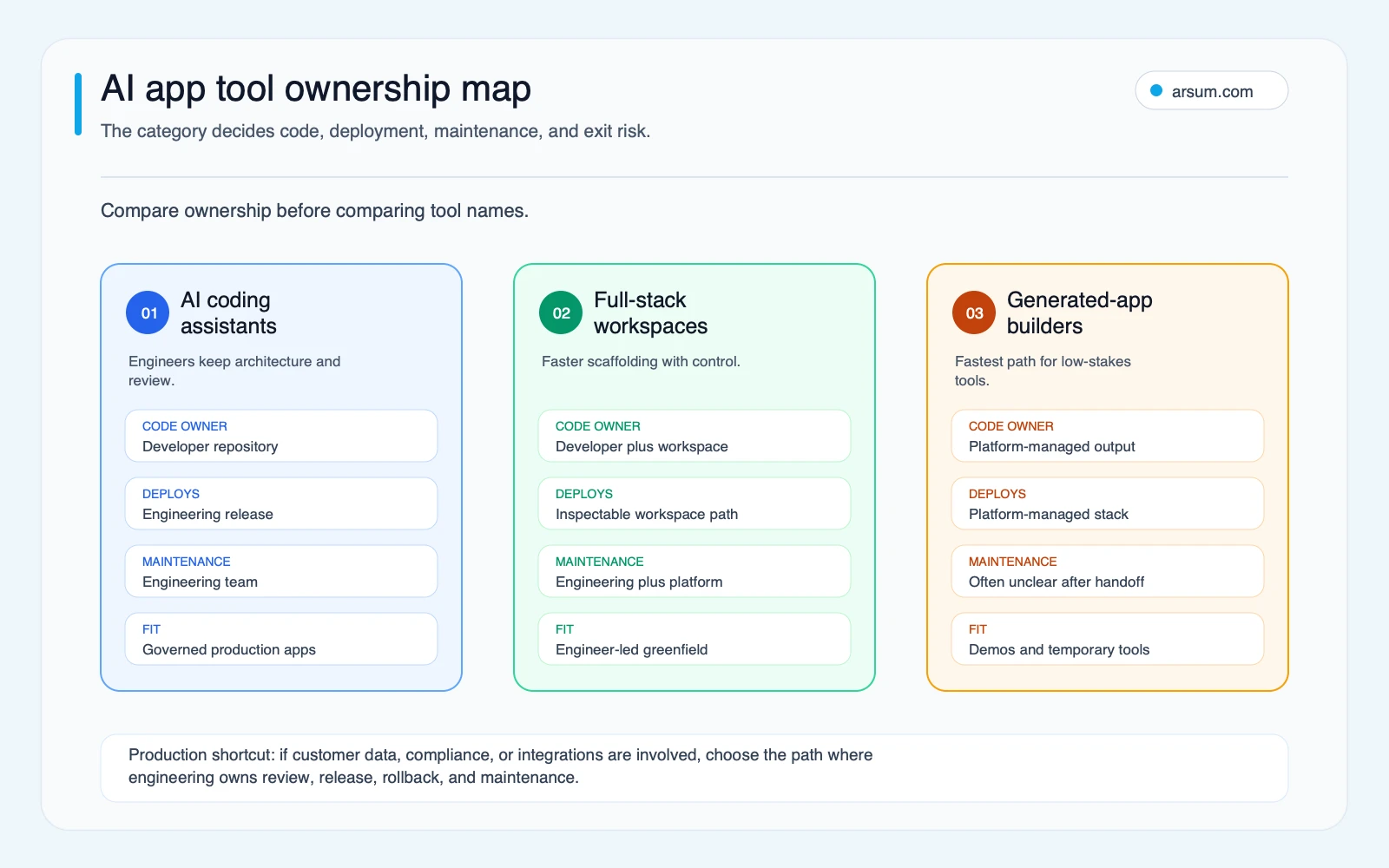
The categories are a routing device, not a ranking. A good vendor can fail the requirements of a particular workflow; a modest tool can be the right choice for a bounded, reversible prototype.
Use the build-risk scorecard as a transparent heuristic
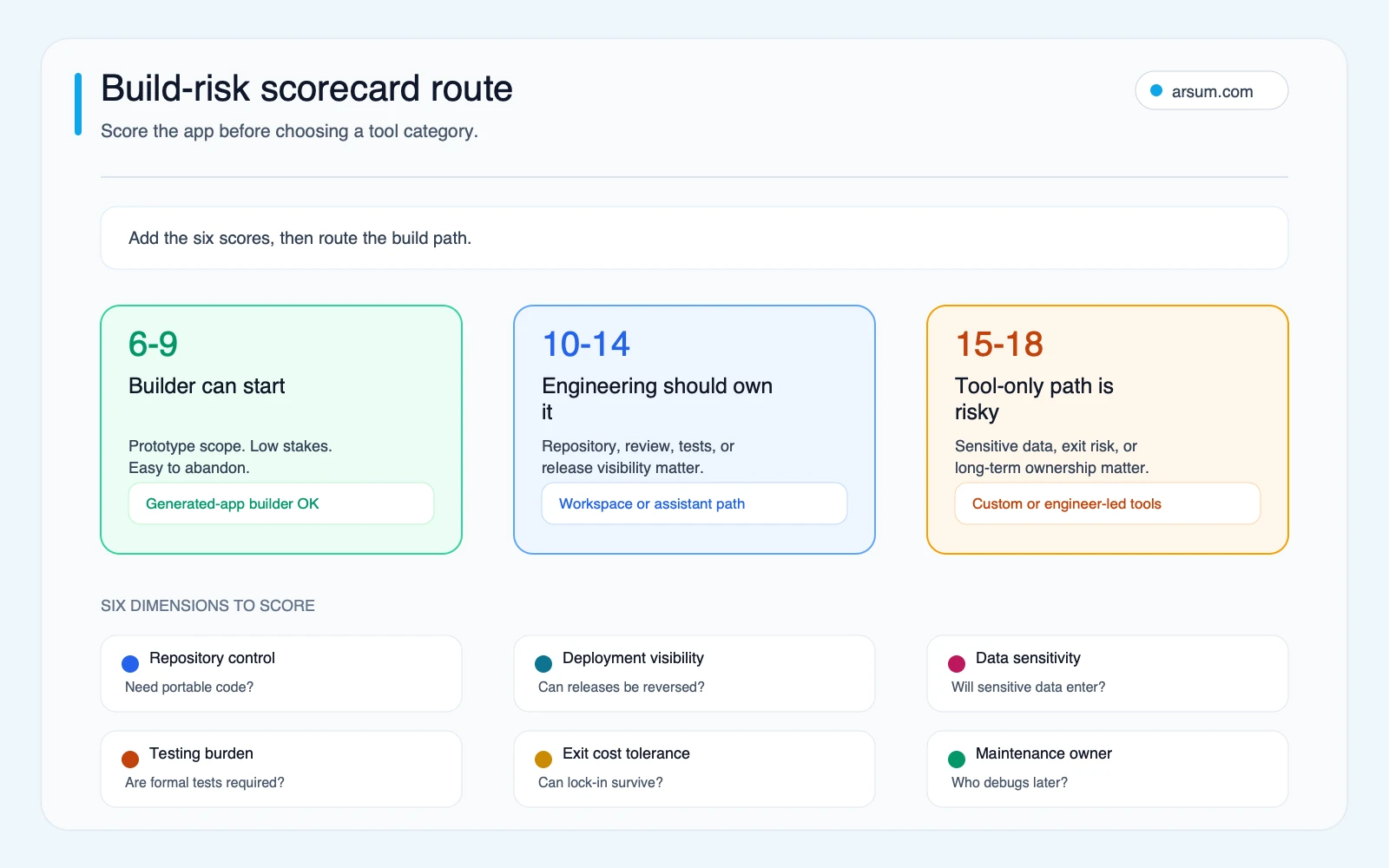
The scorecard below is an editorial heuristic, not a validated predictive model or a vendor certification. It gives six dimensions equal weight because any one of them can create material operating risk. The business owner, technical owner, and risk or security reviewer should score it together.
More importantly, a single high-risk condition can override the total. A customer-data workflow without a named approver or rollback path should not proceed as an autonomous prototype merely because the other scores are low.
| Dimension | 1: lower control need | 2: moderate control need | 3: high control need |
|---|---|---|---|
| Repository control | Disposable prototype | Export preferred | Repository ownership required |
| Deployment visibility | Private demo | Internal production use | Customer-facing or business-critical release |
| Data sensitivity | Synthetic or public data | Approved internal data | Customer data, credentials, financial, health, or regulated data |
| Testing burden | Manual checks are sufficient | Repeatable functional tests needed | Formal security, integration, or release controls required |
| Exit-cost tolerance | Short-lived experiment | Portability desirable | Migration flexibility required from day one |
| Maintenance ownership | Original creator remains available | Small technical team available | Named engineering or product-support owner required |
Add the six scores. Use the result as a prompt for the next decision, not as a mechanical approval.
- 6–9: A generated-app builder can be reasonable for a narrow, reversible use case—provided the team documents ownership and avoids prohibited data.
- 10–14: Favor a workspace or engineering-owned build. A generated-app builder may still help with discovery, but it should not be the sole production control plane without explicit review.
- 15–18: Start with engineering ownership, a coding-assistant workflow, or a custom build path. The application has too many control requirements to delegate the operating model to an unexamined tool.
There are exceptions. A score of 8 can still require engineering review if the app authenticates users or accesses a live system. A score of 16 may still use a generated-app builder for a throwaway interface prototype, as long as it uses synthetic data and is never connected to production. The score routes the production build—not every design experiment.
A pilot that produces procurement evidence
A pilot is useful when it reduces a real decision: whether a selected tool can support a defined workflow under your controls. It is not useful when it becomes an open-ended attempt to build the entire product cheaply.
Consider an illustrative planning case: an operations team wants a small internal app to collect vendor-renewal requests, route them to an owner, and produce a weekly status view.
Pilot boundary
The pilot should use synthetic vendor records or approved non-sensitive test data. Do not include payment details, credentials, customer data, production exports, or contract attachments unless the data-flow review explicitly approves them.
Name these roles before work begins:
| Pilot element | Named role |
|---|---|
| Business workflow owner | Operations lead |
| Repository and hosting owner | Engineering lead or designated technical sponsor |
| Human approver for releases | Product owner plus engineering lead |
| Security and data-flow reviewer | Security, privacy, or risk owner |
| Spend owner | Functional budget owner |
| Maintenance handoff recipient | Named internal technical owner |
Acceptance scorecard
Set a baseline from the current process and define targets as planning assumptions, not promised savings.
| Measure | Baseline | Pilot target | Evidence retained |
|---|---|---|---|
| Request completion | Current manual completion rate over a defined sample | Same or better completion with no new unresolved failure mode | Test cases and outcome log |
| Routing quality | Current number of incorrectly assigned requests | No increase during pilot sample | Approval and exception log |
| Exception handling | Current escalation path | Every exception reaches a named human owner | Timestamped exception record |
| Exportability | No current requirement | Repository, configuration, and data export demonstrated | Export file and restore notes |
| Rollback | No current automated release | Previous version can be restored by the named owner | Rollback test record |
| Spend | Illustrative cap set by budget owner | Spend stays within approved cap | Usage and invoice record |
| Maintenance | Creator knowledge may be concentrated | Handoff owner can make one approved change and deploy it | Handoff test and runbook |
Run a weekly review during the pilot. The business owner reviews whether the workflow is helping; the technical owner reviews defects, access changes, and deployment history; the spend owner reviews usage against the cap.
A sensible stop condition is simple: pause the pilot if prohibited data is introduced, a release cannot be rolled back, a security issue remains unresolved, spending exceeds the approved cap, or the handoff owner cannot reproduce a basic change. The rollback path is to disable the integration or release, restore the previous approved version, revoke unneeded credentials, and return to the existing manual process while the issue is assessed.
This is the distinction between capability and authorization. A tool may be capable of connecting to a system or publishing an app. That does not authorize it to do so without the required owner, evidence, and recovery path.
💡 Arsum builds custom AI automation solutions tailored to your business needs.
Get a Free Consultation →The vendor-evaluation worksheet to complete before purchase
Use the vendor’s own documentation, contract terms, security materials, and a live test to complete this worksheet. Do not accept a sales assurance where the answer needs contractual or technical evidence.
| Field | What to record |
|---|---|
| Repository ownership | Who owns the repository, and can the team export all source code? |
| Environment and infrastructure | Which configuration, database, hosting, and deployment components are portable? |
| Deployment authority | Who can approve, publish, roll back, and revoke access? |
| Data retention and training | What data is retained, logged, or used for model improvement under the selected plan? |
| Security review | Which authentication, authorization, secret, dependency, logging, and output-handling checks are required? |
| Export and restore test | Has the team exported the project and run it in a controlled target environment? |
| Support escalation | What is the escalation path, response commitment, and internal owner for a production issue? |
| Cost visibility | What drives usage charges, who sees them, who can approve them, and what is the hard cap? |
| Twelve-month operating cost | Record subscription, model usage, hosting, support, engineering maintenance, security review, and expected migration contingency separately |
| Maintenance handoff | Can a second named person inspect, test, modify, and deploy the app without the original creator? |
For data questions, use the policy that governs the actual plan you intend to buy. OpenAI’s Enterprise Privacy page is an example of the kind of vendor documentation buyers should review for data ownership, control, and compliance support. It is not a substitute for reviewing another vendor’s terms, product settings, or data-processing agreement.
For AI application security, OWASP’s GenAI Security Project identifies lifecycle risks including prompt injection, insecure output handling, sensitive-information disclosure, model denial of service, and supply-chain concerns. For governance, the NIST AI Risk Management Framework provides a useful basis for incorporating trustworthiness into design, development, use, and evaluation.
Neither source says a particular app builder is safe or unsafe. They explain why the buyer needs a review process around the tool.
Failure modes that should disqualify the current route
The following conditions do not necessarily disqualify AI-assisted development. They do disqualify launching on the current path until the gap is resolved.
No named maintenance owner
If the app’s creator cannot explain who will receive defects, renew dependencies, rotate credentials, and deploy an approved fix, pause. This is especially important for teams using a no-code or generated-app path because the operational knowledge may sit with one person.
No tested export or rollback
A promise that code is portable is not the same as a demonstrated export and restore. Test the export. Test rollback. Record who performed both tests and what depended on the original platform.
Sensitive data enters before approval
Do not let “we only need it for a quick test” become an undocumented data transfer. If the workflow needs sensitive data, define the approved environment, retention terms, access controls, and reviewer before that data is uploaded.
Production integration without an exception path
An AI-generated interface can draft, classify, or prepare work. It should not silently make consequential changes in a live system when failure cost is high and reversibility is low. Require a named human approver, an exception queue, evidence of the action proposed, and a way to halt the integration.
Tool costs cannot be bounded
The research pack includes a qualitative signal from an Ask HN discussion about AI code assistants: one experienced backend developer described dissatisfaction with autocomplete-style value, while search-snippet evidence around the same discussion raised expense management as a buyer concern. This is not market-wide evidence and does not establish a pricing pattern. It does support a practical question: can the organization see usage, set approval limits, and stop spend before an experiment becomes an unplanned operating cost?
Where AI tools help—and where engineering still owns the work
AI can compress the time required to explore an interface, scaffold a workflow, write tests, explain unfamiliar code, or prepare documentation. Those are valuable uses.
The non-commodity responsibilities remain:
- Authentication and authorization design
- Secret storage and access management
- Data permissions and retention decisions
- Integration reliability and idempotency
- Test coverage, release approval, and observability
- Incident response, rollback, and customer support
- Maintenance ownership and migration planning
That is why the right question is not “Can this tool build our app?” Almost every category can produce something that looks like an app. The better question is: “Can our organization operate the resulting system safely at the scope we intend?”
If the answer is uncertain, compare the tool route with AI-driven app development, AI app development services, and a practical AI app development cost framework. For work that requires agents to act across systems, review AI agent security considerations before granting access.
Make the category decision before the vendor shortlist
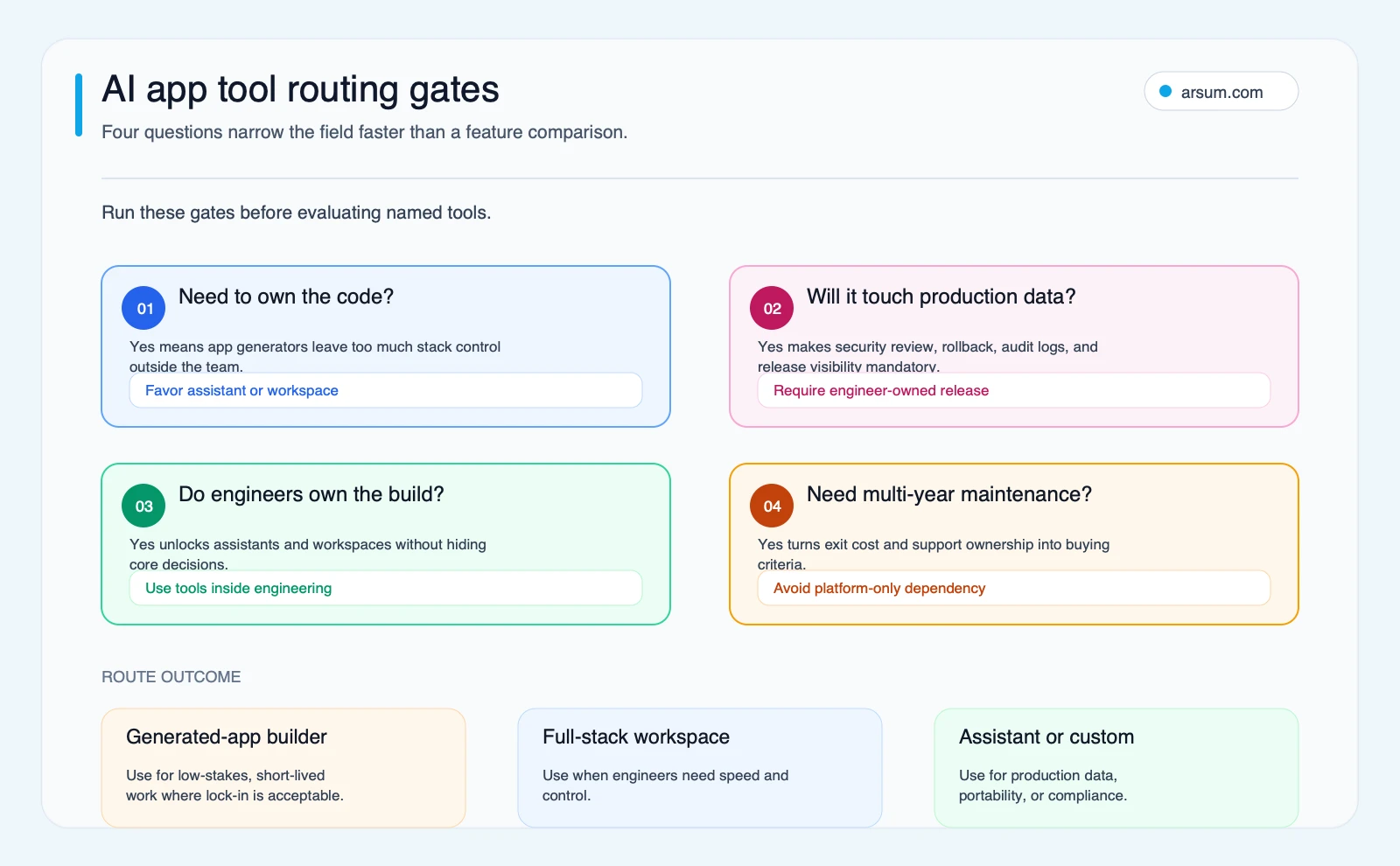
Choose a coding assistant when you have engineering ownership and want AI to accelerate an existing development practice. Choose a full-stack workspace when you want an integrated build environment and can verify the repository, hosting, deployment, and service boundaries. Choose a generated-app builder when the application is bounded, reversible, and supported by an explicit ownership plan.
Bring in a custom development path when the workflow handles sensitive data, creates meaningful customer or operational consequences, spans multiple systems, or needs durable maintenance and control. The tool can still be part of that delivery model; it should not become an unexamined substitute for it.
A useful next step is a scoped build-risk assessment: define the workflow, score the control requirements, map ownership and data flow, test export and rollback assumptions, and estimate the pilot controls and operating work required. That produces a category recommendation and implementation boundary a founder, CFO, COO, risk owner, and technical sponsor can evaluate together.
Source note and limitations
This guide uses direct documentation from Firebase Studio, Replit Agent, OWASP, NIST, and OpenAI Enterprise Privacy, reviewed on 2026-06-29.
Tool capabilities, export options, deployment models, plan terms, and data controls can change. The category descriptions and scorecard are editorial decision aids, not a substitute for security review, legal review, or vendor due diligence. Qualitative practitioner discussion is included only to surface questions worth testing, not to make claims about adoption, reliability, savings, or any vendor’s performance.
Ready to Automate Your Business?
Stop wasting time on repetitive tasks. Let AI handle the busywork while you focus on growth.
Schedule a Free Strategy Call →Written by:Arsum editorial team
- Reviewed by
- Arsum editorial team
- Published
- June 18, 2026
- Updated
- July 4, 2026
- How this was produced
- Arsum uses research packs, source checks, and human editorial review to prepare and update blog articles. Editors are responsible for the final page.
- Source policy
- Sources are linked in the article when used. Methodology and source notes are included on higher-risk or high-visibility pages and are being rolled out across the archive. Editorial policy.
- Why this page exists
- Help B2B operators evaluate AI automation, implementation scope, cost, risk, and build-vs-buy decisions with practical context.