AI tools for app development are not one buying category: choose a prompt-to-app builder when you need a bounded prototype, an AI coding assistant when your engineers will retain repository and release ownership, an agentic coding tool only when review and access controls are ready, and an internal-app platform when operations—not engineering—will maintain the workflow. The decisive question is not which tool produces a first version fastest; it is whether the tool’s ownership model matches the failure cost of the app you intend to run.
AI Tools For App Development: 2026 Comparison
Explore ai tools for app development: compare workflow fit, costs, risks, evidence, and practical next steps before you build, buy, or hire.
Table of Contents
- What Most Guides Miss: The Handoff Is the Product Decision
- The Four Tool Classes and Their Ownership Boundary
- A Buyer Comparison: Evaluate the Tool Class Before the Vendor
- Where Prompt-to-App Stops and Engineering Begins
- The Handoff Route: Stay, Export, or Bring in Engineering
- A Pilot Scorecard That Tests the Operating Model
- Security and Governance Gates for AI Development Tools
- Cost Control: Evaluate Billing and Review Capacity Together
- Common Disqualifiers and Failure Modes
- Choosing the Next Step
What Most Guides Miss: The Handoff Is the Product Decision
A generated screen, API route, or deployed demo is not the same as an owned application. The moment an app connects to customer data, internal systems, billing, identity, or a consequential workflow, someone must own its architecture, secrets, approvals, incidents, and changes.
That is the decision most “best AI app builder” lists blur. A tool can be useful for a prototype and still be a poor fit for the production path. Conversely, an AI coding assistant can be a good fit for a mature engineering team and a poor fit for a team without the capacity to review more code.
Start every evaluation with three choices:
Are you buying prototype speed, internal-workflow flexibility, or engineering leverage?
Who owns the application six months after launch?
What happens if the tool produces a wrong change, exposes data, or cannot be maintained?
If the answer to the last question is “a developer will sort it out later,” the team has not yet selected a toolchain. It has selected a future handoff problem.
For a broader view of where AI belongs in the product lifecycle, see AI in app development. For teams deciding whether they need a product build rather than a tool subscription, AI app development services provides useful planning context.
The Four Tool Classes and Their Ownership Boundary
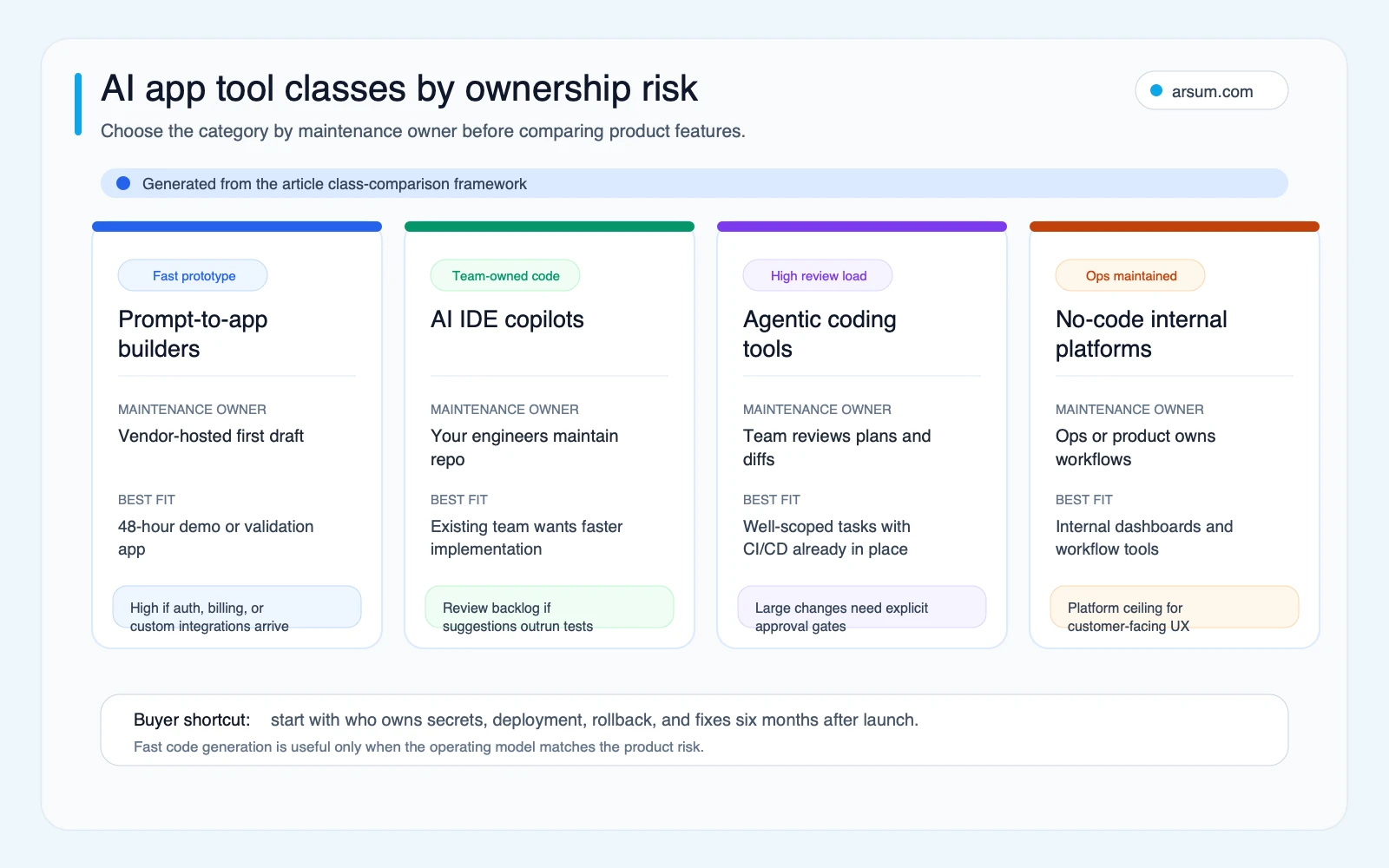
1. Prompt-to-app builders
Prompt-to-app builders generate an initial application from natural-language instructions. Replit’s AI App Builder describes an end-to-end workflow spanning frontend, backend, database structure, deployment, and cloud services.
This class is useful when the immediate deliverable is a prototype, internal proof of concept, or user-testable flow. It can also be a sensible starting point for a customer-facing prototype if the team treats it as a prototype and defines the route to a production codebase before real data or commitments arrive.
The boundary appears when requirements become specific: custom identity rules, audit evidence, complex integrations, unusual data models, service-level expectations, or ongoing delivery ownership. The builder may still be part of the solution, but the buyer should test exportability, hosting dependency, and maintenance responsibility rather than assuming them.
2. AI IDE copilots
AI IDE copilots operate inside an existing engineering workflow. They help developers draft, refactor, explain, and test code while the team retains its repository, CI/CD process, architecture decisions, and release approvals. GitHub Copilot documents plan-based access, model choices, agent workflows, and MCP-related controls—evidence that this is a toolchain governance choice as well as a developer-experience choice.
This class is usually the clearest fit when an engineering team already owns a product and wants help with bounded implementation work. It does not remove the need for code review, test design, or accountability for production changes.
3. Agentic coding tools
Agentic coding tools can inspect a repository, plan a change, edit multiple files, and run selected commands or tests. Their leverage can be meaningful when the task is well scoped and the team can review the plan, changed files, tests, and side effects.
The important distinction is review shape. A copilot may require review of a suggestion; an agent may require review of a coordinated set of changes and the permissions used to produce them. For a practical comparison of two common approaches, see Claude Code vs. Cursor, and for a hands-on workflow perspective, see how to build an app with Claude Code.
4. No-code internal-app platforms
No-code internal-app platforms are designed around operational tools: dashboards, approvals, data views, and workflow interfaces maintained by operations or product teams. They are not simply “AI coding tools without code.” Their value is often governed configuration and a controlled way to connect people to existing systems.
This can be the right category for an internal workflow, provided the team can define permissions, data access, change ownership, and exception handling. It is not automatically the right category for a public product with complex UX, custom domain logic, or a deep engineering roadmap.
A Buyer Comparison: Evaluate the Tool Class Before the Vendor
| Tool class | Typical named examples | Best starting use | Primary maintenance owner | Production question to test | Main failure mode |
|---|---|---|---|---|---|
| Prompt-to-app builder | Replit, Lovable | Prototype or bounded proof of concept | Founder, product owner, or later engineering owner | Can the application and its dependencies be exported, understood, secured, and operated outside the initial workflow? | A prototype becomes a production system without an explicit handoff |
| AI IDE copilot | GitHub Copilot, Cursor | Existing codebase with engineers | Engineering team | Can the team review the additional output without weakening tests, PR standards, or release controls? | More generated changes than the review system can safely absorb |
| Agentic coding tool | Claude Code and similar tools | Well-defined multi-file tasks in a controlled repo | Engineering team with a named technical owner | Can the agent’s permissions, command execution, logs, and rollback be constrained and reviewed? | Broad changes or unsafe actions accepted as a single “successful” run |
| No-code internal-app platform | Retool, Glide | Internal workflows and operational interfaces | Operations or product owner, with IT/data oversight | Can the platform enforce appropriate identity, data-access, audit, and change controls? | An operational workflow gains users and sensitivity beyond its original control model |
The examples are categories, not endorsements or a current feature-ranking claim. Treat each row as a procurement checklist. Ask the vendor to demonstrate the exact edition and configuration you intend to purchase.
| Procurement criterion | Evidence to request during evaluation |
|---|---|
| Code export and repository ownership | A live export into a repository you control; dependency inventory; build and deploy instructions |
| Hosting and operational ownership | Hosting boundary, incident responsibilities, backup and recovery approach, and what changes if you leave |
| Identity and access controls | Supported identity providers, role model, service-account handling, and access-review process |
| Data handling | What content is sent to models or third parties, retention options, training/data-use terms, and regional requirements relevant to your organization |
| Auditability | User, admin, model, agent, and deployment logs; export format; retention controls; evidence available for an investigation |
| Integrations | Authentication method, least-privilege scope, rate-limit behavior, failure handling, and revocation process |
| Pricing mechanics | Current plan page, included usage, premium-model or agent overages, team controls, and budget-alert options |
| Support and exit path | Support commitment, documentation quality, export process, and the owner responsible for a migration if needed |
This table addresses a common procurement error: comparing a polished demo to an operating model. A vendor feature may be technically available but unsuitable if your team cannot govern it.
Where Prompt-to-App Stops and Engineering Begins
AI can accelerate commodity implementation work: scaffolding common interfaces, drafting repetitive functions, generating test starting points, translating a design into components, or explaining an unfamiliar area of a codebase. Those are useful capabilities.
The work that remains is not a defect in the tools. It is the work that makes an application safe and operable:
- Data model and source-of-truth decisions
- Authentication, authorization, and secrets management
- Integration contracts, retries, idempotency, and edge cases
- Test strategy and release criteria
- Monitoring, incident response, and rollback
- Requirements interpretation and approval ownership
- Documentation that explains why a business rule exists, not only what code does
This distinction matters especially for finance, risk, and operational teams. A tool may technically be able to draft a workflow that reads a document, proposes a decision, or sends an update. That does not authorize it to make the decision. The workflow still needs source lineage, an approver, a record of the action, an exception route, and a way to reverse or correct an outcome.
For related workflow design principles, see AI agent security and AI agent architecture patterns.
The Handoff Route: Stay, Export, or Bring in Engineering
Use this route before a prototype grows into a commitment.
| Current situation | Recommended route | Required next control |
|---|---|---|
| A clickable demo, landing-page MVP, or internal concept with no sensitive data | Stay in the builder temporarily | Name an expiry date for the prototype and a decision owner for the next phase |
| Customer-facing app with authentication, payments, customer data, or uptime expectations | Export or rebuild in a repository the organization controls before production use | Technical owner, code review, test and deployment path |
| Internal workflow with sensitive records or approvals | Use the platform only after permission and audit requirements are tested | Role design, approval step, event logs, exception queue |
| Existing application with established engineering practices | Use copilots or agents inside the existing repository | PR review, test execution, access boundaries, and spend controls |
| No named owner for deployment, monitoring, or incident response | Bring in a senior developer or implementation partner before expanding scope | Ownership decision before additional automation |
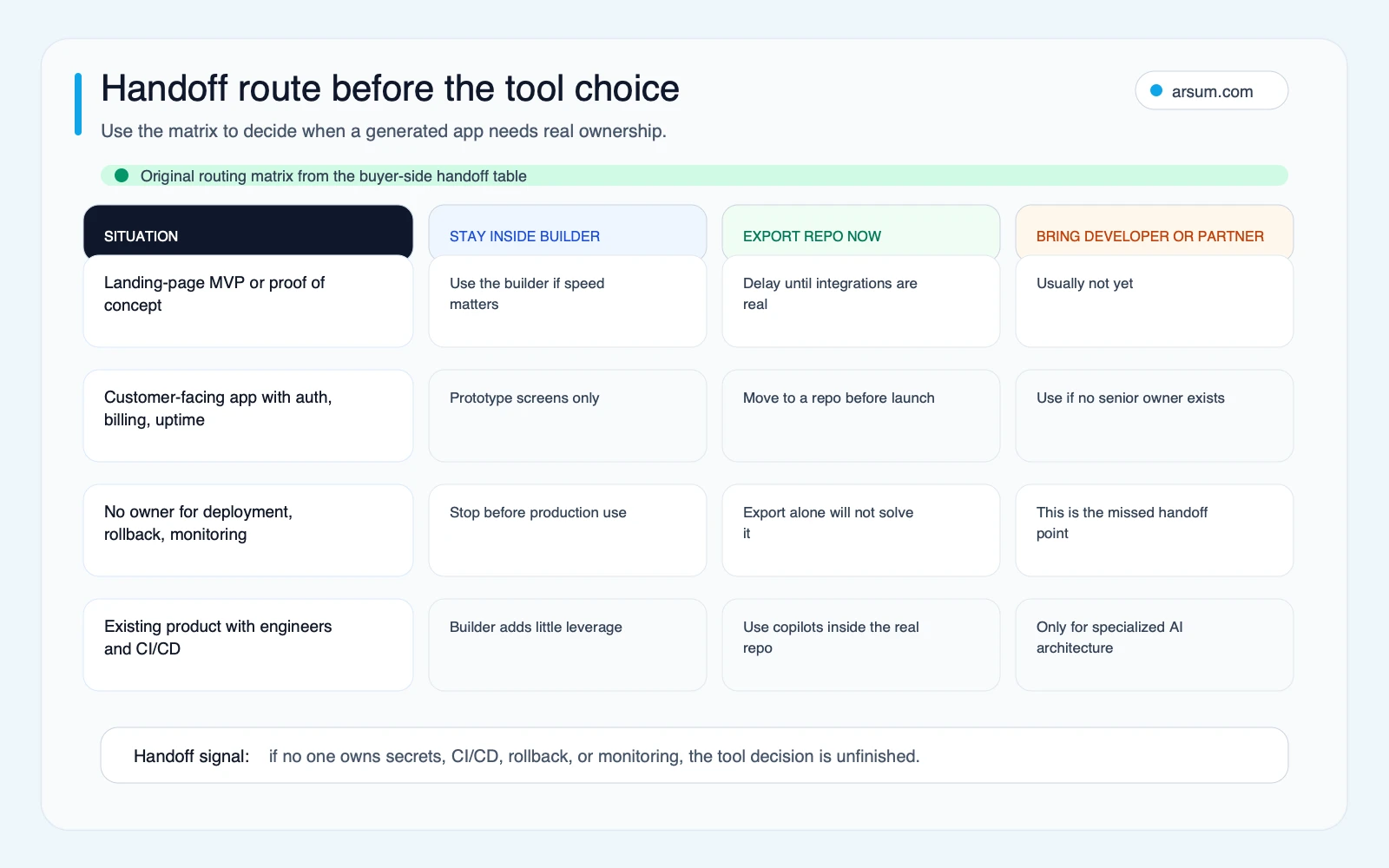
A builder can be part of a sound path. The disqualifying condition is not “the app was generated with AI.” It is the absence of a credible owner and transition plan once the app becomes consequential.
A Pilot Scorecard That Tests the Operating Model
Do not begin with a broad rollout. Select one workflow where the value is plausible, the failure cost is understood, and a human can review output. Examples include a non-sensitive internal request form, a documentation-heavy feature, or a bounded backlog of test improvements—not an autonomous production change to authorization, payments, or regulated decisions.
Minimum pilot charter
| Pilot field | What to define |
|---|---|
| Workflow selected | One bounded workflow, its users, its input sources, and its expected output |
| Business owner | The functional leader accountable for whether the workflow should continue |
| Technical owner | The person accountable for repository, integration, deployment, and rollback decisions |
| Allowed data | Explicitly permitted repositories, records, and environments; exclude data until approved |
| Access boundary | Read-only by default where possible; no production credentials; least-privilege integration scopes |
| Reviewer and approver | Named reviewer for code or output; named approver for release or consequential workflow actions |
| Evidence retained | Prompts or task instructions where appropriate, agent logs, PRs, test output, approvals, exceptions, and rollback record |
| Budget cap | A monthly cap set from the vendor’s current pricing terms and expected users/usage, with an owner for overage approval |
| Review cadence | Daily during the first week, then weekly while the pilot remains active |
| Rollback path | How to revoke access, disable the integration, revert the change, and restore the previous workflow |
Acceptance and stop conditions
Use your own baseline rather than a borrowed productivity claim. An illustrative planning assumption might be: “This workflow currently requires 10 reviewer-hours per week. We will test whether the tool reduces the time spent preparing a review package while maintaining the same approval and quality gates.” The inputs are the current hours, the selected task, the reviewer, and the defined acceptance criteria—not an assumed percentage improvement.
A credible pilot can use these exit criteria:
- Repository export has been tested, if the proposed tool creates or hosts application code.
- Permissions and secrets scope have been reviewed and documented.
- The team can reproduce a change through normal review and test workflows.
- All pilot outputs that affect business records have an identifiable source and approving human.
- Exceptions are visible in a queue with an assigned owner.
- A rollback has been rehearsed.
- Spending remains within the pre-approved cap.
- Reviewers confirm that the tool did not create an unsustainable backlog of unreviewed changes.
Stop or narrow the pilot if the tool requires broader access than approved, cannot supply necessary evidence, causes unresolved test failures, exceeds the spend cap without an approved decision, or creates changes the assigned owner cannot explain and maintain.
Work With Arsum
We help businesses implement AI automation that actually works. Custom solutions, not cookie-cutter templates.
Learn more →Security and Governance Gates for AI Development Tools
The NIST AI Risk Management Framework frames AI risk management as a design-time activity. For app-development tooling, that means controls should be selected before the tool is embedded in repositories, delivery pipelines, or operational systems.
The OWASP GenAI Security Project’s guidance on prompt injection is particularly relevant when a tool can read instructions, code, files, web content, or connected systems. A malicious or untrusted instruction can attempt to influence the model’s behavior; a tool with broad permissions can turn that influence into an unauthorized action.
A minimum gate for an agentic coding pilot should include:
- Repository access limited to the pilot scope; no blanket access by default
- Secrets kept out of prompts, logs, and agent context where possible
- No autonomous production deployment or production data modification during the initial pilot
- PR-based review for code changes, with test execution visible to reviewers
- Explicit human approval for authentication, authorization, billing, data-access, and integration changes
- Logs that connect a task, change, reviewer, test result, and approval
- A documented way to revoke credentials and revert a merged or deployed change
These are not claims that every AI tool is unsafe. They are conditions for authorized use. Technical capability and business authorization are separate decisions.
Cost Control: Evaluate Billing and Review Capacity Together
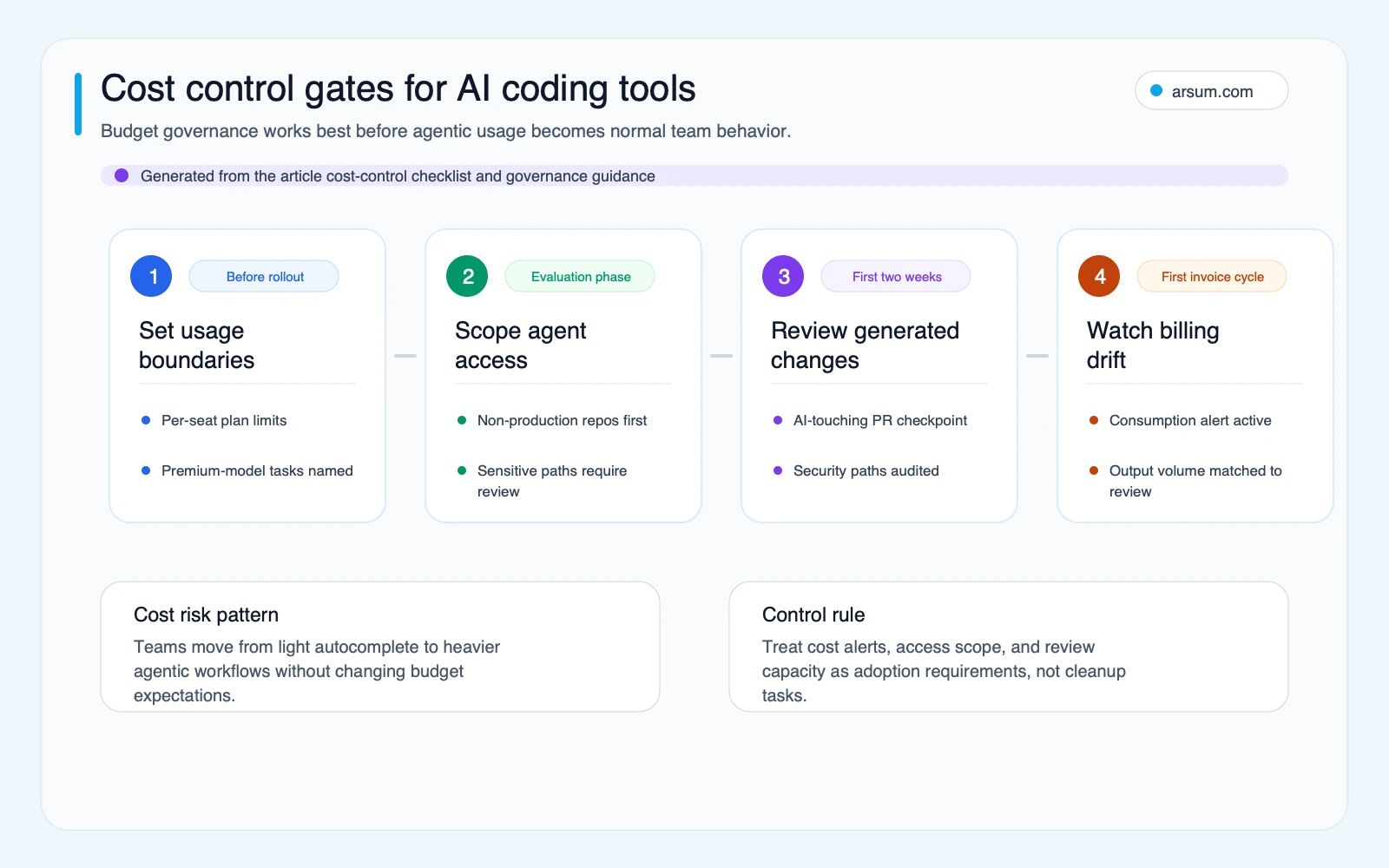
Current pricing, usage allowances, and overage terms change. Rather than using a generic price range, obtain the relevant vendor’s current pricing and document the cost model for the exact plan, model access, and agent usage you expect to enable.
The cost equation includes more than the subscription:
Illustrative planning assumption: monthly tool cost = named users × current plan price + expected usage overages + reviewer time required to validate added output.
The final input often determines whether a rollout creates leverage. A lower-priced tool that creates a large review backlog may not fit the workflow. A more capable agent workflow may be reasonable if it operates only on well-defined tasks with reliable tests and controlled access.
Practitioner discussions are useful here as a qualitative warning, not as pricing evidence. A Hacker News discussion about AI coding tools reducing productivity and a discussion title raising intensive Cursor spend point to recurring concerns about rework and billing drift. They do not establish average productivity or spend. Your pilot should.
Common Disqualifiers and Failure Modes
An AI tool is not a fit for the proposed workflow yet if any of these conditions are true:
- No one can own the generated application after the prototype stage.
- The vendor cannot demonstrate the code, hosting, data, access, logging, or exit requirements your organization needs.
- The intended workflow requires production autonomy before the team has tested review and rollback.
- Sensitive data or credentials would enter a tool without an approved handling model.
- The team has no capacity to review increased code or workflow output.
- The pilot cannot name a baseline, acceptance measure, budget boundary, or stop condition.
- A regulated or consequential decision lacks source lineage, human approval, exception handling, and retained evidence.
A related failure mode is treating AI generation as a substitute for product decisions. It is not. The tool can produce an interface before the team has agreed on the workflow, owner, exceptions, or policy. That speed can be valuable for discovery; it becomes costly when an unexamined prototype becomes the operating system for a real process.
For a build-versus-partner decision, hiring an AI developer versus an agency and AI development services explain the ownership tradeoffs from different angles.
Choosing the Next Step
Choose a prompt-to-app builder if you need a bounded prototype and can state what happens before production use. Choose a no-code internal-app platform if the workflow is internal and its data, permissions, approvals, and maintenance ownership fit the platform model. Choose an AI IDE copilot when an engineering team already owns the repository and release process. Consider agentic coding tools after you can constrain access, review multi-file changes, run tests, retain evidence, and roll back.
If the app has complex integrations, sensitive data, regulated approvals, or no credible technical owner, start with the workflow and controls rather than the tool list. Arsum can help teams scope a workflow/toolchain assessment: define the ownership boundary, evaluate vendor evidence, and design a pilot that has clear acceptance criteria before broader adoption.
Methodology: This article uses a link-only editorial evidence route. Factual capability and governance references are anchored to Replit’s AI App Builder, GitHub Copilot, NIST’s AI Risk Management Framework, and OWASP’s prompt-injection guidance. Practitioner links are qualitative signals about questions and failure modes, not market-wide statistics or performance benchmarks. Vendor pricing, controls, and product features should be verified against the current plan and documentation during procurement.
Ready to Automate Your Business?
Stop wasting time on repetitive tasks. Let AI handle the busywork while you focus on growth.
Schedule a Free Strategy Call →Written by:Arsum editorial team
- Reviewed by
- Arsum editorial team
- Published
- June 14, 2026
- Updated
- July 4, 2026
- How this was produced
- Arsum uses research packs, source checks, and human editorial review to prepare and update blog articles. Editors are responsible for the final page.
- Source policy
- Sources are linked in the article when used. Methodology and source notes are included on higher-risk or high-visibility pages and are being rolled out across the archive. Editorial policy.
- Why this page exists
- Help B2B operators evaluate AI automation, implementation scope, cost, risk, and build-vs-buy decisions with practical context.