AI tools for business automation are worth comparing only after you define the workflow they will change: the owner, systems of record, review step, failure cost, and rollback path. The right tool is not the one with the longest AI feature list; it is the one that can improve a measurable task without creating unowned exceptions, hidden review work, or unauthorized decisions.
Best AI Tools for Business Automation
Explore ai tools for business automation: compare workflow fit, costs, risks, evidence, and practical next steps before you build, buy, or hire.

Table of Contents
- What most guides miss: a tool is not the workflow
- The ROI preflight before you compare vendors
- A practical tool comparison by workflow type
- Use a scorecard that can reject a tool
- Run a supervised pilot before broad rollout
- Integration burden and hidden operating cost
- When to buy, configure, build, or wait
- Common failure modes and their remedies
- A final procurement checklist
- FAQ
What most guides miss: a tool is not the workflow
Most comparisons begin with products. Start with the operating boundary instead.
A production automation needs answers to six questions before procurement:
- What exact task is being changed?
- Which system remains the source of record?
- What inputs can the automation read or write?
- What output can it produce without approval?
- Who handles exceptions and monitors failures?
- How do you stop or roll back the workflow?
That screen changes the shortlist. A tool can be technically capable of drafting an email, extracting an invoice field, or routing a support ticket without being authorized to send, post, pay, approve, reject, or alter a customer record. Capability is not permission.
Use this rule: automate drafting, extraction, classification, and routing first when a reviewer can verify the result. Treat pricing, eligibility, employment, credit, payment, contract, or customer-remedy decisions as consequential actions that require explicit human authorization and retained evidence.
The NIST AI Risk Management Framework is useful here because it frames AI evaluation around harms and organizational controls, not productivity alone. For a broader view of workflow design, see AI process automation.
The ROI preflight before you compare vendors
Subscription price is only one operating cost. Build a baseline that includes task volume, human minutes, review time, exception handling, usage charges, connector limits, and maintenance ownership.
| Readiness check | Question to answer | What “not ready” looks like |
|---|---|---|
| Volume | How many cases occur each week or month? | No reliable count |
| Labor | How many minutes are spent per case, including rework? | “It feels time-consuming” |
| Error cost | What happens if the task is late, wrong, or skipped? | Failure consequences are unknown |
| Cycle time | Does faster handling change cash flow, service, or capacity? | No decision tied to speed |
| Maintenance | Who updates prompts, rules, permissions, and connectors? | The original builder is the only owner |
| Review | What is checked, by whom, and where is the decision recorded? | Review is informal or absent |
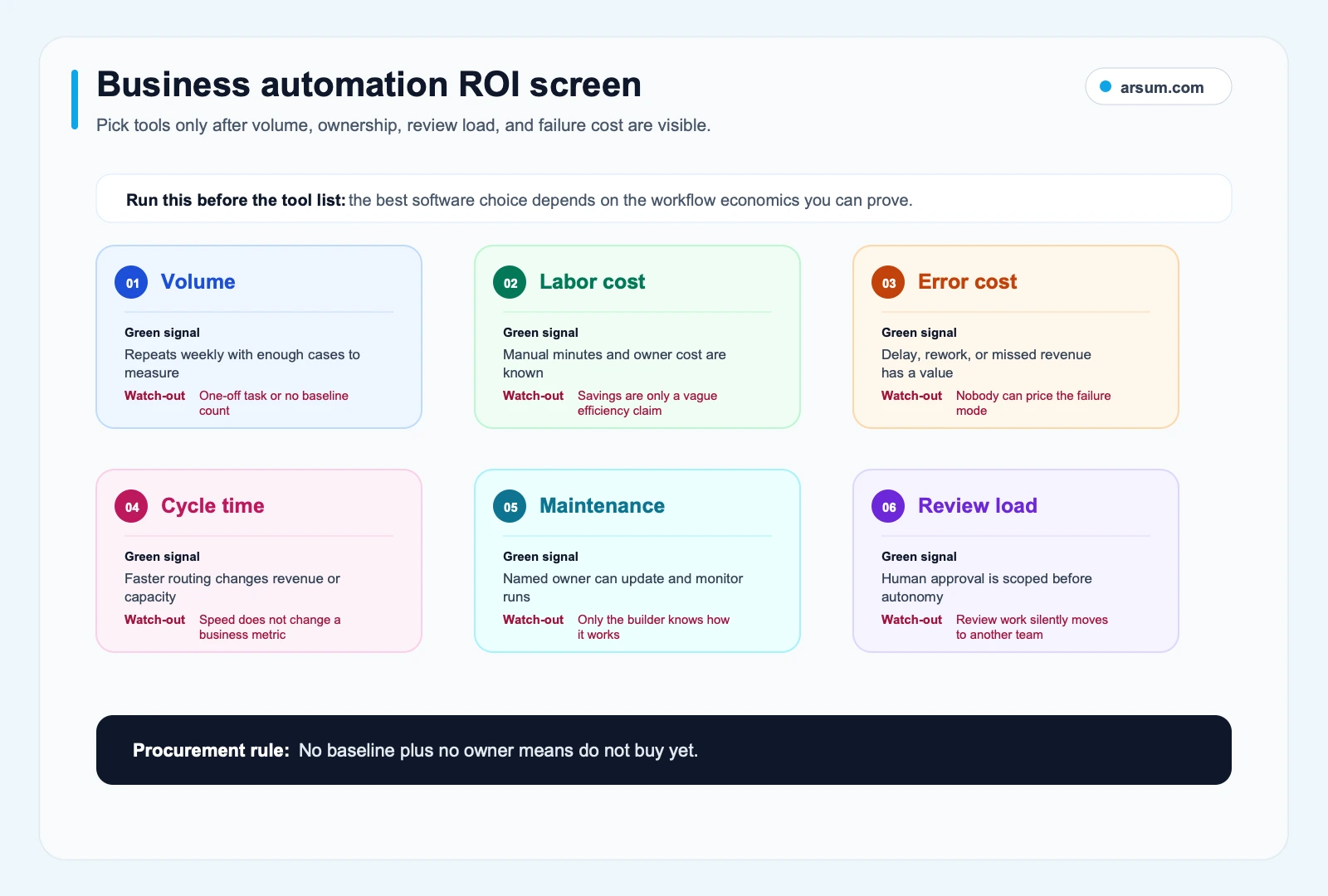
Start with the workflow economics and control model, then choose software.
Worked ROI preflight: document intake
This is an illustrative planning assumption, not an observed result.
Suppose an operations team receives 800 supplier documents each month. Its baseline sample shows 6 manual minutes per document. A proposed workflow extracts fields, validates required data, and routes exceptions to an operations reviewer.
| Input | Illustrative assumption |
|---|---|
| Monthly documents | 800 |
| Current handling time | 6 minutes per document |
| Fully loaded labor rate | $35 per hour |
| Automated handling plus review | 2 minutes per document |
| Additional exception handling | 10 hours per month |
| Tool, usage, and monitoring cost | $1,000 per month |
Current labor baseline: 800 × 6 minutes = 4,800 minutes, or 80 hours. At $35 per hour, that is $2,800 per month.
Proposed operating time: 800 × 2 minutes = 1,600 minutes, or about 26.7 hours, plus 10 exception hours. That leaves roughly 43.3 labor hours before the $1,000 monthly operating cost is considered.
The point is not that this workflow will produce a universal savings figure. The point is that review time and exceptions can materially change the decision. If the pilot cannot retain required source evidence, produces a critical extraction error, or shifts too much work into exception handling, stop expansion even if the headline time calculation looks attractive.
A practical tool comparison by workflow type
The products below are representative paths, not universal “best” picks. Official documentation confirms the capabilities described; fit is an editorial judgment based on workflow shape, existing systems, and controls.
| Workflow type | Representative path | Inputs and system of record | Permitted autonomy | Reviewer and exception path | Procurement question |
|---|---|---|---|---|---|
| App-to-app handoff | Zapier AI | Standard SaaS apps; CRM, forms, collaboration tools remain records | Create drafts, notify, route, sync defined fields | Operations owner reviews failed runs and field conflicts | Are connectors, authentication, retries, and rate limits adequate for your volume? |
| AI document workflow | n8n Advanced AI or a document specialist | Documents plus ERP, CRM, or repository record | Extract, classify, flag missing information, prepare a queue | Document operations reviewer validates low-confidence or policy exceptions | Can you retain source file, extracted values, confidence/review result, and final disposition? |
| Microsoft-centered approval flow | Microsoft AI Builder with Power Platform | Microsoft 365, SharePoint, Dynamics, or approved business apps | Assist classification, extraction, and workflow routing | Process owner approves governed actions through existing workflow controls | Does the tenant’s permission and connector model cover every required system? |
| Support triage | Helpdesk AI within the existing ticket platform | Approved knowledge base and ticketing system | Suggest or send low-risk answers only where policy allows; classify and route | Support lead owns escalations, knowledge gaps, and incorrect-answer remediation | Is the knowledge base complete enough to support the intended contact reasons? |
| CRM hygiene and sales assistance | CRM-native automation or workflow layer | CRM remains source of record; approved enrichment only | Draft follow-up, create tasks, flag missing fields | RevOps owner handles duplicates, bad routing, and field policy | Will the automation improve data quality, or multiply poor segmentation? |
Zapier describes its AI automation layer as taking action across business tools and highlights production concerns such as authentication, retries, rate limits, and safety checks. Its limits documentation is a reminder to model retry behavior and volume rather than assuming every task completes immediately.
n8n’s Advanced AI documentation describes workflows that can work with documents, data sources, and AI components. That can be a better fit than simple trigger-action automation when the workflow must classify, extract, or call tools—but it also raises the need for explicit logging and review.
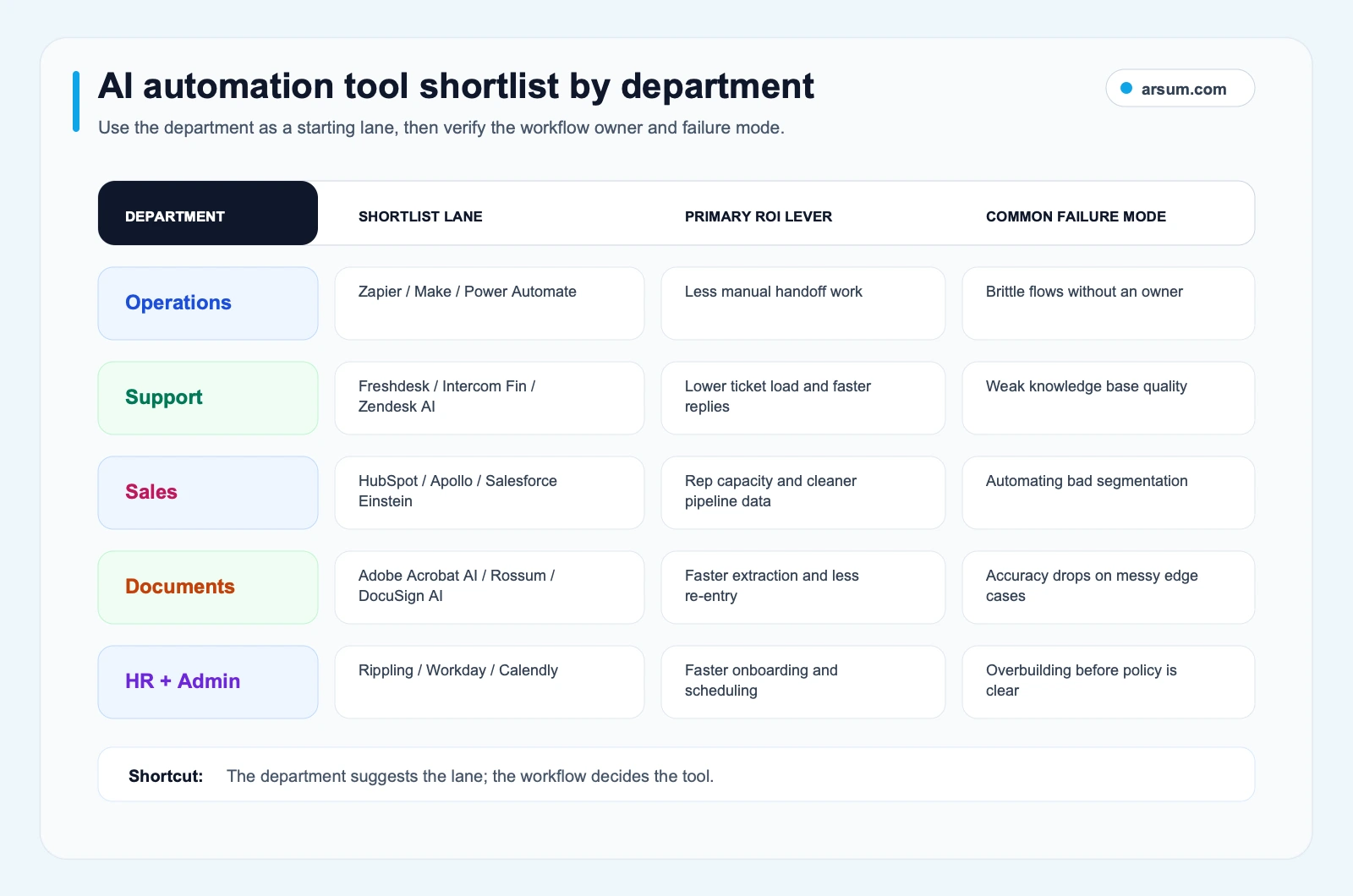
The department narrows the search. The task, source of record, review boundary, and failure cost determine the viable path.
Department examples: start with the safest useful work
Operations: automate a standard handoff, such as creating a task when a validated form arrives. Keep changes to inventory, billing, or customer status behind an approval boundary.
Customer support: use AI to classify tickets, retrieve approved information, draft responses, and escalate. Do not let it make exceptions to refund, cancellation, safety, or account-access policy without an authorized person.
Sales and RevOps: automate task creation, call summaries, approved follow-up drafts, and missing-field prompts. Keep lead qualification rules, territory assignment, pricing, and outbound data governance owned by RevOps.
Documents and finance operations: extract invoice or application fields, compare them against required fields, and place exceptions in a queue. Do not authorize payment, accounting posting, underwriting, or contractual interpretation based solely on generated output. Teams evaluating finance-specific workflows can use AI for finance teams and accounts receivable automation to define tighter controls.
HR and administration: automate onboarding checklists, access-request routing, scheduling, and policy retrieval. Keep employment decisions, compensation, disciplinary actions, and sensitive employee-data access under explicit HR authorization. For a bounded workflow example, see how to automate employee onboarding.
💡 Arsum builds custom AI automation solutions tailored to your business needs.
Get a Free Consultation →Use a scorecard that can reject a tool
A feature checklist cannot tell you whether to proceed. Use two gates and a weighted score.
Gate one: ownership and control
Do not automate yet if any of these are missing:
- A named workflow owner who can approve changes and accept operational responsibility.
- A measurable baseline for volume, handling time, quality, or cycle time.
- A defined exception path and escalation owner.
- Clear source-of-record and access boundaries.
- A rollback method that restores the prior manual or rules-based process.
- Required evidence retention for the workflow’s risk level.
A tool may still be useful for internal experimentation, but it is not ready for production use.
Gate two: consequential autonomy
If the workflow can materially affect money, access, eligibility, legal commitments, safety, employment, or a customer’s rights, require human authorization before the final action. The automation may assemble evidence and recommend an action; the authorized owner makes and records the decision.
Weighted scorecard
Score each item from 1 to 5. Weight reflects the workflow, not the vendor’s marketing category.
| Criterion | Weight | What you are assessing |
|---|---|---|
| Workflow fit | 25% | One named task, clear input and output, measurable value |
| Integration and data lineage | 20% | Source records, permissions, data quality, logs, retry behavior |
| Governance and review | 20% | Approval boundary, access control, audit evidence, remediation |
| Economics | 15% | Labor baseline, usage costs, review effort, maintenance effort |
| Operating ownership | 10% | Monitoring, change control, on-call or business escalation |
| Exit path | 10% | Exportability, manual fallback, ability to disable safely |
Set a pass rule before scoring: a weak governance or ownership score cannot be offset by attractive economics. Among candidates that pass the gates, choose the one with the strongest weighted workflow fit—not necessarily the most AI features.
Run a supervised pilot before broad rollout
A pilot should produce a decision, not merely a demo. Keep it narrow enough to observe failures and representative enough to include normal and ugly cases.
Pilot acceptance scorecard
| Field | Define before launch |
|---|---|
| Workflow and owner | Example: invoice intake; finance operations manager |
| Baseline | Monthly volume, median handling time, rework rate, cycle time, and known error types |
| Scope | A representative, approved sample of cases and sources |
| Target | A stated reduction in handling time or cycle time, while preserving required quality controls |
| Quality metric | Reviewer-corrected output rate, plus a defined critical-error category |
| Exception taxonomy | Missing source, unreadable document, conflicting fields, low confidence, permission failure, downstream-system failure |
| Approval owner | Role authorized to approve consequential actions or policy exceptions |
| Evidence retained | Source input, workflow version, extracted/drafted output, reviewer decision, exception reason, and final system record |
| Review cadence | Daily during initial launch, then a named weekly operating review |
| Stop condition | Critical error, unmanageable exception queue, missing audit evidence, unauthorized action, or no meaningful improvement against baseline |
| Rollback | Disable write actions, route all cases to the prior queue, preserve logs, and investigate before restart |
At 30 days, decide whether the workflow is controlled and improving the intended metric. At 60 days, decide whether it can expand to another case type, connector, or department. Those dates are decision checkpoints, not a promise of realized ROI.
A sensible first pilot limits autonomy. For example, a document workflow can extract values and prepare a record, while a reviewer approves the post to the ERP. Once the team has observed error types, review burden, and source-quality problems, it can propose a controlled expansion.
Integration burden and hidden operating cost
The visible subscription often omits the work that determines whether the system stays useful.
Include these items in procurement:
- Premium connectors, API calls, AI-model usage, storage, and environment costs.
- Rate limits, retries, duplicate-event handling, and partial failures.
- Identity and access management: who can read, write, export, or approve data.
- Source quality work: cleaning CRM fields, knowledge bases, document types, and policy content.
- Testing after process, application, or policy changes.
- Human review, queue management, and remediation.
- Documentation and handover so the automation does not depend on one builder.
Community discussions surfaced in the research pack repeatedly raise a useful buyer objection: time saved in a demo may disappear into setup, debugging, and maintenance. That is qualitative evidence, not a market-wide statistic, but it is a sound reason to require a baseline and operating owner before buying another platform.
For teams comparing workflow layers, AI workflow automation tools explains the orchestration question, while low-code AI automation helps distinguish a configurable workflow from a system that needs engineering ownership.
When to buy, configure, build, or wait
| Decision | Choose it when | Main tradeoff |
|---|---|---|
| Buy a point tool | The workflow is common, inputs are stable, and a vendor supports the needed system boundary | Fastest route, but may leave cross-system or exception work manual |
| Configure internally | The workflow is low consequence and an accountable operations or IT owner can maintain it | Lower initial dependency, but requires discipline around monitoring and change control |
| Build custom | Proprietary data, nonstandard systems, cross-system judgment, or control requirements are the real constraint | More design and engineering responsibility, but a better fit for the actual workflow |
| Wait and fix the process | Ownership, source data, baseline measurement, or approval rules are unclear | Delays automation, but prevents software from hardening a broken process |
Do not use arbitrary counts of branches, tools, or integrations as a build trigger. Escalate when pilot evidence shows that the remaining work is dominated by exceptions, missing controls, unreliable data, or manual reconciliation—not simply because the diagram looks complex.
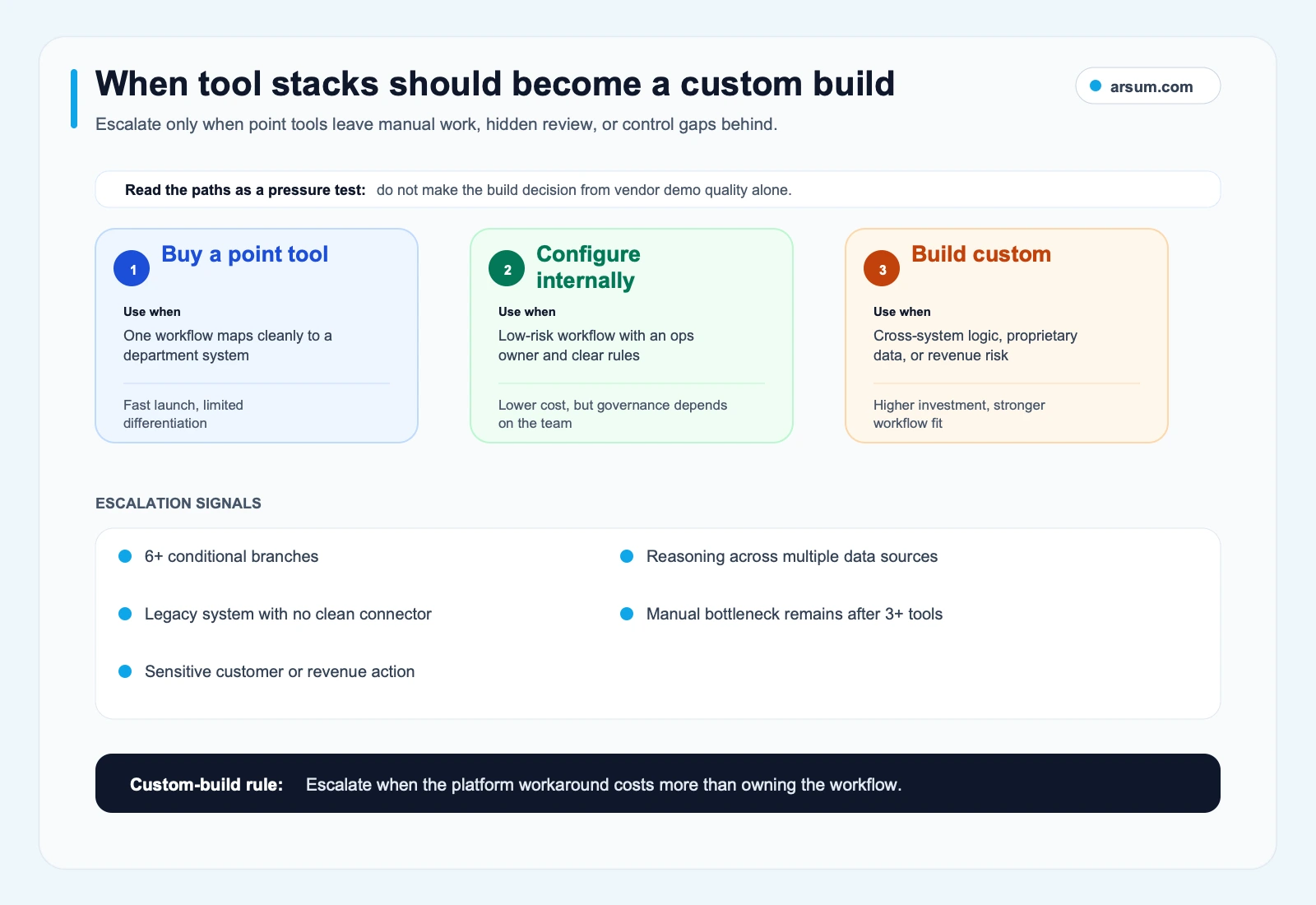
Escalate from a point tool when the workflow’s unresolved work is control, data, and exception design—not another missing feature.
Custom work is most defensible when it reduces a durable operational bottleneck rather than recreating a commodity connector. See custom AI solutions for business for the questions to answer before commissioning that work, and agentic AI workflow automation for the distinction between deterministic workflows and systems that use tool-calling or planning.
Common failure modes and their remedies
The workflow has no real owner. Assign a business owner for outcomes and a technical or platform owner for changes, permissions, and incidents. If neither role can accept the responsibility, pause.
Source data is incomplete or inconsistent. Improve the source process first. AI can flag missing fields; it should not silently invent missing business facts.
The exception path is invisible. Create explicit queues and reasons. Every exception needs a person, a response expectation, and a path back into the system of record.
Review is too expensive. Measure it. If review absorbs the expected capacity gain, narrow the task, improve inputs, or keep the workflow assistive.
The automation takes an unauthorized action. Disable write access, revert to the manual queue, preserve logs, remediate affected records, and reassess the approval boundary before restarting.
The team buys tools by department without a shared architecture. Map systems of record, identity, data access, and integration ownership across the business. A collection of isolated automations can create more reconciliation work than it removes.
A final procurement checklist
Before choosing AI tools for business automation, ask each vendor or internal builder:
- Can we map one workflow from source input to final record?
- Which data is read, written, retained, and accessible to whom?
- What happens when a model, connector, document, or downstream system fails?
- Which outputs are drafts or recommendations, and which actions require approval?
- What baseline and acceptance metrics will determine expansion?
- Who monitors the workflow after launch?
- Can we disable it safely and return work to a known manual path?
Arsum can help when the answer points beyond a simple tool subscription: workflow assessment, control design, integration planning, and custom implementation for a bounded operational use case. Our guide to AI automation services explains what a well-scoped partner engagement should clarify before build work begins.
Work With Arsum
We help businesses implement AI automation that actually works. Custom solutions, not cookie-cutter templates.
Learn more →FAQ
What are the best AI tools for business automation?
The best choice depends on the workflow boundary. Use a standard automation platform for stable app handoffs, an AI workflow builder for document or classification work, an enterprise platform when existing governance and systems matter most, and a custom build when proprietary data or exception-heavy cross-system work is the constraint. Do not automate yet when ownership, baseline metrics, review controls, or rollback are missing.
How should a small business evaluate automation tools?
Start with one repeatable task that has measurable volume and a low-consequence review path. Add subscription, usage, review, maintenance, and exception costs to the business case. A smaller team can often gain more from a narrow, owned workflow than from a broad platform rollout.
What is the difference between AI automation and authorized AI action?
Automation can read, classify, extract, draft, route, and recommend. Authorized action changes a record, commits money, grants access, makes an eligibility decision, or affects a customer or employee. The latter requires explicit ownership, approval controls, and audit evidence appropriate to its consequence.
When does a custom AI solution make sense?
Consider custom work when the pilot shows that the bottleneck is proprietary data access, nonstandard systems, cross-system judgment, recurring exceptions, or controls a generic tool cannot provide. It is not justified merely because an off-the-shelf tool has fewer features.
Ready to Automate Your Business?
Stop wasting time on repetitive tasks. Let AI handle the busywork while you focus on growth.
Schedule a Free Strategy Call →Written by:Arsum editorial team
- Reviewed by
- Arsum editorial team
- Published
- February 23, 2026
- Updated
- July 4, 2026
- How this was produced
- Arsum uses research packs, source checks, and human editorial review to prepare and update blog articles. Editors are responsible for the final page.
- Source policy
- Sources are linked in the article when used. Methodology and source notes are included on higher-risk or high-visibility pages and are being rolled out across the archive. Editorial policy.
- Why this page exists
- Help B2B operators evaluate AI automation, implementation scope, cost, risk, and build-vs-buy decisions with practical context.