App development using AI is most useful when you treat it as a controlled way to accelerate a defined workflow—not a promise that a prompt can replace product, security, and operational ownership. Choose a no-code builder for a reversible prototype, AI-assisted development for a team that can review and operate the code, or a consulting-led custom build when the workflow has sensitive data, deep integrations, audit requirements, or costly failure paths.
App Development Using AI: Practical Guide
Explore app development using ai: compare workflow fit, costs, risks, evidence, and practical next steps before you build, buy, or hire.
Table of Contents
- What most guides miss: generated code is not an operating model
- Choose the right path before choosing a tool
- A concrete workflow: loan-document intake with controlled AI assistance
- Score the workflow before committing to a build
- Run a 30-to-60-day pilot with acceptance rules
- Where AI helps—and where production work begins
- Disqualifying conditions and common failure modes
- Build, buy, or partner: the questions that decide it
- Readiness checklist before production scoping
- Method and limits
What most guides miss: generated code is not an operating model
AI can draft screens, integrations, tests, and documentation. It does not decide which inputs are authorized, who approves uncertain output, what evidence to retain, or how to restore the old process after a failed release.
That distinction changes the buying decision. A demo may prove that a model can produce an answer. A production app must prove that the right people can use that answer within a controlled workflow.
OpenAI’s application-development guidance places evaluations alongside reliability, cost, latency, and guardrails. Firebase’s generative AI guidance similarly describes production controls such as secured deployment paths, server-side prompt handling, monitoring, and protection against abusive use. Those are engineering and operating choices, not a final polish pass.
For an operator, the first question is therefore:
Can this workflow tolerate a wrong, delayed, incomplete, or unavailable AI response—and if not, who catches it?
If the answer is unclear, start with discovery or a bounded prototype, not autonomous production behavior.
Choose the right path before choosing a tool
“App development using AI” covers three different purchases. The right route depends on reversibility, integration depth, data constraints, and who will own the app after launch.
| Path | Best fit | What you are buying | Main boundary |
|---|---|---|---|
| No-code AI builder | Reversible internal prototype or concept test | Fast assembly of screens and simple flows | Platform capabilities, export rights, identity controls, and custom integration limits vary |
| AI-assisted development | A team with engineering ownership | Faster drafting, testing, and documentation inside a normal development workflow | Your team still owns architecture, review, security, deployment, and support |
| Consulting-led custom build | A consequential B2B workflow or AI-native product | Requirements, architecture, integrations, evaluations, controls, and a defined handoff | Requires a named business owner and a realistic operating model |
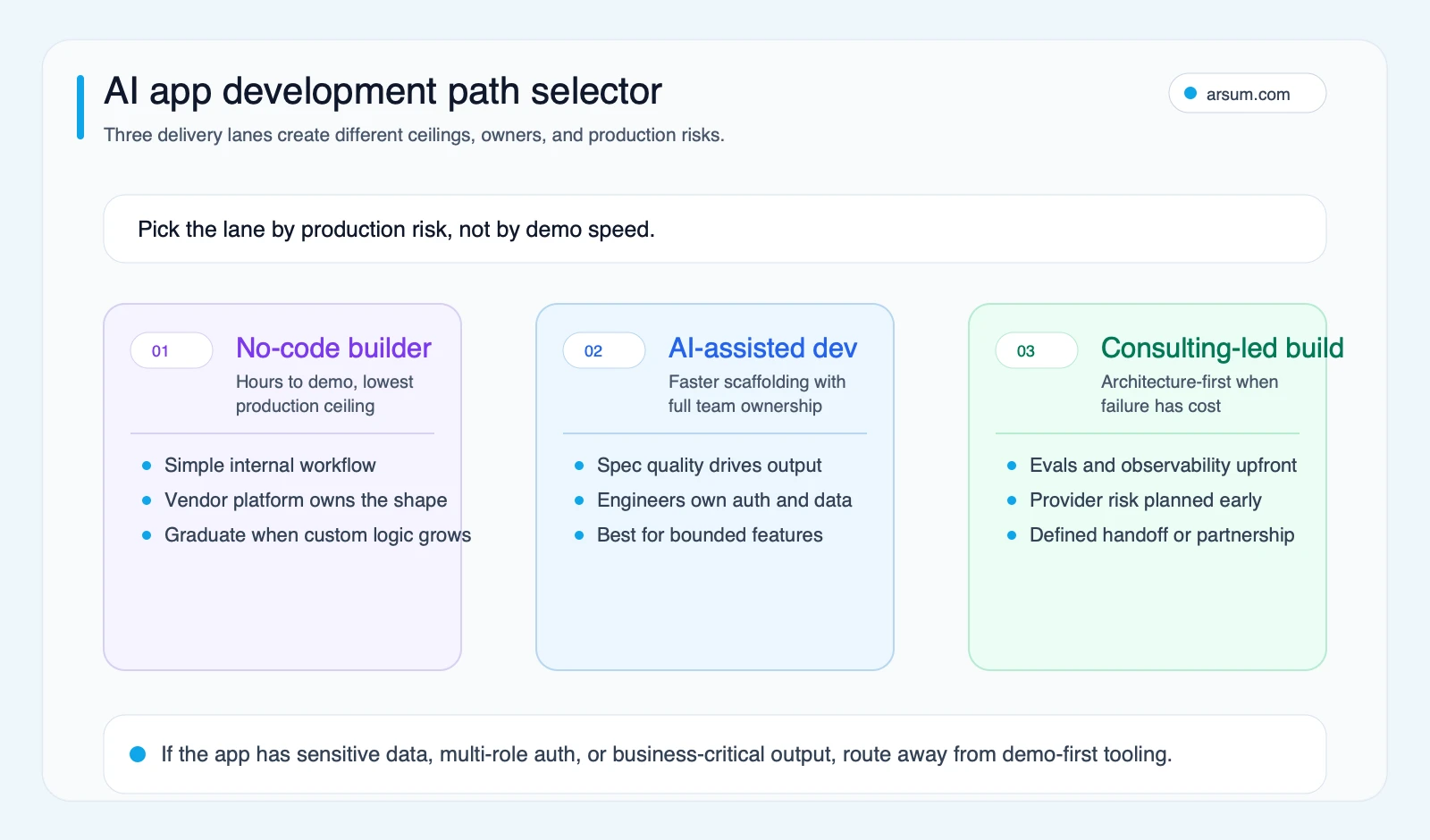
Route by failure cost and ownership first. A working demo is not, by itself, evidence that the same path fits production.
Speed, production ceiling, portability, and operating cost vary by platform, team capability, integration complexity, and contractual export terms. Ask to see the actual export, identity, logging, and deployment constraints for the product you are considering.
Use a no-code builder when the experiment is genuinely bounded
A builder can be appropriate when a small group needs to validate a workflow, the inputs are non-sensitive or appropriately approved, and a human can correct every result before it affects a customer or system of record.
Examples include an internal meeting-prep assistant, a draft knowledge-base search interface, or a form that routes requests to an existing queue. Define the boundary up front: no write access to core systems, no automated external communication, and a clear end date for the prototype.
Use AI-assisted development when you have technical ownership
AI coding tools can reduce blank-page work: scaffolding, repetitive connectors, test drafts, refactoring suggestions, and documentation. They do not remove code review or change the responsibilities of the engineering team.
This route works when the team can translate business requirements into acceptance tests, inspect generated code, and run a normal release process. For a narrower tool comparison, see AI tools for app development and the practical differences between Claude Code and Cursor.
Use a consulting-led custom build when the workflow is consequential
Choose this route when the application has multiple roles, tenant boundaries, regulated or confidential data, more than a light integration surface, or an AI output that could alter a financial, compliance, customer, or operational decision.
The value is not “we can call a model API.” It is designing the workflow around policy, permissions, evaluation, exception handling, observability, and ownership. This is the layer described in AI app development services and AI integration services.
A concrete workflow: loan-document intake with controlled AI assistance
Consider a lender that receives borrower documents through a portal and wants AI to extract and triage information before an analyst reviews the file. This is not a case for an autonomous approval engine. It is a case for reducing preparation work while preserving an accountable underwriting process.
Define the normal path
- A borrower uploads a supported document through the existing portal.
- The app records the document ID, tenant, uploader, time, and source-system reference.
- A document service extracts text and sends only the approved content to the selected AI service under the organization’s data-handling policy.
- The model returns a structured draft: document type, requested fields, source snippets, confidence per field, and a reason when a field is absent.
- The app compares the response to validation rules: required fields, allowed formats, known applicant identifiers, and confidence thresholds.
- A loan operations analyst reviews the draft beside the original document and either accepts, corrects, or rejects it.
- Only the approved fields are written back to the loan-origination system. The model never makes the credit decision.
The useful unit of automation is preparation, not authorization.
Route exceptions explicitly
The app should place a case in an exception queue when any of the following is true:
- The document type is unsupported or uncertain.
- A required field is missing.
- A returned value conflicts with the system of record.
- Confidence falls below the threshold set for that field.
- The request includes a restricted document category.
- The model call times out, fails, or produces invalid structured output.
The exception queue needs an owner. In this example, that is the loan operations manager, with a delegated analyst role for review and correction. The credit-policy owner defines which fields may be auto-populated after review and which must always receive a second approval.
Retain evidence, not just an answer
For each decision, retain the original source reference, extraction version, prompt or instruction version, model version where available, returned structured output, validation results, reviewer identity, edits, approval event, and destination write event. Retention requirements vary by institution and jurisdiction; involve the appropriate compliance and records owners before implementation.
This is also why source lineage matters. A reviewer should be able to see where a value came from, not merely receive a polished summary.
Make rollback real
The rollback path is simple only if it is designed before launch:
- Disable the AI extraction step through a feature flag.
- Keep the existing manual intake queue available.
- Stop write-back to the loan-origination system while preserving submitted documents.
- Route new items to manual review.
- Review affected cases and correct any approved records through the normal controlled process.
A low-confidence result should reduce autonomy. High failure cost is a reason for more review, not for a more aggressive automation target.
Score the workflow before committing to a build
Use this worksheet to compare candidate workflows. Score each dimension from 1 to 5, where 5 means “better for a first controlled AI pilot.”
| Dimension | 1 | 3 | 5 | Weight |
|---|---|---|---|---|
| Reversibility | A mistake can create material customer, legal, or financial harm | Error is recoverable with defined remediation | A human can readily correct or undo the outcome | 25% |
| Approval ownership | No clear approver | Owner exists but handoffs are unclear | One named owner can accept, stop, and roll back the workflow | 20% |
| Data readiness | Inputs are incomplete, inaccessible, or poorly permissioned | Cleanup or access work is needed | Inputs are available, permissioned, and traceable | 15% |
| Evaluation ability | “Good” cannot be tested consistently | Partial sample review is possible | A labeled sample and acceptance criteria can be defined | 15% |
| Integration complexity | Several custom systems or unclear APIs | Two to three managed interfaces | One controlled system or a clean export/import boundary | 10% |
| Feedback speed | Benefits or errors appear only after a long cycle | Weekly review is possible | Quality and handling time can be reviewed within days | 15% |
Multiply each score by its weight and total the result on a 100-point scale.
- 80–100: Suitable for a controlled pilot if the gating conditions below pass.
- 60–79: Start with discovery, data cleanup, or a non-production prototype.
- Below 60: Do not make this the first AI app initiative.
Two conditions override the numeric score:
- No named approval and rollback owner means no production pilot.
- Low reversibility combined with unclear evaluation criteria means no autonomous action; redesign the workflow around draft-and-review assistance.
Worked example
For loan-document intake, an organization might score:
| Dimension | Score | Weighted points |
|---|---|---|
| Reversibility | 4 | 20 |
| Approval ownership | 4 | 16 |
| Data readiness | 3 | 9 |
| Evaluation ability | 4 | 12 |
| Integration complexity | 3 | 6 |
| Feedback speed | 4 | 12 |
| Total | 75/100 |
A 75 suggests discovery plus a tightly controlled pilot, rather than broad deployment. The business can validate document types, source quality, reviewer effort, and system integration before extending to more files or more automation.
Run a 30-to-60-day pilot with acceptance rules
A pilot needs a baseline, a target, and permission to stop. Otherwise it becomes a demo that quietly turns into a production dependency.
For the document-intake example:
| Pilot element | Definition |
|---|---|
| Scope | One document category, one team, one approved source system |
| Baseline | Median handling time per file, correction rate, exception rate, and reviewer time collected before launch |
| Target | An illustrative planning assumption: reduce analyst preparation time without increasing the approved-record correction rate or the unresolved exception backlog |
| Quality measure | Field-level acceptance rate against a reviewed sample; track omissions, incorrect fields, and unsupported-document routing separately |
| Owner | Loan operations manager owns workflow acceptance; technical owner owns system reliability and rollback |
| Review cadence | Daily operational review in week one, then weekly review with operations, security, and product/engineering owners |
| Stop condition | Any material control failure, repeated write-back defect, unmanageable exception queue, or quality below the pre-agreed acceptance threshold |
| Rollback | Disable model calls and write-back; route all new files to the prior manual process |
Do not invent a target such as “90% accuracy” because it sounds credible. Set thresholds by field and failure cost. A miss on a non-critical formatting field and an incorrect income figure are not equivalent errors. The acceptance rule should reflect that difference.
You can use the same pattern for compliance case triage, accounts-receivable correspondence drafts, or onboarding-document routing. For more workflow-level framing, see agentic AI workflow automation and accounts receivable automation.
Where AI helps—and where production work begins
AI assistance is often helpful for contained work:
- Drafting a UI component or API route from a clear specification.
- Producing a first pass at tests that an engineer reviews and expands.
- Converting repeated internal documentation into a maintainable starting draft.
- Extracting structured candidates from defined documents for human verification.
- Drafting a response, summary, or classification where a person retains authority.
The production gap appears when an organization skips the operating controls:
| Demo-first default | Production control |
|---|---|
| “Summarize uploaded documents” | Supported formats, output schema, source citations, and a rule for missing information |
| Shared prompt edited ad hoc | Versioned server-side instructions with a change owner |
| Manual spot checks | A reviewed evaluation set and release criteria |
| One broad service credential | Least-privilege access and separation by tenant or role |
| Model response written directly to a system | Validation, approval, and an explicit write-back policy |
| No post-launch plan | Named owner, monitoring, incident route, and rollback procedure |
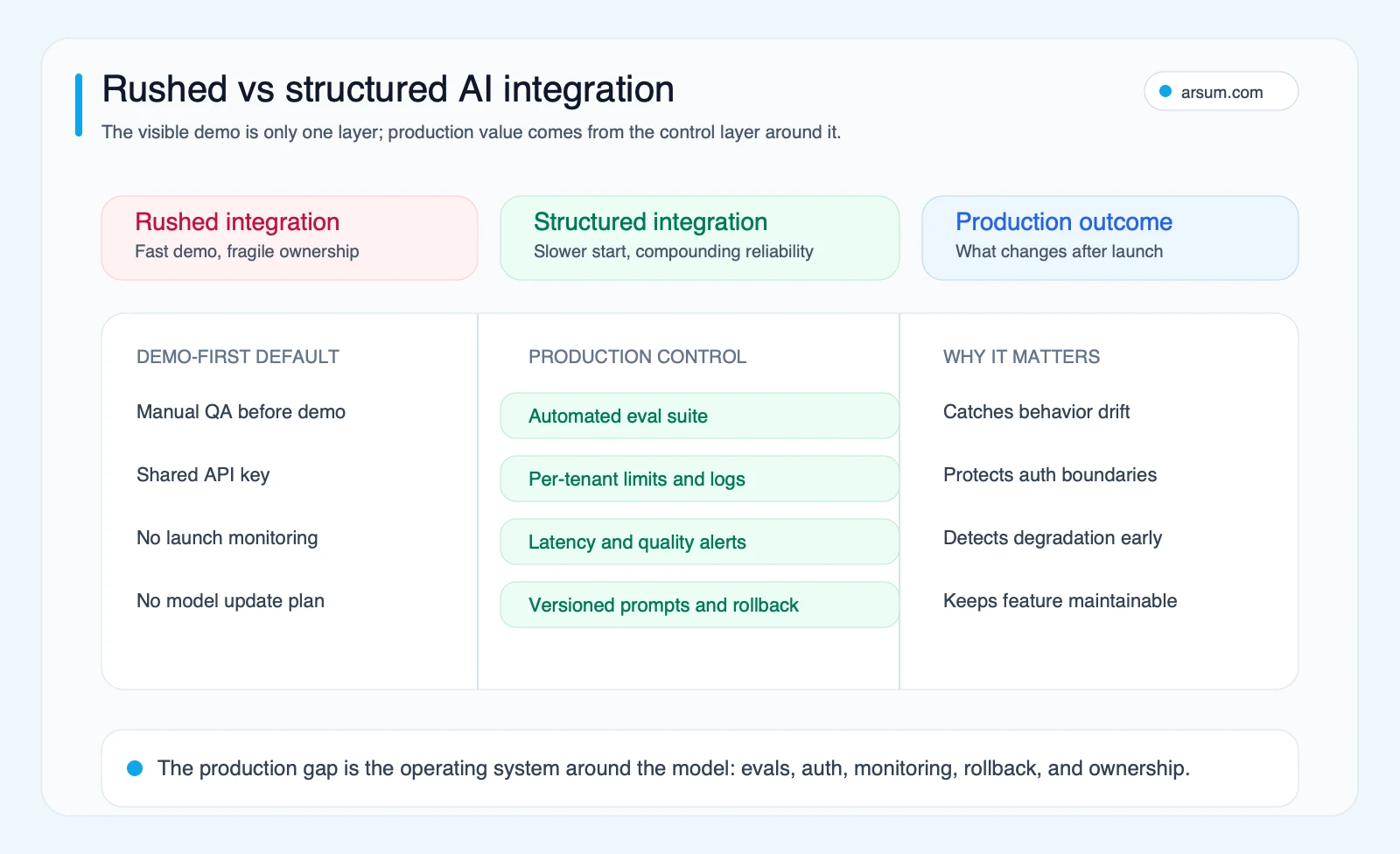
The rushed version may ship faster, but it commonly shifts risk and maintenance work into post-launch operations.
NIST’s AI Risk Management Framework is useful here because it frames governance, mapping, measurement, and management as continuing activities. It does not provide a generic permission slip for automation. It gives teams a way to ask whether the system’s risks are understood, measured, and owned.
Disqualifying conditions and common failure modes
Pause or narrow the initiative when any of these conditions apply:
- The team cannot state what decision the AI may influence and what decision it may never make.
- Data lineage, permitted use, or tenant boundaries are unclear.
- The workflow has no reliable manual fallback.
- A business owner cannot approve thresholds, exceptions, and rollback.
- The organization cannot inspect quality with representative test cases.
- The proposed vendor cannot explain access controls, logging, exportability, or post-launch responsibilities.
- The implementation depends on a single prompt, model, or builder behavior that cannot be versioned or replaced.
Common failure modes are more ordinary than dramatic: unclear requirements, generated code that only covers the happy path, over-broad credentials, unmeasured output drift, a growing exception queue, and a handoff where nobody owns model changes or support.
Qualitative practitioner signals, not performance statistics
Community discussions are useful for identifying these failure modes, but they are not representative market data. Builders frequently describe the same transition: initial generation is impressive, then debugging, architecture cleanup, unclear requirements, and platform limits become the work. One captured snippet puts the requirement issue plainly: “[t]he requirements need to be stricter for AI than for a human developer.” Source: r/vibecoding.
Treat that as a planning warning, not as a quantified claim about all projects.
Build, buy, or partner: the questions that decide it
A builder is not automatically the inexpensive option, and a custom build is not automatically the controlled one. Compare the full operating picture.
| Decision factor | Favor buy or builder | Favor custom build or partner |
|---|---|---|
| Data residency and handling | Vendor terms and controls meet your requirements | Requirements need a specific environment, boundary, or policy design |
| Integration depth | Standard connectors cover the workflow | Core systems require custom APIs, events, validation, or reconciliation |
| Customization | The workflow fits the platform’s native model | Rules, roles, state, or evidence requirements are specific to your operation |
| Auditability | Vendor produces the records and access controls you need | You need tailored lineage, approvals, retention, and review workflows |
| Portability | Export and migration terms are acceptable | Provider or platform concentration is an unacceptable operational risk |
| Total operating cost | Low volume and limited administration justify a subscription | Ongoing workaround, review, and integration costs outweigh the convenience |
| Internal ownership capacity | A capable internal owner can configure and support it | You need architecture, implementation, or post-launch operating support |
Ask a prospective partner to walk through one real workflow: inputs, systems, data boundary, prompt or model versioning, test cases, confidence thresholds, exception queue, approver, retained evidence, support owner, and rollback. A polished prototype without these answers is not enough evidence for a consequential workflow.
For a broader procurement lens, read how to hire an AI developer, hiring an AI developer versus an agency, and AI app development cost.
💡 Arsum builds custom AI automation solutions tailored to your business needs.
Get a Free Consultation →Readiness checklist before production scoping
- The business problem and user decision are defined in one workflow, not a broad “AI transformation” goal.
- Normal flow, failure flow, and manual fallback have been mapped.
- Data sources, permissions, retention, and tenant boundaries have owners.
- The app has defined roles and authorization boundaries.
- AI output has an evaluation method tied to a representative review set.
- Confidence thresholds and exception routing are defined by failure cost.
- A named business owner can approve, pause, and roll back the workflow.
- Prompt, instruction, and model changes have a versioning and release process.
- Logging can show what happened without exposing data beyond policy.
- The post-launch support model includes incident handling, quality review, and cost review.
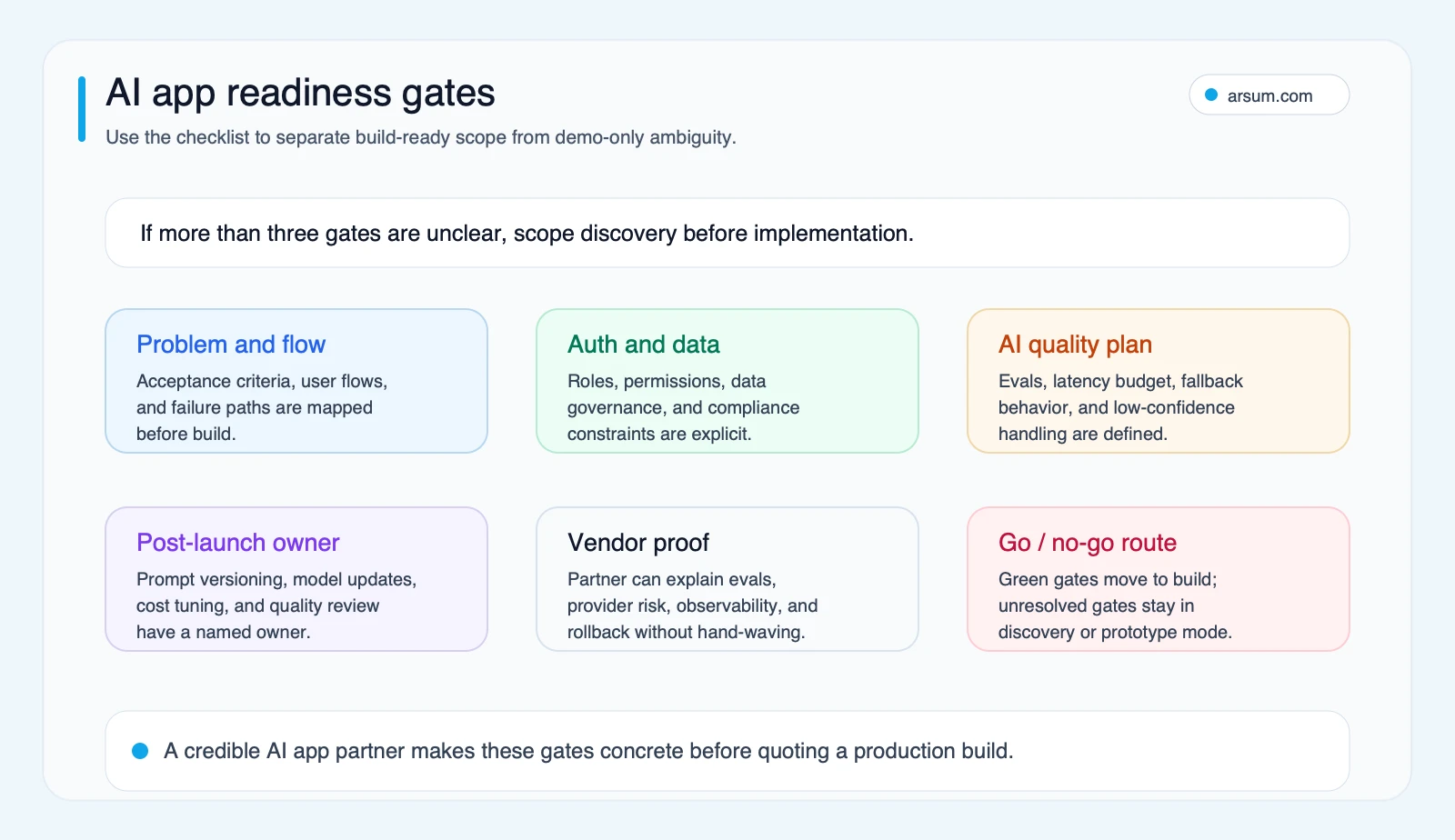
If ownership, evaluation, or rollback is unanswered, route the work to discovery or a non-production prototype rather than production deployment.
Method and limits
This guide uses an editorial decision framework rather than a proprietary benchmark. It distinguishes prototype generation from production operation, and treats community material as qualitative signals about common questions and failure modes—not adoption, savings, accuracy, or prevalence statistics.
Production guidance is linked to primary sources from OpenAI, Firebase, and NIST. The practical conclusion is intentionally narrower than “AI builds apps”: AI can accelerate drafts and constrained workflow steps; the organization still has to authorize, evaluate, monitor, operate, and, when needed, reverse the system.
Ready to Automate Your Business?
Stop wasting time on repetitive tasks. Let AI handle the busywork while you focus on growth.
Schedule a Free Strategy Call →Written by:Arsum editorial team
- Reviewed by
- Arsum editorial team
- Published
- June 20, 2026
- Updated
- July 5, 2026
- How this was produced
- Arsum uses research packs, source checks, and human editorial review to prepare and update blog articles. Editors are responsible for the final page.
- Source policy
- Sources are linked in the article when used. Methodology and source notes are included on higher-risk or high-visibility pages and are being rolled out across the archive. Editorial policy.
- Why this page exists
- Help B2B operators evaluate AI automation, implementation scope, cost, risk, and build-vs-buy decisions with practical context.