Automate customer onboarding by putting repeatable coordination—status updates, reminders, document collection, task routing, and risk alerts—into a controlled workflow while keeping discovery, stakeholder alignment, exceptions, and relationship repair with accountable people. The right design depends less on “how much AI” you add than on whether each customer tier has a clear activation milestone, trustworthy source data, named owners, and a humane escalation path.
Automate Customer Onboarding: Practical Guide
Explore automate customer onboarding: compare workflow fit, costs, risks, evidence, and practical next steps before you build, buy, or hire.

Effective onboarding automation draws a clear boundary between coordination the machine handles and relationships the CSM owns.
Table of Contents
- What most guides miss: choose the autonomy boundary before the tool
- Define the automation boundary
- Select automation depth by customer tier
- Build the trigger-to-owner operating map
- Run a narrow pilot before expanding automation
- Choose CRM configuration, a dedicated platform, or custom orchestration
- Disqualifying conditions and common failure modes
- What customer success practitioners are signaling
- A practical implementation sequence
- Frequently asked questions
What most guides miss: choose the autonomy boundary before the tool
Customer onboarding software can coordinate journeys, forms, portals, messages, and workflow steps. But tool capability is not permission to automate every interaction. The operating decision is where automation stops and a CSM, implementation lead, or executive sponsor takes over.
A useful rule is simple:
- Automate a step when it is repeatable, low-risk, reversible, and can be completed correctly from reliable system data.
- Keep a step human-owned when it requires judgment, commercial authority, relationship context, or recovery from a failed experience.
This is why an automated welcome email and an enterprise kickoff should not be designed the same way. IBM describes onboarding automation as software-supported handling of repeatable setup, communications, document collection, scheduling, data entry, and checks. IBM’s customer onboarding overview supports the coordination layer; it does not justify delegating consequential customer decisions to a model or sequence.
Braze similarly describes using customer behavior and milestones to coordinate onboarding messages and measure progress. That is useful when the behavior event and milestone are trustworthy. If product status is delayed, manually updated, or ambiguous, the message logic can become actively misleading. See Braze’s customer onboarding automation guide.
Define the automation boundary
The boundary is not a claim that “complex” work must always remain manual. It is a control decision: who can approve the next action, how costly an error would be, and whether the system can recover cleanly when it is wrong.
| Onboarding step | Default owner | Why |
|---|---|---|
| Welcome message and initial instructions | Workflow | Timing-sensitive, repeatable communication |
| Intake forms, document requests, reminders | Workflow | Structured collection and follow-up |
| Setup task assignment and due-date tracking | Workflow | Clear routing and shared visibility |
| Product or portal progress status | Workflow, if source data is reliable | Reduces manual status chasing |
| CSM handoff notes | Workflow with human review | Preserves context across internal transitions |
| Risk or stall alert | Workflow signals; human decides response | A signal is not a customer-recovery decision |
| Fit discovery | CSM or implementation lead | Requires listening and contextual judgment |
| Executive stakeholder alignment | Human owner | Trust, authority, and commercial context matter |
| Scope tradeoffs and timeline negotiation | Human owner | Requires accountable decision-making |
| Blocked-account recovery | Human owner | The relationship, not the reminder, is at risk |
| Security, legal, or approval escalation | Named accountable role | High failure cost and formal ownership |
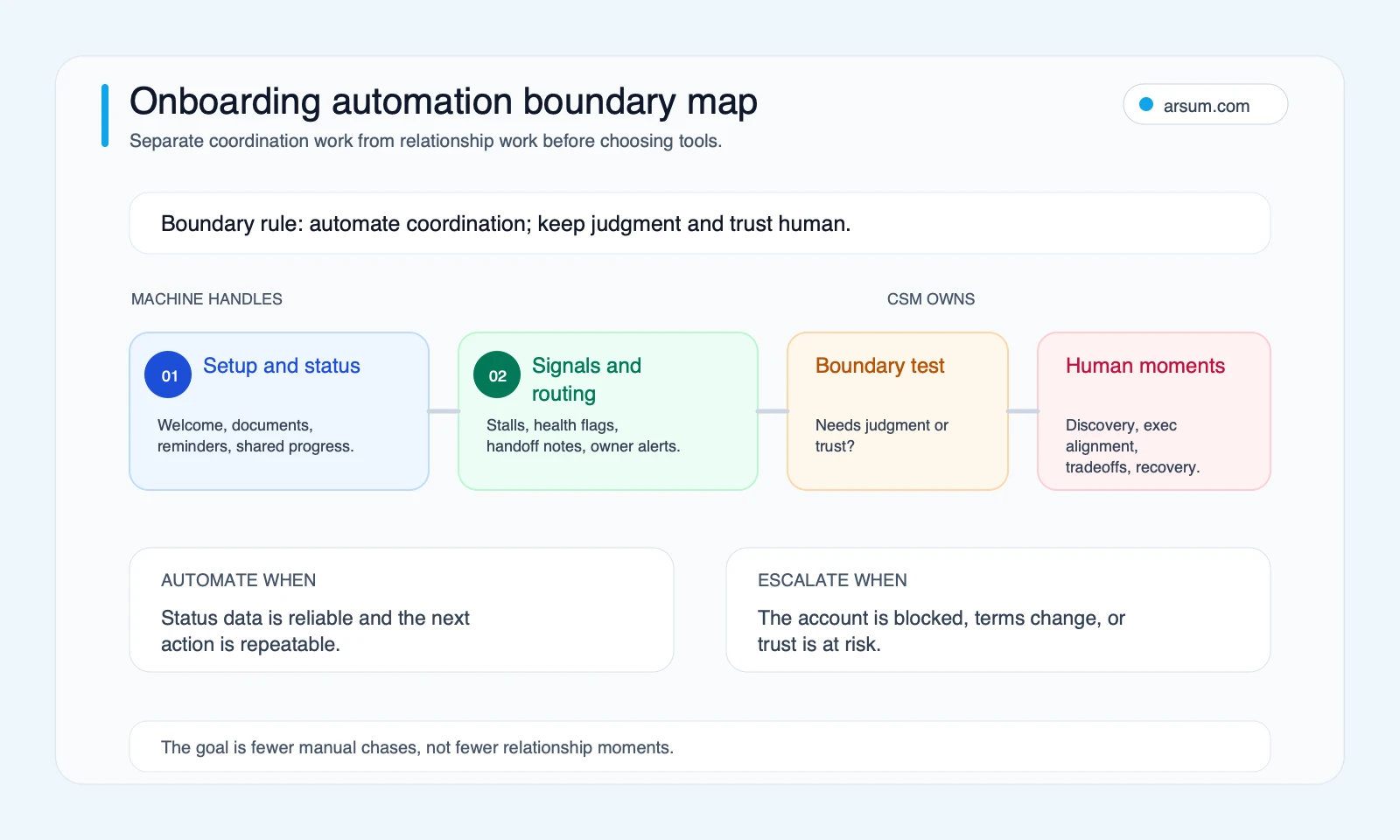
The practical implication: do not start with a generic nurture sequence. Start by identifying the coordination work that currently forces CSMs to reconcile spreadsheets, CRM fields, inboxes, and product activity. That same discipline applies to broader business workflow automation and AI process automation initiatives.
Select automation depth by customer tier
A single onboarding path usually creates one of two failures: strategic accounts receive an impersonal experience, or standard accounts consume more human capacity than their setup requires. Tiering lets you preserve high-touch moments where they matter.
| Tier | Appropriate automation depth | Human role | Minimum system requirements |
|---|---|---|---|
| Self-serve | Product-led guidance, reminders, help content, progress tracking, alert-only intervention | Respond to clear exceptions | Product events, activation definition, support route |
| Assisted | Automated checklist and status coordination around planned CSM touchpoints | Lead milestone conversations and recovery | CRM stage logic, task owner, progress view, calendar and messaging links |
| Enterprise | Workflow structure around a human-led implementation | Own discovery, approvals, stakeholder management, and commercial tradeoffs | Shared portal or workplan, approval routing, document control, implementation owner |
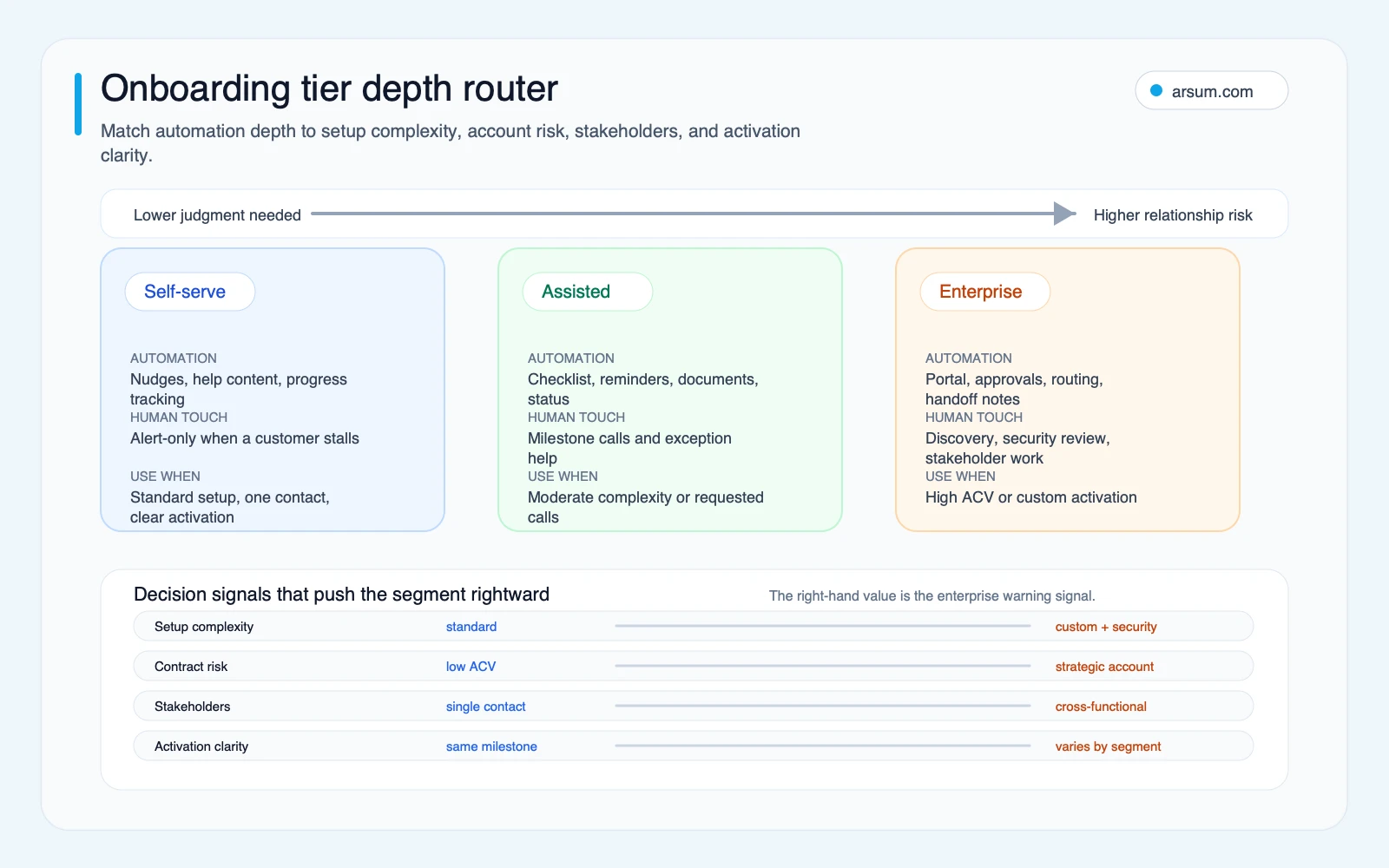
Use four questions to assign a tier:
- Is the configuration standard enough to guide from known inputs?
- Is the activation milestone consistent and observable?
- How many customer and internal stakeholders must act before value is reached?
- What is the cost of a poor or delayed onboarding experience for this segment?
High configuration variability, high account risk, many stakeholders, or unclear activation should reduce autonomy. The system can still collect information, coordinate approvals, and show status—but it should not pretend the account is progressing without a human owner validating the situation.
This is especially important when onboarding flows touch billing, contractual commitments, access controls, or compliance checks. Treat automated routing as operational support, not authorized decision-making.
Build the trigger-to-owner operating map
Before configuring a CRM workflow, portal, integration platform, or product experience, document the operating map. Moxo’s onboarding workflow material emphasizes collaborative workflows across customers, documents, partners, and status tracking; its onboarding workflow page is a useful illustration of the coordination problem. The architecture still needs your own ownership and exception rules.
For every stage, answer the following:
| Operating question | Required answer |
|---|---|
| What starts onboarding? | A specific signed-contract, payment, provisioning, or signup event |
| What is the source of truth? | One system and field set for customer stage and task status |
| What is the activation event? | A measurable product, configuration, or customer-value milestone |
| Which customer actions are required? | Named tasks, due dates, and reminder policy |
| Which internal actions are required? | Named role, queue, and service expectation |
| Which steps require approval? | Approver, escalation route, and decision record |
| What constitutes a stall? | A defined missed milestone, inactivity window, or unresolved blocker |
| Who owns recovery? | Named CSM, implementation lead, or escalation manager |
| What data is retained? | Event history, owner changes, customer communications, approval record |
| How does the workflow roll back? | Disable trigger, pause messages, restore manual queue, review affected accounts |
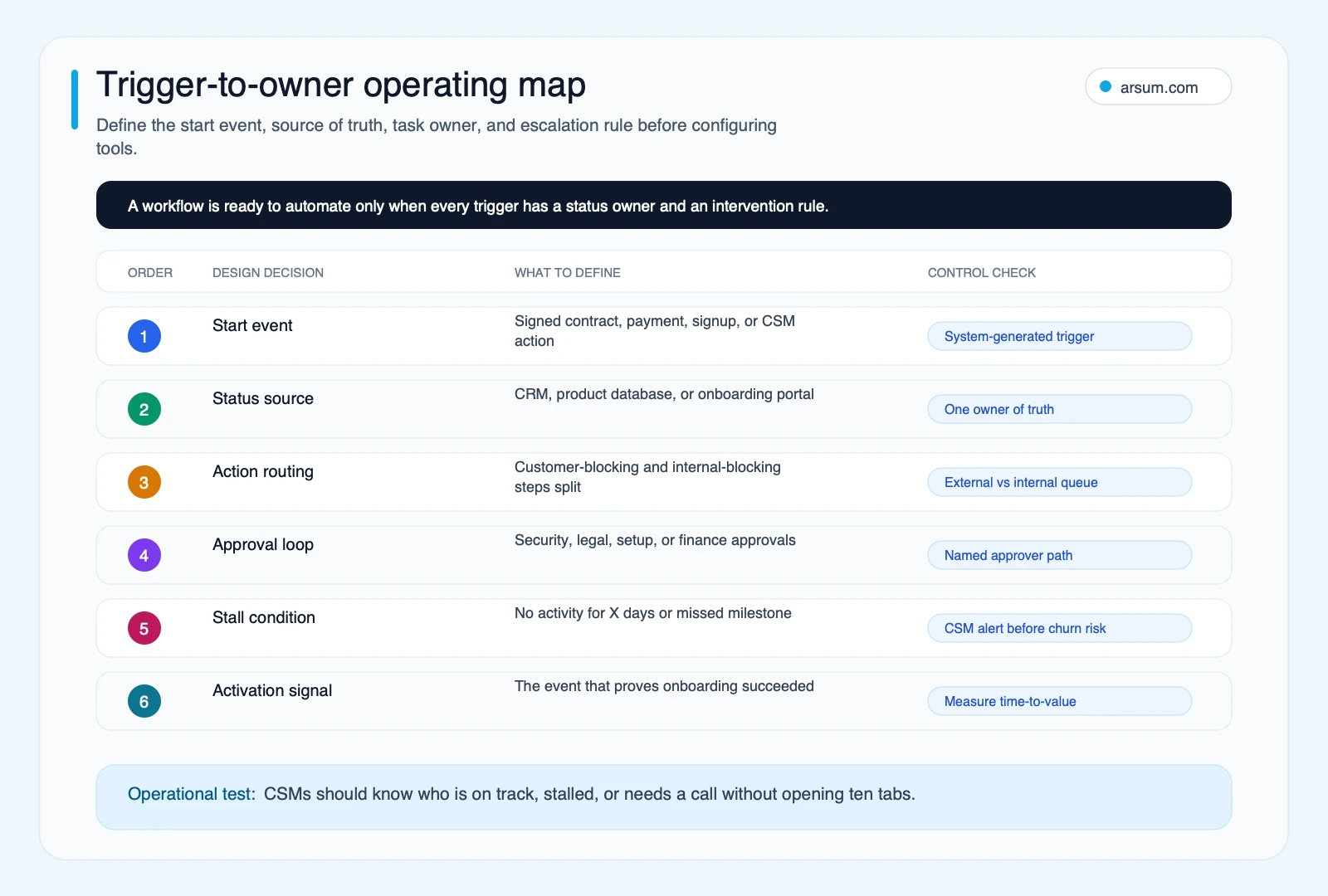
A workflow with two conflicting status sources is not automated; it is a faster way to create contradictory customer communications. Decide whether CRM, product telemetry, the portal, or an implementation system owns each status before adding integrations. AI integration consulting is relevant when this requires reconciling systems rather than merely switching on a connector.
Run a narrow pilot before expanding automation
Do not treat automation as a one-time implementation. Treat it as a controlled operating change with acceptance criteria.
Here is a worked pilot scorecard. It is an illustrative planning model, not a reported customer outcome.
| Scorecard field | Illustrative planning assumption |
|---|---|
| Pilot segment | One assisted tier with a consistent implementation path |
| Pilot scope | Intake collection, checklist creation, reminders, progress visibility, and one stall alert |
| Excluded work | Discovery, commercial changes, security review, executive escalation, and relationship repair |
| Baseline | Measure current CSM coordination minutes per account, activation time, stage-level stall rate, and manual status updates for four weeks |
| Target | Set an internal target for fewer duplicated updates and faster detection of genuine stalls; choose the threshold before launch |
| Quality metric | Alert precision: the share of alerts a CSM judges actionable |
| Exception metric | Number and type of customers who receive a message inconsistent with their actual status |
| Business owner | Head of Customer Success or Operations leader |
| System owner | CRM or RevOps administrator, with product-data owner where events are used |
| Review cadence | Weekly review during the pilot; inspect exceptions and sample customer histories |
| Acceptance condition | Baseline measures improve or remain acceptable without increasing misleading messages, unresolved stalls, or CSM recovery workload |
| Stop condition | Repeated incorrect status-triggered communications, material customer confusion, or an alert queue that lacks a named owner |
| Rollback | Pause outbound automation, return affected accounts to a human-managed queue, preserve the event log, correct data mapping, and retest on a small cohort |
The arithmetic should be visible when evaluating the pilot. For example, if a team currently records 30 minutes of manual coordination per account across 50 accounts per month, the planning baseline is 1,500 coordination minutes monthly. That is a measurement starting point, not a promised savings figure. The real question is whether the reduced activity is replaced by better exception handling—or merely shifted into another system.
A good pilot produces three decisions:
- Which triggers are reliable enough for automated action.
- Which alerts are useful enough for a CSM queue.
- Which onboarding steps remain human-owned because the cost of an incorrect automated interaction is too high.
💡 Arsum builds custom AI automation solutions tailored to your business needs.
Get a Free Consultation →Choose CRM configuration, a dedicated platform, or custom orchestration
The tool decision follows the operating model. A mature workflow does not automatically need a custom build, and a new platform does not fix undefined ownership.
| Approach | Best fit | Data dependencies | Main risk | Ongoing owner |
|---|---|---|---|---|
| CRM and email configuration | Standard onboarding stages, modest volume, predictable task routing | Clean CRM stage fields, owner assignment, message consent and templates | Manual updates remain the hidden source of truth | RevOps plus CS operations |
| Dedicated onboarding platform or portal | Multi-stakeholder coordination, document collection, customer-facing progress visibility | CRM integration, identity/access handling, task model, document governance | Adding another status layer without deciding which system wins | CS operations or implementation operations |
| Custom orchestration | Proprietary activation logic, multiple operational systems, tier-specific routing, unusual approvals | Stable APIs/events, data ownership, audit requirements, support model | Building workflow complexity before proving the pilot | Product/engineering with a business process owner |
Connector platforms can link steps across business systems; Make’s customer onboarding automation examples describe that category of capability. A connector is appropriate only after you know what field, event, owner, and failure state it should move.
Use a CRM-first approach when the process is mostly stage changes, tasks, and communications. Consider a dedicated portal when customers need shared visibility, document exchange, or multi-party coordination. Consider custom orchestration when the activation model depends on product usage, internal approvals, or several systems that cannot reliably express the workflow in one existing tool.
Custom work also requires explicit ownership after launch: who changes rules, who audits alerts, who approves new automation paths, who handles an integration failure, and who has authority to turn automation off. For broader tradeoffs, see AI automation platform guidance and custom AI solutions for business.
Disqualifying conditions and common failure modes
Some workflows should not be automated yet. Pause the project if any of these conditions apply:
- No agreed activation milestone exists for the segment.
- Two or more systems claim to own onboarding status.
- Customer data is routinely entered late or changed outside the workflow.
- No named person owns a stalled task or an alert queue.
- The team cannot explain how an automated message is paused or corrected.
- The onboarding path is changing weekly due to product, pricing, or implementation changes.
- A consequential approval is being routed without a human decision owner.
The most common failure mode is “automation theater”: sequences are running, but CSMs still manually reconcile progress and chase internal teams. Another is stale-state messaging: a customer receives a reminder for work already completed because the source data has not updated. The third is false escalation: the system produces enough low-value alerts that the CSM ignores the queue, including the alerts that matter.
Avoid these failures by auditing a small cohort account by account. Compare the customer’s actual journey, system status, outbound messages, task ownership, and CSM notes. This is more informative than counting messages sent.
What customer success practitioners are signaling
Community discussions are useful for identifying questions buyers ask, but they are not market-wide evidence. The following are qualitative, snippet-level signals from customer success discussions, not adoption statistics or verified tool outcomes.
- A CustomerSuccess discussion about automating customer onboarding raises the scale problem: manual kickoff and follow-up work becomes difficult to sustain, while teams still want guided setup and progress visibility.
- A separate discussion about SaaS onboarding software reflects skepticism that another tool removes actual administration instead of relocating it.
- A B2B onboarding tools discussion points toward practical needs such as portals, CRM handoffs, document collection, and fewer fragmented email/call exchanges.
- A title-level discussion asking what to automate and what to keep human reinforces the central boundary question.
Translate those signals into an evaluation requirement: prove that the proposed workflow removes duplicated coordination, gives the customer accurate progress visibility, and creates a human recovery path when progress breaks.
A practical implementation sequence
Start with one tier and one activation path.
- Map the current workflow from trigger through activation, including rework and exceptions.
- Name the source-of-truth field for every stage and task.
- Separate customer actions, internal actions, approvals, and human judgment calls.
- Choose one automation target with a reversible failure mode, such as document reminders or checklist generation.
- Measure the baseline before launch.
- Review every exception weekly, then expand only after the pilot meets its own acceptance criteria.
This sequence is deliberately less exciting than installing a new platform. It is also how you avoid automating a poorly defined process. If your team needs a broader operating model, AI for operations teams and business process automation consulting provide adjacent decision frameworks.
Trust and methodology
Author: Kai OpenClaw research pack worker. Editorial review status: Arsum Editorial Team review pending for the underlying research pack. Last updated: 2026-07-03.
The boundary map, tier router, trigger-to-owner map, and pilot worksheet are Arsum editorial frameworks. External claims are limited to the linked IBM, Braze, Moxo, and Make materials. Community sources are treated as qualitative signals only; they do not establish market-wide outcomes, tool performance, or ROI.
Frequently asked questions
What is the difference between onboarding automation and a drip sequence?
A drip sequence sends scheduled messages. Customer onboarding automation connects messages, tasks, status, customer actions, internal ownership, and escalation rules around an activation milestone. A sequence may be one component, but it cannot substitute for source-of-truth status and exception handling.
What should stay human in customer onboarding?
Keep discovery, executive alignment, scope changes, negotiations, relationship repair, security or contractual escalation, and blocked-account recovery human-owned. These actions require contextual judgment and accountable authority.
How do you know whether onboarding automation is working?
Use the pilot scorecard: coordination time per account, activation time, stage-level stall rate, alert precision, misleading-message incidents, and unresolved exception volume. Review account histories, not only workflow volume.
Do you need a dedicated onboarding tool?
Not necessarily. CRM and email configuration may be sufficient for a standard path. A portal is useful when customers and internal teams need shared visibility. Custom orchestration is appropriate when proprietary activation logic or multiple systems make generic configuration unreliable.
Ready to Automate Your Business?
Stop wasting time on repetitive tasks. Let AI handle the busywork while you focus on growth.
Schedule a Free Strategy Call →Written by:Arsum editorial team
- Reviewed by
- Arsum editorial team
- Published
- July 3, 2026
- Updated
- July 5, 2026
- How this was produced
- Arsum uses research packs, source checks, and human editorial review to prepare and update blog articles. Editors are responsible for the final page.
- Source policy
- Sources are linked in the article when used. Methodology and source notes are included on higher-risk or high-visibility pages and are being rolled out across the archive. Editorial policy.
- Why this page exists
- Help B2B operators evaluate AI automation, implementation scope, cost, risk, and build-vs-buy decisions with practical context.