Automate data entry by using the visible O*NET/BLS task ranking to choose a repetitive task to inspect, then authorizing only the transfer steps whose inputs, validation rules, exception owner, and rollback path are clear. Technical addressability can prioritize a task; it does not authorize an unattended write into a consequential system.
Automate Data Entry: 9 O*NET Tasks Ranked
Explore automate data entry: see the O*NET/BLS task score, 2029 capability scenario, human-review boundary, and a measurable first workflow pilot.

Table of Contents
- Data entry automation opportunity
- What most guides miss: the ranked task is only the starting point
- Classify the data-entry job before choosing a tool
- Route the workflow using one explicit readiness method
- Build the normal path and the ugly exception path together
- Run a pilot that can be accepted or stopped
- Disqualifying conditions and failure modes
- Choose a tool, integration, or process redesign
- Methodology and limits
- Next step
Arsum Automation Opportunity Index · 2026-08-12
Data entry automation opportunity
Data entry is a high-opportunity target when inputs are digital, fields are defined, and exceptions can be routed. Poor scans, ambiguous source documents, and destructive system writes still require validation.
Current score
81.6/100
High automation opportunity
Modeled task capacity
18.4-30 hours/week
P25-P75 planning range
2029 capability scenario
86.5/100
+4.9 points, not an adoption forecast
Recommended first pilot
document extraction with field validation and exception routing
Start narrow, measure, then expand
Decision: Automate capture, validation, and transfer as one controlled workflow rather than replacing keystrokes with an unaudited bot.
How the data entry score is calculated
For data entry, Arsum assessed 9 of 9 O*NET tasks from Data Entry Keyers (43-9021.00). The 81.6/100 result weights each task's current automation share by O*NET importance, relevance, and frequency. It measures technical workflow opportunity—not the percentage of data entry jobs that disappear and not the share of a team that should be removed.
People should review low-confidence extraction, duplicate or conflicting records, identity-sensitive changes, and irreversible writes. The weighted supervision estimate is 11.8%, which is why the practical design is an exception-and-approval system rather than unsupervised autonomy.
Top data entry tasks for automation support
O*NET task 11401
Read source documents such as canceled checks, sales reports, or bills, and enter data in specific data fields or onto tapes or disks for subsequent entry, using keyboards or scanners.
95/100
Rpa
Automate normal cases; route exceptions
O*NET task 11402
Compile, sort, and verify the accuracy of data before it is entered.
95/100
Traditional Software
Automate normal cases; route exceptions
O*NET task 11403
Compare data with source documents, or re-enter data in verification format to detect errors.
95/100
Rpa
Automate normal cases; route exceptions
O*NET task 11404
Store completed documents in appropriate locations.
65/100
Hybrid
AI assists; review exceptions and material outputs
O*NET task 11405
Locate and correct data entry errors, or report them to supervisors.
85/100
Hybrid
Automate normal cases; route exceptions
O*NET task 11406
Maintain logs of activities and completed work.
85/100
Hybrid
Automate normal cases; route exceptions
O*NET task 11407
Select materials needed to complete work assignments.
65/100
Hybrid
AI assists; review exceptions and material outputs
These are ranked for practical opportunity: task exposure and current capability are discounted when implementation is complex, supervision is heavy, or live human interaction dominates. The recommended pilot above is an editorial choice among these signals, not simply the highest raw percentage.
Data entry tasks that should remain human-led
- 65/100 current capability: Store completed documents in appropriate locations. AI assists; review exceptions and material outputs.
- 65/100 current capability: Select materials needed to complete work assignments. AI assists; review exceptions and material outputs.
- 85/100 current capability: Locate and correct data entry errors, or report them to supervisors. Automate normal cases; route exceptions.
- 65/100 current capability: Load machines with required input or output media, such as paper, cards, disks, tape, or Braille media. AI assists; review exceptions and material outputs.
Data entry capability from 2026 to 2029
2026 current
81.6/100
81.6/100
2028 midpoint
84.8/100
84.8/100
2029 scenario
86.5/100
86.5/100
The scenario adds 4.9 score points by 2029-08-12 under the same task mix. It assumes better reliability and integration in the tasks already identified as technically assistable. It does not assume that employers deploy those systems, that every normal case becomes autonomous, or that employment changes by the same amount.
The largest weighted capability gains come from:
- O*NET task 11404, Store completed documents in appropriate locations. 65→75.
- O*NET task 11407, Select materials needed to complete work assignments. 65→75.
- O*NET task 11405, Locate and correct data entry errors, or report them to supervisors. 85→90.
Modeled hours and wage capacity for data entry
The data entry model assigns 30 hours of a reference 40-hour week across rated tasks and leaves 10 hours unmodeled. On that explicit assumption, current automation capability represents 18.4-30 hours/week. At the May 2025 BLS national mean wage of $21/hour, the gross data entry planning range is $19,869-$33,115/year per worker.
BLS national employment127,080
Mean annual wage$43,310
Tasks with full score inputs9/9
Assessment coverage100%
Gross wage capacity is not net savings. A business case must subtract implementation, software and model usage, review time, exception handling, maintenance, and risk reserves. BLS employment excludes self-employed workers.
A controlled 30/60/90-day data entry pilot
- Days 0-30: baseline document extraction with field validation and exception routing. Capture volume, handling time, rework, error rate, source systems, permissions, and the exception owner before changing the workflow.
- Days 31-60: run in review mode. Let the system prepare or route work, keep logs, and require human approval at the boundary described above. Measure accepted outputs and review cost, not generated volume.
- Days 61-90: expand only after evidence. Increase scope when accuracy, cycle time, exception rate, and net capacity beat the baseline without weakening customer, employee, financial, legal, or operational controls.
Sources, formula, and limitations
Occupation and task facts come from O*NET O*NET 30.3. Employment and wage inputs come from BLS OEWS May 2025 national estimates. Arsum adds the task-level current capability, supervision, implementation, time-allocation, and 2029 scenario assessments.
The occupation score is the exposure-weighted mean of task automation shares. Exposure combines normalized O*NET importance, relevance, and a log-scaled transformation of frequency. The time range applies a ±25% planning band around the modeled task capacity. Read the full Automation Opportunity Index methodology for formulas, QA gates, version history, and reproducible queries.
- The task inventory comes from O*NET 30.3; Arsum supplies the automation assessment and transformation.
- The time model allocates 30 hours of a reference 40-hour week across rated O*NET tasks, leaving 10 hours unmodeled for context switching and work not represented by task statements.
- Hours and wage capacity are planning ranges, not measured savings. Net ROI must subtract software, implementation, review, exception handling, maintenance, and risk costs.
- The 2029 value is a capability scenario, not a forecast of adoption, employment, layoffs, or autonomous operation.
- All 9 tasks have the O*NET inputs needed for score weighting and were assessed.
- BLS wage and employment data use the matching detailed SOC occupation; employment excludes self-employed workers.
Version: aoi-v0.2 · run 6 · capability date 2026-08-12 · forecast horizon 2029-08-12.
What most guides miss: the ranked task is only the starting point
The O*NET/BLS task model above ranks nine data-entry-related tasks under its disclosed Automation Opportunity assumptions. Use the ranking to ask, “Which repetitive task should we assess first?” Do not use it to infer job loss, adoption, realized savings, or that a system may make a business decision without approval.
The decision that matters is narrower:
Automate mechanical transfer only when the team can define a valid record, identify the authoritative source for each field, name the exception owner, and prevent a bad write from silently becoming the system of record.
This distinction changes the pilot design. A high-ranked task involving stable fields might justify a bounded trial. The same task involving payment instructions, customer eligibility, regulated records, or irreversible updates may still require a reviewer to approve every write.
The model is a prioritization aid, not a control model. The control model comes from the workflow: source lineage, validation rules, duplicate handling, approval authority, monitoring, and the ability to correct or reverse an incorrect record.
Classify the data-entry job before choosing a tool
Search results often group browser automation, OCR, spreadsheets, and integrations under one label. They are different workflow types with different failure modes. Start with the input, target system, and consequence of an error—not a tool shortlist.
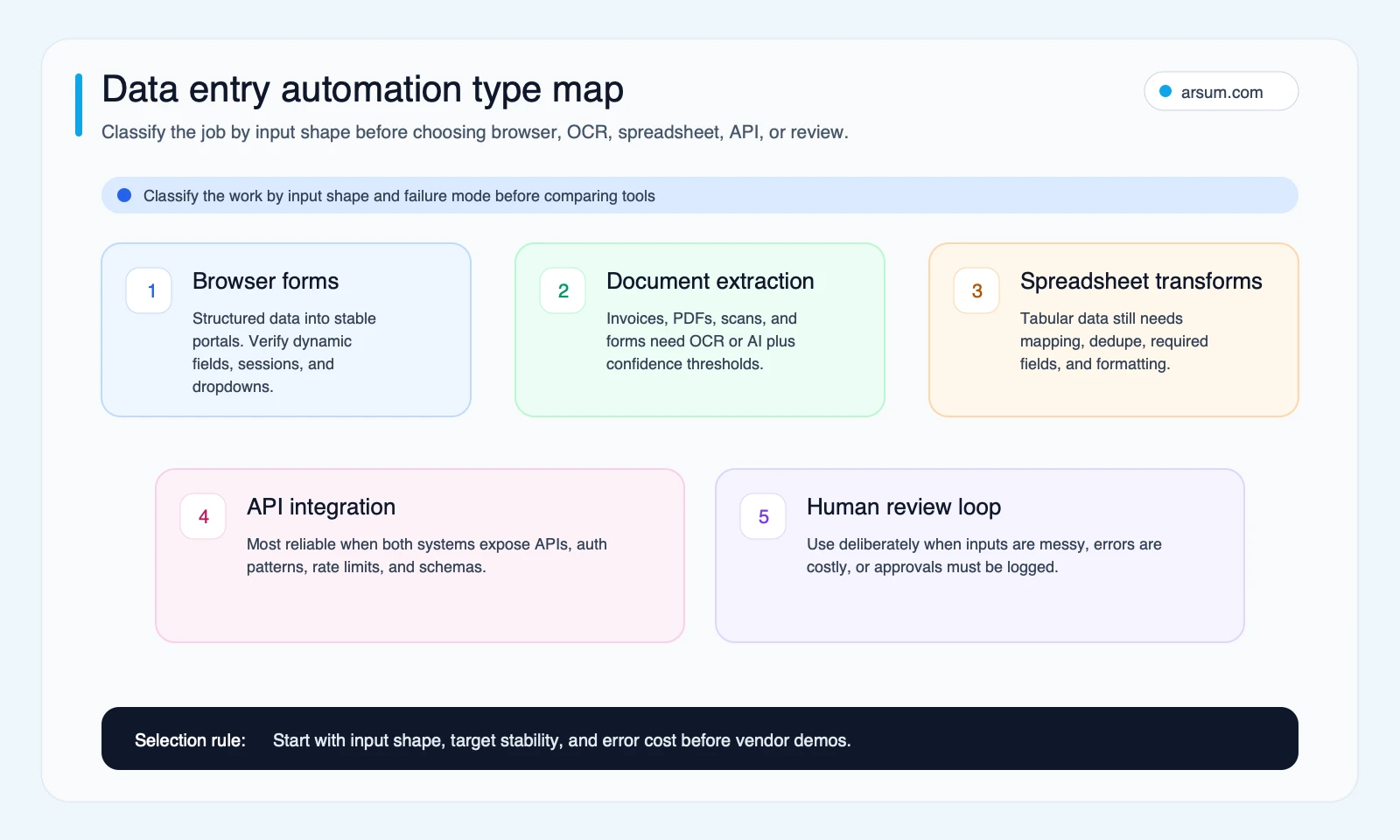
Classify the input, target, and failure consequence before selecting a tool.
Browser form filling
Browser automation moves structured data from a spreadsheet, webhook, database, or internal system into a portal. Axiom.ai’s data-entry guidance describes browser actions such as entering text, pressing buttons, and scraping data. Its form-filling guidance describes mapping structured values into browser fields.
This route can fit stable, authorized portals with repeatable fields and visible submission outcomes. Treat it as a controlled trial when the portal has dynamic dropdowns, date pickers, JavaScript behavior, multi-step authentication, or frequently changing layouts. A practitioner discussion about moving Excel data into web forms identifies dynamic elements as an implementation obstacle; that is qualitative signal, not a benchmark for any tool.
Document extraction
Document extraction turns invoices, purchase orders, receipts, PDFs, scans, and forms into usable fields. DocuWare’s guide describes OCR and advanced OCR as ways to convert scanned documents and images into machine-readable data. That supports the capability claim, not a universal accuracy claim.
Evaluate extraction field by field. Supplier name may be adequate for routing, while a payment amount, tax identifier, account number, or line-item quantity can need stricter validation or review. Practitioner discussion in r/documentAutomation surfaces handwritten content, complex tables, row-alignment errors, and downstream error cascades as failure modes worth testing with real samples.
Spreadsheet transformation
Use this category when data is already tabular but needs column mapping, format normalization, required-field checks, deduplication, or a controlled update to another system. It is often simpler than document extraction or browser automation, but it still needs a data contract: required columns, permitted formats, source precedence, and a rule for whether duplicates are rejected, updated, or reviewed.
API integration
When source and target systems provide authorized, reliable APIs, an integration can remove the brittleness of browser interaction. It still needs authentication controls, duplicate protection, schema-change monitoring, response logging, and a defined owner. API access is an implementation option, not a waiver of review or approval rules.
Human-reviewed write-back
Human review is the appropriate architecture for variable, ambiguous, privacy-sensitive, or high-consequence records. Automation can collect, extract, validate, and prepare a proposed record. The reviewer decides whether it is authorized to write.
| Workflow type | Best first use | Validate before write-back | Keep human approval for |
|---|---|---|---|
| Browser form filling | Stable, authorized portals with repeatable fields | Required fields, submission status, duplicate check | Unfamiliar portal states or consequential submissions |
| Document extraction | Invoices, scans, PDFs, receipts, purchase orders | Field formats, source linkage, low-confidence or conflicting fields | Payment, account, tax, or exception decisions |
| Spreadsheet transformation | Clean CSV or workbook inputs | Required columns, formats, duplicates, business rules | Ambiguous mapping or overwrite decisions |
| API integration | Authorized systems with documented programmatic access | Schema, authentication, duplicate protection, response status | Sensitive writes or rule exceptions |
| Review queue | Variable or high-cost records | Evidence package and approval log | Any record outside approved rules |
For a broader selection lens, see AI workflow automation tools and the comparison of n8n, Make, and Zapier.
Route the workflow using one explicit readiness method
Score each of these eight dimensions from 0 to 2: input consistency, form stability, API availability, data sensitivity, error cost, exception frequency, audit need, and maintenance owner.
This score is a routing tool, not a forecast and not a permission score. Higher scores mean the workflow needs more controls and implementation work.
- Under 6: consider a limited no-code or review-only trial if the task is low consequence and reversible.
- 6–10: run a controlled pilot with explicit validation, evidence retention, and an owned exception queue.
- 11 or more: scope the work as an integration or document-workflow project; do not interpret the score as permission for greater autonomy.
Read the individual dimensions alongside the total. High error cost, data sensitivity, audit need, or exception frequency should reduce unattended automation even if the transfer itself is technically easy.
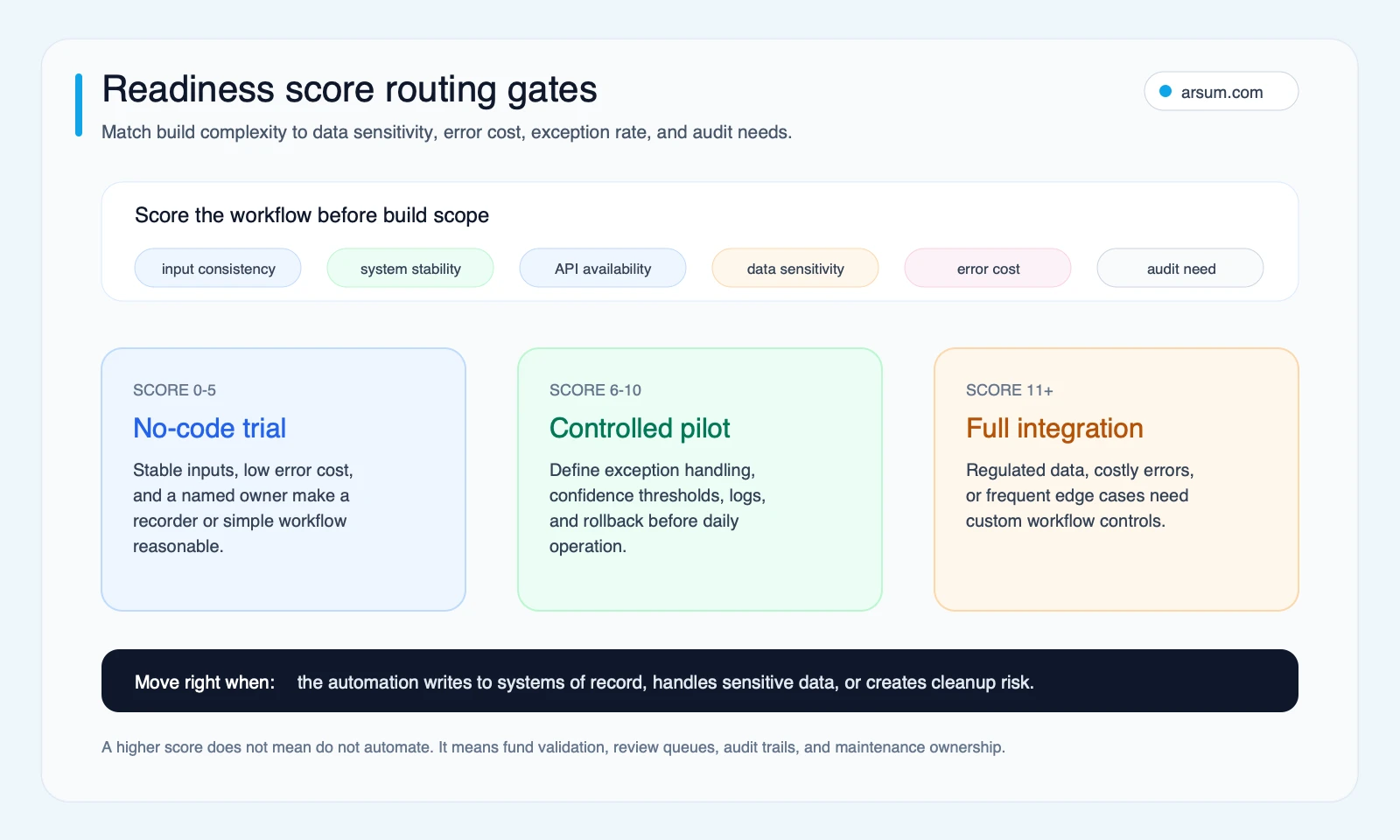
The routing gates indicate the needed level of control and implementation effort; they do not grant more autonomous authority.
Build the normal path and the ugly exception path together
A production workflow needs one path for clean records and another for incomplete, conflicting, or unsafe records. The exception path is where hidden data-quality debt appears if it has not been designed upfront.
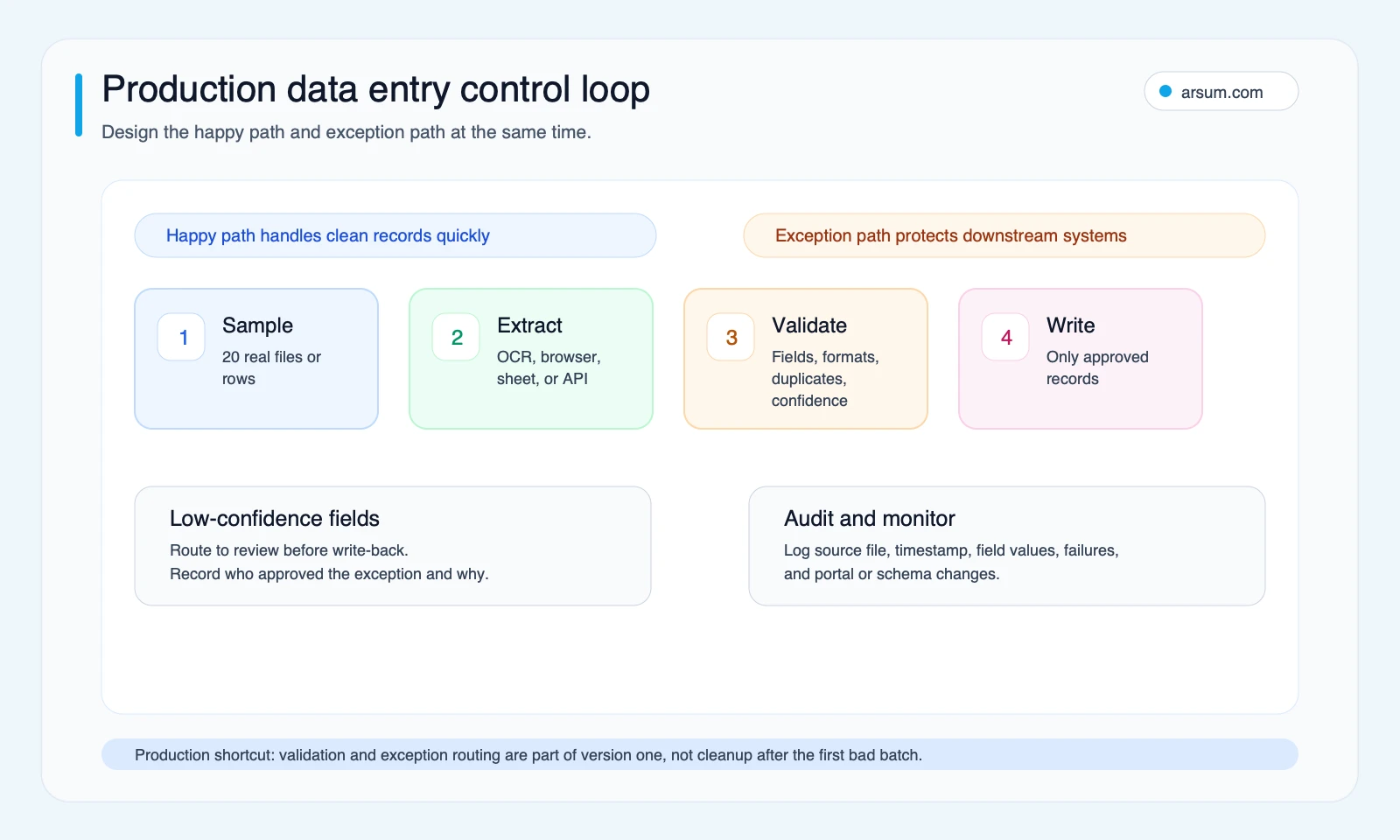
Clean records move through defined controls; uncertain records retain their source evidence and enter a named review queue.
Example: invoice-to-ERP pilot
Assume an accounts-payable team receives supplier invoices as PDFs and keys selected fields into an ERP. This is an illustrative planning template, not an observed result.
Normal path
- Receive the source document and assign a source ID.
- Extract approved fields such as supplier identifier, invoice number, date, currency, amount, and purchase-order reference.
- Validate required fields against format and business rules.
- Check for duplicate invoice number plus supplier.
- Create a proposed ERP record only after source and validation checks pass.
- Log source ID, extracted values, validation result, destination response, timestamp, and workflow version.
Ugly exception path
If an invoice is handwritten, has an unknown supplier, lacks a purchase-order reference, contains a conflicting total, or is already present in the ERP, the workflow should not guess. It should create an exception item with the source document, extracted values, failed rule, proposed action, and reviewer assignment. The accounts-payable lead—or another named role—approves, corrects, rejects, or routes it. Retain the decision and reason with the record.
Rollback
Before enabling write-back, prove that a created record can be found through its source ID, corrected or reversed through the ERP’s approved process, and excluded from duplicate replay. If that cannot be demonstrated, keep the workflow in draft-record or review-only mode.
For adjacent finance workflows, see accounts receivable automation and AI for finance teams.
Run a pilot that can be accepted or stopped
A convincing demo on a few clean records is not a launch criterion. Capture your own baseline, set the acceptance gate before the pilot, and stop when the control boundary fails.
| Measure | Baseline to capture | Pilot target to set internally | Owner and cadence |
|---|---|---|---|
| Records received | Actual intake by source type | A stable, countable pilot scope | Operations owner, weekly |
| Handling minutes per record | Intake, lookup, entry, correction, and review separately | Improvement against measured baseline | Process owner, weekly |
| Required-field completeness | Records meeting the documented data contract | No decline from baseline; field-specific requirement | Data owner, daily sample |
| Exception rate and aging | Exception count and time to resolution | Queue stays within agreed staffing and age limit | Review-queue owner, daily |
| Write-back errors | Incorrect, duplicate, rejected, or unauthorized writes | Maximum set before launch; zero tolerance where warranted | System owner, daily |
| Evidence retention | Source, validation, reviewer action, and destination response | Complete lineage for every scoped record | Control owner, weekly |
| Rollback test | Ability to locate, correct or reverse, and prevent replay | Pass before unattended write-back | System owner, before launch |
Illustrative planning arithmetic:
weekly labor capacity released = weekly records × (baseline handling minutes − pilot handling minutes) ÷ 60
Then include the inputs that generic “time saved” claims omit:
net weekly value = released capacity value − reviewer time − maintenance time − correction cost − tooling and implementation allocation
These are planning assumptions, not expected outcomes. The calculation is only useful when its inputs include correction and exception costs, especially where a bad record affects payments, customer communication, reporting, or compliance.
Pilot acceptance gate: continue only if required-field and evidence-retention standards are met, the exception queue has an owner, the approved write-back error threshold is maintained, and rollback passes. Pause or revert to review-only mode if an unauthorized write occurs, evidence is missing, exception aging exceeds capacity, or a form, template, credential, or rule change invalidates mapping.
💡 Arsum builds custom AI automation solutions tailored to your business needs.
Get a Free Consultation →If your team can measure the workflow but cannot define its authorization boundary or acceptance criteria, the next work is control design—not another tool demo. Arsum can help scope a business process automation consulting assessment around systems, validation, review ownership, and a pilot gate.
Disqualifying conditions and failure modes
Some workflows should not begin with unattended automation.
Do not start with direct write-back when
- the process owner cannot define the authoritative source for each field;
- records affect payment instructions, legal status, customer eligibility, regulatory filings, or another consequential decision without authorized approval;
- portal terms, permissions, or authentication arrangements do not authorize automation;
- nobody owns exceptions, monitoring, or process changes;
- a write cannot be traced, corrected or reversed, and prevented from replaying;
- instructions depend on tacit judgment that cannot be expressed as a rule or routed to a reviewer;
- the sample excludes representative layouts, edge cases, and portal states.
Failure modes to test deliberately
Dirty-source propagation. A duplicate or malformed value can move faster once automated. Test required fields, source precedence, formats, and duplicates before write-back.
Portal change or session failure. Browser flows can fail after page changes, expired authentication, or dynamic-control behavior. Monitor failed states and require a human check after material portal changes.
False confidence in extracted data. A field can look syntactically valid while being contextually wrong. Use field-specific rules and review criteria, not one universal confidence threshold.
Exception queues becoming hidden manual work. Track volume, aging, and resolution reason. If exceptions dominate, improve the source process, field mapping, or workflow scope before expanding.
Maintenance without ownership. Assign a business owner for rules and exceptions and a technical owner for credentials, integrations, monitoring, and changes. “The team” is not an owner.
For a wider operating model, AI process automation and AI automation for small business cover how to sequence narrow, measurable work before a broader program.
Choose a tool, integration, or process redesign
Choose the lightest approach that meets the required control standard.
A no-code browser or spreadsheet workflow can suit stable, low-consequence work with clear rules and visible failures. A document workflow can suit extraction bottlenecks when uncertain fields route to review. An API integration may be appropriate when authorized system access is available and updates need durable monitoring. A custom workflow may be justified when multiple systems, specialized validation, audit evidence, and role-based approvals are central.
Process redesign comes first when the team cannot agree on fields, ownership, handoffs, or exception decisions. Automating ambiguity makes it faster and harder to trace.
| Question | Tool-led workflow | Integration or custom workflow |
|---|---|---|
| Is the task narrow and stable? | Often suitable | May be unnecessary |
| Are inputs and rules documented? | Required | Required |
| Is the target system accessible by API? | Helpful | Often a key advantage |
| Are write errors costly or regulated? | Use review gates; may be insufficient alone | Controls and evidence can be tailored |
| Will variants and exceptions grow? | Can become hard to maintain | Can be designed around routing and ownership |
| Who maintains it? | Business owner plus technical support | Explicit business and technical owners |
Methodology and limits
The visible role-research module is the article’s O*NET/BLS Automation Opportunity task model. It estimates technically addressable task capacity under disclosed assumptions. It does not predict employment outcomes, adoption, savings, accuracy, or permission to automate a decision.
This article also uses an Arsum research pack reviewed on 2026-07-03. Capability descriptions are attributed to Axiom.ai’s data-entry guidance, Axiom.ai’s form-filling guidance, and DocuWare’s automated-data-entry guide. Community material is qualitative evidence of implementation questions and failure modes, not a statistic about reliability, adoption, or outcomes.
The type map, readiness routing, validation checklist, and pilot scorecard are Arsum editorial decision frameworks. Supply and approve your own error tolerances, staffing assumptions, financial inputs, and authorization limits.
Next step
A workflow is ready for a controlled pilot when it has a clear task boundary, measured baseline, named reviewers, defined evidence retention, and a reversible write path. If those elements are absent, define the process before adding automation.
For a broader operational program, see agentic AI workflow automation and AI automation ROI examples. A focused assessment can turn the scorecard into a scoped pilot with source and target mapping, validation rules, exception ownership, acceptance criteria, and rollback design.
Ready to Automate Your Business?
Stop wasting time on repetitive tasks. Let AI handle the busywork while you focus on growth.
Schedule a Free Strategy Call →Written by:Arsum editorial team
- Reviewed by
- Arsum editorial team
- Published
- July 3, 2026
- Updated
- August 12, 2026
- How this was produced
- Arsum uses research packs, source checks, and human editorial review to prepare and update blog articles. Editors are responsible for the final page.
- Source policy
- Sources are linked in the article when used. Methodology and source notes are included on higher-risk or high-visibility pages and are being rolled out across the archive. Editorial policy.
- Why this page exists
- Help B2B operators evaluate AI automation, implementation scope, cost, risk, and build-vs-buy decisions with practical context.