Automated business process solutions should start with a four-way decision: automate now when the work has defined inputs, outputs, and ownership; redesign first when the handoffs or rules are unclear; use a standard workflow tool when reliable connectors and fixed logic cover the job; and scope a custom AI workflow only when exceptions, governance, or integration complexity require controls beyond a standard configuration.
Automated Business Process Solutions: Where AI Fits
Explore automated business process solutions: compare workflow fit, costs, risks, evidence, and practical next steps before you build, buy, or hire.

A buyer-side framework for choosing between workflow tools, custom automation, and agentic builds.
Table of Contents
- What most guides miss: select the process before the platform
- Score the workflow before you buy anything
- Choose the smallest solution tier that preserves control
- The decision tree for build, buy, or redesign
- Run a pilot with an acceptance contract, not a vague promise
- Design the exception path before go-live
- Failure modes that should disqualify or delay automation
- Compare partners on operating design, not AI vocabulary
- A practical next step
What most guides miss: select the process before the platform
Platform comparisons are useful after a team has chosen a process. They are less useful when the actual decision is whether the process is ready, what level of autonomy is authorized, and who will operate the exception path after launch.
Use this as a discovery rubric, not a predictive benchmark. It does not forecast savings, implementation time, or employee impact. It helps a sponsor decide what must be true before asking for proposals.
A workflow is usually ready to automate when:
- The triggering event is clear.
- A correct output can be defined and checked.
- The source data is accessible and has usable lineage.
- The normal path is repeatable enough to describe.
- Exceptions can be identified, routed, and resolved by a named person.
- The business owner can measure whether the workflow is helping or creating rework.
If those conditions are absent, the first project may be process mapping, data cleanup, or an approval redesign—not automation. That is still useful progress. Automating an unclear process can make ambiguity travel faster across systems.
A practical distinction matters here. Anthropic’s guide to effective agents separates predefined workflows from agents and recommends starting with the simplest solution that can reliably do the work. A fixed workflow with one AI-assisted classification step is not automatically an agentic system, and treating it as one can add cost and governance without improving the outcome.
For a broader operating view, see AI business process automation and AI process automation.
Score the workflow before you buy anything
The score below makes six factors explicit. Rate each from 1 to 3 based on a defined sample of recent workflow runs. Use the same sample window for every candidate process so comparisons are fair.
| Factor | 1: weak readiness | 2: partial readiness | 3: strong readiness |
|---|---|---|---|
| Rule clarity | The outcome depends mostly on undocumented judgment | Core steps are known, but edge cases are inconsistently handled | Rules, examples, and acceptance criteria can be documented |
| Exception pattern | Exceptions are unknown or dominate the work | Common exception types are known but not consistently routed | Exceptions are identifiable and have a documented route |
| Data access and lineage | Inputs are manually assembled or source records are unclear | Some structured access exists, with cleanup or reconciliation needed | Inputs are accessible, traceable, and suitable for validation |
| Approval design | Decisions or changes are made without a defined approver | Approval exists but is informal or inconsistently recorded | Approval owner, authority, and escalation path are explicit |
| Compliance and consequence | Requirements are unknown, or the output can create irreversible harm | Controls are understood but need design work | Data handling, audit needs, and permitted autonomy are documented |
| Owner after launch | No one owns maintenance, exceptions, or change requests | An owner is likely but responsibilities are incomplete | A named operational owner accepts post-launch responsibility |
Do not treat a higher score as permission for higher autonomy. A regulated workflow can be well prepared for automation while still requiring human approval before a consequential action. High failure cost and low reversibility should reduce autonomy and increase review controls.
A simple interpretation is:
- Mostly 3s: run a controlled pilot and compare standard tools with a narrow custom option if integration or control needs justify it.
- Mostly 2s: automate only after closing the specific readiness gaps; pilot scope should include those gaps as deliverables.
- Several 1s: redesign the process, establish data access, or assign ownership before selecting a platform.
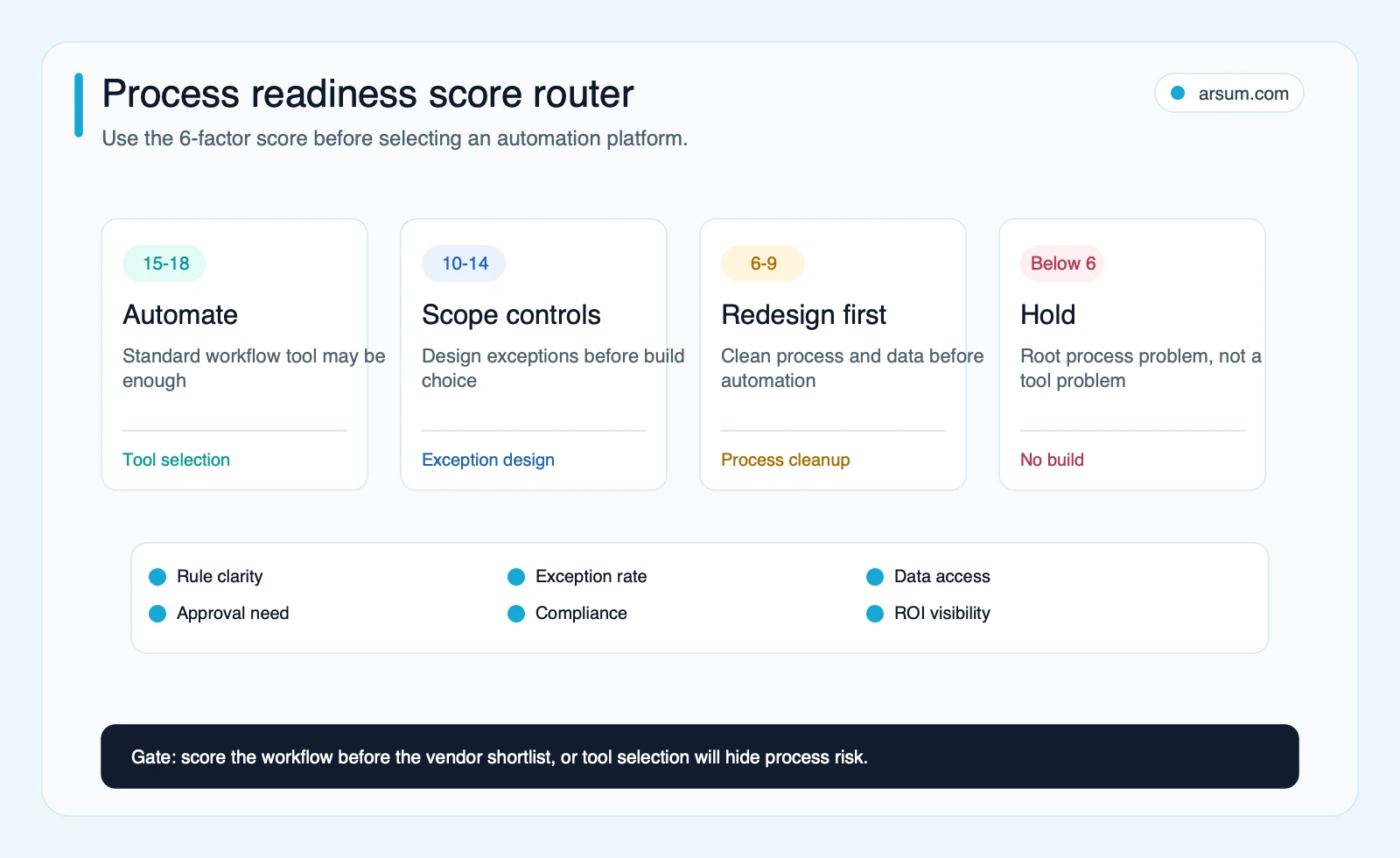
The score is not meant to replace operational judgment. It forces the questions that are often deferred until a workflow is already in production: who reviews output, where exceptions go, what evidence is retained, and who can stop the automation.
Choose the smallest solution tier that preserves control
The solution should match the process, not the ambition of the automation program.
Tier 1: rule-based trigger automation
Choose a standard workflow tool when a defined event triggers a defined action: create a task after a form submission, notify a manager when a record changes, or move an approved data field between supported applications.
Microsoft describes Power Automate as a service for creating automated workflows between apps and services. That makes connector-led tools a sensible place to start for stable, common app-to-app processes.
Before approving a configuration, verify the specific controls you need:
- Which connector permissions are granted and to whom?
- Are failed runs visible, retried, and escalated?
- Can the workflow record inputs, outputs, overrides, and timestamps?
- Can a business owner safely change a rule without bypassing review?
- Is there a manual procedure if the platform, credential, or downstream system is unavailable?
Tier 2: integration automation with controlled branching
Use an integration-first platform when the workflow crosses several systems, needs field mapping, or includes moderate conditional logic. n8n’s documentation positions the platform around workflow automation with AI capabilities as well as business process automation, which reflects the common hybrid pattern: deterministic routing around a bounded AI step.
The important design question is not whether the platform includes AI nodes. It is whether the process has a defined review point when the AI output is uncertain, incomplete, or inconsistent with source records.
Tier 3: custom workflow with AI-assisted steps
A custom implementation may be justified when a workflow has difficult integrations, specialized data handling requirements, complex approval rules, or a need for tailored audit and exception controls. A custom build can still be narrow: one validated extraction step, a human review queue, and a controlled write-back to the system of record.
This is often the right tier for operations where the workflow itself is clear but the inputs vary: documents arrive in different formats, requests need classification, or a reviewer needs a structured draft rather than raw text. The AI step should be constrained to a defined job. It should not be given authority to make an irreversible business decision merely because it can produce a plausible answer.
Tier 4: agentic flows
Treat an agentic flow as a higher-governance design choice. It is relevant when the next action cannot be fully predetermined and the system must choose among tools or information sources within explicit boundaries.
That flexibility can be useful, but it increases the need for tool permissions, logging, testing, spend limits, human intervention, and rollback. If a process can be expressed as a fixed sequence with a single model call, start there.
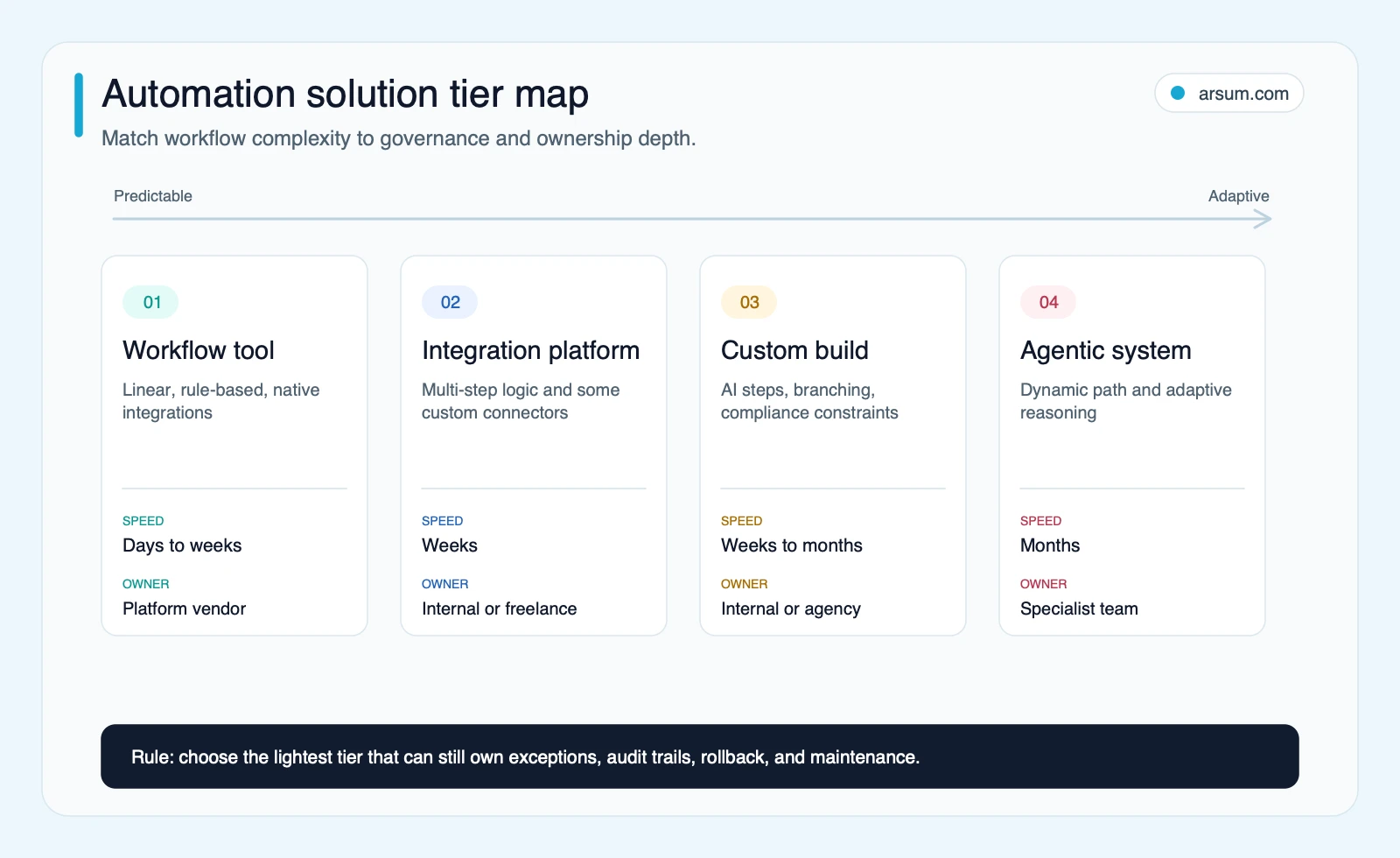
For a closer comparison of workflow tooling, see AI workflow automation tools. For work that genuinely needs agent architecture, see AI agent architecture patterns and agentic AI workflow automation.
The decision tree for build, buy, or redesign
Use this sequence before issuing a vendor brief.
Can the normal path be written as rules and supported by available connectors? If yes, begin with a workflow configuration or integration platform. Do not commission a custom agent for a connector problem.
Does the process require interpretation of variable text, documents, or requests? If yes, test an AI-assisted step, but stage its output before it changes a record or triggers an external action.
Are exceptions predictable enough to classify and assign? If no, conduct discovery first. The project may need better intake data, a simplified policy, or a human operating model before automation.
Does the process handle sensitive data, approvals, financial action, or customer-facing commitments? If yes, define minimum audit evidence, permitted autonomy, escalation authority, and rollback before selecting the technology.
Does a standard platform satisfy those controls in the way you need? Verify this in the actual configuration. Tool categories do not determine whether a particular implementation has usable logging, permissions, alerts, or approval context.
Who owns the system after launch? Name the operational owner, technical maintainer, backup owner, and change-approval authority. A workflow without this is a prototype, not an operational solution.
NIST’s AI Risk Management Framework is useful framing here: risk management is not just a model-selection activity. It belongs in design, development, use, and evaluation. In practice, that means preserving enough evidence to investigate a bad output and enough control to stop the workflow safely.
Operator note: “No-code” can reduce build effort, but it does not remove the need for process ownership. A visual workflow is still production software when it changes records, sends customer communications, or routes approvals.
Run a pilot with an acceptance contract, not a vague promise
A pilot is the right next step when a workflow has a clear normal path but unresolved questions about data quality, exception volume, reviewer load, or tool fit. The objective is not to prove that AI is impressive. It is to decide whether this process can operate safely at the chosen autonomy level.
Here is a worked pilot scorecard using an illustrative AP invoice-matching scenario. It is a planning example, not a client case study or benchmark.
| Pilot element | Illustrative definition |
|---|---|
| Workflow | Match incoming invoices to purchase-order and vendor records, then prepare a reviewable recommendation |
| Baseline period | Review a defined sample window, such as the prior four weeks of invoices |
| Baseline measures | Number of items processed; manual handling time; correction count; exception types; current approval path |
| Target outcome | Reduce manual lookup or routing work while preserving the team’s existing approval authority |
| Quality measure | Agreement between the proposed match and reviewer disposition, tracked by exception type |
| Exception measure | Share of runs routed to review, plus reviewer time required to resolve each category |
| Operational owner | Accounts payable manager or designated finance-process owner |
| Technical owner | Named administrator responsible for credentials, monitoring, and change control |
| Review cadence | Daily during pilot operation, then a scheduled weekly review of exceptions, overrides, and failed runs |
| Audit evidence | Input reference, proposed output, reviewer decision, override reason, timestamps, and downstream action |
| Stop condition | Material errors, unexplained failures, inaccessible audit evidence, or a review burden that makes the pilot uneconomic |
| Rollback path | Disable automated write-back; route new items to the existing manual queue; reconcile any staged or partially completed items |
| Decision date | A pre-agreed go/no-go meeting after the sample window and exception review are complete |
The arithmetic for pilot economics should remain transparent. For example, calculate the value hypothesis from observed inputs: eligible items per period × measured minutes avoided per item × fully loaded internal cost per minute, then subtract implementation, review, platform, and maintenance costs. That is an illustrative planning model until the team validates it with its own baseline and pilot data.
The scorecard also protects against a common false positive: a workflow can appear efficient because the automation moves the easy items quickly while the human team inherits a more difficult exception queue. Measure total reviewer effort, not just the time spent on the automated path.
💡 Arsum builds custom AI automation solutions tailored to your business needs.
Get a Free Consultation →A workflow assessment should produce more than a tool recommendation. It should leave the sponsor with a candidate score, build-versus-buy recommendation, control design, pilot acceptance criteria, ownership model, and an explicit economic hypothesis to validate.
Design the exception path before go-live
The normal path makes a demo look smooth. The exception path determines whether the workflow remains usable after the first messy production week.
Every live automation should have a written answer to these questions:
- What inputs are rejected before processing, and why?
- What happens if source data is missing, stale, duplicated, or contradictory?
- Which outputs can proceed automatically, and which require approval?
- Where are exceptions queued, and what context does the reviewer receive?
- Who is accountable when the queue grows or a downstream system fails?
- Which actions are reversible, and how is reversal performed?
- What evidence is retained for each run, decision, and override?
- Who can modify rules, prompts, permissions, or integrations?
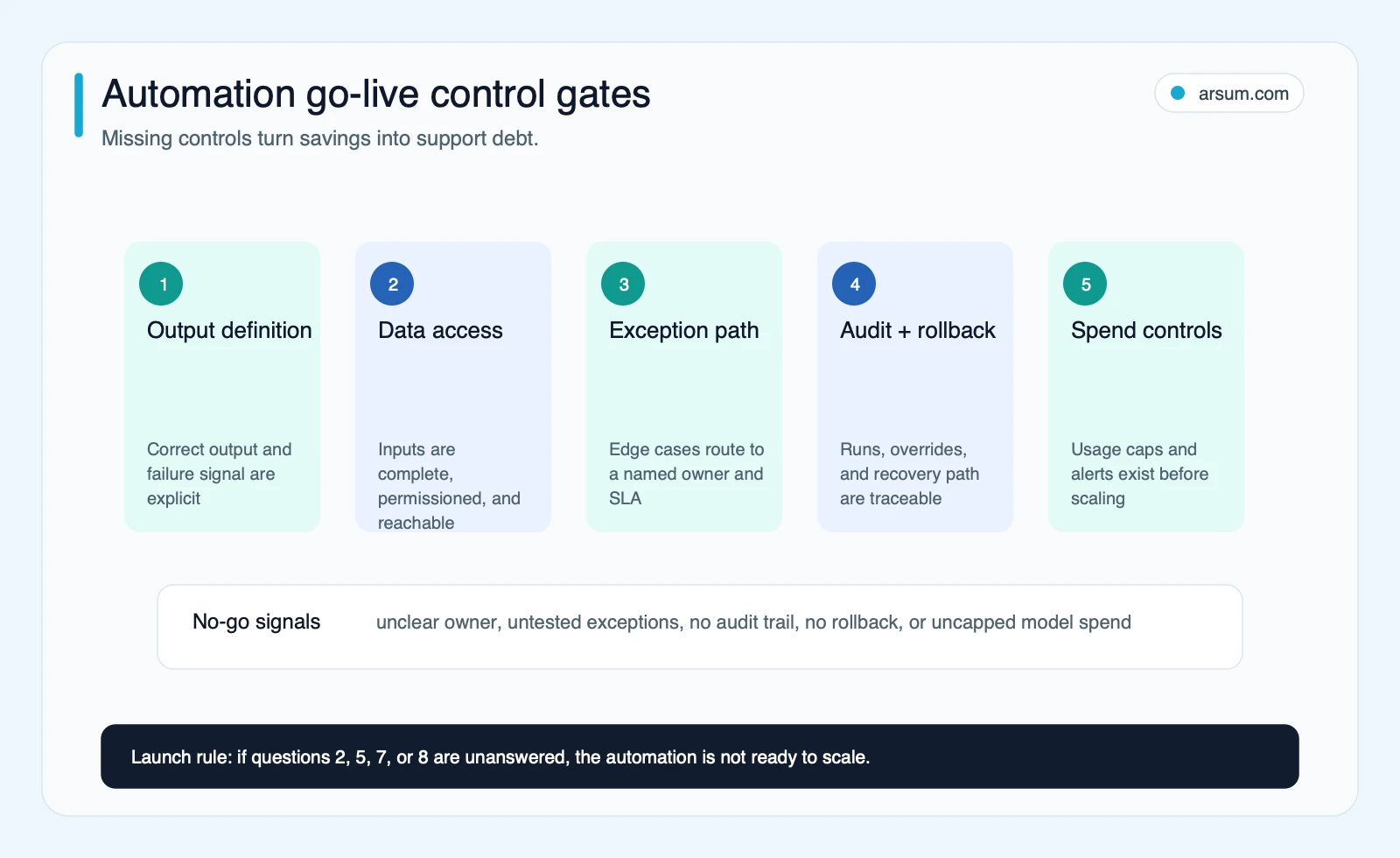
For AI-assisted workflows, place the model between validated input and controlled action. A practical pattern is:
- Validate the incoming data and establish the source record.
- Produce a classification, extraction, draft, or recommendation.
- Check the output against permitted formats and business rules.
- Route uncertain, high-consequence, or out-of-policy cases to review.
- Record the reviewer’s decision and feed the outcome into monitoring.
- Apply the approved change or hold the item for manual completion.
This keeps technical capability separate from business authorization. An AI system may be capable of drafting a customer response or recommending a payment match; the process owner decides whether it may send, approve, or write back without a person.
Failure modes that should disqualify or delay automation
Some conditions do not mean “never automate.” They mean “do not launch this version of the workflow yet.”
The process has no stable definition
If different staff members perform the same work differently and no policy determines which is correct, automation will formalize disagreement. Map the decisions first, including the cases where human judgment is genuinely required.
Source data cannot be trusted or traced
If the team cannot identify the source of truth, reconcile inputs, or explain why a record was used, an automated output will be difficult to defend. Start with data ownership and validation.
No one is authorized to resolve exceptions
An exception queue is not a control if it has no owner, service expectation, or escalation path. The workflow should not go live until an accountable operational role accepts that responsibility.
The proposed autonomy exceeds the failure tolerance
Customer commitments, payments, access changes, eligibility decisions, and regulated actions can have consequences that are difficult to reverse. Lower the autonomy: stage the recommendation, require approval, and monitor for error patterns.
The workflow depends on one builder’s memory
This risk appears often in practitioner discussions. One Hacker News contributor described self-built systems breaking after the original builder left. That is an anecdotal signal, not a market-wide statistic, but the control is straightforward: document the flow, credentials, dependencies, monitoring, owner, and manual fallback.
Other practitioner reports similarly caution against assuming visual tooling stays simple as workflows grow: one Power Automate discussion describes painful maintenance, while an approval-workflow discussion argues that integrations alone may not cover approval-heavy operational work. Treat these as prompts for due diligence, not proof that any platform will fail. Ask vendors to demonstrate the exact exception, permission, handoff, and debugging behavior your workflow requires.
Compare partners on operating design, not AI vocabulary
A credible proposal should explain the workflow boundary before it recommends models or platforms. It should identify the system of record, data access method, normal path, exception taxonomy, approval owner, monitoring approach, rollback action, and post-launch owner.
Ask prospective partners:
- What process sample will you review before final scope?
- What is included in discovery, data cleanup, and acceptance testing?
- Which decisions remain human-approved, and why?
- How will exceptions be categorized, assigned, and measured?
- What audit evidence will be available to an operator?
- Who owns credentials, rule changes, integration changes, and incident response after launch?
- What conditions pause the workflow, and how is manual processing restored?
- What must be true for the pilot to receive a go decision?
This separates a workflow assessment from a generic automation sales conversation. For additional implementation guidance, see business process automation consulting, AI integration services, and custom AI solutions for business.
A practical next step
Pick one workflow that is frequent enough to matter, narrow enough to observe, and safe enough to run with controlled review. Gather a recent sample, score readiness, document exceptions, name the owner, and write the pilot stop condition before comparing platforms.
That approach gives standard workflow tools a fair chance where they fit. It also makes clear when a custom AI solution is justified: not because “agentic” sounds more advanced, but because the process needs integration depth, controlled interpretation, durable auditability, and an operating model that a lighter configuration cannot provide.
Methodology and limits: This article uses a buyer-side editorial framework rather than an in-body benchmark dataset. The research pack combined an observed search-results snapshot with official documentation from Anthropic, NIST, Microsoft, and n8n, accessed June 26, 2026. Linked Hacker News discussions are qualitative practitioner signals only; they are not evidence of market-wide adoption, performance, or platform reliability. No independent performance, cost, timeline, or ROI benchmark is asserted here. Independent editorial review: pending.
Ready to Automate Your Business?
Stop wasting time on repetitive tasks. Let AI handle the busywork while you focus on growth.
Schedule a Free Strategy Call →Written by:Arsum editorial team
- Reviewed by
- Arsum editorial team
- Published
- June 22, 2026
- Updated
- July 5, 2026
- How this was produced
- Arsum uses research packs, source checks, and human editorial review to prepare and update blog articles. Editors are responsible for the final page.
- Source policy
- Sources are linked in the article when used. Methodology and source notes are included on higher-risk or high-visibility pages and are being rolled out across the archive. Editorial policy.
- Why this page exists
- Help B2B operators evaluate AI automation, implementation scope, cost, risk, and build-vs-buy decisions with practical context.