Amazon Bedrock Agents is the right foundation when an AWS-native workflow needs bounded multi-step tool use—not merely retrieval and response—and the team can define allowed actions, evidence, human approvals, and a rollback path. Use amazon bedrock agents for controlled orchestration across AWS systems; use Knowledge Bases alone for retrieval-and-response; consider AgentCore or a custom framework when runtime control or portability is an explicit requirement.
Amazon Bedrock Agents for AWS Automation Teams
Explore amazon bedrock agents: compare workflow fit, costs, risks, evidence, and practical next steps before you build, buy, or hire.

Table of Contents
- What most guides miss: capability is not authorization
- Choose the smallest architecture that can own the workflow
- Decision scorecard: compare foundations against the workflow
- Build a pilot business case before funding production
- Reference architectures: normal path, ugly exceptions, and authority
- Implementation gates that prevent week-three surprises
- A four-week evaluation with a real no-go decision
- When not to use Bedrock Agents
- Limits and sources
What most guides miss: capability is not authorization
A Bedrock demo proves that a model can retrieve information and select tools. It does not prove that the resulting workflow is authorized to update a customer record, make a compliance recommendation, trigger a payment-related step, or send a customer-facing message.
The buyer decision is therefore not “Does Bedrock support agents?” AWS documents that Agents can coordinate model reasoning, action-group invocations, Knowledge Base lookups, guardrail assessments, and iterative steps. The decision is whether your specific workflow has a safe operating boundary. AWS’s overview of how Agents work is useful for the service mechanics; this guide focuses on the operating choice around them.
Scope the first workflow before comparing platforms:
- What starts the case, and what makes it complete?
- Which steps are read-only, which create a draft, and which write to a system of record?
- What source data is authoritative when two systems disagree?
- Which exceptions go to a named reviewer?
- What action must the agent never perform without approval?
- Can the owner reverse an action without manual data repair?
If the workflow is only “find policy text and prepare an answer,” start with a Knowledge Base and a response layer. If it must retrieve context, branch across conditions, call approved APIs, and assemble a reviewable result, Bedrock Agents may fit. If the team needs to choose its own runtime, framework, identity pattern, and observability model across environments, evaluate Amazon Bedrock AgentCore or a custom approach first.
This boundary also makes a broader agentic AI workflow automation decision easier: automation value comes from a controlled change to a real process, not from adding an agent loop to an existing interface.
Choose the smallest architecture that can own the workflow
Knowledge Bases for retrieval and response
Use Amazon Bedrock Knowledge Bases when the system needs to connect proprietary documents or data sources to a generative response, but does not need to take action. This is the appropriate starting point for policy lookup, internal research assistance, guided support drafts, and document-grounded answers.
The operating design still matters. Name the approved corpus, the content owner, the ingestion review process, and what happens when retrieval returns weak or conflicting evidence. A retrieved answer is not automatically an authorized decision.
Bedrock Agents for bounded tool workflows
Use Bedrock Agents when the workflow requires a defined sequence of tool calls and decisions: check a record, retrieve policy context, request missing information, prepare an update, and route an exception. Action groups define actions the agent can perform through APIs or Lambda-backed operations.
Treat each action group as a control boundary, not as a convenience wrapper:
- Give it a narrow purpose and an input schema that rejects ambiguous requests.
- Separate read, draft, and write actions.
- Restrict IAM permissions to the minimum systems and operations needed.
- Return structured success, failure, and retryable-error states.
- Log the input, source identifiers, action selected, result, and reviewer decision where the workflow requires evidence.
A tool description can influence how a model chooses an action, but it is not a security boundary. The API, IAM policy, validation layer, and approval workflow must enforce what is actually allowed. For a deeper control design, see AI agent security.
Multi-agent collaboration only when the handoffs are real
AWS supports a supervisor pattern that coordinates specialized sub-agents. AWS’s multi-agent documentation describes this capability. It can be appropriate when distinct sub-workflows have separate tools, data, and owners.
Do not split an ordinary workflow into multiple agents merely to make the architecture look advanced. Each handoff introduces another trace to inspect, another policy boundary to test, and another failure state to resolve. Start with one agent and explicit deterministic services where possible. Add a supervisor only when independent specializations and their handoffs are part of the business process.
AgentCore or custom orchestration when control is the requirement
AgentCore is a different decision from Bedrock Agents. AWS describes it as managed infrastructure for deploying and operating agents securely at scale with any framework and foundation model. It may be worth evaluating when the team already has framework-specific orchestration, needs a runtime pattern Bedrock Agents does not provide, or wants infrastructure services without replacing its control layer.
A custom framework can also be the better choice when portability across clouds, custom state handling, deterministic orchestration, or non-AWS runtime requirements outweigh the convenience of managed AWS-native integration. It transfers more design and operating responsibility to your team. The useful comparison is not managed versus unmanaged in the abstract; it is which team will own the missing layers after launch. For a framework-oriented comparison, see agentic AI frameworks. For a broader buyer-side shortlist across runtimes, orchestration layers, and enterprise platforms, see best agentic AI tools 2026.
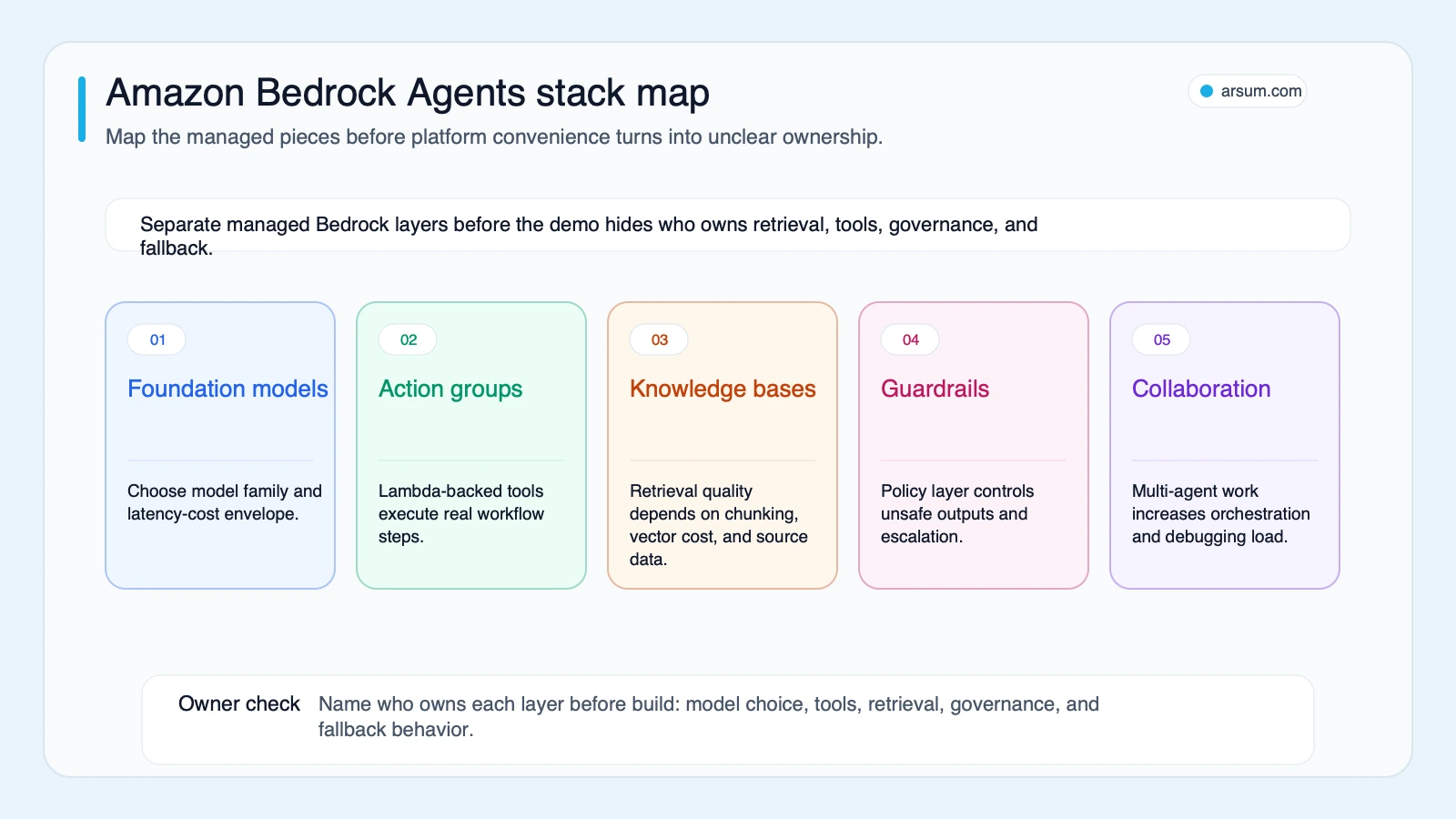
Decision scorecard: compare foundations against the workflow
This is an editorial decision scorecard, not benchmark data or a universal vendor ranking. Score each option from 1 to 5 against the stated workflow, then document why. Weight the criteria before scoring: a cross-cloud product may weight portability more heavily; a tightly AWS-native operation may weight IAM integration and existing observability more heavily.
| Criterion | Bedrock Knowledge Bases | Bedrock Agents | AgentCore / custom framework |
|---|---|---|---|
| Retrieval-only response with cited internal sources | Strong | Possible but often more than needed | Possible, more implementation |
| Bounded multi-step tool workflow | Limited | Strong | Strong |
| AWS-native IAM, Lambda, S3, and CloudWatch alignment | Strong | Strong | Strong, with more assembly |
| Explicit orchestration and runtime control | Limited | Medium | Strong |
| Framework and environment portability | Limited | Limited to medium, depending on design | Strongest when designed for it |
| Lowest implementation responsibility | Strong | Strong for supported patterns | Weakest |
| Ability to preserve existing custom agent logic | Limited | Medium | Strong |
Use these decision boundaries:
- Choose Knowledge Bases when a reviewer can accept or reject a grounded response and no API action is needed.
- Choose Bedrock Agents when the normal path is a bounded sequence of approved tools with an explicit exception queue.
- Choose AgentCore or custom orchestration when the runtime, framework, state model, portability, or observability contract is a requirement rather than a future preference.
- Do not select multi-agent collaboration until you can name the separate business owner, action boundary, and failure behavior for every sub-agent.
Cloud comparison follows the same rule. Bedrock can reduce integration work for systems already using AWS services, while Google Vertex AI agent options may be more natural for a GCP-centered stack. Azure-oriented organizations should similarly evaluate the controls and integrations already used in their Microsoft environment. None of those service capabilities authorizes an agent to make consequential business decisions; that remains a customer workflow and governance responsibility.
💡 Arsum builds custom AI automation solutions tailored to your business needs.
Get a Free Consultation →Build a pilot business case before funding production
A pilot should produce acceptance evidence, not a polished prototype. The following scorecard is an illustrative planning assumption, not an observed Bedrock result. Replace every number with your own baseline and have the workflow owner approve it.
Worked pilot scorecard: document-driven account onboarding
| Field | Illustrative planning assumption | Owner |
|---|---|---|
| Workflow | Intake, document completeness check, CRM draft update, reviewer queue | Operations lead |
| Monthly case volume | 800 cases | Operations lead |
| Current handling time | 18 minutes per case, measured from intake to reviewer-ready packet | Process analyst |
| Current exception rate | 25% of cases require clarification or escalation | Compliance lead |
| Proposed automation | Read documents, retrieve policy, check required fields, create a draft—not approve eligibility | Technical sponsor |
| Authorized writes | Draft record and internal task only | System owner |
| Prohibited actions | Final approval, customer notification, account activation, adverse decision | Risk owner |
| Case set | 100 labeled historical cases, including normal and exception cases | Compliance lead |
| Reviewer cost input | Use the organization’s loaded reviewer cost; do not assume a savings rate | Finance partner |
| Review cadence | Daily during pilot; weekly decision review | Operations lead |
| Rollback | Disable write action group, preserve read-only evidence, route all cases to manual queue | Platform owner |
For planning arithmetic, the baseline labor input is:
800 cases × 18 minutes = 14,400 minutes, or 240 handling hours per month
That figure is not a savings claim. It establishes the maximum manual capacity in scope before accounting for exceptions, reviewer time, implementation cost, model usage, retrieval infrastructure, monitoring, and retained human controls. A financial case should compare the fully loaded cost-to-serve against the proposed operating cost and make the assumptions visible. See AI automation ROI examples for a broader way to structure that calculation.
Set pass, stop, and scale thresholds before the pilot starts:
| Decision gate | Pass threshold | Stop condition |
|---|---|---|
| Evidence completeness | Required source IDs and tool results attached to at least 98 of 100 test cases | Missing source lineage on a consequential recommendation |
| False-action rate | Zero unauthorized write actions in the labeled set and rollback rehearsal | Any unauthorized system-of-record change |
| Exception routing | All policy conflicts, missing documents, and low-confidence cases reach the correct queue | Exception silently completes as a normal case |
| Reviewer burden | Review time is measured against baseline; no assumed reduction | Review time increases without a documented quality benefit |
| Cost ceiling | Cost per completed case remains within the finance-approved pilot ceiling | Cost cannot be explained by model, retrieval, tool, or infrastructure inputs |
| Latency | Meets the workflow’s agreed service window on the test set | Delays create queue or customer-service failure |
| Owner readiness | Named operations, risk, and technical owners sign the operating procedure | No owner accepts escalation or rollback responsibility |
The scale decision should be no-go by default if the team cannot demonstrate those gates. A useful pilot can still end with “use retrieval only,” “remove the write action,” or “use deterministic orchestration for this branch.” That is decision value, not failure.
Reference architectures: normal path, ugly exceptions, and authority
KYC document-review assistance
This is a reference architecture, not legal, compliance, or identity-verification advice.
Normal path: an intake service places documents in the approved source location. The workflow reads the case identifier, retrieves the applicable internal policy, calls approved verification services through narrow action groups, and produces a structured reviewer packet. The packet includes source document references, extracted fields, tool results, policy version, timestamp, and unresolved items.
Ugly exceptions: missing pages, unreadable scans, mismatched names, expired documents, conflicting verification results, unavailable tools, or policies that do not clearly map to the case. These must enter an exception queue; the agent should not infer approval from incomplete evidence.
Approval owner: a designated compliance reviewer or authorized operations role makes the final determination.
Prohibited actions: approving identity, activating an account, communicating a final outcome, or overriding a verification result.
Rollback behavior: disable write-capable actions, retain the case packet and logs, and route new and in-flight cases to the established manual process. Test this before any live write is enabled.
The relevant question is not whether a model can summarize KYC materials. It is whether the operation can retain defensible source lineage and prevent unapproved decisions. Similar boundaries apply to credit decision automation: technical capability should reduce clerical work before it expands autonomous authority.
Patient-intake administration
This is also a reference architecture, not clinical or regulatory advice.
Normal path: a patient submits intake material through an approved application. The workflow verifies required fields, retrieves organization-approved intake instructions, creates a draft in the designated system through a scoped API, and routes the packet to staff.
Ugly exceptions: missing consent, uncertain identity match, conflicting insurance information, unavailable EHR API, redaction failure, or any input that appears to request clinical assessment. These cases stop at the human queue.
Approval owner: an intake operations manager or authorized clinical-administration role, depending on the institution’s process.
Prohibited actions: diagnosing, triaging urgency, changing clinical records without authorized review, or representing an automated output as a clinician’s determination.
Source lineage: retain the submitted document ID, intake form version, retrieved instruction version, tool results, and reviewer disposition.
Rollback behavior: revoke write credentials for the action group, retain evidence, and return all work to the existing intake queue.
Bedrock Guardrails can provide configurable controls for inputs and outputs, including safety and privacy-related policies. AWS’s Guardrails documentation describes those capabilities. They do not replace workflow authorization, clinical governance, access controls, or human review.
Implementation gates that prevent week-three surprises
AWS documentation lists quotas for resources, APIs, and model usage, so quota and throughput planning belongs in the design, not in the incident response. Review the current Amazon Bedrock quotas for the target account, Region, model, and usage pattern.
Turn the pre-launch checklist into evidence-based gates:
| Gate | Required artifact | Test | Pass/fail owner |
|---|---|---|---|
| IAM and model access | Permission map and least-privilege policies | Invoke each action with permitted and denied roles | Security owner |
| Action schema | Versioned input/output contract | Valid, invalid, partial, and duplicate request tests | API owner |
| Knowledge Base | Corpus register, source owner, and deletion plan | Labeled retrieval tests with stale and conflicting documents | Data owner |
| Guardrails | Policy configuration and escalation route | Adversarial, PII, and policy-boundary test cases | Risk owner |
| Tracing | Correlation ID across agent, tools, and queue | Reconstruct a failed case from logs | Platform owner |
| Cost model | Model, retrieval, Lambda/API, storage, and monitoring inputs | Compare pilot usage with finance assumptions | Finance partner |
| Quotas and fallback | Throttling, retry, and manual-queue design | Simulated timeout, quota, and tool outage | Technical sponsor |
| Rollback | Runbook and access-revocation steps | Timed rollback rehearsal | Platform owner |
Practitioner discussions on AWS re:Post and community forums are useful qualitative signals here: teams ask about IAM access denials, guardrail configuration, vector-store costs, and quota limits. They are not market-wide performance evidence. Use them to broaden test cases, then verify current service behavior in AWS documentation and your own account.
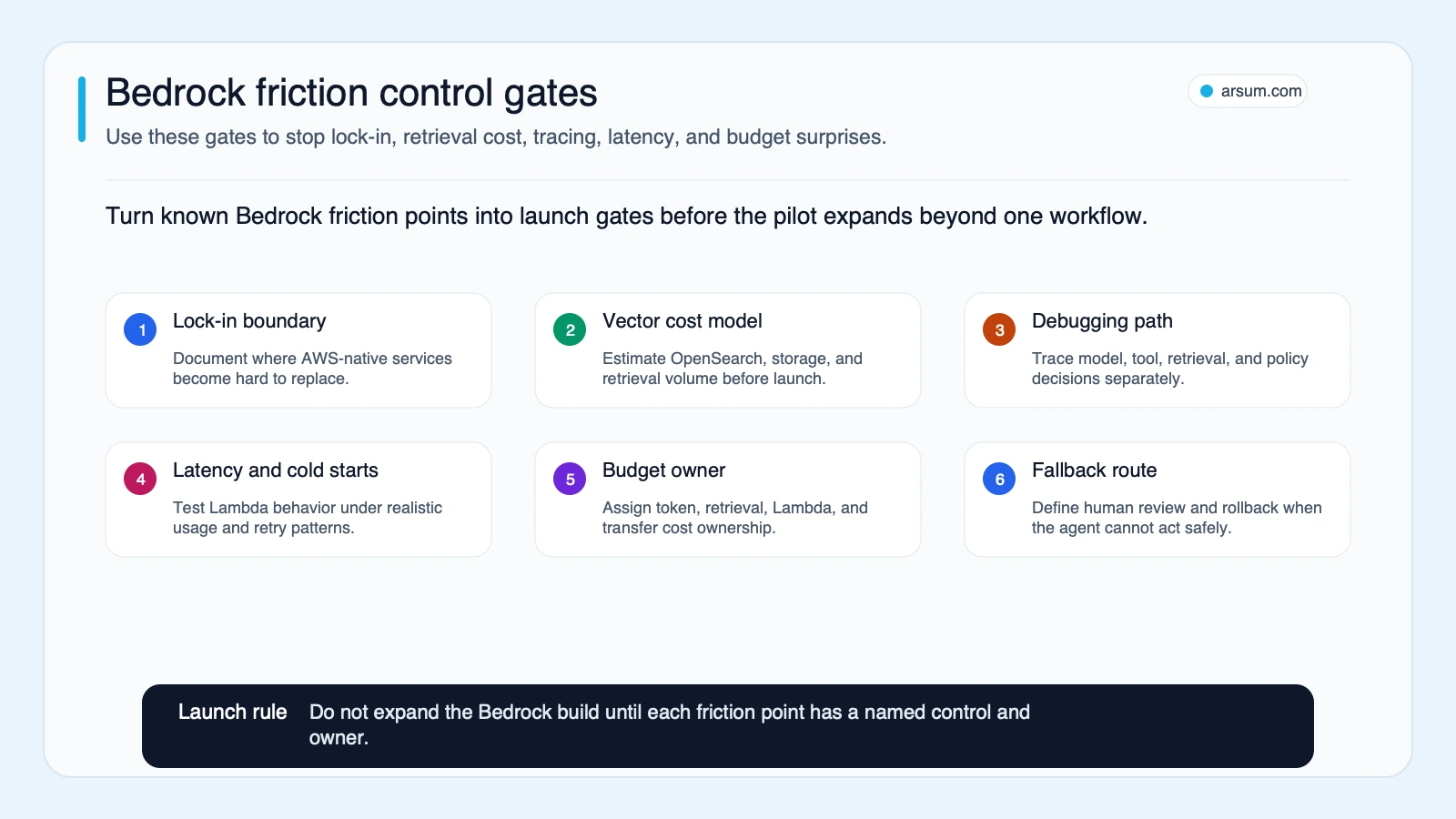
A four-week evaluation with a real no-go decision
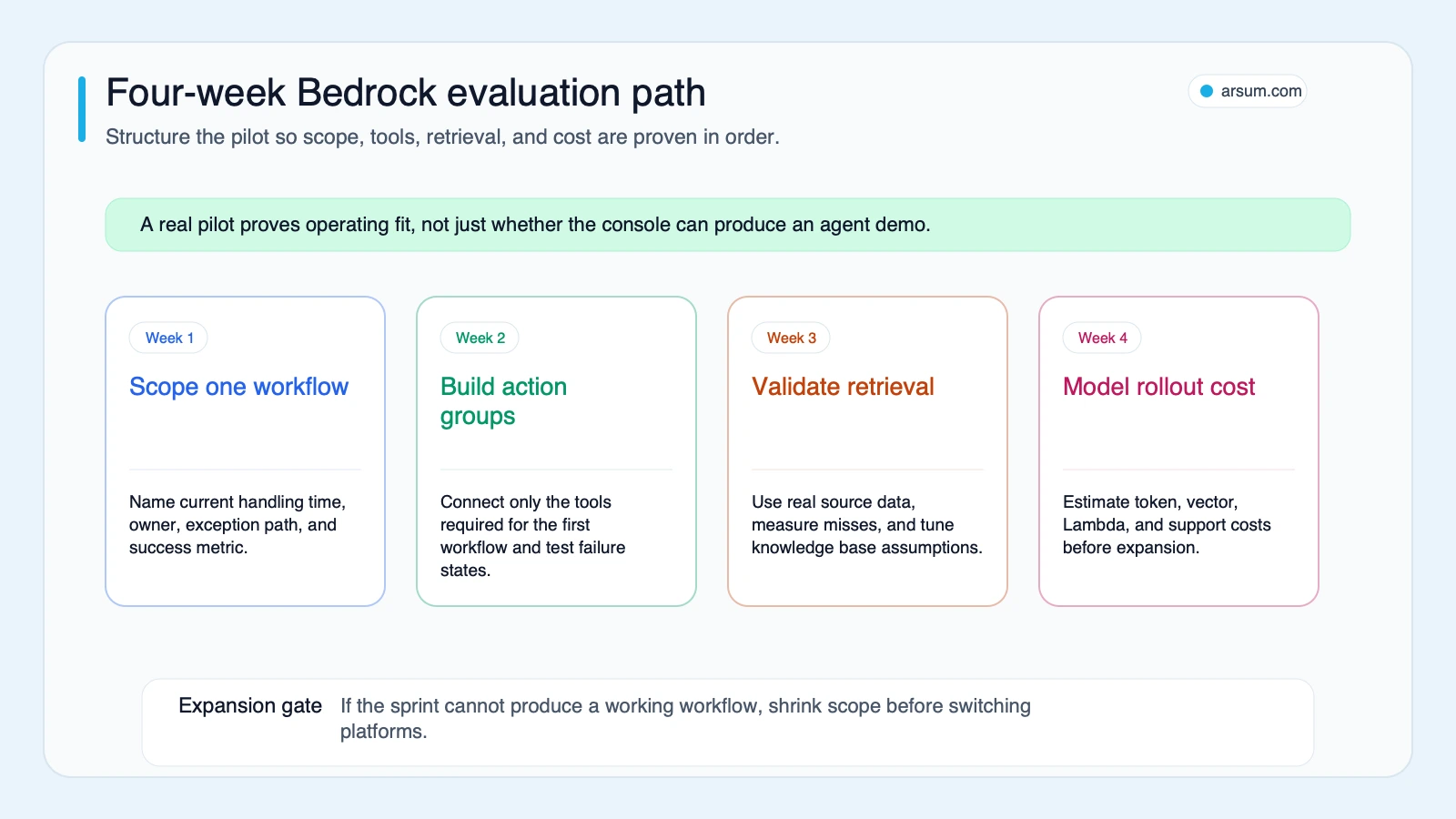
A four-week evaluation can be enough to establish workflow fit, provided its output is a controlled case set and operating decision—not a promise of production readiness.
Week 1: scope and authorize
Choose one narrow workflow with a named operations owner, technical sponsor, risk owner, and rollback owner. Map the normal path, exceptions, source systems, allowed actions, prohibited actions, and current baseline volume and handling time.
Week 2: prove tools before orchestration
Build and independently test action groups against representative API responses, failures, and duplicate requests. Use read-only access or draft-only writes where possible. Confirm the audit fields each tool must return.
Week 3: add retrieval and controls only where needed
Add a Knowledge Base only if the workflow needs proprietary-document retrieval. Test the corpus against known answers, stale material, contradictory sources, and missing information. Configure and test guardrails as part of the workflow boundary, not as a last-minute content filter.
Week 4: acceptance testing and economics
Run the labeled case set and record:
- Completion rate and escalation rate
- False-action rate, including attempted prohibited actions
- Reviewer minutes per completed and escalated case
- End-to-end latency against the agreed service window
- Cost per completed case, with model, tool, retrieval, and infrastructure inputs separated
- Evidence completeness and trace reconstruction success
- Rollback rehearsal result
The accountable owner should make one of three written decisions: scale to a larger controlled cohort, revise the workflow boundary, or stop. Switching platforms is reasonable only when the evidence identifies a platform constraint rather than an unclear process, missing system access, weak source data, or unowned exception path.
When not to use Bedrock Agents
Do not use Bedrock Agents as the default answer when:
- The workflow is retrieval plus a response and no tool action is needed.
- The process owner cannot define authorized versus prohibited actions.
- No human team owns exceptions, approval, or rollback.
- The underlying APIs cannot enforce validation, idempotency, and least privilege.
- The required source material lacks an owner, versioning, or retention rules.
- Portability is a present contractual or architectural requirement and AWS-native integration does not outweigh it.
- The expected business value cannot justify the total operating burden: integration, review, observability, security, model usage, retrieval, and support.
For teams still deciding whether the workflow itself is agent-worthy, AI agents for business can help separate a useful automation candidate from a general-purpose AI idea.
Limits and sources
This guide is an editorial decision framework, not an AWS architecture certification, legal opinion, or pricing quote. AWS service capabilities, regional availability, supported models, quotas, integrations, and pricing can change. Verify the current documentation and your account-specific terms before implementation.
The AWS-specific service claims in this article are grounded in official documentation for Agents, action groups, Knowledge Bases, Guardrails, multi-agent collaboration, quotas, and AgentCore. Community and support-thread material is treated only as a qualitative signal of implementation questions, not as benchmark evidence.
Amazon Bedrock Agents is a defensible AWS-native choice when a workflow needs bounded orchestration and the organization is prepared to own permissions, evidence, exceptions, and rollback. The strongest next step is a Bedrock workflow-fit and pilot-economics assessment: one workflow, one case set, explicit authority boundaries, and a scale/no-scale decision that finance, operations, risk, and engineering can all inspect.
Ready to Automate Your Business?
Stop wasting time on repetitive tasks. Let AI handle the busywork while you focus on growth.
Schedule a Free Strategy Call →Written by:Arsum editorial team
- Reviewed by
- Arsum editorial team
- Published
- February 19, 2026
- Updated
- July 5, 2026
- How this was produced
- Arsum uses research packs, source checks, and human editorial review to prepare and update blog articles. Editors are responsible for the final page.
- Source policy
- Sources are linked in the article when used. Methodology and source notes are included on higher-risk or high-visibility pages and are being rolled out across the archive. Editorial policy.
- Why this page exists
- Help B2B operators evaluate AI automation, implementation scope, cost, risk, and build-vs-buy decisions with practical context.