
Quick Answer
There is no single best AI for app development. Three distinct categories serve fundamentally different needs:
- AI coding assistants (GitHub Copilot, Cursor): Accelerate engineers on existing stacks. GitHub positions Copilot explicitly as an “AI pair programmer” inside existing engineering workflows, not a standalone app generator. (GitHub Docs, “About GitHub Copilot,” accessed June 2026.)
- AI app builders (Bolt, Lovable, Firebase Studio): Generate working prototypes from prompts with bundled database, auth, and hosting infrastructure. Firebase Studio offers browser-based AI-assisted building with integrated Firebase backend workflows. (Google Firebase product documentation, accessed June 2026.)
- Custom AI systems: Built from the ground up for proprietary logic, production-grade integrations, compliance constraints, and long-term ownership.
The routing logic: if your app needs custom business logic, non-standard integrations, mobile-native behavior, or a durable maintenance path, custom development is the realistic choice. If you need proof-of-concept speed on a simple scope, a builder is appropriate. If you have an engineering team on a known stack, a coding assistant is the immediate leverage point.
This guide benchmarks 12 common app-development tasks against AI commoditization and maps each category to five routing questions that determine which path fits your project.
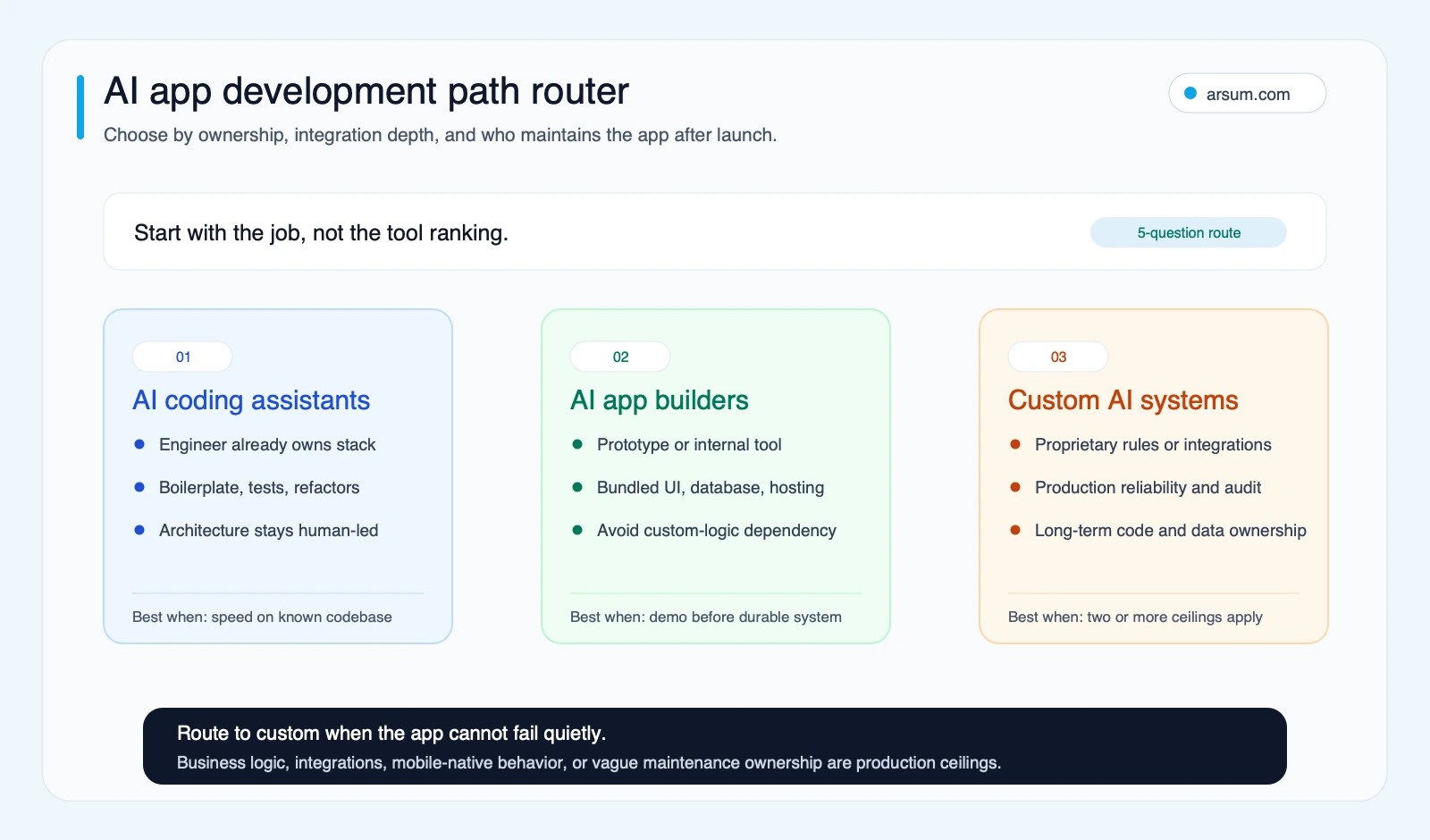
Use the router as a first-pass filter before comparing specific tools. The path changes when custom logic, integration depth, or maintenance ownership becomes a production requirement.
The Honest Answer Nobody Puts in Their Roundup
“Best AI for app development” is the wrong question. The right question is: what kind of app are you building, for whom, and who owns it when the first version ships?
Every ranked list of AI app tools mixes three fundamentally different categories: AI coding assistants that help engineers write faster, AI app builders that generate functional apps from prompts, and full-stack delivery paths where custom AI is embedded into a product from the ground up. Each category solves a different problem. Picking the wrong one wastes time, creates technical debt, or leaves you holding an app you cannot maintain.
This guide separates the categories, maps each to specific use cases, and gives you a decision framework instead of another ranking table.
Want to automate this for your business? Let's talk →
What Most Guides Miss
Most “best AI for app development” roundups commit the same mistake: they rank tools by feature count or prompt quality without explaining when each category actually fits. A founder building an internal dashboard and a product team building a compliance-grade SaaS application are asking different questions. Lumping their needs into the same top-10 list produces a list that serves neither.
Three practical breakpoints that most roundups skip:
Custom functionality as the first ceiling. The moment your app needs a non-standard business rule, a specific payment flow, or behavior the builder was not designed for, the generated code stops being a foundation and starts being a liability. This is a category mismatch, not a failure of any particular tool.
Production ownership as the hidden cost. Apps built on AI builders without a clear engineering owner often become unmaintainable within months. The speed of generation does not eliminate the operational cost of what runs in production.
Backend and integration depth as the second ceiling. Builders abstract the data layer for speed. That abstraction becomes a constraint when you need to migrate schema, connect to enterprise APIs, or run queries the builder was never designed to support.
Understanding these breakpoints before selecting a tool is what separates teams that ship durable products from teams that rebuild the same MVP twice.
Work With Arsum
We help businesses implement AI automation that actually works. Custom solutions, not cookie-cutter templates.
Learn more →Three Categories of AI for App Development
1. AI Coding Assistants
These tools work inside your existing engineering workflow. They autocomplete code, suggest functions, explain unfamiliar patterns, and help developers move faster within a codebase they already own.
Examples: GitHub Copilot, Cursor, Codeium, Amazon CodeWhisperer.
GitHub positions Copilot explicitly as an “AI pair programmer” that works inside the developer’s existing workflow, not as a standalone app generator. (GitHub Docs, “About GitHub Copilot,” accessed June 2026.) This distinction matters: a coding assistant assumes an engineer is already in the loop making architectural decisions. The output quality scales directly with the skill of the engineer directing it.
What they are good at: Accelerating experienced developers on known stacks. Writing boilerplate. Explaining code. Suggesting tests. Catching syntax errors in context.
What they are not: End-to-end app builders. They amplify developer judgment; they do not replace it.
Best fit: Teams with existing engineering capacity who want to move faster without adding headcount.
2. AI App Builders
These tools take a prompt or description and generate a working application, usually with a hosted interface and a database and logic layer bundled in.
Examples: Bolt, Lovable, Replit Agent, Firebase Studio, v0 by Vercel.
Firebase Studio offers browser-based AI-assisted app building with integrated Firebase backend workflows, meaning the database, authentication, and hosting infrastructure are managed inside the same environment. (Google Firebase product documentation, accessed June 2026.) That bundling is the core speed advantage of builders: you ship a working prototype without provisioning anything manually.
What they are good at: Turning an idea into a visible, shareable prototype in hours. Internal tools. Simple customer-facing dashboards. MVPs that need proof-of-concept speed.
What they are not: Production engineering platforms. Builders hit hard limits when the app needs custom business logic, third-party API integrations, authentication at scale, payments, or mobile-native behavior. At that point, the generated code often becomes a liability rather than a foundation.
Best fit: Early-stage founders validating a concept. Operators building a lightweight internal tool. Teams that need a demo, not a durable product.
3. Custom AI Systems and Full-Stack Delivery
This is where AI is embedded in the application architecture itself: a workflow engine that routes tasks using an AI decision layer, a recommendation system trained on proprietary data, a document processing pipeline, or a customer-facing product that does something a builder cannot replicate.
What this is good at: Applications with proprietary logic, integration depth, compliance constraints, mobile-native requirements, or performance demands that exceed what builders can handle.
What this is not: Fast or cheap to start. Custom AI systems require scoping, architecture decisions, model selection, infrastructure planning, and engineering ownership. The tradeoff is durability and control.
Best fit: Founders building differentiated software products. Operators automating complex workflows. Teams that need to own their data, their stack, and their long-term maintenance path.
Commodity vs Non-Commodity: What AI Handles vs What Still Requires Judgment
Not all parts of app development are equally automatable. AI now commoditizes certain tasks effectively. Others still require product judgment, architecture experience, and domain knowledge that AI tools cannot supply.
| App Development Task | Now Commoditized by AI | Still Requires Human Judgment |
|---|---|---|
| Boilerplate and CRUD scaffolding | Yes, reliably | No |
| Prototype UI from a text description | Yes, fast and adequate | Only for custom design systems |
| Basic REST API generation | Yes | No |
| Authentication (standard flows) | Partly | Complex SSO, enterprise IdP, MFA edge cases |
| Payments and billing logic | Basic Stripe checkout only | Subscription logic, revenue recognition, refund rules |
| Third-party API integrations | Simple reads and writes | Rate limiting, error handling, schema mapping |
| Custom business rules | Rarely | Yes, always |
| Database schema design | Rough drafts only | Production schema, migration strategy, indexing |
| Performance optimization | No | Yes |
| Mobile-native behavior | No | Yes |
| Security review and hardening | No | Yes |
| Maintenance and incident response | No | Yes |
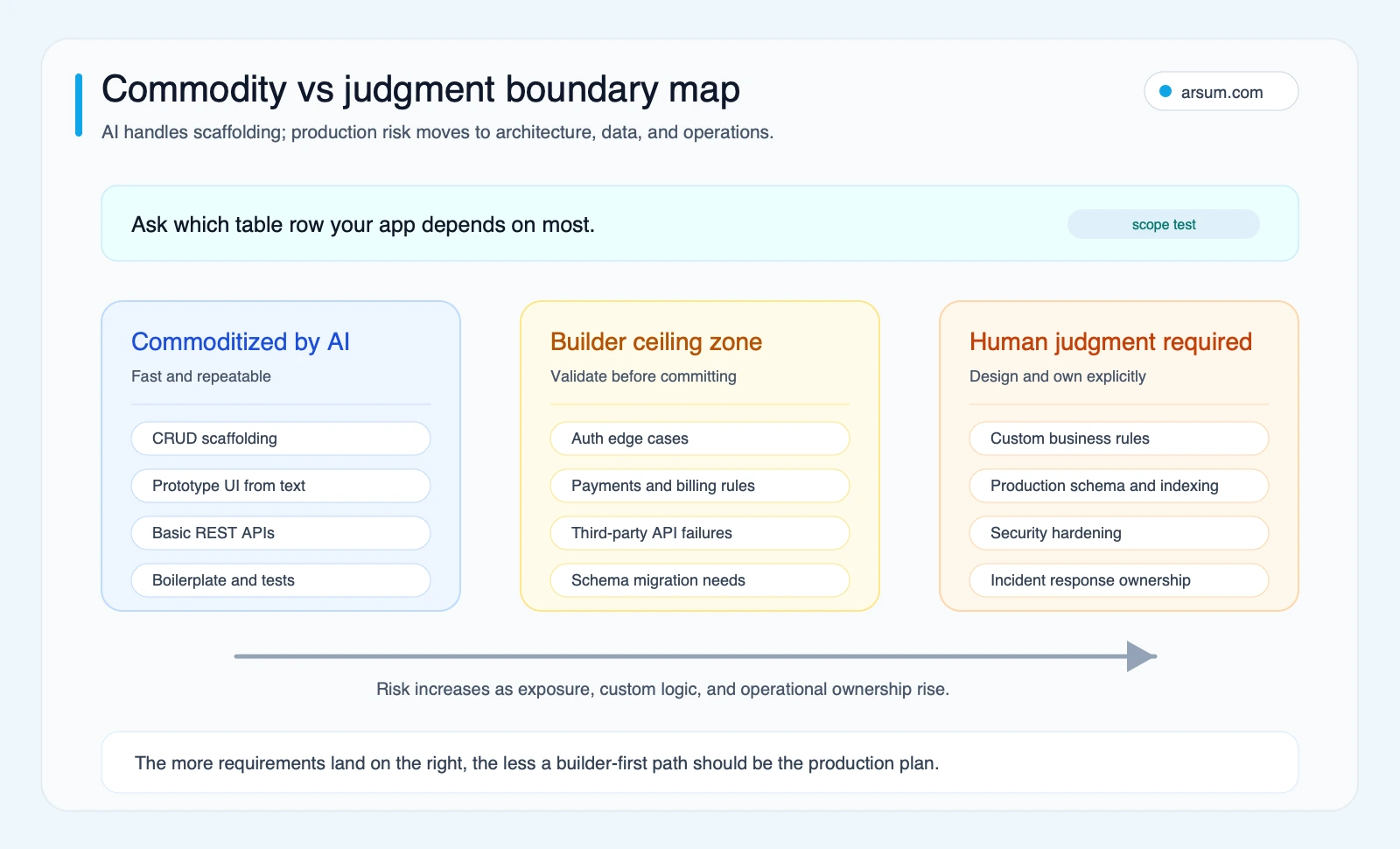
The boundary map turns the table into a scope test. The more your requirements depend on the right side, the less a builder-first production plan fits.
The implication: the more your app depends on the “still requires judgment” column, the less a builder-first approach will serve you in production.
How to Choose: A Decision Path
Before evaluating any specific tool, answer these questions in order. Each one narrows the realistic options:
1. Does your app need custom business logic beyond standard CRUD? If yes, AI builders will hit a ceiling early. Custom engineering is the realistic path.
2. Do you need third-party integrations with Stripe, auth systems, external APIs, or enterprise software? If yes, test a builder against your specific integration requirements before committing. Most builders handle simple cases but struggle with production edge cases.
3. Do you need mobile-native behavior, not just a mobile-responsive web app? If yes, most AI builders are not the right path. React Native or native development with AI-assisted engineering is more realistic.
4. Who maintains this when the first version ships? If unclear, that is a risk signal. Apps built with AI builders without a clear ownership plan often become unmaintainable within months.
5. What is the scale of exposure? An internal tool used by five people tolerates rough edges. A customer-facing product used by hundreds does not.
Routing summary:
- Yes to questions 1, 2, or 3: custom AI development is the realistic path.
- No to 1, 2, and 3, and yes to speed and simplicity: AI app builders are appropriate.
- Existing engineering team, known stack, want faster output: AI coding assistants are the immediate investment.
Mini Experiment: One App Brief, Three Very Different Outcomes
Take the same request: “Build a customer portal where users can log in, pay for a subscription, upload documents, and get AI-generated summaries tied to account history.”
If you hand that brief to an AI app builder, you will usually get a usable demo quickly: a sign-in flow, a simple dashboard, a form, and maybe a basic AI summary call. The speed is real. The weak point appears as soon as you need subscription edge cases, document permissions, audit trails, or custom rules for how summaries should change by account tier.
If you hand the same brief to an engineer using a coding assistant, the output starts slower but usually lands on firmer ground. The assistant helps write routes, tests, and UI scaffolding, but the engineer still decides schema, auth boundaries, payment logic, and failure handling.
If you scope it as a custom AI system from the start, the first milestone is not a prettier prompt. It is a delivery plan: where documents live, how summaries are generated, what happens when an upload fails, which user actions need logs, and who owns the system after launch.
The lesson is simple: the same app idea can look deceptively “done” in three different ways. What changes is not just build speed, but how much production risk you are postponing until later.
💡 Arsum builds custom AI automation solutions tailored to your business needs.
Get a Free Consultation →Where AI Builders Stop Being Enough
A pattern that appears across teams that have shipped with AI builders: the first demo impresses, and the second week of iteration reveals the limits.
Custom functionality is the most common breaking point. The moment a team needs a non-standard business rule, a specific integration, or a behavioral nuance the builder was not designed for, the generated code becomes hard to extend without effectively rewriting it. This is a category mismatch, not a failure of any particular product.
The second breaking point is backend complexity. Many AI builders abstract the database and server layer entirely. That is fine when you want speed. It becomes a problem when you need to query data in a specific way, migrate schema, export data to another system, or connect to a backend the builder was not designed to support.
The third is production stability. Teams building for external users need reliability, observability, and the ability to fix bugs under pressure. Builders that manage your infrastructure are faster to start but harder to debug and harder to own when something goes wrong.
Representative Scenario: A team ships an internal CRM in two days using an AI builder. It works well for three weeks. When the operations lead asks for custom territory-based deal grouping weighted by probability, the builder cannot produce it without rebuilding the data layer from scratch. The team faces three options: accept the limitation, work around it with manual processes, or replatform to a codebase they can own. The replatform takes longer than the original build and requires a technical handoff the builder never documented.
This is not a reason to avoid builders. It is a reason to use them for the scope they were built for, and to plan for replatform costs whenever your product needs to grow beyond that scope.
Buyer Ownership Scorecard
Before committing to any AI app development path, evaluate it against these criteria. Use this as a forcing function before signing any contract or committing substantial engineering time.
Code ownership
- Can you export the generated code?
- Can you run it outside the builder’s own infrastructure?
- Who owns the IP when you leave the platform?
Deployment flexibility
- Where does the app actually run?
- Can you move it to your own cloud or hosting provider if needed?
- What happens to production uptime if the builder has an outage?
Integration depth
- Does the tool handle your specific third-party integrations at production quality?
- Can you authenticate against your existing identity provider?
- Can you connect to databases or APIs you already operate?
Maintenance path
- Who fixes it when something breaks in production?
- Can a new engineer pick up the codebase without the original builder context?
- What is the dependency management and update story over two years?
Cost volatility
- Is pricing based on usage, seats, or a fixed retainer?
- What does the cost look like at five times current usage?
- Are there credit-burn or metered models that create unpredictable spend at scale?
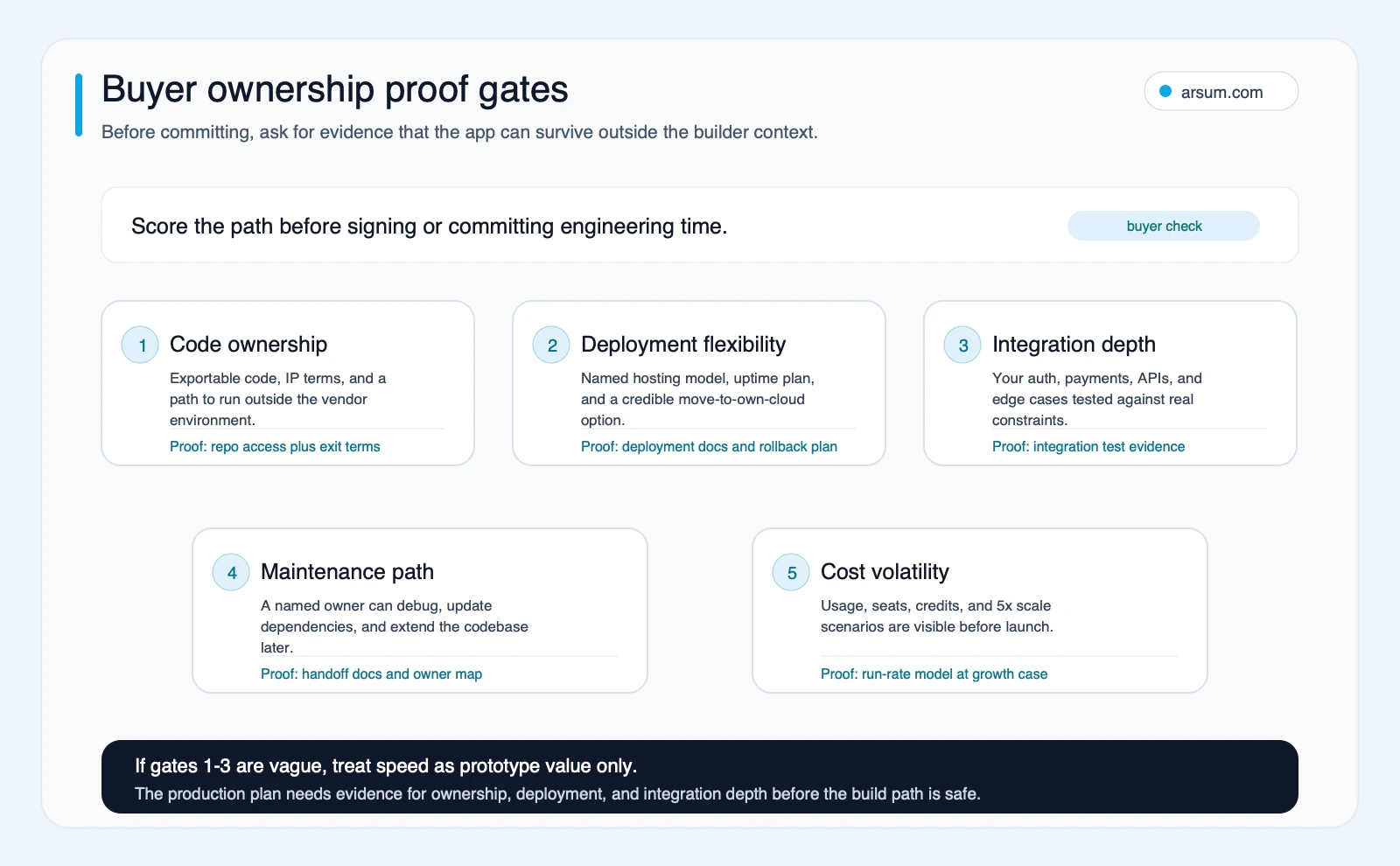
Use the proof gates before committing to a builder, vendor, or custom development path. Vague answers on code ownership, deployment, or integration depth are production risk signals.
Operator Note: What Changes When You Pick Each Path
AI coding assistants: Your team ships faster on the same stack. The organizational change is mostly about tool adoption and prompt discipline. Developers see meaningful gains on routine and repetitive coding tasks. The ceiling appears on novel architectural problems where human judgment is still the primary input.
AI app builders: You trade control for speed. The first version ships in days, not weeks. The operational implication is that your engineering team, if you have one, may need to replatform later. The real cost is builder time plus potential replatform time, not builder time alone. Teams that plan for this tradeoff upfront avoid the surprise.
Custom AI development: The organizational change is larger. You need a scoping process, architecture review, and a clear owner for the system post-delivery. The upside is a system that fits your actual business logic, integrates with your existing infrastructure, and can be maintained and extended without starting over. The early investment is higher; the long-term operational cost is lower. For teams evaluating realistic timelines, budget ranges, and delivery structures, our breakdown of AI app development cost covers what these projects typically involve.
Google Quality Note: Google’s scaled content abuse policy flags AI-generated output produced at speed and scale that lacks genuine user value. (Google Search Central, “Scaled content abuse policy,” accessed June 2026.) This applies equally to AI-generated apps: an app that looks functional in a demo but fails to solve a real user problem at production quality is a liability, not an asset. Speed of generation does not substitute for product judgment, user testing, and quality review at any stage of development.
When Custom AI Development Is the Fit
For teams that need more than a builder can deliver, custom AI development means scoping the real problem, choosing the right model and architecture for the job, building integrations that work reliably under production conditions, and creating a system the team can own and iterate on without starting over.
The signals that point toward custom development over a builder are specific: you need business logic the builder cannot replicate, you need integrations with systems the builder was not designed to connect to, you need production-grade reliability for external users, or you need to own and maintain the system over a multi-year horizon.
Working with a specialized firm makes the most sense when at least two of those signals apply. The value is not just engineering capacity: it is product judgment, architecture experience, and the ability to translate a business problem into a system that solves it durably.
Arsum works with founders and operators on custom AI systems where off-the-shelf builders hit their limits. Teams that come to Arsum typically have already evaluated or tried a builder, identified the specific gaps in integration depth or custom logic, and need a scoping conversation before committing to another build cycle. For teams at that stage, our analysis of AI app development services covers what a durable delivery structure looks like in practice.
Frequently Asked Questions
Can AI build a complete app without a developer? For simple use cases, yes. AI app builders can generate functional tools from prompts, including database, UI, and basic logic. For anything requiring custom business rules, specific integrations, payments, compliance, or mobile-native behavior, some form of engineering judgment is still required, whether from an in-house team or a development partner.
What is the best AI app builder for an MVP? There is no single answer. Bolt, Lovable, and v0 are commonly used for web MVPs. Firebase Studio suits teams that want Firebase-backed infrastructure built in. The right choice depends on your backend requirements and whether you have engineering capacity to extend the generated code when you reach the builder’s limits.
Is GitHub Copilot the same as an AI app builder? No. GitHub explicitly positions Copilot as an AI pair programmer that works inside your existing development workflow. It accelerates an engineer who is already making architectural decisions. It does not generate standalone applications from prompts the way builders like Bolt or Lovable do.
What happens when an AI-built app needs custom features the builder cannot support? Teams typically accept the limitation, use workarounds within the builder’s interface, or replace the generated codebase with custom code. The third option is the most common outcome when custom logic is genuinely required, and it usually costs more total time than the original build.
When does a team need custom AI development instead of a builder? When the app needs custom business logic, non-standard integrations, production-grade reliability for external users, mobile-native functionality, compliance requirements, or a long-term maintenance path the builder cannot support. If two or more of these apply to your project, a custom development path is the realistic option to plan for.
What does it cost to build a custom AI app compared to using a builder? Builders often start at zero or near-zero and scale on usage. Custom AI development typically starts at four to six figures for a scoped initial build, depending on complexity, integrations, and the delivery partner’s model. The more meaningful comparison is total cost of ownership: a builder that forces a replatform at month six may cost more in total than a custom system that runs without major rework for two or three years.
Summary
The best AI for app development depends on where your project sits on three axes: complexity of logic, depth of integrations, and who owns maintenance.
- Simple internal tools and early MVPs: AI app builders are fast and appropriate.
- Accelerating existing engineering on a known stack: AI coding assistants deliver clear value.
- Custom logic, production-grade software, mobile-native apps, or integration-heavy workflows: custom AI development is the realistic path.
The next step is not picking a tool. It is being honest about which category your project actually belongs to, then evaluating options against ownership, reliability, and long-term cost rather than generation speed alone.
Ready to Automate Your Business?
Stop wasting time on repetitive tasks. Let AI handle the busywork while you focus on growth.
Schedule a Free Strategy Call →Methodology note: This guide draws on GitHub Copilot product documentation (GitHub Docs, “About GitHub Copilot,” accessed June 2026), Firebase Studio product documentation (Google Firebase, accessed June 2026), and Google Search Central’s scaled content abuse policy (accessed June 2026). Research was conducted using Kai-local OpenClaw with SearXNG and Brave search fallback on 2026-06-13. Practitioner patterns referenced reflect qualitative signal from open developer communities and are not statistical survey data. Where builder-limitation patterns are described, these reflect commonly reported practitioner experiences rather than a single documented case. Last updated: July 2026.
Related Arsum Guides
Continue with these closely related guides: