The best ai personal assistant is a conditional choice: use a general assistant for draft-only thinking and writing, use the assistant native to your Microsoft or Google workspace when governed company context matters, use a research tool when sources must be checked, and build a custom workflow only when cross-system actions, approvals, and auditability justify it. There is no universal winner because the real decision is what the assistant may access, what it may change, and who owns mistakes.
Best AI Personal Assistant: Practical Guide
Compare the best AI personal assistants for work in 2026. See which tools are best for privacy, daily productivity, internal workflows, and business use.

Table of Contents
- What most guides miss: choose the job and permission level first
- Build a shortlist by work surface, not by brand
- Arsum evaluation framework: the buyer worksheet
- A worked pilot: meeting follow-up to CRM
- When a standalone assistant is enough—and when it is not
- Privacy, connector, and governance gates
- Community signals: what buyers want, and what they should test
- Assistant versus agent: autonomy is a design choice
- Make the buying decision
What most guides miss: choose the job and permission level first
Most “best assistant” lists compare chat quality, features, and subscription plans. That is useful only after you define the job. A tool that drafts a meeting follow-up from pasted notes is not the same product decision as a tool that reads a calendar, retrieves CRM context, creates tasks, and sends customer email.
Start by classifying the intended work:
| Assistant job | Typical output | Appropriate starting permission |
|---|---|---|
| Drafting and analysis | Briefs, emails, summaries, plans | Draft-only |
| Research and briefing | Source list, cited notes, comparison | Read-only web or approved sources |
| Workspace preparation | Meeting recap, document summary, task suggestion | Read-only or read-and-suggest |
| Workflow coordination | Proposed CRM update, routed ticket, drafted follow-up | Approval-required action |
| Routine execution | A narrow, rule-bound internal action | Limited autonomous action only after validation |
The decision rule is simple: the higher the consequence of a bad action and the harder it is to reverse, the less autonomy the assistant should receive. Capability does not create authorization.
A practical assistant often consists of a small stack: one tool for reasoning and drafting, one workspace-native tool for governed context, and—where needed—a narrow workflow integration. Qualitative user discussions point to the same underlying need: people want help coordinating notes, tasks, calendars, email, reminders, and follow-up, not merely better chat. That is buyer-language evidence, not a performance benchmark.
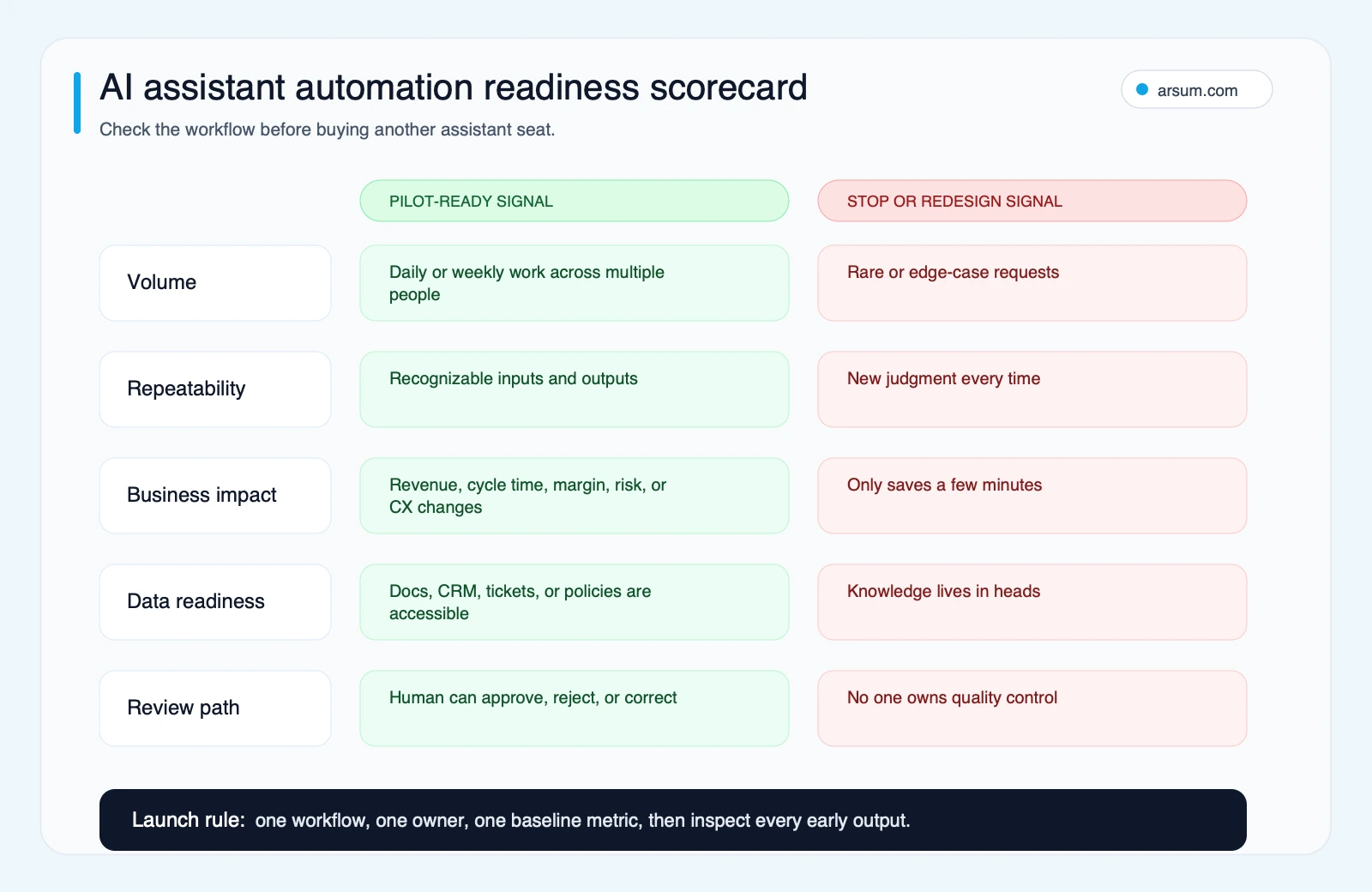
Use this readiness test before buying more seats. A useful assistant workflow has repeatable inputs, a measurable business consequence, usable source data, and a named review owner.
Build a shortlist by work surface, not by brand
Use the work your team repeats to narrow the field. The categories below are not product rankings; they are evaluation paths.
| Dominant workload | Start by evaluating | Do not choose it if | Validate during a pilot |
|---|---|---|---|
| Drafting, analysis, synthesis | A general business assistant | It must act inside several systems without a controlled integration | Output quality, source handling, reviewer correction time |
| Microsoft email, documents, meetings, and files | Microsoft 365 Copilot in the existing tenant | Existing permissions and document hygiene are unclear | Whether users see only authorized context; meeting and document usefulness |
| Google email, documents, and files | Gemini in the existing Workspace environment | The key work lives outside Workspace and needs deeper operational logic | Access boundaries, shared-drive behavior, and useful handoffs |
| Cited external discovery | A research assistant such as Perplexity, plus human review | A citation is being treated as proof without source review | Source relevance, source quality, and traceability into the final brief |
| Cross-system coordination | A custom or integrated workflow | The workflow is low-volume, undefined, or lacks an owner | Exception rate, approval time, logging, and rollback |
For general-purpose company use, ChatGPT Business describes a shared workspace, administrative controls, advanced models, and apps for company tools. For writing-heavy or analytical work where organization-wide controls matter, Claude Enterprise describes its governance, data-control, and administration positioning. Those statements establish categories to evaluate; they do not prove that either tool fits your workflow without a pilot.
For suite-native work, evaluate the suite before the assistant. Microsoft states that Microsoft 365 Copilot uses Microsoft 365 commercial privacy, security, and compliance commitments, which makes tenant permissions and Microsoft Graph access central to the decision. Google’s Workspace generative AI privacy guidance similarly makes organization-level configuration and data commitments part of the evaluation.
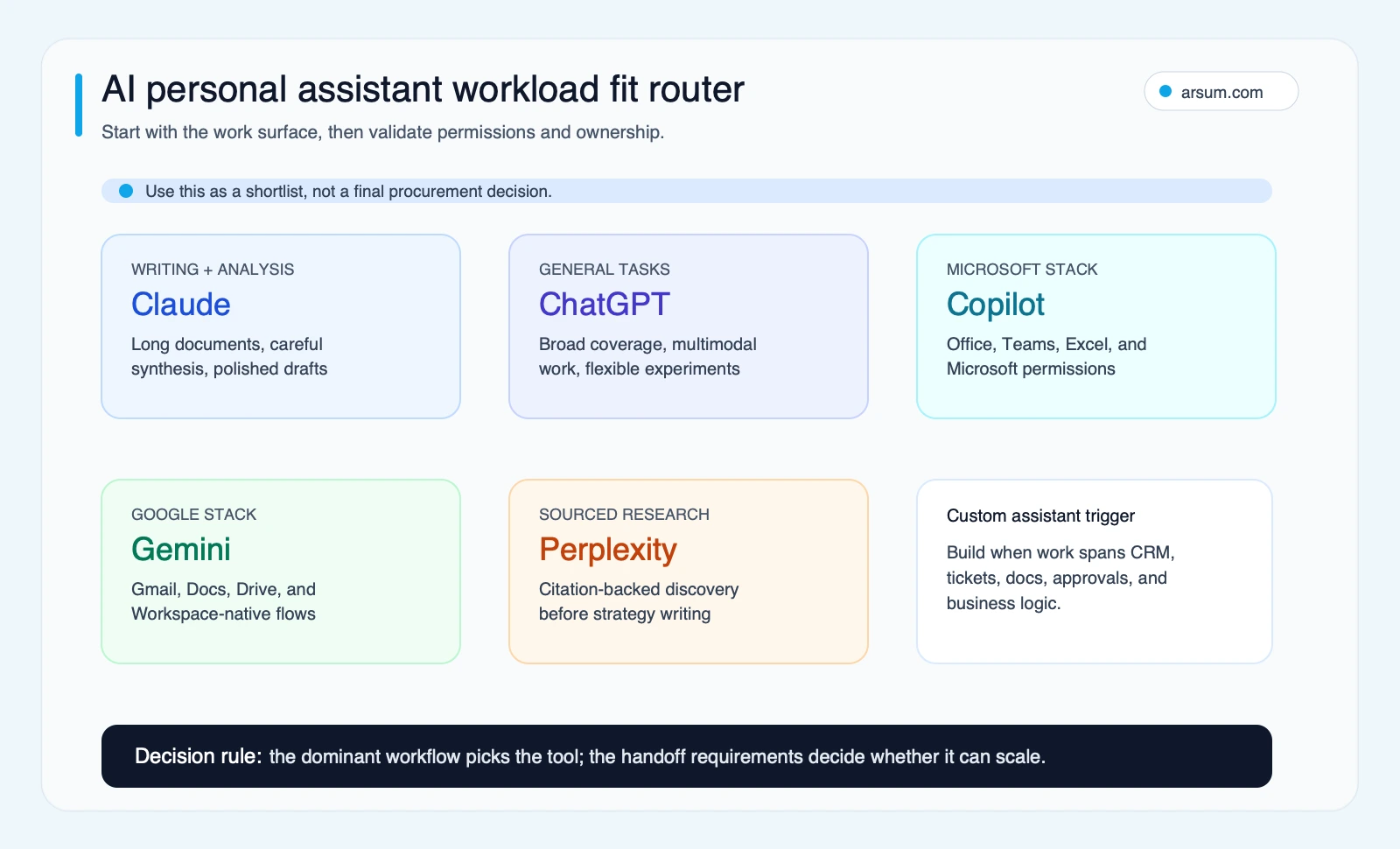
Start with the work surface, then validate connected-system scope, data class, and review ownership. A familiar product is not automatically the right operational fit.
A dated verification note
This guide was updated on June 20, 2026 using the official OpenAI, Microsoft, Google Workspace, and Anthropic pages linked here, plus qualitative search and community signals. Product capabilities, availability, retention settings, regions, connected apps, and commercial-plan terms can vary by tenant and configuration. Confirm the exact plan and settings in procurement and pilot testing; this page intentionally does not rank tools using unstable price, context-window, marketplace, or integration-count claims.
Arsum evaluation framework: the buyer worksheet
The following is an editorial framework, not proprietary performance data. Complete it for one proposed workflow before selecting a platform or approving an integration.
| Field | What to record | Example: meeting follow-up to CRM |
|---|---|---|
| Workflow | One repeatable job, with a clear start and end | Sales call ends; follow-up needs drafting and logging |
| System of record | Where authoritative data lives | CRM account, contact, and opportunity records |
| Allowed data | Specific approved classes | Meeting transcript and existing account fields; no payment or legal advice |
| Assistant output | The bounded work it may perform | Draft recap, suggested next step, proposed CRM field changes |
| Permission tier | Draft-only through autonomous action | Read-and-suggest initially |
| Required approver | Role, not a vague team | Account executive approves external message; sales operations approves field mapping |
| Evidence retained | What makes an output reviewable | Transcript link, source record IDs, proposed changes, reviewer decision |
| Baseline | Current operational measure | Median time from call end to reviewed CRM update |
| Pilot threshold | Pass/fail condition | Target set by the owner before launch; no expansion without meeting it |
| Exception route | Where uncertain cases go | Missing transcript, conflicting account data, or unclear owner goes to sales operations |
| Rollback owner | Who can disable or reverse the change | Revenue operations lead |
| Disqualifying condition | What prevents launch | No approved data scope, no audit trail, or no human owner |
This is more useful than asking which assistant has the longest feature list. It tells you whether the proposed workflow can be governed.
A worked pilot: meeting follow-up to CRM
Meeting follow-up is a reasonable pilot because it is common, observable, and easy to keep approval-based. It is not automatically a fit for autonomous operation.
Scope
A sales representative completes a customer meeting. The assistant receives the approved transcript and selected CRM context. It produces:
- A concise internal summary with decisions, objections, and next steps.
- A draft customer follow-up email.
- Proposed CRM updates, clearly separated from confirmed values.
- A task list with an owner and due-date suggestion.
It does not send email, change CRM records, infer commitments, or create customer-facing obligations without approval.
Scorecard
| Control or metric | Pilot design |
|---|---|
| Baseline | Revenue operations records the current median time from meeting end to completed CRM update for the pilot group |
| Target | The workflow owner sets a reduction target before launch and compares the same measure after pilot use |
| Quality metric | Percentage of outputs requiring material correction; every correction is tagged by source, formatting, judgment, or missing-context cause |
| Exception metric | Percentage of meetings routed out because the transcript is missing, the account is ambiguous, or an action cannot be supported |
| Data boundary | Approved transcript and relevant CRM records only |
| Reviewer | Account executive reviews all external drafts; revenue operations reviews proposed CRM changes |
| Review cadence | Daily during the first week, then weekly if the owner confirms the control design still works |
| Stop condition | Stop if an output creates an unsupported customer commitment, exposes unauthorized information, or produces repeated material errors without a clear remediation path |
| Rollback | Disable the connector or workflow, preserve pilot logs, and return the team to its prior manual template and CRM process |
An illustrative planning assumption can help size the decision, but it is not proof of savings. For example: if a five-person pilot completes 20 eligible follow-ups each week, and the measured baseline is 12 minutes per follow-up, the current work volume is 240 minutes weekly. Any proposed value case should subtract reviewer time, exception handling, administration, and rework before claiming a benefit.
💡 Arsum builds custom AI automation solutions tailored to your business needs.
Get a Free Consultation →For broader workflow design, see our guide to AI workflow automation, the practical choices in AI automation ROI examples, and how to evaluate an AI automation platform.
When a standalone assistant is enough—and when it is not
A standalone assistant is often enough when a knowledgeable human supplies context, reviews the output, and transfers approved work manually. That includes first-pass writing, analysis from supplied documents, research briefs, meeting-summary drafts, and structured planning.
A workspace-native assistant can be appropriate when the value depends on documents, calendar context, email, or meeting artifacts already governed in Microsoft 365 or Google Workspace. The primary work is not “turn on the assistant”; it is validating identities, permissions, shared locations, retention expectations, and information architecture.
A custom workflow becomes more credible when all of the following are true:
- The task has enough volume and repeatability to justify operational design.
- It must join information from more than one internal system.
- Manual handoff causes delay, missed tasks, errors, or poor evidence retention.
- A defined approval route or bounded rule can resolve normal cases.
- There is an accountable owner for exceptions, quality, and rollback.
That is the boundary between an assistant seat and custom AI solutions for business. It is also where an AI agent architecture pattern matters: the workflow must specify triggers, tools, state, approvals, monitoring, and failure handling rather than assuming a model will safely “take care of it.”
Do not build yet if these conditions apply
Do not commission a custom assistant merely because several people dislike administrative work. Stay with templates, rules, a standalone tool, or a tightly scoped suite feature if:
- The process happens infrequently or is still changing.
- The source data is unreliable, scattered, or not authorized for access.
- Nobody can name the correct output or approve it.
- A wrong action would be costly and there is no practical human review.
- The real bottleneck is unclear ownership, not drafting or retrieval.
- The team cannot measure a baseline or explain what would justify expansion.
In these cases, process cleanup is usually the investment. More automation will make an unclear process move faster, not become clearer.
Privacy, connector, and governance gates
Treat privacy as a launch gate, not a checklist at the end of procurement. OpenAI’s business privacy and security information is a reminder that retention, encryption, compliance options, and enterprise data handling are evaluation criteria. They do not remove the buyer’s responsibility to configure the product and control connected systems.
Before granting read access, verify:
- Data classification: Identify what may be used, what needs approval, and what is prohibited. Do not use labels such as “confidential” without translating them into actual assistant permissions.
- Exact plan and tenant settings: Confirm the specific commercial plan, region, data settings, and administrative controls being purchased.
- Connector scope: Review each connected app, shared drive, mailbox, CRM object, and user group. Apply least privilege rather than broad convenience access.
- Source lineage: Require the assistant to link or identify the records behind a proposed summary, action, or field update.
- Prompt-injection and tool-abuse testing: Test hostile instructions contained in email, files, web pages, and uploaded documents before permitting tool actions.
- Approvals and logs: Define who approves what, what is logged, how corrections are recorded, and how a workflow is disabled.
- Rollback: Confirm that an owner can revoke access, stop the workflow, and reverse or correct downstream changes.
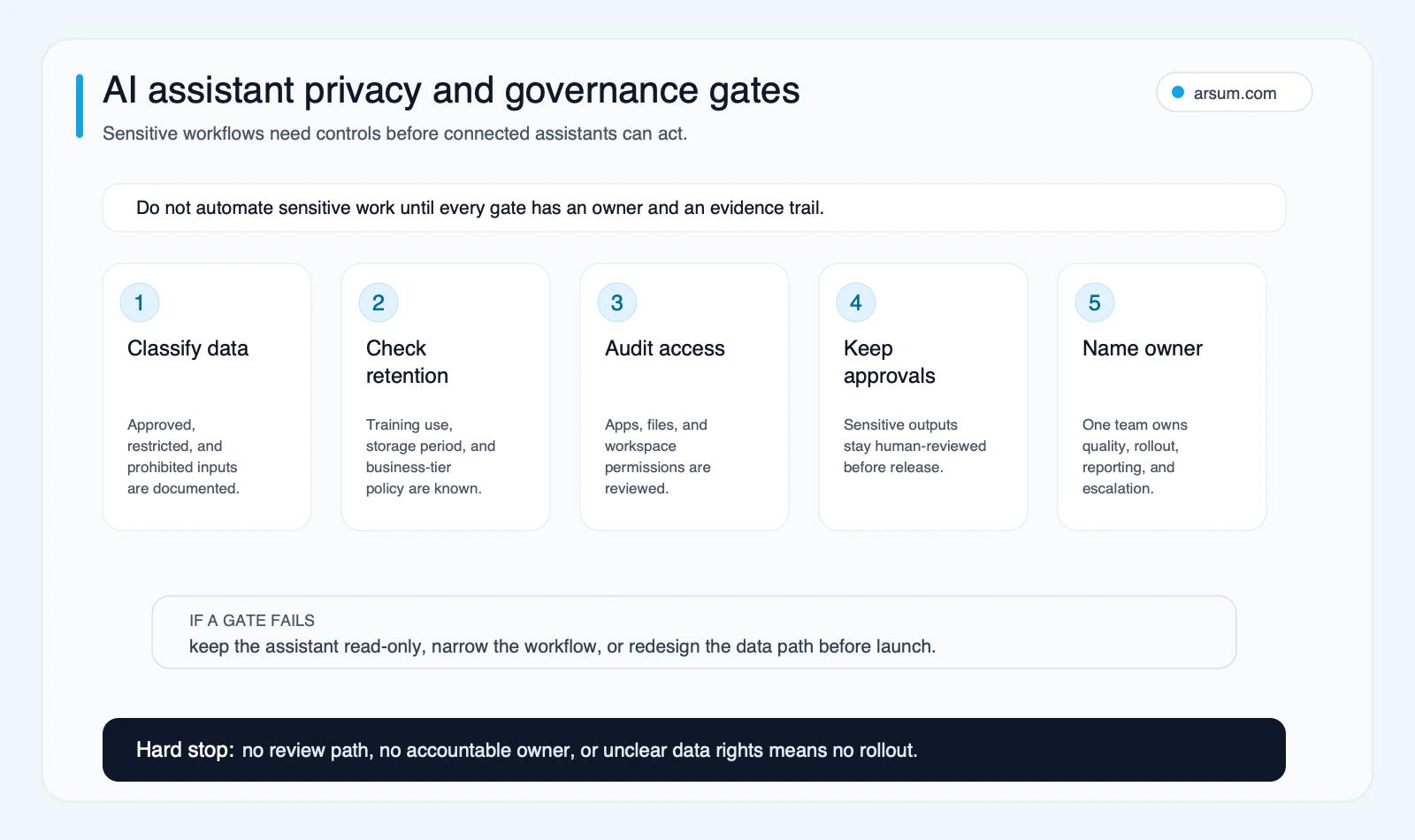
Read access is already consequential when an assistant can summarize, surface, or combine sensitive context. Write access needs stronger evidence, approvals, and rollback.
Community signals: what buyers want, and what they should test
The screenshots below preserve qualitative discussion signals from Reddit and Hacker News. They should be read as examples of buyer questions and failure modes—not as survey evidence, market shares, or verification of any particular product capability.
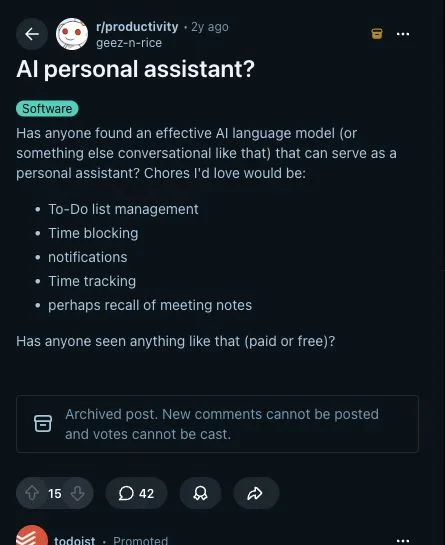
User-language signal: the desired outcome is coordination of tasks, time, notifications, and follow-up.
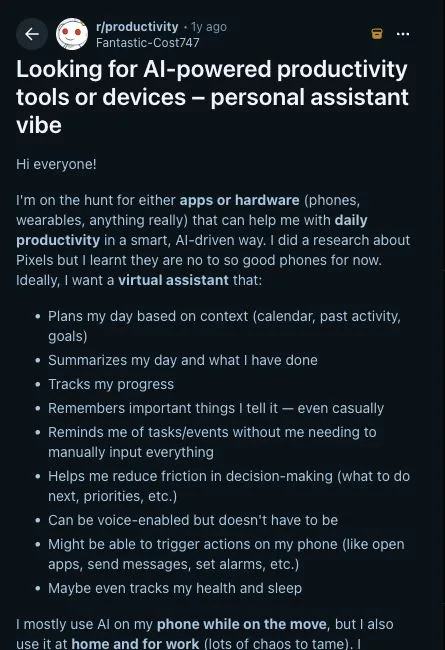
Memory and phone or system actions increase usefulness, but also expand the permission boundary to test.
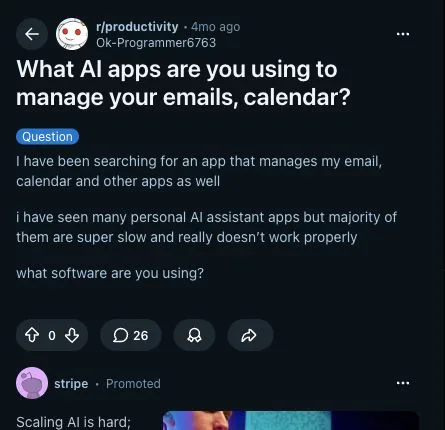
Inbox and calendar workflows should be measured for latency, correction effort, and missed exceptions—not judged from a demo.
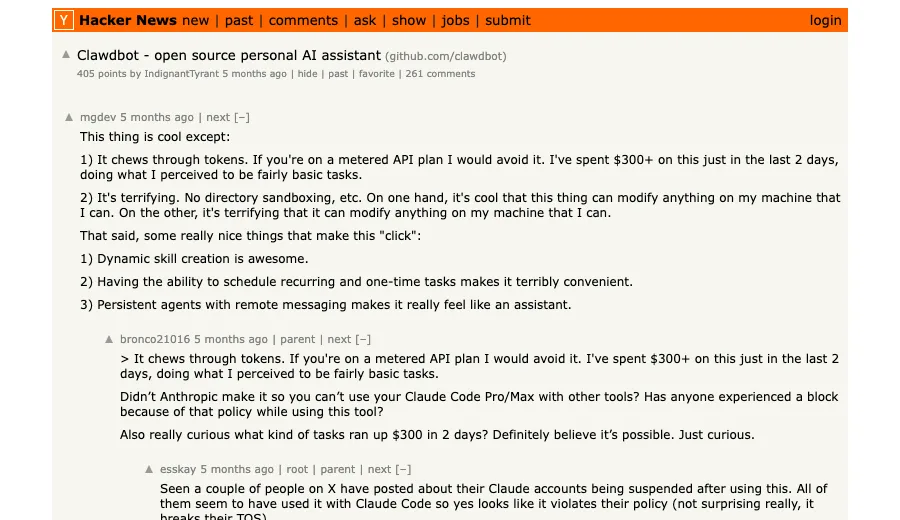
Recurring tasks and remote messaging are useful action cases, which makes containment and ownership part of the design.
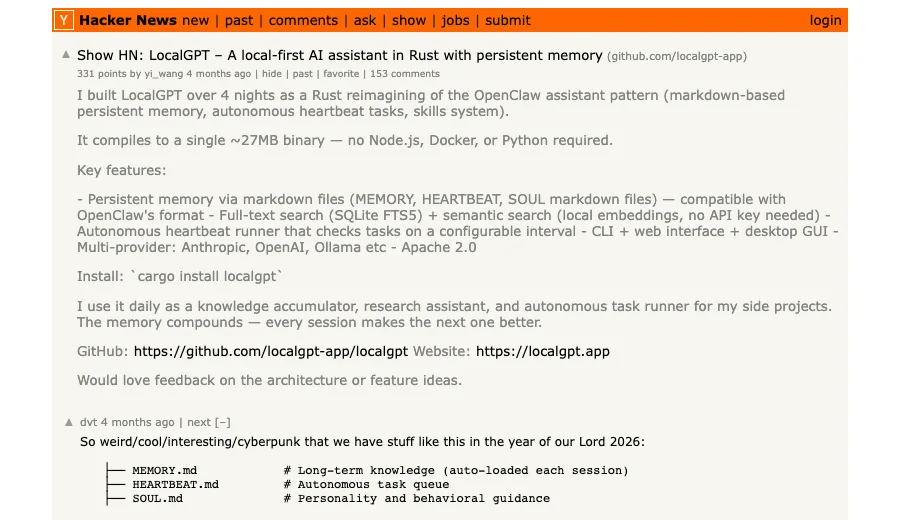
Local-first memory is a directional signal that data location and persistent context matter to some buyers.

Security concerns become more important as assistants gain access to tools, files, inboxes, and communication channels.
Assistant versus agent: autonomy is a design choice
An AI assistant can remain a prompt-driven drafting tool. An AI agent can be deployed to respond to triggers and use tools across a workflow. The difference is not a promise that an agent will operate safely on its own.
Authorized autonomy is determined by:
- The trigger that starts work.
- The sources it may read.
- The tools and fields it may change.
- The approval needed before each action.
- The monitoring and evidence retained.
- The exception path and the owner who receives it.
- The rollback path when the design fails.
For an overview of the distinction, see agentic AI versus generative AI and our guide to AI agents for business. If the proposed workflow involves sensitive or consequential actions, security design should be part of the initial decision; our AI agent security guide covers the operating questions to resolve before expanding access.
Make the buying decision
Choose a general assistant when the work is mostly drafting, analysis, or human-reviewed planning. Choose a suite-native assistant when authorized workspace context is the main value and your permissions are ready. Add a research tool when evidence must remain visible and challengeable. Build a custom workflow only when the process is proven, cross-system, measurable, and governable.
The best next step is not a company-wide rollout. It is one bounded workflow with a baseline, owner, approval design, exception route, pilot threshold, and rollback plan. If it clears that test, expand deliberately. If it does not, change the workflow or keep the task human-led.
Ready to Automate Your Business?
Stop wasting time on repetitive tasks. Let AI handle the busywork while you focus on growth.
Schedule a Free Strategy Call →Written by:Arsum editorial team
- Reviewed by
- Arsum editorial team
- Published
- February 3, 2026
- Updated
- July 5, 2026
- How this was produced
- Arsum uses research packs, source checks, and human editorial review to prepare and update blog articles. Editors are responsible for the final page.
- Source policy
- Sources are linked in the article when used. Methodology and source notes are included on higher-risk or high-visibility pages and are being rolled out across the archive. Editorial policy.
- Why this page exists
- Help B2B operators evaluate AI automation, implementation scope, cost, risk, and build-vs-buy decisions with practical context.