You can build app with Claude Code when the first version is a bounded workflow with clear inputs, acceptance criteria, a named reviewer, and a maintenance owner; it is not a substitute for product judgment, security design, or accountable engineering once the app handles sensitive data, money, or consequential customer decisions.
Build App With Claude Code: Practical Guide
Explore build app with Claude Code: compare workflow fit, costs, risks, evidence, and practical next steps before you build, buy, or hire.

Table of Contents
- What Most Guides Miss: The App Is Not the Unit of Decision
- Screen the Idea Before You Open the Terminal
- Define a Pilot That Can Earn a Production Decision
- Set Up the Project as an Operable System
- Where Claude Code Needs Stronger Human Review
- Manage Context, Cost, and Maintenance
- Demo-Grade Versus Launch-Ready
- Decide Whether to Build, Buy, Hire, or Partner
- Common Failure Modes
- Source and Method Note
- Frequently Asked Questions
Claude Code is a coding agent that can work in a project, edit files, and run commands through terminal-based workflows. Anthropic documents those capabilities in its Claude Code overview and quickstart. The practical question is not whether it can generate an app scaffold. It is whether your team can define, test, operate, and reverse the workflow the scaffold represents. If you are comparing editor-first review against delegated terminal workflows, see Claude Code vs Cursor.
For a founder or operator, Claude Code is most useful for turning a well-understood process into a reviewable prototype: an internal operations tool, a narrow API wrapper, or a focused SaaS feature with a known user and a small set of rules. It is less suitable as the sole delivery path for a production system that needs complex authorization, regulated decisioning, multi-tenant isolation, payment controls, or continuous engineering ownership.
Screen a Claude Code app idea, build in reviewable loops, and pass launch gates.
What Most Guides Miss: The App Is Not the Unit of Decision
Most Claude Code guides focus on prompts, setup, or a happy-path demo. Those matter, but they do not answer the operating decision.
The unit to evaluate is one workflow:
- What event starts it?
- Which system supplies the source data?
- What output does the app produce?
- Who decides whether that output is acceptable?
- What happens to an exception?
- Who can stop or roll back the app after launch?
If you cannot answer those questions in writing, the issue is not that you need a better coding prompt. You need a narrower product and workflow definition.
This distinction matters because generated code can make an unclear process look temporarily complete. A form, dashboard, or AI summary may work on the happy path while hiding unresolved questions about permissions, incomplete inputs, duplicate records, escalation, and ownership. Claude Code can accelerate implementation; it cannot authorize a business decision or decide which failure is acceptable.
A useful decision rule is:
Use Claude Code to implement a workflow your team can already explain, inspect, and correct. Do not use it to discover the workflow after the app has been put in front of customers.
That is also why AI-assisted app delivery differs from simply choosing an AI tool for app development. The tool choice comes after the workflow, controls, and ownership model are clear.
Screen the Idea Before You Open the Terminal
Start by placing the proposed app in a fit category. This is an implementation screen, not a prediction of business value.
| Use case | Claude Code fit | Required human control | Handoff trigger |
|---|---|---|---|
| Internal tool for one team | High | Workflow owner tests normal and exception paths | Multiple teams rely on uptime, auditability, or support |
| Narrow SaaS MVP | Medium-high | Founder owns the written spec, QA, and customer feedback | Billing, multi-tenant access, support commitments, or security complexity |
| API wrapper or operational dashboard | High | Owner supplies API documentation, fixtures, and failure states | Sensitive auth, data-residency requirements, or difficult rate-limit behavior |
| Customer-facing regulated workflow | Low as a solo build | Engineering, security, and compliance review before launch | Before any production use, not after an incident |
A high-fit idea has four characteristics:
- The workflow already occurs often enough to observe.
- Inputs and systems of record are accessible and identifiable.
- One person can approve output quality and own exceptions.
- A bad result is reversible without material harm.
A low-fit idea may still be worth prototyping with Claude Code. The boundary is production autonomy. For example, Claude Code can help build a contract-analysis interface, but the generated output should remain draft review material unless an authorized control design explicitly permits a downstream automated action. It should not silently approve a contract, set a price, make a credit decision, or create a binding customer commitment.
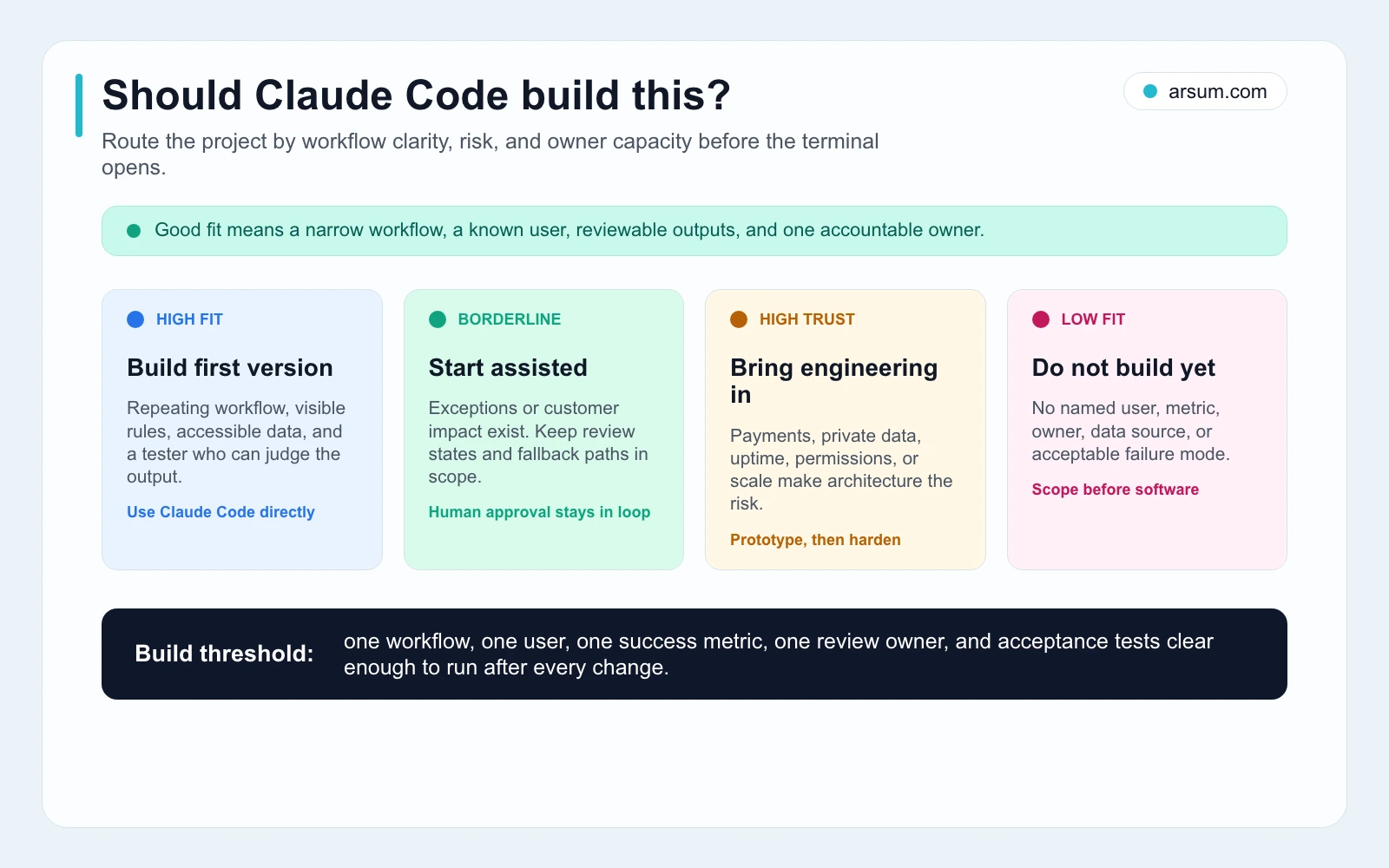
Use the filter before building. If the idea lacks a measurable workflow, accessible inputs, a review owner, or a tolerable failure mode, reduce the scope or choose a different delivery path.
Define a Pilot That Can Earn a Production Decision
A prototype is useful when it answers a specific question about the workflow. Treat the first build as a controlled pilot rather than a promise of savings, speed, or revenue.
A worked pilot scorecard
Consider an internal document-intake assistant. It receives an uploaded document, extracts defined fields, produces a draft summary, and routes incomplete or uncertain cases to an operations reviewer.
| Scorecard field | Example pilot definition |
|---|---|
| Workflow | Extract required fields from an inbound document and prepare a draft record |
| Pilot owner | Operations lead |
| Technical owner | Named builder or engineering sponsor |
| System of record | Existing CRM, case-management system, or approved review queue |
| Inputs | Approved document types and a defined sample set |
| Baseline | Record current weekly case volume, average handling minutes, rework rate, and escalation reasons |
| Target | Reduce handling time only if the quality threshold and review burden remain acceptable |
| Quality measure | Required-field completeness, correct routing, and reviewer acceptance against labeled fixtures |
| Exception measure | Percentage requiring manual completion, rejection, or escalation |
| Review cadence | Daily review during the pilot; weekly decision review with owner and technical sponsor |
| Stop condition | Review time plus correction time exceeds saved handling time, or critical errors recur |
| Rollback | Disable the write-back or outbound action; return to the established manual queue |
| Retained evidence | Source document reference, extraction output, reviewer disposition, reason code, timestamp, and version used |
| Launch gate | Owner signs off on quality, exceptions, support path, security review, and maintenance responsibility |
The scorecard keeps a common mistake visible: a faster draft is not automatically a faster workflow. If the app creates extra checking, correction, and reconciliation work, its apparent automation benefit may disappear.
Use a transparent planning calculation
You can estimate whether a pilot is worth continuing without presenting an unsupported universal ROI claim. Use your own baseline inputs.
Illustrative planning assumption:
- Weekly cases =
V - Current handling minutes per case =
M - Average minutes saved per accepted case =
S - Accepted-case rate after review =
A - Loaded labor cost per hour =
L - Weekly reviewer and correction hours =
R - Weekly operating cost =
O
Estimated weekly gross labor capacity released:
(V × S × A ÷ 60) × L
Estimated weekly net contribution before build effort:
((V × S × A ÷ 60) × L) − (R × L) − O
Then include the build and validation effort separately. A project should not proceed merely because the gross figure is positive. The operator should decide whether the result clears an internal payback threshold after accounting for build hours, review cost, support work, incident exposure, and the cost of an error.
For a consequential workflow, set a stricter rule: if a critical error can cause contractual, financial, legal, or customer harm, do not offset that risk with a labor-savings estimate. Reduce autonomy, add approval, or hand the work to a more durable engineering and control path.
💡 Arsum builds custom AI automation solutions tailored to your business needs.
Get a Free Consultation →If you have a workflow in mind, an implementation assessment should start with this scorecard: the source system, exceptions, accountable owner, acceptance criteria, and rollback method—not a generic request to “add AI.”
Set Up the Project as an Operable System
Anthropic’s setup documentation covers installing and launching Claude Code. The product page describes its ability to work across project files and development contexts. Those capabilities are useful only when the project environment itself is reproducible.
Before the first substantial task, establish:
- A version-controlled repository with a clean starting commit.
- A short application spec: user, trigger, inputs, outputs, system of record, and acceptance criteria.
- A
.envor approved secret-management path; never paste production credentials into prompts or source code. - A local run command and a repeatable test command.
- A minimal architecture note: major components, external services, data flow, and known constraints.
- A session handoff note that can be read by the next builder or reviewer.
This is the same operating concern behind AI app development: code generation shortens some implementation work, but the resulting app still needs source control, deployment discipline, test coverage, and a maintenance owner.
Write the first spec in workflow language
A useful initial spec does not begin with a framework choice. It begins with observable behavior.
For a document-intake pilot:
- A reviewer uploads one approved document type.
- The app stores the source reference in the approved location.
- The app extracts only the defined fields.
- The app displays the source, extracted values, confidence or uncertainty signals where available, and missing-field status.
- The reviewer accepts, corrects, rejects, or escalates the draft.
- The app writes to the system of record only after the required approval.
- Every disposition is logged with the reviewer and reason code.
This is stronger than “build an AI document-processing app” because it gives Claude Code small, verifiable implementation targets and gives the reviewer a way to decide whether the output is fit for use.
Build one layer at a time
Use Claude Code for bounded tasks such as:
- Create the scaffold and local run instructions.
- Add a form with input validation.
- Add a service adapter using approved test credentials.
- Implement one transformation or extraction behavior.
- Add fixtures for normal, incomplete, malformed, and edge-case inputs.
- Add tests and a reviewer interface.
- Add logging, error states, and a manual fallback.
Review and commit after each working layer. This does not mean every change must be tiny; it means each request should have a testable end state. “Build the entire product” makes it hard to isolate defects, verify architectural choices, or reverse a wrong direction.
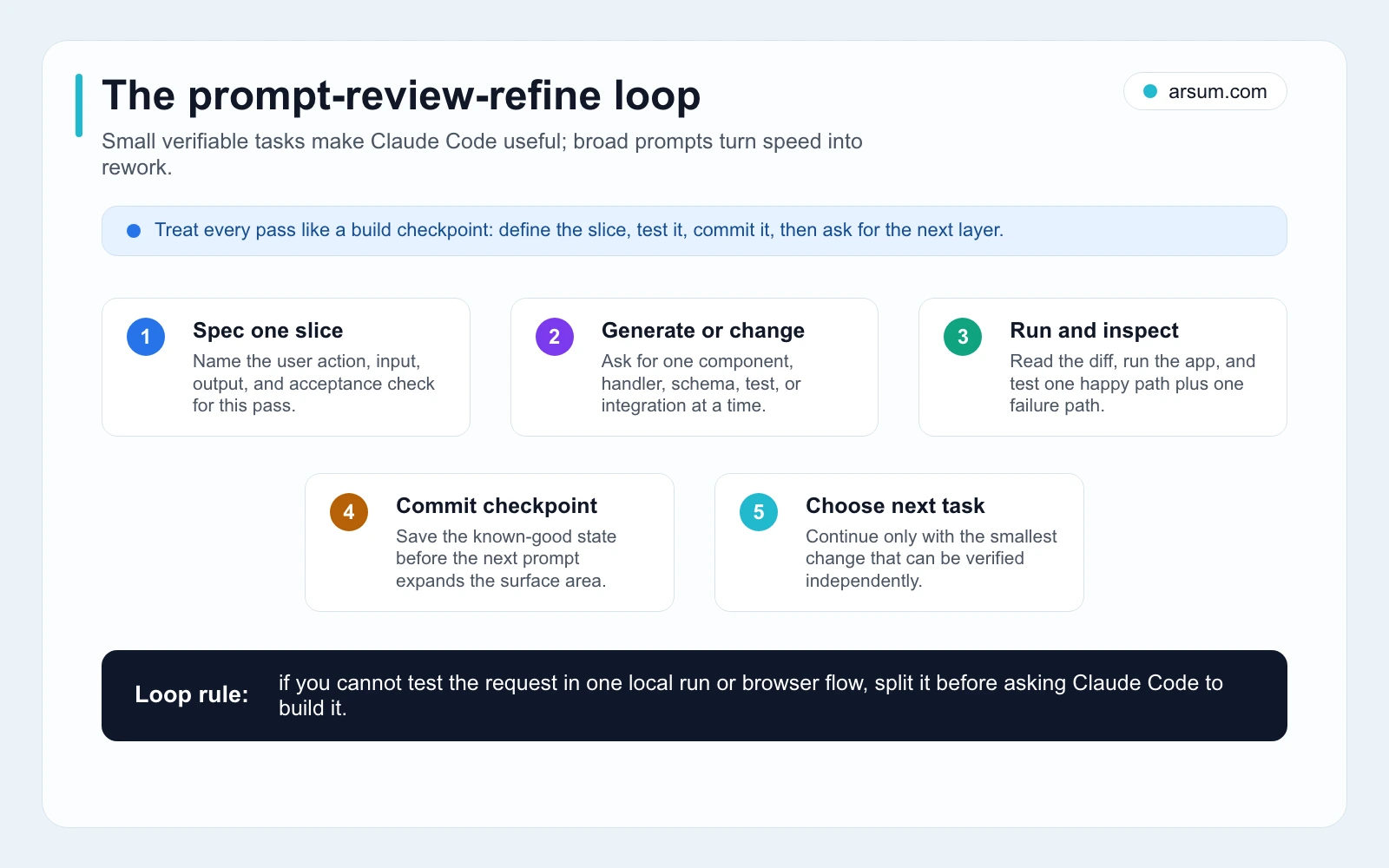
The prompt-review-refine loop works when each request yields one inspectable change, an explicit test, and a checkpoint before the next layer.
Where Claude Code Needs Stronger Human Review
Claude Code can generate implementation quickly, but speed raises the importance of review. Selected practitioner discussions point to recurring concerns around vague specifications, large codebases, context loss, review fatigue, and usage surprises. These are qualitative signals, not market-wide statistics: one Claude Code discussion emphasizes product and design understanding, while another highlights onboarding context and verification.
Disqualifying conditions for a solo build
Pause or hand off to experienced engineering when the first release requires any of the following:
- Production authentication or role-based permissions that affect access to sensitive information.
- Billing, subscription changes, refunds, or other money movement.
- Storage or processing of regulated, confidential, or customer-sensitive data without an approved security design.
- Automated recommendations or decisions with legal, financial, employment, medical, insurance, lending, or similar consequences.
- Multi-tenant isolation, uptime commitments, incident response, or support obligations beyond one accountable owner’s capacity.
- A workflow where a wrong action cannot be easily detected and reversed.
The right response is not necessarily to abandon Claude Code. Use it for discovery, prototyping, test generation, documentation, or a non-production interface. But keep the production boundary under a team that can own architecture, security, code review, deployment, and ongoing change control. For an overview of those operating choices, see AI development services and AI agent security.
Contract and customer workflows need evidence, not just outputs
For a contract-review or customer-facing workflow, require:
- A labeled evaluation set that includes normal cases, missing pages, poor scans, conflicting clauses, and known exceptions.
- Source lineage: each generated finding links back to the source document or relevant excerpt.
- Clear escalation thresholds and an accountable owner for ambiguous or high-risk cases.
- Retention rules for source files, generated outputs, approvals, corrections, and logs.
- A manual fallback that remains usable when the model, integration, or deployment fails.
- Explicit permission boundaries for anything that writes to a CRM, sends messages, changes a record, or affects a customer.
Generated analysis should be treated as draft material until your organization has approved a control design for greater autonomy. Technical capability is not authorization.
Manage Context, Cost, and Maintenance
Large, unclear requests tend to create longer review cycles. Keep the work bounded:
- Begin each session with the current objective, relevant architecture notes, known defects, and the next acceptance test.
- Ask Claude Code to inspect and propose a plan before broad changes.
- Keep prompts scoped to a feature, defect, integration, or refactor boundary.
- Commit working states so the team can compare, revert, and recover.
- Record decisions that should persist beyond the current session.
- Monitor actual account, API, hosting, and vendor usage directly rather than relying on a fixed cost estimate from an article.
Anthropic provides troubleshooting guidance, which is a useful reminder that environment and diagnostic work are part of delivery, not an interruption from it. A reliable build process includes the ability to reproduce failures and determine whether the issue is in the app, dependency, credential, deployment environment, or external service.
Session handoff checklist
Before ending a session, record:
- The workflow being built in one sentence.
- What changed and which commit contains it.
- Commands used to run tests and verify behavior.
- Browser flows, API calls, or fixtures that were tested.
- Known failures, deferred decisions, and manual checks.
- Secrets, permissions, and data-access points requiring review.
- The next smallest verifiable task.
- The named person responsible for accepting the next change.
This is a practical maintenance control, especially if the original builder will not be the only person modifying the app. It also helps distinguish a usable prototype from an undocumented dependency on one person’s chat history.
Demo-Grade Versus Launch-Ready
| Build area | Demo-grade | Launch-ready |
|---|---|---|
| Product definition | Broad prompt and happy-path screen | Written workflow, inputs, outputs, exception path, and acceptance criteria |
| Environment | Runs on one machine | Repository, environment setup, and deployment process can be repeated |
| Verification | One successful manual test | Automated tests, browser or API checks, failure-state testing, and deployment smoke test |
| Security | Secrets and permissions handled informally | Approved secret handling, least-privilege access, and appropriate security review |
| AI behavior | Output looks plausible | Evaluation fixtures, reviewer criteria, escalation, and retained evidence |
| Operations | Builder fixes issues ad hoc | Bug triage, logs, support ownership, rollback, and maintenance plan are assigned |
| Change control | Prompt history is the record | Commits, decisions, release notes, and handoffs are available to the team |
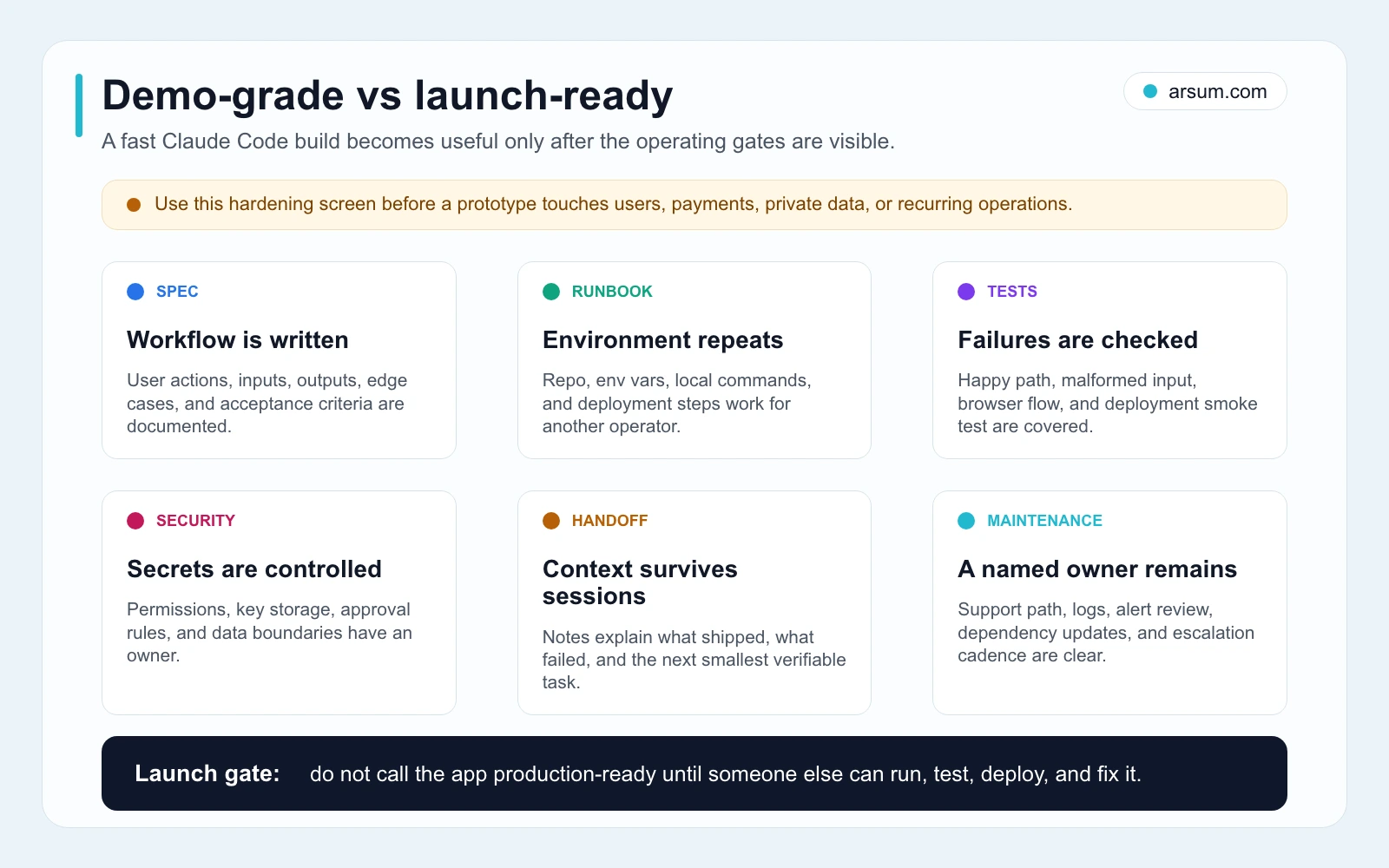
Do not treat the launch gate as paperwork. It is the control that prevents a fast demo from gaining access to customer data, payments, or outbound actions before the team can safely operate it.
Decide Whether to Build, Buy, Hire, or Partner
Claude Code is one implementation option. The best choice depends on whether the workflow is distinctive, how much risk it carries, and who will own it after the first release.
Build with Claude Code
Choose this when the workflow is specific to your business, the scope can be limited, test cases are available, and an internal owner can review the result. Good candidates include internal tools, structured intake flows, operational dashboards, and narrow interfaces around existing systems.
Buy software
Buy when the workflow is common and mature, and a vendor covers the required controls and integrations. Scheduling, document signing, basic CRM workflows, support routing, and standardized reporting often have established options. The evaluation should focus on fit, integration, data handling, exit terms, and operating burden—not only feature lists. The AI workflow automation guide can help frame that comparison.
Hire engineering
Use a dedicated technical team when the product needs resilient architecture, significant integration work, high-traffic reliability, multi-tenant permissions, security review, or a roadmap that will continue after launch. Claude Code may still improve engineering throughput, but it should sit inside an owned delivery process rather than replace it.
Use an implementation partner
Use a partner when the workflow is valuable and defined but the team lacks time, integration experience, technical review capacity, or a safe path through data and approval design. A useful engagement should begin with the workflow scorecard and a production boundary, not with an unsupported promise about cost or delivery speed. See AI app development services and AI implementation services for the broader delivery considerations.
Work With Arsum
We help businesses implement AI automation that actually works. Custom solutions, not cookie-cutter templates.
Learn more →A productive implementation conversation starts with one named workflow and its real constraints: source systems, exception volume, approval owner, launch gate, and rollback path. If you are still deciding whether this build style fits your team, the broader vibe coding tools comparison is a useful next read.
Common Failure Modes
Automating a process nobody has mapped. The app encodes inconsistent rules and forces exceptions downstream. Fix the workflow description before building.
Treating a plausible output as verified. An extraction, classification, or summary may look right while missing an important field or source condition. Use fixtures, reviewer dispositions, and evidence links.
Adding write actions too early. CRM updates, emails, pricing changes, or account changes should remain behind approval until the control design and error handling are proven.
Skipping version control and tests. Fast generated changes are still changes. Without commits and repeatable checks, diagnosis and rollback become expensive.
Assuming current access or pricing. Product plans, API usage, hosting, and third-party service costs can change. Verify current terms directly with the relevant provider before funding a build.
No maintenance owner. If nobody owns bug triage, credentials, logs, dependency updates, and user support, the app is a demo with a delayed failure.
Source and Method Note
This guide uses Anthropic’s official overview, quickstart, setup, and troubleshooting documentation for product and setup claims. It also considers practitioner education from the freeCodeCamp Claude Code handbook and selected Reddit and Hacker News discussions as qualitative signals about workflow friction, not as benchmarks, case studies, or market-wide evidence.
The central conclusion is deliberately narrow: Claude Code can accelerate bounded implementation. Whether the app is worth shipping depends on specification quality, evaluation, review cost, authorization, maintenance ownership, and the ability to stop or roll back safely.
Frequently Asked Questions
Do I need to be a developer to build an app with Claude Code?
You need enough technical comfort to work in the chosen environment and enough product knowledge to define and test the workflow. You do not need to write every line yourself, but someone must own acceptance criteria, inspect changes, and decide when the project needs professional engineering review.
Can Claude Code build a real SaaS product?
It can help implement a real product, especially a narrow first version. A production SaaS still needs decisions about authentication, tenant separation, billing, support, security, deployment, observability, and maintenance. Those responsibilities do not disappear because code was generated quickly.
How much does it cost to build with Claude Code?
There is no reliable fixed figure. Estimate from your own build hours, reviewer time, current vendor pricing, hosting, integrations, ongoing usage, support burden, and the cost of incorrect output. Verify current Claude access and pricing directly through Anthropic before committing.
When should I stop a Claude Code pilot?
Stop, narrow the scope, or hand off when reviewer and correction time exceeds the time saved; the workflow cannot meet its quality threshold; exceptions are too frequent or consequential; or the app reaches auth, billing, sensitive-data, compliance, or reliability requirements that the current owner cannot safely maintain.
What should I do after the prototype works?
Run the launch-ready gate: repeatable environment setup, tests, failure handling, security review appropriate to the data and actions involved, ownership for incidents and maintenance, written handoff material, and a rollback method. If the app crosses into a durable product or critical internal system, move it into an engineering path with clear accountability.
Ready to Automate Your Business?
Stop wasting time on repetitive tasks. Let AI handle the busywork while you focus on growth.
Schedule a Free Strategy Call →Written by:Arsum editorial team
- Reviewed by
- Arsum editorial team
- Published
- April 11, 2026
- Updated
- July 18, 2026
- How this was produced
- Arsum uses research packs, source checks, and human editorial review to prepare and update blog articles. Editors are responsible for the final page.
- Source policy
- Sources are linked in the article when used. Methodology and source notes are included on higher-risk or high-visibility pages and are being rolled out across the archive. Editorial policy.
- Why this page exists
- Help B2B operators evaluate AI automation, implementation scope, cost, risk, and build-vs-buy decisions with practical context.