To build website with AI well, choose the route from the website’s 18-month business role—not from the fastest prompt-to-page demo. An AI builder can be a sound choice for a simple presence or campaign site; AI-assisted code or a development team is the safer route when the site must reliably route leads, connect business systems, support authenticated users, process payments, or become part of a customer workflow.
Build Website With AI: Practical Guide
Explore build website with AI: compare workflow fit, costs, risks, evidence, and practical next steps before you build, buy, or hire.

The right approach depends on what your website needs to do for the business, not what it costs to launch.
Table of Contents
- What most guides miss: this is a requirements decision
- Start with the requirement ladder
- Score the operational requirements, not the design
- Use performance evidence as a secondary screening check
- CMS performance associations in the HTTP Archive corpus
- Compare the three practical routes
- Run a narrow pilot before committing the full site
- Disqualifying conditions and rebuild triggers
- Cost, timing, and ownership: use drivers, not unsupported ranges
- A practical path forward
What most guides miss: this is a requirements decision
Most AI website-builder guides explain how to generate a layout, draft copy, edit sections, and publish. That is useful for a first site. It does not answer the operator’s harder question: what happens after launch when marketing needs structured content, sales needs reliable lead routing, or customers need an account-specific experience?
The decision changes when you separate six site roles:
- Presence page: explain an offer, establish credibility, collect basic inquiries.
- Campaign page: support one offer, event, or conversion path with straightforward tracking.
- CMS marketing site: publish and maintain an evolving content library.
- Revenue-system site: capture, qualify, route, and measure demand across connected systems.
- Customer portal: authenticate users and expose account-specific information or actions.
- AI-enabled application: provide a customer-facing workflow involving models, source data, permissions, review, and fallbacks.
The first two can often start with a builder. The last two are engineering projects. The middle categories require deliberate platform due diligence rather than an assumption that either a builder or custom code is always superior.
Official product pages illustrate the capability range, not a universal answer. Wix AI Website Builder positions its product around conversational site creation; Framer describes a no-code platform with CMS, SEO, collaboration, and publishing capabilities; Microsoft describes AI website-builder features including editing, SEO tools, and integrations in its Power Platform overview. Your decision should be based on the particular plan, integrations, export options, permissions, and architecture you will actually use.
Start with the requirement ladder
Use this ladder before comparing tools or accepting a generated design.
| Site role | A builder can be a reasonable starting point when | Escalate to AI-assisted code or development when |
|---|---|---|
| Presence page | Content is largely static; form submission goes to a monitored inbox | Multiple offers, markets, or approval paths need structured handling |
| Campaign page | One conversion event and simple analytics are sufficient | Qualification, attribution, consent, or follow-up logic must work reliably |
| CMS marketing site | Editors can publish within the platform’s content model and SEO requirements | Large structured content sets, custom templates, or a migration path are material |
| Revenue-system site | Native connectors meet the documented workflow and failures are visible | CRM routing, enrichment, billing, operational data, or nonstandard logic is required |
| Customer portal | — | Accounts, roles, account-specific data, and support workflows are in scope |
| AI-enabled application | — | Data access, evaluation, permissions, human review, and rollback are required |
This is not an argument against builders. It is a boundary-setting exercise. A platform may have an API, native integration, export feature, or headless option that makes it viable for your use case. Another may not. Verify the exact capability before committing operational workflows to it.
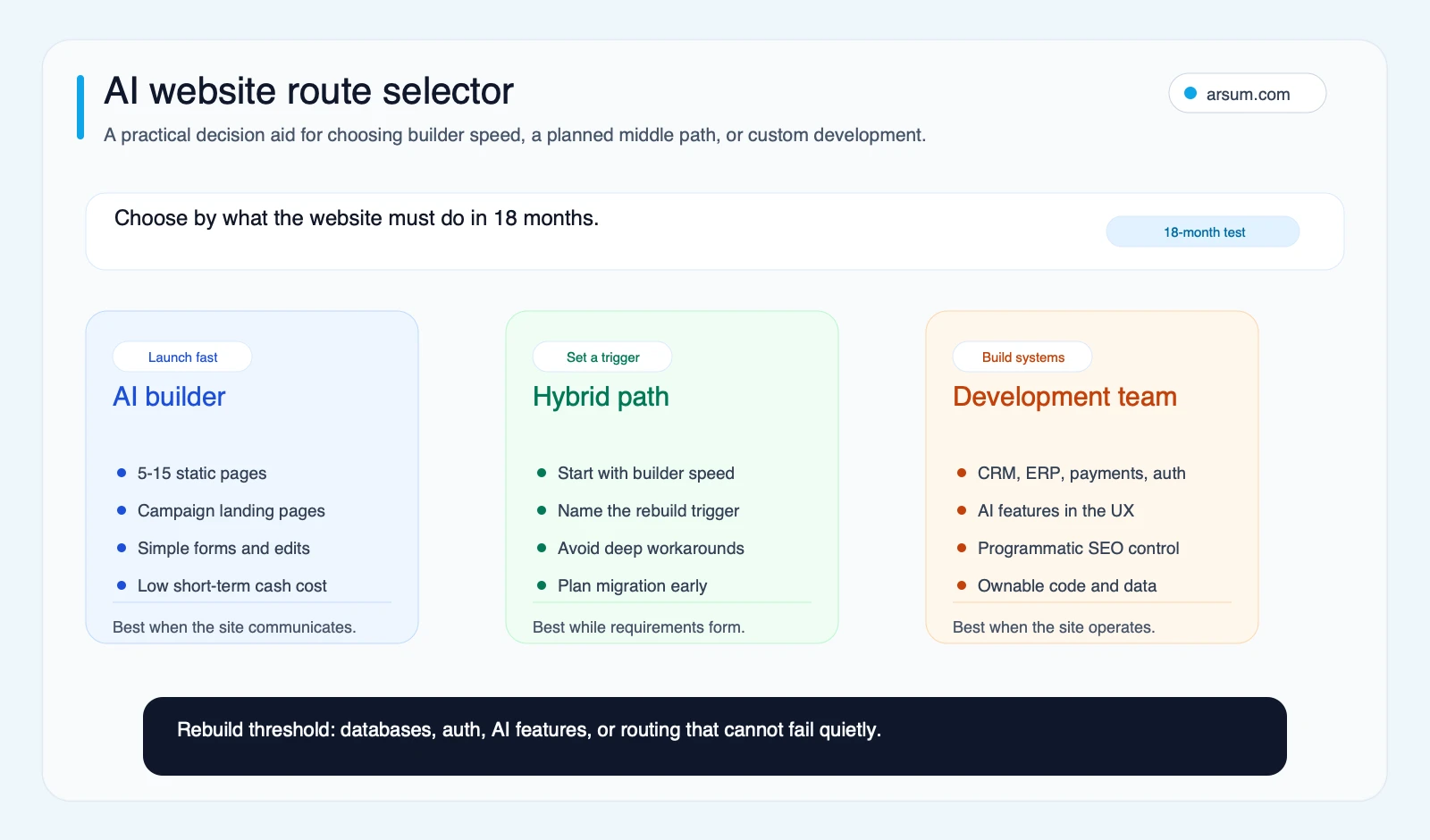
Use the route selector to anchor the decision in the site’s 18-month business role, not only the quickest launch path.
Score the operational requirements, not the design
A polished homepage can conceal a poor system fit. Score each dimension below from 0 to 2:
- 0: low complexity or low consequence
- 1: moderate complexity, with a clear owner and supported implementation path
- 2: high complexity, high consequence, or a requirement that needs custom logic, control, or verification
| Dimension | 0 | 2 |
|---|---|---|
| Custom data flow | Static content only | Data must move between multiple systems reliably |
| CRM and marketing routing | One form to one monitored destination | Branching ownership, enrichment, consent, and follow-up logic matter |
| Authentication | No login | Account-specific content, permissions, or self-service actions |
| SEO architecture | A limited core page set | Large structured page sets and repeatable internal-linking rules |
| Payments or commerce | No checkout or a standard hosted checkout | Subscription rules, customer-specific pricing, inventory, or account billing |
| Content ownership and exportability | Platform dependence is acceptable | The business needs a tested migration path for content, assets, and functionality |
| Maintenance model | One knowledgeable owner can manage changes | Multiple nontechnical teams need governed publishing |
| Security and privacy | Public brochure content | Sensitive submissions, contractual requirements, or enterprise scrutiny |
A total below 6 can usually justify starting with a builder, provided the required capabilities are confirmed. A score of 6–10 calls for platform-specific due diligence and a documented exit path. At 11 or above, scope the work as development from the beginning.
These cutoffs are an Arsum planning heuristic, not validated industry benchmarks. Test them against your integration requirements, compliance obligations, migration constraints, and the actual platform configuration under consideration.
The decision artifact to create before selecting a platform
For every workflow the website will perform, document:
| Field | What to record |
|---|---|
| Requirement | Example: route enterprise demo requests by region and segment |
| Source data | Form fields, consent status, campaign parameters, CRM account data |
| System owner | The person accountable for the destination system and routing rules |
| Approval owner | Who approves changes to qualification, permissions, or customer-facing logic |
| Failure mode | Duplicate lead, unassigned lead, incorrect routing, missing consent record |
| Monitoring | Dashboard, reconciliation report, or daily/weekly exception queue |
| Exception path | Where a failed or ambiguous submission goes and who resolves it |
| Migration path | What must be exported, rebuilt, or kept independent of the platform |
If the team cannot name an owner, detect a failure, or describe a safe exception path, the workflow is not ready for autonomous handling—regardless of what an AI builder can technically generate.
Use performance evidence as a secondary screening check
Functional fit comes first. Once two options can support the required workflow, performance is a useful second screen: assess the proposed template, third-party scripts, images, analytics tags, consent tooling, and embedded widgets before launch.
The evidence brief describes observed associations in HTTP Archive and Chrome UX Report data for a relevant technology set. It does not establish that a platform caused a performance result, and it is not a substitute for testing your own proposed site.
For a buyer, the practical action is simple: build representative pages in the shortlisted stack, include the planned analytics and marketing scripts, then test mobile performance and Core Web Vitals before treating the implementation as approved. A clean demo without production tags, embeds, and real media is not a reliable proxy for the launched experience. Related performance decisions are covered in website technology tax, analytics tools and performance impact, and Google Tag Manager website performance.
Compare the three practical routes
| Route | Best fit | Primary owner | Main control question | Migration question |
|---|---|---|---|---|
| AI website builder | Presence sites and simple campaigns | Marketing or founder | Can the platform support the specific publishing, form, analytics, and permission requirements? | Can content, assets, redirects, and required configuration be extracted or recreated? |
| AI-assisted code | Marketing sites with differentiated components or known integrations | Technical lead with marketing owner | Who reviews generated code, dependencies, accessibility, security, and production changes? | Is the repository, deployment account, and documentation owned by the business? |
| Custom development | Revenue systems, portals, and AI-enabled workflows | Product or technical owner with functional owner | What is automated, who approves exceptions, and how is failure detected? | Can the system be maintained, tested, and changed without a single vendor bottleneck? |
AI website builders
Builders are appropriate when their native workflow meets your requirements. They can reduce the effort of producing an initial design, drafting content, setting up standard pages, and managing routine edits. But “has integrations” is not enough evidence for a consequential workflow.
For example, verify whether the specific connector supports the fields, triggers, error reporting, consent handling, and ownership model you need. Ask whether failed submissions are visible, whether retries can create duplicates, and whether a nontechnical user can safely change the implementation. If your form routes a low-volume inquiry to a shared inbox, the risk is manageable. If it determines sales ownership or starts a regulated workflow, test it as an operational system.
Community discussions around AI builders often focus on SEO structure, ecommerce, integrations, and platform durability. Those are useful qualitative signals about buyer concerns, not market-wide evidence or proof that a particular platform is unsuitable. They reinforce the need to verify the real operating model rather than selecting from a generic “best builder” list.
AI-assisted code generation
AI-assisted code can be the middle route: a team uses tools to accelerate layout creation, component work, copy drafts, tests, and routine implementation while keeping the site in a codebase the business controls. This route works when the requirements exceed a builder’s proven fit but do not require a broad product program.
It still needs engineering discipline. Generated code requires review for accessibility, security, dependency risk, analytics behavior, content editing, deployment, and rollback. The question is not whether the model can write a component; it is whether the business can operate the resulting system safely.
For this route, clarify who owns the repository, cloud accounts, domain configuration, analytics, and documentation. If AI-assisted development is part of the evaluation, AI code generation automation and app development using AI provide useful context on where speed gains still require technical judgment.
Custom development
Custom development is justified when the website is actually a business system: authenticated experiences, account-level content, custom data flows, multiple operational integrations, or an AI feature that affects customer outcomes.
The requirement is not simply “build a chatbot” or “add personalization.” Define the source material, permitted data, access controls, evaluation method, human review point, feedback path, monitoring owner, and condition for disabling the feature. For an AI-enabled customer workflow, technical capability does not authorize autonomous action. The more costly or irreversible the error, the more human approval and fallback should be designed into the process.
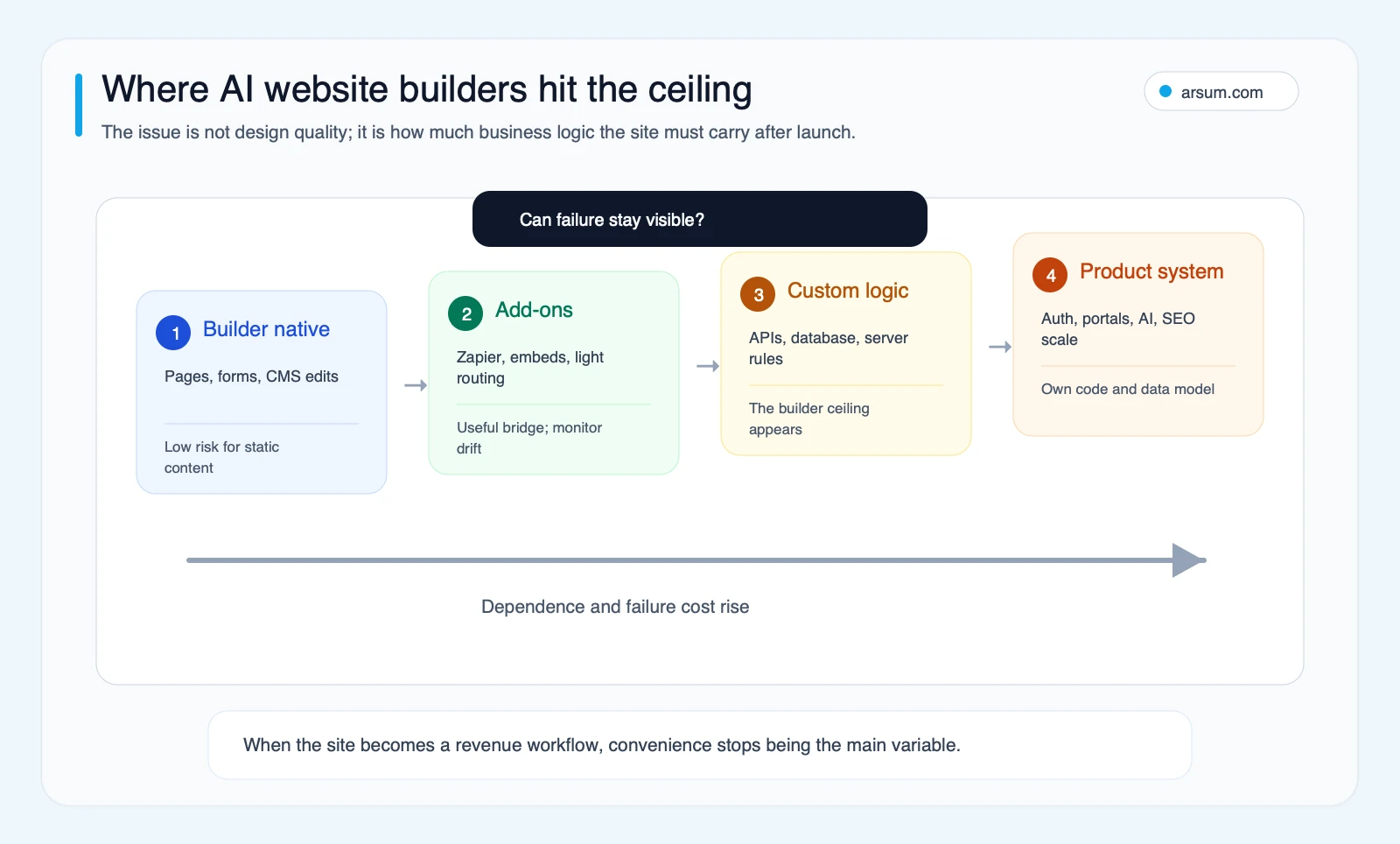
The integration ceiling is reached when a site carries business logic whose failures need visibility, ownership, and recovery—not merely when a site uses an API.
💡 Arsum builds custom AI automation solutions tailored to your business needs.
Get a Free Consultation →Run a narrow pilot before committing the full site
A lead-routing workflow is a practical pilot because it reveals whether the proposed stack can support operational ownership.
Worked pilot scorecard: qualified demo-request routing
This is an illustrative planning model, not an observed result or an industry benchmark.
| Scorecard field | Example planning definition |
|---|---|
| Workflow | Collect a demo request, apply documented routing rules, create or update the CRM record, notify the accountable sales owner |
| Baseline | Manually record the current path: submissions received, time to assignment, duplicate rate, unassigned submissions, and correction effort over a defined observation period |
| Target | Set an internal target for routing completeness and assignment time based on the baseline and sales capacity; do not adopt a generic threshold without testing |
| Quality and exception metric | Count duplicate records, missing required fields, consent mismatches, wrong-owner assignments, and unresolved exceptions |
| Functional owner | Revenue operations lead owns routing rules and CRM outcomes |
| Technical owner | Web or systems owner owns the implementation, logging, and deployment |
| Review cadence | Daily review during launch; then weekly reconciliation until the workflow is stable |
| Stop condition | Pause automated routing if records are lost, consent data is mishandled, or errors cannot be identified and corrected within the agreed operating window |
| Rollback path | Send all submissions to a monitored queue or inbox, preserve the raw submission record, and revert to a documented manual assignment procedure |
Do not call the pilot successful because the form submitted once. Run representative cases: new lead, existing account, incomplete form, unknown region, duplicate entry, consent variation, system outage, and a routing rule change. Keep the raw event record so the team can reconcile what the website captured against what reached the CRM.
The same approach applies to a customer portal. Start with one defined journey—such as document retrieval or service-request intake—rather than promising a broad self-service environment. Measure completion, exception volume, support handoffs, incorrect access attempts, and the time required to recover from a failed integration.
Disqualifying conditions and rebuild triggers
Do not approve a builder-only route for a workflow if any of these conditions are true and the platform cannot demonstrate a supported, testable answer:
- The site will expose account-specific or sensitive information.
- A missed, duplicated, or misrouted action can affect revenue, customer service, compliance, or contractual obligations.
- The business needs custom rules that cannot be expressed and monitored within the platform.
- The proposed integration depends on undocumented workarounds or unowned automation.
- The team cannot identify who will maintain forms, tracking, publishing, permissions, and incident response.
- Content, assets, redirects, configuration, or critical business logic cannot be exported or recreated through a documented migration plan.
- Organic growth depends on structured content at a scale that the editorial and technical workflow cannot govern.
Treat these as investigation triggers, not categorical claims that all builders lack a given feature. A platform may address one or more conditions through supported integrations, APIs, extensions, or a headless architecture. The buyer still needs to test the exact configuration, including what happens when a dependency fails.
Rebuild signals to track after launch
A planned hybrid approach can work well: use a builder for a narrow launch while preserving a clear rebuild decision. Review the following monthly:
- Lead-routing rules are being simulated manually or through brittle automations.
- Marketing cannot create structured pages without platform workarounds or developer intervention.
- The site now needs authenticated or account-specific experiences.
- SEO depends on large structured page sets, consistent templates, and governed internal links.
- Data must move reliably between the site and operational systems.
- The business cannot export or reproduce essential content, assets, design, configuration, or logic cleanly.
Three active signals do not automatically mean “rebuild now.” They mean the original route should be reassessed with an integration inventory, a maintenance ownership review, acceptance criteria, and a migration plan.
Cost, timing, and ownership: use drivers, not unsupported ranges
Published prices and timelines vary by platform, geography, scope, integration complexity, procurement requirements, content readiness, security review, and internal review cycles. Without a named, comparable source and a defined scope, a generic project range creates false precision.
Instead, request a scoped estimate that separates:
- Discovery and requirements definition
- Content, design, and accessibility work
- CMS configuration and editorial workflow
- CRM, analytics, consent, payment, or other integrations
- Authentication, data storage, and security requirements
- Testing, monitoring, documentation, and handover
- Ongoing maintenance and change ownership
- Migration or exit work if the platform later becomes unsuitable
For an illustrative planning assumption, calculate internal cost explicitly rather than presenting it as a market result:
internal coordination cost = hours spent by marketing + sales operations + technical owner × each role’s loaded hourly cost
Then add the quoted vendor or platform costs and the expected cost of maintaining the chosen workflow. The point is not to make a builder appear expensive or custom development appear inevitable. It is to compare the options against the business system you actually need to operate.
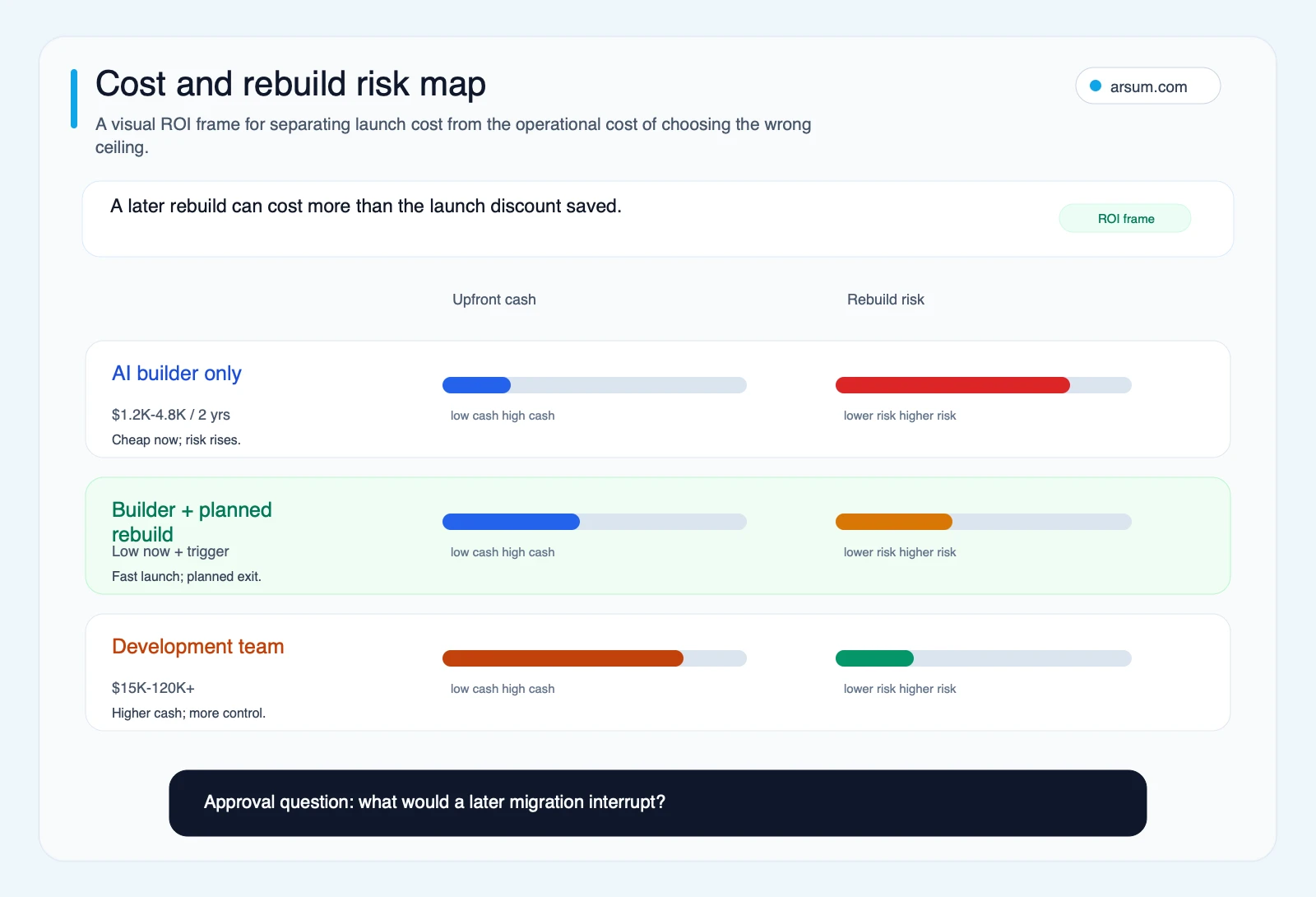
Use the cost and rebuild-risk map to discuss ownership and migration before implementation choices become difficult to reverse.
A practical path forward
Choose an AI builder when the site has a narrow communication job, the required integrations are supported and testable, and your team accepts the platform’s ownership and migration conditions. Use AI-assisted code when you need more control but can keep the work bounded and maintainable. Commission custom development when the site is a revenue workflow, portal, or AI-enabled application with consequential data and user actions.
If you are assessing an AI-enabled workflow beyond the website itself, AI workflow automation and AI integration services can help frame the system boundaries. For teams deciding whether external help is appropriate, AI implementation services outlines the implementation questions worth resolving before a build begins.
The useful next step is a scoped website-system assessment: inventory the integrations, identify the business and technical owners, define acceptance criteria for one pilot workflow, and document the conditions that would trigger a planned rebuild. That gives you a platform decision you can defend after launch—not just a site that looked convincing on day one.
Ready to Automate Your Business?
Stop wasting time on repetitive tasks. Let AI handle the busywork while you focus on growth.
Schedule a Free Strategy Call →Written by:Arsum editorial team
- Reviewed by
- Arsum editorial team
- Published
- May 15, 2026
- Updated
- July 5, 2026
- How this was produced
- Arsum uses research packs, source checks, and human editorial review to prepare and update blog articles. Editors are responsible for the final page.
- Source policy
- Sources are linked in the article when used. Methodology and source notes are included on higher-risk or high-visibility pages and are being rolled out across the archive. Editorial policy.
- Why this page exists
- Help B2B operators evaluate AI automation, implementation scope, cost, risk, and build-vs-buy decisions with practical context.