Business process automation consulting is worth hiring when an automation could appear to succeed while silently routing, approving, or recording work incorrectly—and your team needs someone to define the process boundary, controls, and ownership before that failure reaches production. The right engagement for business process automation consulting produces a buyer-verifiable recommendation: what to automate, what must remain under human approval, how exceptions move, who monitors the workflow, and how work returns to a safe manual path.
Business Process Automation Consulting: Buyer Guide
Explore business process automation consulting: compare workflow fit, costs, risks, evidence, and practical next steps before you build, buy, or hire.

How to decide what to automate, when tools are enough, and when to bring in a consultant.
Table of Contents
- What most guides miss: the tool is not the first decision
- Test workflow readiness before requesting proposals
- What a consulting engagement should deliver before build
- Choose native, platform, hybrid, or custom with test cases
- Worked example: an illustrative invoice-intake pilot
- Surface failure modes during discovery
- Evaluate the consultant’s method, not just their tool preference
- Make the next decision small enough to verify
What most guides miss: the tool is not the first decision
Business process automation uses software to automate complex, repetitive processes, while workflow automation can execute all or part of a process through connected systems and rules. IBM’s business process automation overview and its workflow automation guide explain the category. A buyer still needs to answer a more consequential question: is the problem process design, implementation, or operational ownership?
- Process-design problem: operators follow different rules, inputs are inconsistent, or the team cannot define a correct result.
- Implementation problem: the intended process is clear, but systems, permissions, approvals, and data handoffs are disconnected.
- Ownership problem: the workflow can run, but nobody owns alerts, changes, credentials, output quality, or recovery.
An outside consultant is most useful when more than one problem exists. If the work is simply “create a CRM record after a form is submitted and notify a channel,” your team may be able to validate a native integration or workflow platform directly. Review connector fit in the Zapier app directory, Microsoft Power Automate documentation, or n8n workflow documentation.
The decision rule is simple: do not hire a consultant merely to connect tools. Hire one when you need an independent, documented answer about workflow scope, control gaps, operating ownership, and whether a build should proceed at all.
Test workflow readiness before requesting proposals
A frustrating manual process is not automatically ready for automation. Use a readiness review to expose the questions discovery must settle. This is a qualitative planning aid, not a validated benchmark, predicted ROI model, or universal readiness score.
| Dimension | Buyer question | Evidence to collect |
|---|---|---|
| Volume and value | How often does work occur, and what outcome does delay or error affect? | Representative transaction log and business consequence |
| Input structure | Are inputs complete, standardized, and retrievable? | Forms, records, documents, emails, and field definitions |
| Output clarity | Can the team define correct and incorrect results before testing? | Accepted examples, rejected examples, policies, approval rules |
| Exceptions | When the normal path fails, what happens next? | Exception categories, queue, current handler, escalation path |
| Systems and access | Can the workflow safely reach every required system? | API availability, permission owners, credential policy |
| Reversibility | What happens if the workflow is wrong? | Undo steps, downstream impact, reconciliation procedure |
| Ownership | Who operates it after launch? | Named business owner and technical escalation owner |
Unresolved dimensions should reduce autonomy. A workflow with uncertain source lineage or high-cost, hard-to-reverse actions may still be a valid automation candidate, but its output should be a draft, recommendation, pre-filled record, or approval request—not an authorized decision.
Conditions that should pause production implementation
Defer a production automation when any of the following is true:
- Operators use materially different criteria and cannot agree on an intended path.
- Policies, source systems, approval rules, or input formats are changing during the proposed work.
- The team cannot provide examples of acceptable and unacceptable outputs.
- One person carries undocumented judgment that no queue or decision rule can replace.
- An incorrect action is difficult to reverse and no human approval is required.
- No internal owner will accept monitoring and maintenance responsibility after handoff.
A consultant can still add value here. The appropriate output may be process standardization, a data-cleanup plan, a decision table, or a tightly controlled prototype—not a production commitment.
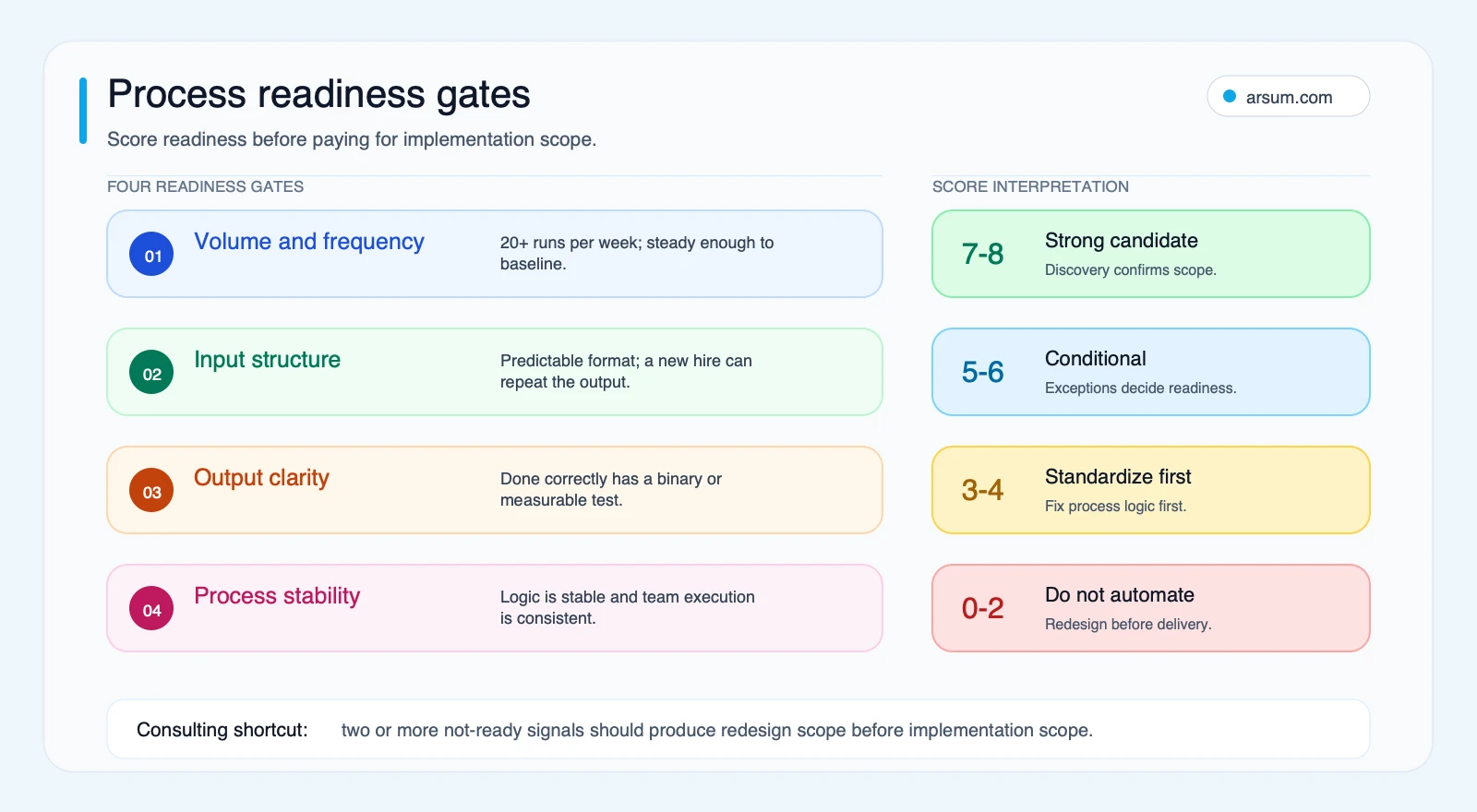
The diagram is a routing aid rather than a scored benchmark. Use its gates to find the limiting condition: high volume does not compensate for unclear output rules, and stable inputs do not justify automated action when the error cannot be safely reversed.
What a consulting engagement should deliver before build
The useful output of business process automation consulting is not a slide deck promising efficiency. It is a set of artifacts that lets the buyer test, govern, and eventually operate the workflow.
Put these deliverables and acceptance criteria in the statement of work.
| Deliverable | Acceptance criterion to request | Risk if missing |
|---|---|---|
| Current-state process map | Shows actual roles, triggers, handoffs, systems, queues, and manual workarounds | A policy diagram hides the work that determines failure risk |
| Exception inventory | Lists exception types, routing rule, responsible role, response expectation, and retained record | “Escalate to the team” becomes an unowned backlog |
| Data and permission map | Identifies fields, systems, access rights, credential owner, and prohibited actions | Teams discover access blockers after design is committed |
| Acceptance-test list | Includes normal cases, rejected cases, missing-data cases, downstream failures, and approvals | “Works well” cannot be evaluated objectively |
| Tool-versus-custom recommendation | Explains options considered, constraints, and rejected alternatives | Buyers pay for unnecessary custom work or overextend a platform |
| Monitoring and alert plan | Defines business-output checks, technical alerts, recipients, and response actions | A completed run is mistaken for a correct business result |
| Runbook and ownership model | Names business owner, technical owner, incident path, change process, and manual fallback | The workflow becomes untrusted infrastructure after launch |
A tool setup may be enough for a low-risk, well-understood workflow. A consulting-led implementation is warranted when the engagement must also resolve process definition, access design, exception handling, audit evidence, and post-launch responsibility.
Practitioner discussions repeatedly surface reliability, tool fit, and process confusion as buyer concerns. They are qualitative signals rather than market-wide evidence, but they are useful prompts for a vendor conversation: an r/automation discussion, an r/Entrepreneur discussion, and a Hacker News discussion of process modeling.
Choose native, platform, hybrid, or custom with test cases
The right implementation is the least complex approach that can meet your acceptance criteria and remain operable by the people who inherit it.
- Native integration or self-serve configuration: consider this when a small number of systems exchange structured records, triggers are clear, errors are low consequence, and reversal is straightforward.
- Low-code workflow implementation: consider this when routing, branching, approval queues, and structured data matter. Verify connectors, permissions, licensing, limits, recovery behavior, and operational ownership. Microsoft documents that Power Automate limits vary by flow type and license.
- Hybrid workflow: consider this when a workflow engine should own deterministic steps while a bounded AI component extracts, classifies, summarizes, or drafts from unstructured material.
- Custom automation: consider this when controlled access across internal systems, bespoke data handling, specialized interfaces, rigorous evaluation, or audit requirements exceed what configuration can safely support.
Do not accept an untested claim that a platform will be sufficient—or that custom development is inherently safer. Ask a prospective consultant to walk through your process against these cases:
- A downstream action completes but an earlier step fails. How is the error detected, reconciled, and, where possible, rolled back?
- A source-system field is renamed, missing, or unavailable. What pauses, what alert fires, and what work enters a manual queue?
- A credential is revoked or rotated. Who restores access, and how are secrets handled?
- A platform limit or rate limit is reached. What is queued, retried, dropped, or escalated?
- A reviewer rejects an AI-generated output. Where is the correction retained, and how is it tied to the source record?
- An automated action must be undone. Who can activate the fallback, what is reconciled, and what evidence remains?
For further tool-selection context, see AI workflow automation tools and AI process automation.
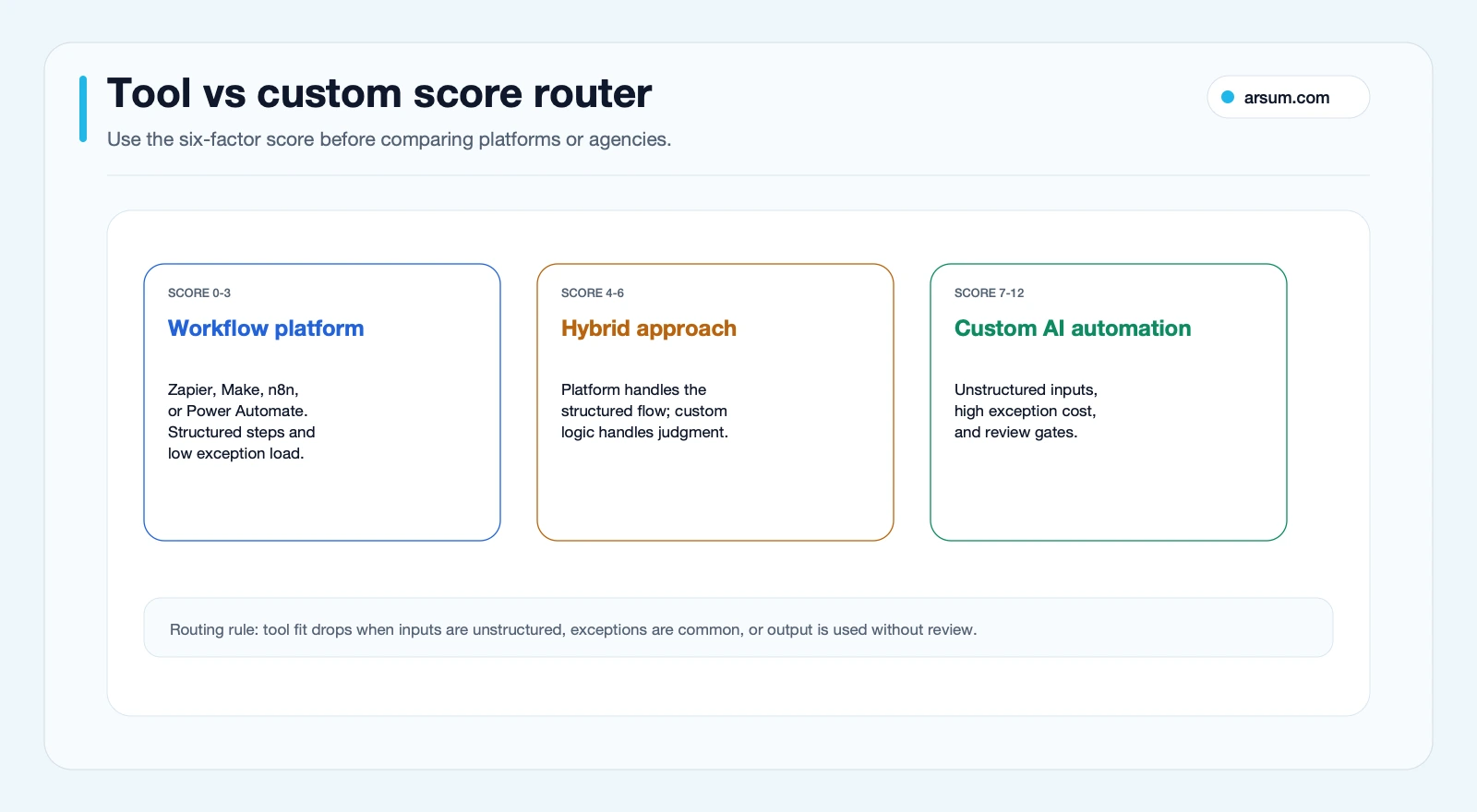
This router is also qualitative. Its inputs are workflow structure, exception and approval needs, data type, integration constraints, error consequences, and maintenance capability. It should guide a discovery conversation, not substitute for test results. A workflow can move toward a platform path when the data and approvals are clear; unresolved exceptions, sensitive permissions, and non-reversible effects move it toward a narrower hybrid design or a custom controlled implementation.
Where AI belongs—and where it does not
AI can help extract fields from variable documents, classify inbound requests, propose a route, or draft a response. It does not automatically have authority to execute a consequential action.
For payment changes, credit or compliance decisions, customer commitments, access changes, and irreversible updates, establish an approval gate and retain source lineage. An operator should be able to inspect:
- The source input and relevant record
- The proposed output or action
- The rule, policy, or instruction governing routing
- The human approver when approval is required
- The final action taken
- Any correction, rejection, or rollback record
That is the useful boundary for an agentic AI workflow: bounded permissions, explicit stop conditions, and review before authorized action. Technical capability is not business authorization.
💡 Arsum builds custom AI automation solutions tailored to your business needs.
Get a Free Consultation →A scoped Arsum assessment should return a workflow boundary, identified control gaps, a pilot scorecard, and a build-versus-buy recommendation—not a generic automation conversation.
Worked example: an illustrative invoice-intake pilot
Consider an illustrative accounts-payable intake workflow. This is a planning scenario, not a client result or a claim about typical outcomes.
Current process and normal path
Invoices arrive through a shared mailbox. An accounts-payable coordinator opens each attachment, identifies the supplier, invoice number, date, amount, purchase-order reference, and cost center, then enters a draft record in the finance system. The coordinator routes invoices with a matching purchase order to the appropriate approval queue and requests clarification for missing or conflicting information.
The normal path is suitable for a hybrid pilot only if the team can provide representative documents, a defined list of fields, a matching rule, and examples of acceptable drafts. The automation may:
- Capture the attachment and source-email metadata.
- Extract proposed invoice fields.
- check for required fields and basic formatting.
- Match a purchase-order reference under defined rules.
- Create a draft record and approval request.
- Retain the source, extracted values, match result, and reviewer decision.
It should not release a payment, approve an exception, modify supplier banking details, or override an approval rule.
Ugly exceptions and approval gate
The exception inventory should include duplicate invoices, unreadable documents, missing purchase-order references, multiple possible matches, currency discrepancies, unexpected supplier details, and instructions that conflict with the attached document.
Each exception needs a route:
| Exception | Automated response | Human owner | Retained evidence |
|---|---|---|---|
| Required field is missing | Create an exception item; do not create a finance draft | Accounts-payable coordinator | Source file, missing-field reason, resolution |
| Multiple purchase-order matches | Hold for review | Budget owner or designated approver | Candidate matches and final selection |
| Suspected duplicate | Flag and hold | Accounts-payable coordinator | Duplicate comparison and disposition |
| Supplier bank-detail change | Do not act automatically | Authorized supplier-maintenance owner | Source request, verification record, approval |
| Finance-system error | Pause affected case and alert technical owner | Technical owner | Error event, retry history, reconciliation outcome |
The approval gate is not an inconvenience added after the fact. It is the boundary that permits useful extraction and routing without giving a model or workflow authority over a consequential financial action.
Pilot scorecard and go/no-go decision
Before launch, the business owner and consultant agree on a representative sample period and record the current process. The pilot scorecard might state:
| Field | Illustrative definition |
|---|---|
| Baseline | Number of invoices in the selected sample, manual touchpoints, cycle-time observations, correction work, and exception categories |
| Target | Fewer manual data-entry steps for invoices that meet stated input and match rules |
| Quality metric | Every draft is checked against the source during the pilot; record field-level corrections and exception routing accuracy |
| Named owners | Accounts-payable lead owns process acceptance; technical owner owns failures, credentials, and changes |
| Review cadence | Weekly review of sampled drafts, exceptions, alerts, and any source-system changes |
| Stop condition | Pause automated draft creation if an unauthorized action occurs, source lineage is missing, a defined control fails, or review finds material errors outside the agreed acceptance standard |
| Rollback | Disable automated draft creation, route new items to the existing mailbox queue, reconcile any draft records created since the last review, and document the decision |
| Go/no-go evidence | Accepted test cases, exception-handling results, review findings, operating runbook, and explicit owner sign-off |
The recommended initial route is hybrid, not because hybrid is universally better, but because the workflow mixes deterministic controls with variable document extraction. A platform may manage email capture, routing, queues, and approvals; a bounded AI component may propose fields; people retain authority over exceptions and approvals. If the team cannot produce stable samples, matching rules, or an owner, the decision should be to standardize first rather than automate.
For a related operating context, see accounts receivable automation and AI automation for finance teams.
Illustrative planning arithmetic
Use your own baseline instead of vendor benchmarks. If a selected period contains N cases and the pilot removes or redirects R manual minutes from each accepted standard case, the estimated monthly capacity affected is:
N × R minutes
This is an illustrative planning assumption, not a savings claim. It excludes implementation work, software costs, exception effort, review time, support, change management, error correction, and any new controls the workflow requires.
A better planning model separates paths:
standard cases × manual minutes avoided
+ exception cases × manual minutes avoided or added
− review, support, platform, and change-management effort
Use this arithmetic to decide whether the pilot has enough operational value to justify continued evaluation, not to promise a financial result before the evidence exists.
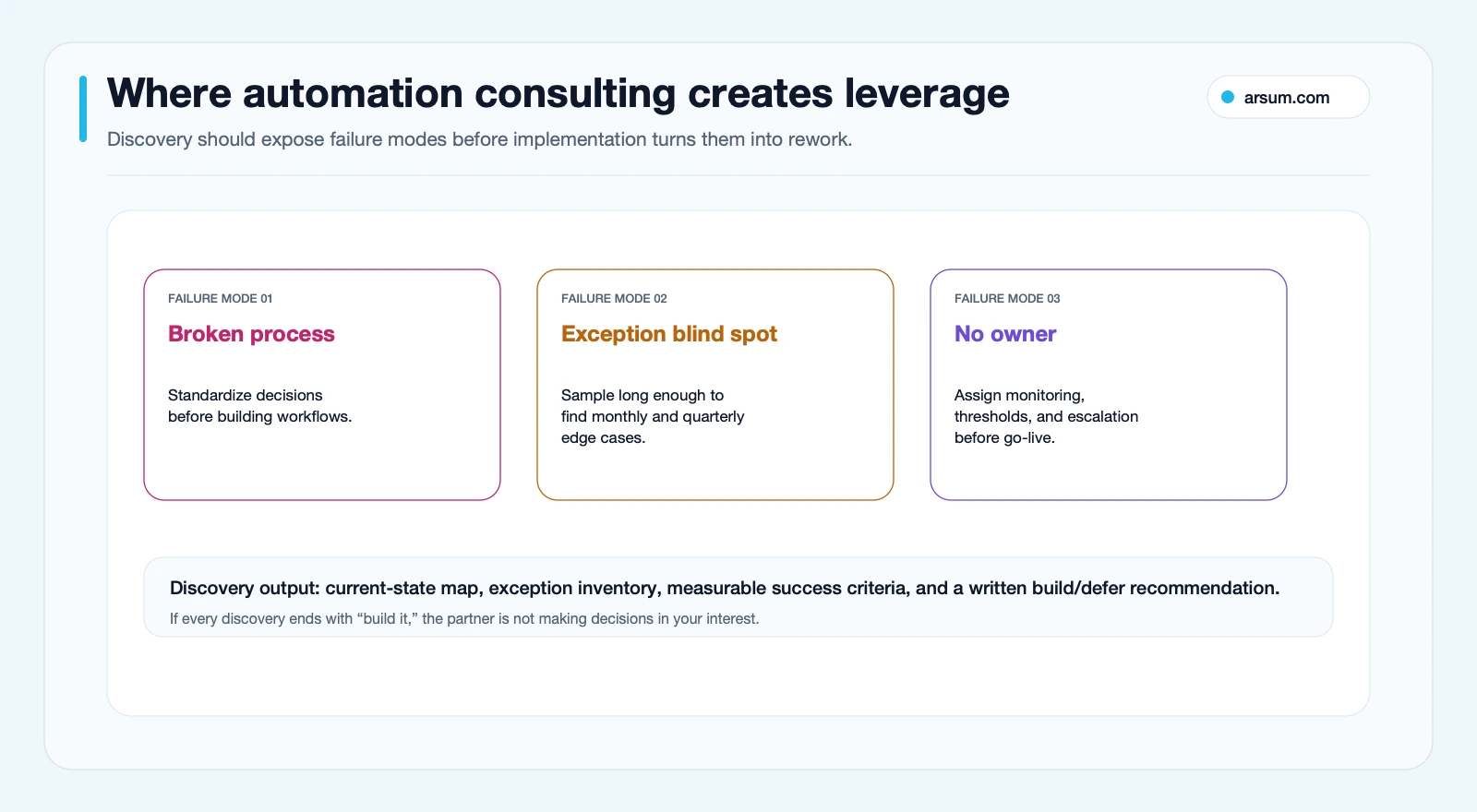
Surface failure modes during discovery
The costliest automation failures are often quiet: a workflow reports completion while its output has drifted from the business rule.
Automating an unstable process
If operators use different criteria, automation formalizes inconsistency. Start with decision tables, shared definitions, or a redesigned handoff. Software should implement an agreed process; it should not decide what the business process means after deployment.
Treating exceptions as edge cases
Every exception needs a trigger, route, owner, and retained record. “Escalate to the team” is incomplete. Name the queue, decision-maker, and recovery action. Test representative historical variation and known unusual cases where available.
Monitoring uptime but not business correctness
Technical uptime does not prove correct business output. Monitor workflow events and output quality separately. A completed run can still create the wrong record, route work to the wrong queue, extract a field incorrectly, or apply an outdated rule.
Leaving ownership ambiguous
A support arrangement is not automatically an operating model. Clarify who reviews alerts, approves changes, owns credentials, maintains documentation, and can pause the workflow. If these responsibilities are unspecified, the scope is not ready for launch.
Evaluate the consultant’s method, not just their tool preference
Use the proposal process to test whether a consultant can make the eventual system operable.
Ask what would make them recommend against the build
A credible answer identifies workflow-specific disqualifiers: unreliable inputs, missing system access, unclear approval policy, high error consequences, lack of ownership, or a process changing too quickly. A consultant who cannot explain when to defer has not demonstrated an independent decision framework.
Ask what discovery produces in writing
Require the current-state map, exception inventory, acceptance tests, data and permission map, architecture recommendation, monitoring plan, ownership model, and runbook outline. Ask what evidence marks each discovery milestone complete.
Ask how recovery and rollback will be tested
Request test cases beyond the happy path. The plan should show who is notified, how affected cases are reconciled, when automated action pauses, and how manual work resumes.
Ask who inherits the workflow
Require named owners. The business owner decides whether outputs remain acceptable; the technical owner handles maintenance and incidents. The consultant’s handoff should include access documentation, configuration or code ownership, credential-rotation responsibilities, alert routes, support boundaries, and a usable manual fallback.
For adjacent sourcing decisions, compare business process automation services, hiring an AI developer versus an agency, and AI integration consulting.
Make the next decision small enough to verify
Bring one candidate workflow to an assessment rather than a broad automation ambition. Provide representative inputs, systems involved, examples of exceptions, existing approvals, and the person who would own the workflow after launch.
A useful outcome is one of four decisions:
- Configure an existing tool internally.
- Standardize the process before automation.
- Run a bounded pilot with explicit controls.
- Build a managed hybrid or custom workflow.
“Not yet” can be the correct answer when controls, inputs, or ownership are missing. The goal is to avoid funding automation that cannot be tested, monitored, and responsibly operated.
For further buyer guidance, see AI automation consulting and automation consultants.
Methodology and source lineage: Written by Johnny Kartakov; editorially reviewed by the Arsum Editorial Team. This guide uses IBM for category definitions, Microsoft, n8n, and Zapier documentation for product-boundary checks, and clearly labeled Reddit and Hacker News discussions as qualitative practitioner signals only. The readiness and routing visuals are Arsum editorial decision aids, not market benchmarks. Last updated: 2026-06-19.
Ready to Automate Your Business?
Stop wasting time on repetitive tasks. Let AI handle the busywork while you focus on growth.
Schedule a Free Strategy Call →Written by:Arsum editorial team
- Reviewed by
- Arsum editorial team
- Published
- May 16, 2026
- Updated
- August 12, 2026
- How this was produced
- Arsum uses research packs, source checks, and human editorial review to prepare and update blog articles. Editors are responsible for the final page.
- Source policy
- Sources are linked in the article when used. Methodology and source notes are included on higher-risk or high-visibility pages and are being rolled out across the archive. Editorial policy.
- Why this page exists
- Help B2B operators evaluate AI automation, implementation scope, cost, risk, and build-vs-buy decisions with practical context.