Business process automation services are useful when a workflow is important enough to deserve a durable operating design—not merely a set of connected triggers. The right service should help you decide whether to clean up the process, configure low-code tools, use RPA for unavoidable screen work, or build API-first orchestration with explicit ownership, exceptions, approvals, and rollback.
Business Process Automation Services: Buyer Guide
Explore business process automation services: compare workflow fit, costs, risks, evidence, and practical next steps before you build, buy, or hire.

Table of Contents
- What Most Guides Miss: Automating a Process Is Not the First Decision
- Score the Candidate Before You Evaluate Vendors
- Choose the Delivery Route: Low-Code, RPA, or Custom Orchestration
- Commodity Configuration vs. Services That Change the Operating Model
- Run a Pilot With Acceptance Criteria, Not a Vague Promise
- Production Governance: The Controls That Belong in the Build
- Questions to Put in Every Vendor Evaluation
- Frequently Asked Questions
- What business processes should be automated first?
- When should we use RPA instead of API integration?
- Is AI required for business process automation?
- What should a business process automation services proposal include?
- How do we know whether to buy software or hire a services partner?
- Ready to Automate Your Business?
The label covers very different work. A notification from a form to Slack is not equivalent to a workflow that reads documents, updates an ERP, routes financial exceptions, and records approvals. Both may be called automation, but they carry different maintenance, control, and service requirements. Microsoft frames automation as a lifecycle of planning, design, build, testing, deployment, and refinement—not a one-time flow configuration (Microsoft Learn).
What Most Guides Miss: Automating a Process Is Not the First Decision
The first decision is whether the current process deserves to be automated in its present form.
A workflow can be repetitive and still be a poor automation candidate. If teams disagree about the rules, work from incomplete data, rely on undocumented judgment, or have no owner for exceptions, automation will make those weaknesses run faster. That is why process mapping, data cleanup, and ownership belong before platform selection.
This is also where the route between workflow cleanup, low-code automation, RPA, and custom work becomes clearer.
- Workflow cleanup first when inputs, ownership, or approval rules are still undefined.
- Low-code/API workflow automation when supported systems exchange structured data and the logic is understandable.
- RPA or screen automation when a necessary business system has no usable API and its user interface is sufficiently stable.
- Custom orchestration when the process spans multiple systems, requires durable state, complex exceptions, auditability, or a controlled AI decision step.
- Process redesign before automation when the workflow depends on PDFs, email interpretation, or manual rekeying that can be replaced with structured intake.
Red Hat distinguishes BPA, which can span repeatable multi-step work across IT systems, from RPA, which often automates repetitive interface-level actions (Red Hat). That distinction matters to buyers: screen automation can be a practical bridge, but it should not become the default architecture when a form, API, or system redesign would create a more maintainable workflow.
A snippet-level practitioner signal from the June 2026 research review reinforces this boundary: teams discussing automation often described mapping bottlenecks and workflow ownership as prerequisites, while warning that PDF-heavy or screen-driven flows can become brittle. This is qualitative input from search-surfaced discussions, not a market-wide finding.
Score the Candidate Before You Evaluate Vendors
Use this scorecard before requesting proposals. Give each dimension a score from 0 to 2, then record the evidence behind it.
| Dimension | 0 | 1 | 2 |
|---|---|---|---|
| Rule clarity | Decisions rely on undocumented judgment | Rules exist but need clarification | Steps and decision rules can be documented and tested |
| Input quality | Inputs are inconsistent, incomplete, or unstructured | Some cleanup or validation is needed | Inputs are structured and source systems are known |
| Exception path | Exceptions are unknown or unmanaged | Common exceptions are known but not fully routed | Exceptions have owners, queues, and resolution rules |
| System access | No confirmed access path | Connectors or UI access are possible but constrained | Stable APIs, supported connectors, or controlled access exist |
| Business value | Low-frequency convenience task | Material time or service-level impact | Critical-path throughput, accuracy, or control issue |
| Ownership | No accountable operator | Sponsor exists but operating owner is unclear | Named business owner and technical maintainer are assigned |
| Reversibility | Bad output is hard to contain | Some containment is possible | Changes can be staged, approved, and rolled back |
Add the scores. A high total does not override a serious control problem.
Mandatory disqualifiers
Do not move a process directly into autonomous execution when any of these apply:
- No named business owner can approve rules, exceptions, and post-launch changes.
- The source data is unreliable and there is no validation step before a consequential action.
- A bad action cannot be detected, contained, or reversed.
- The workflow would approve, pay, deny, send, or alter a consequential record without an appropriate human authority.
- The process changes so frequently that the team cannot describe a stable version to build against.
- Required system access, API limits, or security approvals have not been confirmed.
The output of this exercise should be a one-page vendor brief: process map, systems list, baseline measurements, exception list, named owner, risk level, and preferred route. That brief makes vendor proposals comparable because providers are responding to the same operational problem.
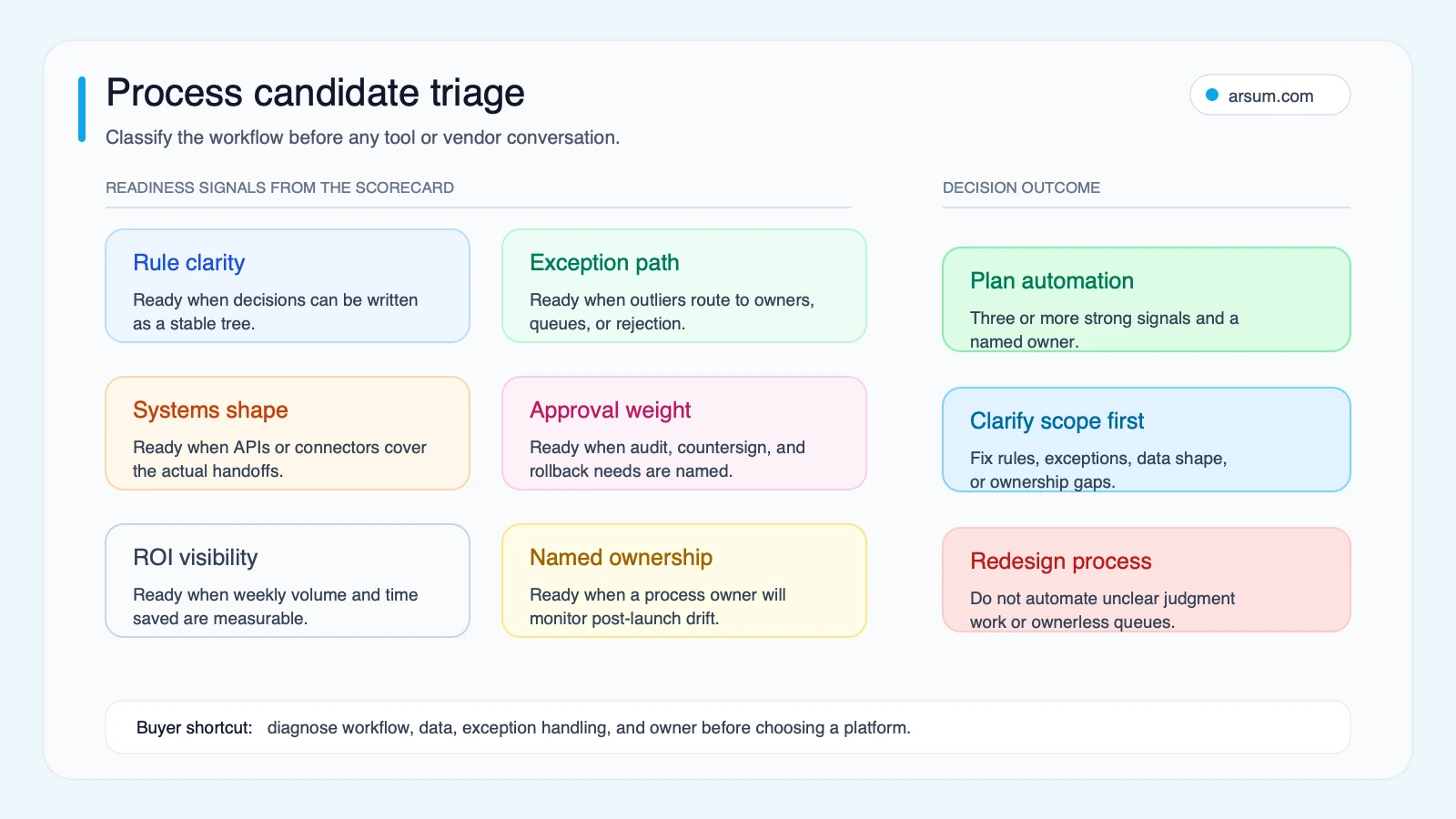
Use the triage map to identify whether the next investment is workflow cleanup, platform configuration, RPA, custom orchestration, or redesign.
If you want an external view, an automation assessment should produce this same brief—not begin with a tool recommendation. Arsum can help turn the checklist into a scoped workflow assessment, including control design and pilot acceptance criteria.
💡 Arsum builds custom AI automation solutions tailored to your business needs.
Get a Free Consultation →Choose the Delivery Route: Low-Code, RPA, or Custom Orchestration
The right technology is determined by the workflow’s interfaces, exceptions, failure cost, and ongoing ownership.
| Route | Suitable inputs and work | Main failure modes | Control requirements | Typical owner | Exit criteria |
|---|---|---|---|---|---|
| Low-code/API workflow automation | Structured SaaS data, standard approvals, notifications, supported connectors | Connector changes, duplicated flows, unclear branching, credential drift | Named flow owner, versioning, error alerts, access review | Operations owner with technical support | Workflow cannot express exceptions cleanly or depends on unsupported systems |
| RPA/screen automation | Stable legacy UI, repetitive navigation, no practical API, bounded steps | UI changes, timing failures, session issues, OCR errors, hidden interface changes | Run logs, retries with limits, screenshots or evidence where appropriate, exception queue, credential controls | Process owner plus automation support | API, structured intake, or system modernization becomes feasible; UI instability exceeds maintenance tolerance |
| Custom API-first orchestration | Multi-system processes, durable state, complex exceptions, controlled AI steps, audit needs | Integration contracts change, unclear state transitions, incomplete monitoring, overbroad permissions | Architecture review, event logs, approval gates, observability, rollback, test environment, least-privilege access | Business process owner and technical product owner | The process can be simplified into a supported platform pattern, or business value no longer justifies bespoke maintenance |
| Process redesign | Unstructured intake, unclear handoffs, duplicated rekeying, inconsistent policies | Recreating the old process in a new form, unresolved owner conflict | Process map, input standards, decision rights, change management | Functional leader | A stable, measurable workflow is ready for automation |
When low-code is enough
Low-code is usually appropriate when a process uses systems with reliable native connectors, structured inputs, and a manageable exception path. It is often a sensible first route for CRM notifications, standard approvals, onboarding tasks, record synchronization, and reporting handoffs.
UiPath describes its Studio environment as supporting both low-code and coded automation across applications and business processes (UiPath documentation). The buyer question is not whether a platform can demonstrate a flow. It is whether your team can understand, monitor, and change it after launch.
For a platform-oriented comparison, see AI workflow automation tools and n8n vs. Make vs. Zapier.
When RPA is the right compromise
RPA is appropriate when the system of record has no API, cannot be changed soon, and the user interface is stable enough to automate with bounded risk. It can reduce manual navigation through legacy applications, but buyers should treat it as an interface dependency with a maintenance plan.
Do not use RPA simply because the current process arrives as emailed PDFs or requires copying data from one screen to another. First ask whether you can change the intake: a web form, structured upload, API, or standardized document template may remove the brittle step entirely. If not, scope the RPA bot around clear handoffs, a monitored exception queue, and a manual fallback procedure.
When custom orchestration earns its cost
Custom work becomes rational when a process requires capabilities a platform cannot safely provide as configured: shared state across systems, complex exception logic, custom integrations, approval evidence, audit-ready history, or controlled AI assistance.
This is especially true when AI interprets variable inputs. The model may be technically capable of classifying, summarizing, or drafting, but that does not authorize it to take a consequential action. Keep high-failure-cost decisions behind thresholds, approval queues, or rule-based constraints. For more detail on this boundary, read agentic AI workflow automation and AI agent security.
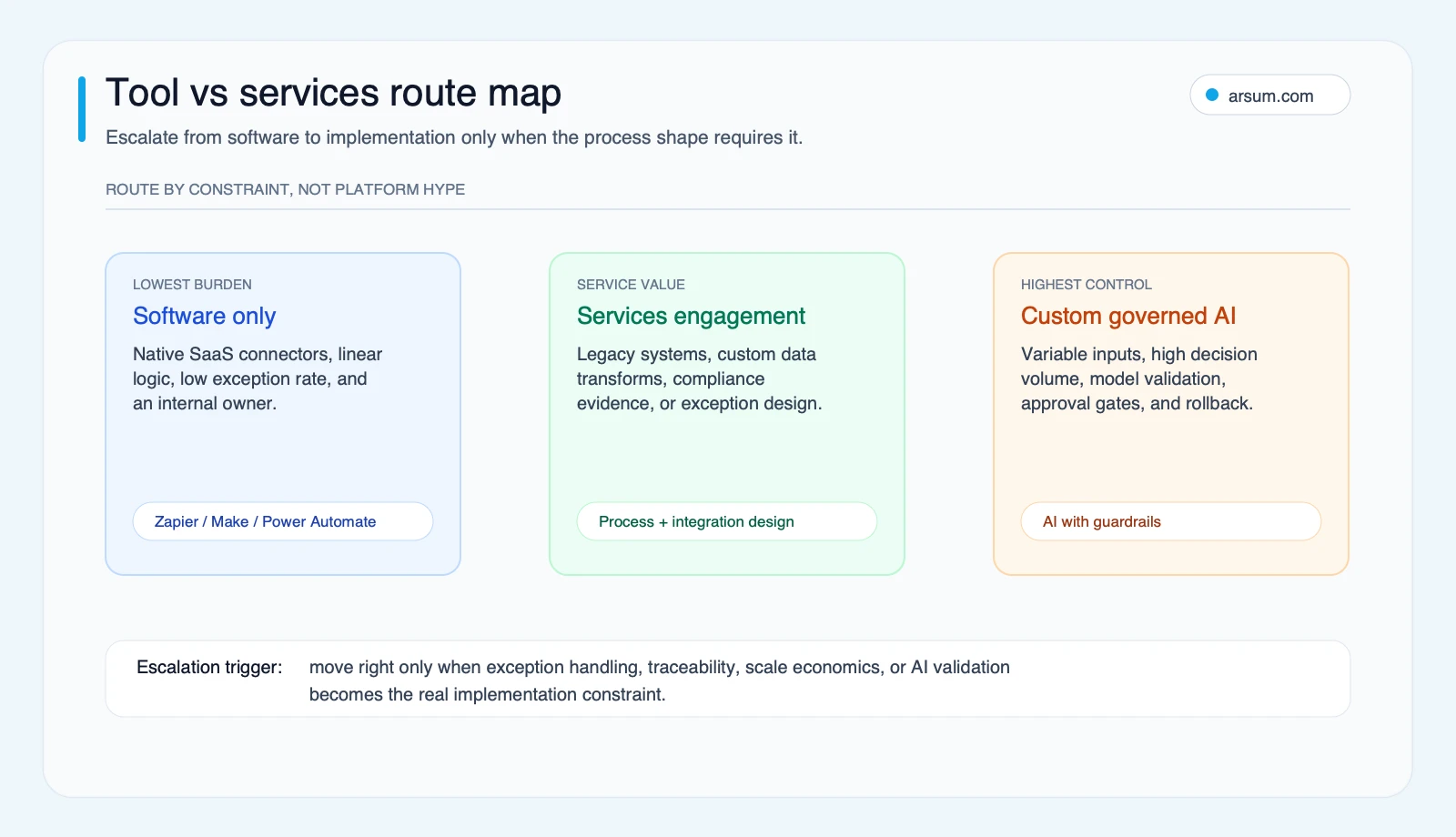
The route map is a buying aid: choose the least complex route that still meets the workflow’s control and maintenance requirements.
Commodity Configuration vs. Services That Change the Operating Model
A service engagement is not automatically justified because a workflow uses several apps.
Configuration is often commodity work when the request is a standard trigger, notification, supported connector, simple field mapping, or one-direction data sync. Software may be the better purchase when the workflow is low-risk and the internal team can own it.
Services add decision value when the work includes:
- Documenting the real process and its exception types.
- Establishing input rules and system-of-record ownership.
- Designing API, data, and state boundaries across systems.
- Creating approval gates and evidence retention for consequential steps.
- Building monitoring, alerts, and operational handoff procedures.
- Defining who changes business rules after launch.
- Testing rollback and manual fallback, not just the happy path.
Salesforce describes BPA in terms of automating repetitive workflows and improving visibility into bottlenecks (Salesforce). That benefit is only durable if someone owns the workflow when a connector changes, a queue backs up, or an exception class becomes common enough to require redesign.
A useful proposal should therefore separate discovery, process cleanup, integration engineering, quality assurance, monitoring, security review, documentation, and post-launch support. A single implementation line item can hide material differences in scope.
For related decision support, business process automation consulting explains what to expect in a scoped consulting engagement, while AI integration services covers the integration side of the decision.
Run a Pilot With Acceptance Criteria, Not a Vague Promise
A pilot is appropriate when the workflow is valuable but the data quality, exception rate, or integration behavior is uncertain. It should test an operating hypothesis, not merely prove that a demo can run.
Illustrative acceptance criteria for a 30-day lead-routing pilot
The following is an illustrative planning scenario, not an observed Arsum or client result.
Assume a revenue operations team receives 200 inbound submissions per week. Its baseline is measured over two weeks before build:
| Measure | Baseline to capture | Pilot target | Owner | Review cadence |
|---|---|---|---|---|
| Weekly eligible volume | Count all submitted records and source | Maintain comparable measurement population | Revenue operations owner | Weekly |
| Median time to first routing decision | Timestamp from submission to routing | Set a target agreed by sales leadership | Sales operations lead | Weekly |
| Misroute definition and rate | Define a misroute, then count corrected assignments | Improve only against the agreed definition | Sales operations lead | Weekly sample review |
| Exception rate | Records sent to human review because data or confidence is insufficient | Keep within the team’s review capacity | SDR manager | Twice weekly |
| Human-review rate | Percentage requiring a reviewer before assignment | Confirm review workload is acceptable | SDR manager | Twice weekly |
| Cost per execution | Software, enrichment, and model inputs divided by completed executions | Remain below the approved planning threshold | Finance partner | Weekly |
| Audit completeness | Required fields, input source, rule/model version, and approver recorded | 100% for pilot decisions requiring evidence | Process owner | Weekly |
| Rollback test | Route automation disabled and manual queue restored | Pass a documented recovery exercise | Technical owner | Before live traffic |
Set the target values before pilot traffic begins. For example, a team may choose to accept the pilot only if routing latency improves, the defined misroute rate does not worsen, audit records are complete, the exception queue remains staffed, and manual routing can be restored during a rollback test. Those are governance choices, not universal benchmarks.
The stop condition should be equally explicit: pause or revert if defined misroutes exceed the agreed tolerance, a security or access-control defect appears, audit evidence is incomplete, execution costs exceed the approved threshold, or the team cannot sustain the review queue.
The rollback path should name the person with authority to disable the workflow, the manual queue that receives new work, the source of truth for pending records, and the process for correcting actions taken during the incident.
This is how an automation pilot produces a usable decision: build, expand, redesign, or stop. For examples of how to frame automation economics without treating estimates as guarantees, see AI automation ROI examples.
Production Governance: The Controls That Belong in the Build
The appropriate level of control rises with failure cost and irreversibility. An automation that drafts an internal summary needs different oversight than one that writes to an ERP, communicates with a customer, or affects a regulated decision.
Before production, verify:
- Traceability: Can an operator reconstruct what happened for one execution, including inputs, rules or versions used, system actions, approvals, and errors?
- Approval authority: Which role can approve, reject, or override each consequential step?
- Exception handling: Where do ambiguous, incomplete, failed, or out-of-policy cases go?
- Rollback: Can the workflow be stopped without losing work or creating duplicate actions?
- Access boundaries: Does each component have only the permissions it needs?
- Monitoring: Are failed runs, queue buildup, latency, and unusual spend visible to the accountable owner?
- Change control: Who approves changes to rules, prompts, connectors, or business logic?
Microsoft’s lifecycle guidance supports treating design, testing, deployment, and refinement as part of the automation work rather than post-sale extras (Microsoft Learn). For AI-assisted workflows, use stronger review gates as output ambiguity or failure cost rises. Read AI agents for business for practical business boundaries and AI implementation services for implementation considerations.
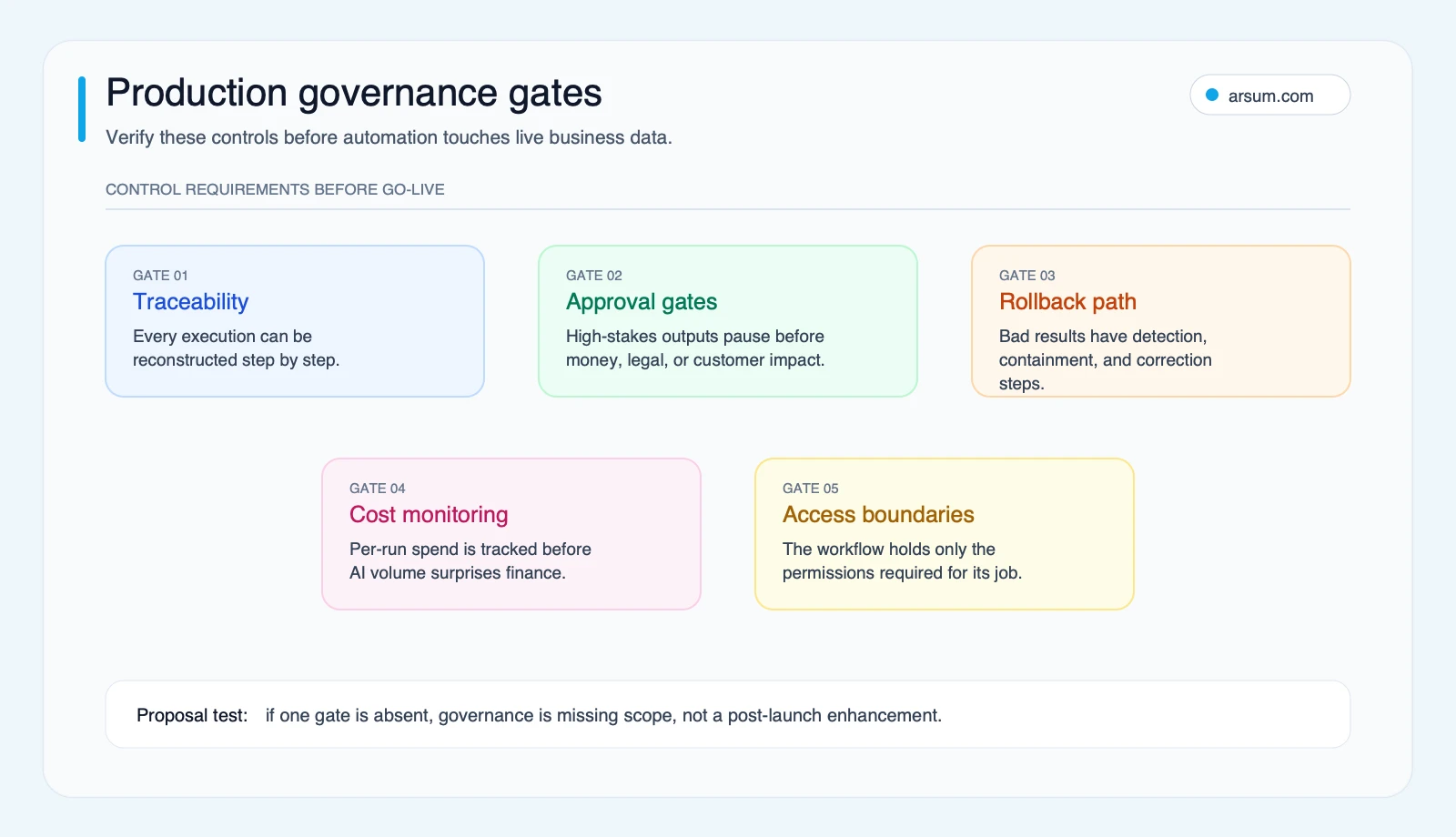
Use these gates before an automation handles customer data, financial records, external communications, or compliance-sensitive work.
Questions to Put in Every Vendor Evaluation
Ask providers to answer these questions in writing:
- What process discovery work happens before tool selection?
- Which inputs, handoffs, and exception types are in scope—and which are excluded?
- Why is low-code, RPA, custom orchestration, or redesign the recommended route?
- Which systems are connected by supported APIs, and which rely on user-interface automation?
- What happens when an integration fails, an input is missing, or an approval is delayed?
- Who owns the workflow after launch, and what maintenance is included?
- What logs, alerts, dashboards, and audit records will be delivered?
- What access permissions are required, and how are they limited?
- What baseline, target, review cadence, stop condition, and rollback test define pilot acceptance?
- Can the provider show a comparable process design and explain its transferability without implying identical outcomes?
A provider does not need to promise universal outcomes to answer these questions well. The useful answer is a transparent scope, an accountable owner, and a design that makes failure visible and recoverable.
Frequently Asked Questions
What business processes should be automated first?
Start with workflows that have clear rules, structured inputs, known exceptions, a named owner, and measurable business value. High-frequency work on a customer, revenue, onboarding, or compliance path is often a better candidate than an occasional convenience task.
When should we use RPA instead of API integration?
Use RPA when a necessary legacy system lacks a practical API and the interface is stable enough to support controlled automation. Prefer APIs or redesigned structured intake when available because they generally create clearer system boundaries and less dependence on screen behavior.
Is AI required for business process automation?
No. Deterministic workflow automation is often the better choice when rules and inputs are stable. Consider AI only where inputs vary or classification, extraction, or drafting would otherwise require substantial manual review—and keep consequential decisions under appropriate controls.
What should a business process automation services proposal include?
It should identify discovery, process mapping, data preparation, integration method, exception handling, testing, monitoring, access controls, documentation, ownership, maintenance, pilot metrics, and rollback. Ask vendors to state exclusions and assumptions as clearly as deliverables.
How do we know whether to buy software or hire a services partner?
Buy software for tool-ready, low-risk, well-supported workflows that your team can own. Consider services when integration, exceptions, governance, or process redesign are the real work. The decision is not whether a tool can run a demo; it is whether the production workflow will remain controlled and maintainable.
Research methodology: This editorial guide uses the validated research set captured on June 26, 2026: Microsoft Learn, UiPath documentation, Red Hat, and Salesforce for explanatory context; practitioner discussion snippets as qualitative signals only. Community snippets were not treated as statistical evidence or verified case studies. Last updated: June 26, 2026.
Ready to Automate Your Business?
Stop wasting time on repetitive tasks. Let AI handle the busywork while you focus on growth.
Schedule a Free Strategy Call →Written by:Arsum editorial team
- Reviewed by
- Arsum editorial team
- Published
- June 25, 2026
- Updated
- July 15, 2026
- How this was produced
- Arsum uses research packs, source checks, and human editorial review to prepare and update blog articles. Editors are responsible for the final page.
- Source policy
- Sources are linked in the article when used. Methodology and source notes are included on higher-risk or high-visibility pages and are being rolled out across the archive. Editorial policy.
- Why this page exists
- Help B2B operators evaluate AI automation, implementation scope, cost, risk, and build-vs-buy decisions with practical context.