Business workflow automation should start with a workflow decision, not a tool comparison: automate high-frequency work with clear rules and measurable outcomes first, use deterministic workflow tools by default, and add AI only where bounded interpretation of unstructured inputs improves the process without removing required human authority.
Business Workflow Automation: Practical Guide
Explore business workflow automation: compare workflow fit, costs, risks, evidence, and practical next steps before you build, buy, or hire.

Table of Contents
- What Most Guides Miss: The Automation Is Not the Workflow
- Score the Workflow Before You Select a Tool
- When Rules Are Enough—and When AI Is Justified
- Buy, Configure, Build, or Redesign
- A Pilot Scorecard That Can Earn Approval
- Design the Exception Path Before the Happy Path Ships
- Common Disqualifiers and Failure Modes
- A Practical Evaluation Sequence
- Methodology and Limits
- Make the Next Decision Concrete
The key distinction is between technical capability and authorized autonomy. A system may be able to classify an email, extract data from a document, or suggest a next step. That does not mean it should approve a payment, change a customer record, or make a compliance decision without a named owner and an escalation path.
What Most Guides Miss: The Automation Is Not the Workflow
Most workflow automation guides begin with connectors, templates, and feature lists. That is useful only after the operating model is clear. The real work is defining what happens when the process is incomplete, ambiguous, delayed, duplicated, or wrong.
A trigger-action flow can look complete in a demo while leaving the difficult part untouched: state synchronization, cancellations, reschedules, approval changes, bad source data, and exceptions that need judgment. Practitioner discussions describe this pattern directly: the hard problem is often state sync rather than the initial alert, and migration means rebuilding rules, special cases, alerts, OCR failures, and fail-safe behavior—not simply recreating the happy path. These are directional operator signals, not market-wide statistics. State-sync discussion and migration discussion.
Use this decision rule before comparing platforms:
Automate a workflow only when you can name the normal path, the exception types, the person or role that owns each exception, the evidence retained for each handoff, and the condition that pauses or rolls back the automation.
If you cannot answer those questions, the immediate need may be process redesign, data cleanup, or ownership clarification rather than automation.
Score the Workflow Before You Select a Tool
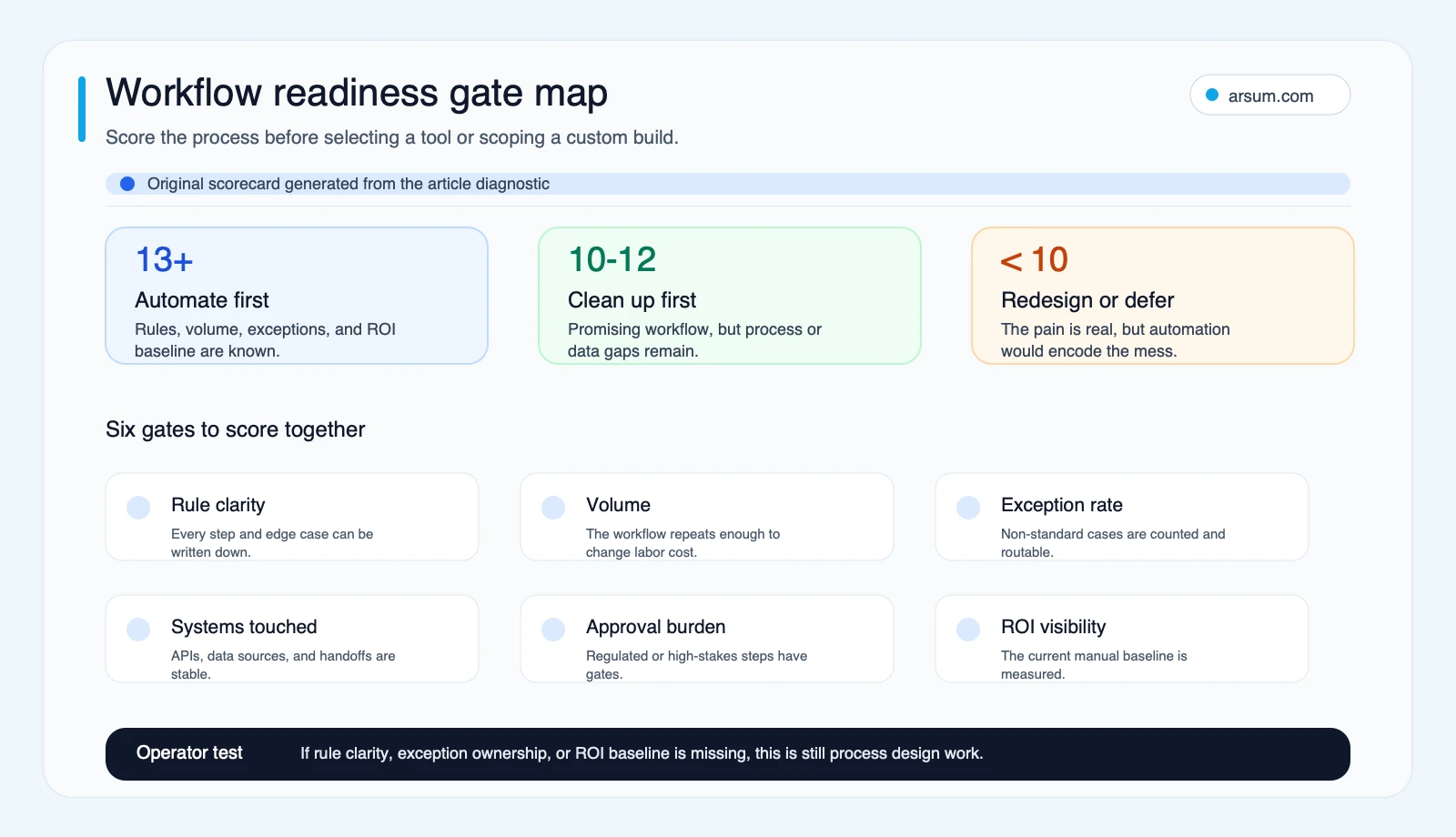
A repetitive task is not automatically a strong automation candidate. The first-wave candidates are usually frequent enough to measure, stable enough to describe, and low enough in consequence that a controlled pilot can safely test them.
Workflow readiness scorecard
Score each criterion from 1 to 3. This is an Arsum planning model, not a prediction of savings or adoption.
| Criterion | 1: weak readiness | 2: partial readiness | 3: strong readiness |
|---|---|---|---|
| Rule clarity | Steps differ by person or case | Normal path is known, some edge cases are unclear | Normal path and common exceptions are documented |
| Volume and frequency | Infrequent or seasonal | Regular but limited volume | Frequent enough to establish a baseline and test results |
| Exception profile | Exceptions are unknown or judgment-heavy | Exceptions can be grouped but need refinement | Exception types and routing rules are known |
| Systems and data | Source data is incomplete or access is unclear | Systems connect with some manual bridging | Stable systems, permissions, and data lineage are available |
| Consequence and approvals | Errors can create material external, financial, or regulatory impact | Some approval controls are required | Low-consequence action or reliable human approval before consequence |
| ROI visibility | No baseline exists | Some time or rework data exists | Cycle time, rework, review effort, and unit cost can be measured |
Add the six scores.
- 13–18: strong first-wave candidate, subject to the consequence gate below.
- 10–12: narrow the scope, clean up the process, or run a discovery period before automation.
- 6–9: redesign or clarify ownership before investing in automation.
The score is not enough on its own. Apply a separate consequence gate: if the workflow can release money, make a regulated determination, change a contractual position, or materially affect a customer, a high score does not justify autonomous action. It just means the workflow may be ready for assistance, structured evidence collection, or recommendation with human approval.
A useful first portfolio might include lead routing, routine internal approvals, document intake, scheduled reporting, ticket classification, and accounts-payable intake. For function-specific examples, see accounts receivable automation, AI customer service automation, and AI automation for procurement.
When Rules Are Enough—and When AI Is Justified
The simplest reliable design is usually the best one. Anthropic’s guidance on effective agents draws a useful boundary: workflows suit predefined paths, while agents suit tasks where the system must dynamically choose actions. That is a design choice with cost and operational-risk implications, not a reason to add an agent to every workflow.
Use standard workflow automation when
A conventional platform is usually the right answer when the process has:
- Fixed conditions, approvals, and routing rules.
- Structured inputs such as forms, consistent records, and known fields.
- Stable APIs or supported integrations.
- A low enough consequence that platform logging and ordinary approval controls meet the need.
- A business owner who can maintain the rules when the process changes.
Mainstream platforms support flows, templates, approvals, activity views, AI features, and environment separation. Those capabilities make them a practical fit for many well-scoped processes. Microsoft Learn’s Power Automate overview is a useful reference for the kinds of platform capabilities buyers should verify.
Add a bounded AI step when
AI may earn its operational complexity when the workflow needs to interpret unstructured material, such as supplier emails, PDFs, support requests, or contract language, and the output can be constrained before it reaches a consequential action.
A safer pattern is:
- Receive a document, message, or record.
- Extract or classify into a defined schema.
- Validate required fields with deterministic rules.
- Compare against source systems.
- Route low-confidence, conflicting, or consequential cases to a named reviewer.
- Log the input reference, output, confidence signal if used, validation result, reviewer action, and final disposition.
The model should not be the authorization system. OWASP’s guidance on system prompt leakage specifically cautions against relying on model instructions for critical controls; enforce permissions, privilege separation, and guardrails outside the model.
For a deeper comparison of this architecture, see agentic AI workflow automation and AI agent architecture patterns.
Buy, Configure, Build, or Redesign
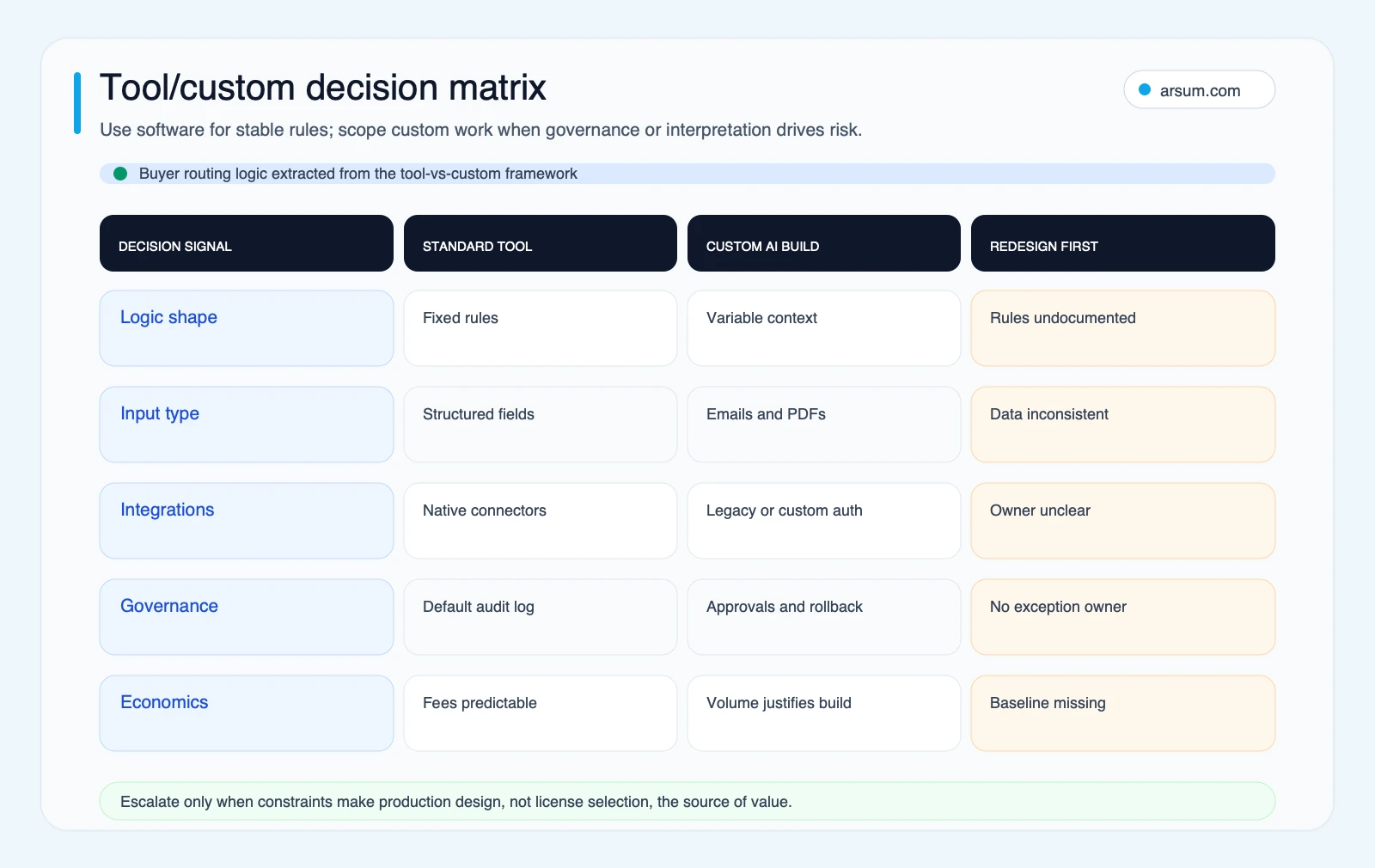
“Build versus buy” is too narrow if it excludes configuration and redesign. Use this checklist to decide what you are actually purchasing.
| Decision area | Standard platform / configuration | Custom implementation | Redesign first |
|---|---|---|---|
| Integration ownership | Native connectors cover the needed systems | APIs, authentication, retries, or state reconciliation need custom ownership | System access or source-of-truth rules are unclear |
| Input type | Structured records and predictable fields | Unstructured documents or context-dependent interpretation | Inputs are inconsistent or missing required data |
| Data residency and security | Vendor controls meet policy requirements | Controls, hosting, segmentation, or retention need tailoring | Requirements are not yet approved |
| Audit controls | Default logs show enough for review | Evidence lineage, approval records, or case-level audit trail must be designed | No one has defined what evidence must be retained |
| Total run cost | Usage is predictable and acceptable | Maintenance, model use, monitoring, and connector ownership are justified | Baseline workload and unit economics are unknown |
| Vendor lock-in | Workflow is portable enough and contract risk is acceptable | Portability or internal control requires custom interfaces | The process changes too often to stabilize |
| Change management | Functional owner can administer the workflow | A product, operations, or engineering owner can maintain it | Ownership is shared, disputed, or absent |
The output should be a decision, not a preference:
- Buy or configure when the workflow is structured, the integration surface is stable, and standard controls meet requirements.
- Build narrowly when interpretation, custom systems, or control requirements are the constraint—and the organization can own ongoing maintenance.
- Redesign first when data, approvals, source-of-truth rules, or exception ownership are unresolved.
- Do not automate yet when the workflow is infrequent, volatile, or too consequential to test safely without a clearer control design.
Data ownership can be a legitimate buying criterion rather than a technical afterthought. A self-hosted automation product was explicitly positioned by its founder for businesses handling sensitive data; that is vendor positioning and qualitative market language, not proof that self-hosting is universally required. Practitioner signal on self-hosting and sensitive data.
For implementation choices beyond the platform layer, compare AI integration services with custom AI agent development services.
💡 Arsum builds custom AI automation solutions tailored to your business needs.
Get a Free Consultation →A Pilot Scorecard That Can Earn Approval
A pilot should be a controlled decision instrument, not a vague proof of concept. Its purpose is to establish whether the workflow can meet an agreed operating threshold with acceptable review effort and risk.
Illustrative AP pilot scenario
This is a planning example, not a documented case study or a market benchmark. Replace every figure with your own baseline before approval.
Suppose a finance team selects invoice intake and matching as a pilot. It first measures, for a defined sample period:
- Cases received and completed.
- Median and tail cycle time from receipt to disposition.
- Minutes of handling and rework per completed case.
- Exception categories and their frequency.
- Review time per exception.
- Corrections discovered after the workflow’s output.
- Cost per completed case, including platform, model, and reviewer time.
- Evidence available for each approval, discrepancy, and final handoff.
The pilot charter might look like this:
| Field | Illustrative planning assumption |
|---|---|
| Scope | Invoice intake, extraction, validation, and routing; no autonomous payment release |
| Baseline owner | Finance operations lead |
| Target | Reduce handling time per clean case while maintaining the approved quality threshold |
| Quality ceiling | No increase in material correction or rework versus the baseline |
| Exception capacity | Named reviewer can clear the expected daily exception queue within the agreed service window |
| Review cadence | Finance owner and technical owner review queue, failures, and costs weekly |
| Evidence retained | Source document reference, extracted fields, validation result, routing outcome, reviewer action, timestamps |
| Stop condition | Unexpected exception volume exceeds review capacity, material correction rate rises, source-system reconciliation fails, or required evidence is missing |
| Rollback path | Pause automated posting or routing; preserve source records; revert to the documented manual queue; investigate before resuming |
A numeric acceptance threshold should be set from the organization’s own baseline. For example, if the baseline has 100 cases and 12 require manual correction, the pilot acceptance threshold might require no more than 12 comparable corrections while reducing handling time for clean cases. The inputs—not a generic percentage—are what make the decision defensible.
This approach keeps the automation assistive where it needs to be. It can prepare evidence, identify mismatches, and route cases. A designated finance role remains responsible for exceptions and any authorization that affects money.
Design the Exception Path Before the Happy Path Ships
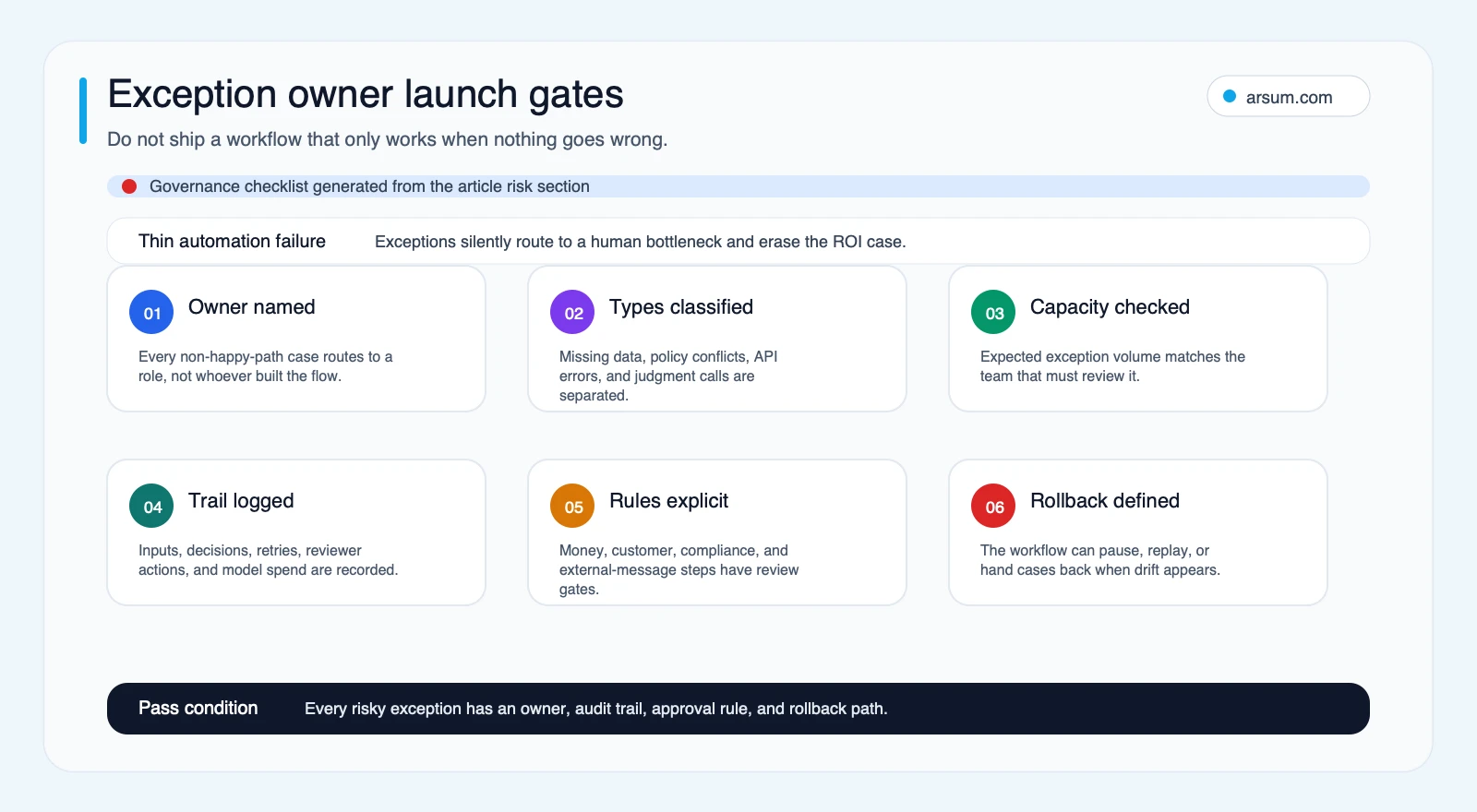
The thin-automation failure mode occurs when a system handles clean cases but turns every hard case into an invisible human queue. The workflow appears successful until exception volume grows, the original builder becomes the default escalator, and operational effort shifts rather than falls.
Before launch, document:
- The exception taxonomy: missing fields, duplicate records, authorization failures, timeouts, low-confidence extraction, source conflicts, and manual overrides.
- The owner for each exception type and their service expectation.
- The escalation route for unresolved or high-consequence cases.
- The system of record for status and final disposition.
- The evidence retained for audits, incident review, and model or rule changes.
- The pause and rollback procedure.
- The maintenance owner when an upstream API, business rule, template, or policy changes.
AI-enabled steps need extra operational testing because their inputs can vary. Builder accounts describe handling timeouts and connection failures as practical challenges in AI workflow experiments. That is directional practitioner evidence, not a general reliability rate. Timeout discussion.
NIST’s AI Risk Management Framework supports treating trustworthy use and risk management as lifecycle work: design, development, use, and evaluation. In practice, that means monitoring and review are not optional production polish; they belong in the pilot charter.
Common Disqualifiers and Failure Modes
Do not lead with automation when any of these conditions apply:
The process has no stable owner
If no functional leader can approve rules, exceptions, and changes, automation will create a maintenance orphan. Assign ownership before selecting a vendor.
The source data cannot support the outcome
A workflow cannot reliably reconcile records if identifiers, statuses, or source-of-truth rules are inconsistent. Use discovery to correct the data contract first.
The consequence is high and reversibility is low
For decisions affecting payments, credit, eligibility, contracts, safety, or regulatory outcomes, automation may support preparation and review, but autonomous execution requires a much higher authorization and control standard. Higher failure cost should reduce autonomy.
The value cannot be measured
If a team cannot establish baseline cycle time, review effort, error-driven rework, backlog, or unit cost, it cannot tell whether automation improved the workflow or merely moved work elsewhere. See AI automation ROI examples for ways to structure the economics around measurable inputs.
The proposed solution automates a broken handoff
Automation can make a poor process happen faster. It does not resolve conflicting approval rules, unclear customer commitments, or missing operating procedures.
A Practical Evaluation Sequence
Start with a small portfolio of candidates rather than one favored tool.
- Map the normal path and common exceptions for each candidate.
- Score readiness and apply the consequence gate.
- Establish a baseline for time, rework, review capacity, and unit cost.
- Choose the simplest architecture that meets the requirements.
- Create a pilot charter with acceptance thresholds, evidence retention, and rollback.
- Run the pilot with a named functional owner and technical owner.
- Expand only if the measured result meets the agreed threshold without transferring unacceptable work to reviewers.
The right first deployment often looks less ambitious than an AI strategy deck. That is a feature. It lets the team validate data quality, exception routing, approval design, and maintenance ownership before placing a more consequential workflow into production.
Methodology and Limits
This article uses a workflow-first editorial framework and source review completed on 2026-06-25. Primary sources from Anthropic, Microsoft, NIST, and OWASP support the workflow-versus-agent, platform-capability, lifecycle-risk, and deterministic-control guidance linked above. Hacker News material is used only as qualitative practitioner evidence of migration, state-sync, data-ownership, and timeout concerns; it does not establish prevalence, savings, reliability, or buyer behavior.
The scorecard and pilot charter are planning tools. They do not predict job loss, adoption, savings, implementation time, or realized ROI. Those outcomes depend on the workflow baseline, system quality, exception profile, review design, and the organization’s ability to operate the result.
Make the Next Decision Concrete
Business workflow automation is worth pursuing when a specific workflow has clear rules, measurable baseline economics, workable exception ownership, and a controlled path to launch. The tool choice comes after that assessment.
If you need to decide whether to configure an existing platform, build a narrow AI-enabled layer, or redesign the process first, use the scorecard and pilot charter as the internal evaluation artifact. A scoped workflow assessment can turn those inputs into a build-versus-buy recommendation, pilot economics, governance design, and rollback plan.
Ready to Automate Your Business?
Stop wasting time on repetitive tasks. Let AI handle the busywork while you focus on growth.
Schedule a Free Strategy Call →Written by:Arsum editorial team
- Reviewed by
- Arsum editorial team
- Published
- June 25, 2026
- Updated
- July 5, 2026
- How this was produced
- Arsum uses research packs, source checks, and human editorial review to prepare and update blog articles. Editors are responsible for the final page.
- Source policy
- Sources are linked in the article when used. Methodology and source notes are included on higher-risk or high-visibility pages and are being rolled out across the archive. Editorial policy.
- Why this page exists
- Help B2B operators evaluate AI automation, implementation scope, cost, risk, and build-vs-buy decisions with practical context.