For teams choosing between Claude Code and Cursor, the practical answer is not “which is better?” but which control model fits the work: use an editor-centered review loop for frequent, human-directed changes, use a bounded agent workflow for specified implementation tasks with reliable tests, and avoid granting either tool autonomy over high-consequence changes without explicit approval gates.
Claude Code vs Cursor: AI Coding Tool Decision Guide
Explore claude code vs cursor: compare workflow fit, costs, risks, evidence, and practical next steps before you build, buy, or hire.

Table of Contents
- What most guides miss: this is a review-capacity decision
- The current product boundary
- Editorial workflow selector
- A control matrix for production-adjacent work
- Run a two-week pilot instead of relying on anecdotes
- Cost predictability: compare the whole operating cost
- Disqualifying conditions and common failure modes
- Decision rule: standardize, split, or reject
- Practical selection checklist
- Source and methodology note
Both products now extend beyond the old “CLI versus IDE” shorthand. Anthropic documents Claude Code across terminal, IDE, desktop, and browser surfaces, while Cursor describes local and cloud agent workflows across its workspace and connected tools. Before procurement, check the current Claude Code overview, Cursor product page, and pricing pages because surfaces and plan limits change quickly.
What most guides miss: this is a review-capacity decision
Feature lists do not settle Claude Code vs Cursor because both can assist with code generation, repository work, and multi-step tasks. The decision changes when you ask a more operational question: where will your team absorb the review work?
An editor-centered workflow makes review continuous. The developer steers, inspects proposed changes, and keeps design decisions close to the implementation moment. A delegated agent workflow can complete a larger bounded pass before review, but the resulting diff may require more deliberate validation across tests, architecture, security, and business rules.
Choose a default based on four conditions:
- Task specification: Can the requester state the expected behavior, boundaries, and acceptance tests before work starts?
- Verification: Does the repository have repeatable tests, linting, type checks, and a usable local or CI environment?
- Failure cost: Would a wrong change affect billing, permissions, customer data, security, or production reliability?
- Review capacity: Does a named engineer have time to inspect, test, and either accept or reject the result?
If specifications and verification are weak, more autonomy does not create leverage. It creates review debt. This is the same distinction that matters in AI code generation automation: model capability can accelerate implementation, but it does not authorize a consequential code change.
The current product boundary
Claude Code: agent workflow with explicit permissions
Anthropic describes Claude Code as an agentic coding tool that can read a codebase, edit files, run commands, and integrate with development tools. Its documented surfaces include terminal, IDE, desktop, and browser—not only a terminal workflow. That makes it appropriate to evaluate as a way to delegate a defined implementation pass, not merely as a command-line assistant. Anthropic’s overview is the source of truth for current capabilities.
For governance, the important fact is not that the tool can act; it is that action needs boundaries. Claude Code has documented permission controls for tools and commands. Its hooks documentation also notes that hooks execute shell commands with the user’s permissions. Treat that as a control-design issue: a hook or command policy can be useful, but it can also extend the impact of an unsafe configuration.
Claude Code is a strong candidate to test when a task is already scoped, crosses files or commands, and has acceptance criteria a reviewer can verify. It is not a reason to skip branch isolation, tests, code review, or release ownership.
Cursor: workspace-centered coding and agent workflows
Cursor is no longer accurately described as only an AI-enhanced editor. Its product pages position it as a coding workspace with local and cloud agent capabilities, and Cursor 3 describes a unified environment for inspecting work performed by agents. See Cursor’s product page and its Cursor 3 announcement for the current framing.
That said, Cursor may still be the simpler first rollout for a team whose work and review habits are already centered in a VS Code-style environment. This is an editorial workflow-fit assessment, not a measured performance claim. The value is less about a universal capability advantage and more about minimizing adoption friction: developers can evaluate the tool where they already navigate code, inspect diffs, and collaborate.
Cursor’s pricing page lists individual, team, and enterprise offerings and describes items such as cloud agents, privacy mode, SSO, and governance options. A buyer should verify which controls apply to the exact plan, deployment, and integration they intend to use.
Editorial workflow selector
The table below is editorial guidance based on task structure and review design. It is not original performance data, a vendor benchmark, or a claim that either tool will produce better code in every repository.
| Workflow scenario | Initial route | Why | Verify before standardizing |
|---|---|---|---|
| Daily edits, debugging, or unfamiliar code paths | Cursor-first | A close, editor-centered review loop may make it easier to steer and inspect work continuously. | Confirm the team can review suggestions without bypassing normal PR standards. |
| Well-scoped multi-file feature with tests | Claude Code-first pilot | A delegated workflow can be valuable when the task, tests, and boundaries are specified in advance. | Require branch isolation, passing checks, and a human diff review. |
| Repository migration or broad cleanup | Split workflow | Both can help investigate and implement, but migration risk depends on test coverage and rollback discipline. | Break work into reversible batches; do not approve one unbounded change. |
| CI, scripts, or command-heavy implementation | Claude Code-first pilot | The work naturally includes command execution and verification loops. | Set command permissions and confirm what environments the tool can access. |
| Security, billing, data access, or authorization changes | Human-led, tool-assisted | Failure cost is high and requirements are often context-specific. | Require least privilege, peer review, test evidence, and release approval. |
| Independent backlog tasks with available reviewers | Cloud/background agents only after a pilot | Parallel work can help only when tasks are independent and review capacity scales with it. | Limit concurrency and define who owns each resulting change. |
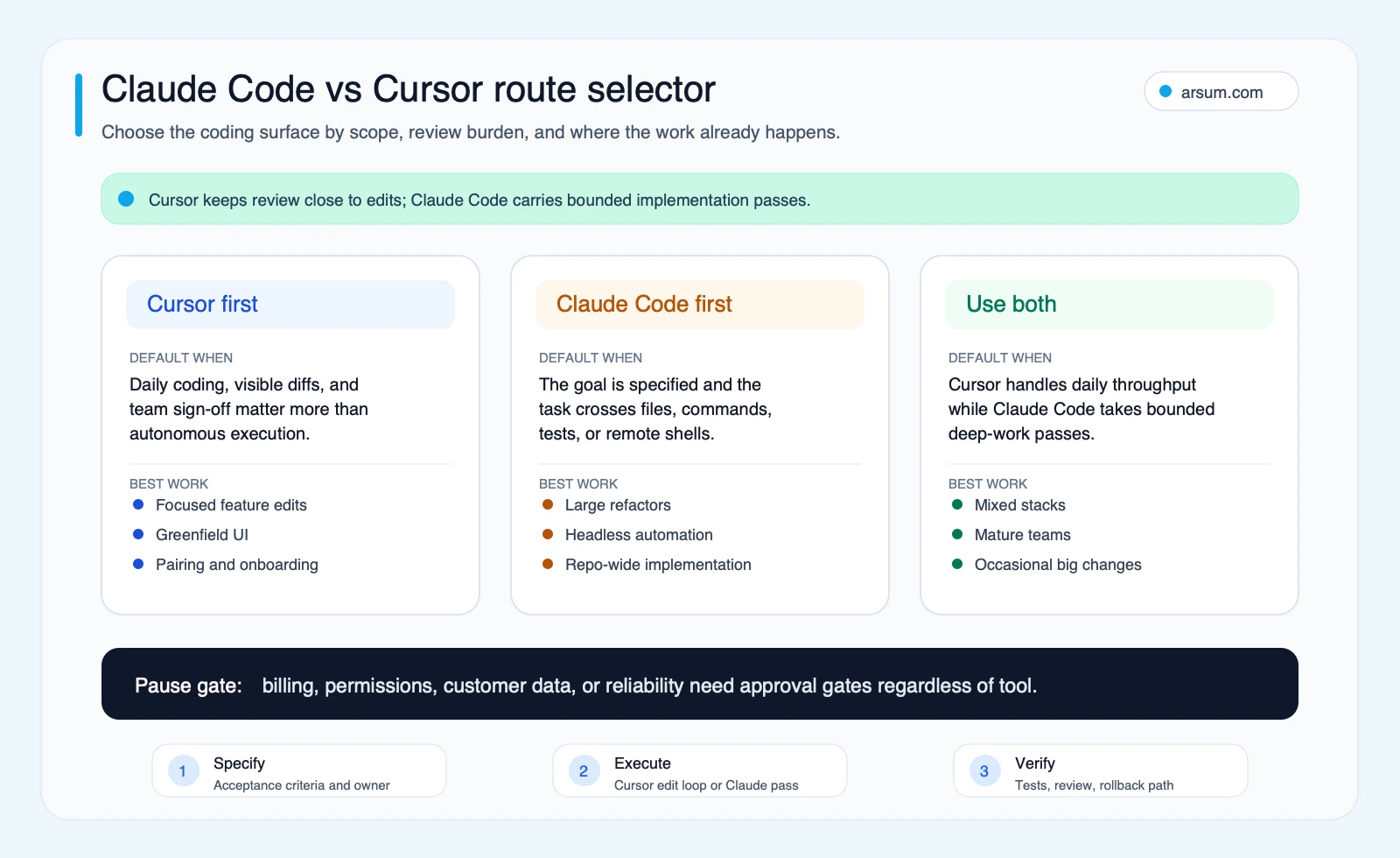
Choose the route by task scope and review capacity, not by a generic winner label.
A control matrix for production-adjacent work
Do not standardize either tool from a developer demo alone. For a team that handles customer systems, internal operations, or regulated data, the purchase decision includes authorization, evidence retention, and rollback.
| Control question | Claude Code evaluation | Cursor evaluation | Team requirement |
|---|---|---|---|
| File edits | Claude Code’s permission configuration should be reviewed for the intended workflow. | Confirm how the chosen Cursor workflow presents, applies, and records edits. | Changes land in an isolated branch and receive normal PR review. |
| Shell or environment commands | Anthropic documents configurable permissions; verify allowlists and inherited user access. | Verify command execution behavior for the specific local or cloud workflow. | Least privilege, no standing production credentials, and explicit command policy. |
| Context scope | Define what repositories, files, tickets, and secrets may be included. | Define the same boundary, including connected services and cloud-agent context. | No production exports, secrets, or unrelated customer data by default. |
| Review evidence | Preserve task brief, generated diff, tests, reviewer decision, and exceptions. | Preserve equivalent records from the editor or agent workflow. | A PR or change record remains the system of record. |
| Logs and traces | Verify retention and administrative access for the plan and deployment. | Verify retention, privacy mode, and administrative visibility for the plan and deployment. | Security owner signs off before use with sensitive code or data. |
| Team controls | Anthropic plan and enterprise terms should be checked against identity and governance needs. | Cursor lists team, enterprise, privacy, and SSO options; verify plan-specific availability. | Procurement verifies SSO, access lifecycle, audit needs, and data policy. |
This matrix intentionally marks several items as verification work rather than assuming parity. Product documentation supports the existence of capabilities and controls, but your organization still has to determine whether the selected plan, identity setup, repository host, and security policy meet its requirements.
For broader design patterns, see AI agent architecture patterns and the guide to AI agent security. The core rule is simple: high failure cost or low reversibility should reduce autonomy.
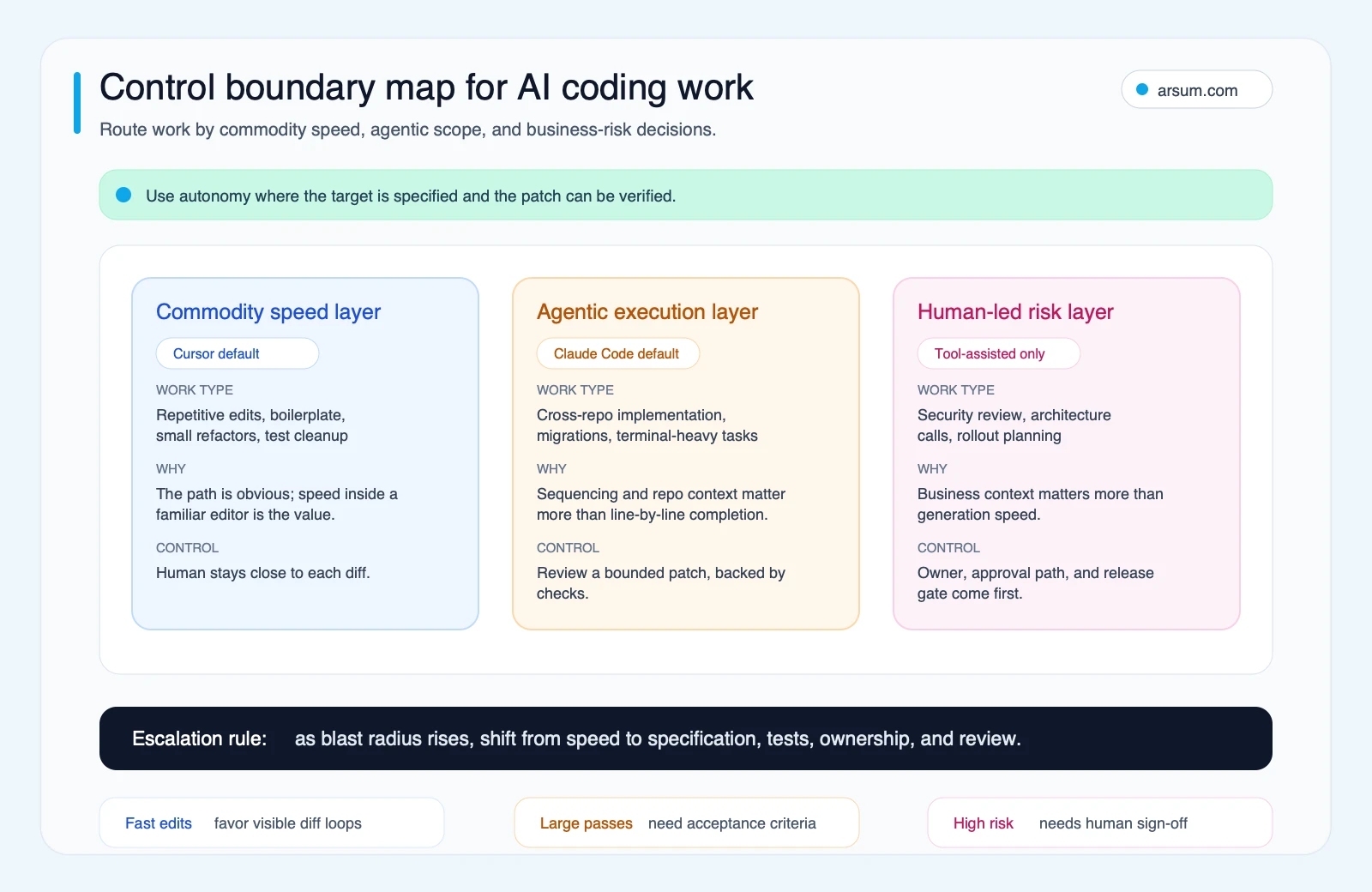
Autonomy belongs in repeatable, testable work. Risky decisions remain human-owned even when implementation is assisted.
💡 Arsum builds custom AI automation solutions tailored to your business needs.
Get a Free Consultation →Run a two-week pilot instead of relying on anecdotes
A short pilot produces more useful evidence than a feature comparison. Run both tools against the same task types, with the same repository controls and reviewer expectations.
Pilot setup
Select three representative tasks:
- A small, low-risk edit, such as a validation rule or focused bug fix.
- A multi-file feature with written acceptance criteria and test commands.
- A defect in an existing workflow where the root cause is not already obvious.
Before anyone uses a tool, write:
- expected behavior and explicit non-goals;
- permitted files, services, and environments;
- required tests, linting, type checks, and manual verification;
- the reviewer and release owner;
- the rollback method, such as reverting the PR or disabling a feature flag.
Worked pilot scorecard
Use this as a planning template. The numbers are acceptance thresholds chosen by your team, not observed results or recommended universal targets.
| Measure | Baseline to capture | Illustrative acceptance threshold | Owner | Review cadence |
|---|---|---|---|---|
| Task completion | Time from approved brief to review-ready PR | Compare both tools on the same task class; no winner based on one task | Engineering lead | After each task |
| Accepted-change cost | Seat or usage cost + developer time + reviewer time + rework time | Lower total cost only counts if tests and review criteria are met | Engineering manager | Weekly |
| Quality | Passing required checks; defects found during review or after merge | No bypassed required checks; no unresolved critical issue attributable to the change | Tech lead | Before merge |
| Exception rate | Runs requiring permission escalation, manual rescue, or task restart | Track every exception and classify the reason | Tool owner | After each run |
| Review burden | Reviewer minutes and number of substantive requested changes | Must fit the team’s available review capacity | Assigned reviewer | Per PR |
| Safety | Unauthorized access attempt, secret exposure, unsafe command, or out-of-scope edit | Zero tolerance; stop and investigate | Security owner | Immediate |
| Developer confidence | Short structured note: usable, uncertain, or unsuitable, with reason | Supporting signal only; never the sole decision factor | Pilot participants | End of week two |
A calculation for accepted-change cost should be reproducible:
accepted-change cost = tool cost allocated to the task + author time + reviewer time + rework time + incident or rollback cost
For example, if a task consumes $12 of allocated tool usage, 45 minutes of engineer time at an internal planning rate of $80 per hour, 20 minutes of review at the same rate, and 30 minutes of rework, the illustrative planning cost is:
$12 + (0.75 × $80) + (0.33 × $80) + (0.5 × $80) = $138.40
The purpose is not to claim savings. It is to make the hidden costs visible and compare accepted, verified changes rather than raw code output.
Stop conditions and rollback
Stop the pilot for any unauthorized environment access, secret-handling failure, unsafe command execution, or change that cannot be traced to an approved brief. Pause and investigate if review time rises materially, required tests are routinely unavailable, or the team begins merging large diffs it cannot explain.
Rollback belongs to the release owner, not the tool. Keep each task in a separate branch, merge through the normal PR path, and ensure a reviewer can revert the change or disable the release path. For workflow automation more broadly, this is the same operating discipline described in agentic AI workflow automation.
Cost predictability: compare the whole operating cost
Do not treat a monthly seat price as the total cost of Claude Code or Cursor. Anthropic’s plan pricing lists Free, Pro, Max, Team, and Enterprise tiers and indicates Claude Code availability within paid plans. Its API pricing documentation explains that API usage varies by model and token category. Cursor’s pricing page provides the current plan structure and should be used for the exact seat, team, cloud-agent, and governance options under consideration.
For each option, separate five cost layers:
- Seat or plan cost: recurring access for the people who will use it.
- Usage exposure: API, agent, or cloud work that may vary with task size and plan rules.
- Engineering time: briefing, steering, and validating changes.
- Review and rework: time spent finding incorrect assumptions, incomplete edge cases, or code that does not meet local conventions.
- Failure cost: incident response, rollback, delayed release, or customer impact if an accepted change fails.
Cursor may be easier to forecast when a team primarily buys predictable seats and keeps work in its normal editor loop. Claude Code may fit well when an organization wants to test deeper delegated work and is prepared to manage the associated permissions, review, and possible usage variability. Those are workflow hypotheses to validate in the pilot, not claims about universal cost efficiency.
Disqualifying conditions and common failure modes
Neither tool is a good first move when the organization cannot safely run the pilot.
Disqualify or defer the evaluation if:
- there is no testable repository, reliable CI, or way to reproduce a change locally;
- production credentials are shared broadly or cannot be separated from development access;
- requirements depend on undocumented business rules held only in one person’s memory;
- nobody is accountable for code review, release approval, and rollback;
- the team expects generated code to bypass architecture, security, or product review.
Common failure modes are more ordinary than model failures:
Vague brief, plausible wrong implementation
A tool can implement the literal request while missing the actual business rule. Solve this with a written brief, examples, non-goals, and acceptance tests—not a longer prompt alone.
Large diffs without a reviewer who understands them
A larger implementation pass can compress authoring time while expanding review risk. Cap task size, require a design note for architectural changes, and reject diffs that cannot be explained by the reviewer.
Excessive permissions
Giving an agent a broad shell, repository, or cloud credential to “make it work” reverses the security model. Start with a constrained development environment, allow only the access required for the task, and escalate deliberately.
Parallel work without parallel review
Background or cloud agents can create a queue of patches faster than a small team can assess them. Limit concurrent work to the number of qualified reviewers available.
Decision rule: standardize, split, or reject
At the end of the two weeks, decide from the scorecard rather than preference alone.
Standardize on Cursor first when the team’s main gain is faster daily coding, the review loop remains manageable in the editor, and the pilot shows accepted changes without adding review or rework burden.
Standardize on Claude Code for defined tasks when well-specified, test-backed implementation passes reach review-ready status with acceptable permission exceptions, understandable diffs, and no safety events.
Use a split workflow when the evidence supports a clear task boundary: editor-centered assistance for daily engineering and a constrained agent workflow for specified, multi-file or command-heavy tasks.
Reject or defer both as a team standard when the pilot exposes weak testing, unclear ownership, uncontrolled data access, or review capacity that cannot keep up. Fix those operational constraints before buying more autonomy.
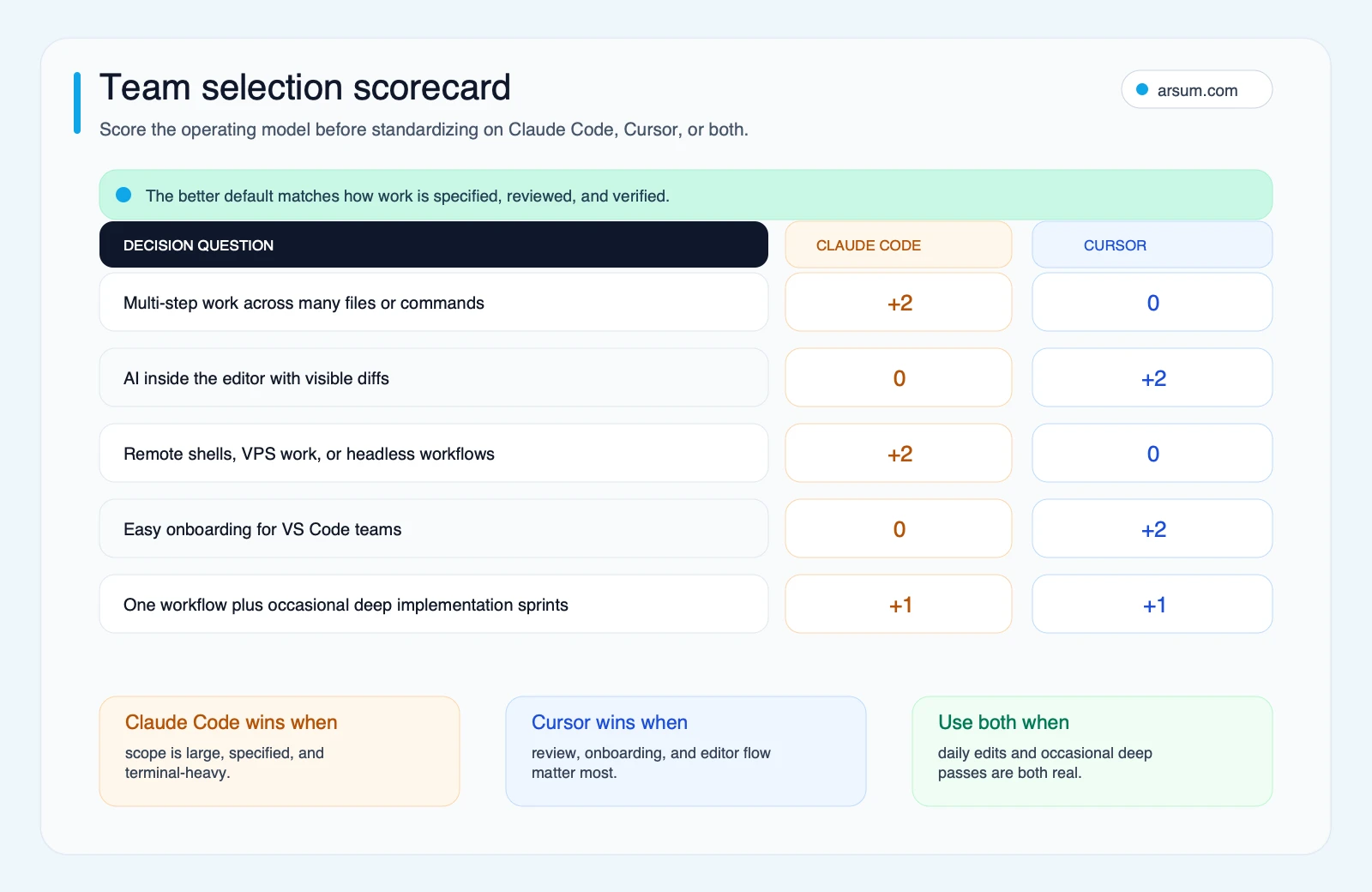
The scorecard is a routing tool, not a benchmark: match daily reviewed work, delegated implementation, and high-risk changes to different controls.
Practical selection checklist
Before committing budget, answer these questions in writing:
- Which tasks are repetitive and verifiable enough to delegate?
- Which changes require a developer to stay in a close review loop?
- What commands, repositories, integrations, and data can the tool access?
- Who approves edits, commands, merges, and releases?
- Where are task briefs, diffs, test results, exceptions, and rollback decisions retained?
- Is a seat-based plan sufficient, or will API or cloud-agent usage materially affect the cost model?
- What will make the team stop using a tool after the pilot?
If the choice is part of a wider delivery decision, compare the tool with the operating model around it. AI app development services and AI implementation services are relevant when the goal is not simply faster coding, but a business application that needs integration, controls, and long-term ownership.
Source and methodology note
This guide uses official Anthropic and Cursor documentation for product surface, pricing, permissions, hooks, privacy, and team-control claims. Community discussion can be useful for identifying questions about autonomy and review comfort, but it is qualitative rather than market-wide evidence; examples include a Reddit practitioner comparison and Hacker News discussion. The editorial workflow selector and pilot scorecard are decision tools, not collected benchmark data.
For most teams, the durable conclusion is straightforward: choose Cursor when close, frequent review is the limiting control; choose Claude Code for well-bounded implementation work that can be tested and reviewed as a batch; and keep high-risk decisions human-owned.
Ready to Automate Your Business?
Stop wasting time on repetitive tasks. Let AI handle the busywork while you focus on growth.
Schedule a Free Strategy Call →Written by:Arsum editorial team
- Reviewed by
- Arsum editorial team
- Published
- April 6, 2026
- Updated
- July 6, 2026
- How this was produced
- Arsum uses research packs, source checks, and human editorial review to prepare and update blog articles. Editors are responsible for the final page.
- Source policy
- Sources are linked in the article when used. Methodology and source notes are included on higher-risk or high-visibility pages and are being rolled out across the archive. Editorial policy.
- Why this page exists
- Help B2B operators evaluate AI automation, implementation scope, cost, risk, and build-vs-buy decisions with practical context.