The cost of building AI agent should be budgeted as a controlled workflow, not a model wrapper: a constrained, read-only pilot may begin in the low five figures, while integrated agents with system writes, security controls, and ongoing ownership can require substantially more. Your usable estimate must separate one-time implementation work from recurring model, tool, review, monitoring, and maintenance costs.
Cost Of Building AI Agent: Costs and ROI
Explore cost of building AI agent: compare workflow fit, costs, risks, evidence, and practical next steps before you build, buy, or hire.
Table of Contents
- Budget answer in one minute
- What most cost guides miss: the demo is not the operating system
- Scope the workflow before asking for a price
- Where the production budget goes
- An end-to-end budget worksheet
- Worked pilot scorecard: invoice intake
- Safety boundaries that change the estimate
- Build, buy, or partner
- Questions to require in every proposal
- FAQ
- Methodology and limitations
Budget answer in one minute
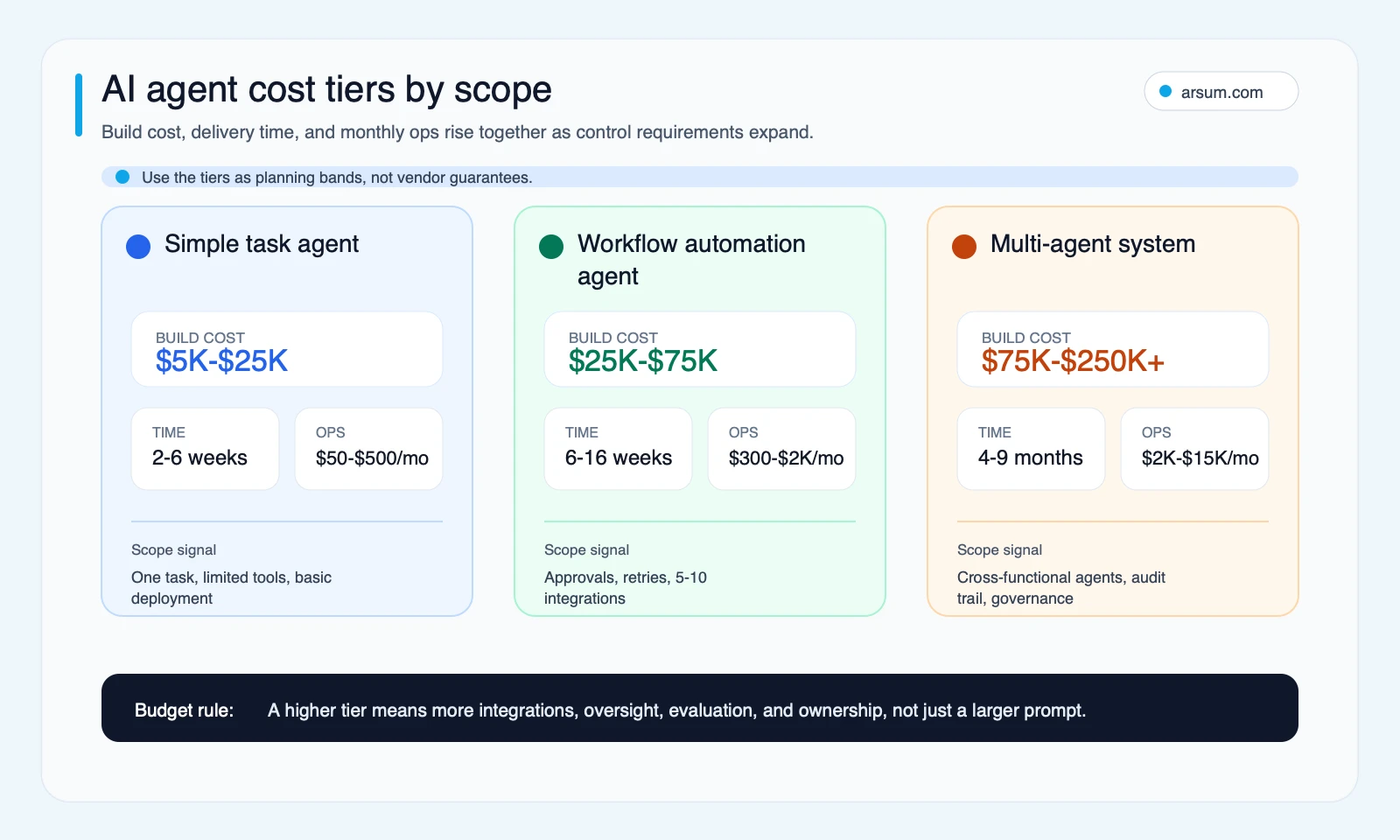
Most published cost guides describe a broad range: simple agents can start in the low five figures, while complex or enterprise implementations can reach into the hundreds of thousands. Those are scope signals, not market guarantees. The difference is rarely “which model did you choose?” It is whether the agent must use private data, integrate with business systems, write records, handle exceptions, prove its work, and recover safely from failure.
Use these planning bands to decide what to estimate next:
| Workflow shape | Planning band | What the budget must cover |
|---|---|---|
| Constrained pilot | Low five figures | One workflow, approved data, read-only access, defined human review, evaluation cases, and a manual fallback |
| Integrated workflow agent | Broadly above a constrained pilot | Production integration, identity and permissions, exception routing, observability, review interface, and support ownership |
| High-control write-capable system | Potentially into six figures or more | System-of-record writes, approval gates, audit evidence, rollback, security review, test environments, incident procedures, and ongoing controls |
| Multi-step or multi-agent system | Scope-dependent and often enterprise-scale | Orchestration, state management, concurrency, simulations, cross-system controls, and an operating model for failures |
These are not quoted rates. They are planning categories synthesized from current vendor cost-guide patterns, which commonly distinguish simpler builds from complex systems but often combine discovery, integration, hardening, and operations into one headline figure. See examples from Softteco, ProductCrafters, Desti Labs, and Sparkout Tech.
The decision is not whether a demo can work. It is whether the workflow can run safely enough, cheaply enough, and predictably enough to earn production funding.
What most cost guides miss: the demo is not the operating system
A reliable budget has two distinct parts:
- Build budget: workflow discovery, prototype work, integrations, controls, evaluations, rollout, and documentation.
- Run-rate budget: model and tool usage, infrastructure, human review, monitoring, incident response, maintenance, and change management.
That distinction changes the buying decision. A prototype that extracts invoice fields or drafts a customer reply may be quick to demonstrate. A workflow that must handle missing data, obey permissions, cite source records, avoid duplicate writes, and return uncertain cases to a human queue is a different investment.
The first question should be:
What is the highest-consequence action this agent may take, and what happens when it is uncertain, wrong, unavailable, or over budget?
If the answer includes updating an ERP, sending customer communications, accessing sensitive data, changing a system of record, or triggering money movement, the control layer belongs in the original estimate. Treating it as a later enhancement is how a cheap proof of concept becomes an expensive rebuild.
OpenAI’s API pricing and developer pricing documentation also make clear that model tokens are not necessarily the only usage dimension. Tools, file or search storage, hosted execution, and service configuration can all affect operating cost.
Scope the workflow before asking for a price
Give every internal team or prospective vendor the same workflow brief. Without it, estimates measure uncertainty more than engineering.
| Workflow shape | Typical behavior | Main build drivers | Main operating drivers | Required decision boundary |
|---|---|---|---|---|
| Constrained knowledge assistant | Answers from approved documents; no writes | Source preparation, retrieval quality, permissions, evaluation set | Sessions, tokens, retrieval/storage, sampled review | Escalate unsupported or low-confidence requests |
| Guided workflow agent | Collects information, drafts outputs, proposes next steps | Integrations, workflow states, exception routing, reviewer experience | Tool calls, retries, review, monitoring | Human approves consequential output or writes |
| Tool-calling operations agent | Reads and writes business systems under policy | Identity, authorization, idempotency, audit logs, rollback | Per-run budgets, trace retention, support, remediation | Named owner approves or policy-gates writes |
| Multi-step system | Coordinates specialized work across systems | Orchestration, state, concurrency, simulations, incident design | More model and tool calls, evaluation, observability, on-call ownership | Autonomy limited by risk and reversibility |
Estimate inputs that actually change cost
A credible proposal should state:
- The first trigger, final outcome, and all workflow handoffs.
- Expected monthly sessions, documents, transactions, or cases.
- Average turns, input and output size, retrieval calls, tool calls, and expected retries.
- Every source system, including whether access is read-only or write-capable.
- Data retention, lineage, privacy, and identity requirements.
- Normal-path rules and exception classes.
- The role that approves policy changes and overrides.
- Evidence retained for a completed, failed, or escalated run.
- The owner of cost alerts, failed runs, workflow changes, and security incidents.
The OpenAI Agents guidance describes applications that can plan, use tools, coordinate work, and keep state. Those capabilities do not remove the need for your application to own authorization, orchestration, evidence, and the failure path.
Where the production budget goes
| Cost layer | One-time budget item | Ongoing budget item |
|---|---|---|
| Discovery and workflow mapping | Map process, policies, sources, exceptions, and owners | Update when policies or processes change |
| Prototype and user workflow | Prompts, interface, sample cases, early feedback | Workflow and usability refinements |
| Data access and retrieval | Permissions, preparation, source-linking, retrieval tests | Storage, refreshes, access reviews |
| Integrations and tools | APIs, authentication, safeguards, error handling | Tool fees, connector maintenance, vendor changes |
| Security and controls | Threat model, allowlists, approval design, red-team scenarios | Permission reviews, incidents, security updates |
| Evaluation | Test set, acceptance criteria, regression harness | New cases, regression runs, quality review |
| Observability | Traces, run IDs, dashboards, alerts, cost attribution | Log retention, monitoring, alert response |
| Rollout and support | Training, queue design, documentation | Escalation, remediation, model and prompt migration |
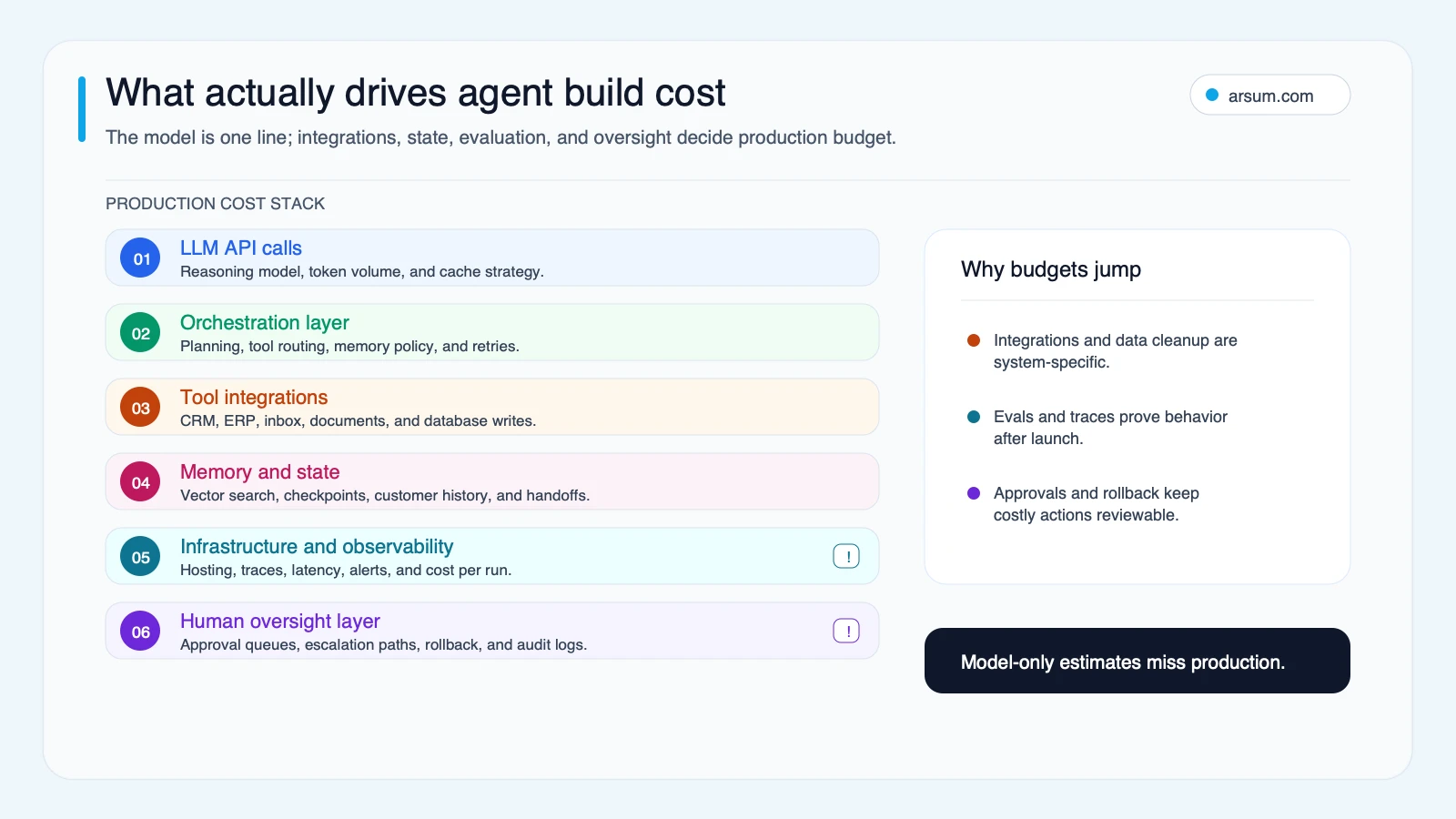
Security is not an optional enterprise add-on when an agent can act. The OWASP AI Agent Security Cheat Sheet identifies risks associated with agent tool use, memory, and actions. OWASP’s agentic AI threats and mitigations is useful for turning those risks into line items: authorization, prompt-injection defenses, tool restrictions, environment isolation, auditability, and monitoring.
Privacy and retention requirements can also alter architecture and procurement. Review provider documentation such as OpenAI Enterprise Privacy against your own data policy before treating a vendor configuration as production-ready.
An end-to-end budget worksheet
Use a worksheet before approving a pilot. The figures below are deliberately variables, not a claim about standard rates.
| Budget component | Planning input | How to validate it |
|---|---|---|
| Discovery | D hours × loaded delivery cost | Count workshops, process mapping, policy review, and workflow specification |
| Build and integration | B hours × loaded delivery cost | Define systems, interfaces, test environments, and excluded work |
| Evaluation and controls | E hours × loaded delivery cost | Size the test set, acceptance process, access controls, and rollback testing |
| Launch and training | L hours × loaded delivery cost | Include queue design, documentation, training, and handover |
| Contingency | C | Reserve for unknown exceptions, source-data issues, and integration rework |
| Monthly model and tool usage | U | Calculate from actual provider prices and workflow volume |
| Monthly review labor | R | Review rate × minutes per review × loaded reviewer cost |
| Monthly monitoring and support | M | Named owner’s allocated time, alerts, logs, and incident handling |
| Monthly evaluation | Q | Regression cases, quality sampling, and policy-change testing |
| Remediation reserve | X | Explicitly decide who bears rework, correction, and customer-impact costs |
An illustrative planning formula is:
Initial budget = D + B + E + L + C
Monthly run-rate = U + R + M + Q + X
The calculation only becomes decision-grade when every input comes from the intended workflow, not from generic “chat volume.” Capture sessions, turns, tokens, retrieval, web or file calls, tool calls, retries, human review, support hours, and evaluation cadence.
Practitioner discussions are a useful qualitative warning, not a pricing benchmark. A Hacker News discussion about real-time dollar budgets for AI agents reflects concern about loops, retries, and unexpected tool usage. Build controls into the operating budget:
- Maximum turns per session
- Maximum tool calls per task
- Retry limits by error type
- Per-session and daily spending caps
- Threshold alerts
- A kill switch that stops new actions while preserving logs
Worked pilot scorecard: invoice intake
A pilot should prove one controlled workflow boundary, not claim that it can automate an entire finance function.
Assume, purely for illustration, that a finance team processes 1,000 invoices per month at a measured baseline of 8 minutes each. The pilot handles intake, extraction, matching suggestions, and routing. It does not release payments.
| Scorecard field | Illustrative planning assumption | Acceptance decision |
|---|---|---|
| Baseline volume | 1,000 invoices/month | Validate against ERP and queue data |
| Baseline handling time | 8 minutes/invoice | Measure by case type |
| Pilot coverage | 60% of supported cases | Count completed supported cases only |
| Quality metric | Required fields extracted and source-linked | Define field-level test criteria before launch |
| Exception metric | Conflicting or unsupported cases enter a human queue | Track class, volume, and aging |
| Business owner | AP manager | Approves policy changes and payment-related boundaries |
| Review cadence | Weekly pilot review; monthly control review | Review spend, quality, exceptions, and incidents |
| Stop condition | Incorrect write, unauthorized access, untraceable output, or budget breach | Pause new runs and investigate |
| Rollback | Disable write tool, revert queued updates, return cases to the existing process | Test before production use |
Illustrative break-even calculation
The baseline workload is:
1,000 invoices × 8 minutes = 8,000 minutes
8,000 ÷ 60 = 133.3 staff hours/month
If the pilot routes 60% of cases and reduces manual work on those supported cases by 70%:
133.3 × 0.60 × 0.70 = 56 gross capacity hours/month
That is capacity released, not automatic savings.
To test break-even, use:
Monthly net value = (realized value of released capacity + avoided error/rework value) − monthly run-rate
Payback months = initial budget ÷ monthly net value
For example, the team must first decide what one released hour is actually worth: avoided contractor spend, avoided hiring, faster processing, reduced backlog, or redeployment to constrained work. If the answer is “nothing measurable changes,” do not present the 56 hours as savings. Then subtract review labor, support, provider usage, evaluation, and remediation from the value case.
For related measurement discipline, see AI automation ROI examples and AI for finance teams.
If you need help converting a workflow into a scoped pilot, acceptance criteria, control boundary, and cost model, an Arsum workflow assessment can make the assumptions explicit before you commit to a build.
💡 Arsum builds custom AI automation solutions tailored to your business needs.
Get a Free Consultation →Safety boundaries that change the estimate
Technical capability is not business authorization. The higher the failure cost and the lower the reversibility, the less autonomy an agent should receive.
For each write action, document:
- Which identity invokes the tool and which fields are in scope.
- Conditions that allow, deny, or escalate the action.
- The named role that can approve exceptions and policy changes.
- Source records, tool parameters, traces, and reviewer decisions retained as evidence.
- Idempotency and retry behavior.
- Whether rollback is possible and how it is tested.
- Who can disable the workflow and where work goes afterward.
The NIST AI Risk Management Framework provides a practical lens: map, measure, manage, and govern risks throughout the system lifecycle. It does not prescribe a single architecture; it makes ownership work visible.
Disqualifying conditions
Defer or narrow the project when:
- No process owner can define the normal path or approve exceptions.
- Source data is unidentified, unreliable, or cannot be retained appropriately.
- The expected value depends on removing review from a high-consequence decision.
- The agent must take irreversible actions without a tested approval or rollback path.
- There is no manual queue for failed, uncertain, or over-budget work.
- Baseline volume, time, error, backlog, or business outcome cannot be measured.
In those cases, the first investment may be process instrumentation, data cleanup, or a read-only decision-support workflow—not a more autonomous agent.
Build, buy, or partner
| If this is true | Consider first | Validate before committing |
|---|---|---|
| Standard connector, low-risk output, no system writes | SaaS or no-code automation | Access controls, exportability, usage limits, review process |
| Proprietary data or unusual exception rules | Configured platform or narrow custom build | Data model, source lineage, evaluation ownership, integration effort |
| System-of-record writes or strict approval policy | Custom controlled workflow | Permissions, audit evidence, rollback, incident process |
| Multiple dependent steps across teams | Phased architecture and pilot sequence | State design, orchestration ownership, support model, governance |
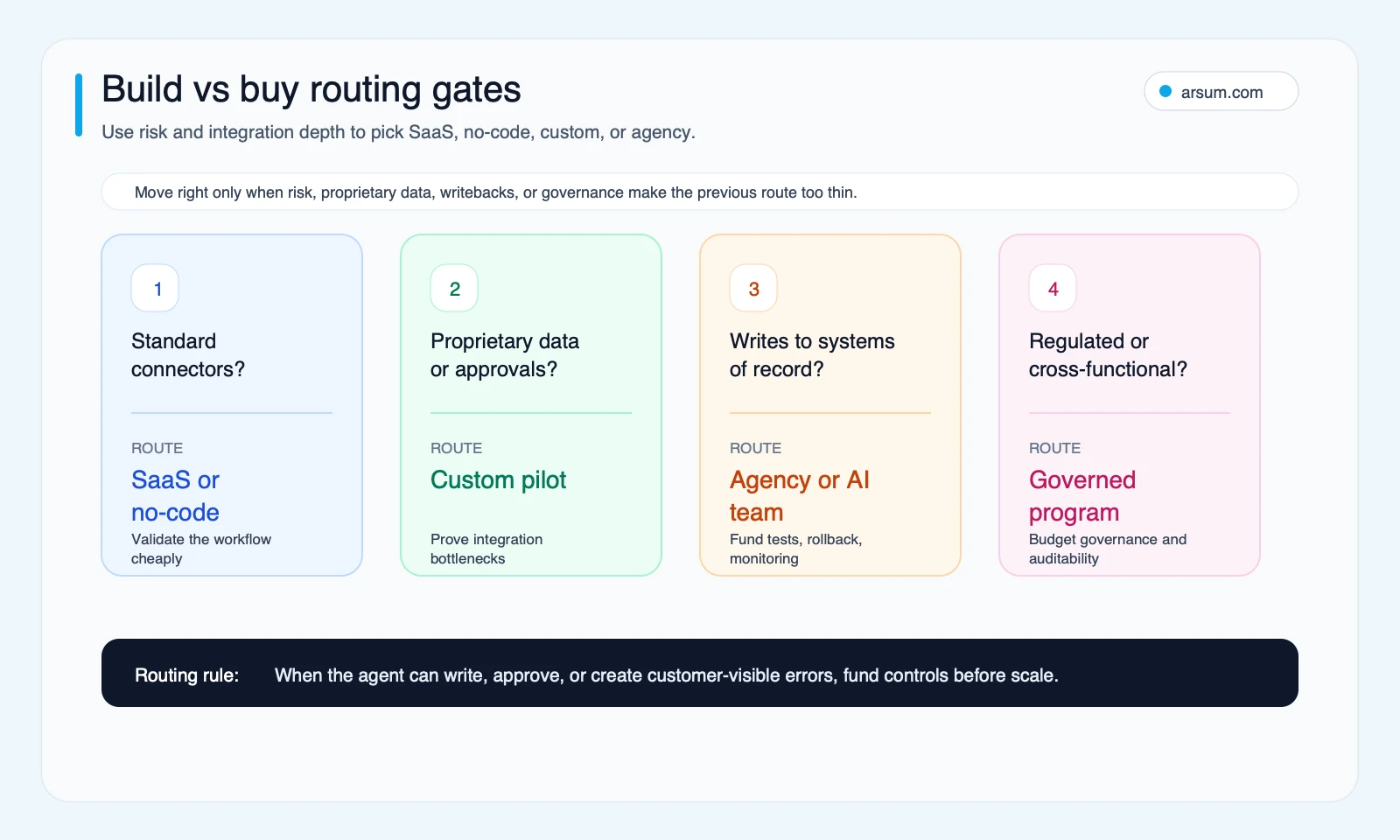
A platform is often sensible when its connectors and control model fit the workflow. Custom work is more defensible when the difficult part is your authorization logic, exception path, proprietary data, or safe integration with core systems. Compare implementation choices through AI agent architecture patterns, AI agent frameworks, and agentic AI workflow automation. If you are comparing delivery options, custom AI agent development services outlines the questions that matter beyond a prototype.
Do not assume an agency is always cheaper or faster than an internal team. Compare like-for-like scope: discovery, ownership, integration access, security review, evaluation, documentation, support, and the cost of future change.
Questions to require in every proposal
Ask vendors, agencies, and internal teams to answer these in writing:
- Which workflow steps are included and excluded?
- Which systems are read-only, and which can receive writes?
- What baseline data will be measured before the pilot?
- What are the acceptance metrics, exception classes, and approval owner?
- How are model, tool, retrieval, monitoring, review, and support costs metered?
- What happens when a tool fails, source data conflicts, or a cost cap is reached?
- What evidence is retained for completed and escalated runs?
- Which parts are configurable, portable, or owned by your team?
- What triggers a pause, rollback, or return to the manual process?
- What maintenance is expected when policies, source systems, or models change?
FAQ
Is there one standard cost to build an AI agent?
No. A useful estimate depends on the workflow boundary and operating requirements. A low-risk, read-only pilot and a write-capable system tied to core business records should not be compared as the same project.
What should be included in an AI agent quote?
Include discovery, build, integrations, evaluations, controls, launch, contingency, and the monthly run-rate for usage, review, monitoring, support, and maintenance. Ask for exclusions separately.
How do I estimate ongoing AI agent costs?
Model each completed workflow run: sessions, turns, model usage, tool calls, retries, human review, monitoring, evaluation, and remediation. Confirm provider prices directly before approving volume assumptions.
When should an agent remain human-in-the-loop?
Keep human approval where the action is consequential, hard to reverse, poorly evidenced, or outside a clearly defined policy boundary. Increased technical capability is not a reason to increase autonomy.
Methodology and limitations
Updated June 18, 2026. This is a link-only editorial evidence route because occupation-automation and website-performance datasets would not improve this specific cost decision. The framework synthesizes vendor cost-guide patterns for scope framing, official OpenAI documentation for pricing and evaluation considerations, and OWASP and NIST guidance for security and governance.
Community sources are used only as qualitative signals about concerns such as runaway usage, governance, and the cost of wrong actions. They are not evidence of market rates, adoption, or performance.
No named technical reviewer is assigned to this editorial version. Before using this framework for a high-control workflow, have the accountable engineering, security, risk, finance, and process owners review the assumptions against the actual system and policy environment.
A funded pilot should produce a scoped workflow, acceptance criteria, cost model, owner, review cadence, stop condition, and rollback path. That is the point at which an AI agent budget becomes suitable for an operating decision.
Ready to Automate Your Business?
Stop wasting time on repetitive tasks. Let AI handle the busywork while you focus on growth.
Schedule a Free Strategy Call →Written by:Arsum editorial team
- Reviewed by
- Arsum editorial team
- Published
- June 29, 2026
- Updated
- July 6, 2026
- How this was produced
- Arsum uses research packs, source checks, and human editorial review to prepare and update blog articles. Editors are responsible for the final page.
- Source policy
- Sources are linked in the article when used. Methodology and source notes are included on higher-risk or high-visibility pages and are being rolled out across the archive. Editorial policy.
- Why this page exists
- Help B2B operators evaluate AI automation, implementation scope, cost, risk, and build-vs-buy decisions with practical context.