Google agentic ai vertex is a procurement and operating-model decision, not a product-label decision: before standardizing on Google’s agent stack, decide who will own the runtime, permissions, evidence, exception queue, and pilot acceptance criteria for one workflow. Google presents Gemini Enterprise Agent Platform as its enterprise agent platform, while current documentation still uses Agent Builder and related Google Cloud components; verify the current component scope and availability in the platform overview before committing architecture or spend.
Google Agentic AI Vertex: Practical Guide
Explore google agentic ai vertex: compare workflow fit, costs, risks, evidence, and practical next steps before you build, buy, or hire.

Table of Contents
- What most guides miss: an agent platform is a control-plane commitment
- Current-state map: read the Google product boundary by job
- Vendor-evaluation matrix: Google versus your existing cloud control plane
- A controlled workflow example: support-triage recommendations
- Run a scored pilot instead of a generic proof of concept
- Four pilot gates and procurement questions
- One authoritative production-control checklist
- Platform-fit recommendation and methodology
What most guides miss: an agent platform is a control-plane commitment
A feature list can show that a platform supports models, tools, retrieval, or agent workflows. It does not answer the buyer’s harder question: can your organization safely operate the resulting system after it reaches real users and real data?
Use this decision rule:
Adopt a managed Google agent platform only when the workflow value justifies making Google Cloud identity, deployment, logging, monitoring, cost controls, and change management part of its ongoing operating model.
That rule changes the evaluation sequence. Start with the business queue and its authorization boundary, then evaluate the platform components needed to run it. Do not begin with a multi-agent diagram or a generic “enterprise AI” procurement category.
For example:
- A knowledge-backed support agent that drafts replies may need approved sources, citations, reviewer approval, and a manual fallback.
- An agent that changes records, grants access, sends customer commitments, or recommends eligibility outcomes needs narrower permissions, explicit human authorization, retained evidence, and tested reversal.
- A team without named GCP operational ownership may build a convincing prototype but still lack a workable answer for service accounts, quotas, incidents, logs, and spend allocation.
That is why agentic AI workflow automation should begin with workflow boundaries. Technical capability does not authorize consequential action.
Current-state map: read the Google product boundary by job
Google’s naming is evolving. Community discussion reflects confusion around changing labels, but it is not an official migration notice. For current procurement and architecture decisions, use Google’s Gemini Enterprise Agent Platform overview, Agent Builder documentation, and agentic architecture guidance as the source of truth.
| Component or layer | Practical role in an evaluation | Question to ask | Availability note |
|---|---|---|---|
| Gemini models | Model capability for reasoning, generation, and multimodal tasks | Which approved model, data-handling, quality, and latency requirements apply? | Verify supported models and regional requirements in current documentation. |
| Agent Development Kit (ADK) | Code-first development of agent logic, tools, and handoffs | Does the engineering team need code-level control over behavior and integrations? | Confirm the supported development and deployment path for the intended environment. |
| Agent Builder | Google Cloud documentation category for building, scaling, and governing agents | Which managed capabilities are needed for this workflow rather than assumed as part of one bundle? | Product boundaries and names can change; validate current documentation. |
| Managed runtime and Google Cloud controls | Deployment, identity, networking, logs, quotas, monitoring, and governance | Can the platform team operate and audit these controls after the pilot? | Treat this as an ownership decision, not merely a setup step. |
| Gemini Enterprise Agent Platform | Google’s enterprise-facing platform label for building, scaling, governing, and optimizing agents | Does the platform scope match the workflow, operating model, and procurement boundary? | Verify scope, terms, and availability directly with Google. |
| External orchestration, tools, and systems | Existing frameworks, APIs, data stores, and specialist services | What must remain portable, and what integration evidence is required? | Test actual contracts and controls; do not infer interoperability from a label alone. |
The buyer mistake is purchasing “the agent platform” before identifying which layers are actually needed for development, runtime, retrieval, evaluation, monitoring, or governance.
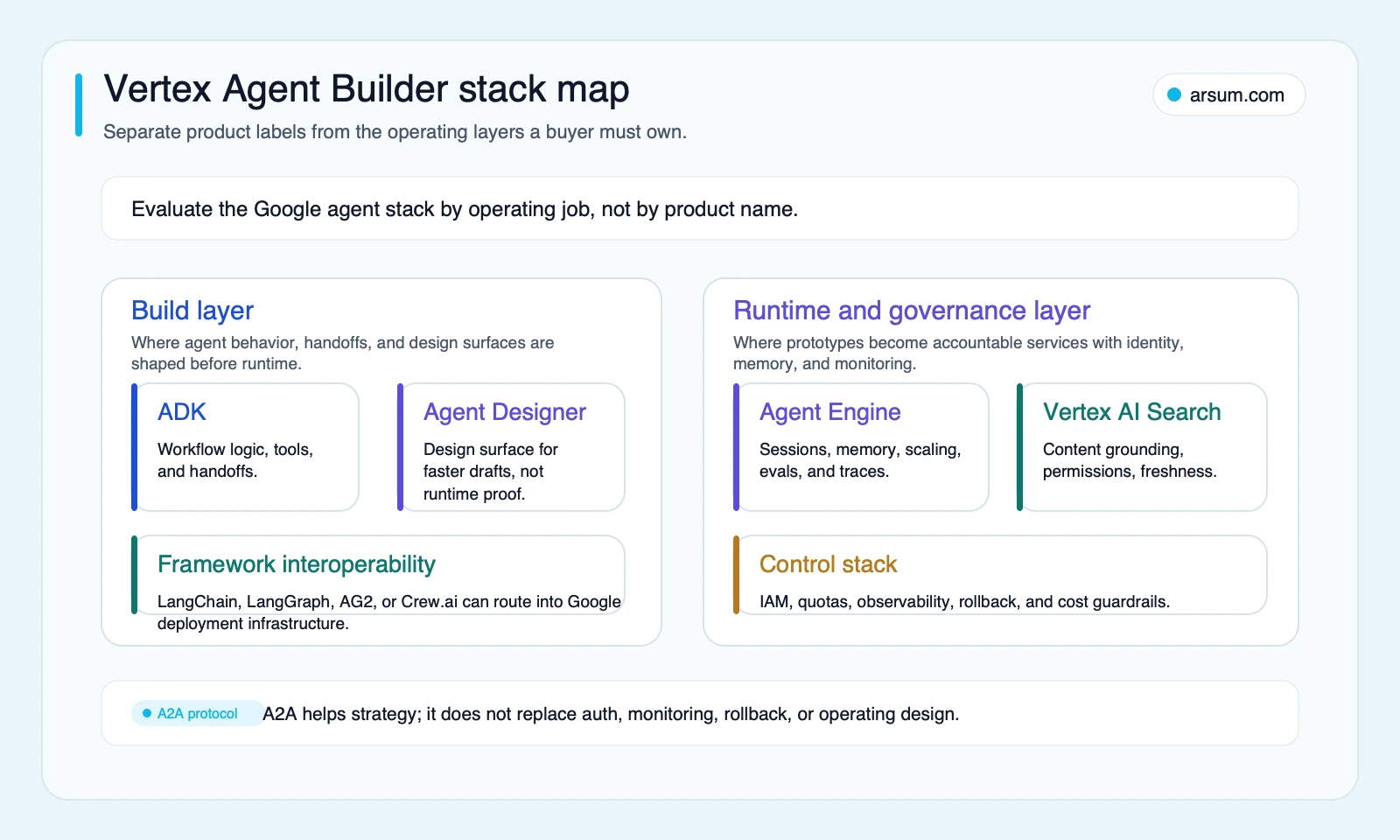
Turn that map into an ownership record. For every layer used in the pilot, document the technical owner and workflow owner, systems and data it can access, approval required for permission changes, evidence retained for outputs and tool calls, fallback behavior, and any portability requirement with its business reason.
For a framework-level decision before committing to a runtime, compare the tradeoffs in agentic AI frameworks. The goal is not maximum flexibility. It is a stack your team can secure, observe, evaluate, and change responsibly.
Vendor-evaluation matrix: Google versus your existing cloud control plane
A Google evaluation should not become a generic comparison of model demos. Compare Google against the cloud and operating environment that already owns the workflow’s identity, data, deployment, and incident response.
| Evaluation area | Google / Gemini Enterprise Agent Platform questions | Existing-cloud or alternative questions | Evidence to request or produce |
|---|---|---|---|
| Control-plane fit | Does the workflow already use GCP identity, networking, deployment, monitoring, or data services? | Would another cloud avoid a new operational boundary? | Current system map, identity boundary, deployment owner, and incident path. |
| Integration burden | Which APIs, source systems, secrets, and tool contracts must be connected? | Does an existing integration layer reduce work or add operational coupling? | Tool inventory, authentication design, timeout behavior, and data-flow diagram. |
| Portability scope | What must remain portable: prompts, agent logic, tools, evaluation data, logs, deployment, or model access? | Is portability a contractual, resilience, or commercial requirement rather than a preference? | Explicit requirements and an exit test for each one. |
| Operational ownership | Who owns quotas, spend, alerts, model or prompt changes, outages, and reviewer feedback? | Does the existing cloud team have a clearer operating model? | RACI, on-call route, change approvals, and cost-center ownership. |
| Fully loaded cost | What costs arise from model use, runtime, retrieval, logging, monitoring, security review, reviewer time, and exceptions? | What costs move or duplicate if another platform is introduced? | Cost model with assumptions, volume bands, and budget controls. |
| Security and authorization | Can permissions be limited to the minimum required for the task? | Does the alternative create broader credentials or less auditable tool access? | Service-account design, tool allowlist, audit requirements, and threat review. |
This matrix does not claim that Google is universally the best platform. It forces a decision based on operational facts that persist after a demo.
A Google-native route is worth evaluating first when Google Cloud already provides the practical home for the workflow’s data, identity, deployment, and monitoring. A different cloud-native route may be more appropriate when another cloud already owns those boundaries. A lighter design may be better when the work is a narrow drafting, retrieval, or classification task with low consequence.
For the broader distinction between generated content and systems that pursue work through tools and state, see agentic AI versus generative AI.
A controlled workflow example: support-triage recommendations
Consider an internal access-request queue. The agent receives a ticket, retrieves approved policy and entitlement information, identifies missing inputs, and drafts a recommendation for an authorized reviewer. It does not grant access.
This is a useful platform-fit pilot because it separates what the system can do from what the organization authorizes it to do.
| Workflow element | Controlled design |
|---|---|
| Input | Ticket text, requester identity, requested application, department, and approved policy documents |
| Agent task | Classify the request, retrieve approved policy, identify missing information, and draft a recommendation |
| Tool boundary | Read-only access to ticketing, policy, and entitlement-reference systems |
| Exception taxonomy | Missing identity data; conflicting policy; inaccessible source; weak retrieval; request outside policy; tool failure |
| Human approver | Designated access-control owner or delegated reviewer |
| Authorized action | Reviewer approves, rejects, or requests more information; the agent prepares the case only |
| Evidence retained | Input reference, source identifiers, recommendation, tool-call log, reviewer decision, timestamp, and configuration version |
| Rollback | Stop automated routing, return new tickets to the existing manual queue, and retain logs for review |
Google documentation can help identify the components available for this design. It does not determine the organization’s authorization policy. That distinction matters when agents receive cloud permissions. Independent Unit 42 research on Vertex AI security supports treating overprivileged identities and cloud-permission paths as explicit security-review concerns.
The autonomy rule is straightforward: high failure cost or low reversibility should reduce autonomy, not increase it.
Run a scored pilot instead of a generic proof of concept
A pilot should resolve a platform-fit question under controlled operating conditions. It is not a demo and not a promised implementation benchmark.
The thresholds below are buyer-defined planning thresholds, not observed Vertex performance claims. Agree them with the workflow owner, risk owner, finance partner, and platform owner before the pilot starts.
| Scorecard item | Baseline to capture | Target or acceptance criterion | Owner | Review cadence |
|---|---|---|---|---|
| Cycle time | Current median time from ticket receipt to reviewed resolution | A defined improvement for approved case types | Workflow owner | Weekly |
| Reviewed-output acceptance | Share of prepared cases accepted without material rewrite | Buyer-defined minimum based on failure cost | Functional reviewer | Weekly sample review |
| Exception rate | Cases routed to human review or unable to proceed | Ceiling by exception category, not one blended figure | Workflow and risk owners | Weekly |
| Critical quality and safety | Material policy errors, unsupported claims, unauthorized actions, or missing evidence | Zero tolerance for predefined critical failures | Risk owner | Per incident and weekly |
| Cost per completed case | Current labor and system cost per completed case | Ceiling including model, runtime, retrieval, logging, review, and exceptions | Finance partner | Weekly |
| Latency | Current service expectation and queue wait time | Workflow-specific limit | Technical owner | Daily during pilot |
| Audit evidence | Existing evidence requirements | Every sampled case retains required references, actions, approvals, and configuration version | Compliance or control owner | Weekly |
| Rollback | Existing manual process | Demonstrated ability to stop routing and restore manual handling | Technical and workflow owners | Before go-live |
Illustrative unit-economics model
Use your own volume, labor, exception, and platform-cost inputs. The following is an illustrative planning assumption:
- 500 eligible cases per month;
- 12 minutes of current reviewer effort per case;
- loaded reviewer cost of $60 per hour;
- 6 minutes of reviewer effort on accepted agent-prepared cases;
- 20% of cases remain full-manual exceptions;
- platform and operating costs are measured separately.
Current labor baseline:
500 cases × 12 minutes ÷ 60 × $60 = $6,000 per month
Illustrative post-pilot reviewer labor:
400 accepted cases × 6 minutes ÷ 60 × $60 = $2,400
100 exception cases × 12 minutes ÷ 60 × $60 = $1,200
That yields illustrative reviewer labor of $3,600 before model, runtime, retrieval, logging, engineering support, and control-review costs. It is not a savings claim. The decision is whether fully loaded cost per completed case, quality, and controls meet the agreed acceptance criteria.
For related planning methods, see AI automation ROI examples.
If you need an independent workflow-fit assessment, the useful deliverable is a scorecard, ownership map, exception taxonomy, evidence requirements, and platform recommendation—not a generic agent demo.
💡 Arsum builds custom AI automation solutions tailored to your business needs.
Get a Free Consultation →Four pilot gates and procurement questions
Gate 1: Choose a measurable, bounded workflow
Select one queue with known baseline performance, defined inputs, a clear owner, and a visible fallback. Avoid starting with a “general assistant for the business.”
Ask:
- Which case types are eligible, and which are excluded?
- What are the systems of record?
- Which source can override another when information conflicts?
- What counts as a completed case?
- Which errors are critical even if they are rare?
Gate 2: Build the smallest controlled path
Start read-only or draft-only. Test approved and denied permissions, stale sources, missing data, ambiguous instructions, tool timeouts, and malformed inputs.
Ask Google or an implementation partner:
- Which components are required for this path, and which are optional?
- How will tool authentication, secrets, and least-privilege access be implemented?
- What logs connect source retrieval, tool calls, output, approval, and configuration version?
- How will the agent behave when a source is unavailable or a tool call fails?
- What evidence demonstrates that the manual fallback works?
Gate 3: Validate cost and operational ownership
Community conversations about billing, integrations, and product boundaries are useful signals of what teams need to test; they do not establish market-wide outcomes. Examples include practitioner cost concerns and Agent Builder implementation questions.
Ask:
- Who receives budget, quota, security, and service-health alerts?
- What will be measured at the case level versus the platform level?
- Who approves prompt, model, tool, and permission changes?
- What test data and exception cases will remain available for regression review?
- What cost is incurred by reviewing and correcting agent outputs, not just generating them?
Gate 4: Make a go/no-go decision
Proceed only if the pilot meets the agreed workflow, quality, cost, authorization, and rollback thresholds.
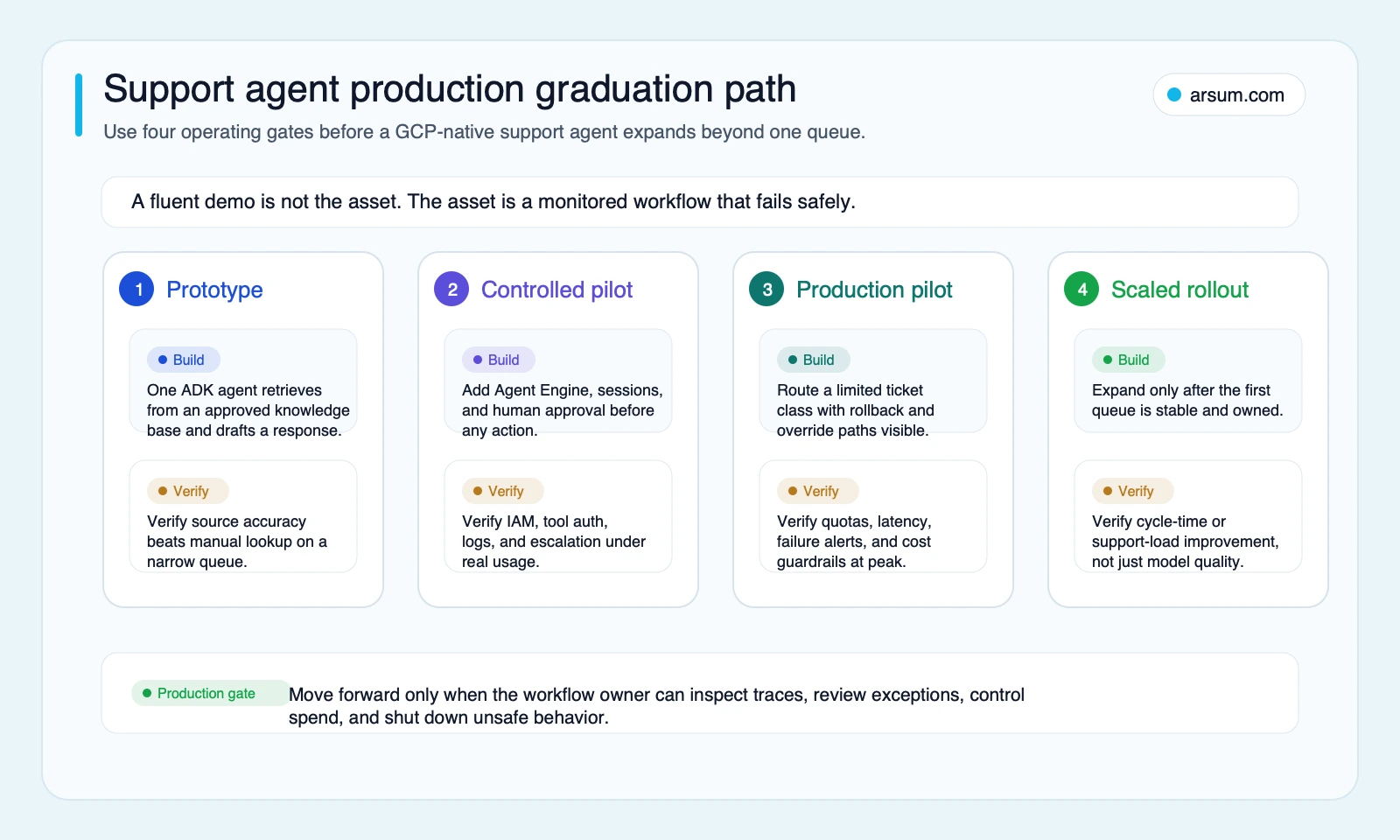
The production path should be conservative: prototype one workflow, add controls, test limited exposure, and expand only after the original workflow produces acceptable evidence.
One authoritative production-control checklist
Use one control checklist rather than repeating generic governance language across every stage:
- Least-privilege service accounts with reviewed IAM scopes.
- Tool-call allowlists, restricted secrets handling, and appropriate network boundaries.
- Named source owners, freshness expectations, and access-control tests.
- Human approval for irreversible, financial, legal, safety-sensitive, or externally binding actions.
- Logs linking input, source references, tool calls, output, approval, and agent-version information.
- Quotas, budget alerts, and a named cost-review owner.
- Escalation ownership for policy conflicts, weak outputs, unavailable tools, and incidents.
- Version control and tested rollback for prompts, tools, models, and agent logic.
- A representative evaluation set that includes the ugly exceptions, not only clean examples.
- A tested manual fallback that can receive traffic immediately.
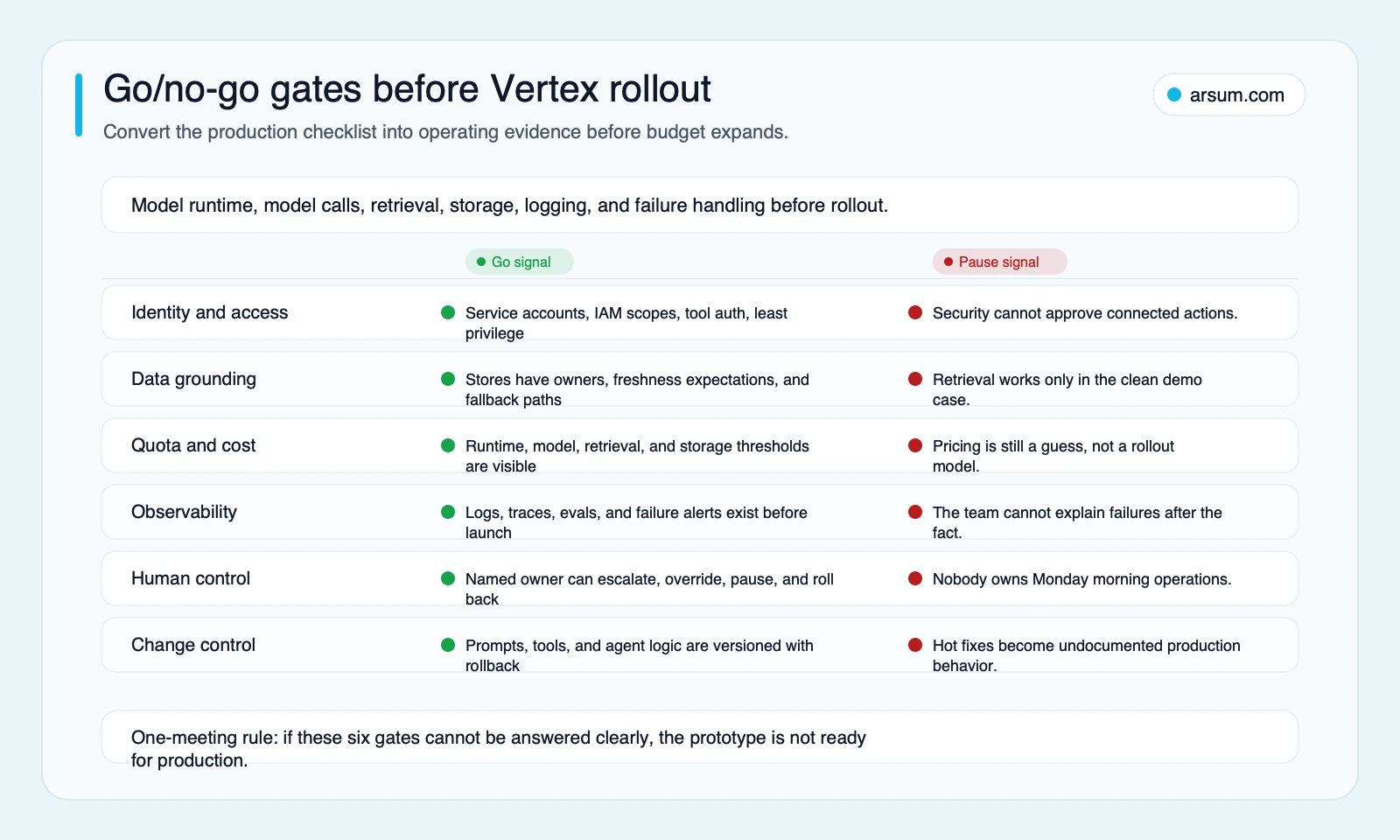
Defer or narrow the rollout when no workflow owner will accept responsibility for the exception queue; required access cannot be approved with least privilege; a critical action lacks an authorization boundary or reliable reversal; test cases omit the highest-risk conditions; fully loaded cost cannot be measured; required evidence is incomplete; or manual fallback has not been exercised.
These are not reasons to abandon AI. They are reasons to reduce scope until the workflow is controllable.
Platform-fit recommendation and methodology
Choose Google’s agent platform when Google Cloud is the practical home for the workflow’s deployment, identity, data access, monitoring, and governance—and when named owners can operate those responsibilities after launch.
Choose a lighter design when the task remains bounded, reversible, and low consequence. Prefer another cloud’s native path when that cloud already owns the relevant identity, data, and operational boundary. Keep portability explicit when it is a real business requirement, then test the part that matters: tools, evaluation assets, logs, deployment, or model access.
This is an editorial buyer-evaluation framework, not an implementation-performance benchmark. It draws on Google’s Gemini Enterprise Agent Platform overview, Agent Builder documentation, agentic architecture guidance, and the cited Unit 42 security research. Product names, component availability, quotas, and release status should be verified against current official documentation before procurement.
For related decisions, review AI agent architecture patterns, AI agent security, custom AI agent development services, AI automation platform guidance, and AI agents for business teams.
Ready to Automate Your Business?
Stop wasting time on repetitive tasks. Let AI handle the busywork while you focus on growth.
Schedule a Free Strategy Call →Written by:Arsum editorial team
- Reviewed by
- Arsum editorial team
- Published
- February 19, 2026
- Updated
- August 12, 2026
- How this was produced
- Arsum uses research packs, source checks, and human editorial review to prepare and update blog articles. Editors are responsible for the final page.
- Source policy
- Sources are linked in the article when used. Methodology and source notes are included on higher-risk or high-visibility pages and are being rolled out across the archive. Editorial policy.
- Why this page exists
- Help B2B operators evaluate AI automation, implementation scope, cost, risk, and build-vs-buy decisions with practical context.