Intelligent process automation examples are useful only when they help you choose a workflow with measurable operational drag, a clear system of record, and a safe path for uncertain cases. The best candidates combine repetitive work with messy inputs or routing decisions—but they do not give an AI system permission to make consequential decisions without defined approval ownership, retained evidence, and a tested rollback.
Intelligent Process Automation Examples for Business
Explore intelligent process automation examples in finance, HR, legal, and ops, with architecture notes, build costs, ROI ranges, and real use cases.

Table of Contents
- What most IPA example lists miss
- Six realistic intelligent process automation examples
- 1. Accounts payable invoice processing
- 2. Expense report policy review
- 3. Employee onboarding coordination
- 4. Supplier onboarding and document completeness
- 5. Contract clause and obligation extraction
- 6. Customer-support routing and assisted resolution
- 7. Employee offboarding and access-revocation coordination
- 8. Operations intake, classification, and work routing
- Use one candidate scorecard, not several overlapping frameworks
- A buyer-fillable pilot scorecard and ROI model
- Build, buy, or partner?
- Failure modes to plan for
- Methodology and limits
What most IPA example lists miss
Most lists name departments: finance, HR, legal, procurement, support. That is inspiration, not a funding decision.
A workflow deserves an IPA pilot when all four conditions below are true:
- The trigger is identifiable. You can name the document, email, event, or request that starts work.
- The baseline exists. The team can measure monthly volume, manual handling time, queue age, rework, errors, or SLA misses.
- Exceptions can be owned. A named person or role can decide what happens when extraction is uncertain, a rule conflicts, or required data is missing.
- The final action is controlled. The workflow has a source of truth, an audit trail, and a way to stop or reverse automated changes.
If one is missing, do discovery before buying software or commissioning a build. This is the practical difference between a promising demo and an operating workflow.
IPA usually combines AI-based interpretation with deterministic business rules and workflow automation. Vendors describe intelligent automation as applying AI and machine learning to more complex workflows, often alongside RPA; that distinction matters because a model’s ability to interpret text does not remove the need for rules, approvals, and systems integration. See UiPath’s overview of intelligent automation and Deloitte’s IPA-versus-RPA explanation.
A first-project selector
| Candidate | Start with it when | Keep human review for | Do not start if |
|---|---|---|---|
| AP invoice processing | Invoice intake, matching, and approvals create a visible queue | Missing PO, uncertain extraction, duplicate, price or quantity discrepancy | No reliable vendor, PO, or ERP record exists |
| Expense audit | Policy rules are written and receipts can be retained | Policy exceptions, duplicates, missing receipts, executive exceptions | Policy is informal or approval authority is unclear |
| Employee onboarding | HR, IT, payroll, and facilities tasks are repeatedly coordinated | Access exceptions, equipment spend, nonstandard employment arrangements | Core systems cannot identify the employee or task owner |
| Supplier onboarding | Required documents and validation criteria are explicit | Bank-detail changes, compliance deficiencies, high-risk suppliers | Required documents and approval rules vary by requester |
| Contract obligation extraction | A defined playbook exists for standard agreements | Nonstandard clauses, material risk, negotiation positions | The goal is to replace legal judgment on bespoke agreements |
| Support routing | Categories, escalation paths, and knowledge sources are stable | Safety-sensitive, contractual, billing, or account-impacting requests | The ticket taxonomy is disputed or source data is stale |
| Offboarding orchestration | Identity and entitlement records are sufficiently complete | Privileged access, disconnected applications, disputed termination events | Identity inventory cannot show what access exists |
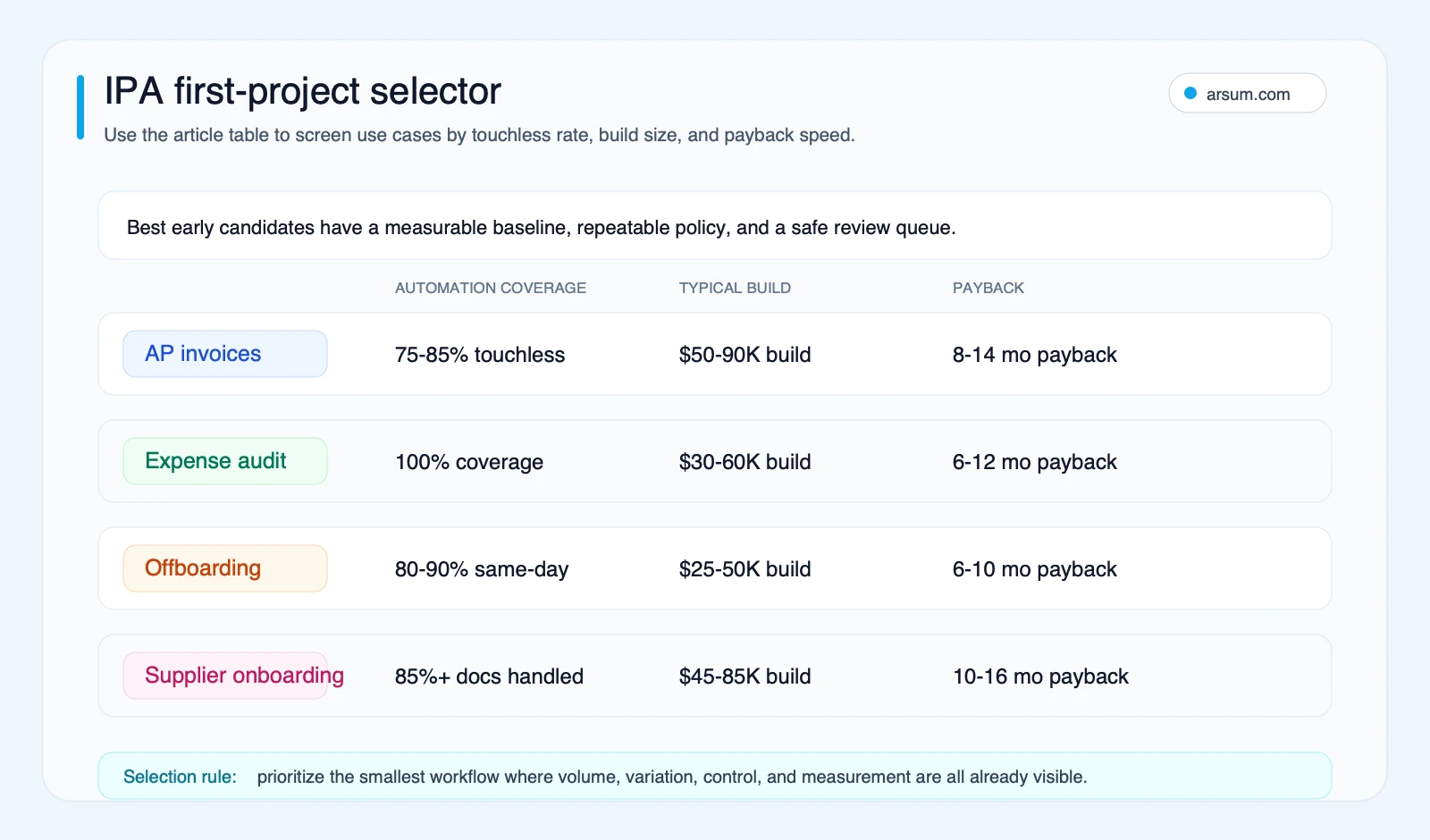
The decision rule is simple: automate bounded interpretation and coordination first; keep money movement, access changes, legal commitments, and policy exceptions behind explicit authorization.
For broader prioritization, use the workflow lens in this AI process automation guide and compare it with the delivery choices in AI business process automation.
Six realistic intelligent process automation examples
The examples below describe implementation patterns, not promised outcomes. Each separates what technology can assist with from what the business should authorize.
1. Accounts payable invoice processing
Automated invoice processing can ingest invoices, extract fields, validate data, route work, and support accounts-payable processing. IBM describes invoice automation around ingestion, validation, and routing, while its procure-to-pay guidance includes OCR and matching invoices against purchase orders. IBM’s invoice-processing overview and procure-to-pay automation guide support this as a practical IPA category.
A controlled AP architecture separates interpretation from authorization:
- Ingestion: inbox, supplier portal, EDI feed, or scanned document.
- AI task: extract supplier, invoice number, dates, amounts, line items, and supporting references.
- Deterministic checks: duplicate detection, vendor-master lookup, PO and receipt matching, approval thresholds, tax and currency validations.
- Permitted automated action: create or update a draft transaction, or post only where pre-approved business rules explicitly allow it.
- Mandatory review: low-confidence fields, missing or mismatched PO data, changed banking details, duplicate signals, contract variance, or unresolved approvals.
- Owner and evidence: AP manager owns the exception queue; retain source document, extracted values, match results, rules evaluated, approval event, editor, and final ERP identifier.
- Rollback: reverse or void the ERP transaction under the organization’s accounting controls, then route the original evidence back to AP.
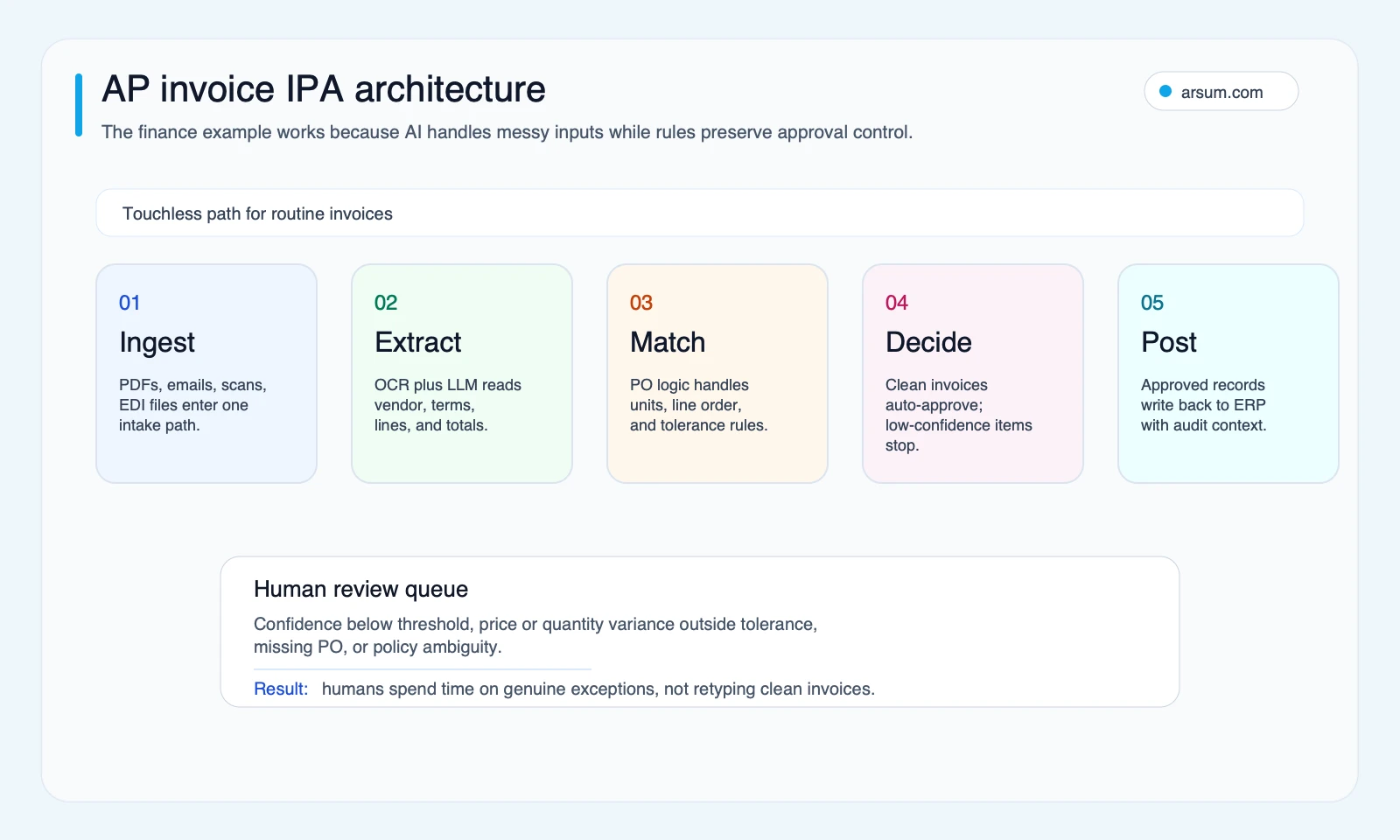
The design question is not “can an AI read an invoice?” It is whether the team can distinguish a draft from an authorized accounting action and resolve exceptions without creating a second reconciliation process. For adjacent cash-collection workflows, see accounts receivable automation.
2. Expense report policy review
Expense workflows are a strong candidate when policy is explicit. The system can extract receipt data, compare submitted expenses with documented policy, detect possible duplicates, and prepare a review packet.
It should not invent policy interpretation. A useful boundary is:
- Automatically calculate policy checks and route clean, low-risk reports only where finance has authorized that path.
- Require review for missing receipts, ambiguous categories, executive exceptions, duplicate indicators, out-of-policy claims, or unavailable exchange-rate evidence.
- Assign the finance operations lead as the approval owner.
- Retain the receipt, original submission, policy version, check results, reviewer decision, and any override reason.
- Roll back by holding reimbursement or reversing the proposed transaction before payment processing, subject to the company’s existing controls.
This is a good example of IPA because document understanding improves coverage, while deterministic policy logic and finance authority remain in charge.
3. Employee onboarding coordination
Onboarding frequently fails at coordination rather than intelligence. A workflow can read approved hiring data, create a task plan, request equipment, open IT tickets, monitor deadlines, and remind owners. It should not grant access beyond defined role templates or authorize discretionary spending.
A workable pattern is:
- Trigger: HRIS record reaches an approved hiring state.
- AI task: normalize role, location, department, start date, and free-text equipment requirements.
- Deterministic checks: approved role catalog, employment type, manager, cost center, and access template.
- Human review: nonstandard access, contractor arrangements, international documentation, role changes, or unavailable approvers.
- System of record: HRIS for employment state; ticketing and identity systems for task and access state.
- Rollback: cancel pending requests and revoke newly provisioned access when the HRIS event is corrected or withdrawn.
The orchestration pattern is closely related to agentic AI workflow automation, but a monitoring agent is still only useful when task ownership and system authority are clear.
4. Supplier onboarding and document completeness
Supplier onboarding often involves collecting tax forms, insurance certificates, banking evidence, and compliance documents. IPA can track a required-document checklist, extract dates and fields, flag missing items, and prepare an ERP or procurement record.
The safe autonomy boundary is narrower than it first appears. The system may request documents, identify apparent deficiencies, and create a draft record. It should always escalate bank-account changes, sanctions or compliance concerns, incomplete required evidence, and supplier approval decisions to the relevant procurement, finance, or compliance owner.
A useful evidence package contains the original document, field extraction, validation result, requirement version, communication history, reviewer decision, and final supplier record. The rollback path is to disable a draft supplier record or block activation until review is complete—not to silently overwrite supplier master data.
5. Contract clause and obligation extraction
IPA can make contract review more navigable by extracting terms against an approved playbook: parties, renewal dates, notice periods, data-processing obligations, liability language, or missing provisions. It can summarize deviations and create an attorney-ready review packet.
It should not autonomously accept material legal risk or treat a generated summary as the agreement. Legal operations can authorize automatic metadata capture and task creation; qualified counsel or designated business owners should approve nonstandard terms, negotiation positions, and contract execution. Preserve the source agreement, extracted clauses, playbook version, model output, review notes, and final signed document reference.
This is usually a second-wave project because success depends on a maintained clause playbook and a reliable definition of what constitutes a material deviation.
6. Customer-support routing and assisted resolution
Support intake is a sensible IPA use case when teams can define categories, urgency rules, escalation destinations, and approved knowledge sources. The workflow can classify requests, extract entities, gather context from authorized systems, propose a response, and route work.
For consequential cases—billing changes, security incidents, cancellation disputes, health or safety concerns, regulated advice, or account changes—the system should route rather than resolve. The support operations owner should review category errors and stale knowledge. Evidence should include the customer message, source records consulted, classification, response draft, agent edits, and final disposition.
This distinction matters: fast first response is not the same as safe autonomous resolution. For a fuller operating model, see AI customer service automation.
7. Employee offboarding and access-revocation coordination
An offboarding workflow can react to an approved HR event, identify connected systems, create revocation tasks, confirm completion, and highlight systems that need manual handling. It should not assume that every removal is safe to execute without checking employment state, privilege level, legal hold requirements, and system-specific dependencies.
The identity or IT security owner should approve exception handling. Privileged accounts, shared credentials, production access, and applications without reliable integration should require visible review. Retain the initiating event, entitlement inventory, revocation attempts, confirmations, failures, manual attestations, and final closure. The rollback is a documented restoration path for erroneous termination or transfer events, with time-bounded reactivation and approval.
8. Operations intake, classification, and work routing
Operations teams often receive requests through email, forms, attachments, and internal messages. An IPA workflow can classify request type, extract key data, validate required fields, create a work item, and direct it to the correct queue.
This is valuable when the organization agrees on taxonomy and service rules. It is not valuable when every requester uses a different definition of priority. Require review for requests that imply a customer commitment, change a commercial term, alter inventory, or lack sufficient source data. Keep the original request, classification rationale, applied routing rules, queue assignment, owner decision, and any reclassification history.
Use one candidate scorecard, not several overlapping frameworks
Score each candidate from 1 to 5, then discuss the reasons behind the score. The point is not a magic threshold; it is to expose what must be true before implementation.
| Criterion | Question to answer |
|---|---|
| Business value | What cost, cash-flow, risk, SLA, or customer problem changes if this queue improves? |
| Volume and repetition | How often does it happen, and how much work is materially similar? |
| Input readiness | Are documents, messages, events, and master data accessible and retained? |
| Policy clarity | Can the organization define rules, mandatory-review cases, and approval authority? |
| Exception safety | What happens after a wrong classification, extraction, or routing decision? |
| System integration | Which system is authoritative, and can the workflow write safely to it? |
| Operating ownership | Who owns queue health, rule changes, evaluations, and rollback? |
| Measurement | What baseline can the team capture before changing the workflow? |
Disqualify a candidate when it has no data owner, no authoritative destination system, no written exception route, or harm that cannot be contained after a mistaken action. Low-volume one-off work and strategic judgment without policy boundaries are also poor first projects.
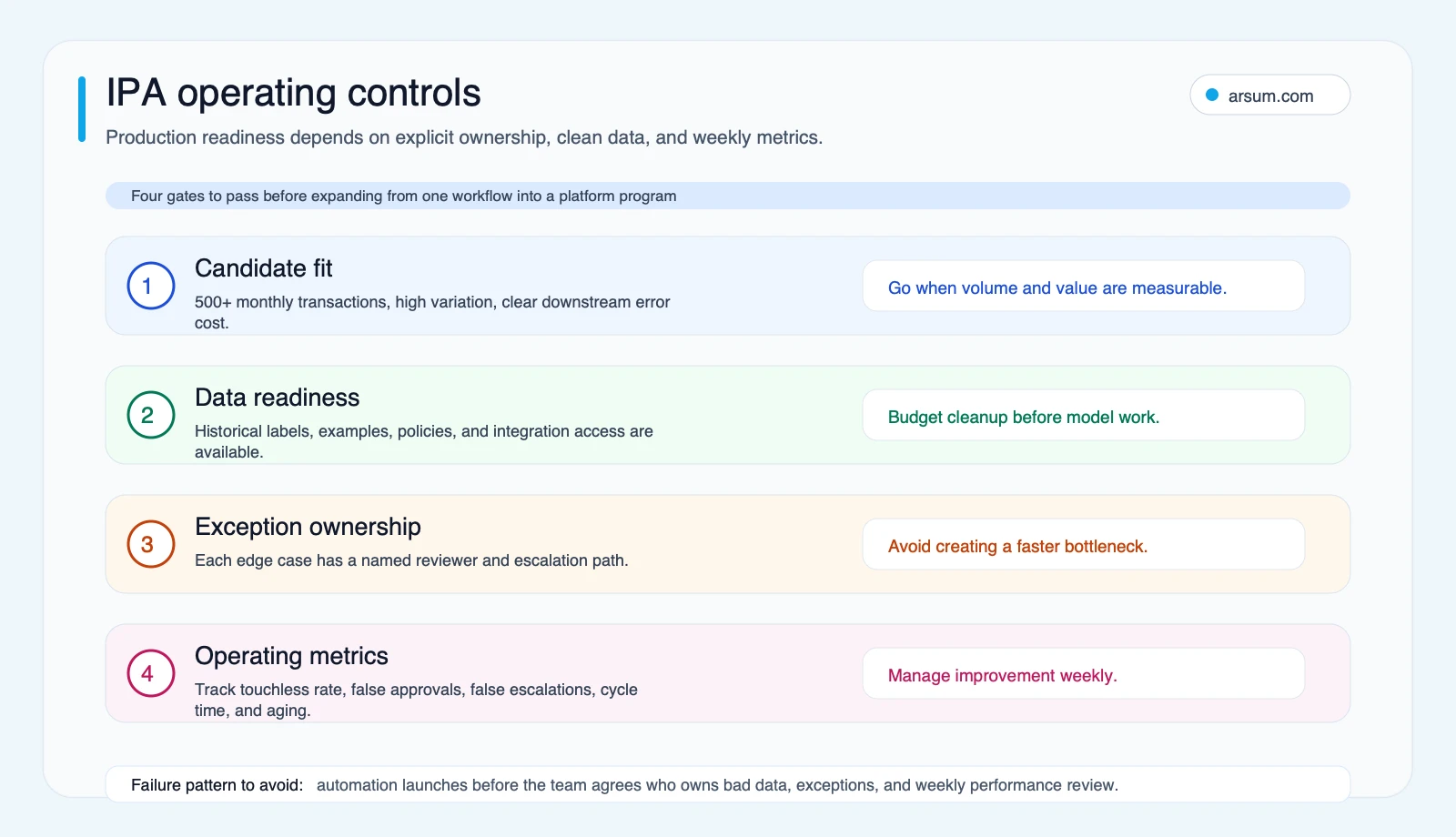
A buyer-fillable pilot scorecard and ROI model
Do not accept “typical” savings, build cost, implementation timeline, or touchless-rate claims as a business case. Build a scenario from your own baseline, label it as a planning assumption, and validate it through a bounded pilot.
Illustrative planning arithmetic
Use these inputs:
| Input | Your baseline | Planning assumption to test |
|---|---|---|
| Monthly transaction volume | V | Enter observed volume |
| Manual minutes per transaction | M | Time sample across normal and exception cases |
| Loaded labor cost per hour | L | Finance-approved labor assumption |
| Expected share handled without manual touch | T | Pilot hypothesis, not a benchmark |
| Exception rate | E | Pilot hypothesis, tracked separately |
| Minutes to review an exception | R | Time sample |
| Build cost | B | Supplier or internal estimate |
| Monthly operating cost | O | Model, integration, monitoring, and support estimate |
A simple monthly labor-capacity estimate is:
((V × M) ÷ 60 × L) − ((V × T × residual minutes) ÷ 60 × L) − ((V × E × R) ÷ 60 × L) − O
This is not realized savings. It is an illustrative planning model that excludes implementation effort, management overhead, error remediation, taxes, cash-flow effects, and the value of redeployed capacity unless those are separately evidenced. Use it to compare candidates, then reconcile it against actual pilot measurements.
Pilot acceptance scorecard
| Measure | Baseline | Target set by workflow owner | Review cadence | Stop condition |
|---|---|---|---|---|
| Touchless rate | Measure before launch | Set after sample evaluation | Weekly | Growth requires unresolved risk or hidden manual work |
| False-approval rate | Manually audit sampled decisions | Set a risk-appropriate tolerance | Weekly and after rule changes | Any material unauthorized action or control breach |
| False-escalation rate | Measure unnecessary reviews | Improve only without relaxing approval safeguards | Weekly | Queue load makes the workflow slower than baseline |
| Exception aging | Current queue age | Owner-defined SLA | Daily or weekly | Exceptions exceed agreed SLA without staffing response |
| End-to-end cycle time | Current elapsed time | Pilot-specific improvement target | Weekly | Regression persists after correction |
| Review cost | Current review effort | Compare with actual pilot workload | Weekly | Review work rises without compensating control benefit |
| Audit-evidence completeness | Sample current records | Required fields and artifacts present | Weekly audit | Missing evidence for consequential action |
| Rollback-test result | Test before production | Successful documented test | Before launch and after material changes | Rollback cannot restore a safe operating state |
OpenAI’s guidance on evaluations supports testing against task-specific criteria instead of relying on generic model claims. Its production guidance also supports monitoring and operational controls. For risk-sensitive implementations, use the accountability and governance framing in the NIST AI Risk Management Framework.
💡 Arsum builds custom AI automation solutions tailored to your business needs.
Get a Free Consultation →A useful assessment should request the same evidence: volume, handling-time sample, source systems, exception categories, current approval authority, required audit artifacts, and the action that must be reversible. If those inputs cannot be gathered, the right next step is process design—not an AI build.
Build, buy, or partner?
Buy a packaged tool when the workflow is standard, the supported integrations match your systems, and you can accept the product’s control model. Confirm data handling, audit exports, approval routing, and exit options before committing.
Build internally when the workflow logic differentiates the business, source systems are unusual, and an internal team can own evaluations, integrations, monitoring, security, and change management.
Use an implementation partner when the workflow is bounded but cross-functional, or when the organization needs help converting operational rules into architecture, evaluation criteria, and a stable review process. The handoff should include system ownership, documentation, monitoring, and rollback procedures—not a black box.
For a practical comparison of delivery models, see AI automation consulting and AI integration services.
Failure modes to plan for
The recurring failures are operational:
- Bad extraction becomes bad records. Require confidence routing, field-level evidence, and reconciliation before critical write-back.
- Stale source data drives wrong actions. Define which system is authoritative and what freshness check blocks an action.
- Approvals are implied rather than encoded. Name the approver, approval limit, delegation rule, and override record.
- Exception queues become invisible backlogs. Monitor age, ownership, capacity, and closure reasons.
- A model change breaks a previously safe workflow. Maintain a test set, change approval, monitoring, and rollback procedure.
- Automation performs an unauthorized action. Reduce autonomy for high-failure-cost or low-reversibility steps; do not compensate with more confidence language.
Community discussions about RPA and AI often frame these concerns as confusion about labels or tools. Treat them instead as a design signal: workflow context, instructions, source systems, and exception ownership determine whether the automation is useful. Those discussions are qualitative reader-language signals, not performance evidence.
Methodology and limits
This editorial guide was built on 2026-06-23 using exact-query and variant search review, plus primary-source checks from IBM, UiPath, Appian, Deloitte, OpenAI, and NIST. Community material was used only to identify common implementation questions, not to establish market-wide rates or outcomes.
The examples are implementation patterns. They do not predict savings, staffing changes, adoption, accuracy, timelines, or payback. Any financial case should use the buyer’s baseline, documented assumptions, pilot measurements, and applicable control requirements.
Ready to Automate Your Business?
Stop wasting time on repetitive tasks. Let AI handle the busywork while you focus on growth.
Schedule a Free Strategy Call →Written by:Arsum editorial team
- Reviewed by
- Arsum editorial team
- Published
- April 4, 2026
- Updated
- July 17, 2026
- How this was produced
- Arsum uses research packs, source checks, and human editorial review to prepare and update blog articles. Editors are responsible for the final page.
- Source policy
- Sources are linked in the article when used. Methodology and source notes are included on higher-risk or high-visibility pages and are being rolled out across the archive. Editorial policy.
- Why this page exists
- Help B2B operators evaluate AI automation, implementation scope, cost, risk, and build-vs-buy decisions with practical context.