Low code AI automation is useful when a repeatable queue needs AI to interpret messy input but the business is not ready to fund a custom service; it becomes risky when nobody owns credentials, exceptions, approvals, and recovery after launch. Treat it as a workflow operating model—not a shortcut to authorized autonomy—and choose the smallest stack that can meet the workflow’s data, volume, and control requirements.
Low Code AI Automation: Practical Guide
Explore low code AI automation: compare workflow fit, costs, risks, evidence, and practical next steps before you build, buy, or hire.
Table of Contents
- What most guides miss: the build is cheap only if the workflow is owned
- Start by characterizing the workflow, not the vendor
- Score readiness before choosing Zapier, Make, n8n, or custom code
- Select a platform by operating requirements
- Calculate pilot economics before promising ROI
- Run an approval-gated pilot with explicit acceptance criteria
- Production controls: what changes after prototype
- When to graduate from low-code to custom infrastructure
- Method and limitations
- Frequently asked questions
What most guides miss: the build is cheap only if the workflow is owned
Platform comparisons usually start with connectors, templates, or AI features. The buyer decision should start elsewhere: can this workflow be operated safely after the first successful demo?
A low-code workflow has at least two layers:
- Deterministic orchestration: receive an event, look up records, apply explicit rules, create a task, update a system.
- AI inference: extract fields from a document, classify an inbound request, draft a response, or choose among tightly bounded next steps.
The AI step does not make the whole workflow “an agent,” and it does not authorize the workflow to take a consequential action. A useful design keeps the system of record, approval rights, and exception path explicit. For a broader treatment of the workflow layer, see AI business process automation and agentic AI workflow automation.
The practical decision rule is simple:
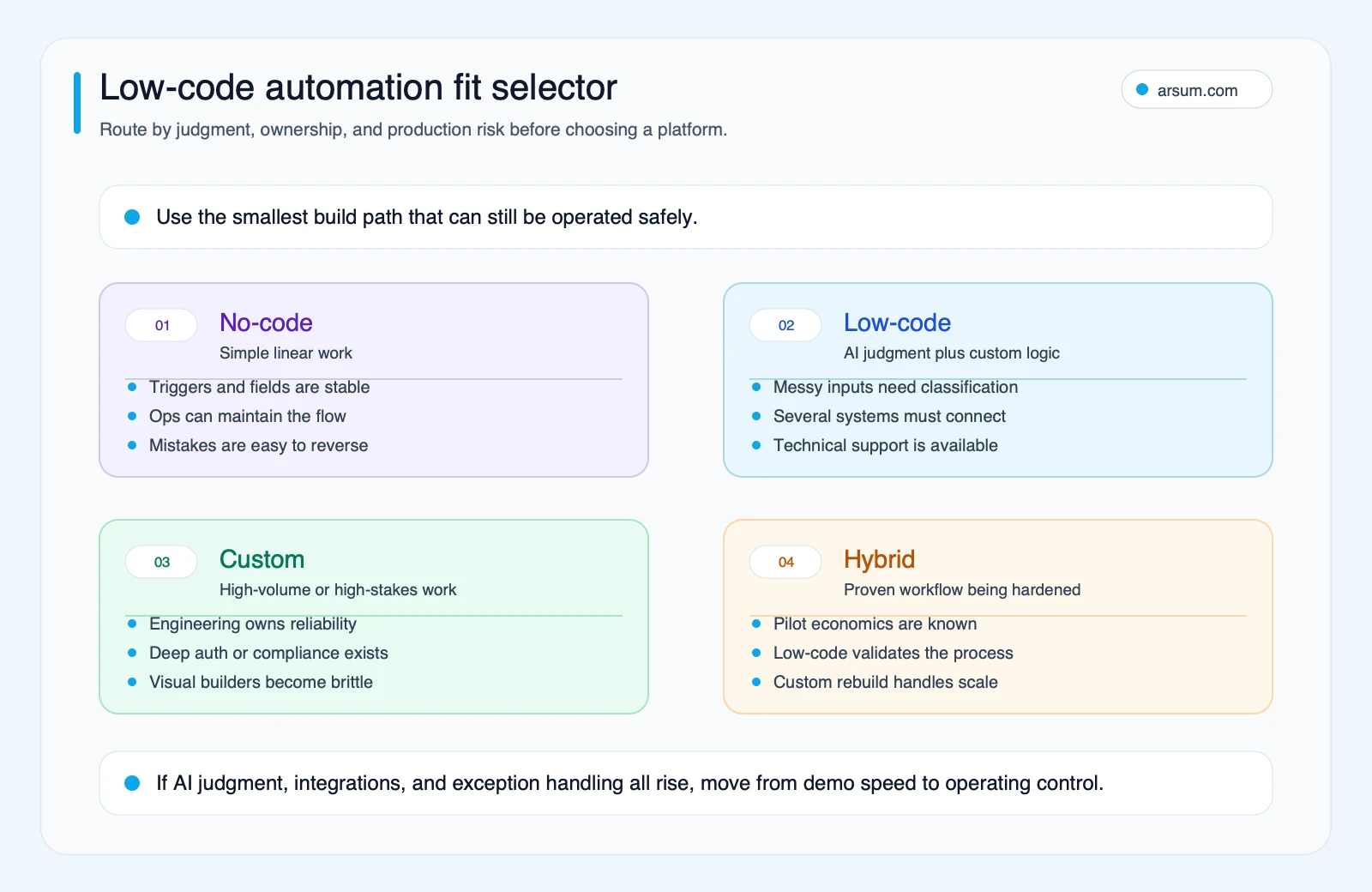
Use low-code when the process is understood, the side effects are bounded, and a named owner can operate a small system. Move toward custom infrastructure when risk, volume, or integration complexity outgrows that operating model.
No-code and low-code are a spectrum, not separate capability tiers. No-code tools can include branching and AI actions; low-code generally means the workflow needs more extensibility, API fluency, scripting, environment discipline, or technical ownership. AI judgment alone does not determine the category.
Start by characterizing the workflow, not the vendor
Use this matrix to decide what you are actually automating before comparing tools.
| Automation type | Suitable use | Required control | Common boundary |
|---|---|---|---|
| Deterministic trigger-action | Move clean records, notify a team, create a task | Basic retries and source-of-truth rules | Inputs become messy or rules multiply |
| Branching orchestration | Route requests, coordinate approvals, synchronize systems | Exception queue, audit trail, deduplication | The visual flow becomes hard to test or change safely |
| AI extraction/classification | Read documents, triage tickets, classify emails | Confidence policy, reviewer queue, input-class QA | Output creates a material side effect without review |
| Tool-using AI workflow | Gather bounded context and invoke approved tools | Tool allowlist, prompt/version history, human approval | Planning, memory, or recovery logic becomes a product concern |
| Custom backend service | High-volume, regulated, deeply integrated processes | Engineering operations, environments, testing, incident response | Usually justified only after the process and economics are proven |
n8n’s AI Agent documentation is a useful reality check: an agent uses connected tool sub-nodes. It is one component in a designed workflow, not a complete operating system for a business process.
Disqualifying conditions
Do not begin with low-code AI automation when any of these are true:
- The team cannot define the source of truth when systems disagree.
- A wrong action would create an irreversible financial, legal, safety, or customer consequence and no approval gate is possible.
- The input classes and exception types are unknown, so there is no meaningful way to measure quality.
- No business owner will accept the exception queue, and no technical owner can manage connectors, secrets, and failures.
- The intended workflow depends on unsupported assumptions about a vendor’s residency, identity, audit-export, recovery, or deployment controls.
- The process changes weekly because the underlying policy is still unsettled.
In those cases, do process discovery first, or design a custom service and governance model from the start. For higher-control builds, AI agent architecture patterns can help frame the boundaries that visual workflows often hide.
Score readiness before choosing Zapier, Make, n8n, or custom code
Score each dimension from 1 to 3. This is an editorial planning tool, not a vendor benchmark.
| Dimension | 1 | 2 | 3 |
|---|---|---|---|
| Business criticality | Internal convenience | Important operational queue | Revenue, compliance, or customer-impacting |
| Data sensitivity | Public or non-sensitive | Internal business data | Regulated, privileged, or highly sensitive |
| Execution volume | Occasional | Daily recurring | High-volume or bursty |
| Failure tolerance | Retry later with little impact | Needs timely human queue | Duplicate or delayed action causes material harm |
| Workflow complexity | Linear and few systems | Branching, multiple systems | Deep integration, complex state, many exception paths |
| Operating owner | Business user can own it | Shared business/technical ownership | Engineering and formal operations required |
Add the six scores:
- 6–9: Start with a simple no-code or managed low-code workflow, with reversible actions.
- 10–13: Low-code is plausible if the owner, review queue, logs, and rollback plan are designed before launch.
- 14–18: Use low-code only as a bounded prototype or integration layer; evaluate custom infrastructure, especially for core execution paths.
A score is not a permission slip. A high data-sensitivity or low-reversibility score should reduce autonomy even if the total remains moderate.
Select a platform by operating requirements
The right comparison is not “which platform is best?” It is “which documented deployment and billing model fits this workflow, and which controls must we verify in the applicable plan?”
| Evaluation criterion | What to ask | Why it matters |
|---|---|---|
| Billing unit | Is usage measured by executions, tasks, operations, AI credits, or another unit? | One workflow can consume very different billable units as it branches, retries, or calls AI tools. |
| Hosting and data boundary | Is cloud, self-hosting, or a specific deployment arrangement required? | The answer affects operational responsibility, data handling, updates, and support. |
| Identity and access | Can access follow the team’s identity, role, and credential-separation needs? | Shared credentials make troubleshooting and offboarding unsafe. |
| Audit and export | Can the team retrieve the run history and evidence it needs? | A business may need to investigate an outcome after the fact. |
| Environment separation | Can development, test, and production be separated in the way the workflow requires? | Uncontrolled changes are a common source of production incidents. |
| Queueing and rate limits | What happens during spikes, API limits, or delayed downstream systems? | “Successful once” is not the same as reliable under normal operating conditions. |
| Recovery | How are retries, failed runs, duplicate side effects, and manual replay handled? | Recovery design determines whether a failure is an inconvenience or an incident. |
| Technical owner capacity | Who handles secrets, connector changes, backups, alerts, and upgrades? | Self-hosting or complex workflows transfer real operating work to the buyer. |
What the primary sources support
- n8n’s deployment guidance distinguishes its cloud offering from self-hosting and warns that self-hosting requires technical knowledge. That supports choosing n8n when the organization can accept the corresponding ownership; it does not mean self-hosting is automatically cheaper or more compliant.
- n8n pricing describes Cloud pricing in terms of workflow executions. Estimate using representative runs, including failures and reruns, rather than comparing plan names alone.
- Zapier’s task-rate documentation explains that successful actions consume tasks and that AI/model/tool steps may use different task amounts. A workflow that fans out after classification needs a task model, not a vague monthly allowance.
- Make’s pricing page lists plan and product concepts including scenarios, AI features, code execution credits, roles, analytics, and audit-log features. Verify the exact plan, deployment, retention, and control capability needed for your use case before treating any item as an available production control.
The editorial fit recommendation is therefore:
- Choose a simpler managed platform when the workflow is low-risk, reversible, and maintained by operations.
- Choose a more technical low-code environment when API flexibility and workflow control matter and a technical operator is accountable.
- Choose custom infrastructure when the workflow needs durable domain logic, high-volume reliability, formal release management, or controls that cannot be verified in the low-code deployment you are considering.
For a side-by-side starting point, see n8n vs. Make vs. Zapier. Treat that comparison as a shortlist aid, then test each candidate against the controls above.
Calculate pilot economics before promising ROI
A workflow should earn its maintenance burden. Use a worked model with your own data before approving rollout.
Illustrative planning assumption
Assume an accounts-operations queue has:
- 1,200 items per month
- 12 baseline handling minutes per item
- a fully loaded labor cost of $42 per hour
- a low-code workflow that reduces average manual work to 5 minutes per completed item
- 2 reviewer minutes per item after automation
- $900 per month in platform, model, and monitoring costs
- a $3,600 one-time pilot build and control-design cost
- no assumed savings from headcount reduction; saved time is capacity released only
The baseline monthly handling cost is:
1,200 × 12 minutes ÷ 60 × $42 = $10,080
The post-automation labor and review cost is:
1,200 × (5 + 2) minutes ÷ 60 × $42 = $5,880
The illustrative monthly capacity value before remediation is:
$10,080 − $5,880 − $900 = $3,300
That is not a result or forecast. It is a planning assumption that still needs an error-and-remediation cost. If the workflow creates 24 material exceptions in a month and each takes 30 additional minutes to resolve, the added cost is:
24 × 30 minutes ÷ 60 × $42 = $504
The illustrative net monthly value becomes $2,796. At that rate, the one-time $3,600 pilot cost would be recovered after roughly 1.3 months—but only if the time reduction and exception assumptions hold in live use.
This model forces the questions generic ROI claims avoid:
- What is the baseline, by input class?
- How much reviewer time remains after automation?
- What does a correction or remediation event cost?
- Which platform and model costs scale with every run?
- Is saved time actually usable capacity, or simply shifted work?
- Does the workflow create new maintenance work for a technical owner?
For more examples of how to structure assumptions rather than invent outcomes, see AI automation ROI examples.
Run an approval-gated pilot with explicit acceptance criteria
Start with one queue, one input family, and one bounded external action. Keep the pilot large enough to expose variation but small enough to pause safely.
| Scorecard item | Baseline to record | Pilot target | Named owner | Review cadence |
|---|---|---|---|---|
| Handling time per completed item | Median and range by input class | Improvement target defined by the process owner | Operations lead | Weekly |
| Extraction or classification quality | Human-reviewed sample by input class | Threshold set separately for each class | Process owner | Weekly |
| Reviewer override rate | Percentage of outputs changed or rejected | Trend downward without hiding difficult cases | Quality reviewer | Weekly |
| Exception rate | Items routed to manual queue | Stable, explainable, and within queue capacity | Queue manager | Daily |
| Duplicate-side-effect rate | Duplicate records, notices, or updates | Zero tolerated for consequential side effects | Technical owner | Daily |
| Run cost | Platform, model, and support cost per completed item | Below approved planning ceiling | Sponsor or finance owner | Monthly |
| Recovery time | Time to pause, identify, and recover from a failed run | Maximum recovery time agreed in advance | Technical owner | After every incident |
Set a stop condition before the pilot starts. For example: pause the workflow if a material wrong action occurs, if duplicate side effects are detected, if the exception queue exceeds the owner’s capacity for two review periods, or if recovery exceeds the agreed maximum. The rollback path should disable the trigger, preserve the run record, route new work to the manual queue, and reconcile incomplete records against the system of record.
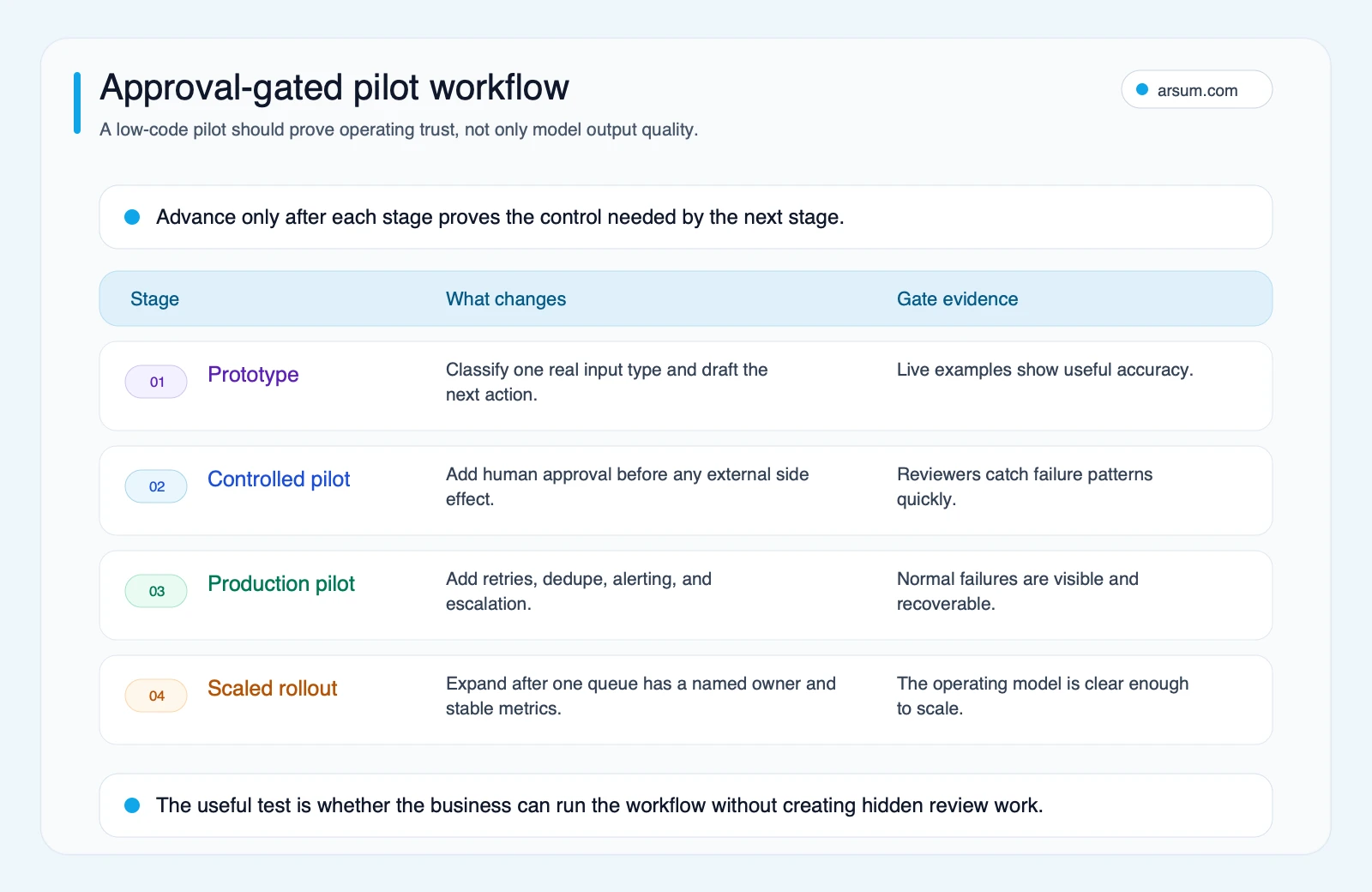
A pilot graduates only when its approval owner signs off on quality by input class, its technical owner signs off on recovery, and its sponsor accepts the economics with reviewer and remediation costs included.
💡 Arsum builds custom AI automation solutions tailored to your business needs.
Get a Free Consultation →Production controls: what changes after prototype
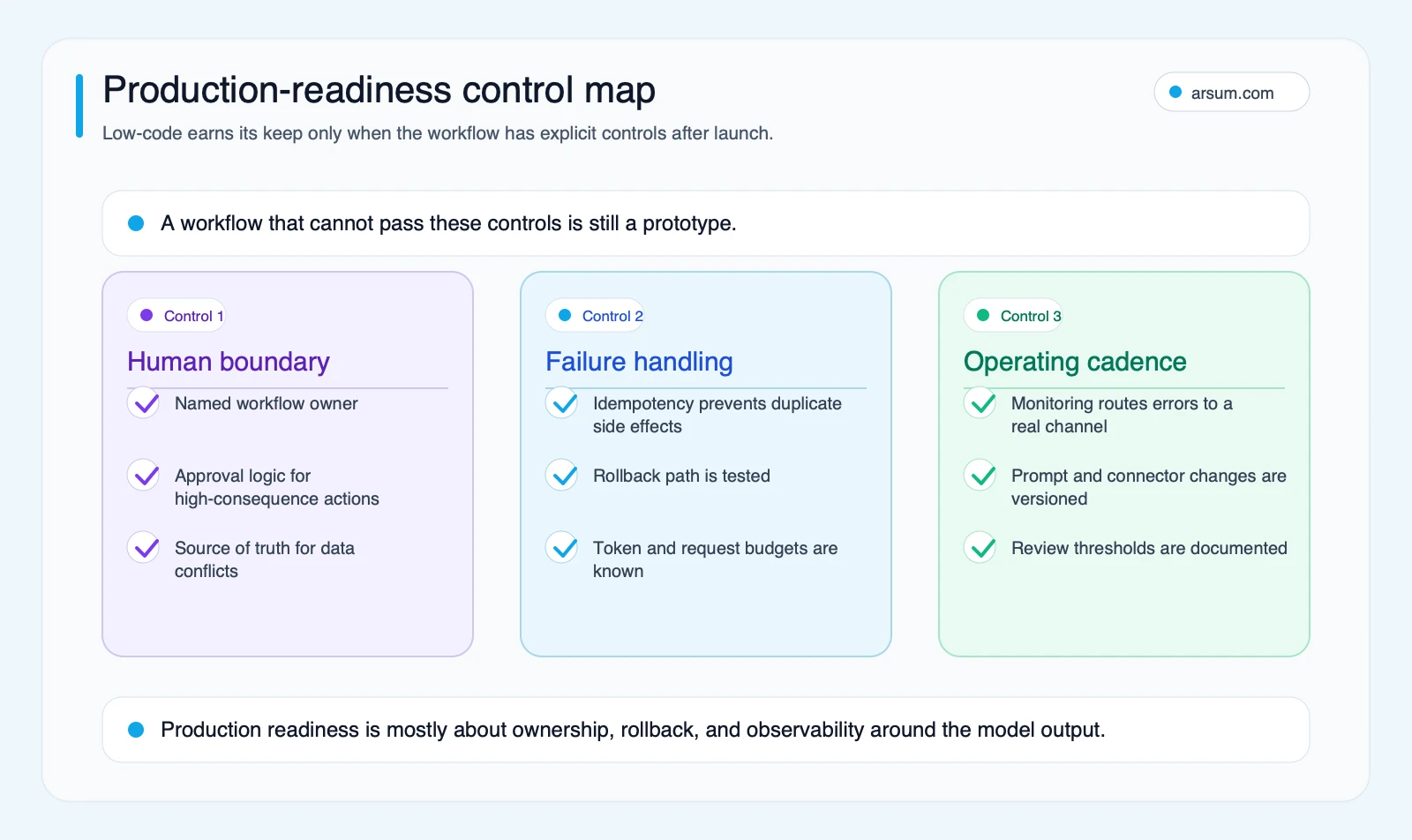
A prototype proves that a model can produce output. Production proves that the organization can detect, contain, and recover from normal failures.
Minimum handoff checklist
- Workflow owner: A named business owner accepts queue performance and policy decisions.
- Technical owner: A named person or team owns credentials, connectors, alerts, changes, and incident response.
- System of record: The team knows which system wins when data conflicts.
- Credential management: Secrets are stored and rotated under a documented ownership model.
- Run logging: Each run has enough context to investigate a disputed output.
- Prompt and version history: The team can identify what instruction, model setting, or routing rule produced a result.
- Exception queue: Low-confidence, missing-data, failed, and policy-sensitive items route to people.
- Idempotency: Retried events cannot create duplicate payments, messages, tickets, or record updates.
- Rate-limit handling: The workflow has a defined response to downstream API limits and delayed systems.
- Rollback: The team has tested how to pause the workflow and return work to the manual path.
- Operating cadence: Owners review failures, cost, and policy drift on a defined schedule.
Qualitative practitioner signals to investigate
Community discovery can reveal questions worth testing, but it is not market-wide evidence. Snippet-level discussions about ongoing n8n automation costs, agent expectations, and self-hosting tradeoffs surfaced failure patterns to investigate:
- Does a technical owner have capacity for updates, backups, secrets, and troubleshooting?
- Are tool permissions, memory, and fallback behavior designed rather than implied by an “agent” label?
- Can retries create duplicate side effects?
- Are cloud limits, licenses, support expectations, and operations costs included in the economics?
Use these as diligence prompts, not as claims about prevalence or platform performance.
When to graduate from low-code to custom infrastructure
Low-code is not a failed first attempt when it reaches a boundary. It can be a valuable way to prove the queue, exceptions, and economics before a custom build.
Graduate when one or more of these conditions persists:
- The visual workflow is harder to review, test, and safely change than a codebase would be.
- The business needs stronger environment separation, release controls, audit evidence, or data boundaries than the chosen deployment can verify.
- Execution volume or workflow cost makes the billing model materially important.
- The process needs durable state, complex reconciliation, specialized queueing, or domain-specific rules.
- Engineering is already the true operating owner, so the visual layer no longer reduces organizational cost.
- The workflow has become product functionality rather than an internal operations bridge.
A hybrid design is often sensible: retain low-code for non-critical notifications and orchestration, while moving high-risk decisions, state management, and core integrations into a custom service. AI integration services and custom AI solutions for business are useful next reads when that boundary appears.
Method and limitations
This guide is an editorial decision framework based on primary documentation for n8n, Zapier, and Make, reviewed on June 23, 2026, plus qualitative community-search signals labeled as such. Vendor features, pricing, deployment, audit, and governance capabilities can vary by plan, region, connector, and configuration; verify them directly during procurement.
The readiness scorecard and pilot worksheet are planning tools. They do not predict realized savings, adoption, error rates, compliance suitability, or implementation time. Their purpose is to make the buyer state the assumptions, owners, review cost, and stop conditions before expanding automation.
Frequently asked questions
Is low-code AI automation suitable for a small business?
It can be, if the workflow is repeatable, mistakes are reversible, and someone can own the automation after launch. Start with one approval-gated queue rather than connecting every business system at once.
Does an AI agent remove the need for workflow design?
No. A tool-using AI component still needs explicit permissions, tools, source data, evaluation, exception handling, and approval boundaries. The question is not whether it can act, but which actions it is authorized to take.
How long should a pilot run?
Run it until the team has observed enough representative input classes, exceptions, and recovery events to make a governed decision. Define the sample, cadence, acceptance criteria, and stop condition before launch rather than relying on a generic timeline.
Should we self-host a low-code platform?
Only if the organization can accept the associated technical responsibilities. n8n explicitly distinguishes cloud and self-hosted options and notes the technical knowledge required for self-hosting; hosting is an operating-model decision, not merely a cost comparison. Review n8n’s guidance alongside your security, support, and recovery requirements.
Ready to Automate Your Business?
Stop wasting time on repetitive tasks. Let AI handle the busywork while you focus on growth.
Schedule a Free Strategy Call →Written by:Arsum editorial team
- Reviewed by
- Arsum editorial team
- Published
- April 10, 2026
- Updated
- July 6, 2026
- How this was produced
- Arsum uses research packs, source checks, and human editorial review to prepare and update blog articles. Editors are responsible for the final page.
- Source policy
- Sources are linked in the article when used. Methodology and source notes are included on higher-risk or high-visibility pages and are being rolled out across the archive. Editorial policy.
- Why this page exists
- Help B2B operators evaluate AI automation, implementation scope, cost, risk, and build-vs-buy decisions with practical context.