For n8n vs Make vs Zapier, choose the platform based on the workflow’s billing unit, exception burden, systems of record, and post-launch owner—not the prettiest builder or lowest advertised entry price. Zapier is often a sensible starting point for simple SaaS handoffs owned by non-technical teams; Make suits operator-owned workflows with visible branching and data transformation; n8n fits teams that can accept technical ownership for custom logic, API control, or self-hosted deployment.
n8n vs Make vs Zapier: Comparison
n8n vs Make vs Zapier compared for business automation. See ROI thresholds, pricing models, integrations, AI workflow depth, and which platform fits your team.

Table of Contents
- What most guides miss: capability is not authorization
- The practical comparison
- Translate billing units before comparing price
- Score platform fit with a transparent rubric
- Build the pilot around acceptance, not a demo
- Failure gates and disqualifying conditions
- When to stay, migrate, or use a different architecture
- A concise recommendation
- Methodology and freshness
- Frequently asked questions
What most guides miss: capability is not authorization
All three platforms can connect applications and run multi-step workflows. That does not mean all three should be allowed to act independently in the same process.
The decision changes when the workflow:
- writes to a CRM, ERP, accounting platform, or other system of record;
- sends customer-facing communications;
- routes revenue opportunities or service cases;
- uses customer, financial, health, or other sensitive data;
- includes AI classification or extraction that can be wrong;
- requires a person to explain why an action happened.
A useful platform choice separates four layers:
- Deterministic handoff: Copy a submitted form into a CRM and notify an owner.
- Deterministic transformation: Normalize fields, deduplicate records, enrich data, and route by rules.
- AI-assisted judgment: Extract fields from a document or suggest a category, with a reviewer approving consequential results.
- Authorized action: Update a system of record, trigger a payment-related process, change a customer status, or send an external message.
The first two layers can often be automated with straightforward controls. The latter two need explicit approval gates, retained evidence, defined exception handling, and a rollback path. Treating an AI node or “agent” feature as permission for autonomous action is where automation projects become operational risk.
For a broader view of where automation belongs in a process—not just inside a tool—see AI business process automation and agentic AI workflow automation.
The practical comparison
| Buying lens | Zapier | Make | n8n |
|---|---|---|---|
| Best initial fit | Simple SaaS handoffs with a non-technical owner | Multi-step operational workflows that benefit from a visible flow diagram | API-heavy, custom, or engineering-supported workflows |
| Builder experience | Guided trigger-and-action setup | Visual scenarios with routers, iterators, and transformations | Visual workflows with more technical configuration and code options |
| Billing lens | Successful tasks; some AI, model, and tool steps can use different task rates | Credits and usage tied to scenarios, AI features, and code execution | Cloud plans use workflow executions; self-hosting shifts cost and operational responsibility to your team |
| Branching and data shaping | Suitable for simpler paths | Strong fit for visible branching, loops, and record handling | Strong fit where branching also needs custom API or code logic |
| Self-hosting | No | No | Available, but requires technical knowledge and infrastructure ownership |
| Best post-launch owner | Business or revenue operations owner | Operations lead or implementation owner | Technical operator, platform team, or engineering-backed partner |
| Consequential workflow readiness | Depends on the surrounding controls | Depends on the surrounding controls | Depends on the surrounding controls; deployment control alone is not governance |
This is an editorial comparison, not a vendor ranking or a claim that one platform is universally cheaper. Vendor documentation describes different billing units and product boundaries: Zapier’s task usage rates, Make pricing, and n8n pricing should be checked against the workflow you intend to run.
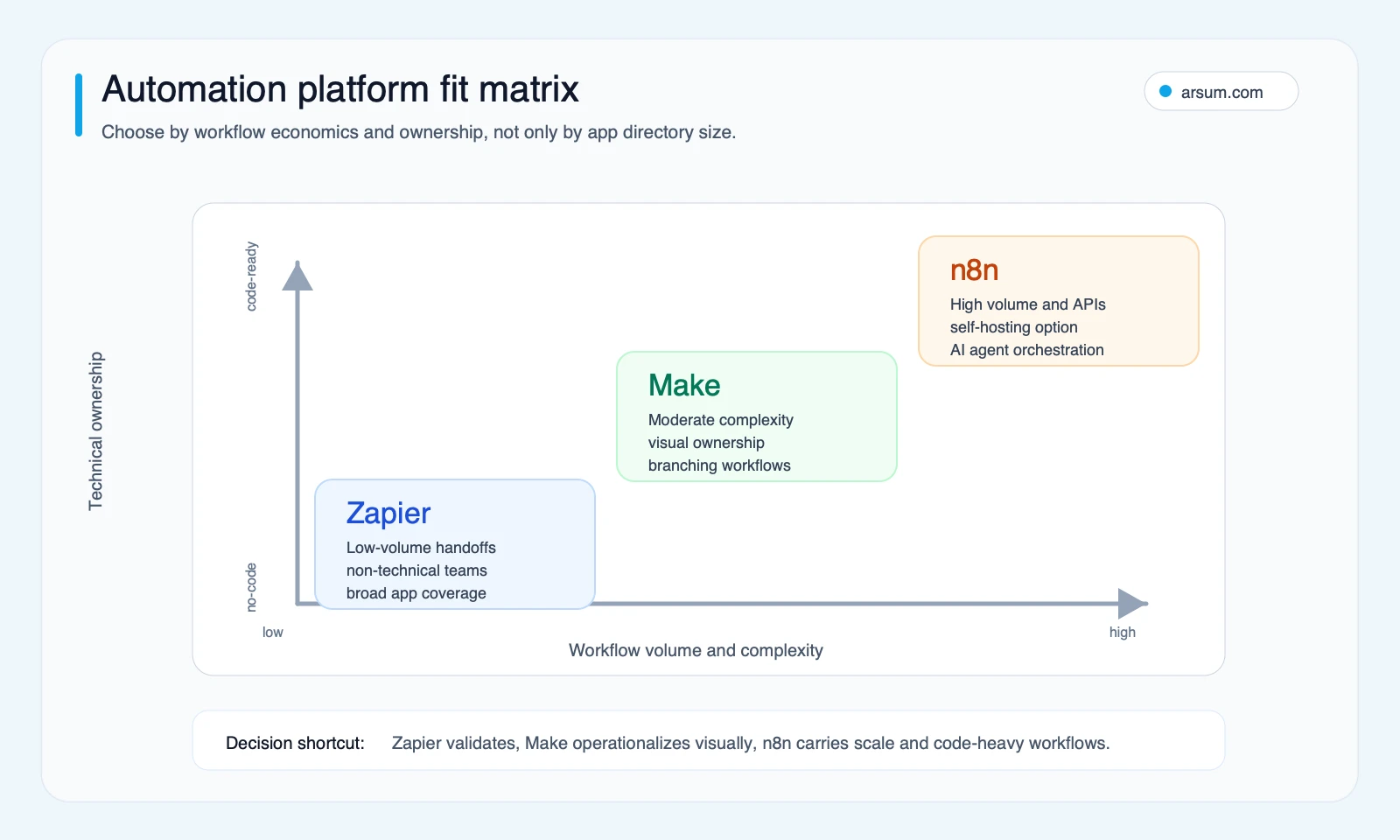
Start with the owner, then the platform
A non-technical sales operations manager can often own a low-risk lead alert, especially if the trigger, action, and recovery step are clear. That same person should not be expected to own a self-hosted workflow that manages secrets, retries API failures, processes customer documents, and writes back to a financial system.
Use this initial rule:
- Start with Zapier when the workflow is a reversible SaaS handoff, the needed app connection is available, and a business owner needs to modify it safely.
- Evaluate Make when the workflow needs visible routers, loops, aggregation, or structured transformations that an operations owner must inspect.
- Evaluate n8n when a technical owner is available and the workflow needs custom API calls, code, a controlled deployment model, or more tailored orchestration.
- Escalate beyond a no-code platform decision when the workflow is business-critical, highly regulated, externally consequential, or dependent on a system-of-record write. In that case, platform selection is only one part of the architecture and control design.
Translate billing units before comparing price
A monthly plan name is not a comparable cost model. Zapier, Make, and n8n do not meter work in the same way.
| Platform | Unit to model | What to count in your workflow |
|---|---|---|
| Zapier | Successful tasks, with separate rates for certain AI/model/tool actions | Every successful action that consumes a task, plus any special-rate AI steps |
| Make | Credits and related usage dimensions | Modules executed, record loops, routers, code execution, and AI-related usage where applicable |
| n8n Cloud | Workflow executions | What counts as one execution in the chosen plan and how many runs are expected |
| n8n self-hosted | Infrastructure and operating ownership | Hosting, upgrades, backups, monitoring, access control, incident response, and the technical time to maintain them |
Zapier explains task and special-step usage on its rates page. Make’s pricing page describes credits, scenarios, AI functionality, code execution, roles, and plan-level features. n8n’s pricing documentation describes Cloud usage in workflow executions; its deployment guidance and hosting documentation make clear that self-hosting requires technical knowledge.
Worked billing-unit example: lead-routing pilot
Use one real workflow rather than a generic “10,000 tasks” comparison.
Illustrative planning assumption, not an observed vendor quote: A B2B company receives 2,000 inbound leads per month. Each lead must be validated, enriched, routed to an owner, logged to the CRM, and reviewed if required fields are missing.
| Workflow step | Normal path | Exception path |
|---|---|---|
| Receive form submission | 1 incoming event | Same |
| Validate required fields | 1 rule check | Mark incomplete |
| Enrich company or contact data | 1 external lookup | Lookup fails or returns low-confidence data |
| Route owner | 1 rules-based action | Place in review queue |
| Write CRM record | 1 system-of-record action | Do not write until reviewer resolves duplicate or missing fields |
| Notify owner | 1 internal notification | Notify reviewer instead |
| Retain run evidence | Run ID, input reference, decision, output reference | Same, plus resolution record |
The planning inputs are:
- 2,000 monthly incoming leads;
- five normal-path processing actions after the trigger;
- 8% assumed exception rate;
- exceptions require review before a CRM write;
- no AI step is authorized to choose a final owner without deterministic routing rules or human approval.
For Zapier, count the successful actions that its current rules identify as tasks, then separately apply any AI or tool-call task rate described on its official rate page. For Make, map each executed module, record loop, router, and any code or AI usage to the current pricing rules. For n8n Cloud, model executions rather than steps; for self-hosted n8n, model operational ownership alongside infrastructure.
The important result is not a pretend universal price. It is a procurement artifact: a documented run model that finance, operations, and the technical owner can recheck when volume, workflow steps, or vendor billing changes.
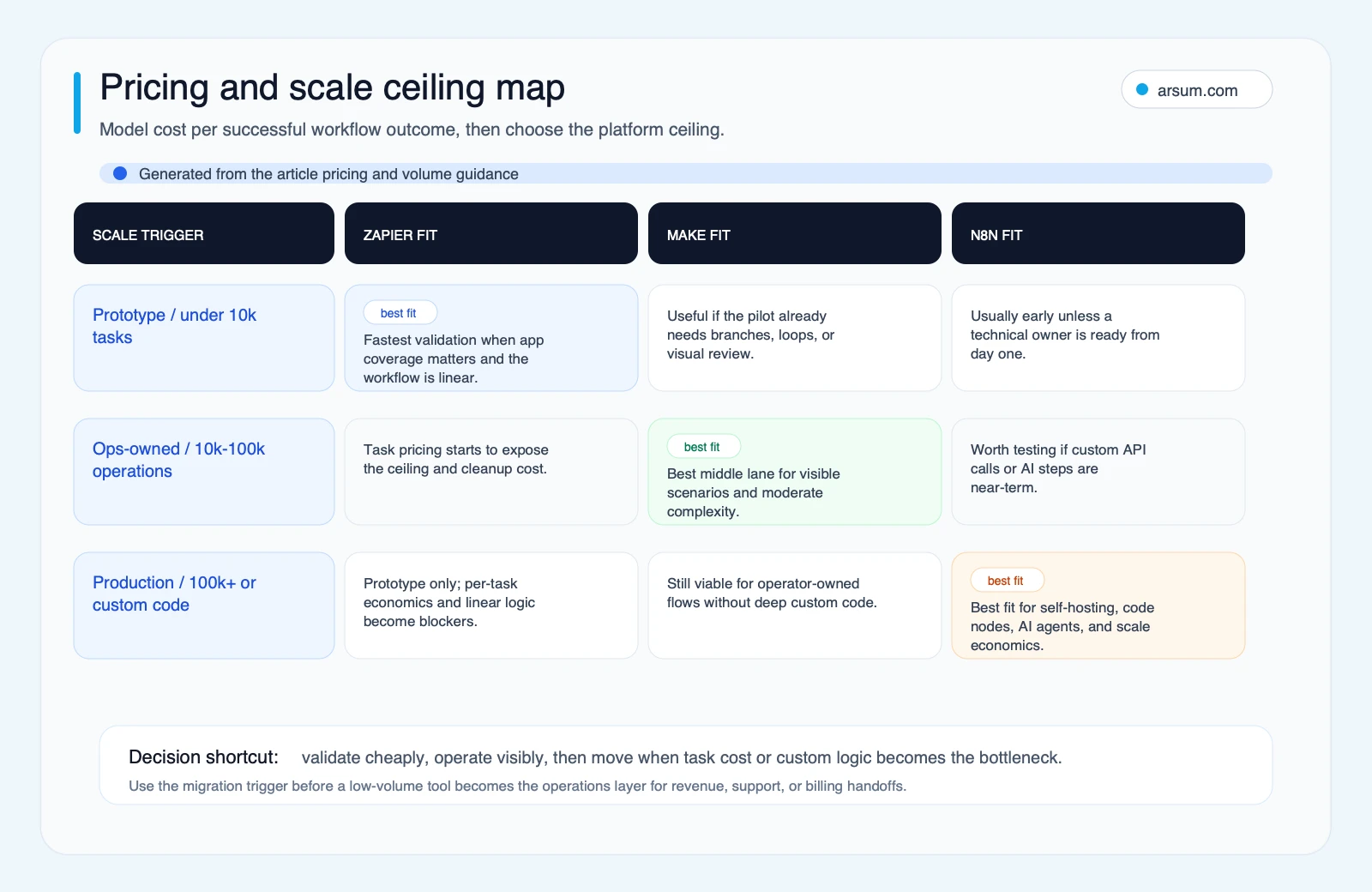
What self-hosting actually changes
Self-hosting n8n can change control and billing economics, but it does not remove cost or responsibility. It moves part of the work from a vendor subscription into your operating model.
Before treating self-hosting as an option, name the person or team responsible for:
- infrastructure configuration and patching;
- credential storage and access reviews;
- backups and restoration testing;
- monitoring, alerting, and run-log retention;
- version changes and regression testing;
- incident ownership when a workflow stalls, duplicates records, or leaks data.
If those responsibilities have no owner, n8n may still be technically capable but operationally unsuitable. A Cloud plan, Make, Zapier, or a narrower first workflow can be the better decision.
Score platform fit with a transparent rubric
Use a weighted scorecard rather than volume thresholds alone. Score each category from 1 to 5, where 1 means the platform is a poor fit for the current operating reality and 5 means it is a strong fit. Weight the categories according to the workflow’s importance.
| Criterion | What a low score means | What a high score means |
|---|---|---|
| Builder skill | No one can safely diagnose or edit the workflow | A named owner can maintain the workflow and documentation |
| Workflow complexity | Single, reversible handoff | Branching, loops, transformations, API dependencies, and nontrivial exception paths |
| Credential governance | Shared personal credentials or unclear permissions | Managed service accounts, least-privilege access, rotation, and access review |
| Observability | Failures are noticed only after a complaint | Logs, alerts, run IDs, retry status, and a review queue are visible |
| Exception volume | High or poorly understood exception rate | Exceptions are measured, routed, and owned |
| Consequence of failure | Easy manual correction with little external effect | Revenue, customer, compliance, financial, or operational consequences |
| Maintenance capacity | No technical or operational support | Named owner, change process, and budget for maintenance |
| Integration depth | Standard SaaS actions only | Custom APIs, internal services, system-of-record writes, or complex data contracts |
The scorecard should not turn “high technical complexity” into automatic permission for high autonomy. It should do the opposite: as the consequence of failure rises, require stronger human approval, evidence retention, and engineering review.
A useful shorthand:
- Zapier tends to score well when builder skill is low and workflow consequence is low.
- Make tends to score well when visible logic, operational ownership, and moderate complexity matter.
- n8n tends to score well when technical capacity, custom integration depth, and long-term control are genuine requirements.
- Enterprise support or engineering review is required when access, auditability, system-of-record actions, or recovery procedures cannot be clearly owned by the platform’s everyday builder.
💡 Arsum builds custom AI automation solutions tailored to your business needs.
Get a Free Consultation →An Arsum workflow assessment can turn one candidate process into a billing-unit model, control map, pilot scorecard, and ownership plan before a team commits to a platform.
Build the pilot around acceptance, not a demo
A successful automation pilot should prove a controlled business outcome. It should not merely show that a workflow can run once with clean test data.
Here is a pilot scorecard for the lead-routing example.
| Element | Pilot definition |
|---|---|
| Workflow | Validate, enrich, route, and create CRM records for inbound leads |
| Baseline | Measure current median time to assign a complete lead, manual touchpoints, duplicate rate, and incomplete-record rate before automation |
| Target | Define a target reduction in manual routing work or assignment delay using the measured baseline; do not set a savings claim without baseline data |
| Quality metric | Percentage of records routed correctly and percentage requiring manual correction |
| Exception metric | Exception rate by reason: missing fields, duplicate match, failed enrichment, routing-rule conflict, or system write failure |
| Accountable owner | Named sales operations or revenue operations owner |
| Technical owner | Named administrator, engineering owner, or implementation partner |
| Review cadence | Daily review during launch; weekly review after stable operation |
| Approval gate | Human approval for exceptions and any consequential CRM merge, reassignment, or customer-facing follow-up |
| Evidence retained | Run ID, timestamps, source record reference, applied rule, reviewer decision, error state, and final record reference |
| Stop condition | Pause new automated writes if error rate, duplicate rate, or unresolved exception queue exceeds the agreed threshold |
| Rollback | Disable the workflow, preserve logs, return intake to the documented manual queue, and reconcile records created since the last known-good run |
This is also where AI should be introduced carefully. A deterministic validation rule is different from AI extraction. AI extraction is different from a tool-calling workflow. A tool-calling workflow is different from an autonomous system authorized to act.
n8n documents its AI Agent node as a workflow component that requires connected tool sub-nodes. That is a useful capability boundary: it does not eliminate the need to define inputs, tool permissions, review conditions, and fallback behavior.
For a practical framework on when agent-like workflows are appropriate, see AI agent architecture patterns and AI agent security.
Failure gates and disqualifying conditions
Do not launch because the happy path works. Launch only after the workflow passes these gates.
- Target gate: The workflow has a measurable baseline and an owner who can decide whether the pilot worked.
- Data gate: Realistic messy inputs have been tested, including missing fields, duplicates, malformed records, and delayed upstream responses.
- Credential gate: Connections use managed access where feasible; permissions are documented and not dependent on one employee’s personal account.
- Exception gate: Every failure state creates a queue, notification, or assigned case. No exception should disappear into an unread run history.
- Write gate: System-of-record changes have idempotency, approval rules where needed, and a reconciliation procedure.
- Change gate: Workflow edits are documented, tested before release, and attributable to an approved owner.
- AI gate: AI output is constrained to an appropriate role: extraction, suggestion, classification, or limited tool use. High-cost mistakes reduce autonomy.
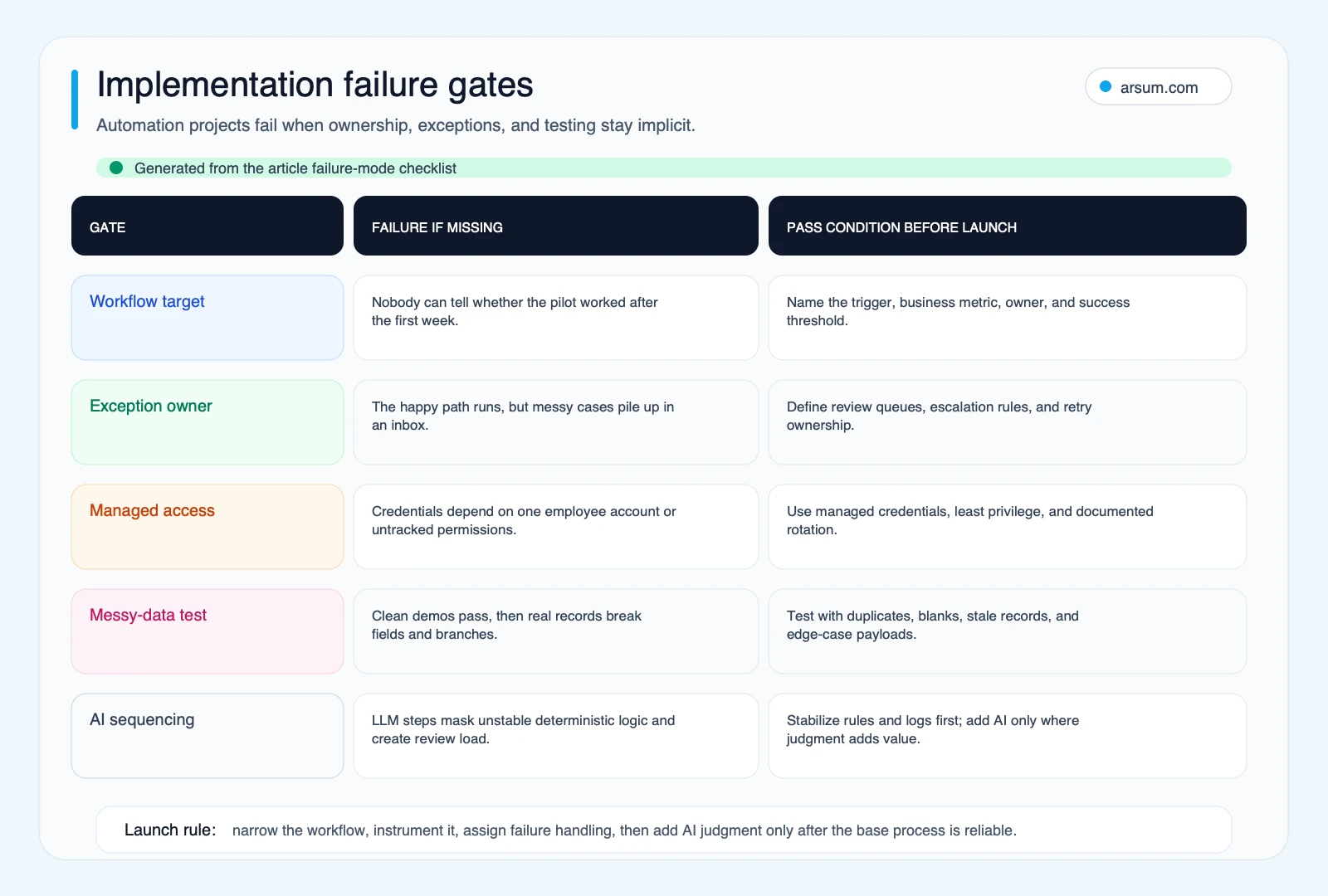
Disqualify a workflow from an initial low-code pilot when any of these are true:
- there is no accountable business owner;
- the process has no stable source of truth;
- exceptions are common but undocumented;
- a wrong action cannot be reversed or reconciled;
- critical permissions must be shared informally;
- the team cannot retain enough evidence to investigate an error;
- the expected benefit depends on an AI system making unreviewed consequential decisions.
In those cases, document the process first, narrow the scope, or use an engineering-backed implementation. A platform cannot compensate for an undefined operating model.
When to stay, migrate, or use a different architecture
Migration should be triggered by evidence, not platform fashion.
Consider reassessing your platform when:
- the billing-unit model no longer matches actual volume;
- error cleanup consumes more owner time than the automation saves;
- custom API logic is becoming a patchwork of workarounds;
- credential access needs formal governance;
- the business now depends on the workflow for a customer, revenue, finance, or compliance outcome;
- AI steps need evaluation, confidence thresholds, review queues, or deterministic fallbacks;
- nobody can explain how to pause, recover, and reconcile the workflow after a failure.
A team may reasonably keep a small Zapier workflow if it is stable, low-risk, and cheap relative to the disruption of moving it. A team may choose Make because visual review is more valuable than maximum flexibility. A team may choose n8n because custom integration control and technical ownership are strategic. None of those choices are permanent commitments.
The more important question is whether the platform still matches the workflow’s current criticality. For a related framework on platform choices, see AI automation platform guide and AI workflow automation tools.
A concise recommendation
Choose Zapier for a narrow, reversible SaaS handoff with a non-technical owner and an acceptable task model.
Choose Make for an operations workflow that needs inspectable branching, record handling, and a capable operator who can own scenarios and exceptions.
Choose n8n when custom APIs, code, controlled deployment, or technical orchestration are real requirements—and when someone can own the infrastructure, security, monitoring, changes, and recovery work that come with it.
Choose an engineering-backed approach or enterprise support when workflow failure has material customer, financial, security, regulatory, or operational consequences.
Before deciding, bring one workflow, monthly volume, systems of record, known exception rate, and accountable owner to the evaluation. That gives you enough information to compare billing units, control requirements, and long-term ownership honestly.
Methodology and freshness
This guide uses official vendor documentation for billing and product-boundary claims: Zapier, Make, and n8n, plus n8n’s official documentation on self-hosting and its AI Agent node. Community discussion can reveal recurring buyer questions about app coverage, visual logic, volume, and self-hosting responsibility, but it is qualitative signal rather than market-wide evidence.
Pricing, plan limits, feature availability, and billing definitions can change. Recheck the official pages before approving a purchase or presenting a cost model.
Frequently asked questions
Is n8n free?
n8n offers self-hosting, but “free” applies to the software license rather than the complete operating model. Your team still needs to own hosting, security, backups, upgrades, monitoring, and incident response. n8n Cloud pricing is based on workflow executions; confirm current limits and pricing on n8n’s pricing page.
Is Make better than Zapier?
Neither is categorically better. Make is often worth evaluating when a workflow needs visible branching, loops, and transformation logic. Zapier can be the better choice when a non-technical owner needs a simpler SaaS handoff or a required app connection is available there. Compare one defined workflow using each vendor’s billing rules.
Can we use AI agents in these platforms?
You can add AI-assisted steps and, in some products, tool-calling or agent-oriented workflow components. That does not make the resulting workflow safe to act without review. Start by defining whether AI extracts information, suggests a classification, calls bounded tools, or performs an authorized action; then assign confidence thresholds, human approval, audit evidence, and rollback rules accordingly.
Should we build internally or use an implementation partner?
Build internally when the workflow is reversible, low-risk, well understood, and has an owner who can maintain it. Use implementation support when the work touches multiple APIs, sensitive data, systems of record, AI output, complex exceptions, or shared credential governance. The implementation requirement is not simply “more integrations”; it is a clearer control and ownership design.
Ready to Automate Your Business?
Stop wasting time on repetitive tasks. Let AI handle the busywork while you focus on growth.
Schedule a Free Strategy Call →Written by:Arsum editorial team
- Reviewed by
- Arsum editorial team
- Published
- April 3, 2026
- Updated
- July 17, 2026
- How this was produced
- Arsum uses research packs, source checks, and human editorial review to prepare and update blog articles. Editors are responsible for the final page.
- Source policy
- Sources are linked in the article when used. Methodology and source notes are included on higher-risk or high-visibility pages and are being rolled out across the archive. Editorial policy.
- Why this page exists
- Help B2B operators evaluate AI automation, implementation scope, cost, risk, and build-vs-buy decisions with practical context.