Use a no-code AI agent builder when its interface, connectors and controls fit your workflow. Compare custom development when you need behavior, source permissions or a product interface the platform cannot support cleanly. Evaluate the complete operating cost and ownership of either route before buying.
No-Code AI Agent Builders: When to Buy or Build
Evaluate no-code agent builders against custom development: permissions, platform limits, operating costs, exportability and a practical pilot worksheet.

Table of Contents
- Decide which kind of builder fits the workflow
- Score the workflow before comparing vendors
- Choose no-code, low-code, or code-first ownership
- Run a pilot with pass/fail controls
- Security, approvals, and operational launch gates
- Procurement questions to resolve
- What to do next
- Check platform ownership before committing
The buying decision is not “which agent builder looks fastest in a demo?” It is whether a visual platform can run one real process at an acceptable cost and control level. For a support queue, intake workflow, CRM handoff, or document-routing task, no-code can be a sensible pilot route. For money movement, account changes, regulatory decisions, or complex proprietary logic, technical capability does not authorize autonomous action.
Decide which kind of builder fits the workflow
Search results often group together several different products under “AI agent builder.” That makes comparison lists look comprehensive while obscuring the actual operating choice.
| Category | What it does | Good fit | Boundary to watch |
|---|---|---|---|
| No-code agent builder | Configures prompts, knowledge, actions, and handoffs visually | A bounded process with existing SaaS systems and human approval | The workflow may become difficult to test or export as logic grows |
| Visual workflow automation | Connects triggers, rules, APIs, and data transforms; may add AI at selected steps | Cross-app routing, enrichment, notifications, and structured intake | A model should not decide a high-impact action simply because it is in the flow |
| No-code app builder with AI features | Creates an interface or internal app with AI-assisted interactions | Teams that need a front end around a narrow process | An app interface does not solve process ownership or integration controls |
| Code-first agent SDK | Gives engineers tools, handoffs, tracing, and custom orchestration | Product-grade workflows, strict permissions, state, tests, and portability | Requires engineering ownership rather than a business-only operating model |
A practical example: an agent that classifies incoming requests and drafts a reply for review is a bounded workflow. An “operations assistant” with access to email, CRM, contracts, finance systems, and the authority to change records is not. The second case needs explicit authorization design before it needs a builder.
Zapier’s agent documentation describes connected knowledge sources and actions within its app ecosystem. That can make it a practical option for teams already operating there. It does not remove the need to define which source is authoritative, who approves an action, or what happens when a connected system fails.
Score the workflow before comparing vendors
A builder should follow a workflow decision, not substitute for one. Use this scorecard with the process owner before booking demos.
| Gate | Questions to answer | Pass condition |
|---|---|---|
| Workflow boundary | What starts the process, what inputs are used, what output is produced, and where does it end? | One repeatable job can be described without “and then it handles anything else.” |
| Business case | What is the monthly volume, handling time, delay, error, or missed-revenue baseline? | A baseline exists and the metric is attributable to this workflow. |
| Recovery | What happens after an invalid output, API failure, duplicate event, or missing data field? | There is a retry limit, exception queue, owner, and manual recovery path. |
| Data access | Which systems and fields are needed? Are read, write, and approval permissions separated? | Least-privilege access is feasible and sensitive fields are intentionally handled. |
| Operating ownership | Who maintains prompts, connector credentials, exceptions, and changes after launch? | One named operational owner and one technical escalation owner accept the work. |
| Exit path | Can the team inspect logic, export critical records, and rebuild the process elsewhere if necessary? | The workflow, data lineage, and dependencies are documented. |
Score each gate as 0 for unknown, 1 for partly defined, or 2 for proven. A score below 8 out of 12 means the next action is process mapping, not vendor selection. A score of 10 or more is a reasonable basis for a controlled pilot.
The central decision rule is simple: high failure cost and low reversibility should reduce autonomy. A model may be technically able to update a customer record, approve a payment exception, or send a customer message. Those are separate from whether it has permission to do so.
Disqualifying conditions
Pause a no-code agent project if any of these are true:
- No one can provide a baseline volume, error, cycle-time, or service-level measure.
- The process depends on undocumented judgment that cannot be reviewed from a retained record.
- The platform would need broad credentials because granular permissions are unavailable.
- A wrong action cannot be reversed without material financial, legal, customer, or safety consequences.
- No owner will review exceptions, logs, and changes after launch.
- The vendor cannot provide enough evidence for your required data, retention, security, or procurement review.
These conditions do not automatically mean “build custom.” They may mean the workflow needs redesign, a lower-autonomy first phase, or no automation at all.
Choose no-code, low-code, or code-first ownership
Use the operating constraint to choose the route.
| If the workflow needs… | Start with | Why |
|---|---|---|
| Existing SaaS connectors, predictable routing, small data transformations, and human approval for sensitive outcomes | No-code | It can validate the workflow without a full engineering project. |
| Webhooks, custom branching, data transforms, or an internal technical owner | Low-code automation | It keeps visual workflow speed while allowing harder integration logic. |
| Custom state, fine-grained authorization, deterministic tests, deep tracing, portable orchestration, or product-level reliability | Code-first | The system needs engineering-owned controls rather than a template-led configuration. |
| Broad access, unclear policies, no exception owner, or irreversible actions | Pause | The control model is incomplete. |
A code-first comparison is not a claim that code is inherently better. The OpenAI Agents SDK guide is useful here because it makes the ownership tradeoff visible: code-first implementations can support tools, handoffs, streaming, and tracing, but your team must design and operate them. Read AI agent architecture patterns if the workflow has multiple systems, queues, or approval states.
Platform evaluation worksheet
Do not rely on a vendor’s category label, template count, or a roundup’s ranking. Ask each shortlisted provider the same questions and record the answer with a link to current documentation and the relevant plan or deployment scope.
| Evaluation area | Procurement question |
|---|---|
| Data handling | Which inputs are stored, where, for how long, and under what model-provider terms? Can training use be controlled? |
| Access control | Can read, write, and approval permissions be separated by connector, environment, and user role? |
| Authentication | How are OAuth tokens, service accounts, secrets, token rotation, and revoked access handled? |
| Auditability | Can you identify source data, workflow version, action history, retries, human approvals, and configuration changes? |
| Human approval | Can an action be held for review, reassigned, rejected, and resumed with a retained rationale? |
| Testing and tracing | Can the team test hard branches, inspect tool calls, reproduce a failure, and distinguish model error from connector error? |
| Resilience | What happens after a timeout, duplicate trigger, rate limit, malformed input, or downstream outage? |
| Portability | Can you export records and logic? What must be rebuilt if you leave? |
| Operating ownership | Who can safely change prompts, connections, thresholds, and policies? What support or escalation path exists? |
| Full run cost | What are the platform, usage, model, connector, retrieval, storage, review, remediation, and maintenance costs? |
Treat the platform worksheet as a way to structure a shortlist, not an independent hands-on benchmark or a certification statement about any named platform. Use the AI agent platform comparison to narrow the category before procurement, then verify pricing, plan limits, hosting, regional availability, model terms, logging, and security posture directly with the vendor. If an agency will configure or replace the platform for you, use the AI automation agency pricing worksheet to compare implementation, usage, support and ownership on the same terms. For example, Zapier distinguishes agent knowledge sources from search actions, which is a useful prompt to verify the retrieval pattern your workflow actually requires. Likewise, Lindy’s security overview illustrates the type of vendor documentation buyers should request and review; it does not replace your own scope-specific diligence.
Run a pilot with pass/fail controls
A pilot should demonstrate that the workflow can be operated, not merely that a model can produce plausible text. Start with one queue and keep the first release within an authorized boundary.
Illustrative planning model: support-request routing
This is a planning assumption, not an observed result or a promise of savings.
Assume a team receives 400 eligible requests per month. The current baseline is 12 minutes of handling per request. The proposed pilot routes 50% of requests through an agent, with humans reviewing 20% of those routed requests for an average of 4 minutes. Assume a loaded labor cost of $45 per hour, 24 internal setup hours at $60 per hour, $250 per month in platform and model usage, and 3% of routed requests requiring 15 minutes of remediation.
| Input | Illustrative assumption |
|---|---|
| Eligible monthly requests | 400 |
| Current handling time | 12 minutes each |
| Agent-routed share | 50% |
| Review rate on routed requests | 20% |
| Review time | 4 minutes |
| Remediation rate | 3% |
| Remediation time | 15 minutes |
| Loaded labor cost | $45/hour |
| Setup labor | 24 hours at $60/hour |
| Monthly platform and model usage | $250 |
Under those assumptions, compare the avoided manual minutes with review and remediation minutes, then subtract recurring run cost and one-time setup cost. Do not use the model to approve a purchase until the team substitutes its own measured volumes, loaded labor rate, review burden, and usage terms.
A useful sensitivity range changes the routed share from 30% to 70%, the review rate from 10% to 40%, and the remediation rate from 1% to 8%. If the business case works only at the optimistic edge, the project is not ready to scale.
Pilot scorecard
| Measure | Baseline | Pilot target | Owner | Review cadence | Stop condition | Rollback |
|---|---|---|---|---|---|---|
| Eligible queue volume | Measured before launch | Stable denominator each week | Operations lead | Weekly | Volume definition changes without documentation | Revert to manual routing |
| Cycle time | Current median and tail time | Improvement target set by owner | Queue manager | Weekly | Cycle time worsens for two reviews | Disable agent trigger |
| Quality | Existing error or rework rate | No deterioration beyond agreed tolerance | Quality owner | Weekly sample review | Unexplained quality breach | Route all work to review queue |
| Exceptions | Current exception categories | Categorized, assigned, and measurable | Process owner | Twice weekly during pilot | Exception backlog exceeds capacity | Pause new automated actions |
| Access and audit trail | Approved source systems and roles | Every action traceable to source and workflow version | Security or IT owner | Before launch and on changes | Missing logs, excessive access, or unapproved connector | Revoke credentials and restore prior process |
| Cost per completed item | Current handling cost | Measure platform, model, review, and remediation costs | Finance partner | Monthly | Cost rises without a justified service improvement | End pilot or redesign |
The owner should sign off on the exact threshold values before launch. “The model seems accurate” is not an acceptance metric.
Planning an implementation? See what an Arsum build can include →
Security, approvals, and operational launch gates
No-code does not make security simple; it moves part of the security surface into connectors, prompts, tool configuration, knowledge sources, and workflow settings. OWASP’s Top 10 for LLM applications and OWASP’s Agentic Skills guidance are practical references for reviewing prompt injection, excessive agency, sensitive-data exposure, and third-party skill or connector risk.
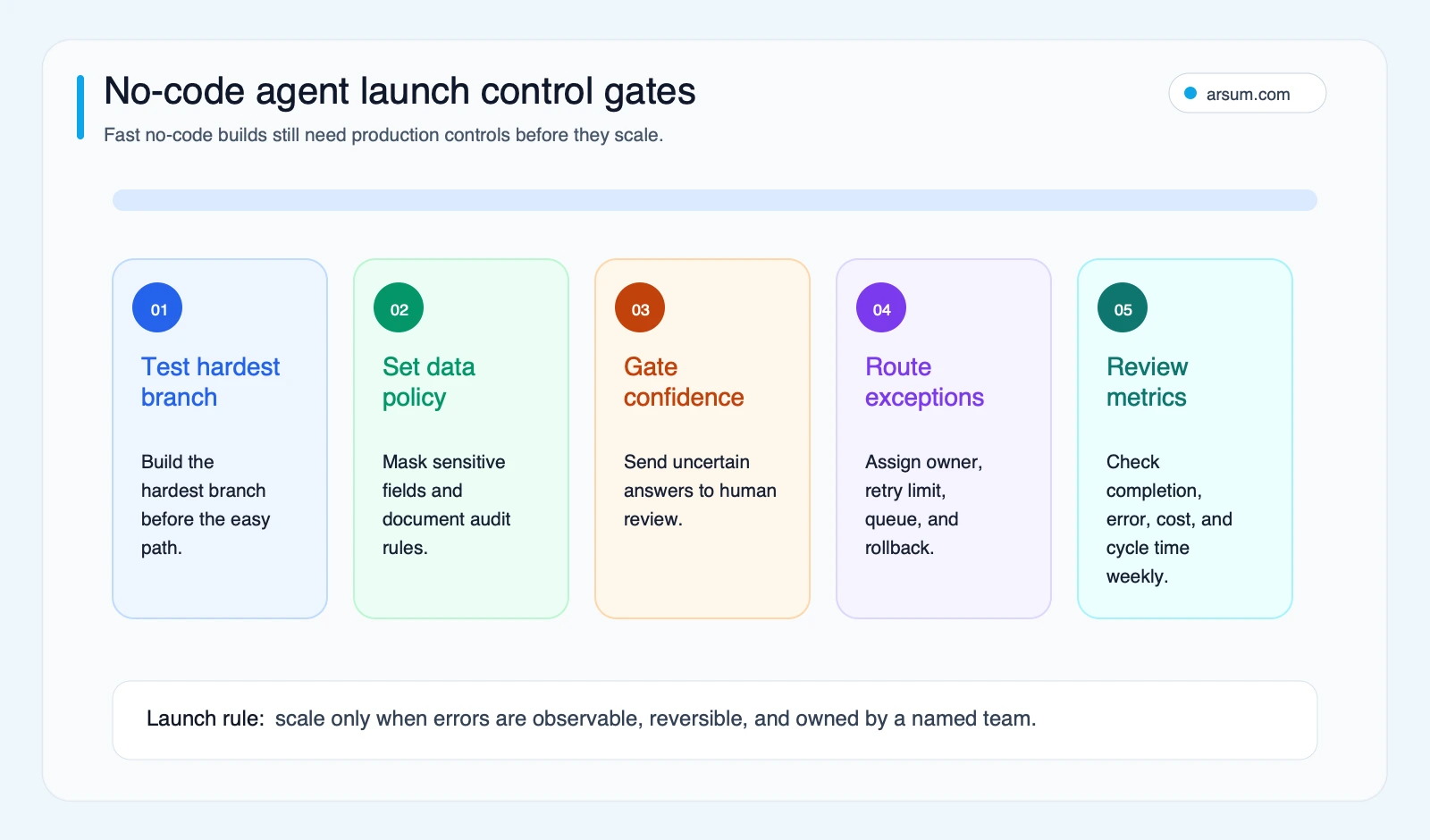
Arsum’s illustrative planning framework. Select the diagram to view it at full size.
Separate access from authority
A sound first release distinguishes four levels:
- Read/search: retrieve approved information from named sources.
- Draft/recommend: produce a classification, summary, or suggested next step.
- Prepare action: create a draft record, message, or transaction for a human.
- Execute action: send, update, approve, or trigger a downstream change.
Start at the lowest level that creates value. Execution should require explicit business authorization, a defined approver, retained evidence, and a tested reversal path. Self-hosting, where available, may change infrastructure control, but it does not by itself solve permission design, data classification, model-provider terms, logging, or approval ownership.
Before go-live, test the hard branch rather than only the happy path:
- An instruction attempts to override the workflow’s rules.
- A source document contains irrelevant or malicious instructions.
- A required field is missing or conflicts with another system.
- A connector returns a timeout, duplicate event, or partial write.
- A human rejects the recommended action.
- A credential is revoked while work is in progress.
- The agent reaches its retry limit.
Procurement questions to resolve
Use these questions to test whether a platform fits the way your team will operate it. The list is an editorial checklist, not a survey of platform users.
| Qualitative signal | Procurement question it should trigger |
|---|---|
| “Affordable” becomes unclear after usage grows | What is billed per run, model call, retry, data lookup, storage unit, user, and connector? |
| No-code still requires platform-specific expertise | Who will build, test, document, and maintain the workflow after the first employee changes roles? |
| A successful MVP becomes a core dependency | Can you export records, reproduce logic, and migrate the critical path? |
| Agents with broad tools feel risky | Which tools can act, on what scope, with which approvals, and where is the action log? |
What to do next
Choose one workflow with a visible baseline and a recoverable failure mode. Write down its trigger, inputs, source systems, permitted actions, exception queue, human approver, rollback path, and owner. Then use the scorecard and evaluation worksheet to decide whether no-code, low-code, or code-first ownership fits.
This article is an editorial decision framework, not an independent hands-on benchmark or a substitute for procurement, security, legal, or compliance review. Platform capabilities, pricing, data handling, and compliance posture are volatile and must be verified against current official documentation, your plan, deployment model, region, model-provider terms, and required controls.
Check platform ownership before committing
A visual workflow still depends on connector permissions, platform limits, persistent state and someone maintaining it. Ask the vendor to show how you export the workflow, move credentials, inspect a failed run, change an integration and continue operation if your plan changes. Model usage, platform subscriptions and the team’s review time are separate cost lines.
Use a no-code platform when its existing interface and connectors fit the agreed process. Consider custom AI agent development when the product needs its own user experience, detailed source permissions, data processing or behavior that the platform cannot express cleanly. The AI app cost worksheet and hiring guide help compare the total responsibility of each route.
Discuss your AI product or search system
Bring the intended users, data sources, workflow, and budget. We can define a focused first phase and the responsibilities after launch.
Discuss your project →Published by:Arsum
- Published
- February 4, 2026
- Updated
- September 8, 2026
- How this was produced
- These guides are prepared and updated with AI assistance. Linked documentation, proposed evaluation methods, and illustrative calculations are distinguished from reported project results. No independent human review is implied by the byline.
- Source policy
- Technical references are linked where used. Planning figures and suggested scorecards are assumptions, not market benchmarks or measured client outcomes. Editorial policy.
- Why this page exists
- Help product and technical teams scope AI applications and intelligent search, compare delivery options, and define acceptance and ownership.