ServiceNow agentic AI is worth piloting when a specific workflow already depends on ServiceNow records, approvals, identities, and workflow history—and when you can prove that constrained automation improves the work without weakening control. The decision is not whether the platform can demonstrate an agent; it is whether one bounded workflow has clean enough data, ownership, exception handling, and reversal options to justify native implementation.
ServiceNow Agentic AI Evaluation Guide
Explore servicenow agentic ai: compare workflow fit, costs, risks, evidence, and practical next steps before you build, buy, or hire.

Table of Contents
- What most guides miss: an agent is not the operating model
- Map the ServiceNow layers before choosing a use case
- Decide whether native ServiceNow is the right center of gravity
- A worked example: incident triage with controlled execution
- Use a pilot scorecard that measures value and control
- Build the cost case from variables, not public price guesses
- Post-launch ownership: the dashboard that prevents silent failure
- Disqualifying conditions and common failure modes
- Bottom line
What most guides miss: an agent is not the operating model
Most ServiceNow agentic AI evaluations start with feature labels. That is backwards. The buying decision changes when you separate the work into four layers:
- Assistance: drafting, summarizing, retrieving knowledge, or guiding a human through a task.
- Conversation: collecting intent and information through a user-facing interface.
- Execution: selecting and completing a sequence of actions across approved tools.
- Governance: deciding who may authorize actions, inspect activity, correct errors, and stop the workflow.
ServiceNow describes Now Assist AI agents as LLM-enabled agents that can perform tasks from automated responses through more complex problem solving. It describes AI Agent Studio as the place to create and manage agentic workflows and agents, including execution logs and testing workflows. Those capabilities matter, but they do not answer the operational question: what is the agent allowed to do without a person?
A useful pilot makes that boundary explicit. A low-risk agent may classify, retrieve, draft, route, and prepare an action. A higher-risk action—changing access, closing a high-impact incident, approving an exception, altering a production configuration, or committing a financial obligation—should remain approval-gated until the team has evidence that the control design works.
For a broader view of where agents belong in a workflow rather than in a chat interface, see agentic AI workflow automation and AI agent architecture patterns.
Map the ServiceNow layers before choosing a use case
ServiceNow’s product language changes quickly, so buyers should validate edition, entitlement, and availability with their account team before treating any feature as purchased capability. The current vendor positioning is still useful when scoped to the job each layer performs.
| Layer | Practical role | Buyer question |
|---|---|---|
| Now Assist | Human assistance inside an existing workflow | Does better drafting, summarization, or retrieval remove a real bottleneck? |
| AI Agents | Multi-step task execution within defined permissions and tools | Which actions can run automatically, and which require approval? |
| AI Agent Studio | Configuration, testing, and management of agentic workflows | Who owns testing, version changes, and release approval? |
| Virtual Agent | Structured conversational intake and guidance | Is the problem primarily intake, or does it require downstream execution? |
| IntegrationHub and subflows | Deterministic actions and integrations | Which steps should remain rule-based instead of agent-selected? |
| Otto | ServiceNow’s newer conversational AI positioning across its AI Platform | Is this an experience layer for the workflow, rather than the workflow control layer? |
ServiceNow positions AI Agents as autonomous agents for complex workflows and AI Agent Studio as a way to build and customize them with guardrails and task automation. That does not mean every workflow should become agentic. A deterministic subflow is usually the better answer when the inputs are structured, the sequence is stable, and there is no meaningful judgment to apply.
The same distinction prevents a common category error: treating Virtual Agent, Now Assist, and AI Agents as interchangeable. A conversational front door can improve intake without being authorized to execute. An assistant can prepare work without closing it. An agent can select and invoke approved tools, but it still needs a control model around permissions, approvals, evidence, and rollback.
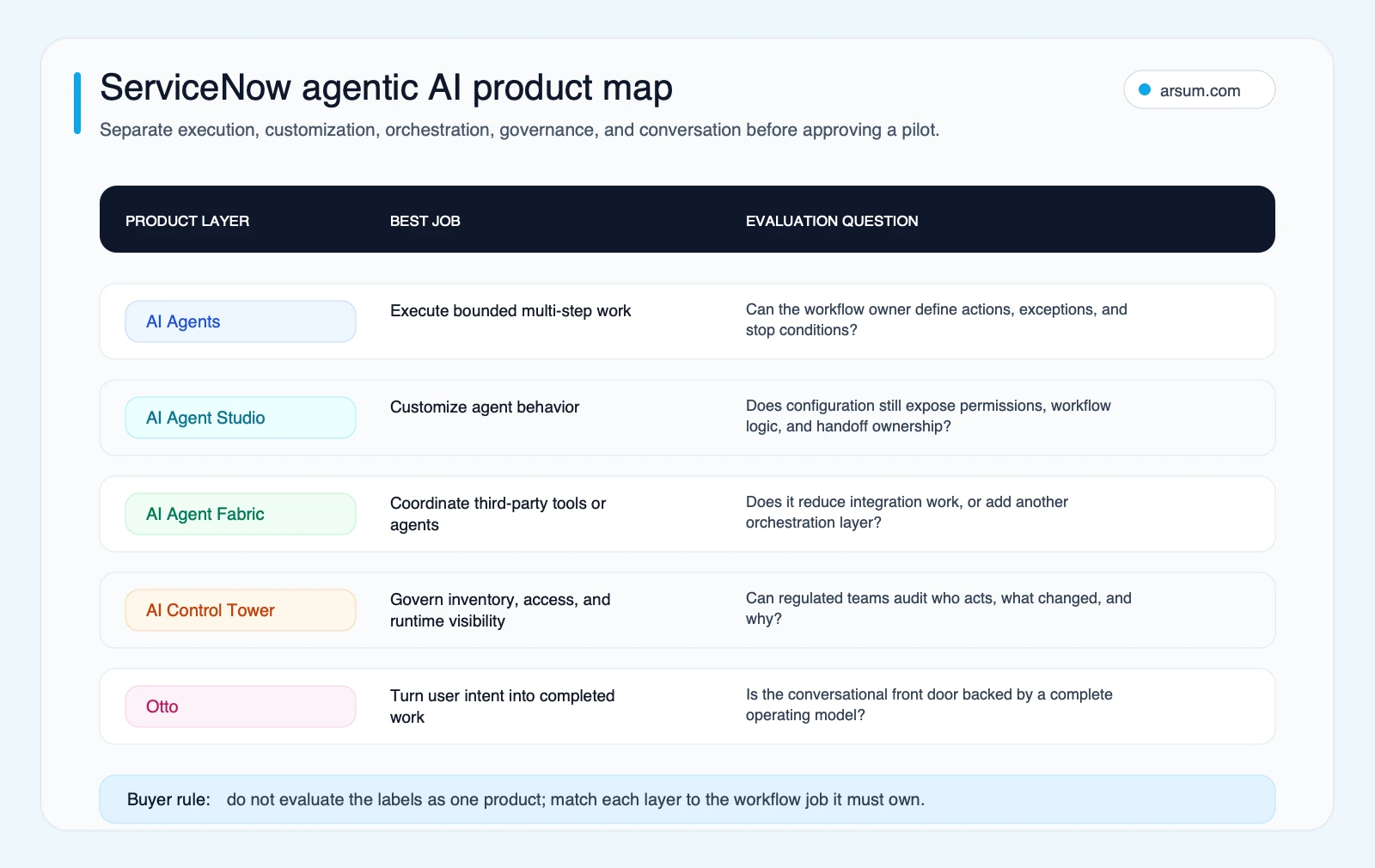
The map is useful because it stops a pilot from becoming a vague “ServiceNow AI” program. Select the layer that addresses the bottleneck, then define the autonomy boundary for that layer.
Decide whether native ServiceNow is the right center of gravity
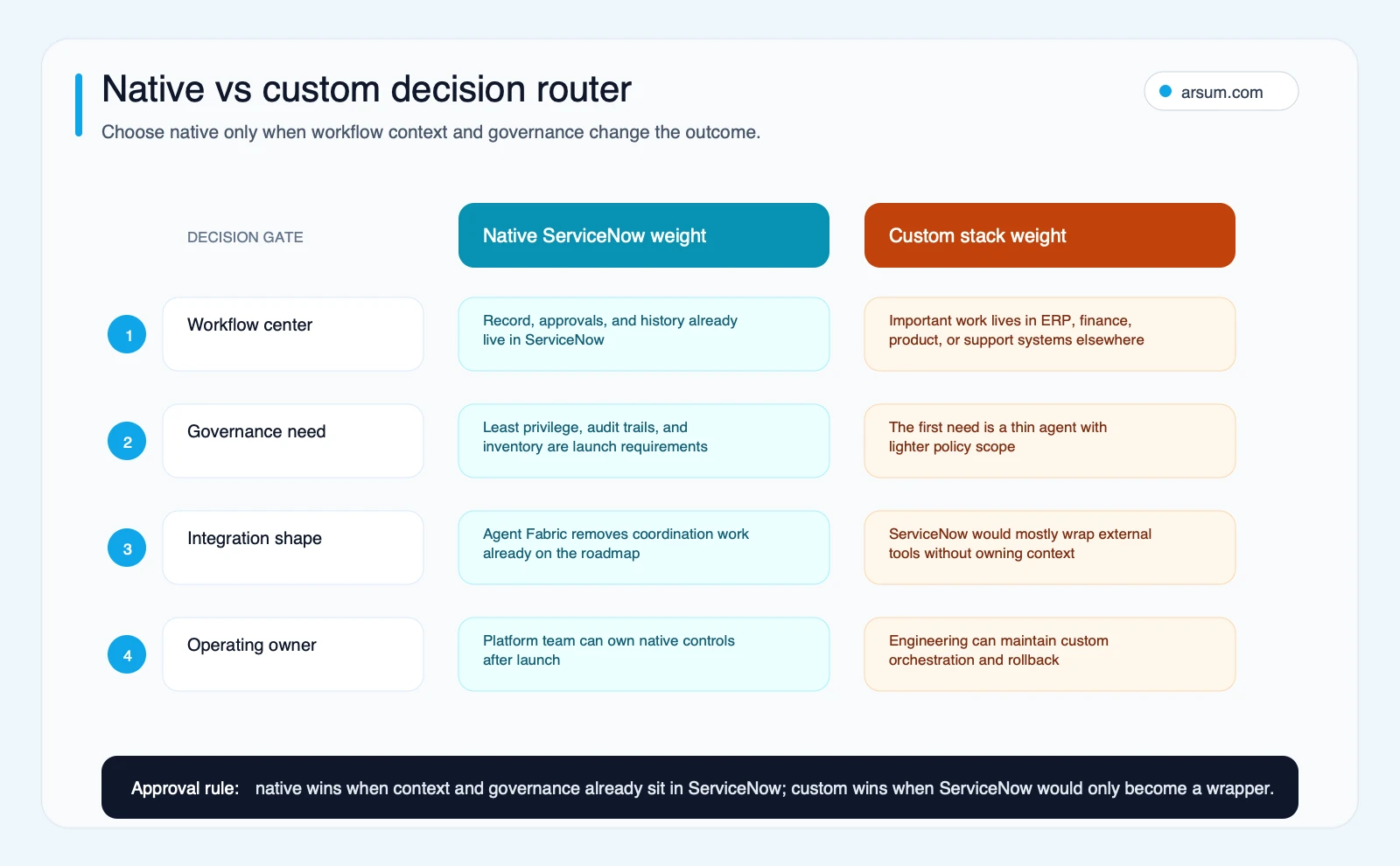
Native ServiceNow is usually the stronger route when the workflow’s records, identity model, approvals, service context, and audit history already live in the Now Platform. In that case, moving the work to an external agent stack can create a second control surface that must be reconciled with ServiceNow anyway.
A custom or external route is more credible when ServiceNow is only one downstream system among many, the primary interaction happens elsewhere, or the organization needs orchestration flexibility it is prepared to own after launch.
| Option | Best fit | Advantage | Control cost |
|---|---|---|---|
| Native ServiceNow AI Agents | ServiceNow-centered ITSM, employee, customer, or security work | Reuses existing records, roles, workflows, and approvals | Requires disciplined platform configuration and entitlement validation |
| External conversational layer with ServiceNow as system of record | Teams that need Slack, Teams, web, or product-native intake | Keeps ServiceNow for fulfillment while changing the front door | Requires careful identity, handoff, and audit design across systems |
| Custom agent stack | Cross-system work where ServiceNow is not the dominant context | More flexibility in model, orchestration, and user experience | Buyer owns observability, authorization, rollback, and maintenance |
ServiceNow’s Implementation Office Hours guidance for Now Assist for ITSM distinguishes the generative AI product layer from autonomous digital workers configured in AI Agent Studio, while emphasizing lower-environment testing, monitoring, administration, and change management. That is a practical reason to favor native implementation only when native operating context is genuinely valuable.
Use this decision rule:
- Keep the work native when the system of record, approvals, and most action tools are already in ServiceNow.
- Use a deterministic workflow when the process is stable enough to encode without model judgment.
- Use an external interaction layer when the main problem is employee or customer access, but fulfillment must remain in ServiceNow.
- Build custom orchestration only when ServiceNow is one component of a broader workflow and your team accepts long-term control-plane ownership.
For a more general build-versus-partner decision, compare AI agent development services with AI agent consulting.
A worked example: incident triage with controlled execution
Consider a service desk workflow for routine incidents. This is not a promise of results; it is a control design example that shows what a pilot must specify.
Normal path
A user submits an incident through an approved ServiceNow intake channel. The agent may:
- Read the incident description, affected service, user identity, and relevant knowledge records.
- Classify the likely category and priority using the team’s existing policy.
- Check known-issue records and approved remediation guidance.
- Draft a response and propose a routing or remediation action.
- Execute only pre-approved, reversible actions, such as assigning a queue, requesting missing fields, or triggering a deterministic diagnostic subflow.
- Record the inputs, tool calls, outputs, selected action, timestamps, and outcome against the case or linked execution log.
The agent should not independently close a high-impact incident, change a production configuration, disable an account, or override priority policy. Those actions require named human authorization.
Exception taxonomy
Define exceptions before the pilot starts:
| Exception | Required handling | Owner |
|---|---|---|
| Missing or conflicting CMDB/service context | Escalate without action | ITSM process owner |
| Low-confidence classification | Route to human triage queue | Service desk lead |
| Request implies privileged or production change | Create approval task; no direct execution | Change manager or service owner |
| Knowledge source is outdated or contradictory | Flag source and stop automated recommendation | Knowledge manager |
| Automation action fails or returns incomplete status | Mark execution failed, preserve log, assign human follow-up | Platform owner |
| User disputes automated handling | Reopen or create correction path; review evidence | Service desk lead |
This model makes authorization proportional to failure cost. Technical ability to invoke a tool is not permission to use it autonomously.
Evidence retained and rollback
Retain the incident identifier, user request, knowledge sources retrieved, confidence or routing rationale where available, tool/action identifiers, approval record, before-and-after state, execution result, correction, and final resolver. Retention and access policies should follow your organization’s existing ServiceNow and records-management requirements.
Rollback should be concrete: disable the agent’s action capability or route it to draft-only mode; revert the deterministic subflow or configuration version; restore the prior case state where feasible; and route new work to the established human queue. If a change cannot be meaningfully reversed, it is not a sensible first autonomous action.
Use a pilot scorecard that measures value and control
A 30-day pilot can establish fit, but it should not be judged on demo quality or anecdotal satisfaction. Use one workflow, a baseline period, shadow mode, and pre-agreed thresholds. The targets below are illustrative planning assumptions, not ServiceNow benchmarks. Replace them with thresholds based on your current workflow, risk appetite, and available volume.
| Field | Example pilot definition |
|---|---|
| Workflow | Routine incident triage for one service category |
| Baseline | Measure weekly incoming cases, median handling time, reassignment rate, reopen/correction rate, and cost per completed case using internal loaded-cost assumptions |
| Target | Reduce human handling time or reassignment work without increasing correction, escalation, or policy exceptions beyond the approved threshold |
| Business owner | ITSM process owner |
| Technical owner | ServiceNow platform owner |
| Risk approver | Service owner or change manager |
| Initial autonomy | Draft, classify, retrieve, route, and invoke only reversible, pre-approved subflows |
| Shadow-mode period | Agent produces recommendations and proposed actions; human completes the action and records agreement or correction |
| Quality metric | Human agreement rate on classification/routing and correction rate after execution |
| Exception metric | Share of cases escalated for missing context, uncertain routing, privileged action, or tool failure |
| Cost metric | License/consumption plus implementation and monitoring cost divided by completed cases; compare with avoided handling effort |
| Stop condition | Any automation-caused security or policy incident; an unapproved privileged action; or correction/escalation rates above the agreed threshold for the review period |
| Rollback | Disable action tools, return to draft-only or manual routing, revert approved configuration version, and notify owners |
| Expansion gate | Only add actions or adjacent workflows after quality, exception, cost, and control thresholds are met for the agreed sample |
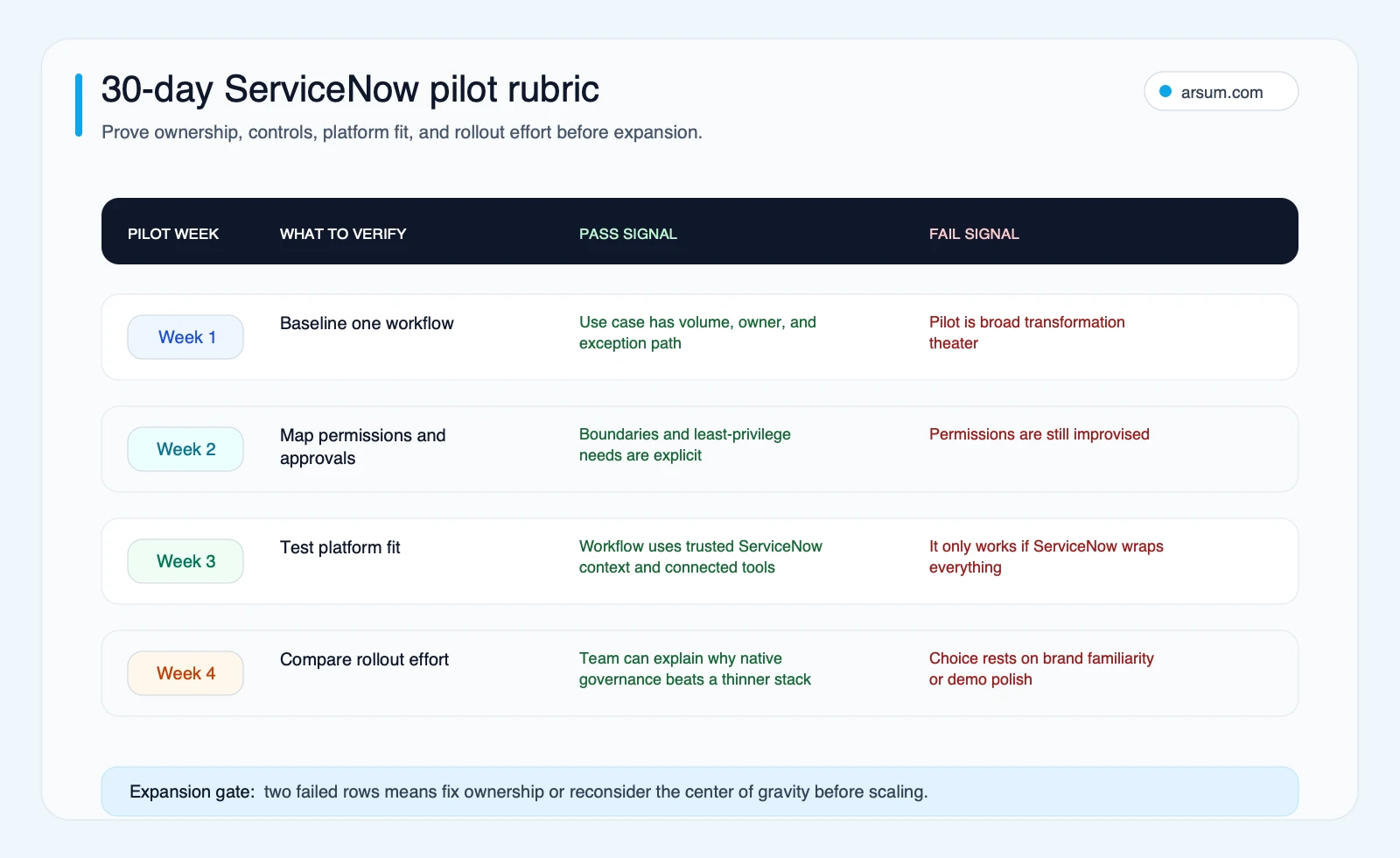
A practical four-week sequence is:
- Week 1: establish the baseline, confirm data access, identify the process owner, and document the exception taxonomy.
- Week 2: audit out-of-box capabilities, customizations, plugins, patch level, roles, integrations, and the deterministic flows the agent may call.
- Week 3: run shadow mode in a lower-risk environment or limited production cohort, with human approval on every consequential action.
- Week 4: review quality, escalation, correction, consumption, cost, operator feedback, audit evidence, and expansion eligibility.
ServiceNow community implementation guidance recommends validating plugins, patch level, complexity, context limits, testing, and environment updates rather than assuming available agents are turnkey. See AI Agent Practical Implementation: Lessons from the Field.
Build the cost case from variables, not public price guesses
Public pricing is not a reliable basis for a ServiceNow agentic AI business case. ServiceNow Community guidance says Now Assist pricing depends on users, required features, and organizational needs, and recommends obtaining precise pricing from ServiceNow sales or an account executive. See the Now Assist licensing discussion.
Use a worksheet that makes the missing inputs visible:
| Cost or value input | Planning logic |
|---|---|
| Native licensing and entitlement | Quote for the edition, products, users, and scope required for the candidate workflow |
| Assist or consumption cost | Estimate from vendor-provided terms and pilot usage; monitor actual consumption separately |
| Implementation cost | Internal platform work plus external implementation support, integration, testing, and security review |
| Operating cost | Process owner time, platform administration, monitoring, knowledge maintenance, and incident review |
| Avoided handling cost | Illustrative assumption: completed cases × minutes avoided per case × internal loaded cost per minute |
| Correction cost | Corrected or reopened cases × average remediation time × internal loaded cost per minute |
| Net decision | Compare avoided handling and quality gains with licensing, consumption, implementation, operating, and correction cost |
The arithmetic is only useful if the baseline is credible. For example, do not claim savings from “automation rate” alone. Measure whether work was completed correctly, whether it was merely deflected to another queue, and whether the downstream correction cost rose.
If you need a broader internal model before requesting a quote, the AI automation ROI examples guide can help structure assumptions without turning them into unsupported outcomes.
Work With Arsum
We help businesses implement AI automation that actually works. Custom solutions, not cookie-cutter templates.
Learn more →Post-launch ownership: the dashboard that prevents silent failure
An agentic workflow needs an operating dashboard, not a launch announcement. Review it weekly during the pilot and at an agreed cadence after expansion.
| Metric | Definition | Why it matters |
|---|---|---|
| Autonomous resolution rate | Cases completed through approved automated action without human completion | Shows realized autonomy, but not quality by itself |
| Escalation rate | Cases handed to a human because of uncertainty, policy, missing context, or tool failure | Reveals where the workflow boundary is too broad or data is weak |
| Correction or reversal rate | Automated cases later corrected, reopened, reversed, or disputed | Detects quality and control failure |
| Assist consumption | Consumption associated with the workflow over the review period | Keeps unit economics visible |
| Cost per resolved case | Total attributable pilot cost divided by correctly completed cases | Prevents misleading volume-only reporting |
| Automation-caused incidents | Security, policy, service, or customer-impacting events linked to automation | A stop-and-review signal, not a metric to normalize away |
| Knowledge and configuration changes | Source, prompt/workflow, integration, or role changes since the prior review | Preserves traceability when performance changes |
The named process owner should own business outcomes and exception policy. The platform owner should own configuration, release control, access, and observability. Security, privacy, and change owners should approve the action classes that affect their domains. If those roles are unnamed, the project is not ready for greater autonomy.
Disqualifying conditions and common failure modes
Do not expand an agentic pilot when any of these conditions is true:
- The workflow has no accountable owner who can approve exception policy.
- The CMDB, CSDM, knowledge base, or case data is too incomplete to support reliable routing or action.
- The team cannot state which tools the agent can use and which permissions are prohibited.
- There is no lower-environment test route, shadow mode, or feasible rollback method.
- The business case depends on an unverified license assumption or ignores consumption, monitoring, and correction work.
- The desired action is consequential and irreversible, but the design relies on model confidence instead of human authorization.
- ServiceNow would become a thin wrapper around systems it does not own, with no clear governance or context advantage.
Practitioner conversations also raise value uncertainty, configuration burden, pricing opacity, and interest in separate intake layers while ServiceNow remains the system of record. Those are qualitative signals rather than market-wide evidence: one discussion of Now Assist value and a pricing discussion should inform your diligence, not substitute for your own pilot data.
Bottom line
Pilot ServiceNow agentic AI when native ServiceNow context materially reduces the effort of governing and executing a well-defined workflow. Start with a reversible, measurable task; keep consequential actions approval-gated; and expand only after the dashboard shows acceptable quality, escalation, correction, consumption, and cost.
If the work mostly lives outside ServiceNow, or if the team cannot name the owner, approval boundary, retained evidence, and rollback path, pause before adding an agent. The strongest outcome may be a deterministic workflow, an external interaction layer, or a narrower implementation plan—not more autonomy.
Ready to Automate Your Business?
Stop wasting time on repetitive tasks. Let AI handle the busywork while you focus on growth.
Schedule a Free Strategy Call →Written by:Arsum editorial team
- Reviewed by
- Arsum editorial team
- Published
- February 20, 2026
- Updated
- July 7, 2026
- How this was produced
- Arsum uses research packs, source checks, and human editorial review to prepare and update blog articles. Editors are responsible for the final page.
- Source policy
- Sources are linked in the article when used. Methodology and source notes are included on higher-risk or high-visibility pages and are being rolled out across the archive. Editorial policy.
- Why this page exists
- Help B2B operators evaluate AI automation, implementation scope, cost, risk, and build-vs-buy decisions with practical context.