
Shopify AI for Store Owners: Best Use Cases in 2026
Most guides on Shopify AI are feature catalogs. They list what exists, skip the tradeoffs, and leave you to figure out whether any of it moves your actual operating costs.
This is a decision guide. The core question isn’t which Shopify AI tools exist, it’s where AI creates measurable workflow change, at what implementation cost, at what rollout risk, and which tier of investment the problem actually justifies.
What Most Shopify AI Guides Still Miss
Most search results flatten three different decisions into one headline: use Shopify’s native AI, add an app, or build something custom. Those are not interchangeable moves. They have different ownership costs, different data requirements, and different failure modes.
The practical mistake is comparing features instead of workflow fit. Store owners usually do not need more screenshots of Sidekick or longer lists of AI apps. They need a function-by-function answer to three questions:
- Is the workflow repetitive enough that native Shopify AI or one app is already sufficient?
- Is the real bottleneck missing business logic, messy data, or weak review process rather than missing AI?
- If a store adds another AI layer, who owns the exceptions, the QA work, and the maintenance burden six months later?
That ownership question is where most AI roundups stay too shallow. AI for product drafts, support summaries, and lightweight admin help is increasingly commodity. The higher-cost decision is when to add another tool, another integration, or a custom workflow that your team now has to maintain.
Before you read further, here is the decision anchor:
- Under $1M revenue, catalog under 100 SKUs: App-store AI is usually the right level. Native Shopify Magic and apps like Gorgias AI and Rebuy address most operational needs. Custom builds rarely pay back at this scale.
- $1M to $5M revenue, catalog 100 to 500 SKUs: Apps cover most cases, but specific functions like support volume, recommendation quality, or high-content throughput are where custom AI can begin to show financial logic.
- $5M+ revenue, catalog 500+ SKUs, significant operational complexity: App-tier tools are more likely to show measurable gaps. The question becomes which function to prioritize first and how to sequence the build.
Getting this threshold wrong in either direction is expensive. A custom build on a small store often does not make sense. A larger store still handling large support or content volume manually may be leaving measurable margin on the table.
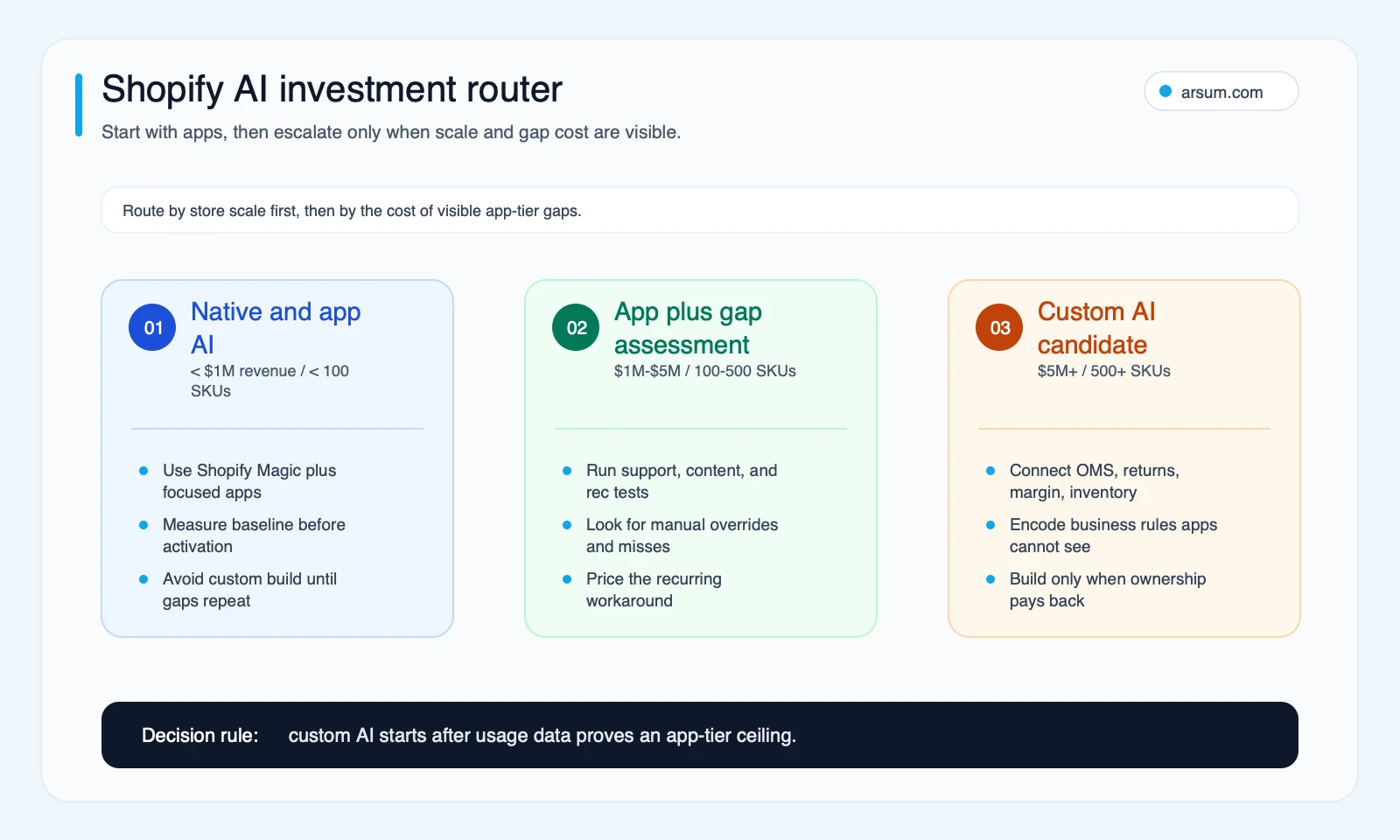
Use the investment router to decide whether native tools, app-store AI, or a custom Shopify AI build fits the store’s scale and visible gap cost.
Want to automate this for your business? Let's talk →
Shopify AI at a Glance
| Function | Native / App option | Custom AI trigger |
|---|---|---|
| Product descriptions | Shopify Magic | Brand voice at scale, large catalogs, technical accuracy required |
| Recommendations | Rebuy, LimeSpot, Bold | Large catalogs, margin or inventory logic required |
| Customer support | Gorgias AI, Tidio | High weekly ticket volume, OMS or returns integration needed |
| Inventory forecasting | Inventory Planner | Complex seasonality, multi-warehouse, unreliable lead times |
| Content at scale | Shopify Magic + templates | High SKU throughput, brand-specific voice, structured data |
Authoritative references for the comparison points above:
- Shopify Magic overview
- Shopify Sidekick help docs
- Shopify developer docs for Storefront MCP and agent tooling
- Gorgias AI Agent overview
Start with apps. Move to custom when the gaps show in your revenue or operations data.
What “Shopify AI” Actually Covers
The phrase is used loosely across three distinct categories:
Shopify’s own AI tools like Shopify Magic and Sidekick. Native, no additional cost, bounded by what Shopify has integrated into its platform.
App Store AI like Gorgias AI, Rebuy, Inventory Planner, and similar apps. Each handles a specific workflow and connects to Shopify through standard API integrations.
Custom AI systems layered on Shopify’s infrastructure and connected to a broader data stack such as OMS, warehouse, returns, ERP, and internal business logic.
Each tier has a different ROI ceiling. App-store AI runs similar logic for many merchants on the same plan. Custom AI costs more, but it can incorporate proprietary context and business rules that app tooling cannot.
Buyer Decision Framework
Use this to map the rest of the article to your situation. The three stages are sequential, most stores should work through Stage 1 before evaluating Stage 2, and Stage 2 before committing to Stage 3.
Stage 1, Start Here (App tier)
Profile: Under $3M revenue, standard catalog, Shopify-native operations
- Activate Shopify Magic for product descriptions, Gorgias AI for support deflection, Rebuy for recommendations
- Instrument before you activate: log your current per-SKU content time, inbound ticket deflection rate, and AOV by recommendation source
- Decision trigger for Stage 2: usage data showing at least one recurring gap, such as frequent manual override, underperforming recommendations, or weak support deflection
Stage 2, Validate Here (Gap assessment)
Profile: Mid-market revenue, app tools active, noticing quality gaps or recurring manual overrides
- Run the ceiling detection checklist in this article
- Identify whether gaps are data gaps, logic gaps, or integration gaps
- Decision trigger for Stage 3: multiple checklist items confirmed, or a measurable revenue or operations impact attributable to AI output quality in a high-volume function
Stage 3, Escalate Here (Custom AI)
Profile: Larger store, at least one function showing clear financial impact from an AI quality gap
- Support volume is high and unresolved edge cases are growing
- Recommendation quality is constrained by business rules app algorithms cannot encode
- Content volume or compliance needs exceed what generic prompts can sustain
- Decision trigger: the annualized cost of the manual workaround exceeds the likely cost of a purpose-built system at your scale
Shopify’s Native AI: What It Does and Where It Stops
Shopify Magic
Shopify Magic is Shopify’s umbrella brand for built-in AI content tools. Current capabilities include product description generation from bullet points or tags, email subject line suggestions, image background removal, and blog content drafts.
Where Magic works well: high-SKU catalogs where writing every product by hand is not practical, draft generation before human editing, and accelerating new product launches. Where it does not: complex or technical products, strict brand voice requirements, or anything requiring proprietary context that Shopify’s generic model does not have access to.
Sidekick
Sidekick is Shopify’s natural-language admin assistant. You can query it and trigger simple tasks inside the Shopify admin.
Operational boundary: Sidekick operates within the Shopify admin on your store’s data. It cannot pull external data sources, does not handle complex multi-step automations beyond native Shopify flows, and may not reflect platform-level incidents or off-platform operational context in real time.
Operator Note: The most common Shopify AI implementation mistake is not choosing the wrong tool, it is applying AI before the underlying data is reliable. A disorganized product catalog produces disorganized AI-generated descriptions. Fragmented support ticket history makes AI triage inconsistent. Data quality work typically needs to happen before AI work, and it often takes longer than teams budget for.
What Merchants Actually Report
Shopify’s merchant community has documented AI pain points that vendor marketing rarely surfaces. These are qualitative signals from community forums, implementation risk patterns, not statistical benchmarks.
Risk: AI-generated content can hallucinate technical data. Community reports show that technical or SEO-sensitive content can require more review than merchants expect. What this generalizes to: if product specifications, technical accuracy, or structured SEO data matter, a human review step before publishing is not optional.
Risk: Forecasting tools can hit data-access limits for supply chain use cases. Community feature requests show that some inventory-heavy merchants run into purchase-order or supply-pipeline visibility gaps. What this generalizes to: before committing to any app-level forecasting tool, verify it can access the specific data your operation depends on.
Risk: Outcome skepticism is real and earned. Stores that see clear ROI usually connect AI to a specific operational bottleneck with a measurable before-and-after baseline. If you cannot name the operational metric you are improving, you will struggle to prove ROI later even if some improvement exists.
Mitigation across all three: Keep a human-review step in AI content workflows, validate data access before implementation, and measure AI impact against a clear pre-deployment baseline.
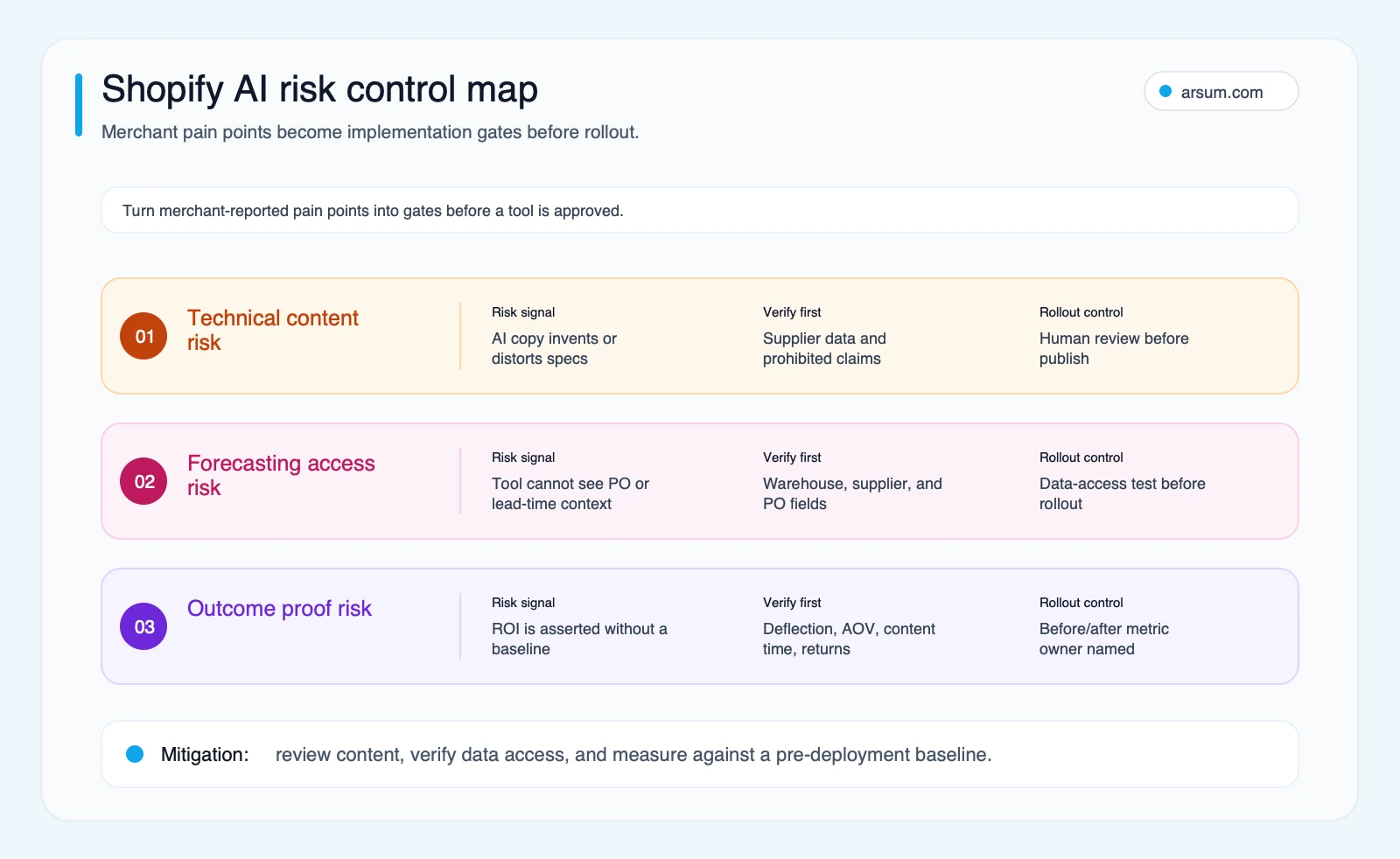
Use the risk control map as a pre-rollout checklist before approving AI content, forecasting, or ROI-sensitive Shopify workflows.
Where Shopify AI Implementations Fail
Three failure patterns appear consistently enough to plan around before you start.
Underestimating data cleanup. A product catalog with inconsistent attribute tagging, missing supplier specifications, or duplicate SKUs will produce unreliable AI output regardless of model quality. Data cleanup is foundational work, not an optional preliminary step.
Overestimating AI autonomy. Most ecommerce AI deployments are decision-support systems, not autonomous operators. A support workflow that automates routine questions still needs a designed human path for exceptions.
Deploying without baseline measurement. If you do not know your current ticket deflection rate, per-SKU content time, or AOV by recommendation source before deployment, you cannot demonstrate lift afterward with confidence.
High-Value Use Cases by Function
Merchandising and Personalization
AI-driven product recommendations are now standard in ecommerce. The practical takeaway is straightforward: better relevance can improve average order value and reduce wasted merchandising effort.
App-level options: Rebuy, LimeSpot, and Bold Product Upsell cover much of the use case for stores with manageable catalogs and standard merchandising logic.
Where app logic breaks down: recommendation systems can perform well on engagement while still missing business constraints like margin, return rate, bundle logic, or inventory position. That is where custom logic starts to make sense.
Custom AI signal: Stores with large catalogs, meaningful return rates, or strong merchandising constraints often find that generic recommendation algorithms surface products that do not reflect actual business priorities.
Customer Support Automation
Support is one of the clearest AI use cases in ecommerce when the workflow is defined and measured.
A common pattern: a support team handles a large share of repetitive tier-1 questions like order status, shipping delays, returns initiation, and standard policy answers. AI can help reduce manual handling volume, but only when the workflow, templates, review process, and exception path are all designed clearly.
What changes operationally: when support automation works, the team usually shifts from answering every routine question manually to reviewing AI quality, handling complex cases, and maintaining exception workflows. The function becomes more structured, not just faster.
Custom AI signal: when ticket volume is high and the unresolved cases are increasingly complex, the economics of a custom support workflow connected to OMS and returns systems can compare favorably to scaling the human team alone. For a full breakdown of typical implementation costs and ROI patterns, see our AI customer service automation guide.
💡 Arsum builds custom AI automation solutions tailored to your business needs.
Get a Free Consultation →Product Content at Scale
Creating accurate, on-brand product descriptions is one of the most time-consuming operations tasks in ecommerce. Shopify Magic helps, but generic output usually needs review and context.
A common pattern: content teams spend a large amount of time researching supplier specifications, drafting descriptions, editing for brand voice, and uploading content. AI-assisted workflows can reduce blank-page time and speed up first drafts, but the gains depend on clean specs, strong prompts, and editorial review.
The critical variable: a structured prompt template with brand guidelines, prohibited language, and supplier data performs very differently from a generic request to “write a product description.”
Where it stops working: technical products, compliance-heavy categories, or strongly differentiated brand voice often require more review than generic prompting saves. That is the signal for a more purpose-built content pipeline, or a decision to keep content manual at current scale.
Inventory and Demand Forecasting
Most stores solve demand planning with spreadsheets, gut feel, or basic reorder points in Shopify. This is a high-upside AI area for inventory-heavy merchants, but data access limitations matter.
App-level: Inventory Planner and similar tools can work well for relatively straightforward catalogs and stable supplier lead times.
Custom AI signal: stores with complex seasonality, multiple warehouses, high SKU counts, or variable supplier performance may benefit from models that incorporate more operational context than app tooling can access or encode.
Use Case Decision Matrix
Before committing to any implementation, map your use case against these four variables.
| Use Case | Required Data | ROI Speed | Common Failure Mode | Recommended Tier |
|---|---|---|---|---|
| Product descriptions | Product attributes, specs, brand guidelines | Fast if catalog throughput is high | Publishing without review; inaccurate specs go live | App (Magic) → Custom pipeline for compliance or brand consistency needs |
| Support automation | Ticket history, OMS access | Often faster than other use cases | Deflection tracked, response quality ignored | App (Gorgias) → Custom when complexity and volume outgrow templates |
| Recommendations | Order data, return data, margin context | Medium | App logic misses margin or return constraints | App (Rebuy) → Custom when business-rule constraints matter |
| Demand forecasting | Sales history, lead times, PO context | Slower | Missing purchase-order or supplier context | App → Custom for multi-warehouse or complex supply chains |
| Content at scale | Supplier specs, brand voice guide, example content | Medium | Generic prompts, weak brand context, compliance gaps | App + template → Custom pipeline for stricter requirements |
Original Data: Shopify AI Prioritization Matrix
This prioritization matrix is Arsum’s planning model built from the source set above. It is meant to help store operators compare time-to-value, implementation burden, and post-launch ownership across the Shopify AI workflows most often evaluated together.
If you are deciding where to test AI first, score each workflow by time-to-value, implementation burden, and who has to maintain it after launch.
| Workflow | Time to value | Implementation burden | Ongoing owner | Best starting tier |
|---|---|---|---|---|
| Product-description drafting | Fast | Low to medium | Content or merchandising lead | Native Shopify AI or prompt-based app |
| Support summarization and tier-1 deflection | Fast to medium | Medium | Support lead plus QA owner | App first, custom only after clear edge-case burden |
| Product recommendations | Medium | Medium | Merchandising owner | App first |
| Forecasting and replenishment | Medium to slow | Medium to high | Operations owner | App first, custom if supply logic is complex |
| Multi-step merchandising or content workflows across systems | Slowest upfront | High | Ops or revops owner | Custom only when the manual workaround is already expensive |
In practice, this is why many merchants get more value from improving product data and support workflows before they touch more ambitious forecasting or cross-system automation.
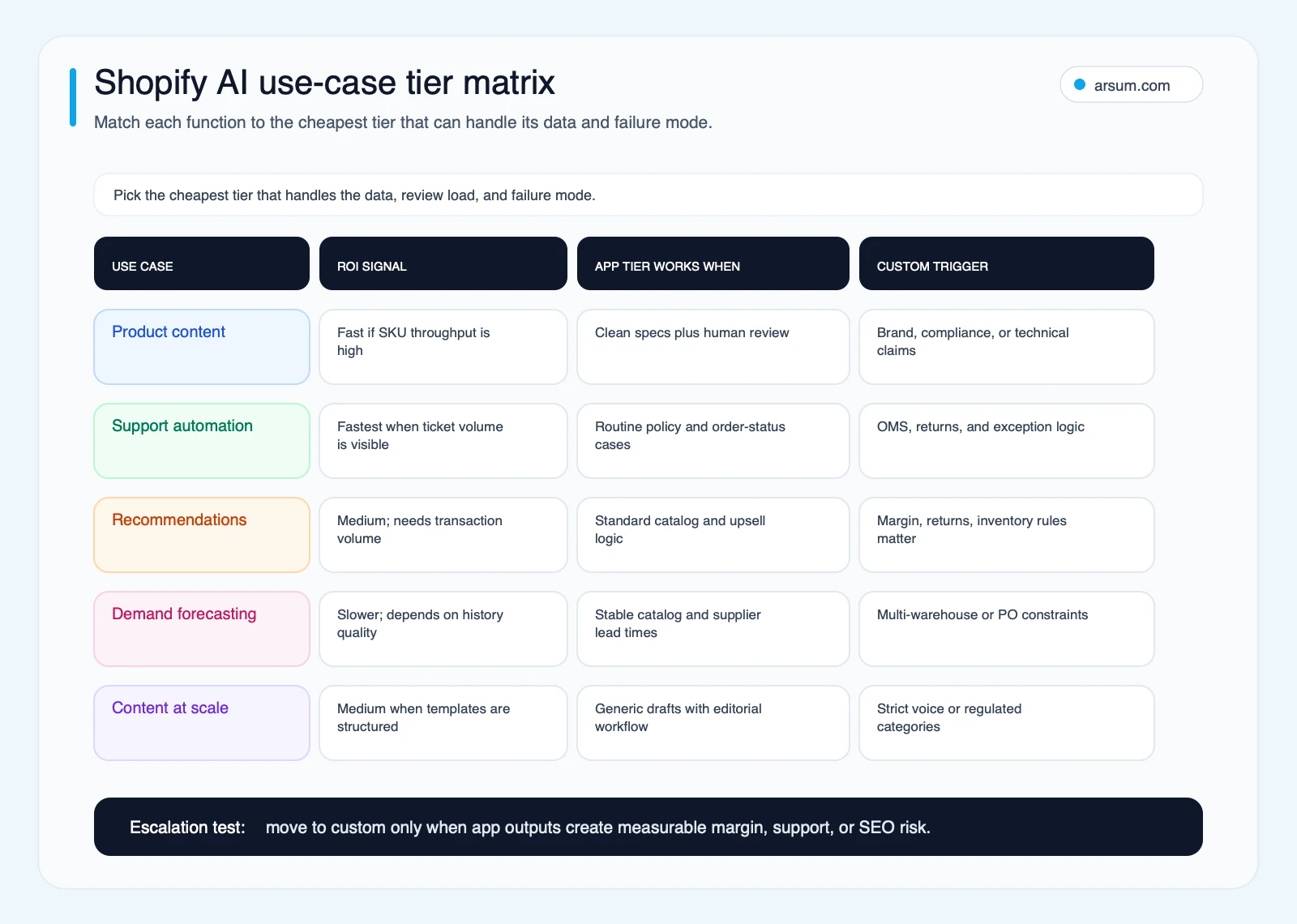
Use the tier matrix to match each Shopify AI function to the lowest-cost implementation level that still handles the required data, review load, and failure mode.
Commodity vs. Non-Commodity: Where Shopify AI Actually Differentiates
Most Shopify AI is commodity infrastructure. The stores that pull ahead with AI usually invest in proprietary context, their data, merchandising logic, and operational constraints, not just feature activation.
| Category | Commodity AI | Non-Commodity AI |
|---|---|---|
| Product descriptions | Shopify Magic, generic app templates | Custom prompts shaped by brand voice and supplier specs |
| Recommendations | Generic behavioral algorithm | Models shaped by margin, returns, and inventory rules |
| Customer support | FAQ deflection, order status lookups | OMS-integrated, returns-aware, brand-consistent workflows |
| Inventory planning | Basic reorder alerts | More context-aware demand models |
| Analytics | Standard Shopify reports | Cross-system dashboards spanning orders, returns, and marketing |
When App-Store AI Is Enough
App-store AI is usually the right call when:
- Revenue is under roughly $3M/year
- Catalog is under roughly 200 SKUs
- Operations run through standard Shopify flows without significant custom logic
- You are validating whether AI adds value before committing budget to a custom build
Start with apps. Let real usage data tell you where the gaps are.
Ceiling Detection Checklist after an initial evaluation period:
- Are you consistently editing or overriding AI output because it misses brand voice or catalog-specific context?
- Are support tickets that AI “resolved” generating follow-up complaints or human escalations?
- Are recommended products driving clicks but not purchases, or creating return-rate concerns?
- Are forecast recommendations requiring regular manual adjustment because they miss supplier or seasonal nuance?
- Is the overhead of managing AI outputs approaching the cost of doing the work without AI?
Two or more checks usually indicate visible operational gaps worth evaluating further. For a broader view of AI automation economics across business functions, see our guide to AI tools for business automation.
When You Need Custom AI
Custom AI starts making financial sense when:
- Support volume is high enough that app-level automation still leaves a heavy manual exception burden
- Recommendation quality affects AOV or margin in a measurable way and the gap is tied to business rules app output cannot reflect
- You hold proprietary data that app-store tools cannot access or act on
- The annualized cost of the manual workaround exceeds the likely cost of building and maintaining a more purpose-built system
Custom AI often uses the same underlying models as app-store tools. The difference is integration depth and proprietary context. Our custom AI solutions guide covers what a custom build process typically looks like. For the in-house vs. agency decision, see hiring an AI developer vs. agency.
Work With Arsum
We help businesses implement AI automation that actually works. Custom solutions, not cookie-cutter templates.
Learn more →What Shopify AI Can’t Do
Current Shopify AI, native and app-based, does not:
- Make nuanced policy-exception judgment calls on returns, fraud disputes, or high-value complaints
- Manage supplier relationships or negotiate terms
- Create truly differentiated customer experiences at the app tier when competitors access the same algorithms
- Handle complex B2B purchasing workflows without significant custom development
- Compensate for bad data
AI amplifies what you are already doing well. Data and process infrastructure work usually comes before AI work. For typical cost and timeline expectations across ecommerce AI builds, our AI automation agency pricing guide covers current market benchmarks.
Google Risk: AI Content and Search Visibility
Stores publishing AI-generated product descriptions at scale without human review carry real search visibility risk.
Google’s spam policy updates explicitly target AI-generated content produced at scale without oversight. Product description pages with generic, technically inaccurate, or highly repetitive AI content can create the exact kind of search-quality risk merchants should avoid.
Before publishing, human review should confirm three things: factual specifications match supplier data, prohibited claims do not appear, and repeated AI patterns are not being pushed live across large numbers of SKUs without editorial oversight.
Required safeguards if you are running AI content workflows:
- AI-generated product descriptions should pass through human review before publishing
- Technical claims should be verified against source data before going live
- Products with compliance implications should have explicit editorial sign-off in the workflow
Using AI for content drafts can be operationally sound. Publishing AI content at scale without editorial oversight is a search liability.
Getting Started with Shopify AI
Before you scope a custom build, run one contained 30-day pilot. Pick a single workflow, define a baseline, and decide in advance what would count as a pass.
Simple pilot design:
- Product content: compare time per SKU, factual-edit rate, and publish-ready rate across a human-only batch and an AI-draft batch.
- Support: compare deflection rate, follow-up rate, and time-to-resolution for a narrow set of tier-1 ticket types.
- Recommendations: compare click-through, add-to-cart rate, and return-rate impact for one app-controlled recommendation block.
If the workflow does not beat your baseline clearly enough to survive weekly QA overhead, you probably do not need a bigger AI stack yet.
For most store owners, the right entry sequence is:
- Enable Shopify Magic and assess output quality for your specific catalog, with a human editor reviewing an initial batch against product specification data
- Trial Gorgias AI with a limited set of automated reply templates, then measure deflection rate and response quality
- Install one recommendation app and instrument click-through, AOV impact, and return-rate patterns
- After an initial evaluation period, run the ceiling detection checklist to identify where gaps are showing in your operations data
That baseline gives you real data to make a custom-build decision, rather than building before you know which operational problem is large enough to justify the investment. For AI implementation ROI patterns in similar ecommerce contexts, see our AI automation ROI examples.
If support volume, recommendation quality, or content velocity are clearly the bottleneck at that point, an AI automation service can scope what a purpose-built solution would look like and cost.
Methodology Note
This article draws on Shopify’s official product and help documentation for Shopify Magic and Sidekick, public developer documentation for Shopify agent tooling, qualitative merchant signals surfaced through Shopify-community and Reddit discovery, and published vendor material from tools discussed in the article.
Threshold figures throughout this article, such as ticket volume, SKU counts, revenue ranges, and cost benchmarks, should be treated as directional planning ranges rather than universal benchmarks. Public community snippets are used here as qualitative operator signal, not platform-wide failure rates or controlled benchmarks. All threshold figures should be calibrated against your specific operational situation.
Last updated: 2026-06-14
Shopify AI features and third-party app capabilities change frequently; verify current feature availability in Shopify’s official documentation before making implementation decisions.
Frequently Asked Questions
Is Shopify Magic worth using? Yes, for most stores, with a human editor in the loop. Product description generation can reduce time per SKU for larger catalogs, but the output is generic without customization. Technical or brand-voice-sensitive products require more editing. Treat it as a draft tool, not a publish pipeline. The risk of publishing Magic output without review is not just quality, it is search visibility.
How much does a custom AI system for Shopify cost? Contained custom AI builds such as a support agent, recommendation engine, or structured content pipeline can vary widely depending on integration complexity, data cleanup, and maintenance scope. The main buyer question is not just the build quote, but whether the workflow is valuable enough to justify ongoing ownership after launch. See our AI development services guide for a more detailed breakdown.
What’s the ROI timeline for Shopify AI? Support automation often shows results faster than recommendations or forecasting because labor savings are easier to measure directly. Recommendation engines usually take longer because the lift has to compound across enough transactions to show clearly against a baseline. Content workflows can pay back quickly if SKU volume is high enough and output quality is reviewed. These timelines depend on having pre-deployment metrics in place. See our AI automation ROI examples for case patterns.
Can small stores benefit from Shopify AI? Yes, through apps rather than custom builds. For smaller stores, native tools and app-level automation are usually the right first step. Sequence it carefully: content and support automation often make sense before more advanced personalization. Custom builds make more sense when operational problems are clearly large enough to affect margins or team capacity materially.
What data do I need before starting? For content and support, start with clean product data and a representative set of past support tickets. For recommendations, you need order history with conversion and return signals. For demand forecasting, you need historical sales data, seasonality context, and supplier lead-time information. If product attributes or ticket history are inconsistent, that upstream cleanup usually has to happen before AI work begins.
Can Shopify AI handle B2B ecommerce? In limited ways. Shopify Magic and Sidekick are designed mainly for D2C commerce patterns. Stores running B2B operations with custom pricing tiers, account-specific catalogs, or PO-based purchasing usually find that app-level AI does not map cleanly to their purchasing logic without significant customization. B2B complexity is one of the clearer signals for custom development rather than app-tier tooling.
If your support queue already exceeds the point where app automation still leaves a heavy manual burden, your product catalog is growing faster than your content team can sustain, or you have run the ceiling detection checklist and found multiple gaps, the conditions for a custom AI build are visible in your operations data, not in a vendor pitch deck. An initial scoping conversation should map what a purpose-built solution would cost, how long it might take to pay back at your scale, and which function to address first.
Ready to Automate Your Business?
Stop wasting time on repetitive tasks. Let AI handle the busywork while you focus on growth.
Schedule a Free Strategy Call →Related Arsum Guide
Continue with this closely related guide: