What is vibe coding? Vibe coding is building software by describing the outcome in natural language, using AI to generate and revise code, and judging the result through use rather than writing every line yourself. It can be a fast route to a prototype, internal tool, or tightly bounded product test—but once the work touches customer data, money, permissions, or a long-lived workflow, it becomes an ownership and engineering decision, not simply a prompting exercise.
What Is Vibe Coding: Practical Guide
Explore what is vibe coding: compare workflow fit, costs, risks, evidence, and practical next steps before you build, buy, or hire.

Table of Contents
- What Most Guides Miss: Vibe Coding Is an Ownership Decision
- Vibe Coding vs Responsible AI-Assisted Development
- What Vibe Coding Can Realistically Produce
- Tool Choice Should Follow the Ownership Model
- A Worked Pilot Scorecard: Internal Sales Handoff
- Launch-Readiness Gates Before Real Data
- Build, Buy, or Bring Engineering In?
- Where Vibe-Coded Projects Commonly Fail
- Is Vibe Coding Right for Your Business?
- Methodology and Limits
What Most Guides Miss: Vibe Coding Is an Ownership Decision
The useful question is not “can an AI tool build this?” It usually can build a first version. The question is: who can prove that the workflow is correct, authorize exceptions, and repair it when a dependency changes?
Primary-source explainers describe vibe coding as using natural-language interaction to create software, often lowering the entry barrier for people with limited coding experience. Google Cloud, IBM, and GitHub support that definition. They do not make generated code automatically safe, maintainable, or appropriate for production use.
Use this rule before choosing a tool:
| If the workflow has… | Treat it as… | Decision |
|---|---|---|
| Low failure cost, no sensitive data, and a short life | A prototype | Vibe code it and learn quickly |
| One team, stable inputs, and a named operator | A controlled pilot | Vibe code with engineering review |
| Customer data, authentication, payments, or multiple integrations | Production software | Assign an engineering owner before launch |
| Regulatory, financial-control, healthcare, or irreversible decisions | Consequential system | Buy or build with specialist engineering and formal controls |
A working demo proves that a concept is possible. It does not prove that the data is correct, the access model is safe, or the software has an owner after the original builder moves on.
Vibe Coding vs Responsible AI-Assisted Development
“Vibe coding” is useful shorthand, but it can hide an important difference in operating model.
- Pure vibe coding: describe, generate, try it, and accept output with minimal inspection. This can be reasonable for private mockups, disposable prototypes, and simple static experiences.
- Responsible AI-assisted development: use AI to accelerate implementation while a human owns requirements, reviews changes, tests expected behavior, and controls deployment.
- Engineer-led AI development: use AI inside a disciplined software workflow with version control, tests, environments, deployment checks, monitoring, and maintenance ownership.
AI assistance is sufficiently common in development workflows that it belongs in an operating discussion, not only an experimental one; see the Stack Overflow 2025 Developer Survey. But tool use is not a substitute for accountable review.
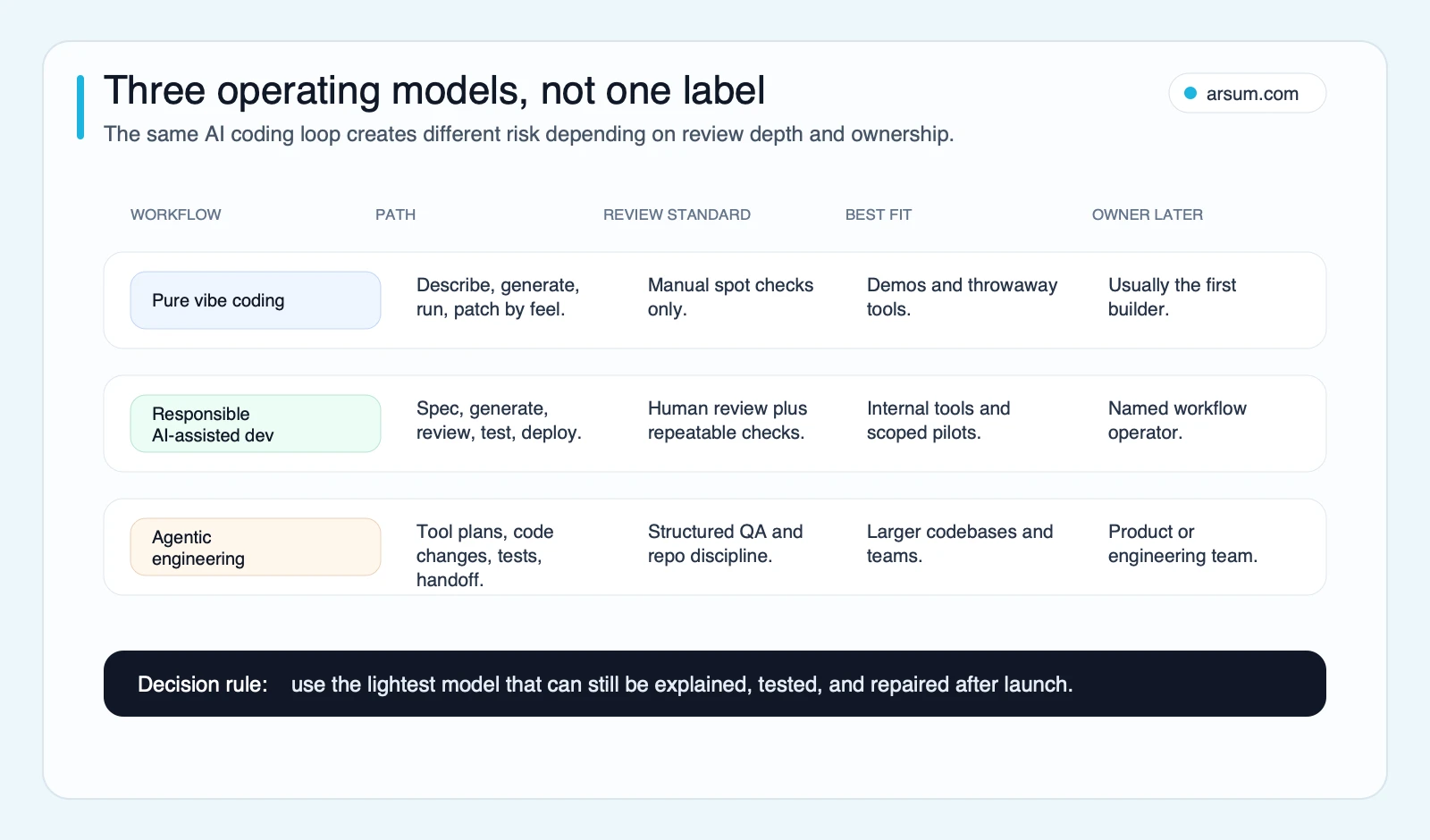
The same prompt-to-code loop has very different risk depending on whether review, testing, and post-launch ownership exist.
For a founder or operator, the practical boundary is simple: if a failure can be fixed by deleting the project and starting again, a lightweight approach may be fine. If a failure can misroute a lead, expose data, charge a customer, or create an inaccurate business record, the workflow needs an accountable owner and engineering controls.
What Vibe Coding Can Realistically Produce
Vibe coding is strongest when the workflow is narrow, inputs are understandable, and the team can inspect the output.
Good initial candidates include:
- A private prototype used to validate a product idea
- An internal dashboard that reads from an existing, well-defined source
- A form-to-workflow tool with required-field checks
- A simple admin interface for one operational team
- A lightweight API wrapper around a documented service
- A customer-facing MVP with limited functionality and an explicit engineering review before real data is introduced
The first build becomes less suitable for unmanaged vibe coding when requirements include:
- Multi-user authentication or role-based permissions
- Payments, billing, refunds, or financial records
- Customer, employee, health, or regulated data
- A changing data model used by several teams
- Background jobs that can silently fail
- Multiple systems of record with conflicting data
- A workflow where an incorrect automated decision is costly or hard to reverse
This is why an AI-generated landing page and an AI-generated revenue workflow should not be evaluated with the same standard. The first is primarily a design and publishing task. The second is a system of record, routing, authorization, and exception-management task.
For adjacent product decisions, see AI-driven app development, AI app development cost, and building a website with AI.
Tool Choice Should Follow the Ownership Model
Tools change quickly, so this is an editorial fit assessment, not a permanent capability ranking. Check each vendor’s current documentation before committing a production workflow.
| Route | Useful when | What you still own | Escalate when |
|---|---|---|---|
| Browser-based app builder | You need a fast prototype or simple internal application | Data model, permissions, integrations, deployment decisions | The app needs complex roles, custom integrations, or a durable code handoff |
| Hosted development environment | You want a low-setup path to a first working app | Secrets, repository access, testing, uptime, and maintenance | Real customers or sensitive data enter the workflow |
| AI code editor | You already have a repository and someone can review code | Architecture, tests, dependency updates, deployments | Changes affect critical systems without review coverage |
| Terminal AI coding tool | A technical team needs broad codebase assistance | Branch discipline, test execution, approvals, and rollback | No one can inspect or safely merge generated changes |
| UI generator | You need to explore screens or components quickly | Accessibility, application logic, state, auth, and integration | The interface becomes a production application boundary |
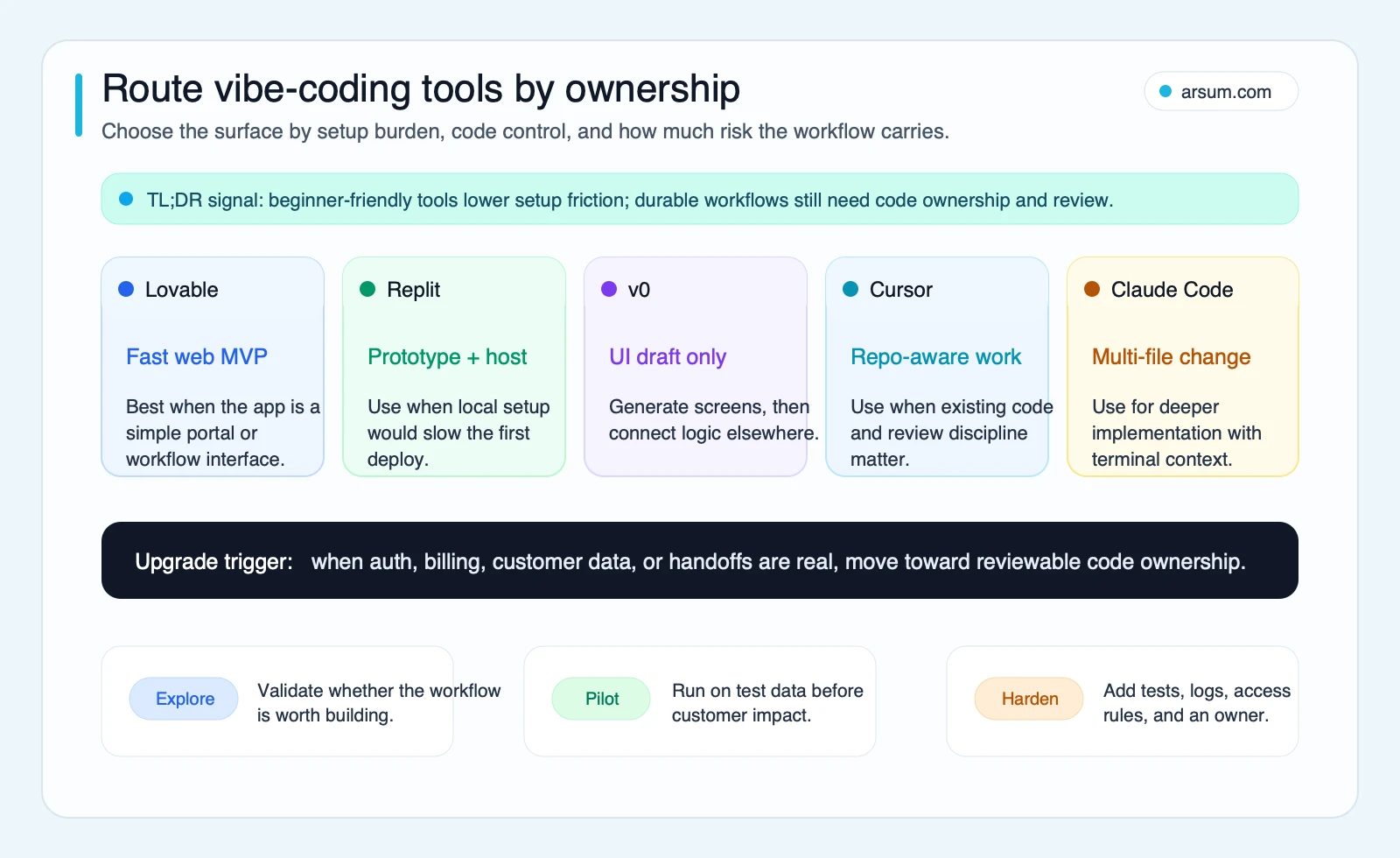
Use the route selector to choose a starting environment, not to bypass the ownership requirements of the workflow.
A useful tool choice leaves you with an understandable asset: source code in a controlled repository where appropriate, documented credentials, a named maintainer, and a repeatable way to test changes. If a project works only in one person’s chat history or personal account, it has not been handed off.
Teams comparing code-oriented workflows can review Claude Code vs Cursor and how to build an app with Claude Code.
A Worked Pilot Scorecard: Internal Sales Handoff
Consider a sales-handoff workflow. A web form captures an inbound request; an operator checks required fields, creates or updates a CRM record, routes the lead, and alerts the assigned representative. This can be a reasonable pilot only if the team keeps the first version narrow.
Define the boundary and owner
| Item | Pilot definition |
|---|---|
| Trigger | A submitted internal or website lead form |
| System of record | The CRM, not the generated app or spreadsheet |
| Pilot action | Validate fields, prepare a CRM record, and draft the routing event |
| Human approval | Sales Operations Manager approves unusual, incomplete, duplicate, or high-value records |
| Out of scope | Pricing changes, entitlement changes, contract approval, and automatic financial commitments |
| Named workflow owner | Sales Operations Manager |
| Engineering reviewer | A designated technical owner approves integrations, credentials, and deployment changes |
The generated interface may collect and validate information, but it should not become an unofficial database. The CRM remains the authoritative record. Every field written to it should have documented source lineage: where it came from, how it was transformed, and which rule allowed the write.
Establish a baseline without inventing ROI
Observe the existing process for two weeks:
- Number of handoffs processed each week
- Minutes of operator handling per handoff
- Incomplete, duplicate, or wrongly routed records
- Time from form submission to assigned owner
- Time spent correcting existing-process errors
An illustrative planning assumption might be: 80 handoffs per week × 6 minutes of manual handling = 480 minutes, or 8 hours of observed work per week. This is not a savings forecast. It is baseline arithmetic the owner can replace with actual measurements.
Score the pilot before live launch
| Scorecard field | Example acceptance rule |
|---|---|
| Baseline | Two weeks of handoff volume, handling time, and correction records |
| Target | Reduce manual touchpoints on complete records while retaining human review for exceptions |
| Quality metric | No incorrect CRM writes in the approved test set |
| Exception threshold | Every missing field, duplicate, routing ambiguity, or API failure enters a visible exception queue; none may be silently discarded |
| Test-data plan | Use representative synthetic or approved non-production records, including duplicate, incomplete, malformed, and unavailable-service cases |
| Review cadence | Sales Operations Manager reviews the queue daily during the pilot; technical owner reviews logs and failures weekly |
| Evidence retained | Requirements, test cases, approval record, run logs, integration configuration, exception outcomes, and change history |
| Stop condition | Any unauthorized data write, access-control failure, repeated unexplained routing error, or inability to reconstruct what happened |
| Rollback path | Disable the automation, return to the documented manual handoff, preserve logs, and revoke or rotate affected credentials if needed |
A pilot passes when the team can demonstrate correct handling of normal records and controlled handling of exceptions—not merely when the happy path works in a demo.
If you want help applying this worksheet to a real workflow, Arsum can assess the fit, risk gates, system boundaries, and engineering-review triggers before you commit to a delivery path.
💡 Arsum builds custom AI automation solutions tailored to your business needs.
Get a Free Consultation →Launch-Readiness Gates Before Real Data
Security-focused coverage of vibe coding makes a straightforward point: fast creation does not remove security accountability. See Tanium’s discussion of vibe coding and the OWASP GenAI Security Project for broader control context.
Before a pilot touches live data, pass each gate with an owner and evidence.
Data and source-of-truth gate
- Identify the system of record for every critical field.
- Document which fields are read, written, or transformed.
- Define what happens when sources disagree.
- Confirm whether the generated application stores data unnecessarily.
- Identify who may approve a manual correction.
This prevents a useful-looking interface from becoming an unofficial second database that operators trust more than the actual system of record.
Identity, secrets, and permissions gate
- Use separate accounts or service identities where practical.
- Apply least-privilege access: only the permissions required for the scoped action.
- Review authentication, authorization, and role behavior.
- Keep secrets out of code, prompts, screenshots, and shared project settings.
- Document how credentials are rotated when an owner leaves or a token is exposed.
A tool that can call an API is technically capable of making changes. That does not mean it is authorized to make every change available to the credential.
Test and exception gate
- Test normal, incomplete, duplicate, malformed, and unavailable-service inputs.
- Create an exception queue with a named human approver.
- Make failures visible instead of retrying or discarding them silently.
- Keep a manual route available while the pilot is evaluated.
- Confirm which exceptions must stop the workflow rather than continue automatically.
This prevents automation from becoming hidden rework.
Recovery, monitoring, and maintenance gate
- Keep logs sufficient to answer what happened, when, under which version, and with which identity.
- Document deployment ownership and dependency ownership.
- Confirm backups, rollback, and credential-rotation procedures.
- Name the person who responds when the workflow fails after launch.
- Set a review date for integrations, business rules, and unresolved exceptions.
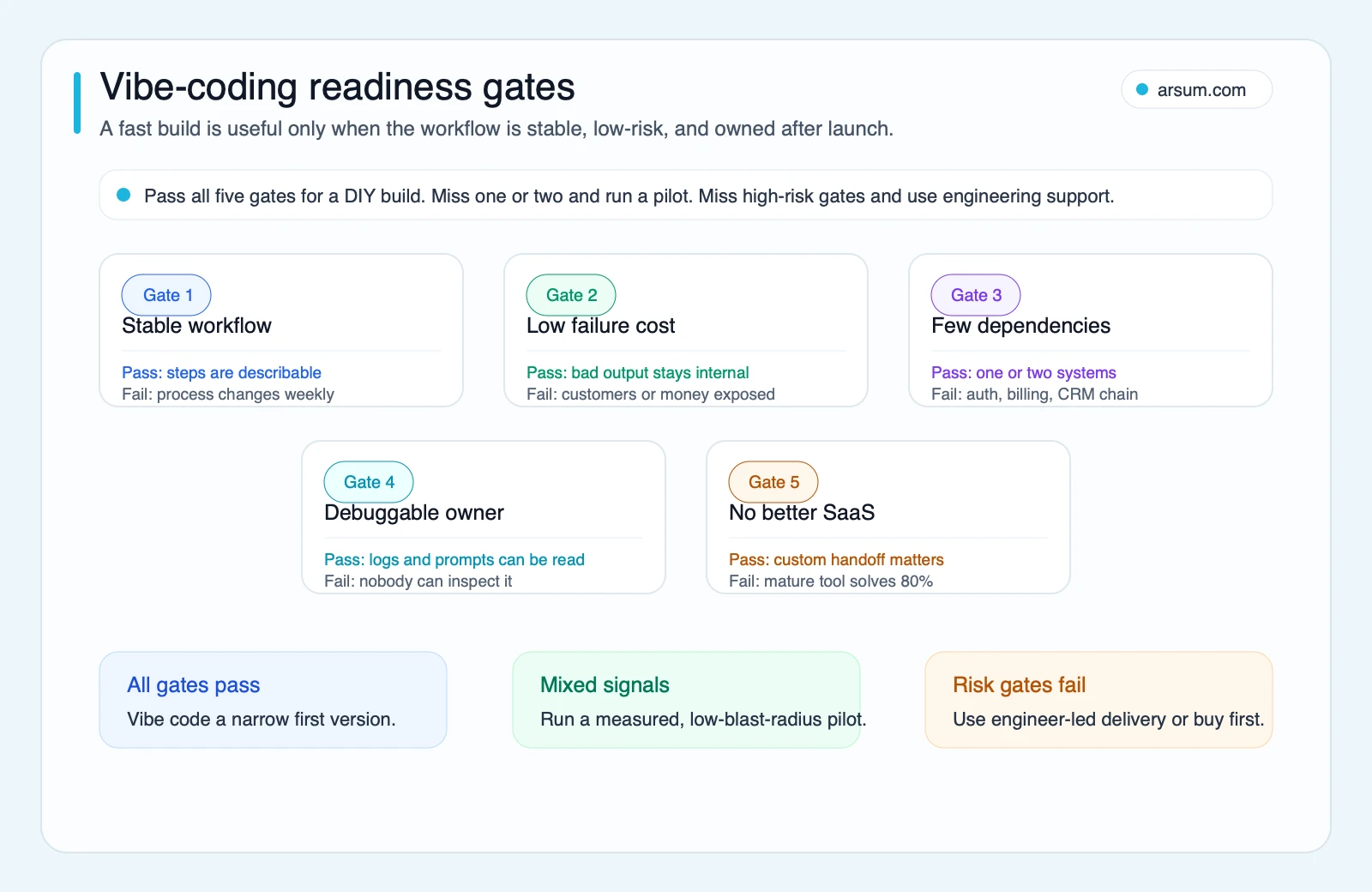
If a gate fails, reduce autonomy: keep the work as a prototype, add engineering review, choose a mature SaaS product, or move to an engineer-led build.
Build, Buy, or Bring Engineering In?
Use this decision rule after the scorecard, not before it.
| Decision | Choose it when | Required proof |
|---|---|---|
| Vibe-coded prototype | Learning value is high and failure is easy to reverse | No sensitive data, no critical integrations, and a clear disposal path |
| Controlled pilot | The workflow is stable, narrow, and owned by one team | Test plan, exception queue, named operator, technical review, rollback |
| Buy a SaaS product | The workflow is common and a credible product already meets requirements | Vendor security, integration, data-handling, and ownership fit |
| Engineer-led build | The workflow differentiates the business or carries meaningful risk | Architecture, access design, test coverage, monitoring, support, and maintenance ownership |
No-code can be right for a standard workflow with platform guardrails. Custom code can be right when the workflow is genuinely specific. AI-assisted engineering can accelerate either path. The error is treating the fastest route to a demo as proof that it is the lowest-risk route to operate.
For wider implementation context, see agentic AI workflow automation, AI integration services, and AI agent security.
Where Vibe-Coded Projects Commonly Fail
Practitioner discussions on Reddit and Hacker News are qualitative signals, not measured prevalence data. They are useful for identifying failure patterns to test for early:
- The codebase grows through many prompt sessions without a stable architecture or test suite.
- The original builder cannot explain a change, reproduce a bug, or hand the project to another person.
- Secrets and integrations are added casually, without a permissions model or rotation plan.
- The project works only on ideal inputs and has no route for duplicates, missing data, or third-party outages.
- A prototype acquires customers before anyone defines support ownership, release practice, or recovery procedures.
- Teams automate a process that was never stable enough to specify.
These are not arguments against using AI to build. They are reasons to make the transition from prototype to production explicit.
Is Vibe Coding Right for Your Business?
Vibe coding is worth using when it lowers the cost of learning without hiding the cost of ownership. It is a strong option for a founder testing a product idea, an operator validating one narrow internal workflow, or a technical team accelerating routine implementation work.
It is not a permission slip to deploy opaque code into a revenue-critical or regulated process. As failure cost rises, autonomy should fall: add review, tighten permissions, preserve evidence, and assign engineering ownership.
If your workflow has passed the prototype stage but cannot meet the launch gates, that is still a useful result. The opportunity may be real, but the delivery path should be a controlled pilot, a SaaS evaluation, or an engineered build—not more prompting. For a broader framework on the transition, see AI application development services and AI implementation services.
Methodology and Limits
This editorial guide was updated using definitional and security-oriented sources from GitHub, Google Cloud, IBM, Tanium, OWASP, and the Stack Overflow 2025 Developer Survey, accessed in June 2026. Community threads are included only as qualitative examples of maintenance and security concerns; they do not establish adoption rates, failure rates, or tool performance.
Ready to Automate Your Business?
Stop wasting time on repetitive tasks. Let AI handle the busywork while you focus on growth.
Schedule a Free Strategy Call →Written by:Arsum editorial team
- Reviewed by
- Arsum editorial team
- Published
- April 8, 2026
- Updated
- July 7, 2026
- How this was produced
- Arsum uses research packs, source checks, and human editorial review to prepare and update blog articles. Editors are responsible for the final page.
- Source policy
- Sources are linked in the article when used. Methodology and source notes are included on higher-risk or high-visibility pages and are being rolled out across the archive. Editorial policy.
- Why this page exists
- Help B2B operators evaluate AI automation, implementation scope, cost, risk, and build-vs-buy decisions with practical context.